Zigbee2mqtt: Experimental: Allow setting TX power
~The default TX power for the CC1352P-2 is 5dbm, however the device supports up to 25dbm. We should allow the user to control this.~
This allows to set the transmit power of the adapter. To set it put the following in configuration.yaml.
experimental:
  transmit_power: 0
Important, read before using
- Use on your own risk, I'm not responsible for any damage to your hardware; some values may also not be legal depending on your country regulations
- Requires latest dev
- Works for all adapters (CC2531, CC2530, CC1352P-2 and CC26X2R1)
- Allowed values are -22 dBm (min) till 19 dBm (max), default is 0 except for the CC2530 + CC2591 = 4 and CC2530 + CC2592 = 19
- I don't know what values are allowed per adapter, @fredrikgk could you clarify this??
 Koenkk
All 22 comments
The radio supports certain power settings in the range from -20 dBm to the maximum level for a specific device. I am not sure exactly where in the stack to find the power settings, but you can see them in SmartRF Studio. The SW will select the closest RF setting to the number provided, so if you for example set transmit_power: 6 for CC2652R, 5 dBm will be used.
There is no way to destroy the HW through this setting.
Note that the CC1352P do not have any available settings between 5 dBm and 14 dBm. Personally, I would simply go with the maximum setting anyway. For a single device for personal use, no one will ever be affected by that.
 fredrikgk
on 28 Nov 2019
fredrikgk
on 28 Nov 2019
So, when using the CC1352P-2, setting this to 19 will get the most power and using the PA?
I have only read (but not understand) this: http://dev.ti.com/tirex/content/simplelink_cc13x2_26x2_sdk_2_40_00_81/docs/proprietary-rf/proprietary-rf-users-guide/proprietary-rf/tx-power.html#use-the-20-dbm-power-amplifier
 XRyu
on 28 Nov 2019
XRyu
on 28 Nov 2019
Correct!
You do not really have to care about any of the documentation you linked to, that is handled by the SW.
fredrikgk
on 28 Nov 2019
@fredrikgk thanks for your response, instead of setting a number, would it make sense to just set a level? e.g. low= -22, medium = 0 , high = 19
Koenkk
on 28 Nov 2019
Apologies for butting in - can anyone give me a sense of the range of the CC1352P-2 on max setting vs CC2530 + CC2591 (or GBAN in my case)?
 Alfiegerner
on 28 Nov 2019
Alfiegerner
on 28 Nov 2019
@Koenkk, I like the flexibility of being able to set whatever. I would keep the configuration setting as-is.
The only change I would recommend is setting the default level for CC2652R to 5.
fredrikgk
on 28 Nov 2019
@Alfiegerner , the performance is very similar. I would not expect you to see any noticeable difference in range.
fredrikgk
on 28 Nov 2019
@Koenkk
Hi! Thank you for implementing this! Could you please also update hassio docker zigbee2mqtt-edge addon to allow setting this new experimental section with TX power?
 dmitrybabeshko
on 28 Nov 2019
dmitrybabeshko
on 28 Nov 2019
Will setting the transmit power also work with CC2562RB?
I know this device is not officially supported but it is managing my zigbee network.
 didiht
on 28 Nov 2019
didiht
on 28 Nov 2019
Zigbee herdsman does not differentiate between CC2652R and CC2652RB.
fredrikgk
on 28 Nov 2019
@Alfiegerner , the performance is very similar. I would not expect you to see any noticeable difference in range.
Thank you.
Alfiegerner
on 28 Nov 2019
@danielwelch
Hello, could you please extend zigbee2mqtt hassio docker addon to allow specifying this experimental/tx_power option? Thanks!
dmitrybabeshko
on 12 Dec 2019
I’d be happy to add this to the edge version. Are there other experimental options that should also be added?
 danielwelch
on 13 Dec 2019
danielwelch
on 13 Dec 2019
@danielwelch
I know only about transmit_power.
dmitrybabeshko
on 13 Dec 2019
I just got a CC1352P-2 and was wondering when this will be integrated into master. I'd very much like to bump up the TX power and be on mainline rather than dev branch. Thanks @Koenkk for your huge investment of time and work in this project!
 TASSDevon
on 2 Jan 2020
TASSDevon
on 2 Jan 2020
Please be aware that setting the experimental transmit power too high seems to cause issues with the network stability if the coordinator looses power / is restarted.
I've set the transmit power to different settings over the last few weeks.
Whereby, I noticed that the link quality almost doubled (one way towards the receiving device) when setting the transmit power to the max.
However, when my coordinator got restarted, I suddenly got a lot of NO network route 205 issues as well as some end devices not checking in anymore.
I do not think It's a bug, but rather a side effect that comes with setting high transmit power.
I hypothesize that the CC coordinators determine routes upon starting.
Therefore, setting a high transmit power after pairing doesn't negatively affect the network.
However, when the coordinator is power cycled, it established new routes and picks routes based on the high transmit linkquality.
Thereby, creating an issue where the routes favored by the coordinator are routes that are directly connected to the coordinator.
Whereby, the receiving devices aren't capable of sending a strong enough signal to be picked up by the coordinator.
Can somebody confirm or reject my hypothesis based on their knowledge of zigbee2mqtt and the z-stack?
 sfstar
on 3 Jan 2020
sfstar
on 3 Jan 2020
From my understanding, the mesh forms by end devices tracking who they are connected to, and using that endpoint. This implies a two-way path, and the self-healing nature of the network will cause a coordinator with poor receive but high transmit to be unfavorable compared to a router with a good receive and transmit, from any given endpoint's POV.
 skandragon
on 7 Jan 2020
skandragon
on 7 Jan 2020
I'm using hassio add-on and just upgraded to 1.10.
Refer to the spec of CC2538 + CC2592 I'm using as coordinator, it has max transmission power of 22 dBmbut I set it at 15. How can I verify that this setting entry is actually working or not?
Also note that I connect remotely from hassio to my coordinator which is connected to wemos d1 mini using serial connection. @Koenkk Will this setting properly work?
Thanks.
 myiotcenter
on 6 Feb 2020
myiotcenter
on 6 Feb 2020
Is this experimental function only for coordinator or is it working also with CC2530 routers?
 1igeza
on 28 Feb 2020
1igeza
on 28 Feb 2020
@1igeza it only works on the coordinator. This value cannot be set over the air via a zigbee command.
Koenkk
on 28 Feb 2020
The cc2538+cc2592 datasheet contains next tx power values table:
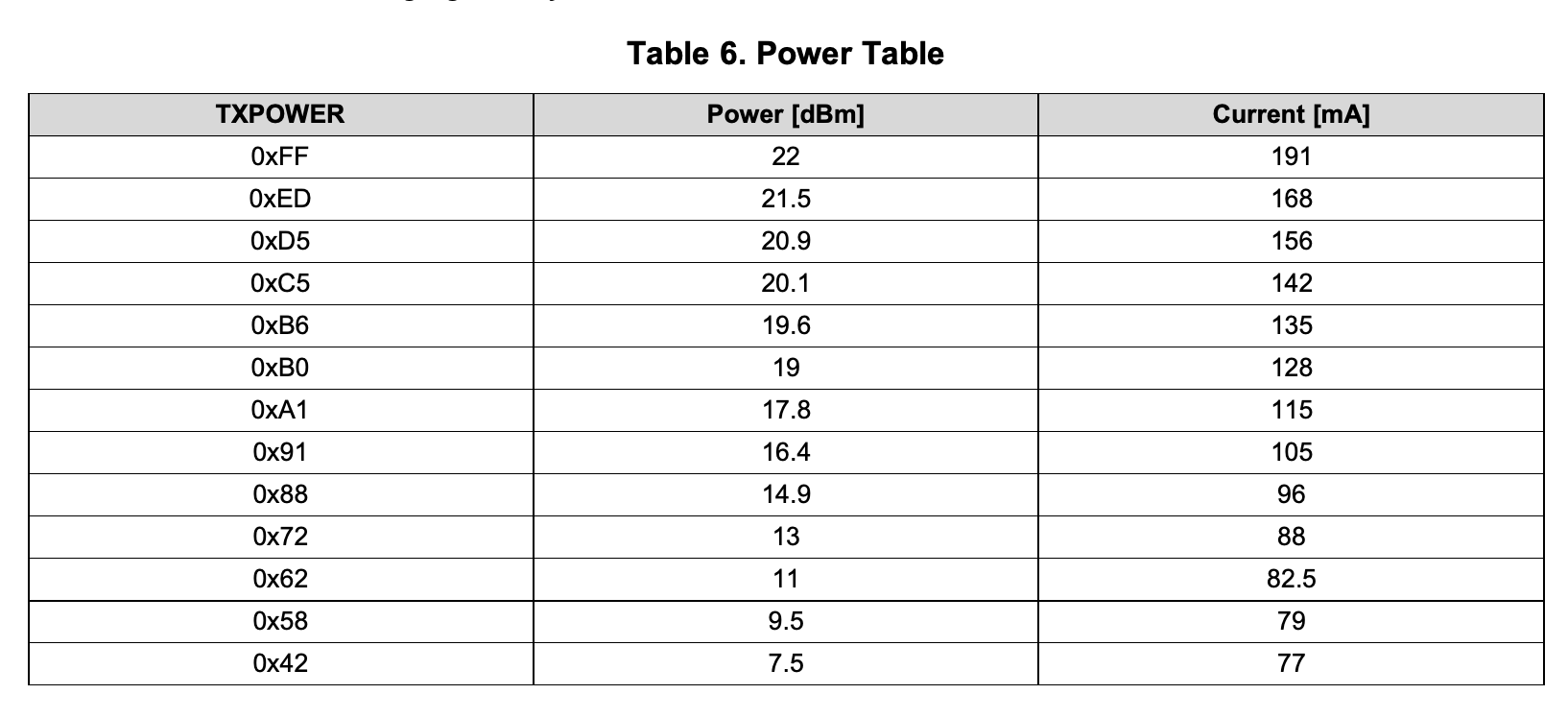
As I see for 20dbm need to pass 0xC5 into setTransmitPower(), but it is impossible because setTransmitPower() get only -128...127 values
 gev
on 24 Mar 2020
gev
on 24 Mar 2020
This issue has been automatically marked as stale because it has not had recent activity. It will be closed if no further activity occurs. Thank you for your contributions.
![stale[bot] picture](https://avatars3.githubusercontent.com/in/1724?v=4&s=40) stale[bot]
on 23 May 2020
stale[bot]
on 23 May 2020
Related issues
 Underknowledge
·
4Comments
Underknowledge
·
4Comments
 Courty40
·
4Comments
Courty40
·
4Comments
 sylarevan
·
5Comments
sylarevan
·
5Comments
 mpuff
·
3Comments
mpuff
·
3Comments
 alwashe
·
4Comments
alwashe
·
4Comments