Zigbee2mqtt: Network Map "Last Seen" is in epoch seconds rather than human readable date/time
Epoch seconds is good for computers but not useful for humans :)
The old version used to be better for humans.
Old:
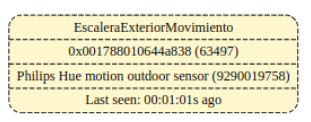
Now:

If epoch seconds is required for some reason (i.e. this is not a defect but a designed feature) the can we have both?
BTW I am OK to have the timestamp (as opposed to calculated delta between last seen and current time) - this makes more sense as the map can be out of date.
zigbee2mqtt version:
1.6.0 (commit #78824b48c090470d178c00da80c0d57c58eeccf2)
CC253X firmware version:
CC2530_CC2591_SOURCE_ROUTING_20190619
 james-fry
All 28 comments
agreed, it would be more readable to display the elapsed attribute.
but in a mean time you could pass the graphviz output through some one liner to rewrite the field.
 lolorc
on 1 Nov 2019
lolorc
on 1 Nov 2019
That's my fault... almost.
I asked for having last_seen in the raw version of the network map: https://github.com/Koenkk/zigbee2mqtt/issues/1910
@Koenkk did it in this commit: https://github.com/Koenkk/zigbee2mqtt/commit/f5463dbf0e7fa1a2a0825c92dc9aeea1c1156836
@bochelork also ask something similar: https://github.com/Koenkk/zigbee2mqtt/issues/1989
 carldebilly
on 1 Nov 2019
carldebilly
on 1 Nov 2019
For raw fair enough.
But for graphviz I think it must be human readable.
Or have both.
james-fry
on 1 Nov 2019
The graphviz version is for humans... Humans are not using epoch times.
carldebilly
on 1 Nov 2019
How can I reproduce this? On the latest dev I get last seen in seconds ago:
zigbee2mqtt:info  2019-11-03T13:32:03: MQTT publish: topic 'zigbee2mqtt/bridge/networkmap/graphviz', payload 'digraph G {
node[shape=record];
  "0x00124b00120144ae" [style="bold, filled", fillcolor="#e04e5d", fontcolor="#ffffff", label="{Coordinator|0x00124b00120144ae (0)|Last seen: 00:00:00s ago}"];
  "0x00124b00120144ae" -> "0x0017880104c9cd33" [penwidth=0.5, weight=0, color="#994444", label="220"]
  "0x00158d00018255df" [style="rounded, filled", fillcolor="#4ea3e0", fontcolor="#ffffff", label="{plug|0x00158d00018255df (59818)failed: lqi|Xiaomi Mi power plug ZigBee (ZNCZ02LM)|Last seen: 00:00:04s ago}"];
  "0x00158d00018255df" -> "0x00124b00120144ae" [penwidth=0.5, weight=0, color="#994444", label="123"]
  "0x00158d00018255df" -> "0x0017880104c9cd33" [penwidth=0.5, weight=0, color="#994444", label="255"]
  "0x00158d00024a5e57" [style="rounded, dashed, filled", fillcolor="#fff8ce", fontcolor="#000000", label="{cube|0x00158d00024a5e57 (1193)failed: lqi|undefined undefined|Last seen: 00:00:49s ago}"];
  "0x0017880104e45517" [style="rounded, dashed, filled", fillcolor="#fff8ce", fontcolor="#000000", label="{dimmer|0x0017880104e45517 (30818)|Philips Hue dimmer switch (324131092621)|Last seen: 00:00:22s ago}"];
  "0x0017880104c9cd33" [style="rounded, filled", fillcolor="#4ea3e0", fontcolor="#ffffff", label="{bulb|0x0017880104c9cd33 (44052)|Philips Hue White Single bulb B22 (8718696449691)|Last seen: 00:00:01s ago}"];
  "0x0017880104c9cd33" -> "0x00124b00120144ae" [penwidth=0.5, weight=0, color="#994444", label="78"]
}'
 Koenkk
on 3 Nov 2019
Koenkk
on 3 Nov 2019
I will upgrade to latest dev and retest
james-fry
on 3 Nov 2019
Upgraded to latest hassio edge build and its still the same:
zigbee2mqtt:info 2019-11-03T19:00:10: MQTT publish: topic 'zigbee2mqtt/bridge/networkmap/graphviz', payload 'digraph G {
node[shape=record];
"0x00124b00077263d2" [style="bold, filled", fillcolor="#e04e5d", fontcolor="#ffffff", label="{Coordinator|0x00124b00077263d2 (0)|Last seen: 1572807610433}"];
"0x00124b00077263d2" -> "0x0017880102449ebf" [penwidth=0.5, weight=0, color="#994444", label="0"]
"0x00124b00077263d2" -> "0x000d6ffffe2647c8" [penwidth=0.5, weight=0, color="#994444", label="128"]
"0x00124b00077263d2" -> "0x000d6ffffe7c10b4" [penwidth=0.5, weight=0, color="#994444", label="79"]
"0x0017880104af95c3" [style="rounded, dashed, filled", fillcolor="#fff8ce", fontcolor="#000000", label="{Hue Dimmer 1|0x0017880104af95c3 (2863)|Philips Hue dimmer switch (324131092621)|Last seen: unknown}"];
"0x00158d00012cb3a8" [style="rounded, dashed, filled", fillcolor="#fff8ce", fontcolor="#000000", label="{1st Floor Landing Environment|0x00158d00012cb3a8 (1824)|Xiaomi MiJia temperature & humidity sensor (WSDCGQ01LM)|Last seen: 1572806843237}"];
"0x00158d00012bf150" [style="rounded, dashed, filled", fillcolor="#fff8ce", fontcolor="#000000", label="{Hallway Environment|0x00158d00012bf150 (4185)|Xiaomi MiJia temperature & humidity sensor (WSDCGQ01LM)|Last seen: unknown}"];
"0x00158d0001a665dc" [style="rounded, dashed, filled", fillcolor="#fff8ce", fontcolor="#000000", label="{Living Room Light Button|0x00158d0001a665dc (27668)|Xiaomi Aqara wireless switch (WXKG11LM)|Last seen: 1572806060576}"];
"0x00158d000132ea95" [style="rounded, dashed, filled", fillcolor="#fff8ce", fontcolor="#000000", label="{Kitchen Movement|0x00158d000132ea95 (12381)|Xiaomi MiJia human body movement sensor (RTCGQ01LM)|Last seen: 1572807447670}"];
"0x00158d0001a65d8a" [style="rounded, dashed, filled", fillcolor="#fff8ce", fontcolor="#000000", label="{Kitchen Back Door Lock|0x00158d0001a65d8a (26521)|Xiaomi Aqara door & window contact sensor (MCCGQ11LM)|Last seen: unknown}"];
"0x00158d0000f23a9b" [style="rounded, dashed, filled", fillcolor="#fff8ce", fontcolor="#000000", label="{Hallway Movement|0x00158d0000f23a9b (48535)|Xiaomi MiJia human body movement sensor (RTCGQ01LM)|Last seen: 1572807233518}"];
"0x00158d0001583845" [style="rounded, dashed, filled", fillcolor="#fff8ce", fontcolor="#000000", label="{2nd Floor Landing Environment|0x00158d0001583845 (49869)|Xiaomi MiJia temperature & humidity sensor (WSDCGQ01LM)|Last seen: 1572807237824}"];
"0x00158d0001562914" [style="rounded, dashed, filled", fillcolor="#fff8ce", fontcolor="#000000", label="{Seth Bedroom Light Button|0x00158d0001562914 (44072)|Xiaomi MiJia wireless switch (WXKG01LM)|Last seen: unknown}"];
"0x00158d0000efbb1c" [style="rounded, dashed, filled", fillcolor="#fff8ce", fontcolor="#000000", label="{Hallway Front Door|0x00158d0000efbb1c (42729)|Xiaomi MiJia door & window contact sensor (MCCGQ01LM)|Last seen: unknown}"];
"0x00158d00012678c2" [style="rounded, dashed, filled", fillcolor="#fff8ce", fontcolor="#000000", label="{Back Bedroom Light Button|0x00158d00012678c2 (6161)|Xiaomi MiJia wireless switch (WXKG01LM)|Last seen: unknown}"];
"0x001788010409379c" [style="rounded, dashed, filled", fillcolor="#fff8ce", fontcolor="#000000", label="{Hue Dimmer 2|0x001788010409379c (63577)|Philips Hue dimmer switch (324131092621)|Last seen: unknown}"];
"0x00158d0001a3e00e" [style="rounded, dashed, filled", fillcolor="#fff8ce", fontcolor="#000000", label="{Seth Window Sensor|0x00158d0001a3e00e (40417)|Xiaomi Aqara door & window contact sensor (MCCGQ11LM)|Last seen: 1572806167769}"];
"0x00158d0001a3e00e" -> "0x00124b00077263d2" [penwidth=1, weight=0, color="#994444", label="18"]
"0x00158d000321d0b7" [style="rounded, dashed, filled", fillcolor="#fff8ce", fontcolor="#000000", label="{Kitchen Back Door|0x00158d000321d0b7 (7688)|Xiaomi Aqara door & window contact sensor (MCCGQ11LM)|Last seen: unknown}"];
"0x00158d000321d100" [style="rounded, dashed, filled", fillcolor="#fff8ce", fontcolor="#000000", label="{Doorbell|0x00158d000321d100 (21557)|Xiaomi Aqara door & window contact sensor (MCCGQ11LM)|Last seen: unknown}"];
"0x0017880106424c50" [style="rounded, filled", fillcolor="#4ea3e0", fontcolor="#ffffff", label="{Garden Floodlight|0x0017880106424c50 (12051)|Philips Hue Welcome white flood light (17436/30/P7)|Last seen: unknown}"];
"0x0017880106424c50" -> "0x000d6ffffe7c10b4" [penwidth=0.5, weight=0, color="#994444", label="42"]
"0x0017880102449ebf" [style="rounded, filled", fillcolor="#4ea3e0", fontcolor="#ffffff", label="{Kitchen Pendant|0x0017880102449ebf (16473)|Philips Hue White Single bulb B22 (8718696449691)|Last seen: unknown}"];
"0x0017880102449ebf" -> "0x000d6ffffe2647c8" [penwidth=0.5, weight=0, color="#994444", label="44"]
"0x000b57fffeef91a5" [style="rounded, filled", fillcolor="#4ea3e0", fontcolor="#ffffff", label="{Garden Switch|0x000b57fffeef91a5 (17756)failed: lqi|IKEA TRADFRI control outlet (E1603/E1702)|Last seen: unknown}"];
"0x000d6ffffede76b0" [style="rounded, dashed, filled", fillcolor="#fff8ce", fontcolor="#000000", label="{Ikea Square Switch|0x000d6ffffede76b0 (38633)|IKEA TRADFRI ON/OFF switch (E1743)|Last seen: unknown}"];
"0x000d6ffffe2647c8" [style="rounded, filled", fillcolor="#4ea3e0", fontcolor="#ffffff", label="{Fireplace Lights|0x000d6ffffe2647c8 (10065)|IKEA TRADFRI control outlet (E1603/E1702)|Last seen: 1572806650333}"];
"0x000d6ffffe2647c8" -> "0x000d6ffffe7c10b4" [penwidth=0.5, weight=0, color="#994444", label="73"]
"0x000d6ffffe7c10b4" [style="rounded, filled", fillcolor="#4ea3e0", fontcolor="#ffffff", label="{Ikea Router Kitchen|0x000d6ffffe7c10b4 (51832)|IKEA TRADFRI signal repeater (E1746)|Last seen: unknown}"];
"0x000d6ffffe7c10b4" -> "0x000d6ffffe2647c8" [penwidth=0.5, weight=0, color="#994444", label="52"]
"0xd0cf5efffed82bdd" [style="rounded, dashed, filled", fillcolor="#fff8ce", fontcolor="#000000", label="{Ikea Square Switch 2|0xd0cf5efffed82bdd (8719)|IKEA TRADFRI ON/OFF switch (E1743)|Last seen: unknown}"];
"0x00158d0001314429" [style="rounded, dashed, filled", fillcolor="#fff8ce", fontcolor="#000000", label="{Trust remote|0x00158d0001314429 (30745)|Trust Remote control (ZYCT-202)|Last seen: unknown}"];
"0x0017880104092eb5" [style="rounded, dashed, filled", fillcolor="#fff8ce", fontcolor="#000000", label="{Hue Dimmer 3|0x0017880104092eb5 (54331)|Philips Hue dimmer switch (324131092621)|Last seen: unknown}"];
"0x0017880104092eb5" -> "0x00124b00077263d2" [penwidth=1, weight=0, color="#994444", label="95"]
"0x0017880103a43375" [style="rounded, dashed, filled", fillcolor="#fff8ce", fontcolor="#000000", label="{Hue Dimmer 4|0x0017880103a43375 (62235)|Philips Hue dimmer switch (324131092621)|Last seen: unknown}"];
}'
This is using the HA network map addon.
From HACS I see this info:
Installed commit: | 8ad3189
-- | --
Available commit: | 8ad3189
Author(s): | @rgruebel
james-fry
on 3 Nov 2019
I have no clue why, the logic can be found here: https://github.com/Koenkk/zigbee2mqtt/blob/dev/lib/extension/networkMap.js#L74, could you add some console.log to see what is happening?
Koenkk
on 4 Nov 2019
I just checked with my other network (cc1352P-2) running z2m on docker native (not hassio) and I see the same thing:
zigbee2mqtt:info 2019-11-04T17:14:11: MQTT publish: topic 'zigbee2mqtt_cc1352p/bridge/networkmap/graphviz', payload 'digraph G {
node[shape=record];
"0x00124b001ca604d0" [style="bold, filled", fillcolor="#e04e5d", fontcolor="#ffffff", label="{Coordinator|0x00124b001ca604d0 (0)|Last seen: 1572887651050}"];
"0x00124b001ca604d0" -> "0x000b57fffe329809" [penwidth=0.5, weight=0, color="#994444", label="137"]
"0x00158d0001a65d8a" [style="rounded, dashed, filled", fillcolor="#fff8ce", fontcolor="#000000", label="{Kitchen Back Door Lock|0x00158d0001a65d8a (26930)|Xiaomi Aqara door & window contact sensor (MCCGQ11LM)|Last seen: 1572887642363}"];
"0x00158d0001a65d8a" -> "0x00124b001ca604d0" [penwidth=1, weight=0, color="#994444", label="159"]
"0x00158d00016c21e8" [style="rounded, dashed, filled", fillcolor="#fff8ce", fontcolor="#000000", label="{Office Light Button|0x00158d00016c21e8 (52305)|Xiaomi Aqara wireless switch (WXKG11LM)|Last seen: 1572887611989}"];
"0x00158d00016c21e8" -> "0x00124b001ca604d0" [penwidth=1, weight=0, color="#994444", label="118"]
"0x000b57fffe329809" [style="rounded, filled", fillcolor="#4ea3e0", fontcolor="#ffffff", label="{Ikea Tradfri WW Bulb|0x000b57fffe329809 (20439)|IKEA TRADFRI LED bulb E27 1000 lumen, dimmable, opal white (LED1623G12)|Last seen: unknown}"];
"0x00158d000281fb0c" [style="rounded, dashed, filled", fillcolor="#fff8ce", fontcolor="#000000", label="{Leak Sensor|0x00158d000281fb0c (31925)|Xiaomi Aqara water leak sensor (SJCGQ11LM)|Last seen: unknown}"];
"0x00158d0000eff19a" [style="rounded, dashed, filled", fillcolor="#fff8ce", fontcolor="#000000", label="{1st Floor Landing Light Button|0x00158d0000eff19a (48527)|Xiaomi MiJia wireless switch (WXKG01LM)|Last seen: unknown}"];
"0x00158d0001656a12" [style="rounded, dashed, filled", fillcolor="#fff8ce", fontcolor="#000000", label="{1st Floor Landing Movement Illuminance|0x00158d0001656a12 (20228)|Xiaomi Aqara human body movement and illuminance sensor (RTCGQ11LM)|Last seen: 1572887483762}"];
"0x0017880104092eb5" [style="rounded, dashed, filled", fillcolor="#fff8ce", fontcolor="#000000", label="{Hue Dimmer 3|0x0017880104092eb5 (43566)|Philips Hue dimmer switch (324131092621)|Last seen: 1572887636176}"];
"0x0017880103a43375" [style="rounded, dashed, filled", fillcolor="#fff8ce", fontcolor="#000000", label="{Hue Dimmer 4|0x0017880103a43375 (50806)|Philips Hue dimmer switch (324131092621)|Last seen: 1572887637319}"];
"0x0017880103a43375" -> "0x000b57fffe329809" [penwidth=1, weight=0, color="#994444", label="255"]
"0x00158d000126785c" [style="rounded, dashed, filled", fillcolor="#fff8ce", fontcolor="#000000", label="{Main Bedroom Light Button|0x00158d000126785c (54926)|Xiaomi MiJia wireless switch (WXKG01LM)|Last seen: unknown}"];
"0x00158d0001314429" [style="rounded, dashed, filled", fillcolor="#fff8ce", fontcolor="#000000", label="{Trust remote|0x00158d0001314429 (54925)|Trust Remote control (ZYCT-202)|Last seen: unknown}"];
}'
I just pulled the latest image before I triggered the networkmap.
As you can see its the same.
BTW both are running in same docker on an ubuntu VM on intel if that makes a difference.
Apologies but I am not a js developer so adding logging will not be trivial for me.
I guess I need to attach to the container, edit the networkMap.js file and add the log entries.
Question is where is console logging available for docker/hassio?
Can I use logger.debug instead?
Thanks for the guidance.
james-fry
on 4 Nov 2019
Logger.debug is also fine
Koenkk
on 4 Nov 2019
What I found is that when I restart z2m something is setting last_seen to "epoch":
zigbee2mqtt:debug 2019-11-04T19:52:12: Received MQTT message on 'zigbee2mqtt/bridge/config/last_seen' with data 'epoch',
zigbee2mqtt:debug 2019-11-04T19:52:12: Received MQTT message on 'zigbee2mqtt/bridge/config/last_seen' with data 'epoch',
zigbee2mqtt:debug 2019-11-04T19:52:12: Received MQTT message on 'zigbee2mqtt/bridge/config/last_seen' with data 'epoch',
zigbee2mqtt:debug 2019-11-04T19:52:12: Received MQTT message on 'zigbee2mqtt/bridge/config/last_seen' with data 'epoch',
zigbee2mqtt:info  2019-11-04T19:52:12: Set last_seen to epoch,
zigbee2mqtt:info  2019-11-04T19:52:12: Set last_seen to epoch,
zigbee2mqtt:info  2019-11-04T19:52:12: Set last_seen to epoch,
zigbee2mqtt:info  2019-11-04T19:52:12: Set last_seen to epoch,
In networkMap.js I can see that the utils.formatDate method is being passed settings.get().advanced.last_seen (which will evaluate to "epoch") as the type.
In utils.js passing "epoch" as the type will result in the case statement returning the same date string that is passed in - i.e. epoch seconds... hence I will see epoch secs in the network diagram.
The question therefore is: what is setting last_seen to epoch on start up? And how do I change this behaviour.
In the docs the advanced.last_seen configuation parameter seems unrelated to this behaviour, and (given its optional) I am not setting it:
last_seen: 'disable'
# Optional: Add an elapsed attribute to MQTT messages, contains milliseconds since the previous msg (default: false)
Zigbee2MqttAssistant has an option for that https://github.com/yllibed/Zigbee2MqttAssistant#settings called AutosetLastSeen, setting it to "epoch" when a device is reported without this information. You can turn it off if you need.
If it's causing problem, please open an issue for that!
carldebilly
on 4 Nov 2019
Aha its your fault :)
No but seriously, I think there is a documentation issue here.
In z2ma docs it says:
AutosetLastSeen | true | Will turn on last_Seen on Zigbee2Mqtt automatically when detected as off.
-- | -- | --
And z2a docs say:
last_seen: 'disable'
# Optional: Add an elapsed attribute to MQTT messages, contains milliseconds since the previous msg (default: false)
But neither mention being able to set last_seen to 'epoch' or any other valid value...
Also, and I raised this before, I dont think its correct for behaviour on this to be the same between raw and graphviz network maps...
Is there a use case for graphviz to show epoch? IMO no.
For sure there is for raw - i.e. Z2MA.
As it stands I have the choice now between using Z2MA which must have epoch set, or using z2a network map in HA, which is not usable with epoch set.
IMO a resonable fix is to conditionally force date type ISO_8601_local when map is graphviz.
james-fry
on 4 Nov 2019
I agree it shouldn't affect the _graphviz_ version.
There's no requirement for Z2MA to have epoch there... ISO format is supported too... it's just it's slightly more processing to parse an ISO format than an epoch. Both will work.
carldebilly
on 5 Nov 2019
There's no requirement for Z2MA to have epoch there... ISO format is supported too... it's just it's slightly more processing to parse an ISO format than an epoch. Both will work.
Thanks for confirming.
I will try setting AutosetLastSeen to off/false and check it makes a difference.
james-fry
on 5 Nov 2019
Also @Koenkk please let me know if there is a doc defect for last_seen here:
https://www.zigbee2mqtt.io/configuration/configuration.html
I would be happy to submit a PR to update.
What are the valid values for last_seen?
james-fry
on 5 Nov 2019
The valid values are shown above:
# Optional: Add a last_seen attribute to MQTT messages, contains date/time of last Zigbee message
# possible values are: disable (default), ISO_8601, ISO_8601_local, epoch (default: disable)
last_seen: 'disable'
Im an idiot :astonished:
Need to l2r ;)
Thanks Koen
james-fry
on 6 Nov 2019
Time is now always in ISO_8601_local, please confirm and close this issue.
Koenkk
on 6 Nov 2019
How long does docker image rebuild take?
james-fry
on 6 Nov 2019
10 minutes, once the checkmark is green it's available (https://github.com/Koenkk/zigbee2mqtt/commits/master). Hassio takes longer (+- 2 hours after checkmark goes green).
Koenkk
on 6 Nov 2019
NVM tests failed, therefore nothing new is published, will fix asap.
Koenkk
on 6 Nov 2019
Ah ok this is why it didnt work.
Just pulled latest
zigbee2mqtt:info 2019-11-06T19:59:24: Starting zigbee2mqtt version 1.6.0 (commit #45c6f23)
And got
zigbee2mqtt:info 2019-11-06T20:00:31: MQTT publish: topic 'zigbee2mqtt_cc1352p/bridge/networkmap/graphviz', payload 'digraph G {
node[shape=record];
"0x00124b001ca604d0" [style="bold, filled", fillcolor="#e04e5d", fontcolor="#ffffff", label="{Coordinator|0x00124b001ca604d0 (0)|Last seen: 1573070431487}"];
james-fry
on 6 Nov 2019
The valid values are shown above:
# Optional: Add a last_seen attribute to MQTT messages, contains date/time of last Zigbee message
# possible values are: disable (default), ISO_8601, ISO_8601_local, epoch (default: disable)
last_seen: 'disable'
I had the last_seen property set to "ISO_8601_local" but for some reason it kept being overwritten to "epoch".. Now I know that this was due to the Zigbee2MqttAssistant addon I installed recently.
 aXecuter
on 6 Nov 2019
aXecuter
on 6 Nov 2019
@aXionDevelopment You can disable this in the addon. Do you think it should be opt-in instead of opt-out?
I think I'll remove this feature. An addon like Z2MA shouldn't make changes...
carldebilly
on 7 Nov 2019
Do you think it should be opt-in instead of opt-out?
I would have said it should be opt-in if its forcing epoch seconds.
But I think it wont matter either way when @Koenkk fix is rolled out successfully since that forces all graphviz map to use human readable format anyway...
james-fry
on 7 Nov 2019
Build fixed, docker image is up.
Koenkk
on 7 Nov 2019
This issue has been automatically marked as stale because it has not had recent activity. It will be closed if no further activity occurs. Thank you for your contributions.
![stale[bot] picture](https://avatars3.githubusercontent.com/in/1724?v=4&s=40) stale[bot]
on 6 Jan 2020
stale[bot]
on 6 Jan 2020
Related issues
Koenkk
·
3Comments
 pepp86
·
4Comments
pepp86
·
4Comments
 jeroenterheerdt
·
3Comments
jeroenterheerdt
·
3Comments
 andreasbrett
·
3Comments
andreasbrett
·
3Comments
 alwashe
·
4Comments
alwashe
·
4Comments