Zigbee2mqtt: Heiman HS1CG-M is not Supported - Zigbee2MQTT 1.6.0
Hi, Heiman Smart Combustible Gas Sensor Model: HS1CG-M can't pairing - Zigbee2MQTT version 1.6.0.
Log:
zigbee2mqtt:warn 9/13/2019, 2:21:14 PM Device with modelID 'GAS_V15' is not supported.
zigbee2mqtt:warn 9/13/2019, 2:21:14 PM Please see: https://www.zigbee2mqtt.io/how_tos/how_to_support_new_devices.html
I tried manual configuration in configuration.yaml with
binary_sensor:
- platform: "mqtt"
state_topic: "zigbee2mqtt/"
availability_topic: "zigbee2mqtt/bridge/state"
payload_on: true
payload_off: false
value_template: "{{ value_json.gas }}"
device_class: "gas"sensor:
- platform: "mqtt"
state_topic: "zigbee2mqtt/"
availability_topic: "zigbee2mqtt/bridge/state"
unit_of_measurement: "-"
value_template: "{{ value_json.linkquality }}"
But not Success.
Thank you for willingness
 vencakratky
All 17 comments
Hi, can you check with the dev branch and re-pair the device? Adding support for this device should be easier there. After pairing, does it trigger?
 Koenkk
on 14 Sep 2019
Koenkk
on 14 Sep 2019
I use Home Assistant, i tried stop services "Zigbee2MQTT" and install "Zigbee2MQTT-edge" with start on boot and Protection mode on.
There is My Config for Zigbeee2MQTT-edge":
{
"data_path": "/share/zigbee2mqtt",
"devices": "devices.yaml",
"groups": "groups.yaml",
"homeassistant": true,
"permit_join": true,
"mqtt": {
"base_topic": "zigbee2mqtt",
"server": "mqtt://homeassistant",
"user": "MYNAME-USER",
"password": "MYPASSWORD"
},
"serial": {
"port": "/dev/ttyACM0"
},
"advanced": {
"pan_id": 6754,
"channel": 11,
"network_key": [
1,
3,
5,
7,
9,
11,
13,
15,
0,
2,
4,
6,
8,
10,
12,
13
],
"availability_blacklist": []
},
"ban": [],
"whitelist": [],
"queue": {}
}
After Touch-Button for pairing on GAS Senzor is this log:
zigbee2mqtt:info 9/15/2019, 9:45:03 AM Device '0x005043c9a3332f96' joined
zigbee2mqtt:info 9/15/2019, 9:45:03 AM MQTT publish: topic 'zigbee2mqtt/bridge/log', payload '{"type":"device_connected","message":"0x005043c9a3332f96"}'
zigbee2mqtt:info 9/15/2019, 9:45:03 AM Starting interview of '0x005043c9a3332f96'
zigbee2mqtt:info 9/15/2019, 9:45:03 AM MQTT publish: topic 'zigbee2mqtt/bridge/log', payload '{"type":"pairing","message":"interview_started","meta":{"friendlyName":"0x005043c9a3332f96"}}'
zigbee2mqtt:warn 9/15/2019, 9:45:13 AM Received message from unsupported device with Zigbee model 'GAS_V15'
zigbee2mqtt:warn 9/15/2019, 9:45:13 AM Please see: https://www.zigbee2mqtt.io/how_tos/how_to_support_new_devices.html.
zigbee2mqtt:warn 9/15/2019, 9:45:13 AM Received message from unsupported device with Zigbee model 'GAS_V15'
zigbee2mqtt:warn 9/15/2019, 9:45:13 AM Please see: https://www.zigbee2mqtt.io/how_tos/how_to_support_new_devices.html.
zigbee2mqtt:warn 9/15/2019, 9:45:13 AM Received message from unsupported device with Zigbee model 'GAS_V15'
zigbee2mqtt:warn 9/15/2019, 9:45:13 AM Please see: https://www.zigbee2mqtt.io/how_tos/how_to_support_new_devices.html.
zigbee2mqtt:info 9/15/2019, 9:45:16 AM Successfully interviewed '0x005043c9a3332f96', device has succesfully been paired
zigbee2mqtt:warn 9/15/2019, 9:45:16 AM Device '0x005043c9a3332f96' with Zigbee model 'GAS_V15' is NOT supported, please follow https://www.zigbee2mqtt.io/how_tos/how_to_support_new_devices.html
zigbee2mqtt:info 9/15/2019, 9:45:16 AM MQTT publish: topic 'zigbee2mqtt/bridge/log', payload '{"type":"pairing","message":"interview_successful","meta":{"friendlyName":"0x005043c9a3332f96","supported":false}}On Hardware Heiman is:
Smart Combustible Gas Sensor
Model: HS1CG-M
FCC ID: 2AK7XHS1CG
Networking: Zigbee HA1.2
Shenzhen Heiman Technology
With other device "Smart Metering Plug" from Heiman, zigbee2MQTT-Edge working good.
Sorry, if i make some mistakes, i am only end-user for Home Assistant on Raspberry Pi 4
vencakratky
on 15 Sep 2019
Looks good! I've added support for this device in the edge version, please wait 4 hours before updating.
Koenkk
on 16 Sep 2019
You are GOD! Now in "Edge" version its working :smiley:
Thank you once again! :+1:
zigbee2mqtt:info 9/18/2019, 5:02:50 PM 0x005043c9a3332f96 (0x005043c9a3332f96): HS1CG-M - HEIMAN Combustible gas sensor (Router)
zigbee2mqtt:info 9/18/2019, 5:02:51 PM MQTT publish: topic 'homeassistant/binary_sensor/0x005043c9a3332f96/gas/config', payload '{"payload_on":true,"payload_off":false,"value_template":"{{ value_json.gas }}","device_class":"gas","state_topic":"zigbee2mqtt/0x005043c9a3332f96","json_attributes_topic":"zigbee2mqtt/0x005043c9a3332f96","name":"0x005043c9a3332f96_gas","unique_id":"0x005043c9a3332f96_gas_zigbee2mqtt","device":{"identifiers":["zigbee2mqtt_0x005043c9a3332f96"],"name":"0x005043c9a3332f96","sw_version":"Zigbee2mqtt 1.6.0","model":"Combustible gas sensor (HS1CG-M)","manufacturer":"HEIMAN"},"availability_topic":"zigbee2mqtt/bridge/state"}'
zigbee2mqtt:info 9/18/2019, 5:02:51 PM MQTT publish: topic 'homeassistant/sensor/0x005043c9a3332f96/linkquality/config', payload '{"unit_of_measurement":"-","value_template":"{{ value_json.linkquality }}","state_topic":"zigbee2mqtt/0x005043c9a3332f96","json_attributes_topic":"zigbee2mqtt/0x005043c9a3332f96","name":"0x005043c9a3332f96_linkquality","unique_id":"0x005043c9a3332f96_linkquality_zigbee2mqtt","device":{"identifiers":["zigbee2mqtt_0x005043c9a3332f96"],"name":"0x005043c9a3332f96","sw_version":"Zigbee2mqtt 1.6.0","model":"Combustible gas sensor (HS1CG-M)","manufacturer":"HEIMAN"},"availability_topic":"zigbee2mqtt/bridge/state"}'
vencakratky
on 18 Sep 2019
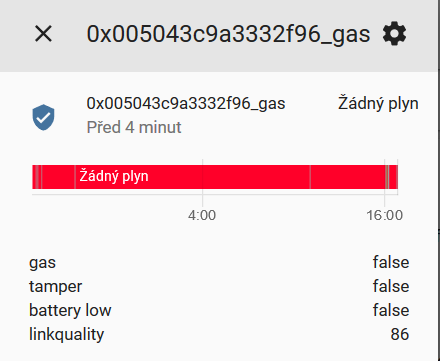
Hi, i am really sorry for bother. I thinked, this sensor is functional, in HA i see 2 sensors:
binary_sensor.0x005043c9a3332f96_gas
sensor.0x005043c9a3332f96_linkquality
If i click on binary_sensor, i can show:
gas false
tamper false
battery low false
linkquality 86
Problem is, always show false. I tried "Gas test" button of Gas sensor, show false...I tried gas from cigarette lighter, sensor beeps (alarm) , but in "binary_sensor.0x005043c9a3332f96_gas" and "sensor.0x005043c9a3332f96_linkquality" is always false. Signal is the signal is excellent.
I tried delete both sensor, new pairing, restart HA, but always false :(
vencakratky
on 19 Sep 2019
Can you provide the zigbee2mqtt log when clicking the button?
Koenkk
on 20 Sep 2019
There is log from zigbee2mqtt-edge after click on "sensor.0x005043c9a3332f96_gas" and "0x005043c9a3332f96_linkquality:
zigbee2mqtt:info 9/21/2019, 9:55:50 AM MQTT publish: topic 'homeassistant/binary_sensor/0x005043c9a3332f96/gas/config', payload '{"payload_on":true,"payload_off":false,"value_template":"{{ value_json.gas }}","device_class":"gas","state_topic":"zigbee2mqtt/0x005043c9a3332f96","json_attributes_topic":"zigbee2mqtt/0x005043c9a3332f96","name":"0x005043c9a3332f96_gas","unique_id":"0x005043c9a3332f96_gas_zigbee2mqtt","device":{"identifiers":["zigbee2mqtt_0x005043c9a3332f96"],"name":"0x005043c9a3332f96","sw_version":"Zigbee2mqtt 1.6.0","model":"Combustible gas sensor (HS1CG-M)","manufacturer":"HEIMAN"},"availability_topic":"zigbee2mqtt/bridge/state"}'
zigbee2mqtt:info 9/21/2019, 9:55:50 AM MQTT publish: topic 'homeassistant/sensor/0x005043c9a3332f96/linkquality/config', payload '{"unit_of_measurement":"-","value_template":"{{ value_json.linkquality }}","state_topic":"zigbee2mqtt/0x005043c9a3332f96","json_attributes_topic":"zigbee2mqtt/0x005043c9a3332f96","name":"0x005043c9a3332f96_linkquality","unique_id":"0x005043c9a3332f96_linkquality_zigbee2mqtt","device":{"identifiers":["zigbee2mqtt_0x005043c9a3332f96"],"name":"0x005043c9a3332f96","sw_version":"Zigbee2mqtt 1.6.0","model":"Combustible gas sensor (HS1CG-M)","manufacturer":"HEIMAN"},"availability_topic":"zigbee2mqtt/bridge/state"}'

There is log after touch "Test" button on Heiman Gas device - device beeps:
zigbee2mqtt:info 9/21/2019, 10:05:25 AM MQTT publish: topic 'zigbee2mqtt/0x005043c9a3332f96', payload '{"gas":false,"tamper":false,"battery_low":false,"linkquality":26}'
zigbee2mqtt:info 9/21/2019, 10:05:26 AM MQTT publish: topic 'zigbee2mqtt/0x005043c9a3332f96', payload '{"gas":false,"tamper":false,"battery_low":false,"linkquality":39}'
zigbee2mqtt:info 9/21/2019, 10:06:44 AM MQTT publish: topic 'zigbee2mqtt/0x005043c9a3332f96', payload '{"gas":false,"tamper":false,"battery_low":false,"linkquality":76}'
zigbee2mqtt:info 9/21/2019, 10:06:45 AM MQTT publish: topic 'zigbee2mqtt/0x005043c9a3332f96', payload '{"gas":false,"tamper":false,"battery_low":false,"linkquality":44}'
There is log after test with cigarette gas-lighter (device beeps):
zigbee2mqtt:info 9/21/2019, 10:08:40 AM MQTT publish: topic 'zigbee2mqtt/0x005043c9a3332f96', payload '{"gas":false,"tamper":false,"battery_low":false,"linkquality":23}'
zigbee2mqtt:info 9/21/2019, 10:08:52 AM MQTT publish: topic 'zigbee2mqtt/0x005043c9a3332f96', payload '{"gas":false,"tamper":false,"battery_low":false,"linkquality":78}'
There are Images after Button and gas-lighter test:
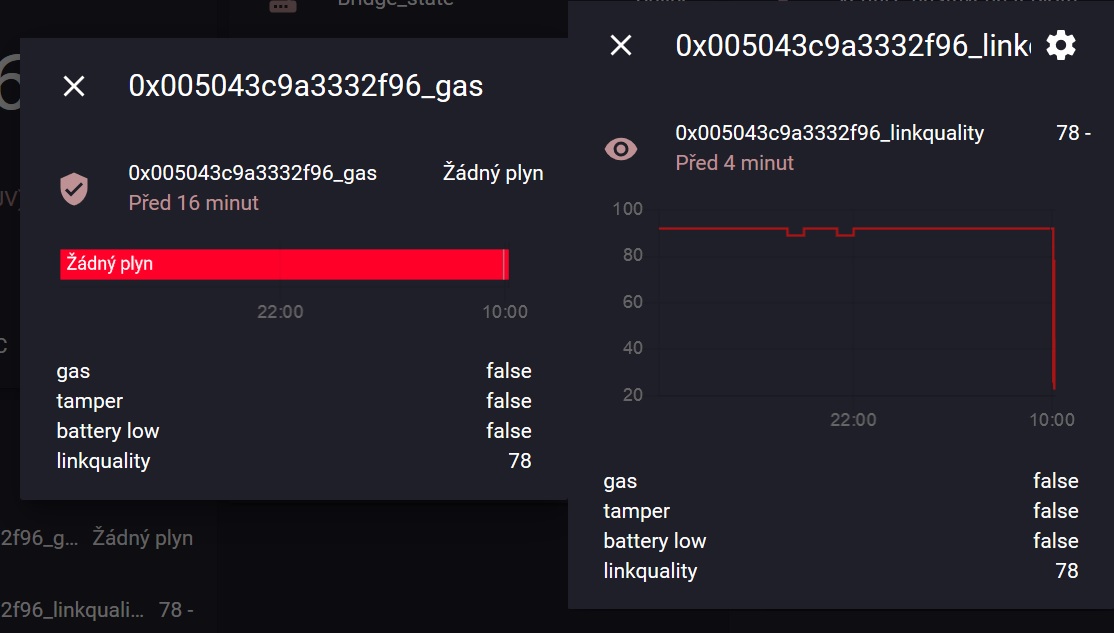
What i see, on this sensor is only change "linkquality", but nothing else. Thank you for your willingness Koen 👍
vencakratky
on 21 Sep 2019
There is log after touch "Test" button on Heiman Gas device - device beeps:
There is log after test with cigarette gas-lighter (device beeps):
Can you provide the debug logging when doing this?
To enable debug logging set in configuration.yaml:
advanced:
  log_level: debug
There is debug log:
After test button on device Heiman:
zigbee2mqtt:debug 9/23/2019, 2:05:42 PM Received Zigbee message from '0x005043c9a3332f96' of type 'commandStatusChangeNotification' with data '{"zonestatus":34,"extendedstatus":0}' from endpoint 1 with groupID 0
zigbee2mqtt:info 9/23/2019, 2:05:42 PM MQTT publish: topic 'zigbee2mqtt/0x005043c9a3332f96', payload '{"gas":false,"tamper":false,"battery_low":false,"linkquality":78}'
zigbee2mqtt:debug 9/23/2019, 2:05:44 PM Received Zigbee message from '0x005043c9a3332f96' of type 'commandStatusChangeNotification' with data '{"zonestatus":32,"extendedstatus":0}' from endpoint 1 with groupID 0
zigbee2mqtt:info 9/23/2019, 2:05:44 PM MQTT publish: topic 'zigbee2mqtt/0x005043c9a3332f96', payload '{"gas":false,"tamper":false,"battery_low":false,"linkquality":94}'
zigbee2mqtt:debug 9/23/2019, 2:06:38 PM Received Zigbee message from '0x005043c9a3332f96' of type 'commandStatusChangeNotification' with data '{"zonestatus":34,"extendedstatus":0}' from endpoint 1 with groupID 0
zigbee2mqtt:info 9/23/2019, 2:06:38 PM MQTT publish: topic 'zigbee2mqtt/0x005043c9a3332f96', payload '{"gas":false,"tamper":false,"battery_low":false,"linkquality":76}'
zigbee2mqtt:debug 9/23/2019, 2:06:39 PM Received Zigbee message from '0x005043c9a3332f96' of type 'commandStatusChangeNotification' with data '{"zonestatus":32,"extendedstatus":0}' from endpoint 1 with groupID 0
zigbee2mqtt:info 9/23/2019, 2:06:39 PM MQTT publish: topic 'zigbee2mqtt/0x005043c9a3332f96', payload '{"gas":false,"tamper":false,"battery_low":false,"linkquality":94}'
Test with gas-lighter:
zigbee2mqtt:debug 9/23/2019, 2:08:58 PM Received Zigbee message from '0x005043c9a3332f96' of type 'commandStatusChangeNotification' with data '{"zonestatus":32,"extendedstatus":0}' from endpoint 1 with groupID 0
zigbee2mqtt:info 9/23/2019, 2:08:58 PM MQTT publish: topic 'zigbee2mqtt/0x005043c9a3332f96', payload '{"gas":false,"tamper":false,"battery_low":false,"linkquality":94}'
zigbee2mqtt:debug 9/23/2019, 2:08:58 PM Received Zigbee message from '0x005043c9a3332f96' of type 'commandStatusChangeNotification' with data '{"zonestatus":34,"extendedstatus":0}' from endpoint 1 with groupID 0
zigbee2mqtt:info 9/23/2019, 2:08:58 PM MQTT publish: topic 'zigbee2mqtt/0x005043c9a3332f96', payload '{"gas":false,"tamper":false,"battery_low":false,"linkquality":94}'
zigbee2mqtt:debug 9/23/2019, 2:09:18 PM Received Zigbee message from '0x005043c9a3332f96' of type 'commandStatusChangeNotification' with data '{"zonestatus":34,"extendedstatus":0}' from endpoint 1 with groupID 0
zigbee2mqtt:info 9/23/2019, 2:09:18 PM MQTT publish: topic 'zigbee2mqtt/0x005043c9a3332f96', payload '{"gas":false,"tamper":false,"battery_low":false,"linkquality":94}'
zigbee2mqtt:debug 9/23/2019, 2:09:19 PM Received Zigbee message from '0x005043c9a3332f96' of type 'commandStatusChangeNotification' with data '{"zonestatus":32,"extendedstatus":0}' from endpoint 1 with groupID 0
zigbee2mqtt:info 9/23/2019, 2:09:19 PM MQTT publish: topic 'zigbee2mqtt/0x005043c9a3332f96', payload '{"gas":false,"tamper":false,"battery_low":false,"linkquality":68}'
zigbee2mqtt:debug 9/23/2019, 2:09:23 PM Saving state to file /share/zigbee2mqtt/state.json
zigbee2mqtt:debug 9/23/2019, 2:09:24 PM Received Zigbee message from '0x000d6f000b7a5985' of type 'attributeReport' with data '{"activePower":58}' from endpoint 1 with groupID 0
zigbee2mqtt:info 9/23/2019, 2:09:24 PM MQTT publish: topic 'zigbee2mqtt/0x000d6f000b7a5985', payload '{"state":"ON","linkquality":99,"power":5.8,"current":0.02,"voltage":242.17}'
vencakratky
on 23 Sep 2019
Found the issue and fixed it.
Will be available in the latest dev branch within a few hours.
Koenkk
on 23 Sep 2019
YES !! Now it´s working!!! :-) THANK YOU Koen!
vencakratky
on 26 Sep 2019
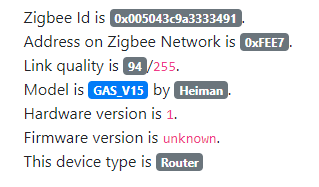
@Koenkk - I have just the same issue and same sensor, although I can see there are 2 on supported devices list:
HS1CG_M HS1CG-M
I have the: Combustible gas sensor (HS1CG_M) (as detected by Z2M)
Is there any chance that the "-" changes anything?
Binary sensor is always false.

 andriej
on 21 Aug 2020
andriej
on 21 Aug 2020
@andriej what is not working? Can you share the data/database.db entry of this device?
Koenkk
on 22 Aug 2020
@Koenkk sorry, wasn't precise in my feedback.
It has paired with Z2M, it is routing and visible on the map, but when I press test button or when I put lighter gas next to it (and alarm goes off), it's not changing in HA/MQTT message.
{"id":2,"type":"Router","ieeeAddr":"0x005043c9a3333491","nwkAddr":65255,"manufId":48042,"manufName":"Heiman","powerSource":"Mains (single phase)","modelId":"GAS_V15","epList":[1],"endpoints":{"1":{"profId":260,"epId":1,"devId":1026,"inClusterList":[0,3,1280,9],"outClusterList":[25],"clusters":{"genBasic":{"attributes":{"appVersion":0,"stackVersion":2,"hwVersion":1}}},"binds":[]}},"appVersion":0,"stackVersion":2,"hwVersion":1,"dateCode":"20150330","zclVersion":1,"interviewCompleted":false,"meta":{},"lastSeen":1597773947145}
andriej
on 22 Aug 2020
Since interviewing has no been completed successfully ("interviewCompleted":false). I would recommend to force remove the device through https://www.zigbee2mqtt.io/information/mqtt_topics_and_message_structure.html#zigbee2mqttbridgeconfigremove and try repairing the device. Hopefully it gets interviewed successfully this time.
Koenkk
on 23 Aug 2020
@vencakratky - how excatly were you pairing the device so interview managed to be completed?
andriej
on 24 Aug 2020
I have now nothing problem with this Gas sensor. But i am waiting for new Coordinator and after i make new Repairing. In your case i would try:
topic: zigbee2mqtt/bridge/config/force_remove
payload: "0x005043c9a3333491"
From http://mqtt-explorer.com/ download "MQTT Explorer" and connect to your Mosquitto broker
Delete all strings with 0x005043c9a3333491
Make hard reset Heiman Gas sensor (with small paper clip/staple) and try new Pairing with Zigbee2MQTT-edge.
vencakratky
on 24 Aug 2020
Related issues
 jeroenterheerdt
·
3Comments
jeroenterheerdt
·
3Comments
 andreasbrett
·
4Comments
Koenkk
·
3Comments
andreasbrett
·
4Comments
Koenkk
·
3Comments
 jwilling
·
4Comments
jwilling
·
4Comments
 alwashe
·
4Comments
alwashe
·
4Comments