Zigbee2mqtt: Z-Stack 3 on CC2531/CC2530 adventures
This issue is created in order to gather feedback of users using the CC2531/CC2530 AND Z-Stack 3.0 (= Zigbee 3.0)
You are about to enter a highly experimental area (no guarantees)
Notes
- Zigbee 3.0!
- Firmware can be found here in the bin folder: https://github.com/Koenkk/Z-Stack-firmware/tree/dev/coordinator/Z-Stack_3.0.x
- It's not possible to migrate your Zigbee 1.2 network (requires repairing)
- The network restore trick that we used in Zigbee 1.2 doesn't work anymore (due to better security policies). A backup of the CC2531/CC2530 is taken at every shutdown of zigbee2mqtt, file can be found under
data/coordinator_backup.json. This backup is automatically restored when starting with a new flashed CC2531/CC2530. - Requires latest zigbee2mqtt dev branch.
Known issues
- Pan ID and extended pan ID can't be set (probably not something to worry about)
- Pairing only seems possible during the first 180 seconds (even with
permit_join: true, a workaround is to restart zigbee2mqtt.
 Koenkk
All 133 comments
What are the benefits of Zigbee 3.0 for zigbee2mqtt? Will it allow more than the default 15 devices on a CC2531 coordinator (and if so how many)? Do we need new firmware on the CC2531 routers as well?
btw, thanks @koenkk for a fantastic product and all the effort you put into this project, it is very much appreciated!
 jarrah31
on 23 Apr 2019
jarrah31
on 23 Apr 2019
@jarrah31 it also has a direct children limit of 15. No new router firmware is needed (zigbee 1.2 devices can join a zigbee 3.0 network). More about zigbee 3.0 changes can be found here: http://www.ti.com/lit/an/swra615/swra615.pdf
I've just released a new firmware 20190423 (https://github.com/Koenkk/Z-Stack-firmware/tree/dev/coordinator/Z-Stack_3.0.x/bin).)
- Increased stability
- Try to fix issue that kicked of Xiaomi devices from the network
- Increased number of direct children from 10 to 15
Koenkk
on 23 Apr 2019
Hey, I'm new to this whole Zigbee thing but I got this one up and running with the future intent of integrating with Openhab to finally make my Hue Tap do things Philips never dreamed of :) Is there documentation available how GPP devices can be paired? Perhaps something specific for Hue Tap? I'm running 20190423 with the latest dev Docker container.
 Z0l
on 27 Apr 2019
Z0l
on 27 Apr 2019
@Z0l you can try to pair it, setup procedure seems to be here: https://huetips.com/tutorials/how-to-add-a-hue-tap/ (10 seconds press a button).
Koenkk
on 28 Apr 2019
I have flashed my cc2531 with CC2531ZNP-with-SBL.hex:
sudo ./cc-tool -e -w CC2531ZNP-with-SBL.hex                                                                                                                                            ±[●][master]
[sudo] Passwort für phil:
  Programmer: CC Debugger
  Target: CC2531
  Erasing flash...
  Completed
  Writing flash (241 KB)...
  Completed (17.97 s.)
but the stick does not seem to work with zigbee2mqtt anymore:
> [email protected] start /opt/zigbee2mqtt
> node index.js

  zigbee2mqtt:info 4/28/2019, 9:59:45 PM Logging to directory: '/opt/zigbee2mqtt/data/log/2019-04-28.21-59-45'
  zigbee2mqtt:info 4/28/2019, 9:59:46 PM Starting zigbee2mqtt version 1.3.1 (commit #39d6a8e)
  zigbee2mqtt:info 4/28/2019, 9:59:46 PM Starting zigbee-shepherd
  zigbee2mqtt:info 4/28/2019, 9:59:51 PM Error while starting zigbee-shepherd, attempting to fix... (takes 60 seconds)
  zigbee2mqtt:info 4/28/2019, 10:00:51 PM Starting zigbee-shepherd
  zigbee2mqtt:error 4/28/2019, 10:00:56 PM Error while starting zigbee-shepherd!
  zigbee2mqtt:error 4/28/2019, 10:00:56 PM Press the reset button on the stick (the one closest to the USB) and start again
  zigbee2mqtt:error 4/28/2019, 10:00:56 PM Failed to start
        {"message":"rsp error: 2","stack":"Error: rsp error: 2\n    at rspHdlr (/opt/zigbee2mqtt/node_modules/zigbee-shepherd/lib/components/controller.js:309:29)\n    at CcZnp.<anonymous> (/opt/zigbee2mqtt/node_modules/cc-znp/lib/ccznp.js:264:13)\n    at Object.onceWrapper (events.js:277:13)\n    at CcZnp.emit (events.js:189:13)\n    at CcZnp._mtIncomingDataHdlr (/opt/zigbee2mqtt/node_modules/cc-znp/lib/ccznp.js:366:14)\n    at Immediate._onImmediate (/opt/zigbee2mqtt/node_modules/cc-znp/lib/ccznp.js:342:22)\n    at runCallback (timers.js:705:18)\n    at tryOnImmediate (timers.js:676:5)\n    at processImmediate (timers.js:658:5)"}
  zigbee2mqtt:error 4/28/2019, 10:00:56 PM Exiting...
npm ERR! code ELIFECYCLE
npm ERR! errno 1
npm ERR! [email protected] start: `node index.js`
npm ERR! Exit status 1
npm ERR!
npm ERR! Failed at the [email protected] start script.
npm ERR! This is probably not a problem with npm. There is likely additional logging output above.

npm ERR! A complete log of this run can be found in:
npm ERR!     /home/pi/.npm/_logs/2019-04-28T21_00_56_252Z-debug.log
after pressing the reset button on the stick I get this error:
pi@raspberrypi:/opt/zigbee2mqtt $ npm start

> [email protected] start /opt/zigbee2mqtt
> node index.js

  zigbee2mqtt:info 4/28/2019, 10:03:41 PM Logging to directory: '/opt/zigbee2mqtt/data/log/2019-04-28.22-03-41'
  zigbee2mqtt:info 4/28/2019, 10:03:42 PM Starting zigbee2mqtt version 1.3.1 (commit #39d6a8e)
  zigbee2mqtt:info 4/28/2019, 10:03:42 PM Starting zigbee-shepherd
  zigbee2mqtt:info 4/28/2019, 10:03:44 PM Error while starting zigbee-shepherd, attempting to fix... (takes 60 seconds)
   zigbee2mqtt:info 4/28/2019, 10:04:44 PM Starting zigbee-shepherd
  zigbee2mqtt:error 4/28/2019, 10:04:45 PM Error while starting zigbee-shepherd!
  zigbee2mqtt:error 4/28/2019, 10:04:45 PM Press the reset button on the stick (the one closest to the USB) and start again
  zigbee2mqtt:error 4/28/2019, 10:04:45 PM Failed to start
        {"message":"request timeout","stack":"Error: request timeout\n    at CcZnp.<anonymous> (/opt/zigbee2mqtt/node_modules/cc-znp/lib/ccznp.js:261:22)\n    at Object.onceWrapper (events.js:277:13)\n    at CcZnp.emit (events.js:189:13)\n    at Timeout.<anonymous> (/opt/zigbee2mqtt/node_modules/cc-znp/lib/ccznp.js:240:18)\n    at ontimeout (timers.js:436:11)\n    at tryOnTimeout (timers.js:300:5)\n    at listOnTimeout (timers.js:263:5)\n    at Timer.processTimers (timers.js:223:10)"}
  zigbee2mqtt:error 4/28/2019, 10:04:45 PM Exiting...
npm ERR! code ELIFECYCLE
npm ERR! errno 1
npm ERR! [email protected] start: `node index.js`
npm ERR! Exit status 1
npm ERR!
npm ERR! Failed at the [email protected] start script.
npm ERR! This is probably not a problem with npm. There is likely additional logging output above.

npm ERR! A complete log of this run can be found in:
npm ERR!     /home/pi/.npm/_logs/2019-04-28T21_04_45_888Z-debug.log
the same stick worked fine with the old version:
pi@raspberrypi:/opt/zigbee2mqtt $ npm start

> [email protected] start /opt/zigbee2mqtt
> node index.js

  zigbee2mqtt:info 4/28/2019, 8:29:24 PM Logging to directory: '/opt/zigbee2mqtt/data/log/2019-04-28.20-29-24'
  zigbee2mqtt:info 4/28/2019, 8:29:25 PM Starting zigbee2mqtt version 1.3.1 (commit #39d6a8e)
  zigbee2mqtt:info 4/28/2019, 8:29:25 PM Starting zigbee-shepherd
  zigbee2mqtt:info 4/28/2019, 8:29:25 PM zigbee-shepherd started
  zigbee2mqtt:info 4/28/2019, 8:29:25 PM Coordinator firmware version: '20190223'
  zigbee2mqtt:info 4/28/2019, 8:29:25 PM Currently 1 devices are joined:
  zigbee2mqtt:info 4/28/2019, 8:29:25 PM 0x7cb03eaa00a6f7a3 (0x7cb03eaa00a6f7a3): AB3257001NJ - OSRAM Smart+ plug (Router)
  zigbee2mqtt:warn 4/28/2019, 8:29:25 PM `permit_join` set to  `true` in configuration.yaml.
  zigbee2mqtt:warn 4/28/2019, 8:29:25 PM Allowing new devices to join.
  zigbee2mqtt:warn 4/28/2019, 8:29:25 PM Set `permit_join` to `false` once you joined all devices.
  zigbee2mqtt:info 4/28/2019, 8:29:25 PM Zigbee: allowing new devices to join.
  zigbee2mqtt:info 4/28/2019, 8:29:25 PM Connecting to MQTT server at mqtt://192.168.178.71
  zigbee2mqtt:info 4/28/2019, 8:29:26 PM zigbee-shepherd ready
  zigbee2mqtt:info 4/28/2019, 8:29:26 PM Connected to MQTT server
  zigbee2mqtt:info 4/28/2019, 8:29:26 PM MQTT publish: topic 'zigbee2mqtt/bridge/state', payload 'online'
  zigbee2mqtt:info 4/28/2019, 8:29:26 PM MQTT publish: topic 'zigbee2mqtt/0x7cb03eaa00a6f7a3', payload '{"state":"ON","linkquality":78}'
  zigbee2mqtt:info 4/28/2019, 8:29:26 PM MQTT publish: topic 'homeassistant/switch/0x7cb03eaa00a6f7a3/switch/config', payload '{"payload_off":"OFF","payload_on":"ON","value_template":"{{ value_json.state }}","command_topic":"zigbee2mqtt/0x7cb03eaa00a6f7a3/set","state_topic":"zigbee2mqtt/0x7cb03eaa00a6f7a3","name":"0x7cb03eaa00a6f7a3_switch","unique_id":"0x7cb03eaa00a6f7a3_switch_zigbee2mqtt","device":{"identifiers":"zigbee2mqtt_0x7cb03eaa00a6f7a3","name":"0x7cb03eaa00a6f7a3","sw_version":"Zigbee2mqtt 1.3.1","model":"Smart+ plug (AB3257001NJ)","manufacturer":"OSRAM"},"availability_topic":"zigbee2mqtt/bridge/state"}'
  zigbee2mqtt:info 4/28/2019, 8:29:26 PM MQTT publish: topic 'homeassistant/sensor/0x7cb03eaa00a6f7a3/linkquality/config', payload '{"unit_of_measurement":"-","value_template":"{{ value_json.linkquality }}","state_topic":"zigbee2mqtt/0x7cb03eaa00a6f7a3","json_attributes_topic":"zigbee2mqtt/0x7cb03eaa00a6f7a3","name":"0x7cb03eaa00a6f7a3_linkquality","unique_id":"0x7cb03eaa00a6f7a3_linkquality_zigbee2mqtt","device":{"identifiers":"zigbee2mqtt_0x7cb03eaa00a6f7a3","name":"0x7cb03eaa00a6f7a3","sw_version":"Zigbee2mqtt 1.3.1","model":"Smart+ plug (AB3257001NJ)","manufacturer":"OSRAM"},"availability_topic":"zigbee2mqtt/bridge/state"}'
  zigbee2mqtt:info 4/28/2019, 8:29:26 PM MQTT publish: topic 'zigbee2mqtt/bridge/config', payload '{"version":"1.3.1","commit":"39d6a8e","coordinator_firmware":20190223,"log_level":"info","permit_join":true}'
  zigbee2mqtt:info 4/28/2019, 8:29:26 PM Successfully configured 0x7cb03eaa00a6f7a3 (0x7cb03eaa00a6f7a3)
 runningman84
on 28 Apr 2019
runningman84
on 28 Apr 2019
Btw. the same error happens in the dev branch (commit #4472c01)
runningman84
on 28 Apr 2019
Can you provide the output of DEBUG=* npm start (on https://pastebin.com/)
Koenkk
on 29 Apr 2019
For me it works with the dev version:
4/28/2019, 8:58:36 PM - info: Logging to directory: '/app/data/log/2019-04-28.20-58-36'
4/28/2019, 8:58:36 PM - info: Starting zigbee2mqtt version 1.3.1 (commit #unknown)
4/28/2019, 8:58:36 PM - info: Starting zigbee-shepherd
4/28/2019, 8:58:38 PM - info: zigbee-shepherd started
4/28/2019, 8:58:38 PM - info: Coordinator firmware version: '20190425'
4/28/2019, 8:58:38 PM - info: Currently 0 devices are joined:
4/28/2019, 8:58:38 PM - warn: 'permit_join' set to  'true' in configuration.yaml.
4/28/2019, 8:58:38 PM - warn: Allowing new devices to join.
4/28/2019, 8:58:38 PM - warn: Set 'permit_join' to 'false' once you joined all devices.
4/28/2019, 8:58:38 PM - info: Zigbee: allowing new devices to join.
4/28/2019, 8:58:38 PM - info: Connecting to MQTT server at mqtt://localhost
4/28/2019, 8:58:38 PM - info: zigbee-shepherd ready
4/28/2019, 8:58:38 PM - info: Connected to MQTT server
4/28/2019, 8:58:38 PM - info: MQTT publish: topic 'zigbee2mqtt/bridge/state', payload 'online'
4/28/2019, 8:58:38 PM - info: MQTT publish: topic 'zigbee2mqtt/bridge/config', payload '{"version":"1.3.1","commit":"unknown","coordinator":20190425,"log_level":"info","permit_join":true}'
However nothing happens when I keep pushing the button for 10 sec (I tried pushing all 4). Is the limitation on pairing has to happen in the first 180 seconds still in place? Also, is that normal that the led turns off after some time (didn't measure how long, but when I plug the USB in and start the docker container, the LED turns off).
Z0l
on 29 Apr 2019
@Z0l the pairing limitation is actually a zigbee 3.0 feature :-)
https://www.ti.com/lit/an/swra615/swra615.pdf "Permit join can no longer be enabled forever as networks will automatically close joining after a maximum of 254 seconds."
just resend the mqtt cmd permit_join true when the 254s have passed.
 lolorc
on 29 Apr 2019
lolorc
on 29 Apr 2019
@lolorc it would be cool if zigbee2mqtt would expose a switch like "permit_join" to homeassistant.
runningman84
on 29 Apr 2019
@runningman84 a hack is probably already possible. using zigbee2mqtt/bridge/config/permit_join as a mqtt switch with retain true. I guess it would also be possible to tell home assistant to set it to false 254s after it has been set to true.
but I agree it would better to be able to read from zigbee2mqtt/bridge/config/permit_join and get the updated status, and also having z2m setting it to false after 254s
lolorc
on 29 Apr 2019
@runningman84 @lolorc don't spend time on this. Soon I will implement something that zigbee2mqtt does this automatically.
Koenkk
on 29 Apr 2019
@Koenkk
Can you provide the output of
DEBUG=* npm start(on https://pastebin.com/)
runningman84
on 29 Apr 2019
@runningman84 after updating, did you do a rm -rf node_modules && npm install?
Koenkk
on 29 Apr 2019
I just run rm -rf node_modules && npm install and flashed the firmware once again. Now it seems to start:
pi@raspberrypi:/opt/zigbee2mqtt $ npm start

> [email protected] start /opt/zigbee2mqtt
> node index.js

  zigbee2mqtt:info 4/29/2019, 8:49:59 PM Logging to directory: '/opt/zigbee2mqtt/data/log/2019-04-29.20-49-59'
  zigbee2mqtt:info 4/29/2019, 8:50:00 PM Starting zigbee2mqtt version 1.3.1 (commit #a54e256)
  zigbee2mqtt:info 4/29/2019, 8:50:00 PM Starting zigbee-shepherd
  zigbee2mqtt:info 4/29/2019, 8:50:02 PM zigbee-shepherd started
  zigbee2mqtt:info 4/29/2019, 8:50:02 PM Coordinator firmware version: '20190425'
  zigbee2mqtt:info 4/29/2019, 8:50:02 PM Currently 1 devices are joined:
  zigbee2mqtt:info 4/29/2019, 8:50:02 PM 0x7cb03eaa00a6f7a3 (0x7cb03eaa00a6f7a3): AB3257001NJ - OSRAM Smart+ plug (Router)
  zigbee2mqtt:warn 4/29/2019, 8:50:02 PM `permit_join` set to  `true` in configuration.yaml.
  zigbee2mqtt:warn 4/29/2019, 8:50:02 PM Allowing new devices to join.
  zigbee2mqtt:warn 4/29/2019, 8:50:02 PM Set `permit_join` to `false` once you joined all devices.
  zigbee2mqtt:info 4/29/2019, 8:50:02 PM Zigbee: allowing new devices to join.
  zigbee2mqtt:info 4/29/2019, 8:50:02 PM Connecting to MQTT server at mqtt://192.168.178.71
  zigbee2mqtt:info 4/29/2019, 8:50:02 PM zigbee-shepherd ready
  zigbee2mqtt:info 4/29/2019, 8:50:02 PM Connected to MQTT server
  zigbee2mqtt:info 4/29/2019, 8:50:02 PM MQTT publish: topic 'zigbee2mqtt/bridge/state', payload 'online'
  zigbee2mqtt:info 4/29/2019, 8:50:02 PM MQTT publish: topic 'zigbee2mqtt/0x7cb03eaa00a6f7a3', payload '{"state":"ON","linkquality":0}'
  zigbee2mqtt:info 4/29/2019, 8:50:02 PM MQTT publish: topic 'homeassistant/switch/0x7cb03eaa00a6f7a3/switch/config', payload '{"payload_off":"OFF","payload_on":"ON","value_template":"{{ value_json.state }}","command_topic":"zigbee2mqtt/0x7cb03eaa00a6f7a3/set","state_topic":"zigbee2mqtt/0x7cb03eaa00a6f7a3","name":"0x7cb03eaa00a6f7a3_switch","unique_id":"0x7cb03eaa00a6f7a3_switch_zigbee2mqtt","device":{"identifiers":"zigbee2mqtt_0x7cb03eaa00a6f7a3","name":"0x7cb03eaa00a6f7a3","sw_version":"Zigbee2mqtt 1.3.1","model":"Smart+ plug (AB3257001NJ)","manufacturer":"OSRAM"},"availability_topic":"zigbee2mqtt/bridge/state"}'
  zigbee2mqtt:info 4/29/2019, 8:50:02 PM MQTT publish: topic 'homeassistant/sensor/0x7cb03eaa00a6f7a3/linkquality/config', payload '{"unit_of_measurement":"-","value_template":"{{ value_json.linkquality }}","state_topic":"zigbee2mqtt/0x7cb03eaa00a6f7a3","json_attributes_topic":"zigbee2mqtt/0x7cb03eaa00a6f7a3","name":"0x7cb03eaa00a6f7a3_linkquality","unique_id":"0x7cb03eaa00a6f7a3_linkquality_zigbee2mqtt","device":{"identifiers":"zigbee2mqtt_0x7cb03eaa00a6f7a3","name":"0x7cb03eaa00a6f7a3","sw_version":"Zigbee2mqtt 1.3.1","model":"Smart+ plug (AB3257001NJ)","manufacturer":"OSRAM"},"availability_topic":"zigbee2mqtt/bridge/state"}'
  zigbee2mqtt:info 4/29/2019, 8:50:02 PM MQTT publish: topic 'zigbee2mqtt/bridge/config', payload '{"version":"1.3.1","commit":"a54e256","coordinator":20190425,"log_level":"info","permit_join":true}'
  zigbee2mqtt:warn 4/29/2019, 8:50:14 PM No converter available for 'AB3257001NJ' with cid 'genBasic', type 'devChange' and data '{"cid":"genBasic","data":{"manufacturerName":"OSRAM","modelId":"Plug 01","powerSource":1}}'
  zigbee2mqtt:warn 4/29/2019, 8:50:14 PM Please see: https://www.zigbee2mqtt.io/how_tos/how_to_support_new_devices.html.
  zigbee2mqtt:warn 4/29/2019, 8:50:14 PM No converter available for 'AB3257001NJ' with cid 'genBasic', type 'devChange' and data '{"cid":"genBasic","data":{"zclVersion":1,"appVersion":12,"stackVersion":2,"hwVersion":1,"dateCode":"20140331DEOS****","swBuildId":"V1.04.12"}}'
  zigbee2mqtt:warn 4/29/2019, 8:50:14 PM Please see: https://www.zigbee2mqtt.io/how_tos/how_to_support_new_devices.html.
  zigbee2mqtt:warn 4/29/2019, 8:50:15 PM No converter available for 'AB3257001NJ' with cid 'genBasic', type 'devChange' and data '{"cid":"genBasic","data":{"deviceEnabled":1}}'
  zigbee2mqtt:warn 4/29/2019, 8:50:15 PM Please see: https://www.zigbee2mqtt.io/how_tos/how_to_support_new_devices.html.
  zigbee2mqtt:warn 4/29/2019, 8:50:15 PM No converter available for 'AB3257001NJ' with cid 'genIdentify', type 'devChange' and data '{"cid":"genIdentify","data":{"identifyTime":0}}'
  zigbee2mqtt:warn 4/29/2019, 8:50:15 PM Please see: https://www.zigbee2mqtt.io/how_tos/how_to_support_new_devices.html.
  zigbee2mqtt:warn 4/29/2019, 8:50:15 PM No converter available for 'AB3257001NJ' with cid 'genGroups', type 'devChange' and data '{"cid":"genGroups","data":{"nameSupport":0}}'
  zigbee2mqtt:warn 4/29/2019, 8:50:15 PM Please see: https://www.zigbee2mqtt.io/how_tos/how_to_support_new_devices.html.
  zigbee2mqtt:warn 4/29/2019, 8:50:15 PM No converter available for 'AB3257001NJ' with cid 'genScenes', type 'devChange' and data '{"cid":"genScenes","data":{"count":0,"currentScene":0,"currentGroup":0,"sceneValid":0,"nameSupport":0}}'
  zigbee2mqtt:warn 4/29/2019, 8:50:15 PM Please see: https://www.zigbee2mqtt.io/how_tos/how_to_support_new_devices.html.
  zigbee2mqtt:info 4/29/2019, 8:50:16 PM MQTT publish: topic 'zigbee2mqtt/0x7cb03eaa00a6f7a3', payload '{"state":"ON","linkquality":84}'
  zigbee2mqtt:warn 4/29/2019, 8:50:16 PM No converter available for 'AB3257001NJ' with cid 'haElectricalMeasurement', type 'devChange' and data '{"cid":"haElectricalMeasurement","data":{"measurementType":8,"activePower":400}}'
  zigbee2mqtt:warn 4/29/2019, 8:50:16 PM Please see: https://www.zigbee2mqtt.io/how_tos/how_to_support_new_devices.html.
  zigbee2mqtt:warn 4/29/2019, 8:50:16 PM No converter available for 'AB3257001NJ' with cid 'manuSpecificOsram', type 'devChange' and data '{"cid":"manuSpecificOsram","data":{"0":0}}'
  zigbee2mqtt:warn 4/29/2019, 8:50:16 PM Please see: https://www.zigbee2mqtt.io/how_tos/how_to_support_new_devices.html.
  zigbee2mqtt:info 4/29/2019, 8:50:16 PM Device incoming...
  zigbee2mqtt:info 4/29/2019, 8:50:16 PM MQTT publish: topic 'zigbee2mqtt/bridge/log', payload '{"type":"pairing","message":"device incoming"}'
  zigbee2mqtt:warn 4/29/2019, 8:50:53 PM Failed to configure 0x7cb03eaa00a6f7a3 (0x7cb03eaa00a6f7a3) ('Error: Timed out after 10000 ms') (attempt #1)
  zigbee2mqtt:warn 4/29/2019, 8:50:53 PM This can be ignored if the device is working properly
But the OSRAM plug does not seem to work well with this firmware or software. State changes are not reported and there are these timed out error messages.
runningman84
on 29 Apr 2019
I just removed the plug from the outlet and put it back in... now the state change is recognized:
  zigbee2mqtt:warn 4/29/2019, 8:50:53 PM Failed to configure 0x7cb03eaa00a6f7a3 (0x7cb03eaa00a6f7a3) ('Error: Timed out after 10000 ms') (attempt #1)
  zigbee2mqtt:warn 4/29/2019, 8:50:53 PM This can be ignored if the device is working properly
  zigbee2mqtt:info 4/29/2019, 8:53:20 PM Successfully configured 0x7cb03eaa00a6f7a3 (0x7cb03eaa00a6f7a3)
  zigbee2mqtt:info 4/29/2019, 8:53:22 PM MQTT publish: topic 'zigbee2mqtt/0x7cb03eaa00a6f7a3', payload '{"state":"OFF","linkquality":86}'
  zigbee2mqtt:info 4/29/2019, 8:53:24 PM MQTT publish: topic 'zigbee2mqtt/0x7cb03eaa00a6f7a3', payload '{"state":"ON","linkquality":84}'
  zigbee2mqtt:info 4/29/2019, 8:53:25 PM MQTT publish: topic 'zigbee2mqtt/0x7cb03eaa00a6f7a3', payload '{"state":"OFF","linkquality":86}'
  zigbee2mqtt:info 4/29/2019, 8:53:26 PM MQTT publish: topic 'zigbee2mqtt/0x7cb03eaa00a6f7a3', payload '{"state":"ON","linkquality":81}'
  zigbee2mqtt:info 4/29/2019, 8:53:27 PM MQTT publish: topic 'zigbee2mqtt/0x7cb03eaa00a6f7a3', payload '{"state":"OFF","linkquality":86}'
  zigbee2mqtt:info 4/29/2019, 8:53:28 PM MQTT publish: topic 'zigbee2mqtt/0x7cb03eaa00a6f7a3', payload '{"state":"ON","linkquality":84}'
  zigbee2mqtt:info 4/29/2019, 8:53:28 PM MQTT publish: topic 'zigbee2mqtt/0x7cb03eaa00a6f7a3', payload '{"state":"OFF","linkquality":89}'
I've got this running, I took the plunge straight into Z-Stack 3 since I don't have any of my network setup. No bugs to report yet, but are there any instructions on how to use touchlink in this? Or is the whole point that we now _could_ make touchlink work, rather than that it already _is working_?
My hue bulbs don't even like resetting with the API touchlink trick on the original bridge, but using my Conbee (which I'm hoping to replace for the more open zigbee2mqtt) I was able to reset them and then get them onto zigbee2mqtt, so I'd love to see touchlink without any other device.
Only a couple of devices so far, and I'm not doing anything sophisticated, but it is working with what I've paired up (a GE switch and a hue bulb)
 GlitchHound
on 7 May 2019
GlitchHound
on 7 May 2019
@GlitchHound good idea! I will look into this, please keep an eye on https://github.com/Koenkk/zigbee2mqtt/issues/1509
Koenkk
on 8 May 2019
Do i understand this correctly:
The network restore trick that we used in Zigbee 1.2 doesn't work anymore (due to better security policies). A backup of the CC2531 is taken at every shutdown of zigbee2mqtt, file can be found under data/coordinator_backup.json. This backup is automatically restored when starting with a new flashed CC2531.
Does this imply that i can even change the hardware without the need to repair all devices? Or does this "only" cover firmware changes?
 sehraf
on 19 May 2019
sehraf
on 19 May 2019
@sehraf yes, hardware can be changed without repairing (was also possible with 1.2). Note that when going from zigbee 1.2 to 3.0 you have to re-pair.
Koenkk
on 19 May 2019
everything Working fine but when i stop the zigbee2mqtt service with availability_timeout: option in the configuration.yaml this is the log:
May 20 11:50:54 hassbian systemd[1]: Stopping zigbee2mqtt...
May 20 11:50:54 hassbian npm[11064]: #33[32m zigbee2mqtt:info#033[39m 5/20/2019, 11:50:54 AM MQTT publish: topic 'zigbee2mqtt/0x00158d0001c9affc/availability', payload 'offline'
May 20 11:50:54 hassbian npm[11064]: #33[32m zigbee2mqtt:info#033[39m 5/20/2019, 11:50:54 AM MQTT publish: topic 'zigbee2mqtt/bridge/state', payload 'offline'
May 20 11:50:54 hassbian npm[11064]: #33[32m zigbee2mqtt:info#033[39m 5/20/2019, 11:50:54 AM Disconnecting from MQTT server
May 20 11:50:54 hassbian mosquitto[3833]: 1558367454: Client mqttjs_0943bd74 disconnected.
May 20 11:50:54 hassbian systemd[1]: zigbee2mqtt.service: Main process exited, code=killed, status=15/TERM
May 20 11:50:54 hassbian npm[11064]: #33[32m zigbee2mqtt:info#033[39m 5/20/2019, 11:50:54 AM MQTT publish: topic 'zigbee2mqtt/0x00158d0001c9affc/availability', payload 'offline'
May 20 11:50:54 hassbian npm[11064]: events.js:174
May 20 11:50:54 hassbian npm[11064]: throw er; // Unhandled 'error' event
May 20 11:50:54 hassbian npm[11064]: ^
May 20 11:50:54 hassbian npm[11064]: Error: client disconnecting
May 20 11:50:54 hassbian npm[11064]: at MqttClient._checkDisconnecting (/opt/zigbee2mqtt/node_modules/mqtt/lib/client.js:370:26)
May 20 11:50:54 hassbian npm[11064]: at MqttClient.publish (/opt/zigbee2mqtt/node_modules/mqtt/lib/client.js:408:12)
May 20 11:50:54 hassbian npm[11064]: at MQTT.publish (/opt/zigbee2mqtt/lib/mqtt.js:95:21)
May 20 11:50:54 hassbian npm[11064]: at DeviceAvailability.publishAvailability (/opt/zigbee2mqtt/lib/extension/deviceAvailability.js:146:19)
May 20 11:50:54 hassbian npm[11064]: at zigbee.getDevices.filter.forEach (/opt/zigbee2mqtt/lib/extension/deviceAvailability.js:106:39)
May 20 11:50:54 hassbian npm[11064]: at Array.forEach ()
May 20 11:50:54 hassbian npm[11064]: at DeviceAvailability.stop (/opt/zigbee2mqtt/lib/extension/deviceAvailability.js:106:14)
May 20 11:50:54 hassbian npm[11064]: at extensions.filter.forEach (/opt/zigbee2mqtt/lib/controller.js:177:64)
May 20 11:50:54 hassbian npm[11064]: at Array.forEach ()
May 20 11:50:54 hassbian npm[11064]: at Controller.stop (/opt/zigbee2mqtt/lib/controller.js:177:47)
May 20 11:50:54 hassbian npm[11064]: Emitted 'error' event at:
May 20 11:50:54 hassbian npm[11064]: at MqttClient._checkDisconnecting (/opt/zigbee2mqtt/node_modules/mqtt/lib/client.js:370:12)
May 20 11:50:54 hassbian npm[11064]: at MqttClient.publish (/opt/zigbee2mqtt/node_modules/mqtt/lib/client.js:408:12)
May 20 11:50:54 hassbian npm[11064]: [... lines matching original stack trace ...]
May 20 11:50:54 hassbian npm[11064]: at Controller.stop (/opt/zigbee2mqtt/lib/controller.js:177:47)
May 20 11:50:54 hassbian systemd[1]: zigbee2mqtt.service: Succeeded.
May 20 11:50:54 hassbian systemd[1]: Stopped zigbee2mqtt.
 drbios
on 20 May 2019
drbios
on 20 May 2019
@drbios fixed in latest dev.
Koenkk
on 20 May 2019
@Koenkk excellent!! i will update
excellent thank you very much ... amazing work
drbios
on 20 May 2019
CC2530 and CC2530_CC2591 firmwares are also available: https://github.com/Koenkk/Z-Stack-firmware/tree/master/coordinator/Z-Stack_3.0.x/bin
Koenkk
on 24 May 2019
I started using the Z-Stack 3 a couple of days ago. So far I haven't had any stability issues as I had with the older stack. However, somehow I cannot get my two IKEA Floalt to connect. Other IKEA bulbs do not pose a problem, and even battery powered Xiaomi connect with little to no problem. Anyone else had problems with these lamps?
 ekaats
on 25 May 2019
ekaats
on 25 May 2019
I have updated my CC2530_CC2591 to the Z-Stack 3 firmware and have repaired all my devices.
After a few minutes though, all devices are going offline.
Here is my config and I have attached a log with debug enabled.
I'm running the latest Docker dev image.
homeassistant: true
permit_join: true
mqtt:
  base_topic: zigbee2mqtt
  server: 'mqtt://192.168.1.10'
serial:
  port: /dev/zigbee
advanced:
  pan_id: 0x1a62
  rtscts: false
  log_level: debug
  availability_timeout: 60
 hanzoh
on 28 May 2019
hanzoh
on 28 May 2019
When I disable the availability_timeout, it last a bit longer, but then crashes after the second or so network update for refreshing the network map in Home Assistant. I have now disabled that automation as well and will monitor how long it lasts. This heavy polling lets the CC2530 crash somehow.
hanzoh
on 28 May 2019
Can you post the log_level: debug when this happens (http://www.zigbee2mqtt.io/configuration/configuration.html)
Koenkk
on 28 May 2019
Works fine for me on cc2531
 milakov
on 29 May 2019
milakov
on 29 May 2019
Hello ... happens the same to me using zs3 and a cc2530+2591,suddenly everything goes offline and I had to reinstall everything again ...no possibilitie of repairing.
Now I am using zs1.2.2 and not using availability_timeout it's much more stable.
drbios
on 29 May 2019
I have reenabled the /10m network scan for the map in home assistant, and so far it has been stable. So it really must be the availability check that crashes the network. Had to unplug and replug the USB to serial converter to get it started again.
hanzoh
on 29 May 2019
Okay, 1,5 hours later, and it crashed again.
@Koenkk Please find attached the debug log since z2m started this morning at 2:00AM (automatic update to latest-dev Docker image).
It fails at 5/29/2019, 5:50:00 PM, I reenabled the network map refresh (every 10 minutes) at 5/29/2019, 3:52:41 PM.
hanzoh
on 29 May 2019
@hanzoh probably happens because of https://github.com/Koenkk/zigbee2mqtt/issues/652#issuecomment-496842986. Without the networkmap everything should be working fine.
Koenkk
on 29 May 2019
Today I found out that the Z-Stack 3 firmware might have some issues with an explicitly set network key. After reading about the (possible?) security settings when not using a network key, I decided to add one and change my network to another channel as well. (re)pairing went smooth but after awhile I noticed instability in the network, particularly from Ikea devices. Furthermore, upon reset they seemed to be unpaired or otherwise unreachable. Other devices also showed faults but these or for the most part sensors that just didn't register anything, so I guess they were unpaired/unreachable as well.
Removing the custom channel did not help. Instead it made repairing impossible somehow. Changing the network key did help, or so it seemed. I was able to restart zigbee2mqtt and reconnect with my devices. To be sure I reflashed the old Z-Stack and sure enough, using the same settings both custom channel and network key worked.
So, tl;dr: Setting network key (and possibly channel) seems broken on Z-Stack CC2531.
ekaats
on 2 Jun 2019
Non-default channel works fine for me with different xiaomi devices in the network with cc2531 flashed with z-stack 3
milakov
on 2 Jun 2019
Will there ever be an option to migrate all my configured devices from 1.x to 3.x?
I have 2 hue bulbs which I can't reset, cause I don't have the remote.
 CypherMK
on 3 Jun 2019
CypherMK
on 3 Jun 2019
@CypherMK probably not but lightlink is on the todo list.
Koenkk
on 3 Jun 2019
can you build this firmware for CC2530+CC2592 ?
 faronov
on 4 Jun 2019
faronov
on 4 Jun 2019
Where does the device limit of 40devices come from? I already have about 50 devices in my network. Does this mean I have to split up the network if I ever upgrade to 3.0?
 matlab22
on 5 Jun 2019
matlab22
on 5 Jun 2019
@faronov does the Z-Stack 1.2 CC2592 work stable now?
@matlab22 this is due to a new security requirement in Zigbee 3. Note that this only applies to Zigbee 3 devices, meaning that you can have max 40 Zigbee 3 devices in your network AND an unlimited amount of Zigbee 1.2 devices.
Koenkk
on 5 Jun 2019
@matlab22 this is due to a new security requirement in Zigbee 3. Note that this only applies to Zigbee 3 devices, meaning that you can have max 40 Zigbee 3 devices in your network AND an unlimited amount of Zigbee 1.2 devices.
How do I know which is connected by 1.2 and which by 3.0? I have devices that claim to be 3.0 connected to your v1.3 firmware. So I assume they are backwards compatible. I have a lot of Xiaomi stuff, do you know which version they are using?
matlab22
on 5 Jun 2019
@Koenkk I only today finishing assemble and tried right now to flash 1.2, but I have an idea to use some security zones and I see that you get some progress about stack 3
for my devices stack 3 more stable than 1.2
faronov
on 5 Jun 2019
@matlab22 it may be listed in the device specification, but currently there is no way of easily knowing this.
Koenkk
on 6 Jun 2019
I still haven't made the switch to the Zigbee 3 firmware. I am wondering how it compares stability wise on the CC2531 and when you would start recommending that people use this by default over the Zigbee 1.2 firmware :)
 kiwinol
on 6 Jun 2019
kiwinol
on 6 Jun 2019
I migrated my network to Z-Stack 3 mainly because on Z-Stack 1.2 most of my Xiaomi sensors were removed every 1 or 2 days making me to repair them continuously.
In Z-Stack 3 is not happening, or at least that often (I had to repair two sensors after a couple of weeks of use) and it is quite stable.
There are sometimes that the sensors do not respond immediately and they start responding after a couple of minutes, but I still don't know why this is happening as I don't see anything in logs,
 santirguez
on 6 Jun 2019
santirguez
on 6 Jun 2019
Thanks for sharing your experience. I am finding my setup is pretty stable at the moment, except the the latest firmware, I had to roll back to 20190223 firmware.
kiwinol
on 6 Jun 2019
I migrated my network to Z-Stack 3 mainly because on Z-Stack 1.2 most of my Xiaomi sensors were removed every 1 or 2 days making me to repair them continuously.
In Z-Stack 3 is not happening, or at least that often (I had to repair two sensors after a couple of weeks of use) and it is quite stable.
There are sometimes that the sensors do not respond immediately and they start responding after a couple of minutes, but I still don't know why this is happening as I don't see anything in logs,
Have you separated out your WiFi channel (on all APs) from the Zigbee one? I have over 20 Xiaomi sensors, never drop now that I separated out my 2.4Ghz channels to ensure no interference with Zigbee radio. I'm on firmware v1.2 20190223
I have some samsung and other Zigbee devices as well on the network. all working great! I have two routers, CC2531 and a CC2530 external antenna. and the Samsung plug and one Light bulb show as routers as well.
So i'm afraid to change ... i'll setup a new dev environment perhaps and move a few sensors to it.
 marc-gist
on 14 Jun 2019
marc-gist
on 14 Jun 2019
Everytime I need to restart zigbee2mqtt service my network is messed up and I need to reset bulbs to get them working again. It is annoying... CC2531 with Z-Stack 3.0 firmware and latest zigbee2mqtt dev git channel...
 valexi7
on 6 Jul 2019
valexi7
on 6 Jul 2019
I have this error with CC2530+cc2591 firmware CC2530_CC2591_20190523.zip:
    {"message":"Cannot read property 'zclClustersReq' of null","stack":"TypeError: Cannot read property 'zclClustersReq' of null\n    at /app/node_modules/zigbee-herdsman/dist/lib/components/event_handlers.js:243:32\n    at _fulfilled (/app/node_modules/zigbee-herdsman/node_modules/q/q.js:854:54)\n    at /app/node_modules/zigbee-herdsman/node_modules/q/q.js:883:30\n    at Promise.promise.promiseDispatch (/app/node_modules/zigbee-herdsman/node_modules/q/q.js:816:13)\n    at /app/node_modules/zigbee-herdsman/node_modules/q/q.js:877:14\n    at runSingle (/app/node_modules/zigbee-herdsman/node_modules/q/q.js:137:13)\n    at flush (/app/node_modules/zigbee-herdsman/node_modules/q/q.js:125:13)\n    at process._tickCallback (internal/process/next_tick.js:61:11)"}
  zigbee2mqtt:error 7/24/2019, 6:09:45 PM
    {"message":"Cannot read property 'zclClustersReq' of null","stack":"TypeError: Cannot read property 'zclClustersReq' of null\n    at /app/node_modules/zigbee-herdsman/dist/lib/components/event_handlers.js:243:32\n    at _fulfilled (/app/node_modules/zigbee-herdsman/node_modules/q/q.js:854:54)\n    at /app/node_modules/zigbee-herdsman/node_modules/q/q.js:883:30\n    at Promise.promise.promiseDispatch (/app/node_modules/zigbee-herdsman/node_modules/q/q.js:816:13)\n    at /app/node_modules/zigbee-herdsman/node_modules/q/q.js:877:14\n    at runSingle (/app/node_modules/zigbee-herdsman/node_modules/q/q.js:137:13)\n    at flush (/app/node_modules/zigbee-herdsman/node_modules/q/q.js:125:13)\n    at process._tickCallback (internal/process/next_tick.js:61:11)"}
The reason i change to zigbee 3.0 because some not solved bug with CC2630/cc2650 end devices (in side TI stack) with router
 dzungpv
on 24 Jul 2019
dzungpv
on 24 Jul 2019
@Koenkk How to make Zigbee 3.0 more stable? CC2652R1 have some hardware bug but CC2530/2531 good enough, I will invest time to it if you need help
dzungpv
on 2 Aug 2019
@dzungpv I'm currently still investigating the CC2652R issues. CC2538 might also be an option #1568
Koenkk
on 2 Aug 2019
@Koenkk I only try with CC2530/2531, but i have some problem with z2mqtt, every time restart z2mqtt it will start pairing from the start, so it is about z2mqtt? I read some one use Ztool solution to start the Z 3.0 network and it work stable.
dzungpv
on 2 Aug 2019
@dzungpv you mean that all your pairing are lost?
Koenkk
on 2 Aug 2019
@Koenkk Yes, and it start re-pairing all the devices, I setup test network with only 1 router and two end devices
dzungpv
on 2 Aug 2019
@dzungpv strange, I currently use the CC2531 + zigbee 3 in production and it's working reliable for 2 months now.
Probably it zigbee-herdsman detect that the configuration is not up-to-date and therefore reinitialises the device, can you provide the log when running with DEBUG=* npm start?
Koenkk
on 3 Aug 2019
@Koenkk I connect 22 device in the network, 2 router and it start error when reboot/start and it never work again unless i re flash, but it only work the first time and repeat:
  zigbee2mqtt:error 8/9/2019, 8:08:25 PM
    {"message":"Cannot read property 'zclClustersReq' of null","stack":"TypeError: Cannot read property 'zclClustersReq' of null\n    at /zigbee2mqtt-1.5.1/node_modules/zigbee-herdsman/dist/lib/components/event_handlers.js:243:32\n    at _fulfilled (/zigbee2mqtt-1.5.1/node_modules/zigbee-herdsman/node_modules/q/q.js:854:54)\n    at /zigbee2mqtt-1.5.1/node_modules/zigbee-herdsman/node_modules/q/q.js:883:30\n    at Promise.promise.promiseDispatch (/zigbee2mqtt-1.5.1/node_modules/zigbee-herdsman/node_modules/q/q.js:816:13)\n    at /zigbee2mqtt-1.5.1/node_modules/zigbee-herdsman/node_modules/q/q.js:877:14\n    at runSingle (/zigbee2mqtt-1.5.1/node_modules/zigbee-herdsman/node_modules/q/q.js:137:13)\n    at flush (/zigbee2mqtt-1.5.1/node_modules/zigbee-herdsman/node_modules/q/q.js:125:13)\n    at process._tickCallback (internal/process/next_tick.js:61:11)"}
@Koenkk never mind, i delete all and start over, now it work fine for 48 hours, 2 CC2530 Z-Stack 3 router with 24 end devices on CC2530+CC2591, include those Xiaomi sensors: 2 motion, 3 temperature, 1 door. I will report back it not stable.
dzungpv
on 10 Aug 2019
@Koenkk I could not find any note about a 40 device limit in Zigbee 3. Is there a device limit in combination with the CC2530/31 and Zigbee 3 or general for Zigbee 3?
It's hard for me to believe that is is a general device limit in Zigbee 3.
 choeflake
on 28 Aug 2019
choeflake
on 28 Aug 2019
Only in combination with the cc2531/cc2530.
Koenkk
on 29 Aug 2019
I found that with current implementation (where you don't set panId at all) it is a bit of lottery with unpredictable results (I tested 3.0.2 on cc2538 though), and while it works for some time, under some condition it can stop (giving every time different panid after stick power cycle ). But, on 3.0.2 you actually CAN set PanId and extPanId from shepherds and it works.
I patched code and I have now panid and extpanid I request from config file.
If I change panid in config and restart - I get another one. Fully correct behaviour.
This is patch for herdsman 0.5.7 (one is installed currently with my dev branch). I wanted to make RP, but realised that in current dev of herdsman things are completely different.
 antst
on 3 Sep 2019
antst
on 3 Sep 2019
By the way, all those reports about lost pairing, very likely, due to floating PAN ID. This is what I see. I didn't have this problem on my sticks, but probably because of infinite chain of reflashes I flashed something somewhere which made it stable (I was not erasing chip), but when I started to experiment, with erasing chip etc, I ended up in situation when firmware which was stable for months, now also gives me different pan_id on every reboot. And, generally problem shown to be tricky. It can go unchanged for 10 reboots, and start to change on 11th, and then after another 20 reboots become stable back. And it possibly depends on how long boot takes. Apparently this issue was reported to TI year ago, and TI did nothing so far.
Patch above fixed it by restoring behaviour which is current with 1.2 stack, It correctly set pan_id on z2m start.
this was original thread about issue
http://e2e.ti.com/support/wireless-connectivity/zigbee-and-thread/f/158/t/746836
but today's testing (we did over 400 reboots/power cycles) showed that there is more story to it than just ZDSECMGR_TC_DEVICE_MAX.
antst
on 3 Sep 2019
It looks like there is a bug in binary-only part of z-stack.
antst
on 3 Sep 2019
I found that with current implementation (where you don't set panId at all) it is a bit of lottery with unpredictable results (I tested 3.0.2 on cc2538 though), and while it works for some time, under some condition it can stop (giving every time different panid after stick power cycle ). But, on 3.0.2 you actually CAN set PanId and extPanId from shepherds and it works.
I patched code and I have now panid and extpanid I request from config file.
If I change panid in config and restart - I get another one. Fully correct behaviour.
This is patch for herdsman 0.5.7 (one is installed currently with my dev branch). I wanted to make RP, but realised that in current dev of herdsman things are completely different.
The reason that this was done is that once a pan ID is already in used and one is specified, the coordinator does not start. But I agree that we should just pass this and let the user decide on a new pan ID.
Koenkk
on 4 Sep 2019
It does explain a the issues I've been having with 3.0. I haven't been able to keep a working network after reboots. I to did once succeed in getting the settings just right, but after reconfigurating things within home assistant and reflashing the stick my setup got unreliable as well.
Now I am running 1.2 with source routing and it seems to be stable although (re)pairing is somewhat challenging.
Aside from these issues, is there any idea on what the ideal future setup would be for zigbee 3.0 and the new herdsmen? Will CC2530/31 still be the main platform or are other options maturing enough for 30/31 to be considered obsolete? From the discussions I take that we are running against the limits of these sticks as coordinators. Is that correct?
ekaats
on 4 Sep 2019
Aside from these issues, is there any idea on what the ideal future setup would be for zigbee 3.0 and the new herdsmen? Will CC2530/31 still be the main platform or are other options maturing enough for 30/31 to be considered obsolete? From the discussions I take that we are running against the limits of these sticks as coordinators. Is that correct?
That is also my concern, 40 devices on this stick is not enough. Even the 'new' (?) CC2652R has the limit of 40 devices. So what options do we have? Personally I like the way zigbee2mqtt is architectured and open source. Compared to the deCONZ stack for example.
choeflake
on 4 Sep 2019
We are definitely running into the limits of the CC2530/1, however the CC2652R should be able to support much more devices than 40, however currently I cannot get it to work stable (https://e2e.ti.com/support/wireless-connectivity/zigbee-and-thread/f/158/p/834603/3089128#3089128).
There are basically two options:
- Hope that we can find out what the problems with the CC2652R are
- Support non TI adapters, I've already did lots of preparations for this regarding the zigbee-herdsman refactor. Candidates are: XBEE S2c, nRF52840, Conbee 2, .....
Koenkk
on 4 Sep 2019
You can also look at cc2538, I have coordinator firmware (3.0.2 stack) for it with limit of 200 directly connected devices. Not tested though at this scale. But 40-50 works like a charm.
antst
on 4 Sep 2019
@Koenkk Does this Q3 fix provide an improvement for CC253X(0/1/8) users as well? Or does this only have a benefit for the CC2652R sticks.
 imdos
on 27 Sep 2019
imdos
on 27 Sep 2019
@imdos no, actually z-stack 3 on CC253X is already stable, I'm running it in my production setup for months now without issues.
Koenkk
on 27 Sep 2019
Cool, well I guess it is time to switch then from 1.2 to 3. Will it be possible to upgrade and downgrade the hardware? So eg from 2531 to 2652r or 2538 and back if it turns out to be not so stable?
imdos
on 29 Sep 2019
@imdos migration is not possible as the internal data structures of the firmware's are not compatible.
Koenkk
on 30 Sep 2019
@imdos migration is not possible as the internal data structures of the firmware's are not compatible.
Oh; bummer, do I get this right? It won't be possible to switch the hardware without repairing (re-join each device)?
I understand it isn't possible to upgrade from 1.2 to 3 without repairing each device; but that is acceptable and should occur only once.
imdos
on 30 Sep 2019
@imdos no, actually z-stack 3 on CC253X is already stable, I'm running it in my production setup for months now without issues.
@Koenkk , can you please confirm that you are using the 20190425 firmware version in your stable production tests please? Thanks
 xppx99
on 2 Oct 2019
xppx99
on 2 Oct 2019
@xppx99 yes that's the one I'm using.
Koenkk
on 3 Oct 2019
@imdos migration is not possible as the internal data structures of the firmware's are not compatible.
Oh; bummer, do I get this right, then? It won't be possible to switch hardware without repairing (re-join each device)?
I understand it isn't possible to upgrade from 1.2 to 3 without repairing each device; but that is acceptable and should thus occur only once.
imdos
on 3 Oct 2019
@imdos
https://github.com/Koenkk/zigbee2mqtt/issues/1445#issuecomment-536600472
https://github.com/Koenkk/zigbee2mqtt/issues/1445#issuecomment-537835729
Exact same comment twice, 3 days in between. What exactly are you trying to say here?
You are asking a question and answering it at the same time.
 electrofloat
on 3 Oct 2019
electrofloat
on 3 Oct 2019
I'm experiencing random connection problems with some lights with the latest zigbee2mqtt and 20190425 fw:
zigbee2mqtt:error 10/1/2019, 11:42:28 PM Zigbee publish to device 'xxx', genOnOff - off - {} - {"manufSpec":0,"disDefaultRsp":0} - null failed with error Error: AF data request fails, status code: 205. No network route. Please confirm that the device has (re)joined the network.
While this is a mains powered (Hue) device and worked before but suddenly doesn't anymore. I have at least two (powered) lights which randomly give these errors. The rest of the network is stable, better than it was with 1.2.
 peterforeman
on 3 Oct 2019
peterforeman
on 3 Oct 2019
@imdos
#1445 (comment)
#1445 (comment)Exact same comment twice, 3 days in between. What exactly are you trying to say here?
You are asking a question and answering it at the same time.
I editted my first post in which my question wasn't clear (which was my first sentence.) My second sentence is actually already confirmed in another post.
Therefore I got the impression that the question was missed and had to validate this by asking the same again.
My apologies if that isn't accepted behaviour.
imdos
on 3 Oct 2019
@peterforeman unfortunately Z-Stack 3 on the CC2531 consumes too much memory to enable the route caching features (that is why you are seeing this error). For this we need to use more powerful hardware (CC2652R/CC2538); both are in the process of being supported but still WIP.
Koenkk
on 3 Oct 2019
- Support non TI adapters, I've already did lots of preparations for this regarding the zigbee-herdsman refactor. Candidates are: XBEE S2c, nRF52840, Conbee 2, .....
@Koenkk Will this dongle be sufficient or do we require a much larger and more expensive board? There is no ipx nor SMA connector available, so I geuss less transmitting and receiving power.
imdos
on 8 Oct 2019
@Koenkk Will this dongle be sufficient or do we require a much larger and more expensive board? There is no ipx nor SMA connector available, so I geuss less transmitting and receiving power.
Don't rush! ) This is ideal candidate for coordinator, but it doesn't have even suitable firmware yet :)
antst
on 8 Oct 2019
Don't rush! ) This is ideal candidate for coordinator, but it doesn't have even suitable firmware yet :)
 vke
on 8 Oct 2019
vke
on 8 Oct 2019
CLI exmaple isn't really what you need. It is full-featured coordinator but not full featured border-router (this is what we exactly use, but call "coordinator"). And text protocol isn't best option either. So, there is a need in firmware with binary protocol and fully-featured border-router functionality.
antst
on 8 Oct 2019
CLI exmaple isn't really what you need.
I understand perfectly what you are talking about, as I am a developer familiar with nrf52840, but it seems to me that this is a good start point to implement something like ZNP-like proto on nrf52 series.
vke
on 8 Oct 2019
@vke @antst i think we should at least give the text protocol a try. The dongle is cheap; very fast and can be programmed over usb without the need of a flasher. @vke could you help with this?
Koenkk
on 8 Oct 2019
There is a whole thread on nordic forum about CLI not reporting out of the box attributes updates or whatever, I don't really recall what. But something which is required for coordinator.
But, otherwise, what is there - it works, I checked :) And I played with NRF CLI as dedicated border-router (without coordinator function). It worked, but only with more or less "standard" zigbee devices (ie really written according to specs and standards of zigbee and ZCL).
antst
on 8 Oct 2019
I did end up settling for CC2531 for now and stuck with the 1.2 firmware for now, but the nRF52840 USB dongles do look very appealing over a CC2652R cost wise. I still had one in my cart on amazon for ~ 15 EUR from when I first started looking, it went up to 18 EUR now but that is still < 20 EUR which is a very good price point.
Edit: picked up a nRF52840 I had in my card, as it is still super cheap and could be fun to mess around with.
 sjorge
on 20 Oct 2019
sjorge
on 20 Oct 2019
This issue has been automatically marked as stale because it has not had recent activity. It will be closed if no further activity occurs. Thank you for your contributions.
![stale[bot] picture](https://avatars3.githubusercontent.com/in/1724?v=4&s=40) stale[bot]
on 19 Dec 2019
stale[bot]
on 19 Dec 2019
(activity for not closing it)
electrofloat
on 19 Dec 2019
Starting the journey, thanks a lot @Koenkk.
So far just small pairing issues with the Aqara Opple buttons (need to try a lot of times to get it pairing), but otherwise it works fine 👍
Still waiting for some other Aqara devices to have the complete setup.

Find the 3 intruders that won't be using Zigbee2MQTT 😄
 Kormyr
on 17 Jan 2020
Kormyr
on 17 Jan 2020
Starting the journey, thanks a lot @Koenkk.
So far just small pairing issues with the Aqara Opple buttons (need to try a lot of times to get it pairing), but otherwise it works fine
Still waiting for some other Aqara devices to have the complete setup.
Find the 3 intruders that won't be using Zigbee2MQTT
Hi
How do you activate the external antenna in the coordinator?
drbios
on 17 Jan 2020
Starting the journey, thanks a lot @Koenkk.
So far just small pairing issues with the Aqara Opple buttons (need to try a lot of times to get it pairing), but otherwise it works fine
Still waiting for some other Aqara devices to have the complete setup.
Find the 3 intruders that won't be using Zigbee2MQTTHi
How do you activate the external antenna in the coordinator?
I did not :) I just had this antenna laying around that fits and wanted to show that it was the CC1352P-2.
But I just noticed that I posted this message on the wrong topic...
Kormyr
on 17 Jan 2020
Hi
How do you activate the external antenna in the coordinator?I did not :) I just had this antenna laying around that fits and wanted to show that it was the CC1352P-2.
But I just noticed that I posted this message on the wrong topic...
To enable the external antenna you have to move a small resistor at the board.
If you got your antenna from a wifi device it most commonly has a RP-SMA connector which does not fit the SMA on the board. You need an antenna with a SMA. Otherwise the middle part (small pin) will not connect properly.
matlab22
on 17 Jan 2020
Hi
How do you activate the external antenna in the coordinator?I did not :) I just had this antenna laying around that fits and wanted to show that it was the CC1352P-2.
But I just noticed that I posted this message on the wrong topic...To enable the external antenna you have to move a small resistor at the board.
If you got your antenna from a wifi device it most commonly has a RP-SMA connector which does not fit the SMA on the board. You need an antenna with a SMA. Otherwise the middle part (small pin) will not connect properly.
Interesting, did anyone test to see if there is a real increase in signal range/quality with an external antenna?
I wanted to wait for somebody to try it to see if it's worth to add an antenna.
By the way the antenna on the picture is this one, which I assume should work: https://www.aliexpress.com/item/4000293397269.html
Kormyr
on 17 Jan 2020
Hi
How do you activate the external antenna in the coordinator?I did not :) I just had this antenna laying around that fits and wanted to show that it was the CC1352P-2.
But I just noticed that I posted this message on the wrong topic...To enable the external antenna you have to move a small resistor at the board.
If you got your antenna from a wifi device it most commonly has a RP-SMA connector which does not fit the SMA on the board. You need an antenna with a SMA. Otherwise the middle part (small pin) will not connect properly.Interesting, did anyone test to see if there is a real increase in signal range/quality with an external antenna?
I wanted to wait for somebody to try it to see if it's worth to add an antenna.
By the way the antenna on the picture is this one, which I assume should work: https://www.aliexpress.com/item/4000293397269.html
LOL proud owner of 1352p-2 XD
thanks for the antenna recomendation
drbios
on 17 Jan 2020
Hi
How do you activate the external antenna in the coordinator?I did not :) I just had this antenna laying around that fits and wanted to show that it was the CC1352P-2.
But I just noticed that I posted this message on the wrong topic...To enable the external antenna you have to move a small resistor at the board.
If you got your antenna from a wifi device it most commonly has a RP-SMA connector which does not fit the SMA on the board. You need an antenna with a SMA. Otherwise the middle part (small pin) will not connect properly.Interesting, did anyone test to see if there is a real increase in signal range/quality with an external antenna?
I wanted to wait for somebody to try it to see if it's worth to add an antenna.
By the way the antenna on the picture is this one, which I assume should work: https://www.aliexpress.com/item/4000293397269.html
The pictures of the antenna looks good, however the description is confusing. So if the antenna has this little middle pin, then you are probably fine :)
I did make a brief test with PCB antenna and external antenna and found no significant change. So I put the resistor back and stayed with the quite good PCB antenna
matlab22
on 17 Jan 2020
This issue has been automatically marked as stale because it has not had recent activity. It will be closed if no further activity occurs. Thank you for your contributions.
stale[bot]
on 7 Apr 2020
Koenkk just made huge progress towards Z-Stack3 Green Power here: https://github.com/Koenkk/zigbee-herdsman/issues/22#issuecomment-610544376
electrofloat
on 7 Apr 2020
Just tried updating my CC2531 with 3.0 stack to hopefully fix IKEA repeater and blinds dropping off network. I used the firmware CC2531ZNP-with-SBL.hex from CC2531_20190425.zip. A fresh dev install of zigbee2mqtt and a vanilla configuration.yaml fails to start with the following error:
 Starting zigbee-herdsman...
Apr 12 21:58:15 screenpi npm[26975]: zigbee2mqtt:error 2020-04-12 21:58:15: Error while starting zigbee-herdsman
Apr 12 21:58:15 screenpi npm[26975]: zigbee2mqtt:error 2020-04-12 21:58:15: Failed to start zigbee
Apr 12 21:58:15 screenpi npm[26975]: zigbee2mqtt:error 2020-04-12 21:58:15: Exiting...
Apr 12 21:58:15 screenpi npm[26975]: zigbee2mqtt:error 2020-04-12 21:58:15: Error: SREQ '--> SYS - osalNvRead - {"id":96,"offset":0,"len":1,"value":{"type":"Buffer","data":[85]}}' failed with status '2' (expected '0')
Apr 12 21:58:15 screenpi npm[26975]:     at Znp.<anonymous> (/home/pi/zigbee2mqtt/node_modules/zigbee-herdsman/dist/adapter/z-stack/znp/znp.js:246:27)
Apr 12 21:58:15 screenpi npm[26975]:     at Generator.next (<anonymous>)
Apr 12 21:58:15 screenpi npm[26975]:     at fulfilled (/home/pi/zigbee2mqtt/node_modules/zigbee-herdsman/dist/adapter/z-stack/znp/znp.js:5:58)
Tried re-flashing firmware with same results.
 jdtsmith
on 13 Apr 2020
jdtsmith
on 13 Apr 2020
I just updated to the firmware from the version of 2020/03/06 (which worked fine) to the one of 2020/03/28 and also updated zigbee2mqtt to dev version ("transportrev":2,"product":1,"majorrel":2,"minorrel":7,"maintrel":1,"revision":20200306}) and am now also stuck with the same error as @jdtsmith.
Going back to the previous firmware did not help, also reflashing it with the steps from https://www.zigbee2mqtt.io/information/flashing_via_uniflash.html did not fix the problem.
 papanirual
on 13 Apr 2020
papanirual
on 13 Apr 2020
I had this too. Switching from dev to master solved it for me.
 copystring
on 13 Apr 2020
copystring
on 13 Apr 2020
Thanks. I rolled back to master (1.12.2) and can confirm zStack30x is now working on my CC2531. Stable so far, so I'm hopeful.
jdtsmith
on 14 Apr 2020
@jdtsmith are you running CC2531ZNP-with-SBL.hex from CC2531_20190425.zip as well? I had problems pairing some "TuYa TS0201 kind" sensors and thougt they run ZigBee3.0, so upgraded my CC2531 to zstack3 build.
With CC2531ZNP-with-SBL.hex and 1.12.2 master I can not pair any device. I just get "Device '0x14b457xxxe7376xx' left the network" once, if I try to pair.
 thezenox
on 16 Apr 2020
thezenox
on 16 Apr 2020
Yes, from CC2531_20190425.zip I'm running CC2531ZNP-with-SBL.hex. This z30x stack seems to be running fine now, but did not fix my problems as hoped. Specifically, Fytur blinds still leave the network of their own accord after some time (day or so), and binding to an up/down remote is as flakey as it was before. But other devices function as before, and my repeaters, one or more of which dropped off under 1.2 firmware, haven't (yet). So possibly some improvements...
jdtsmith
on 16 Apr 2020
I suffer from this issue, relashing the stick every few months fixes it, would that firmware helps , or it's too unstable yet ? https://github.com/Koenkk/zigbee2mqtt/issues/2997
 ptempier
on 28 Apr 2020
ptempier
on 28 Apr 2020
I was having several of the AF issues running with the Z-Stack 1.2, mostly with my Yale look, including:
AF data request fails, status code: 240. MAC transaction expired.
AF data request fails, status code: 233. MAC no ack.
AF data request fails, status code: 205. No network route.
After migrating, those issues seems to be gone, and it is working for more than a month now without any issues. Today I realised the lock was not responding anymore, I looked at the logs and saw this:
May 25 17:48:22 hass npm[1654]: zigbee2mqtt:error 2020-05-25 17:48:22: Publish 'set' 'state' to '0x000d6f0010f9ffac' failed: 'Error: Command 0x000d6f0010f9ffac/1 closuresDoorLock.lockDoor({"pincodevalue":""}, {"timeout":6000,"manufacturerCode":null,"disableDefaultResponse":true}) failed (Error: AREQ - AF - dataConfirm after 5000ms)'
May 25 17:48:22 hass npm[1654]: zigbee2mqtt:info 2020-05-25 17:48:22: MQTT publish: topic 'zigbee2mqtt/bridge/log', payload '{"type":"zigbee_publish_error","message":"Publish 'set' 'state' to '0x000d6f0010f9ffac' failed: 'Error: Command 0x000d6f0010f9ffac/1 closuresDoorLock.lockDoor({\"pincodevalue\":\"\"}, {\"timeout\":6000,\"manufacturerCode\":null,\"disableDefaultResponse\":true}) failed (Error: AREQ - AF - dataConfirm after 5000ms)'","meta":{"friendly_name":"0x000d6f0010f9ffac"}}'
May 25 17:48:27 hass npm[1654]: zigbee2mqtt:error 2020-05-25 17:48:27: Publish 'set' 'state' to '0x000d6f0010f9ffac' failed: 'Error: Command 0x000d6f0010f9ffac/1 closuresDoorLock.unlockDoor({"pincodevalue":""}, {"timeout":6000,"manufacturerCode":null,"disableDefaultResponse":true}) failed (Error: AREQ - AF - dataConfirm after 5000ms)'
May 25 17:48:27 hass npm[1654]: zigbee2mqtt:info 2020-05-25 17:48:27: MQTT publish: topic 'zigbee2mqtt/bridge/log', payload '{"type":"zigbee_publish_error","message":"Publish 'set' 'state' to '0x000d6f0010f9ffac' failed: 'Error: Command 0x000d6f0010f9ffac/1 closuresDoorLock.unlockDoor({\"pincodevalue\":\"\"}, {\"timeout\":6000,\"manufacturerCode\":null,\"disableDefaultResponse\":true}) failed (Error: AREQ - AF - dataConfirm after 5000ms)'","meta":{"friendly_name":"0x000d6f0010f9ffac"}}'
One thing that I noticed, last time and this time again is that I start to get errors when the device connect simultaneously to the coordinator and the router I have as you can see below, ffac is my Yale Lock.
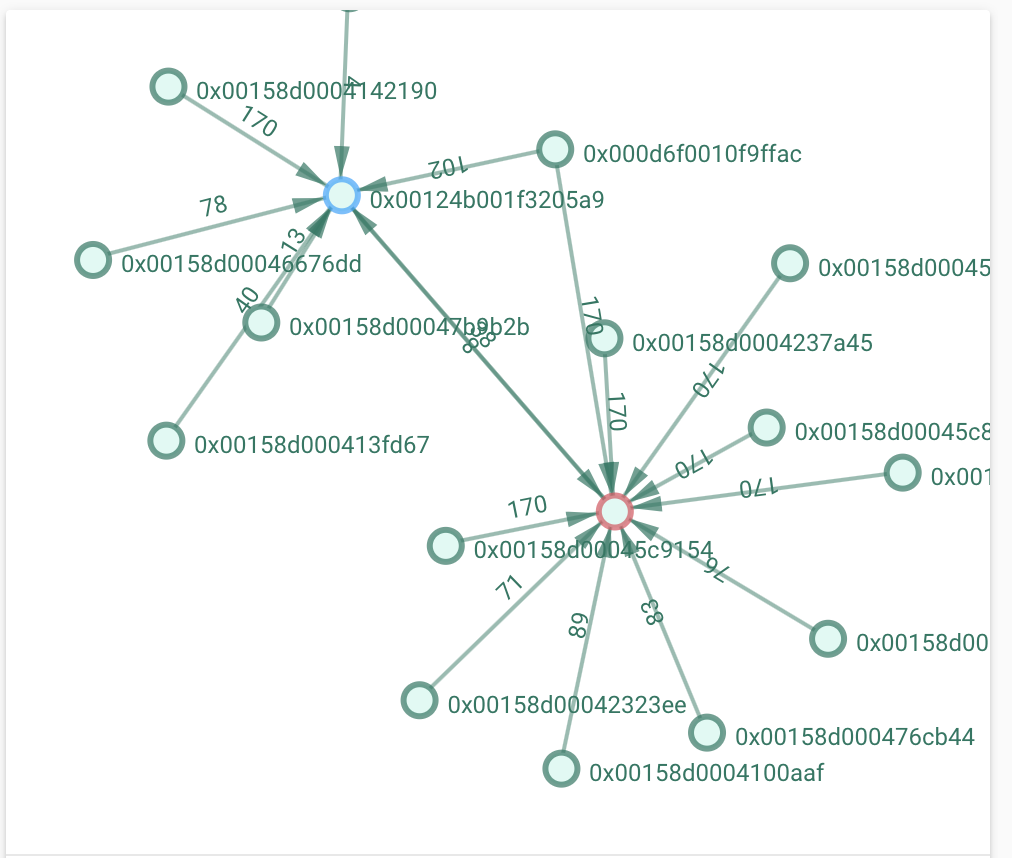
Is there anything I can do to solve this?
 hahmann
on 25 May 2020
hahmann
on 25 May 2020
@hahmann make sure you are on the latest zigbee2mqtt version first (timeout should be bigger than 5000 here).
Koenkk
on 26 May 2020
@Koenkk updated to the latest 1.13.1 but still same issue:
Jun 09 11:38:47 hassio npm[12658]: zigbee2mqtt:error 2020-06-09 11:38:47: Publish 'set' 'state' to '0x000d6f0010f9ffac' failed: 'Error: Command 0x000d6f0010f9ffac/1 closuresDoorLock.lockDoor({"pincodevalue":""}, {"timeout":10000,"manufacturerCode":null,"disableDefaultResponse":true}) failed (Error: AREQ - AF - dataConfirm after 9000ms)'
Jun 09 11:38:47 hassio npm[12658]: zigbee2mqtt:info  2020-06-09 11:38:47: MQTT publish: topic 'zigbee2mqtt/bridge/log', payload '{"type":"zigbee_publish_error","message":"Publish 'set' 'state' to '0x000d6f0010f9ffac' failed: 'Error: Command 0x000d6f0010f9ffac/1 closuresDoorLock.lockDoor({\"pincodevalue\":\"\"}, {\"timeout\":10000,\"manufacturerCode\":null,\"disableDefaultResponse\":true}) failed (Error: AREQ - AF - dataConfirm after 9000ms)'","meta":{"friendly_name":"0x000d6f0010f9ffac"}}'
If I remove and repair it will work for a couple days but when the network gets stable eventually the lock will connect to both router/coordinator and the problems will start to happen.
hahmann
on 9 Jun 2020
- Besides the error, does the lock lock/unlock?
- Where is the device initially connected to?
- What device is the router?
Koenkk
on 9 Jun 2020
Sorry @Koenkk I should have been more specific.
When the error happen the lock will not work anymore, it won't report its state nor lock/unlock based on the commands, for every command I send it will report the Error: AREQ - AF - dataConfirm after 9000ms.
The lock is initially connected to the coordinator, a CC2531, and the router is a CC2530 + CC2591.
hahmann
on 10 Jun 2020
@hahmann could you post a sniff of a case were it works and one where it fails? https://www.zigbee2mqtt.io/how_tos/how_to_sniff_zigbee_traffic.html
@ptvoinfo I expect that the CC2530 router does not hold the message long enough for the next Data request from the lock.
Koenkk
on 10 Jun 2020
@Koenkk From my point of view, the router does not hold messages at all. It retransmits it to a network immediately.
 ptvoinfo
on 11 Jun 2020
ptvoinfo
on 11 Jun 2020
@Koenkk 3.0 is still experimental? If you build new firmware have ota update to coordinator?
 shirou93
on 13 Jun 2020
shirou93
on 13 Jun 2020
@shirou93 it's not experimental anymore but also not recommended. 3.0 is much heavier for the already limited CC2531. I recommend 1.2 instead.
Koenkk
on 13 Jun 2020
@Koenkk
Thx for reply
Do you recommend cc2530 on 3.0 firmware?
shirou93
on 13 Jun 2020
No (cc2530 == cc2531 without usb)
Koenkk
on 13 Jun 2020
Even in router mode? Would there be any advantage?
 ruimarinho
on 13 Jun 2020
ruimarinho
on 13 Jun 2020
@ruimarinho see https://github.com/Koenkk/Z-Stack-firmware/issues/153
Koenkk
on 14 Jun 2020
No (cc2530 == cc2531 without usb)
?
I have one of these on order -
https://www.aliexpress.com/item/4000060995530.html?spm=a2g0s.9042311.0.0.40694c4dsHFJuu
 Westcott1
on 16 Jun 2020
Westcott1
on 16 Jun 2020
@hahmann could you post a sniff of a case were it works and one where it fails? https://www.zigbee2mqtt.io/how_tos/how_to_sniff_zigbee_traffic.html
@Koenkk unfortunately I don't have a spare CC2531 to do sniffing, will arrange one and get back to you with more details. So far the lock still connected only to the coordinator so I'm not seeing any errors so far.
hahmann
on 16 Jun 2020
@Koenkk, another thing to add is that I can't get the reports of the lock/unlock when the lock is locked/unlocked from the keypad/panel, only when it is done from zigbee. If I lock from Zigbee2mqtt and open from the keypad it will show as locked. In the past (previous version and z-stack 1.2) I used to get one message for every lock/unlock, with a number explaining from where is was locked/unlocked.
Just enabled debug here but there is nothing coming from the lock when I lock/unlock from the keypad or knob.
Any ideas?
hahmann
on 24 Jun 2020
@hahmann try to reconfigure the lock via https://www.zigbee2mqtt.io/information/mqtt_topics_and_message_structure.html#zigbee2mqttbridgeconfigure (make sure to wakeup the device right before executing this)
Koenkk
on 27 Jun 2020
@hahmann try to reconfigure the lock via https://www.zigbee2mqtt.io/information/mqtt_topics_and_message_structure.html#zigbee2mqttbridgeconfigure (make sure to wakeup the device right before executing this)
Excellent! Doing a configure for the lock solved the issue, it is reporting every lock/unlock now, coming from the bridge, knob or keypad as expected! Thank you so much.
hahmann
on 3 Jul 2020
PSA: for those following along, TI moved the descriptive PDF re: zigbee3 to here: https://www.ti.com/lit/an/swra615a/swra615a.pdf
and Heda's issue https://github.com/Koenkk/Z-Stack-firmware/issues/153 contains a nice summary of some of the new features
 reedstrm
on 31 Jul 2020
reedstrm
on 31 Jul 2020
Hi,
I have a CC2530+CC2592 device connected to serial on a raspberry pi, using the firmware from here (3.0.x). Seems to work, but I was trying to re-initialize it and it failed when trying to commission the network.
The app cnf bdb start commissioning request (mode: 0x4 - BDB_COMMISSIONING_MODE_NWK_FORMATION) failed with an app cnf bdb commission notification with status 0x8 (BDB_COMMISSIONING_FORMATION_FAILURE).
I tried various settings for the channels mask, setting a particular pan id or letting it unset (that is, to be randomly generated), with the same result.
Is it possible to re-commission a network with this firmware?
 aromanro
on 18 Aug 2020
aromanro
on 18 Aug 2020
Hi there,
I'm testing CC2531 with z-stack 3. I've got few CC2531 with router firmware either.
On firmware 1.2 I was able to pair devices through routers, this means I didn't need to go near coordinator, I could be behind many walls as long routers were being seen by coordinator.
Unfortunatelly this doesn't work with z-stack 3. I've tried many times to pair through router with no success, first attempt near coordinator and done.
Is it expected behavior?
 mgrom
on 19 Aug 2020
mgrom
on 19 Aug 2020
Routers should allow other nodes to join through them. I hope you have z-stack 3 on both the coordinator and routers.
aromanro
on 20 Aug 2020
Routers should allow other nodes to join through them. I hope you have z-stack 3 on both the coordinator and routers.
As mentioned in this thread already routers can work on 1.2.
mgrom
on 20 Aug 2020
Yes, they do. There is backward compatibility but I wouldn't be so sure about joining.
Especially not about joining zigbee 3 devices.
Even for joining directly connected to the coordinator, for many 'legacy' devices I had to set a 'link key exchage' flag in the coordinator to false in order to have them join, otherwise they were kicked out of the network.
aromanro
on 20 Aug 2020
I have read through this thread and am still a little confused as to whether I should replace the 1.2 FW on my CC2531.
I'm using the stick with the 1.2 FW in the native ZHA integration in HA. This works well ordinarily but unfortunately it doesn't with the Aqara QBKG25LM.
I was advised to use ZStack 3 to fix this, but if 1.2 allows me to use the QBKG25LM with Z2M I'll probably go that route instead.
So my question is does FW3 allow more HW to work (in particular the QBKG25LM) independent of the software, or would the Z2M/Herdsman quirks available make the QBKG25LM work with 1.2 FW?
 sshaikh
on 9 Sep 2020
sshaikh
on 9 Sep 2020
I have a question regarding a CC2530 / 2592 module:
Which pins does z-stack use for switching the PA and LNA of the CC2592 module.
Is it always P1.0 (LNA) and P1.1 (PA)?
 creativtransfer
on 20 Sep 2020
creativtransfer
on 20 Sep 2020
Hi
Is any chance to write firmware serise Z-Stack 3.x to coordinator CC2531 https://www.google.com/search?q=CC2531&sxsrf=ALeKk03fVjyj6WndR0BuMBXenVv3QwnFyg:1601636604597&source=lnms&tbm=isch&sa=X&ved=2ahUKEwiF3oCn4ZXsAhWEl4sKHQFYBZsQ_AUoAnoECAwQBA&biw=1920&bih=1008#imgrc=NW1KZ1PfXbtwbM ??
Which file i must use ?
 pepsonEL
on 2 Oct 2020
pepsonEL
on 2 Oct 2020
This issue is stale because it has been open 30 days with no activity. Remove stale label or comment or this will be closed in 7 days
![github-actions[bot] picture](https://avatars2.githubusercontent.com/in/15368?v=4&s=40) github-actions[bot]
on 2 Nov 2020
github-actions[bot]
on 2 Nov 2020
Related issues
 jwilling
·
4Comments
jwilling
·
4Comments
 pepp86
·
4Comments
pepp86
·
4Comments
 LCerebo
·
3Comments
LCerebo
·
3Comments
 alwashe
·
4Comments
alwashe
·
4Comments
 jerrychong25
·
4Comments
jerrychong25
·
4Comments
Most helpful comment
PSA: for those following along, TI moved the descriptive PDF re: zigbee3 to here: https://www.ti.com/lit/an/swra615a/swra615a.pdf
and Heda's issue https://github.com/Koenkk/Z-Stack-firmware/issues/153 contains a nice summary of some of the new features