Zigbee2mqtt: CC2530 + CC2592 = Very long range solution

The guys from our community tried to use TI cc2530 modules from EBYTE with a new cc2592 amplifier with a power of 100mW E18-MS1PA1-PCB. For this module, we had to build a special Z-Stack ZNP firmware, since there was no firmware for such an amplifier. And the results exceeded expectations!
The tests with the “round button” from Xiaomi showed that the coordinator get the signals even at a distance of 400m of direct visibility. In the house, the button works through 2 reinforced concrete walls. Those the amplifier greatly increases the range and sensitivity.
Another indicative criterion is the parameters of the link_quality signals from devices (they can be seen, for example, on the network map in iobroker.zigbee or zigbee2mqtt). For this module, link_quality shows 36–40 and good work, where the coordinator cc2531 showed 2–5 and there were interruptions in communication (3 foam-block walls, one thin wooden wall).
There is a version of this module with an external antenna connection. And there is also a 500mW E18-2G4Z27SI module, but we didn’t feel any significant difference in comparison with the 100mW module (or we couldn’t correct start it in the firmware yet), the current consumption of the 500mW module coincided with the 100mW module.
On the basis of these modules, the craftsmen made themselves coordinators and routers to cover with the network not only a residential building, but also the area around it.

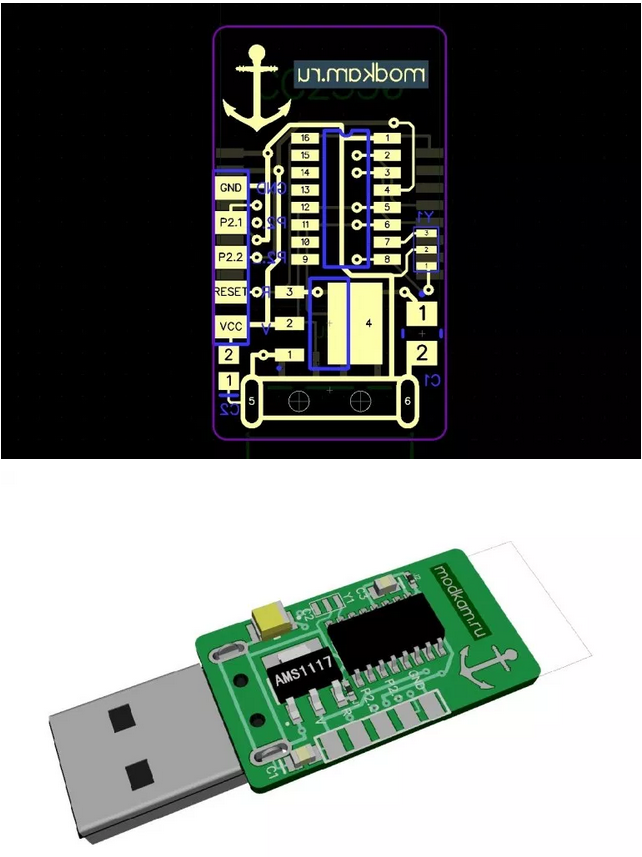
The user Jager share his stick PCB in his blog.

ps. sorry for my English :)
 kirovilya
All 57 comments
sounds nice !
have you tried the ipx version E18-MS1PA1-IPX ?
feel free to submit a PR for cc2530+cc2592 support :-)
 lolorc
on 16 Apr 2019
lolorc
on 16 Apr 2019
have you tried the ipx version E18-MS1PA1-IPX ?
This module works
 Jager-f
on 16 Apr 2019
Jager-f
on 16 Apr 2019
i guess it works, just wondering if link quality comparaisons have been done with this module as well.
lolorc
on 16 Apr 2019
@lolorc
feel free to submit a PR for cc2530+cc2592 support :-)
yes. later
kirovilya
on 16 Apr 2019
i guess it works, just wondering if link quality comparaisons have been done with this module as well.
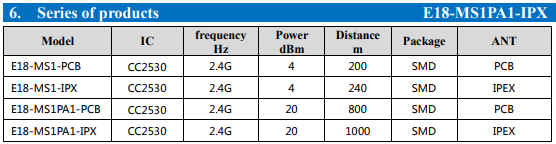
Real tests have not yet done. The manufacturer claims this, but the data are clearly overestimated.
 Jager-f
on 16 Apr 2019
Jager-f
on 16 Apr 2019
@lolorc
feel free to submit a PR for cc2530+cc2592 support :-)
yes. later
I hope so, because I just ordered some ;-)
lolorc
on 16 Apr 2019
I am interested in the router firmware to use it standalone in the middle of the house.
 wunderbaum
on 17 Apr 2019
wunderbaum
on 17 Apr 2019
sure, we've been asking about info about the router code so we can build it ourselves, but the question has been left unanswered...
https://github.com/Koenkk/Z-Stack-firmware/issues/50
https://github.com/Koenkk/Z-Stack-firmware/issues/21
https://github.com/Koenkk/zigbee2mqtt/issues/165#issuecomment-401628955
https://github.com/Koenkk/zigbee2mqtt/issues/494
...
;-)
lolorc
on 17 Apr 2019
@wunderbaum I do not have the source code for the router. Therefore, we checked on the module with 500mW - firmware of router with cc2591 came up there
kirovilya
on 17 Apr 2019
the firmwares for cc2591 should probably work on cc2592, they probably lack changes to increase the power output.
lolorc
on 17 Apr 2019
sorry...
@lolorc did not work for cc2592. I had to do a bit in the source code
kirovilya
on 17 Apr 2019
Maybe someone can contact ptvoinfo for providing a router firmware for this special device.
wunderbaum
on 17 Apr 2019
@kirovilya Nice work! Have you tried it with IKEA bulbs? IKEA bulbs are, ee, hmm, "quite strange" :-D
 MiloshCZ
on 17 Apr 2019
MiloshCZ
on 17 Apr 2019
What is the maximum number of devices with this firmware?
 antst
on 19 Apr 2019
antst
on 19 Apr 2019
@antst I assembled the firmware based on the ZNP - there are 15 direct connect devices by default. a little later I make the PR for firmware in the Z-StacK-firmware.
Are you russian? find me in telegram :)
kirovilya
on 19 Apr 2019
@MiloshCZ not test yet
kirovilya
on 19 Apr 2019
@kirovilya , Hi, I have the exact same hardware, I am having issues with range which i suspect is to do with my amplifier CC2592 settings in Zstack 3.0 ZNP. I have tested with this https://github.com/kirovilya/files/blob/master/CC2530_CC2592_ZNP.hex and having no issues at all with the range but i have some custom settings enabled in ZNP which i need for my use case.
Also my code is working perfectly fine for me on CC2530 + RFX2401c (HAL_PA_LNA setting for amplifier) .Can you please help with this. Its very urgent for me. It will be great if you could share the Zstack code patch that you have applied for ZNP for getting cc2592 amplifier working.
 battuashwik
on 19 Apr 2019
battuashwik
on 19 Apr 2019
@battuashwik Very simple: you must specify directive
HAL_PA_LNA_CC2592
instead of directive
HAL_PA_LNA
Try it. Perhaps both should be used. I'm still testing, too, maybe something else needs to be changed.
kirovilya
on 20 Apr 2019
Hey, tried that already, not working. I tried applying patches mentioned in https://e2e.ti.com/support/wireless-connectivity/zigbee-and-thread/f/158/p/758643/2802562#2802562 , still no luck, was wondering if you have done something else to get it working.
battuashwik
on 20 Apr 2019
@battuashwik look at the proposed patch https://github.com/Koenkk/Z-Stack-firmware/issues/71, I think the main changes for you will be in the hal_board_cfg.h file
kirovilya
on 20 Apr 2019
@battuashwik look at the proposed patch Koenkk/Z-Stack-firmware#71, I think the main changes for you will be in the hal_board_cfg.h file
Hey thanks, got it working and works much better than my rfx2401c amplifier.
battuashwik
on 21 Apr 2019
Hey @ptvoinfo ! Can you build "router-firmware" with cc2530+cc2592 ?
kirovilya
on 24 Apr 2019
Whow, my order came quick! I already have the small item.
Hopefully @ptvoinfo makes us a routing firmware.
I keep my fingers crossed and owe you a beer ;)
wunderbaum
on 29 Apr 2019
The firmware is here:
https://ptvo.info/wp-content/uploads/2018/09/cc2530_cc2591_1.2.2a.44539_firmware.zip
https://ptvo.info/wp-content/uploads/2018/09/cc2530_cc2592_1.2.2a.44539_firmware.zip
 ptvoinfo
on 29 Apr 2019
ptvoinfo
on 29 Apr 2019
I am using this Chip now for quite a while but I made a UART Version out of it since I don’t line USB dongles.
https://drive.google.com/file/d/1YfYTegq1n7-A1CzsvAAA9TlK87XtGEHA/view?usp=drivesdk
Currently I am running the KronKk Firmware but I will try kirovilya‘s tonight.
 Ormerod2
on 29 Apr 2019
Ormerod2
on 29 Apr 2019
Hello guys ...2 question ...
To program this little friend ... it's the same pin connection that is used for cc2530?
Where is the appropriate coordinator and router for this lovely units?
Best regards from Chile 👌
 drbios
on 9 May 2019
drbios
on 9 May 2019
The firmware is just 2 steps above:
https://github.com/Koenkk/zigbee2mqtt/issues/1437#issuecomment-487658726
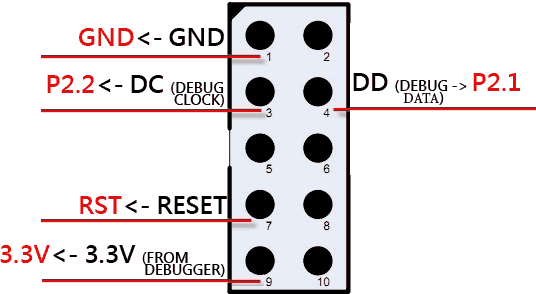
For programming use the pinout from the flasher here:
Chapter 2, cc debugger pinout and connect the P2.1, P2.2 etc to the according ones on the CC2592-module as described here:
https://www.aliexpress.com/item/CDEBYTE-2Pcs-Lot-Smart-Home-Automation-Module-E18-MS1PA1-PCB-2-4GHz-CC2530-Wireless-Zigbee-Module/32803068018.html
wunderbaum
on 10 May 2019
Thanks for your help my friend ...today I will start my experimentation 👌👌
drbios
on 10 May 2019
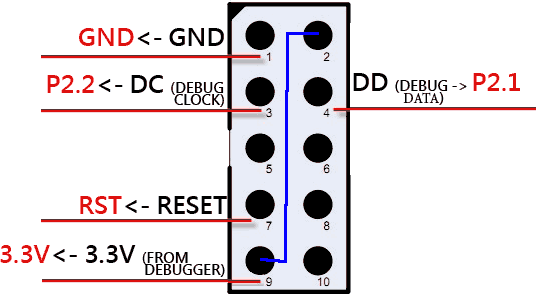
I have doubts about the connections...the cc2530 flashing procedure indicates use 2 vcc connections between the module and the cc debuger...but according to the manual of these modules only have 1 vcc pin (number 2) ...where is the second vcc pin?
drbios
on 13 May 2019
@drbios you need to connect the 2nd and 9th contact between each other, then the ccdebugger will work fine
kirovilya
on 13 May 2019
@kirovilya doing that means provide 3.3v + 3.3v = 6.6v to the pin2 of this modules?
drbios
on 13 May 2019
@drbios why 6.6v? just connect the pins (blue line)
kirovilya
on 13 May 2019
Really sorry about 6.6v comment...I though that pin2 and pin9 of the debugger were 3.3 volt 🤦♂️
Now I will try again with this conection configuration.
Thanks Thanks thanks 👌👌👌
drbios
on 13 May 2019
now it works !!
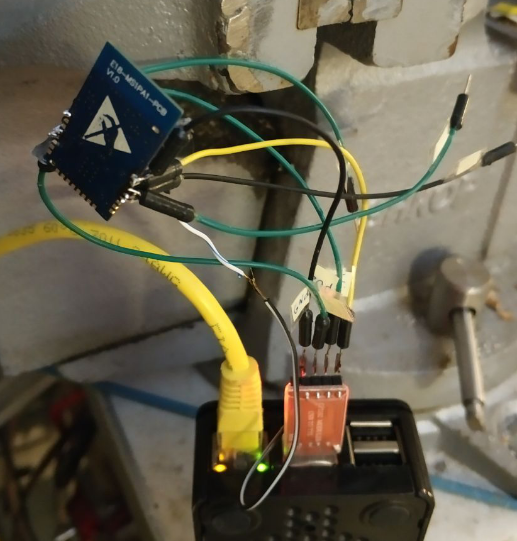
this is my "programmer interface" XD

thanks
drbios
on 13 May 2019
Thanks a lot @kirovilya and @ptvoinfo for the solution. And thanks to Jager for the PCB and the parts list. It really works. I have a coordinator and a router for the time being and have connected close to 24 devices. All works well. I have used the coordinator firmware from https://github.com/Koenkk/Z-Stack-firmware/blob/master/coordinator/Z-Stack_Home_1.2/bin/CC2530_CC2592_20190515.zip and router firmware from http://ptvo.info/wp-content/uploads/2018/09/cc2530_cc2592_1.2.2a.44539_firmware.zip
I have a small issue though , with the current board and connections, I could not tell if the board is connected to a network or not. So is there a way I can add a LED to indicate this ?
Thanks in Advance. And once again great work.
 linusali
on 17 May 2019
linusali
on 17 May 2019
I still have issue with stability of firmware.
“Naked” cc2530 works like charm in test setup with 20 devices.
With this fronted coordinator hangs after sometime, like it used to be with older 2530.
I assume that adding fronted somehow reduces available memory.
Btw, maxheap is different for naked 2530 and with frontend.
Is it possible to make firmware for 12 devices max or so? Even 10.
But not 5, as in max_stability
antst
on 21 May 2019
I am using this Chip now for quite a while but I made a UART Version out of it since I don’t line USB dongles.
https://drive.google.com/file/d/1YfYTegq1n7-A1CzsvAAA9TlK87XtGEHA/view?usp=drivesdkCurrently I am running the KronKk Firmware but I will try kirovilya‘s tonight.
@Ormerod2 could you provide the files for the UART version? i like this :)
 XRyu
on 23 Jun 2019
XRyu
on 23 Jun 2019
for me it was impossible to build... my soldering skills ain't good enough
drbios
on 25 Jun 2019
Will this work?
https://item.taobao.com/item.htm?spm=a1z10.5-c-s.w4002-16785486380.12.c60918aaYpf6dL&id=583299208437
 halfcherry
on 11 Aug 2019
halfcherry
on 11 Aug 2019
This issue has been automatically marked as stale because it has not had recent activity. It will be closed if no further activity occurs. Thank you for your contributions.
![stale[bot] picture](https://avatars3.githubusercontent.com/in/1724?v=4&s=40) stale[bot]
on 10 Oct 2019
stale[bot]
on 10 Oct 2019
For this usb card with E18-2G4Z27SI which firmware is compatible? Is an antenna also needed?
https://it.aliexpress.com/item/4000834424643.html?spm=a2g0o.productlist.0.0.7fc37f39juEj2Y&algo_pvid=83a57da3-8ed6-423f-b8ce-422c3d4a8488&algo_expid=83a57da3-8ed6-423f-b8ce-422c3d4a8488-2&btsid=0ab6f83115883377035427337e52aa&ws_ab_test=searchweb0_0,searchweb201602_,searchweb201603_
 httpedo13
on 1 May 2020
httpedo13
on 1 May 2020
Hello kirovilya,
You can tutorial me how to build ZNP firmware
This is my preprocessing
BDB_FINDING_BINDING_CAPABILITY_ENABLED=0
TC_LINKKEY_JOIN
HAL_UART_DMA_RX_MAX=128
MAXMEMHEAP=2765
NWK_MAX_DEVICE_LIST=10
ZDSECMGR_TC_DEVICE_MAX=30
DISABLE_GREENPOWER_BASIC_PROXY
POWER_SAVING
FEATURE_SYSTEM_STATS
MT_GP_CB_FUNC
ASSERT_RESET
MAKE_CRC_SHDW
it's not working
 lehungmt94
on 25 May 2020
lehungmt94
on 25 May 2020
@leanderseidlitz Use ready-made firmware from here https://github.com/Koenkk/Z-Stack-firmware/tree/master/coordinator/Z-Stack_Home_1.2/bin including for cc2592.
And here is the build instruction https://github.com/Koenkk/Z-Stack-firmware/blob/master/coordinator/Z-Stack_Home_1.2/COMPILE.md
kirovilya
on 25 May 2020
@leanderseidlitz Use ready-made firmware from here https://github.com/Koenkk/Z-Stack-firmware/tree/master/coordinator/Z-Stack_Home_1.2/bin including for cc2592.
And here is the build instruction https://github.com/Koenkk/Z-Stack-firmware/blob/master/coordinator/Z-Stack_Home_1.2/COMPILE.md
Nice instruction, thanks @kirovilya
lehungmt94
on 25 May 2020
Hey guys. Just wanted to let you know, that I've built a module based on the E18-MS1PA1-IPX for the GPIO header of the Pi: https://allgeek.de/2020/06/22/zigbee-modul-fuer-den-raspberrypi-cc2530-mit-homegear-oder-zigbee2mqtt/ (german)

It's open source but we also sell ready made modules. So hit me up, if you need anything.
 codmpm
on 10 Jul 2020
codmpm
on 10 Jul 2020
Hey guys. Just wanted to let you know, that I've built a module based on the E18-MS1PA1-IPX for the GPIO header of the Pi: https://allgeek.de/2020/06/22/zigbee-modul-fuer-den-raspberrypi-cc2530-mit-homegear-oder-zigbee2mqtt/ (german)
It's open source but we also sell ready made modules. So hit me up, if you need anything.
Wow that's nice. How can I get one or two long range one? Does it come with the same firmware ?
linusali
on 10 Jul 2020
They are sold in our online Shop, the link is in the blog article. We preflash the modules with Z-Stack Coordinator Firmware 1.2 oder 3.0.x.
Don't want to hijack the issue for marketing, so hit me up with an email at [email protected].
codmpm
on 10 Jul 2020
@codmpm i sadly can't find the files that are open source :) I have some of the SMD-modules here, as i wanted to start something myself but never did :) is there a chance to get the platine and casedesign for the Long Range Router somewhere? :) love the sleek look!
XRyu
on 11 Jul 2020
Hey @XRyu, the case for the router is here: https://www.thingiverse.com/thing:4192704
Did not manage to put the pcb files on github, yet.
Get in touch with me. Maybe I can get you some prototype PCB's where the LED of the router was wired as a power indicator. My email is in the comment before yours.
Here's the correct issue for CC2530 routers: https://github.com/Koenkk/zigbee2mqtt/issues/52
codmpm
on 12 Jul 2020
Sorry, I am very new to this. Can I direct solder the E18-MS1PA1-IPX to Raspberry Pi uart without any PCB board?
 lily148
on 1 Sep 2020
lily148
on 1 Sep 2020
@lily148 get in touch with me via [email protected]... I'll send you one pcb for the E18-MS1PA1-IPX.
I have some spare pcb's from our module: https://shop.codm.de/automation/zigbee/15/zigbee-cc2530-cc2592-long-range-raspberry-pi-funkmodul-v0.3?c=5
codmpm
on 2 Sep 2020
Hey,
I was working on e18-ms1pa1-ipx and I want to know is CC2530ZNP-Pro-Secure_LinkKeyJoin.hex for coordinator and router-cc2530-cc2591-diag.hex for router works fine together?
And I want to know that is it possible to connect this module directly to arduino (tx and rx) as coordinator or router?
 fahimehorvatinia
on 6 Sep 2020
fahimehorvatinia
on 6 Sep 2020
@fahimehorvatinia , I tested direct solder the pin to my Pi tx and rx, it works. No extra PCB is needed but you need to have better soldering skill. Otherwise, @codmpm 's PCB module might be better choice.
lily148
on 11 Sep 2020
@lily148 ,
Hi,
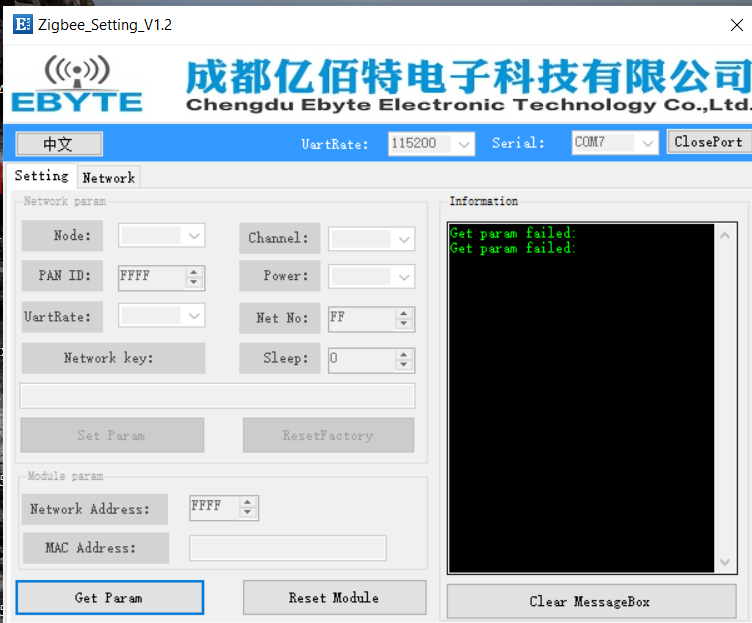
I connected this module directly to Computer via (usb to ttl) module, but i couldn't set up communication .
how did you connect it directly?
this is my pin connection.
VCC->3.3
GND->GND
P0.3 ->TX
P0.2 -> Rx
and this is the error that I got.
fahimehorvatinia
on 11 Sep 2020
@fahimehorvatinia , what is did was direct connect the board to the Pi uart port. That's it.
By the way, had you already flash the firmware or download your program into the board via CC debugger?
lily148
on 11 Sep 2020
@lily148 I've download cc2530-cc2592.hex file to the module using cc debugger.
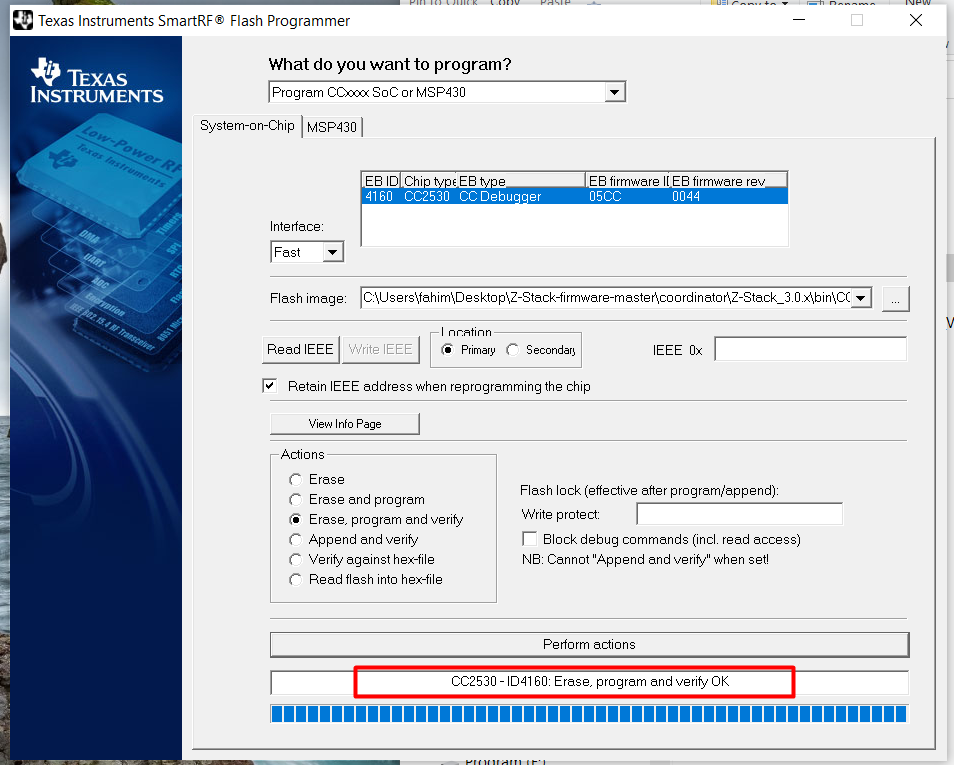
And after that I connected e18-ms1pa1-ipx module to computer(using usb to ttl converter).
Is there any software that I make sure connection is ok?
I just used ebyte software configuration to get parameters and it failed.
fahimehorvatinia
on 11 Sep 2020
@fahimehorvatinia , I am not sure... because I am not using the ebyte software nor using any USB to ttl. I just direct connect to the uart pin on the Pi.
lily148
on 12 Sep 2020
Related issues
 RefineryX
·
4Comments
RefineryX
·
4Comments
 sylarevan
·
5Comments
sylarevan
·
5Comments
 mpuff
·
4Comments
mpuff
·
4Comments
 z4rn0x
·
3Comments
z4rn0x
·
3Comments
 andreasbrett
·
4Comments
andreasbrett
·
4Comments
Most helpful comment
The firmware is here:
https://ptvo.info/wp-content/uploads/2018/09/cc2530_cc2591_1.2.2a.44539_firmware.zip
https://ptvo.info/wp-content/uploads/2018/09/cc2530_cc2592_1.2.2a.44539_firmware.zip