Zigbee2mqtt: New Hampton Bay fan controller
I have been trying to add my hampton bay fan controllers in following the issue here but it looks like my model is a little different; I have the light working, but every time I send a command a timeout error is thrown and it locks up for a few minutes. The fan on the other hand if I send a command to it looks like it crashes and reboots, no status change on the fan. Not sure if I am just adding it wrong, but either way its beyond me. Thanks for any help.
Light Log:
https://hastebin.com/jateqexomi.makefile
 Firemogle
All 39 comments
Please try with the following fan_mode converter:
fan_mode: {
    key: ['fan_mode'],
    convert: (key, value, message, type, postfix) => {
        const cid = 'hvacFanCtrl';
        const attrId = 'fanMode';
        const mapping = {
            'off': 0,
            'low': 1,
            'medium': 2,
            'medium-high': 3,
            'high': 4,
            'breeze': 6,
        };

        if (type === 'set') {
            return {
                cid: cid,
                cmd: 'write',
                cmdType: 'foundation',
                zclData: [{attrId: zclId.attr(cid, attrId).value, attrData: mapping[value], dataType: 48}],
                cfg: cfg.default,
            };
        } else if (type === 'get') {
            return {
                cid: cid,
                cmd: 'read',
                cmdType: 'foundation',
                zclData: [{attrId: zclId.attr(cid, attrId).value}],
                cfg: cfg.default,
            };
        }
    },
},
You should be able to control the fan by sending to zigbee2mqtt/0x0022a3000016d039/set payload:
{
"fan_mode": "medium"
}
 Koenkk
on 4 Apr 2019
Koenkk
on 4 Apr 2019
Thanks for the response, that fixed the fan perfectly!
Any idea what is going on with the light? It works but it looks like it locks up for a couple min everytime I change it.
Thanks again!
Firemogle
on 9 Apr 2019
@Firemogle this is an issue with the firmware, please keep an eye on #211, perhaps this will solve it.
Koenkk
on 10 Apr 2019
Thanks for the update
Firemogle
on 10 Apr 2019
@Firemogle
the fan_mode goes in toZigbee.js right?
I have it setup w/ the new fan_mode is when publishing to mqtt i get error:
Apr 17 17:31:44 931-HUB-LOFT npm[1074]: zigbee2mqtt:info 4/17/2019, 5:31:44 PM Successfully configured 0x0022a3000016cd34 (0x0022a3000016cd34)
Apr 17 17:32:03 931-HUB-LOFT npm[1074]: zigbee2mqtt:debug 4/17/2019, 5:32:03 PM Received zigbee message of type 'attReport' with data '{"cid":"genOnOff","data":{"onOff":0}}' of device 'HDC52EastwindFan' (0x0022a3000016cd34) of endpoint 1
Apr 17 17:32:03 931-HUB-LOFT npm[1074]: /opt/zigbee2mqtt/lib/extension/deviceReceive.js:109
Apr 17 17:32:03 931-HUB-LOFT npm[1074]: if (c.cid === cid) {
Apr 17 17:32:03 931-HUB-LOFT npm[1074]: ^
Apr 17 17:32:03 931-HUB-LOFT npm[1074]: TypeError: Cannot read property 'cid' of undefined
Apr 17 17:32:03 931-HUB-LOFT npm[1074]: at mappedDevice.fromZigbee.filter (/opt/zigbee2mqtt/lib/extension/deviceReceive.js:109:23)
Apr 17 17:32:03 931-HUB-LOFT npm[1074]: at Array.filter (
Apr 17 17:32:03 931-HUB-LOFT npm[1074]: at DeviceReceive.onZigbeeMessage (/opt/zigbee2mqtt/lib/extension/deviceReceive.js:105:52)
Apr 17 17:32:03 931-HUB-LOFT npm[1074]: at extensions.filter.forEach (/opt/zigbee2mqtt/lib/controller.js:145:31)
Apr 17 17:32:03 931-HUB-LOFT npm[1074]: at Array.forEach (
Apr 17 17:32:03 931-HUB-LOFT npm[1074]: at Controller.onZigbeeMessage (/opt/zigbee2mqtt/lib/controller.js:145:14)
Apr 17 17:32:03 931-HUB-LOFT npm[1074]: at Zigbee.onMessage (/opt/zigbee2mqtt/lib/zigbee.js:224:18)
Apr 17 17:32:03 931-HUB-LOFT npm[1074]: at ZShepherd.emit (events.js:189:13)
Apr 17 17:32:03 931-HUB-LOFT npm[1074]: at ZShepherd.
Apr 17 17:32:03 931-HUB-LOFT npm[1074]: at ZShepherd.emit (events.js:189:13)
Apr 17 17:32:03 931-HUB-LOFT npm[1074]: npm ERR! code ELIFECYCLE
Apr 17 17:32:03 931-HUB-LOFT npm[1074]: npm ERR! errno 1
Apr 17 17:32:03 931-HUB-LOFT npm[1074]: npm ERR! [email protected] start: node index.js
Apr 17 17:32:03 931-HUB-LOFT npm[1074]: npm ERR! Exit status 1
Apr 17 17:32:03 931-HUB-LOFT npm[1074]: npm ERR!
Apr 17 17:32:03 931-HUB-LOFT npm[1074]: npm ERR! Failed at the [email protected] start script.
Apr 17 17:32:03 931-HUB-LOFT npm[1074]: npm ERR! This is probably not a problem with npm. There is likely additional logging output above.
Apr 17 17:32:03 931-HUB-LOFT npm[1074]: npm ERR! A complete log of this run can be found in:
Apr 17 17:32:03 931-HUB-LOFT npm[1074]: npm ERR! /home/pi/.npm/_logs/2019-04-18T00_32_03_255Z-debug.log
Apr 17 17:32:03 931-HUB-LOFT systemd[1]: zigbee2mqtt.service: Main process exited, code=exited, status=1/FAILURE
Apr 17 17:32:03 931-HUB-LOFT systemd[1]: zigbee2mqtt.service: Unit entered failed state.
Apr 17 17:32:03 931-HUB-LOFT systemd[1]: zigbee2mqtt.service: Failed with result 'exit-code'.
Apr 17 17:32:03 931-HUB-LOFT systemd[1]: zigbee2mqtt.service: Service hold-off time over, scheduling restart.
Apr 17 17:32:03 931-HUB-LOFT systemd[1]: Stopped zigbee2mqtt.
 dwest576
on 18 Apr 2019
dwest576
on 18 Apr 2019
Update: Seems the fan and light work even though it throws the above error and restarts Z2M every time.
dwest576
on 18 Apr 2019
Was thinking that I made a mistake. I completely reloaded the rPI and reconfigured everything, got the same type of error while pairing the fan to the z2m
Apr 19 12:11:04 931-HUB-LOFT npm[528]: zigbee2mqtt:debug 4/19/2019, 12:11:04 PM Received zigbee message of type 'readRsp' with data '{"cid":"genBasic","data":{"zclVersion":1,"manufacturerName":"King Of Fans, Inc.","modelId":"HDC52EastwindFan","powerSource":0}}' of device 'HDC52EastwindFan' (0x0022a3000016cd34) of endpoint 1
Apr 19 12:11:04 931-HUB-LOFT npm[528]: /opt/zigbee2mqtt/lib/extension/deviceReceive.js:109
Apr 19 12:11:04 931-HUB-LOFT npm[528]: if (c.cid === cid) {
Apr 19 12:11:04 931-HUB-LOFT npm[528]: ^
Apr 19 12:11:04 931-HUB-LOFT npm[528]: TypeError: Cannot read property 'cid' of undefined
dwest576
on 19 Apr 2019
Can you make a pr with your current changes? I can assist further from there.
Koenkk
on 19 Apr 2019
I would love to, however, I have never done that. What does that mean exactly? Do I upload the files I changed?
dwest576
on 19 Apr 2019
@dwest576 this should help: https://www.youtube.com/watch?v=rgbCcBNZcdQ
Koenkk
on 19 Apr 2019
Thanks for your help!! I think I did it correctly. There should be a PR in zigbee-shepherd-converters
dwest576
on 19 Apr 2019
Sorry, so does this work now? I'm looking for a solution for my ceiling fan and integrating with zigbee2mqtt would be great.
 hgelpke
on 24 Apr 2019
hgelpke
on 24 Apr 2019
@Firemogle Do you by chance have the code for "fz.generic_fan_mode? Trying to finish up a PR for this device and I think this is the last piece.
description: 'Universal wink enabled white ceiling fan premier remote control',
supports: 'on/off',
fromZigbee: [
fz.generic_state, fz.light_brightness, fz.ignore_fan_change, fz.generic_fan_mode, fz.ignore_onoff_change,
dwest576
on 24 Apr 2019
Whenever I turn the light on\off or change the brightness, the device changes almost immediately and updated state is reflected in HA. However, 30 seconds later I see the following logged:
zigbee2mqtt:error 5/9/2019, 1:32:26 PM Zigbee publish to device '0x0022a300002786ac', genOnOff - off - {} - {"manufSpec":0,"disDefaultRsp":0} - null failed with error Error: Timed out after 30000 ms
This wouldn't be a problem except that in those 30 seconds no further commands can be sent to the device (presumably because zigbee2mqtt is waiting for the first command to complete). After 30 seconds, all previously sent commands are processed (well, one command is processed and then we wait for 30 seconds again :))
Is this the firmware issue mentioned a few comments above?
Seems like the device is responding since the updated state is received from the device.
 alexanv1
on 9 May 2019
alexanv1
on 9 May 2019
@alexanv1 I have the same issue where light control commands execute successfully on the target device, and even result in a corresponding devChange and attReport message being received.
However, no messages are able to be sent for 30 seconds afterwards. This is using the 20190608 firmware and the dev branch of zigbee2mqtt.
 nkaminski
on 13 Jun 2019
nkaminski
on 13 Jun 2019
I haven't found a solution for this so I've just learned to live with it... Was planning to update to latest firmware - so it's good to know that doing so won't help..
alexanv1
on 13 Jun 2019
@alexanv1 After more digging into the code and furthering my knowledge of zigbee's APS/AF layer, I've been able to locate the root cause of this issue.
This issue occurs because the zigbee ZCLincomingData message sent in response to light control commands by this device does not contain the sequence number that zigbee-shepherd is expecting. This in turn causes zigbee-shepherd (and therefore zigbee2mqtt) to continue waiting until the zigbee publish timeout expires.
I / we should do more research into the Zigbee specifications to determine if zigbee2mqtt or the fan controller is behaving in an nonstandard manner such that the final fix is as "universal" as possible.
Finally, if you want an immediate, but quite possibly detrimental to stability workaround for this, you can prevent the mandatoryEvent variable from being set altogether in the send functions of node-modules/zigbee-shepherd/lib/components/af.js to disable waiting for the acknowledgement altogether.
nkaminski
on 13 Jun 2019
@nkaminski this is indeed what's happening, can you sniff the zigbee traffic of this?
Koenkk
on 13 Jun 2019
@Koenkk I only have a single (genuine TI) CC2531EMK module at the moment.
Are you suggesting to sniff the traffic using another module and the TI capture utilities or to capture the data lower in the stack via the debug logs of cc-znp or zigbee-shepherd?
nkaminski
on 13 Jun 2019
@nkaminski sniffing is the first step here I think (http://www.zigbee2mqtt.io/how_tos/how_to_sniff_zigbee_traffic.html). This allows us to see what's actually behaving wrong.
Koenkk
on 13 Jun 2019
@Koenkk OK, I will procure a 2nd cc2531 stick and take a packet capture of the traffic between zigbee2mqtt and this fan control.
nkaminski
on 13 Jun 2019
@Koenkk Capture taken on a 2nd stick under the following test conditions on another CC2531 stick. At first glance this looks to be an application layer issue as opposed to a MAC or physical one. Do you agree?
Sequence of events: Startup zigmee2mqtt, fan on (OK), fan off (OK), light brighten (30s hang), light off (30s hang)
Transport Key (dedicated just for this network): 17:81:ca:38:ac:1b:2f:f5:7a:0a:03:5d:56:78:90:8b
Paired Lightify bulb is NOT powered for this test, but is fully functional with no hangs when powered.
nkaminski
on 16 Jun 2019
@nkaminski thanks for this log.
I've checked with a normal bulb, I think the reason that it hangs is that the default response is missing:
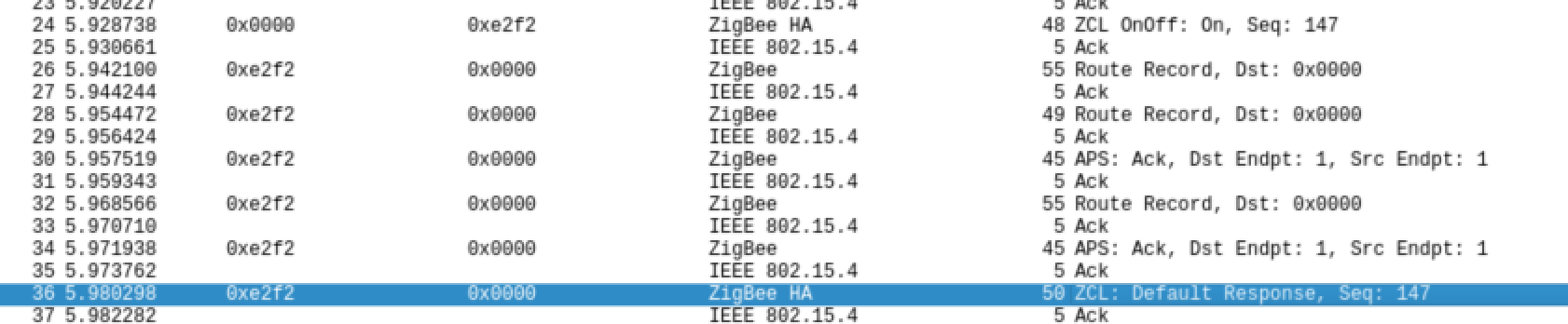
Can you change https://github.com/Koenkk/zigbee-shepherd-converters/blob/master/converters/toZigbee.js#L241 to
cfg: {manufSpec: 0, disDefaultRsp: 1},
I hope that this fixes the hanging when changing brightness (for on/off https://github.com/Koenkk/zigbee-shepherd-converters/blob/master/converters/toZigbee.js#L61 should be changed the same).
Koenkk
on 16 Jun 2019
@Koenkk The hang still occurs even with these changes. After further examination, it appears that zigbee-shepherd is still waiting on an incomingMsg event with the incorrect sequence number.
I have added console.log statements to https://github.com/Koenkk/zigbee-shepherd/blob/master/lib/components/af.js#L365 with prefix "Await mandatoryEvent" and https://github.com/Koenkk/zigbee-shepherd/blob/master/lib/components/af.js#L720 with prefix "Emit mandatoryEvent" and the output appears to support this hypothesis. Thoughts?
Log output:
zigbee2mqtt:trace 6/16/2019, 11:53:41 AM zigbeeQueue: Added new job with ID 1 for 0x0022a3000029407d
zigbee2mqtt:trace 6/16/2019, 11:53:41 AM zigbeeQueue: Executing job with ID 1 for 0x0022a3000029407d
zigbee2mqtt:info 6/16/2019, 11:53:41 AM Zigbee publish to device '0x0022a3000029407d', genLevelCtrl - moveToLevelWithOnOff - {"level":137,"transtime":0} - {"manufSpec":0,"disDefaultRsp":1} - null
Await mandatoryEvent ZCL:incomingMsg:24401:1:4
Emit mandatoryEvent AF:dataConfirm:1:4
zigbee2mqtt:debug 6/16/2019, 11:53:41 AM Received zigbee message of type 'attReport' with data '{"cid":"genLevelCtrl","data":{"currentLevel":137}}' of device 'HBUniversalCFRemote' (0x0022a3000029407d) of endpoint 1
zigbee2mqtt:info 6/16/2019, 11:53:41 AM MQTT publish: topic 'zigbee2mqtt_upstairs/0x0022a3000029407d', payload '{"state":"OFF","linkquality":131,"brightness":137,"fan_mode":"off","fan_state":"OFF"}'
Emit mandatoryEvent ZCL:incomingMsg:24401:1:13
zigbee2mqtt:debug 6/16/2019, 11:53:41 AM Received zigbee message of type 'devChange' with data '{"cid":"genLevelCtrl","data":{"currentLevel":137}}' of device 'HBUniversalCFRemote' (0x0022a3000029407d) of endpoint 1
zigbee2mqtt:error 6/16/2019, 11:54:11 AM Zigbee publish to device '0x0022a3000029407d', genLevelCtrl - moveToLevelWithOnOff - {"level":137,"transtime":0} - {"manufSpec":0,"disDefaultRsp":1} - null failed with error Error: Timed out after 30000 ms
zigbee2mqtt:info 6/16/2019, 11:54:11 AM MQTT publish: topic 'zigbee2mqtt_upstairs/bridge/log', payload '{"type":"zigbee_publish_error","message":"Error: Timed out after 30000 ms","meta":{"entity":{"ID":"0x0022a3000029407d","type":"device","friendlyName":"0x0022a3000029407d"},"message":"{\"state\": \"ON\", \"brightness\": 137}"}}'
zigbee2mqtt:trace 6/16/2019, 11:54:11 AM zigbeeQueue: Completed job with ID 1 for 0x0022a3000029407d with error Error: Timed out after 30000 ms
nkaminski
on 16 Jun 2019
@nkaminski nice findings, using sniffing, can you verify that the device indeed reports with the wrong sequence number? (in other words, does the device mess up?)
Koenkk
on 17 Jun 2019
Will aim to do this later today.
nkaminski
on 17 Jun 2019
@Koenkk It indeed looks like the root cause of this hang is the fan controller replying with an unexpected ZCL transaction sequence number. After comparing the sequence numbers reported via the added log statements to those in the traffic sniffed on a second module, the values are offset by 1 but otherwise agree in all cases.
zigbee2mqtt log:
zigbee2mqtt:info 6/18/2019, 9:58:23 PM Zigbee publish to device '0x0022a3000029407d', genOnOff - on - {} - {"manufSpec":0,"disDefaultRsp":1} - null
Await mandatoryEvent ZCL:incomingMsg:24401:1:4
Emit mandatoryEvent AF:dataConfirm:1:4
zigbee2mqtt:debug 6/18/2019, 9:58:23 PM Received zigbee message of type 'attReport' with data '{"cid":"genOnOff","data":{"onOff":1}}' of device 'HBUniversalCFRemote' (0x0022a3000029407d) of endpoint 1
zigbee2mqtt:info 6/18/2019, 9:58:23 PM MQTT publish: topic 'zigbee2mqtt_upstairs/0x0022a3000029407d', payload '{"state":"ON","linkquality":126,"brightness":137,"fan_mode":"on","fan_state":"ON"}'
Emit mandatoryEvent ZCL:incomingMsg:24401:1:23
zigbee2mqtt:error 6/18/2019, 9:58:53 PM Zigbee publish to device '0x0022a3000029407d', genOnOff - on - {} - {"manufSpec":0,"disDefaultRsp":1} - null failed with error Error: Timed out after 30000 ms
zigbee2mqtt:info 6/18/2019, 9:58:53 PM MQTT publish: topic 'zigbee2mqtt_upstairs/bridge/log', payload '{"type":"zigbee_publish_error","message":"Error: Timed out after 30000 ms","meta":{"entity":{"ID":"0x0022a3000029407d","type":"device","friendlyName":"0x0022a3000029407d"},"message":"{\"state\": \"ON\"}"}}'
zigbee2mqtt:trace 6/18/2019, 9:58:53 PM zigbeeQueue: Completed job with ID 1 for 0x0022a3000029407d with error Error: Timed out after 30000 ms
Wireshark textual output:
No. Time Source Destination Protocol Length Info
4 9.087405 0x0000 0x5f51 ZigBee HA 48 ZCL OnOff: Off, Seq: 5
Frame 4: 48 bytes on wire (384 bits), 48 bytes captured (384 bits) on interface 0
IEEE 802.15.4 Data, Dst: 0x5f51, Src: 0x0000
Frame Control Field: 0x8861, Frame Type: Data, Acknowledge Request, PAN ID Compression, Destination Addressing Mode: Short/16-bit, Frame Version: IEEE Std 802.15.4-2003, Source Addressing Mode: Short/16-bit
Sequence Number: 211
Destination PAN: 0x1d63
Destination: 0x5f51
Source: 0x0000
[Extended Source: TexasIns_00:0e:89:cb:92 (00:12:4b:00:0e:89:cb:92)]
[Origin: 3]
FCS: 0x351f (Correct)
ZigBee Network Layer Data, Dst: 0x5f51, Src: 0x0000
ZigBee Application Support Layer Data, Dst Endpt: 1, Src Endpt: 1
Frame Control Field: Data (0x40)
Destination Endpoint: 1
Cluster: On/Off (0x0006)
Profile: Home Automation (0x0104)
Source Endpoint: 1
Counter: 116
ZigBee Cluster Library Frame
Frame Control Field: Cluster-specific (0x11)
Sequence Number: 5
Command: Off (0x00)
No. Time Source Destination Protocol Length Info
5 9.089325 IEEE 802.15.4 5 Ack
Frame 5: 5 bytes on wire (40 bits), 5 bytes captured (40 bits) on interface 0
IEEE 802.15.4 Ack, Sequence Number: 211
Frame Control Field: 0x0002, Frame Type: Ack, Destination Addressing Mode: None, Frame Version: IEEE Std 802.15.4-2003, Source Addressing Mode: None
Sequence Number: 211
FCS: 0x51ae (Correct)
_..skip.._
No. Time Source Destination Protocol Length Info
8 9.099402 0x5f51 0x0000 ZigBee HA 52 ZCL: Report Attributes, Seq: 24
Frame 8: 52 bytes on wire (416 bits), 52 bytes captured (416 bits) on interface 0
IEEE 802.15.4 Data, Dst: 0x0000, Src: 0x5f51
Frame Control Field: 0x8861, Frame Type: Data, Acknowledge Request, PAN ID Compression, Destination Addressing Mode: Short/16-bit, Frame Version: IEEE Std 802.15.4-2003, Source Addressing Mode: Short/16-bit
Sequence Number: 254
Destination PAN: 0x1d63
Destination: 0x0000
Source: 0x5f51
[Extended Source: Californ_00:00:29:40:7d (00:22:a3:00:00:29:40:7d)]
[Origin: 6]
FCS: 0x5b0b (Correct)
ZigBee Network Layer Data, Dst: 0x0000, Src: 0x5f51
ZigBee Application Support Layer Data, Dst Endpt: 1, Src Endpt: 1
Frame Control Field: Data (0x40)
Destination Endpoint: 1
Cluster: On/Off (0x0006)
Profile: Home Automation (0x0104)
Source Endpoint: 1
Counter: 88
ZigBee Cluster Library Frame, Command: Report Attributes, Seq: 24
Frame Control Field: Profile-wide (0x08)
Sequence Number: 24
Command: Report Attributes (0x0a)
Attribute Field
Attribute: OnOff (0x0000)
Data Type: Boolean (0x10)
On/off Control: Off (0x00)
No. Time Source Destination Protocol Length Info
9 9.101450 IEEE 802.15.4 5 Ack
nkaminski
on 19 Jun 2019
Also, since this looks to be indeed a case of nonstandard device behavior, possibly this issue is best worked around by implementing a means to ignore the response on a per-device basis.
That way the workaround can be enabled selectively, only for devices with buggy firmware. Thoughts?
nkaminski
on 19 Jun 2019
@nkaminski that was exactly what I was thinking, aps ack is now disabled for this device in the dev branch (https://github.com/Koenkk/zigbee-shepherd-converters/blob/master/devices.js#L4282)
Koenkk
on 19 Jun 2019
@nkaminski and @Koenkk, thanks a lot for spending time on this!
Unfortunately the fix doesn't appear to work for me. I am running zigbee2mqtt Hassio.io add-on and upgraded to latest (uninstalled add-on, removed repository, re-add repository, install edge add-on) but I am still seeing exactly the same behavior as before with 30 second timeout.
Also tried using a local devices.js file with same results.
Unfortunately my ability to troubleshoot this is limited by running hass.io and not having a second stick to capture ZigBee traffic on but hopefully @nkaminski will be able to repro as well.
alexanv1
on 20 Jun 2019
@alexanv1 and @Koenkk , this fix doesn't work for me either, as the APS ack messages are present as expected. The issue appears to be the feedback response, not the APS ack/response.
However, taking cues from your changes and continuing to learn more about the operation of this codebase, I was successful in developing a patch which resolves this issue without changing the behavior, except specifically when interacting with this device. Let me know if this looks reasonable or if any other captures or tests are warranted.
node_modules_patch.txt
Finally, this same device model can also my referenced by the name 'HBUniversalCFRemote', hence adding such to devices.js in my patch.
nkaminski
on 21 Jun 2019
@nkaminski thanks, I've integrated this in the dev branch, does it work now?
Koenkk
on 23 Jun 2019
I abandoned this project about a month ago after we got the device working, but not because of the issue above. I went with a different product (which has its own issues, LOL) due to my zigbee network being very short ranged. I was having issues with the Z2M device being able to see a fan 10 feet away, and it didn't appear that the fans communicated with each other to increase the range. I would have to hold the Z2M antenna very close to the fan to get it to pair, then would be able to have it 10 feet away to operate, but it wouldn't communicate with other fans.
Anyway, if you need help with testing, I still have all the modules and the Z2M device I can throw in a module in a fan to test for you.
Let me know if you need assistance. I absolutely loved the project, I wish my devices range was better, made me sad to leave.
dwest576
on 23 Jun 2019
@dwest576 These fan controllers report that they are Zigbee EndDevices, not routers. Therefore, these fan controllers will not relay messages via one another and therefore you may want to add a few devices such as Smart+/Lightify bulbs that do act as routers to help with coverage.
Also, I may suggest re-pairing your devices using a different channel if you are struggling with poor range and low link quality
nkaminski
on 23 Jun 2019
Ah that’s interesting. Where did you find that? I thought all powered devices acted as routers.
All working for me; no hangs. @alexanv1 can you see if this works correctly in your case? Apologies for leaving a few console.log statements from debugging in my earlier patch as well.
Also to answer @dwest576 's comment, such is reported in the device metadata that this library saves into the file named "database.db" -> type: EndDevice
nkaminski
on 25 Jun 2019
Yes, works perfectly for me as well. Thanks!
Btw, @nkaminski have you been able to get the fan controller to pair without having the coordinator more than a few meters away? The few times I need to re-pair it, I ran into the same issue as @dwest576
alexanv1
on 25 Jun 2019
I've never tried pairing this fan controller more than about 8 ft / 2.5m away.
Also, it sounds like this issue is indeed resolved :)
nkaminski
on 26 Jun 2019
This issue has been automatically marked as stale because it has not had recent activity. It will be closed if no further activity occurs. Thank you for your contributions.
![stale[bot] picture](https://avatars3.githubusercontent.com/in/1724?v=4&s=40) stale[bot]
on 25 Aug 2019
stale[bot]
on 25 Aug 2019
Related issues
 Courty40
·
4Comments
Courty40
·
4Comments
 rm2kdev
·
3Comments
rm2kdev
·
3Comments
 mpuff
·
3Comments
mpuff
·
3Comments
 andreasbrett
·
3Comments
andreasbrett
·
3Comments
 z4rn0x
·
3Comments
z4rn0x
·
3Comments