Zigbee2mqtt: Aqara human body sensor not reporting illuminance (does report battery level) every 50-60 minutes
The Aqara Human body sensor should report the illuminance every 50-60 minutes, even if no movement/occupancy is detected.
I do see battery status updates every 50-60 minutes in de Home Assistant logs, but no illumination updates, unless there is movement.
Is this a flaw in the decoder??
 MarsWarrior
All 42 comments
Are you aware that there are two versions of the sensor? One with and one without illuminance sensor.
 sehraf
on 8 Jan 2019
sehraf
on 8 Jan 2019
Yes, I have the one with the illuminance sensor.
But this is only reported if there is movement, which is different from connecting this sensor to the Aqara hub.
I'm using zigbee2mqtt v 1.01 btw combined with the coordinator software from december 2018.
MarsWarrior
on 8 Jan 2019
the sensor has no special reporting interval set and so zigbee2mqtt takes the values as they come.
Battery values seem to be reported every 50-60 minutes.
The Aqara Hub could be
- set a reporting at the first registration
- check the sensor regularly
we could try to implement a get (if possible) and then you can query it yourself at the desired interval
edit:
i just saw that illuminance changes are ignored. However, the illuminance is also reported during movement.
fz.generic_illuminance - accept report
fz.ignore_illuminance_change - ignore change
 Chrischi-
on 8 Jan 2019
Chrischi-
on 8 Jan 2019
Aha!
So it van be fixed if I understand it correctly. Nice 😄
MarsWarrior
on 8 Jan 2019
why is it actually necessary to preserve these values outside of motion detection?
Chrischi-
on 8 Jan 2019
It was used as a coarse detection of light levels during the day to keep lights on instead of off.
With several sensors and thus several reports at different times I got readings approx every 15 minutes. More than enough for this purpose.
So nothing fancy, but it just worked. With the migration to zigbee2mqtt this stopped working which is a bit annoying at this time of the year (winter) with lots of overcast days.
MarsWarrior
on 8 Jan 2019
makes sense to me as well. it should report light level outside of motion detection.
 lolorc
on 9 Jan 2019
lolorc
on 9 Jan 2019
then someone who owns the sensor should test it and do a PR.
Chrischi-
on 9 Jan 2019
i've removed fz.ignore_illuminance_change, will see if it changes anything :)
lolorc
on 9 Jan 2019
there is no change converter. You have to add one. devices.js + fromZigbee.js
fromZigbee.js

generic_illuminance_change: {
        cid: 'msIlluminanceMeasurement',
        type: 'devChange',
        convert: (model, msg, publish, options) => {
            return {illuminance: msg.data.data['measuredValue']};
        },
},


devices.js

fz.generic_illuminance_change
@Koenkk
is it possible to use an array as type:?
like this: type: ['attReport', 'devChange'],
Chrischi-
on 9 Jan 2019
ok @Chrischi- thanks for the info
that's why I got zigbee2mqtt:warn 2019-1-9 12:14:15 No converter available for 'RTCGQ11LM' with cid 'msIlluminanceMeasurement', type 'devChange' and data '{"cid":"msIlluminMeasurement","data":{"measuredValue":41}}' :)
trying what you've proposed, waiting for a change
edit: one just happened, but it was with motion. (i'm not at home)
Jan 09 12:48:25 zigbee2mqtt/motion_lum_01 {"occupancy":true,"linkquality":78,"ts":1547034505702,"ls":836941}
Jan 09 12:48:25 zigbee2mqtt/motion_lum_01 {"illuminance":70,"linkquality":78,"ts":1547034505738,"ls":36}
Jan 09 12:48:25 zigbee2mqtt/motion_lum_01 {"illuminance":70,"ts":1547034505746,"ls":8}
Nice progress!
So if the burglar(s) don’t trigger motion again, you should have results within 50 minutes 😀
MarsWarrior
on 9 Jan 2019
nope
zigbee2mqtt:debug 2019-1-9 16:50:43 Received zigbee message of type 'attReport' with data '{"cid":"genBasic","data":{"65281":{"1":2995,"3":28,"4":5032,"5":1,1,"6":[0,3],"10":12125,"11":60,"100":0}}}' of device 'lumi.sensor_motion.aq2' (motion_lum_01)
zigbee2mqtt:info 2019-1-9 16:50:43 MQTT publish, topic: 'zigbee2mqtt/motion_lum_01', payload: '{"battery":"55.00","voltage":2995,"linkquality":78,"ts":1547049043818,"ls":3043941}'
zigbee2mqtt:debug 2019-1-9 16:50:43 Received zigbee message of type 'devChange' with data '{"cid":"genBasic","data":{"65281":[null,null,null,28,5032,11,[0,3],null,null,null,12125,60,null,null,null,null,null,null,null,null,null,null,null,null,null,null,null,null,null,null,null,null,null,null,null,null,null,null,null,null,null,null,null,null,null,null,null,null,null,null,null,null,null,null,null,null,null,null,null,null,null,null,null,null,null,null,null,null,null,null,null,null,null,null,null,null,null,null,null,null,null,null,null,null,null,null,null,null,null,null,null,null,null,null,null,null,null,null,null,null,0]}}' of  device 'lumi.sensor_motion.aq2' (motion_lum_01)
could you show me a debug log when the sensor is triggered?
Chrischi-
on 9 Jan 2019
sure
  zigbee2mqtt:info 2019-1-9 12:48:25 MQTT publish, topic: 'zigbee2mqtt/motion_lum_01', payload: '{"occupancy":true,"linkquality":78,"ts":1547034505702,"ls":836941}'
  zigbee2mqtt:debug 2019-1-9 12:48:25 Received zigbee message of type 'devChange' with data '{"cid":"msOccupancySensing","data":{"occupancy":1}}' of device 'lumi.sensor_motion.aq2' (motion_lum_01)
  zigbee2mqtt:debug 2019-1-9 12:48:25 Received zigbee message of type 'attReport' with data '{"cid":"msIlluminanceMeasurement","data":{"measuredValue":70}}' of device 'lumi.sensor_motion.aq2' (motion_lum_01)
  zigbee2mqtt:info 2019-1-9 12:48:25 MQTT publish, topic: 'zigbee2mqtt/motion_lum_01', payload: '{"illuminance":70,"linkquality":78,"ts":1547034505738,"ls":36}'
  zigbee2mqtt:debug 2019-1-9 12:48:25 Received zigbee message of type 'devChange' with data '{"cid":"msIlluminanceMeasurement","data":{"measuredValue":70}}' of device 'lumi.sensor_motion.aq2' (motion_lum_01)
And the 'attReport' or 'devChange' message??
No further logging as with the last line of your previous log (with all the nulls)
Exactly as @Chrischi- mentions below 👍
MarsWarrior
on 9 Jan 2019
zigbee2mqtt:debug 2019-1-9 16:50:43 Received zigbee message of type 'attReport' with data '{"cid":"genBasic","data":{"65281":{"1":2995,"3":28,"4":5032,"5":1,1,"6":[0,3],"10":12125,"11":60,"100":0}}}' of device 'lumi.sensor_motion.aq2' (motion_lum_01)
is there a log line like this?
Chrischi-
on 9 Jan 2019
These are the kind of logs I get every 55 minutes:
zigbee2mqtt:debug 2019-1-9 01:42:51 Received zigbee message of type 'attReport' with data '{"cid":"genBasic","data":{"65281":{"1":3005,"3":23,"4":5032,"5":14,"6":[0,1],"10":0,"11":3,"100":0}}}' of device 'lumi.sensor_motion.aq2' (0x00158d0002b71fdf)
zigbee2mqtt:info 2019-1-9 01:42:51 MQTT publish: topic 'common/gateway/zigbee2mqtt/studym_pir', payload '{"illuminance":4,"linkquality":31,"occupancy":false,"battery":99,"voltage":3005}'
zigbee2mqtt:debug 2019-1-9 01:42:51 Received zigbee message of type 'devChange' with data '{"cid":"genBasic","data":{"65281":[null,3005,null,23,5032,14,[0],null,null,null,0,3,null,null,null,null,null,null,null,null,null,null,null,null,null,null,null,null,null,null,null,null,null,null,null,null,null,null,null,null,null,null,null,null,null,null,null,null,null,null,null,null,null,null,null,null,null,null,null,null,null,null,null,null,null,null,null,null,null,null,null,null,null,null,null,null,null,null,null,null,null,null,null,null,null,null,null,null,null,null,null,null,null,null,null,null,null,null,null,null,0]}}' of device 'lumi.sensor_motion.aq2' (0x00158d0002b71fdf)
@MarsWarrior that could be the good message. We saw the same for the WSDCGQ01LM and WSDCGQ11LM where the temperature and humidity was reported trough a genBasic attReport. (see: https://github.com/Koenkk/zigbee-shepherd-converters/blob/master/converters/fromZigbee.js#L250)
Next question, which of these values makes sense to be the illuminance?
1is used for the battery4is a too high value6unlikely as it is an array100seems to be a good candidate as this is also used for the WSDCGQ01LM and WSDCGQ11LM
 Koenkk
on 9 Jan 2019
Koenkk
on 9 Jan 2019
I think it is the “11” field. In this example 3. I see that one having the same values as reported if movement is detected. The “100” value is always 0 in my logs.
MarsWarrior
on 9 Jan 2019
11 looks like a good value.
Or is it already used for something else?
edit:
@MarsWarrior
Great minds think alike.
Chrischi-
on 9 Jan 2019
Great, let's verify this, can you shine a flashlight into the sensor and verify that this value increases?
Koenkk
on 10 Jan 2019
Seems like 11 is correct. According to my logs it seems consistent with the value reported during a motion event that happened 10 minutes later:
2019-1-10 14:15:17 - debug: Received zigbee message of type 'attReport' with data '{"cid":"genBasic","data":{"65281":{"1":3045,"3":19,"4":17320,"5":35,"6":[0,3],"10":51107,"11":381,"100":0}}}' of device 'lumi.sensor_motion.aq2'
2019-1-10 14:25:16 - debug: Received zigbee message of type 'attReport' with data '{"cid":"msIlluminanceMeasurement","data":{"measuredValue":358}}' of device 'lumi.sensor_motion.aq2'
And when it started getting dark outside:
2019-1-10 16:08:18 - debug: Received zigbee message of type 'attReport' with data '{"cid":"genBasic","data":{"65281":{"1":3045,"3":19,"4":17320,"5":35,"6":[0,7],"10":51107,"11":24,"100":0}}}' of device 'lumi.sensor_motion.aq2'
 liads
on 10 Jan 2019
liads
on 10 Jan 2019
Should be working in the dev branch now.
Koenkk
on 10 Jan 2019
Seems to be generally working, but 2 messages are being published to MQTT after each report..
First one with the previous illuminance value and then the updated one.
2019-1-10 23:34:17 - debug: Received zigbee message of type 'attReport' with data '{"cid":"genBasic","data":{"65281":{"1":3045,"3":21,"4":17320,"5":35,"6":[0,4],"10":51107,"11":0,"100":0}}}' of device 'lumi.sensor_motion.aq2'
2019-1-10 23:34:17 - info: MQTT publish: topic 'zigbee2mqtt/hall_motion', payload '{"illuminance":131,"linkquality":34,"occupancy":false,"battery":100,"voltage":3045,"last_seen":"2019-01-10T21:34:17.598Z"}'
2019-1-10 23:34:17 - info: MQTT publish: topic 'zigbee2mqtt/hall_motion', payload '{"illuminance":0,"linkquality":34,"occupancy":false,"battery":100,"voltage":3045,"last_seen":"2019-01-10T21:34:17.618Z"}'
2019-1-10 23:34:17 - debug: Received zigbee message of type 'devChange' with data '{"cid":"genBasic","data":{"65281":[null,3045,null,21,17320,35,[0,4],null,null,null,51107,null,null,null,null,null,null,null,null,null,null,null,null,null,null,null,null,null,null,null,null,null,null,null,null,null,null,null,null,null,null,null,null,null,null,null,null,null,null,null,null,null,null,null,null,null,null,null,null,null,null,null,null,null,null,null,null,null,null,null,null,null,null,null,null,null,null,null,null,null,null,null,null,null,null,null,null,null,null,null,null,null,null,null,null,null,null,null,null,null,0]}}' of device 'lumi.sensor_motion.aq2'
@liads thanks for finding this, fixed in the dev branch.
Koenkk
on 11 Jan 2019
@Koenkk to test this tomorrow (assuming the docker container is updated tomorrow), do I need the latest firmware on my CC2531 stick, or can I use the older one (think from september 2018)?
MarsWarrior
on 11 Jan 2019
Firmware does't matter, just use the latest dev branch.
Side information: if you see a green check mark behind a commit to the dev branch, it means that the dev docker image contains that change. (it takes +-15 min from commit to new dev docker image)
Koenkk
on 11 Jan 2019
Ok. Installed the latest-dev docker image and I pointed the PIR to the wall and every hour I changed the brightness of the (zigbee controlled) ledstrip.
I see the reported illuminance changing every 55 minutes.
  zigbee2mqtt:info 2019-1-12 16:08:41 MQTT publish: topic 'common/gateway/zigbee2mqtt/studym_pir', payload '{"illuminance":8,"linkquality":39,"occupancy":false,"battery":97,"voltage":2995,"last_seen":"2019-01-12T16:08:41.784Z"}',
  zigbee2mqtt:info 2019-1-12 16:31:41 MQTT publish: topic 'common/gateway/zigbee2mqtt/studym_pir', payload '{"illuminance":41,"linkquality":55,"occupancy":false,"battery":100,"voltage":3005,"last_seen":"2019-01-12T16:31:41.792Z"}',
  zigbee2mqtt:info 2019-1-12 17:26:40 MQTT publish: topic 'common/gateway/zigbee2mqtt/studym_pir', payload '{"illuminance":47,"linkquality":55,"occupancy":false,"battery":100,"voltage":3005,"last_seen":"2019-01-12T17:26:40.610Z"}',
  zigbee2mqtt:info 2019-1-12 18:21:42 MQTT publish: topic 'common/gateway/zigbee2mqtt/studym_pir', payload '{"illuminance":48,"linkquality":55,"occupancy":false,"battery":97,"voltage":2995,"last_seen":"2019-01-12T18:21:42.764Z"}',
  zigbee2mqtt:info 2019-1-12 19:16:42 MQTT publish: topic 'common/gateway/zigbee2mqtt/studym_pir', payload '{"illuminance":44,"linkquality":55,"occupancy":false,"battery":100,"voltage":3005,"last_seen":"2019-01-12T19:16:42.801Z"}',
  zigbee2mqtt:info 2019-1-12 20:11:43 MQTT publish: topic 'common/gateway/zigbee2mqtt/studym_pir', payload '{"illuminance":44,"linkquality":55,"occupancy":false,"battery":100,"voltage":3005,"last_seen":"2019-01-12T20:11:43.140Z"}'
From my point of view, this issue can be closed, if there is nothing more to do 🥇
MarsWarrior
on 12 Jan 2019
Works great for me too! Thanks!
Also, only one message is being published to MQTT now :+1:
2019-1-12 16:29:52 - debug: Received zigbee message of type 'attReport' with data '{"cid":"genBasic","data":{"65281":{"1":3045,"3":21,"4":17320,"5":35,"6":[0,65549],"10":51107,"11":7,"100":0}}}' of device 'lumi.sensor_motion.aq2'
2019-1-12 16:29:52 - info: MQTT publish: topic 'zigbee2mqtt/hall_motion', payload '{"illuminance":7,"linkquality":34,"occupancy":false,"battery":100,"voltage":3045,"last_seen":"2019-01-12T14:29:52.877Z"}'
2019-1-12 16:29:52 - debug: Received zigbee message of type 'devChange' with data '{"cid":"genBasic","data":{"65281":[null,3045,null,21,17320,35,[0,65549],null,null,null,51107,7,null,null,null,null,null,null,null,null,null,null,null,null,null,null,null,null,null,null,null,null,null,null,null,null,null,null,null,null,null,null,null,null,null,null,null,null,null,null,null,null,null,null,null,null,null,null,null,null,null,null,null,null,null,null,null,null,null,null,null,null,null,null,null,null,null,null,null,null,null,null,null,null,null,null,null,null,null,null,null,null,null,null,null,null,null,null,null,null,0]}}' of device 'lumi.sensor_motion.aq2'
Great, thank you @liads and @MarsWarrior !
Koenkk
on 13 Jan 2019
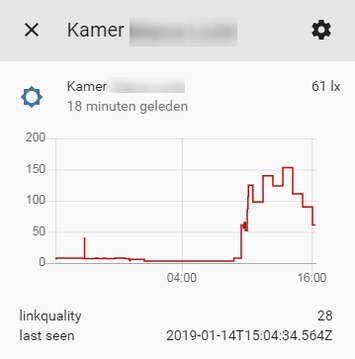
Proof of the pudding :rofl:
MarsWarrior
on 14 Jan 2019
btw the value is not "lux"
Chrischi-
on 14 Jan 2019
btw the value is not "lux"
That is what zigbee2mqtt configures. I'm using the mqtt discovery feature of Home Assistant...
So no idea what it should be called...
MarsWarrior
on 14 Jan 2019
So no idea what it should be called...
ooookay ^^
but to be honest, I don't know exactly what unit is.
you could put a candle about 1 meter away. This should give a value of 1 lx in a dark room
edit:
I did some research, and it's really Lux. At least the xiamoi app says so. Sorry for the confusion.
Chrischi-
on 14 Jan 2019
Hi all,
I can see that you are experts in this Aqara body sensor. I have a problem, and I do not know if this is a bug in latest zigbee2mqtt or my setup, or I have faulty sensor.
Problem is simple every 50-60 minutes I receive mqtt message:
6/14/2019, 4:43:35 PM MQTT publish: topic 'zigbee2mqtt/motion_MI_1', payload '{"illuminance":0,"linkquality":81,"last_seen":"2019-06-14T14:43:35.205Z","elapsed":3302774,"occupancy":true,"battery":100,"voltage":3015}'
Even though there is no motion - it is always 'occupancy:true'. I specifically put the sensor into dark cabinet, which nobody opens, so I am sure no motion is detected. So since it is being send every 55 min or so I found this thread, and my guess is that Illuminance data is sent to coordinator, and for some reason occupancy:true is generated. My current setup for the sensor is in devices.yaml:
'XXXXXXXXXXXXX':
  friendly_name: motion_MI_1
  retain: false
  occupancy_timeout: 0
  debounce: 0.5
My zigbee2mqtt version 1.4.0., firmware is CC2531_20190425
Can someone help me with the issue and give any clue. Is it my setup, or real bug in the zigbee2mqtt, or just my sensor (unfortunately I do not have one more to check this). It is really annoying when light is triggered by no-motion. My wife freaks out a lot :)
 sergiigladchuk
on 14 Jun 2019
sergiigladchuk
on 14 Jun 2019
@sergiigladchuk
could you please activate debug and upload the log to pastebin?
Chrischi-
on 14 Jun 2019
Hi @Chrischi- - no need for debug - I found the issue (actually I was almost sure by the time I ended up writing my first post).
The problem was my setup:
occupancy_timeout: 0
Since I did not need actual occupancy:false to be sent by coordinator (I handle timeout variably in the code via appDaemon) I switched off that message to keep MQTT less spammed. As now it appears after I revert it back to standard occupancy_timeout: 90 coordinator sends occupancy:false the latest state together with battery and illuminance levels every 55 min. I have noticed same behavior with my door sensor from Aqara - it sends battery level evey 50 min together with latest status of door open or closed. But nobody touches the door.
Now when I know this specifics I can modify my automations - but I am not sure if this is desirable behavior of zigbee2mqtt, or it is impossible to split payload and keep only data which actually triggered the message, which would make sense.
I still can send the debug if it is needed later today.
sergiigladchuk
on 15 Jun 2019
Here is debug of one message. Sensor is still in dark cabinet with no motion, but I have changed my setup to occupancy_timeout: 90
https://pastebin.com/zEFriuNh
sergiigladchuk
on 15 Jun 2019
The Sensor uses this converters:
- fz.xiaomi_battery_3v
- fz.generic_occupancy_no_off_msg
- fz.generic_illuminance
- fz.ignore_basic_change
- fz.ignore_illuminance_change
- fz.ignore_occupancy_change
- fz.RTCGQ11LM_interval
this is the generic_occupancy_no_off_msg converter and look for the mentioned issue https://github.com/Koenkk/zigbee2mqtt/issues/467:
    generic_occupancy_no_off_msg: {
        // This is for occupancy sensor that only send a message when motion detected,
        // but do not send a motion stop.
        // Therefore we need to publish the no_motion detected by ourselves.
        cid: 'msOccupancySensing',
        type: ['attReport', 'readRsp'],
        convert: (model, msg, publish, options) => {
            if (msg.data.data.occupancy !== 1) {
                // In case of 0 no occupancy is reported.
                // https://github.com/Koenkk/zigbee2mqtt/issues/467
                return;
            }

            // The occupancy sensor only sends a message when motion detected.
            // Therefore we need to publish the no_motion detected by ourselves.
            const useOptionsTimeout = options && options.hasOwnProperty('occupancy_timeout');
            const timeout = useOptionsTimeout ? options.occupancy_timeout : occupancyTimeout;
            const deviceID = msg.endpoints[0].device.ieeeAddr;

            // Stop existing timers because motion is detected and set a new one.
            if (store[deviceID]) {
                store[deviceID].forEach((t) => clearTimeout(t));
            }

            store[deviceID] = [];

            if (timeout !== 0) {
                const timer = setTimeout(() => {
                    publish({occupancy: false});
                }, timeout * 1000);

                store[deviceID].push(timer);
            }

            // No occupancy since
            if (options && options.no_occupancy_since) {
                options.no_occupancy_since.forEach((since) => {
                    const timer = setTimeout(() => {
                        publish({no_occupancy_since: since});
                    }, since * 1000);
                    store[deviceID].push(timer);
                });
            }

            if (options && options.no_occupancy_since) {
                return {occupancy: true, no_occupancy_since: 0};
            } else {
                return {occupancy: true};
            }
        },
},
Ok, I see and I understand the option cache_state: true in my config now as well. Thanks, I will stick to default options then.
sergiigladchuk
on 16 Jun 2019
Related issues
 mpuff
·
3Comments
mpuff
·
3Comments
 sylarevan
·
5Comments
sylarevan
·
5Comments
 jeroenterheerdt
·
3Comments
jeroenterheerdt
·
3Comments
 LCerebo
·
3Comments
LCerebo
·
3Comments
 jwilling
·
4Comments
jwilling
·
4Comments
Most helpful comment
@liads thanks for finding this, fixed in the dev branch.