Zigbee2mqtt: Testing: device availability
This allows zigbee2mqtt to mark individual devices as offline. E.g. when you switch a bulb off using the regular switch.
The device availability is published on zigbee2mqtt/[FRIENLDY_NAME]/availability with possible payloads being offline and online.
Home Assistant integration has been updated, devices will be shown as unavailable when they are offline.
Device availability is only checked for AC powered routers.
Todos
- [x] Check device availability for new paired devices (without having to restart zigbee2mqtt)
- [x] [Mark device online when message is received](https://github.com/Koenkk/zigbee2mqtt/issues/775#issuecomment-451383773)
- [x] [Retrieve state after online](https://github.com/Koenkk/zigbee2mqtt/issues/775#issuecomment-450958929)
- [x] Update documentation
- [x] Allow to blacklist devices from being checked
- [x] Availability timeout for non AC-powered devices (#1020)
- [ ] Test, test and test
How to test
Update zigbee2mqtt to the latest dev branch (edge for hassio users). Stop zigbee2mqtt, add to zigbee2mqtt configuration.yaml
advanced:
  availability_timeout: 60 # Availability check interval
start zigbee2mqtt and restart Home Assistant.
Most of the credits of this feature go to @ugrug
 Koenkk
All 107 comments
doesnt work with hassio/zigbee2mqtt-edge.
Can't see anything different. (when is zigbee2mqtt-edge updated to most recent source?)
 wimpie007
on 30 Dec 2018
wimpie007
on 30 Dec 2018
Should be, can you post your startup log?
Koenkk
on 30 Dec 2018
sure.
https://pastebin.com/VaamLD4M
and in configuration.yaml:
experimental:
availablility_timeout: 60
regards,
wimpie007
on 30 Dec 2018
@wimpie007 I see that your are running #2a197a4, this was introduced in a later commit #afeed4f372bced737206bd91f8e62ce65b127eb9 (this can be seen in the startup log).
Note that also a typo has just been fixed availablility -> availability, I've updated the configuration in the OP. Wait at least one hour to give the hassio addon some time to regenerate.
Koenkk
on 30 Dec 2018
I stopped/started the zigbee2mqtt-edge addon in hassio this morningn (auto-update is on), but still on commit #2a197a4.
In hassio, i can't do more to 'force' the update?
wimpie007
on 31 Dec 2018
I dont understand why, the image has been updated 14 hours ago which makes sense (https://hub.docker.com/r/dwelch2101/zigbee2mqtt-edge-armhf/tags). @danielwelch could you help?
Koenkk
on 31 Dec 2018
I don’t think starting and stopping alone should work, as this doesn’t pull the new image. You need to uninstall and re-install.
 danielwelch
on 31 Dec 2018
danielwelch
on 31 Dec 2018
Thanks! uninstall/install did the trick, bit annoying, but ok!:) will report later on....
wimpie007
on 31 Dec 2018
doesnt seem to do anything...
here is the start-log.
https://pastebin.com/u5kANWCm
wimpie007
on 31 Dec 2018
Can you post a bit more of you startup log? I'm especially interested in the homeassistant/ topic it publishes to.
Koenkk
on 31 Dec 2018
sure!
https://pastebin.com/WmXvQ2Qz
PS Happy 2019!!:)
wimpie007
on 1 Jan 2019
Happy 2019! Somehow the functionallity is not enabled yet (because it still publishes zigbee2mqtt/bridge/state as availabillity topic). Can you post the experimental part of your configuration.yaml again?
Koenkk
on 1 Jan 2019
config in hass.io:
{
"data_path": "/share/zigbee2mqtt",
"homeassistant": true,
"permit_join": false,
"mqtt_base_topic": "zigbee2mqtt",
"mqtt_server": "mqtt://homeassistant:1883",
"serial_port": "/dev/ttyACM0",
"disable_led": true,
"log_level": "debug",
"zigbee_shepherd_debug": false
}
and config yaml:
https://pastebin.com/mtYCa2G4
EDIT!
DOH!
i did a paste from the instruction site, and copied also the typo:
availablility_timeout: 60
will test again with
availability_timeout
wimpie007
on 1 Jan 2019
YES! we are getting somewhere!
for the lights it works! show up as "unavailable" when powered-off.
BUT... also for al the sensors.
Sensors show all up as unavailable as they do not respond to ping...
"Device availability is only checked for AC powered routers.": not true!:)
wimpie007
on 1 Jan 2019
Can you post your log_level: debug log?
Koenkk
on 1 Jan 2019
https://pastebin.com/bbu0MEnD
see for example device:
0x00158d00029c076d (0x00158d00029c076d): RTCGQ11LM - Xiaomi Aqara human body movement and illuminance sensor (EndDevice)
wimpie007
on 1 Jan 2019
Found the bug, should be fixed
Koenkk
on 1 Jan 2019
Koen, thanks!
it works now!
state of the lamps doesnt reflect reality after power off/on, but that is another issue...
a big step for this project! nice!
wimpie007
on 2 Jan 2019
I think that could be fixed relatively easy, we just need to poll the state when yhe bulb comes back online. (unfortunately I dont have access to my laptop for a few days)
Koenkk
on 2 Jan 2019
@Koenkk I can also confirm that it works for me on a bunch of different Trådfri bulbs as well as some Philips Hues. I don't see any updates for my battery driven sensors/buttons as expected..
It would be great if you also manage the state of the lights send to Home Assistant as mentioned by @wimpie007.
Under all circumstances - thanks for doing/maintaining this brilliant project !
 martinrosenauer
on 3 Jan 2019
martinrosenauer
on 3 Jan 2019
Another improvement would be:
- faster convergence to state online by using "Received zigbee message"..."with data"... as 'online-trigger'
Now, even when the "received zigbee message" is received, the device remains "unavailable" until the next ping cycle...
wimpie007
on 4 Jan 2019
Great feature !
 mrwiwi
on 6 Jan 2019
mrwiwi
on 6 Jan 2019
Question.. I have the E11-G13 - Sengled Element Classic (A19) (EndDevice) bulbs, these do not report when they are turned ON by the wall switch nor their status periodically.
The thing is, the type of this device is "EndDevice" so this code will not actually try pinging these bulbs. Should EndDevice be added or should I be using another method to detect if they are available or not?
 Iv4nS
on 11 Jan 2019
Iv4nS
on 11 Jan 2019
@Iv4nS you should modify this function: https://github.com/Koenkk/zigbee2mqtt/blob/dev/lib/extension/deviceAvailability.js#L29 to also return true when the modelId is the one of your bulb.
Koenkk
on 14 Jan 2019
My OSRAM Smart+ plugs are detected (falsely) as offline from time to time. Does anybody else has observed this behavior?
EDIT: This is how it looks like (grey is offline)

there is something going on ...
 sehraf
on 19 Jan 2019
sehraf
on 19 Jan 2019
For the 1.1 release I made this option non-experimental, please move availability_timeout from experimental to advanced (https://github.com/Koenkk/zigbee2mqtt/blob/dev/docs/configuration/configuration.md)
Koenkk
on 29 Jan 2019
I've disabled device availability since home assistant won't let me control the smart plug when it is marked as offline (which makes sence if it would be offline ... which it isn't)
So a blacklist might come in handy.
sehraf
on 29 Jan 2019
@sehraf I see, added this to the OP
Koenkk
on 29 Jan 2019
Thanks to @jbmbn devices will now instantly get marked as online when they are powered on again. This can be tested in the dev branch.
Koenkk
on 31 Jan 2019
Koen, thanks!
it works now!
state of the lamps doesnt reflect reality after power off/on, but that is another issue...
a big step for this project! nice!
Implemented (can be tested in the dev branch).
Koenkk
on 2 Feb 2019
@sehraf availability_blacklist has been implemented (documentation: https://github.com/Koenkk/zigbee2mqtt/blob/dev/docs/configuration/configuration.md)
Koenkk
on 2 Feb 2019
Hi, I have authored PR #1030 to work around the issue of availablity of non AC devices. The change allows home assistant to decide whether a device is available based on how long it has been since the most recent state update was received
 timstanley1985
on 6 Feb 2019
timstanley1985
on 6 Feb 2019
One thing that's a little annoying once this is enabled - theres lots of logspam when your devices aren't always on:
 zigbee2mqtt:error 2019-2-7 19:05:53 Failed to ping 0x0017880102ebca62
 zigbee2mqtt:info 2019-2-7 19:05:53 MQTT publish: topic 'zigbee2mqtt/living_ceiling_light_2/availability', payload 'offline'
This will repeat every so often for each offline device.. Could these messages only be logged upon transitioning from online to offline? (or offline -> online again..) This I guess is more annoying when using via hassio, and the log history available is severely limited.
 kiall
on 7 Feb 2019
kiall
on 7 Feb 2019
@kiall implemented!
Koenkk
on 9 Feb 2019
@Koenkk Get this on pairing mode if device isnt fully online:
 zigbee2mqtt:error 2019-3-9 21:29:53
        {"message":"Cannot read property 'ieeeAddr' of undefined","stack":"TypeError: Cannot read property 'ieeeAddr' of undefined\n    at DeviceAvailability.isPingable (/opt/zigbee2mqtt/lib/extension/deviceAvailability.js:33:44)\n    at DeviceAvailability.onZigbeeMessage (/opt/zigbee2mqtt/lib/extension/deviceAvailability.js:142:28)\n    at extensions.filter.forEach (/opt/zigbee2mqtt/lib/controller.js:134:31)\n    at Array.forEach (<anonymous>)\n    at Controller.onZigbeeMessage (/opt/zigbee2mqtt/lib/controller.js:134:14)\n    at Zigbee.onMessage (/opt/zigbee2mqtt/lib/zigbee.js:209:18)\n    at ZShepherd.emit (events.js:180:13)\nat ZShepherd.<anonymous> (/opt/zigbee2mqtt/node_modules/zigbee-shepherd/lib/shepherd.js:99:14)\n    at ZShepherd.emit (events.js:180:13)\n    at /opt/zigbee2mqtt/node_modules/zigbee-shepherd/lib/components/event_handlers.js:229:18"}
 tb-killa
on 9 Mar 2019
tb-killa
on 9 Mar 2019
I started zigbee2mqtt with 3 ikea tradfri gu 10 turned on, after 5 minutes I turned them off, and only one of them became unavailable in home assistant. I turned them on again a few minutes later and than off again but this time none was unavailable. For more details see https://github.com/Koenkk/zigbee2mqtt/issues/1334#issuecomment-478298221
Here is the new debug log: https://gist.github.com/Bruceforce/5a943f8ac665ef52aadddffe0f6f37a7
and database.db: https://gist.github.com/Bruceforce/9ad158de004e66bf1c518b5cb8133ffb
 Bruceforce
on 4 Apr 2019
Bruceforce
on 4 Apr 2019
@Bruceforce indeed something strange is going on, I added extra logging, could you provide the same logging on the latest dev branch?
Koenkk
on 7 Apr 2019
@Koenkk Sorry it took a while. Did the same as before.
Debug log: https://gist.github.com/Bruceforce/ea0a48c999cbc467804ad5e0481b04d7
database.db: https://gist.github.com/Bruceforce/383e6ad87db1702e3f81e71c23d134b2
Bruceforce
on 9 Apr 2019
@Koenkk @Bruceforce Maybe https://github.com/Koenkk/zigbee2mqtt/issues/1395 is the root cause for the problem
 didiht
on 9 Apr 2019
didiht
on 9 Apr 2019
@Bruceforce thanks to @didiht this should be fixed in the latest dev branch, can you verify?
Koenkk
on 9 Apr 2019
Thanks to both of you. It's now working again.
Bruceforce
on 10 Apr 2019
Good Afternoon all.
I have a similar problem an I am at the end of my (limited) knowledge.
When ever the AC is removed from my 9 Tradfri LED1650R5 bulbs they will then not rejoin when AC is switched back on.
I have a CC2531 USB as coordinator in Raspi, as well as a CC2530 as a router.
I am running a Raspi 3B+ with Hassio 91.4 and zigbee2mqtt-edge(although I tried latest stable version also.)
Interestingly the router is still pingable (as seen in log) until the power is returned to LED bulbs and then that also becomes unpingable as soon as power is returned.
The only way to get the devices back is to unplug the USB CC2531 and restart the zigbee2mqtt add on.
I have tried reflashing both CC2531 and CC2530 and repairing, I even selected a Zigbee channel to try to provide some stability, but to no avail.
The log is here https://gist.github.com/smith844/8f699effc9974cd9e21694b8185c977f
In the log above I removed power at 1:10:00 PM and turned it back on at 1:11:30 PM, you will see from the log that after the switch on the router stops responding to pings.
The configuration.yaml is here https://gist.github.com/smith844/6afcfdbd7a04c2a9826a1507525131be
Any help gratefully received. I hoped by adding a router it would help in the cases where AC power is removed from all the devices (on the wall switch) as it would provide a stable network. I am guessing I was wrong.........
 smith844
on 24 Apr 2019
smith844
on 24 Apr 2019
Sorry can't get the link to work, but the addresses are:
Log.txt
https://gist.github.com/smith844/8f699effc9974cd9e21694b8185c977f
https://gist.github.com/smith844/8f699effc9974cd9e21694b8185c977f
Configuration.yaml
https://gist.github.com/smith844/6afcfdbd7a04c2a9826a1507525131be
https://gist.github.com/smith844/6afcfdbd7a04c2a9826a1507525131be
smith844
on 24 Apr 2019
@smith844 as a quick check, can you check if this happens with the max devices firmware? (https://github.com/Koenkk/Z-Stack-firmware/tree/master/coordinator/max_devices/CC2531)
Koenkk
on 24 Apr 2019
@Koenkk
I reflashed it with the Max devices and I get the same results. still pings router(CC2530) after tradfri devices are off but as soon as power to them is reapplied all stops.
smith844
on 24 Apr 2019
@Koenkk
It works. I obviously didn't give it enough time to stabilise. The state reporting is still a bit hit and miss in HA but I can live with that. Thank you for the assistant and your advancement of the add on. It has certainly given my wife less reasons to hate my drive towards home automation :)
smith844
on 25 Apr 2019
@smith844 so the max devices firmware has fixed this issue? It would be nice if you could confirm this by flashing the max stability again, then we know the issue is in the max stability firmware.
Koenkk
on 25 Apr 2019
I will of course do that as soon as I get an opportunity, probably later tonight or tomorrow.
smith844
on 25 Apr 2019
@smith844 can you check if this has also been fixed in the latest dev firmware? https://github.com/Koenkk/Z-Stack-firmware/tree/dev/coordinator/Z-Stack_Home_1.2/bin
Koenkk
on 26 Apr 2019
I tested this with 1.31, seems to work. But I get a lot off false "offline" warnings even when my ikea bulb is on. Timeout was set to 60
I guess I should update to latest dev branch?
 CypherMK
on 27 Apr 2019
CypherMK
on 27 Apr 2019
@CypherMK how do you verify that the offline warnings are false? A bulb can be on (shining) and offline at the same time. That's why I'm asking.
Bruceforce
on 27 Apr 2019
@Koenkk I have installed the dev branch and it works about the same as the max devices. I then relooked at max stability and max devices. I no longer get a failed system when .i put power on after ac power out, even in max stability, but the availability and state reporting is very intermittent and inconsistent.
I have bulbs that show offline and unavailable in HA and wont accept MQTT messages that still toggle on and off, but only with a group message. its all very strange, but more usable than it was.
smith844
on 27 Apr 2019
@Bruceforce
I used node red, and used the topic: zigbee2mqtt/(device)/availability
This gives me multiple offline messages immediately followed by a online message, but I didn't check the ZigBee map. Lamp is controllable.
CypherMK
on 27 Apr 2019
Updated to the dev branch and the behaviour is the same.
What marks a bulb offline?
What I expected to achieve is, that when I switch off the wall switch, I will immediately get an offline message, After switching, I will immediately get an online message. So it would be possible to automate some stuff.
CypherMK
on 28 Apr 2019
@CypherMK a device is marked offline when a ping request fails. The interval of the ping request is configured by availability_timeout: 30, in this example every device is pinged each 30 seconds.
So the time between bulb powerlos and bulb offline is max 30 seconds. When the device is powered on, it should become online immediately.
Koenkk
on 29 Apr 2019
I think devices should be unavailable when zigbee2mqtt isn't connected to broker, i.e. LWT should be set to offline for every device availability topic.
 definitio
on 4 May 2019
definitio
on 4 May 2019
@definitio zigbee2mqtt already published offline for every device, LWT doesn't seem to be possible as the used MQTT library only allows one LWT message (and this is already used for zigbee2mqtt/bridge/state).
Koenkk
on 5 May 2019
Hi, I'm new to zigbee2mqtt and i find that the availabillity of battery powered devices is pretty important especially for some sensors like smoke alarm, water leakage sensor, etc.
I know that different devices will have different report/heartbeat interval. Perhaps just make it configurable for each device? Any plan to include this feature? If not, what is the best way to monitor this in home assistant?
 waiweng83
on 27 May 2019
waiweng83
on 27 May 2019
a battery operated device will simply not answer to "pings" from the coordinator.
You can just wait and hope that the device will send a packet.... no way to tell it's dead or 'sleeping'.
That's why battery operated devices are not pinged.
wimpie007
on 27 May 2019
You do not need to ping the battery powered device to know its availability. Some of the devices will send a heartbeat periodically. For example, Xiaomi/Aqara door/window sensor will send a heartbeat together with its battery voltage around once per hour. We can do like if we do not receive any packet for more than 3 hours, mark it as dead. Of course every devices will send out heartbeat at different interval, some might not even send out any heatbeat. That's why I suggest the watchdog period to be configurable per every device.
waiweng83
on 27 May 2019
ok, i understand. Yes, that would be a nice option. (configurable 'timeout' that is 'reset' when receiving a message from the device...)
wimpie007
on 27 May 2019
That would be great. Now I constructed something similar within node red. So when my temperature sensor doesn't report within a hours, I get a pushover notification.
CypherMK
on 27 May 2019
There is a PR by another guy for this feature before (#761 ) but somehow the feature is dropped.
Anyone knows why?
waiweng83
on 28 May 2019
@ugrug is the guy comes out with the idea of attribute_report_interval.
Do you mind creating another PR for this function? I think it's really useful.
waiweng83
on 18 Jun 2019
Any update on this? Would be create if i can see the status of battery based devices.
 desertspider
on 18 Jul 2019
desertspider
on 18 Jul 2019
Does this work with a group of lights?
CypherMK
on 23 Jul 2019
Hey all,
I'm also after this. I'm currently trying to get a PR across the line in Home Assistant for the binary_sensor to support the expire_after setting. That would mean you could set expire_after to say 60 minutes (in the Zigbee2MQTT config), and if one heart beat on the Xiaomi sensors is missed, the device is marked as unavailable.
I'm having a hard time getting the PR across the line. It's practically done, but the HA guys want it done slightly differently. If you're keen, take a look and feel free to make suggestions or give me ideas on how to do it.
Here is the PR: https://github.com/home-assistant/home-assistant/pull/26058
Cheers,
 KiLLeRRaT
on 8 Sep 2019
KiLLeRRaT
on 8 Sep 2019
You do not need to ping the battery powered device to know its availability. Some of the devices will send a heartbeat periodically. For example, Xiaomi/Aqara door/window sensor will send a heartbeat together with its battery voltage around once per hour. We can do like if we do not receive any packet for more than 3 hours, mark it as dead. Of course every devices will send out heartbeat at different interval, some might not even send out any heatbeat. That's why I suggest the watchdog period to be configurable per every device.
I believe the devices can also be told to report attributes, or at least some can. I would prefer to see temperature and battery reporting set up to cause this heartbeat to occur some known time, where we can then make the device timeout 3x that interval by default. Powered devices can be configured to report more often, as well, although I've seen several battery-powered devices that claim to be mains powered.
 skandragon
on 9 Oct 2019
skandragon
on 9 Oct 2019
You do not need to ping the battery powered device to know its availability. Some of the devices will send a heartbeat periodically. For example, Xiaomi/Aqara door/window sensor will send a heartbeat together with its battery voltage around once per hour. We can do like if we do not receive any packet for more than 3 hours, mark it as dead. Of course every devices will send out heartbeat at different interval, some might not even send out any heatbeat. That's why I suggest the watchdog period to be configurable per every device.
I believe the devices can also be told to report attributes, or at least some can. I would prefer to see temperature and battery reporting set up to cause this heartbeat to occur some known time, where we can then make the device timeout 3x that interval by default. Powered devices can be configured to report more often, as well, although I've seen several battery-powered devices that claim to be mains powered.
Hi @skandragon, I got my PR across the line and merged in, so as soon as that is released, we can start making use of this heartbeat on MQTT binary sensors. Normal MQTT sensors should already support this.
KiLLeRRaT
on 10 Oct 2019
There is no possibility to enable/disable this feature via MQTT commands? I did not find this from https://www.zigbee2mqtt.io/information/mqtt_topics_and_message_structure.html
 Kryzek
on 5 Nov 2019
Kryzek
on 5 Nov 2019
Nope
Koenkk
on 5 Nov 2019
Otherwise availability seems to be working fine, but I noticed this on my log
zigbee2mqtt:debug 2019-11-08T17:48:05: Failed to ping '0x00158d0001cded1c'
(node:2205) UnhandledPromiseRejectionWarning: Error: Timeout - 1045 - 11 - 191 - 8 - 1 after 10000ms
    at Timeout.object.timer.setTimeout [as _onTimeout] (/opt/zigbee2mqtt/node_modules/zigbee-herdsman/dist/utils/waitress.js:44:24)
    at ontimeout (timers.js:436:11)
    at tryOnTimeout (timers.js:300:5)
    at listOnTimeout (timers.js:263:5)
    at Timer.processTimers (timers.js:223:10)
(node:2205) UnhandledPromiseRejectionWarning: Unhandled promise rejection. This error originated either by throwing inside of an async function without a catch block, or by rejecting a promise which was not handled with .catch(). (rejection id: 3)
I know that this device is not powered to mains at the moment.
Is it possible to stop pinging these devices that are already marked unavailable? Doesn't devices tend to announce themselves with "Device '[deviceid]' announced itself" when they rejoin when powered on? If this is normal behavior with router devices maybe this could be signal to start pinging them again to detect powerloss etc again?
Kryzek
on 8 Nov 2019
Testing this now as it will probably fix my hue bulbs being out of sync colorwise after a power failure.
So far so good, but I have a question.... does this cause extra network traffic? or does this just watch for updates from power devices and if one doesn't check it, it goes offline?
Edit: OK it does a sort of ping so it is causing extra traffic... will experiment with a 5 min interval and see if it still picks up the bulbs after a poweroff to query there default color state.
 sjorge
on 8 Nov 2019
sjorge
on 8 Nov 2019
I noticed that my Airam bulb gets marked as unavailable. Whenever I toggle it on via remote it gets marked as available and after 60 seconds (I have availability value set to 60) it gets marked as offline. Is there way to exclude devices that does not respond correctly to ping?
Kryzek
on 9 Nov 2019
@Kryzek yes using the blacklist: https://www.zigbee2mqtt.io/information/availability.html
Koenkk
on 9 Nov 2019
So this started happening after enabling availability (I also have reporting enabled, using CC2652R):
0x00158d0001d0f272 is https://www.zigbee2mqtt.io/devices/4713407.html
Received Zigbee message from '0x00158d0001d0f272', type 'attributeReport', cluster 'genOnOff', data '{"onOff":0}' from endpoint 1 with groupID 0
MQTT publish: topic 'zigbee/0x00158d0001d0f272', payload '{"state":"OFF","linkquality":36,"brightness":234}'
MQTT publish: topic 'zigbee/0x00158d0001d0f272/availability', payload 'online'
(node:2205) UnhandledPromiseRejectionWarning: Error: Data request failed with error: 'MAC no ack' (233)
    at ZStackAdapter.<anonymous> (/opt/zigbee2mqtt/node_modules/zigbee-herdsman/dist/adapter/z-stack/adapter/zStackAdapter.js:490:27)
    at Generator.next (<anonymous>)
    at fulfilled (/opt/zigbee2mqtt/node_modules/zigbee-herdsman/dist/adapter/z-stack/adapter/zStackAdapter.js:5:58)
(node:2205) UnhandledPromiseRejectionWarning: Unhandled promise rejection. This error originated either by throwing inside of an async function without a catch block, or by rejecting a promise which was not handled with .catch(). (rejection id: 126)
I can control Airam bulb with remote paired with it directly and I get status reports from it followed by an error (as above).
zigbee2mqtt:info  MQTT publish: topic 'zigbee/0x001788010278b40a/availability', payload 'offline'
zigbee2mqtt:debug Failed to ping '0x001788010278b40a'
zigbee2mqtt:info  MQTT publish: topic 'zigbee/0x00158d0001d0f272/availability', payload 'offline'
zigbee2mqtt:error Failed to ping '0x00158d0001d0f272'
I noticed also that ping to Airam gets different classfication "zigbee2mqtt:error" where other devices get "zigbee2mqtt:debug" with Failed to ping -message.
I also lot ability to control bulb via z2m - i get MAC no ack (223) error.
Publishing 'set' 'state' to '0x00158d0001d0f272'
Publish 'set' 'state' to '0x00158d0001d0f272' failed: 'Error: Data request failed with error: 'MAC no ack' (233)'
MQTT publish: topic 'zigbee/bridge/log', payload '{"type":"zigbee_publish_error","message":"Publish 'set' 'state' to '0x00158d0001d0f272' failed: 'Error: Data request failed with error: 'MAC no ack' (233)'","meta":{"friendly_name":"0x00158d0001d0f272"}}'
What I understand this message would mean that device is not responding to network but this is not case since I get immediate state responses back when using remote.
I have tried to power-cycle the bulb but issue remains. Any ideas what I could do to trace back the cause of this? I do have my old CC2531 which I can flash to sniff-firmware if there is any more information to be found from sniff logs.
Kinda funny how this bulb starts actings weird from every feature I test it with. Last time it spammed my network to death after enabling reporting 🤣
Kryzek
on 10 Nov 2019
@Kryzek please provide the log when controlling via zigbee2mqtt fails and via the remote succeeds.
Koenkk
on 10 Nov 2019
Bulb seemed to respond every now and then whole night according to HA:
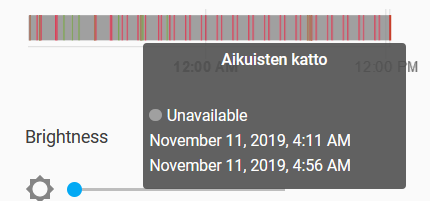
Today I updated to 1.7.0-dev and now bulb stays online and I can command it from Z2M again as usual. Will keeping this on the eye.
Kryzek
on 11 Nov 2019
Ok, so far I've noticed one hiccup with this bulb (just happened):
zigbee2mqtt:info  2019-11-11T16:45:54: MQTT publish: topic 'zigbee/0x00158d0001d0f272/availability', payload 'offline'
zigbee2mqtt:error 2019-11-11T16:45:54: Failed to ping '0x00158d0001d0f272'
And then again
zigbee2mqtt:info  2019-11-11T16:47:54: MQTT publish: topic 'zigbee/0x00158d0001d0f272/availability', payload 'online'
zigbee2mqtt:debug 2019-11-11T16:47:54: Successfully pinged '0x00158d0001d0f272'
zigbee2mqtt:debug 2019-11-11T16:47:54: Received Zigbee message from '0x00158d0001d0f272', type 'readResponse', cluster 'genOnOff', data '{"onOff":1}' from endpoint 1 with groupID 0
Need to check again at morning if bulb has been jumping offline/online.
Kryzek
on 11 Nov 2019
Now also with https://github.com/Koenkk/zigbee2mqtt/pull/2387 availability_whitelist - if it fits in.
Kryzek
on 22 Nov 2019
When new device joins network when availability is used, the newly joined device is not marked available.
Kryzek
on 25 Nov 2019
I had an idea while in traffic today for battery devices...
It would be nice to add a sort of timeout list, e.g. for an aqara temp sensor you could set it to 5400 (1h30) and if we have not had a message from that device within that timestamp, we set it offline.
They normally report every hour so it gives us some leeway or maybe set it to 2h30 or something. I messed with some bulbs and I had 1 sensor drop of the network until I hit the little button and I did not notice for 3 days :s
sjorge
on 25 Nov 2019
Thanks to @sjorge the availability feature is now also available for non-pingable devices. These will automatically be marked as unavailable when no messages has been received for 25 hours. Currently available in the latest dev.
Koenkk
on 9 Dec 2019
Hey,
i have set availability_timeout: 600 in my config. Do i have to set something else to enable availability for battery devices? I am on 1.8.0 (commit #da4d26a). I have test with a smoke detector. I removed the battery and checked my logs since 48 hours there was no message from that device, but it is still marked as online.
 sideshowbob84
on 3 Jan 2020
sideshowbob84
on 3 Jan 2020
If you enable debug logging it should print periodic message with device XXX last seen XXX seconds ago... are you getting those?
sjorge
on 3 Jan 2020
Yes these messages are present. But i noticed that the device i waited for, was the only one which did not showed a "last seen" message. I remember that i restartet zigbee2mqtt service after i removed the battery from the device. After i put the battery in once, the last seen mesage for this device appeared too. I now removed the battery and will wait for 25 hours. Could it be that a device is automaticly announced as online after restart of the zigbee2mqtt service, but the "last seen" counter starts only if the device was really seen once?
sideshowbob84
on 3 Jan 2020
zigbee2mqtt needs at least one lastSeen entry in database.db, if you didn't have one. It won't be checked until it sees the device for the first time.
sjorge
on 3 Jan 2020
It worked now. Sorry for bothering you.
sideshowbob84
on 4 Jan 2020
Using Z2M v1.9.0 and was testing this as well. I have two Philipps bulbs (and a OSRAM smart plug) that are frequently offline in HA (using availability_timeout: 120) which is annoying since HA does not allow me to control them when offline (which makes sense). Interestingly, disabling this feature allows me to always control them, making me believe that they are never actually offline. Of course I can blacklist those devices but this isn't somehow the idea of this feature. :see_no_evil:
Is this a bug or anything I miss here?
 CodeFinder2
on 27 Jan 2020
CodeFinder2
on 27 Jan 2020
the bulb is put 'offline' when it misses 1 'ping'. Even if it is a momentary glitch (wich occurs more often when the bulb/device is further away), it will be flagged as offline for the duration of "availability_timeout", even in reality, it's only a few seconds.
In my opinion, it would be better to put a device offline after, for example, 3 consecutively ping losses. Not after 1 ping. Of course, flagging a device as 'dead' (power off device for example) would longer to detect. Kinda finding an equilibrium...
wimpie007
on 27 Jan 2020
@wimpie007 thanks for your explanation! I see, hm. :thinking:
I propose a slighty different solution, trying to be a better fit regarding detecting dead devices ASAP vs. not erroneously flagging online devices as off that just have a momentary glitch: given a device that would be flagged as offline according to the current implementation in Z2M, Z2M should probe/ping that specific device specifically for, say, N seconds (e.g., N=10s) in shorter intervals (say, every k seconds, k << N, e.g., k=1s). Iff the device fails to reply to all (specific) ping requests within the N seconds (measured starting from the initial detection as possibly being offline according to the current implementation) it is considered dead/off. If only one reply is received, Z2M can surely stop the 'specific pinging' for that device.
Justification: depending on the typical duration for such glitches, one will select N. In my example, dead devices would be detected with only a delay of 10s and 'glitched devices' are only required to reply once within the 10s duration to not become flagged as offline. (And by assumption, dead devices would never reply since they are...dead, thus detected correctly.)
@Koenkk What do you think about this idea? I know it might be a bit more complex to implement and less capable coordinators (CC2531) may not be powerful enough but this is a problem for the availability feature anyway. :see_no_evil:
CodeFinder2
on 7 Feb 2020
Yeah for routers it might make sense to have a 3 strike rule type of thing, not sure if spamming it a lot in a short time span is good though. Because the failure might have been because say the network was congested. You'd be making it worse in that case.
sjorge
on 7 Feb 2020
Good point! Is it possible to detect congestion in the network somehow?
Edit: if we can get round trip times to other devices in the network (or at least the amount of successful pings wrt the number of devices in the network), we might be able to estimate congestion (?). For instance, if there are 100 devices in a very congested network, maybe only 5 will reply immediately. But if it's not congested, say, 70 will reply immediately. Clearly, this assumes that the majority of devices is actually not dead. 😂 And sure, if it is congested, we should adjust my proposed strategy (e.g., enlarge the delays between devices specific ping request depending on the amount of estimated congestion).
CodeFinder2
on 7 Feb 2020
Marking the device as unavailable just because a ping reply was loss is not working well for me. Sometime I have a device that become unavailable because of that. I think there should be a little tolerance to packet loss before marking the device as unavailable. Unfortunately, I had to switch off that feature.
 ohmer1
on 3 Mar 2020
ohmer1
on 3 Mar 2020
This issue has been automatically marked as stale because it has not had recent activity. It will be closed if no further activity occurs. Thank you for your contributions.
![stale[bot] picture](https://avatars3.githubusercontent.com/in/1724?v=4&s=40) stale[bot]
on 2 May 2020
stale[bot]
on 2 May 2020
I have the same issues reported by wimpiee007. So any chance that there will be an option to choose after how many unsuccessfull pings a device is marked as unavailable?
 jmerifjKriwe
on 12 May 2020
jmerifjKriwe
on 12 May 2020
@Koenkk Starting with Home Assistant 0.112.5, it's possible to configure multiple availability topics, for example:
availability:
 - topic: zigbee2mqtt/bridge/state
 - topic: zigbee2mqtt/0x00158d0001d0f272/availability
An updated availability on any configured topic will flick availabaility, so for this to work:
zigbee2mqtt/bridge/stateshould only be used to sendofflinefor MQTT will and before disconnecting zigbee2mqtt from MQTTzigbee2mqtt/0x00158d0001d0f272/availabilityshould be used to sendonlineandofflinewhen connection is established or lost with the xigbee device
 emontnemery
on 14 Jul 2020
emontnemery
on 14 Jul 2020
@emontnemery thanks, so if I understand correctly, I should change the following in the device discovery payload:
availability_topic: zigbee2mqtt/my_device/availability
to
availability:
  - topic: zigbee2mqtt/my_device/availability
  - topic: zigbee2mqtt/bridge/state
If yes, for backwards compatibility purposes is it allowed to have both (will this work on both < 0.112.5 and 0.112.5 >=)?
availability_topic: zigbee2mqtt/my_device/availability
availability:
  - topic: zigbee2mqtt/my_device/availability
  - topic: zigbee2mqtt/bridge/state
availability:
  - topic: zigbee2mqtt/my_device/availability
  - topic: zigbee2mqtt/bridge/state
Exactly! Just take care not to send online to topic: zigbee2mqtt/bridge/state or all devices will be marked as available
If yes, for backwards compatibility purposes is it allowed to have both (will this work on both < 0.112.5 and 0.112.5 >=)?
No, that's unfortunetaly not allowed :(
emontnemery
on 14 Jul 2020
@emontnemery thanks, I will set a reminder to update this after the 0.114 release (so everybody got time to update).
Koenkk
on 15 Jul 2020
Thanks to @sjorge the availability feature is now also available for non-pingable devices. These will automatically be marked as unavailable when no messages has been received for 25 hours. Currently available in the latest dev.
For non-pingable devices I would suggest moving from a global "availability_timeout" to a device specific. That is, move this option under the individual device sections of the configuration file.
Justification is that some battery sensors update more regularly than others. For example Xiaomi temperature sensors are typically updating every 1000 seconds, while their contact sensors may only update every 5000 seconds.
 DrWilder
on 31 Jul 2020
DrWilder
on 31 Jul 2020
Would it be possible to enable the "ping-poll" for some of the battery powered devices? Use case: contact or motion sensors, where it would be good to learn within a few minutes that the sensor is offline. For eg: loss of a contact/motion sensor can be a sign of a possible security breach/tampering.
 fdaemon
on 9 Oct 2020
fdaemon
on 9 Oct 2020
I have try to change type of Bulb which is often shutdown from Router to EndDevice to avoid some other device choose this router, but now i cannot ping them with availibility time out ... Is ther a way to ping specifically End Device ? (in my cas bulb wich is not on battery) @Koenkk ?
 steve41200
on 15 Oct 2020
steve41200
on 15 Oct 2020
I have try to change type of Bulb which is often shutdown from Router to EndDevice to avoid some other device choose this router,
Don't do this, this will have zero effect
Koenkk
on 15 Oct 2020
Strange, in Zigbee2mqttassitant, it show my bulb in cercle since i have change device type in the database file and i have no arrow who go to in. It seems work. It's just an error of zigbeetomqttassistant ?
steve41200
on 15 Oct 2020
@Koenkk The possibility to define a list of availability topics was included in HA 0.112, and 0.117 will be released in a couple of days. I think it's OK to change zigbee2mqtt to use the list now.
emontnemery
on 26 Oct 2020
@emontnemery yes you are right, implemented this. Thanks for pinging!
Koenkk
on 27 Oct 2020
Related issues
 jwilling
·
4Comments
jwilling
·
4Comments
 jeroenterheerdt
·
3Comments
jeroenterheerdt
·
3Comments
 mpuff
·
4Comments
mpuff
·
4Comments
 Courty40
·
4Comments
Courty40
·
4Comments
 sylarevan
·
5Comments
sylarevan
·
5Comments
Most helpful comment
the bulb is put 'offline' when it misses 1 'ping'. Even if it is a momentary glitch (wich occurs more often when the bulb/device is further away), it will be flagged as offline for the duration of "availability_timeout", even in reality, it's only a few seconds.
In my opinion, it would be better to put a device offline after, for example, 3 consecutively ping losses. Not after 1 ping. Of course, flagging a device as 'dead' (power off device for example) would longer to detect. Kinda finding an equilibrium...