Zigbee2mqtt: Does the zigbee network map work correctly?
Does the zigbee network map work as it should? Here is mine:
digraph G { node[shape=record]; "0x00124b001202328b" [label="{0x00124b001202328b|Coordinator|No model information available|online}"]; "0x00158d000123df04" [label="{study_button|EndDevice|Xiaomi Aqara wireless switch (WXKG11LM)|online}"]; "0x00158d000200d0c4" [label="{bedroom_motion|EndDevice|Xiaomi Aqara human body movement and illuminance sensor (RTCGQ11LM)|online}"]; "0x00158d00017206c0" [label="{office_door|EndDevice|Xiaomi MiJia door & window contact sensor (MCCGQ01LM)|online}"]; "0x00158d0001720704" [label="{bedroom_door|EndDevice|Xiaomi MiJia door & window contact sensor (MCCGQ01LM)|online}"]; "0x00158d0002476ba9" [label="{bedroom_temp|EndDevice|Xiaomi Aqara temperature, humidity and pressure sensor (WSDCGQ11LM)|online}"]; "0x00158d0002476ba9" -> "0x00124b001202328b" [label="94"] "0x00158d00023f5036" [label="{bathroom_temp|EndDevice|Xiaomi Aqara temperature, humidity and pressure sensor (WSDCGQ11LM)|online}"]; "0x00158d0001872b69" [label="{living_room_button|EndDevice|Xiaomi MiJia wireless switch (WXKG01LM)|online}"]; "0x00158d0002476b3c" [label="{outside_temp|EndDevice|Xiaomi Aqara temperature, humidity and pressure sensor (WSDCGQ11LM)|online}"]; "0x00158d0001a668e8" [label="{master_bedroom_button|EndDevice|Xiaomi Aqara wireless switch (WXKG11LM)|online}"]; "0x00158d0001a668e8" -> "0x00124b001202328b" [label="45"] "0x00158d00019dee01" [label="{spare_bedroom_button|EndDevice|Xiaomi MiJia wireless switch (WXKG01LM)|online}"]; "0x00158d00019dee01" -> "0x00124b001202328b" [label="71"] "0x00158d000216085f" [label="{master_bedroom_fan|Router|Xiaomi Mi power plug ZigBee (ZNCZ02LM)|online}"]; "0x00158d000216085f" -> "0x00124b001202328b" [label="62"] "0x00158d0001148b7e" [label="{office_cube|EndDevice|Xiaomi Mi smart home cube (MFKZQ01LM)|online}"]; "0x00158d0002437899" [label="{office_temp|EndDevice|Xiaomi Aqara temperature, humidity and pressure sensor (WSDCGQ11LM)|online}"]; "0x00158d00015da618" [label="{master_bedroom_motion|EndDevice|Xiaomi MiJia human body movement sensor (RTCGQ01LM)|online}"]; "0x00158d00015da618" -> "0x00124b001202328b" [label="72"] "0x00158d0001fa6453" [label="{spare_bedroom_booklight|Router|Xiaomi Mi power plug ZigBee (ZNCZ02LM)|online}"]; "0x00158d0001fa6453" -> "0x00124b001202328b" [label="69"] "0x00158d000204658a" [label="{master_bedroom_door|EndDevice|Xiaomi Aqara door & window contact sensor (MCCGQ11LM)|online}"]; "0x00158d000200e303" [label="{office_motion|EndDevice|Xiaomi Aqara human body movement and illuminance sensor (RTCGQ11LM)|online}"]; "0x00158d00015da4c3" [label="{spare_bedroom_motion|EndDevice|Xiaomi MiJia human body movement sensor (RTCGQ01LM)|online}"]; "0x00158d00015da604" [label="{stairs_motion|EndDevice|Xiaomi MiJia human body movement sensor (RTCGQ01LM)|online}"]; "0x00158d0001a2b36b" [label="{office_storage_motion|EndDevice|Xiaomi MiJia human body movement sensor (RTCGQ01LM)|online}"]; "0x00158d00026d387e" [label="{study_backlight|Router|Xiaomi Mi power plug ZigBee (ZNCZ02LM)|online}"]; "0x00158d00026d387e" -> "0x00124b001202328b" [label="7"] }
I'm confused by the lack of links with signal quality in the diagram to the online (and working) zigbee devices. Additionally, should a router be able to connect to another router if it is closer than the co-ordinator? Because in my scenario study_backlight would be much better off connecting via master_bedroom_fan. Link quality of the study_button in the same room as the study_backlight is 68 and I assume it's connecting to the study_backlight router even if the diagram doesn't show that.
Thanks in advance.
Regards,
Michal
 mihalski
All 92 comments
The networkmap is indeed still buggy (but it's not high on my priority list).
 Koenkk
on 4 Dec 2018
Koenkk
on 4 Dec 2018
Fair enough, how about router to router connections? Is that a supported feature or is that not part of the spec/implementation?
mihalski
on 4 Dec 2018
Some router to router connections are shown, but note that a device can communicated with multiple other devices (something which is not shown in the networkmap).
Koenkk
on 5 Dec 2018
Does that mean an end device can communicate with another end device to relay messages? And does this apply to low power battery powered devices? I'm slowly shifting devices from the Xiaomi gateway to zigbee2mqtt and am hoping this will make the Zigbee network more robust.
mihalski
on 5 Dec 2018
No, only routers can communicate with other (multiple) routers. end devices are sleeping most of the time.
Koenkk
on 5 Dec 2018
Is there a way to view any of this information and confirm what is happening without using the graph?
 danpowell88
on 17 Dec 2018
danpowell88
on 17 Dec 2018
@danpowell88 the debug version the router firmwares show which childs it has.
Koenkk
on 17 Dec 2018
Do you have an example of what the output looks like?
On Mon, 17 Dec. 2018, 5:17 pm Koen Kanters <[email protected] wrote:
@danpowell88 https://github.com/danpowell88 the debug version the
router firmwares show which childs it has.—
You are receiving this because you were mentioned.
Reply to this email directly, view it on GitHub
https://github.com/Koenkk/zigbee2mqtt/issues/652#issuecomment-447745614,
or mute the thread
https://github.com/notifications/unsubscribe-auth/ABDKbca4peHDqD-Vpb8pZWWg--Q0FraLks5u50T2gaJpZM4ZAb6y
.
danpowell88
on 17 Dec 2018
I also observe that the network map generated has a number of online end devices, which are not connected to anything. At the same time 2 routers (Xiaomi smart plug) don't have any end devices connected to them. Could it be that end device to router connections are just not shown?
Having correct network map would help to identify issues with connectivity and reliability, which is especially relevant for CC2531 USB dongle, which seems to have lower signal strength than XIaomi gateway.
 milakov
on 10 Jan 2019
milakov
on 10 Jan 2019
The missing links in the network graph are due to a bug in the lqiScan code in zigbee-shepherd. Here https://github.com/Koenkk/zigbee-shepherd/blob/aa1b9496b7aca7a14c76330c5a70a99bb8fa7918/lib/shepherd.js#L440 it looks for duplicates devices by ieee address but this also has a side effect of limiting links to one per device, i.e. it omits many valid links. A mesh network should have many links per device. The deduplication instead needs to occur for links using a composite key of device and its parent. So code should change to something like this:
                key = ieeeAddr + '|' + parent
                if (dev && dev.type == "Router" && !noDuplicate[key]) {
                    chain = chain.then(function () {
                        return self.lqi(ieeeAddr).then(processResponse(ieeeAddr));
                    });
                }
                noDuplicate[key] = devinfo;
Making this change I get a much richer list of links coming back from lqiScan. A matching change would also need to be done in zigbee2mqtt network map code https://github.com/Koenkk/zigbee2mqtt/blob/9380bbcadf6a361e9c9e621f8175c3c30c2eba9d/lib/extension/networkMap.js#L79 to process the list of links for each device instead of one link per device. So the code should be something like:
            lqiDevices.forEach((lqiDevice) => {
                if (lqiDevice != undefined && lqiDevice.ieeeAddr == device.ieeeAddr) {
                    text += `  "${device.ieeeAddr}" -> "${lqiDevice.parent}" [label="${lqiDevice.lqi}"]\n`;
                }
            });
Unfortunately I couldn't actually get the code fully working - my limited nodeJS got in the way but this may give someone else the hint to get this working.
 clockbrain
on 16 Jan 2019
clockbrain
on 16 Jan 2019
@clockbrain looks good, could you make a PR? We can further polish the code there.
Koenkk
on 16 Jan 2019
@Koenkk i've made a PR for the change to zigbee-shepherd https://github.com/Koenkk/zigbee-shepherd/pull/9.
With this change I now get 18 links in my raw network map instead of 6 links.
I'm new to github etc and I don't know how to relate my fork of zigbee-shepherd to my fork of zigbee2mqtt so I'm stuck trying to get the zigbee2mqtt network graph to show the extra links.
clockbrain
on 17 Jan 2019
@clockbrain thanks, I will take care of the zigbee2mqtt update.
Koenkk
on 17 Jan 2019
@clockbrain merged and updated zigbee2mqtt.
Koenkk
on 18 Jan 2019
here is the result, still have unlinked devices here :)

 lolorc
on 19 Jan 2019
lolorc
on 19 Jan 2019
This morning my network map showed really nice like this:

Then I removed two devices and added them back, and after that my network map looked like this:

It has been like this for some hours now.. Is there something I can do to improve the network map again?
I tried restarting Zigbee2mqtt, removed the dongle. Waked up every device, still no change.
I'm on the latest DEV build.
 bizziebis
on 27 Jan 2019
bizziebis
on 27 Jan 2019
@lolorc regarding the unlinked devices in the map - can you try requesting the map just after triggering those missing end devices. If end devices are asleep when the coordinator issues the lqi scan they may be missed. I also sometimes have unlinked end devices on my map.
@bizziebis does your network map still not work? Make sure you don't have zigbee2mqtt admin panel running as it spams the network with map requests. You could also try requesting a raw network map and counting the returned links but it is more likely that the network is busy during the lqi probe rather than something wrong with the graphviz generation code.
clockbrain
on 1 Feb 2019
It was looking great when I rebuild the network and had 10 devices connected. Then I added 3 more including a CC2531 router, it didn't show the connection between routers anymore. Only between coordinator <-> router <-> end device.
About the busy network, I was thinking the same, as I see a lot of diag messages from my two routers. I'll try them with the non diag version so the network is more at rest.
Edit: I had to re-pair the whole network because the panId somehow got changed.. But now the network is looking good:

bizziebis
on 1 Feb 2019
@clockbrain At some point I had a nice map with all devices connected. Not anymore. Using dev branch. It seems like the map shows connections from end devices to coordinator fine but no connections from end devices to routers. Waking up end devices (pressing reset buton shortly) and re-generating the map doesn't help.

milakov
on 2 Feb 2019
@milakov I see it is only end devices that aren't showing links. Are you sure these devices are all paired and actually working ok? Are all your routers shown on the map?
The online status for end devices doesn't necessarily mean they are actually online. zigbee2mqtt only checks online for routers. End devices are always shown as online regardless.
To gather the network links in response to a map request, each router is polled in turn and their neighbour table is examined. Given that you have reasonable links showing for your coordinator and some routers I guess that either a critical router to which many end devices are paired has gone away or many of these end devices have themselves dropped off your network.
clockbrain
on 2 Feb 2019
Yes, all those end devices are paired and report that they are alive at least every hour (I am checking it with newly introduced last_seen option). And they all function well as well, temperature updates and button presses are coming to Home Assistant.
All routers are on the map.
milakov
on 2 Feb 2019
I noticed that when the coordinator is pinging the routers, and get successfull reply, the network map is OK
2019-2-2 18:21:01 - debug: Ping 0x00124b00016f2bd5
2019-2-2 18:21:01 - debug: Successfully pinged 0x00124b00016f2bd5
2019-2-2 18:21:01 - debug: Ping 0x00158d0002370efc
2019-2-2 18:21:01 - debug: Successfully pinged 0x00158d0002370efc
2019-2-2 18:21:01 - debug: Ping 0xbfb6775ffeffe79d
2019-2-2 18:21:01 - debug: Successfully pinged 0xbfb6775ffeffe79d
2019-2-2 18:21:01 - debug: Ping 0x00158d00024d8998
2019-2-2 18:21:01 - debug: Successfully pinged 0x00158d00024d8998
When the ping of a router is not successfull, the network map seems incomplete
2019-2-2 18:48:35 - error: Failed to ping 0x00158d0002370efc
It's strange that at first the coordinator was pinging 4 routers with all positive results, and after a restart of Zigbee2MQTT service the coordinator was only pinging 1 router with a negative result. Nothing changed in the network between the 5 seconds of restarting.
What makes the coordinator decide which devices to ping, and what devices not to ping?
bizziebis
on 2 Feb 2019
@bizziebis All xiamoi routers + CC2530/CC2531 routers are pinged.
When setting availability_timeout all devices will be pinged (https://koenkk.github.io/zigbee2mqtt/configuration/configuration.html)
Koenkk
on 2 Feb 2019
I remember that there was only one change I made before my network map was incomplete again. I removed one sensor which was marked as unknown, and re-paired it. After that the network map was incomplete. Before the removal it was very detailed. That also happened the last time I rebuild the network. I don't know if it was a coincidence.
bizziebis
on 3 Feb 2019
@Koenkk I just discovered something. I thought the network map got incomplete when one router was not able to be pinged. Turns out that router was only connected to the coordinator trough another (CC2531) router. Moving the router closer to the coordinator, so a direct link was established, made the complete network map show up again!
I could replicate it with a different router. It was also out of range of the coordinator at a moment and rendered half of the network map incomplete. Moving it closer solved it again.
bizziebis
on 4 Feb 2019
I have exactly same story going on, and as my network "heals" and some end devices little by little are getting behind the routers that are themselves behind the routers - network map gets incomplete.
Although, all my devices are giving signals okay, and are operating just fine.
I have 5 routers, all Xiaomi stuff (smart plugs and wall switches), and some 30 end devices.
Could it bee that "router behind a router" answers to some things like ping (or map) differently?
Here is excerpt from logs:
1) Direct router, ping going OK:
zigbee2mqtt:debug 2019-2-13 22:46:32 Check online 0x00158d00026eb005 0x00158d00026eb005
2019-02-13T20:46:32.646Z zigbee-shepherd:request REQ --> ZDO:nodeDescReq
2019-02-13T20:46:32.700Z zigbee-shepherd:msgHdlr IND <-- ZDO:nodeDescRsp
  zigbee2mqtt:debug 2019-2-13 22:46:32 Successfully pinged 0x00158d00026eb005
2) This is router behind a router, as you can see in zigbee-shepherd there is something goin on (im no expert on this library) and maybe it needs to be parsed additionally?
zigbee2mqtt:debug 2019-2-13 22:46:32 Check online 0x00158d0002b701ae 0x00158d0002b701ae
2019-02-13T20:46:32.870Z zigbee-shepherd:request REQ --> ZDO:nodeDescReq
2019-02-13T20:46:36.834Z zigbee-shepherd:af dispatchIncomingMsg(): type: incomingMsg, msg: [object Object]
2019-02-13T20:46:36.844Z zigbee-shepherd:msgHdlr IND <-- AF:incomingMsg, transId: 0
2019-02-13T20:46:36.846Z zigbee-shepherd:af dispatchIncomingMsg(): type: zclIncomingMsg, msg: [object Object]
2019-02-13T20:46:37.888Z zigbee-shepherd:request REQ --> ZDO:nodeDescReq
  zigbee2mqtt:debug 2019-2-13 22:46:42 Failed to ping 0x00158d0002b701ae
 quarcko
on 13 Feb 2019
quarcko
on 13 Feb 2019
This issue has been automatically marked as stale because it has not had recent activity. It will be closed if no further activity occurs. Thank you for your contributions.
![stale[bot] picture](https://avatars3.githubusercontent.com/in/1724?v=4&s=40) stale[bot]
on 14 Apr 2019
stale[bot]
on 14 Apr 2019
The map is still very incomplete. I have all devices working properly for me (at least most of the time), but almost all end devices are not connected to anything:

milakov
on 15 Apr 2019
@milakov this is expected, as during scanning these are sleeping.
Koenkk
on 15 Apr 2019
@Koenkk Notice I have a couple of Aqara weather sensors directly connected to the coordinator. I am pretty sure they are sleeping most of the time as well (battery powered) but they are always shown in the map with a link to the coordinator.
milakov
on 15 Apr 2019
I have updated Zigbee2MQTT and after this, all my sensors are disconnected in the map (but working fine). I have waited 6 days, but nothing has changed in my map? Is there anything I can do/trigger to fix this?
 ualex73
on 15 Apr 2019
ualex73
on 15 Apr 2019
For me it helped to power off all routers for some time and power them back on.
I did it because was doing some maintenance at home and had to shut down whole house power.
After this map was complete.
Then i added 2 more routers and map is again incomplete. Will try same scheme sometime later.
My hassio is on UPS so it is not affected by powering off whole house for an hour.
Coordinator was kept online.
My routers btw are all xiaomi wall switches with neutral.
Sent from BlueMail
On Apr 15, 2019, 12:32, at 12:32, Alexander notifications@github.com wrote:
I have updated Zigbee2MQTT and after this, all my sensors are
disconnected in the map (but working fine). I have waited 6 days, but
nothing has changed in my map? Is there anything I can do/trigger to
fix this?--
You are receiving this because you commented.
Reply to this email directly or view it on GitHub:
https://github.com/Koenkk/zigbee2mqtt/issues/652#issuecomment-483179442
quarcko
on 15 Apr 2019
I had the same and wrote down steps that fixed it for me somewhere here on GitHub.
If I remember correctly.
Unplugging the routers and restarting zigbee fixed it for me.
After that plug in your routers again.
Could also be that I had to move the routers nearer to the Coord at the restart.
 h4nc
on 15 Apr 2019
h4nc
on 15 Apr 2019
Interestingly, when I run map update the coordinator send "Link Quality Request" to one of the routers (Gledopto bulb), it either responds with "Status: Not Supported"or doesn't respond at all, in both cases coordinator doesn't ask any other device about link quality. Could it be a bug?

milakov
on 1 May 2019
@lolorc regarding the unlinked devices in the map - can you try requesting the map just after triggering those missing end devices. If end devices are asleep when the coordinator issues the lqi scan they may be missed. I also sometimes have unlinked end devices on my map.
@clockbrain nope, I've tried with aqara sensors, door sensors and 2 kinds of switches, the devices still appear as unlinked.
lolorc
on 2 May 2019
@Koenkk I've posted a PR https://github.com/Koenkk/zigbee-shepherd/pull/23 with some changes to lqiscan which make it easier to understand what is going on with map generation.
@mihalski The PR includes a change that swaps the order of map building. Previously it recursed into connected routers before collecting their local links. With this change it collects links before recursing. I don't quite understand how the error handling works with the promise style code but it is possible that previously one error from a router would abort the whole map. This PR may help with that. I don't have very many devices connected in my network so can't test at a large scale.
@lolorc sorry, now that I understand a bit better how the lqiscan builds the map, the advice I gave earlier is wrong. The lqi scan doesn't poll end devices to build the map. It gets all the info it needs from the coordinator and routers. Routers have all the info relating to their associated end devices in neighbor tables so no need to poll end devices.
clockbrain
on 13 May 2019
@clockbrain I will look at it ASAP
Koenkk
on 13 May 2019
@Koenkk I've had another go at restructuring the network map code. https://github.com/Koenkk/zigbee2mqtt/pull/1543
Testing needed!
clockbrain
on 19 May 2019
@clockbrain I've merged your PR in the dev branch.
At all: can you test if things have been improved in the dev branch?
Koenkk
on 19 May 2019
I've just installed the latest version: The map has no connections now. Zero.
milakov
on 19 May 2019
Was about to post the same. No connection whatsoever.
bizziebis
on 19 May 2019
@Koenkk looks like its premature to include it in dev. Can you revert that PR for the moment.
@milakov @bizziebis I'll look further into it and then ask you to test again once I add some more debug lines. Got to go to work just now.
clockbrain
on 19 May 2019
@milakov @bizziebis I've updated the PR https://github.com/Koenkk/zigbee2mqtt/pull/1546 with a timeout to handle uncontactable devices which is what I think was preventing your maps from being generated. Are you in a position to test this straight from the code in the PR or do you need @Koenkk to merge it to the dev branch?
clockbrain
on 20 May 2019
@clockbrain I am using z2m as hass.io add-on, I think the only way for me to check new changes is to have them them in dev branch. I can also sniff zigbee traffic if needed.
milakov
on 20 May 2019
@milakov Ok, I guess you will need to wait on dev then. No need to capture zigbee traffic. Running with debug on (DEBUG=zigbee-shepherd* npm start 2>&1 | tee debug.txt) shows the lqi traffic, e.g. this is what I see in my log.
2019-05-20T02:02:14.854Z zigbee-shepherd:request REQ --> ZDO:mgmtLqiReq
2019-05-20T02:02:14.858Z zigbee-shepherd:request REQ --> ZDO:mgmtLqiReq
2019-05-20T02:02:14.859Z zigbee-shepherd:request REQ --> ZDO:mgmtLqiReq
2019-05-20T02:02:14.860Z zigbee-shepherd:request REQ --> ZDO:mgmtLqiReq
2019-05-20T02:02:14.899Z zigbee-shepherd:msgHdlr IND <-- ZDO:mgmtLqiRsp
2019-05-20T02:02:14.911Z zigbee-shepherd:msgHdlr IND <-- ZDO:srcRtgInd
2019-05-20T02:02:14.988Z zigbee-shepherd:msgHdlr IND <-- ZDO:mgmtLqiRsp
2019-05-20T02:02:14.995Z zigbee-shepherd:msgHdlr IND <-- ZDO:mgmtLqiRsp
2019-05-20T02:02:15.002Z zigbee-shepherd:msgHdlr IND <-- ZDO:mgmtLqiRsp
2019-05-20T02:02:15.028Z zigbee-shepherd:msgHdlr IND <-- ZDO:srcRtgInd
The problem with network map isn't generally the zigbee lqi traffic, its trying to corral all the asynchronous lqi calls back together to build the map. The PR code works fine for me but I do only have a fairly simple network hence asking for broader testing.
clockbrain
on 20 May 2019
it is indeed better with the timeout.
with your initial PR, no devices were connected on my cc2652r networkmap (same PR on cc2530 was giving a proper network map)
now it's also ok on cc2652r (more devices)

lolorc
on 20 May 2019
@Koenkk thanks for the merge. No, I don't think increasing the timeout is needed. It should return all the links it has gathered before the timeout so at a minimum it would have the direct coordinator links.
If anyone is still having problems with the network map in dev can you add a simple debug line
console.log(result);
just before here https://github.com/Koenkk/zigbee2mqtt/blob/e4a50b662d237439bae975422206b38cfbbb868c/lib/zigbee.js#L333
and post the error message.
clockbrain
on 21 May 2019
@clockbrain Why don't you add debugging in a "normal" way? I updated to the latest dev, zero connections yet.
milakov
on 22 May 2019
@Koenkk I've added another PR with extra network map debugging https://github.com/Koenkk/zigbee2mqtt/pull/1559
@milakov yes, I should have included that first time around but I JS isn't my first language (needed to do some quick study). Also, another avenue you could perhaps try is temporarily move your cc2531 and /data to a Windows PC and try to debug from there. zigbee2mqtt runs ok under Windows, See https://github.com/Koenkk/zigbee2mqtt/issues/648
clockbrain
on 23 May 2019
@clockbrain That's an option! Another one is to modify the file inside the container, could probably work! Will try this evening.
milakov
on 23 May 2019
@clockbrain I added this
console.log(result);
Where is it logged exactly to? Log doesn't contain any new entries with this.
milakov
on 23 May 2019
@clockbrain I've just installed the latest dev with, this is what I see in log:
  zigbee2mqtt:info 5/23/2019, 9:20:16 PM Starting network scan...
  zigbee2mqtt:debug 5/23/2019, 9:20:16 PM Preparing asynch network scan for '0x00124b0019368448'
  zigbee2mqtt:debug 5/23/2019, 9:20:16 PM Scanning device: '0x00124b0019368448'
  zigbee2mqtt:debug 5/23/2019, 9:20:16 PM Preparing asynch network scan for '0x00124b001b50416b'
  zigbee2mqtt:debug 5/23/2019, 9:20:16 PM Scanning device: '0x00124b001b50416b'
  zigbee2mqtt:debug 5/23/2019, 9:20:16 PM Preparing asynch network scan for '0x00124b001b50c0a6'
  zigbee2mqtt:debug 5/23/2019, 9:20:16 PM Scanning device: '0x00124b001b50c0a6'
  zigbee2mqtt:debug 5/23/2019, 9:20:16 PM Preparing asynch network scan for '0x00124b001b505747'
  zigbee2mqtt:debug 5/23/2019, 9:20:16 PM Scanning device: '0x00124b001b505747'
  zigbee2mqtt:debug 5/23/2019, 9:20:16 PM Preparing asynch network scan for '0x00158d00024f2e59'
  zigbee2mqtt:debug 5/23/2019, 9:20:16 PM Scanning device: '0x00158d00024f2e59'
  zigbee2mqtt:debug 5/23/2019, 9:20:16 PM Preparing asynch network scan for '0x00158d0002561266'
  zigbee2mqtt:debug 5/23/2019, 9:20:16 PM Scanning device: '0x00158d0002561266'
  zigbee2mqtt:debug 5/23/2019, 9:20:16 PM All network map promises created
  zigbee2mqtt:info 5/23/2019, 9:20:16 PM Network scan failed: 'Error: request unsuccess: 132'
  zigbee2mqtt:info 5/23/2019, 9:20:16 PM MQTT publish: topic 'zigbee2mqtt/bridge/networkmap/graphviz', payload 'digraph G {
node[shape=record];
  "0x00124b0019368448" [style="bold", label="{0x00124b0019368448|Coordinator|No model information available|online}"];
  "0x00158d000254cced" [style="rounded, dashed", label="{aqara_double_button_2|EndDevice|Xiaomi Aqara double key wireless wall switch (WXKG02LM)|online}"];
  "0x00158d0001ef8655" [style="rounded, dashed", label="{aqara_button_table|EndDevice|Xiaomi Aqara wireless switch (WXKG11LM)|online}"];
  "0x00158d00024a5018" [style="rounded, dashed", label="{water_leak_bathroom|EndDevice|Xiaomi Aqara water leak sensor (SJCGQ11LM)|online}"];
  "0x00158d0001ef852b" [style="rounded, dashed", label="{aqara_button_cor|EndDevice|Xiaomi Aqara wireless switch (WXKG11LM)|online}"];
  "0x00158d0002720cd1" [style="rounded, dashed", label="{climate_kitchen|EndDevice|Xiaomi Aqara temperature, humidity and pressure sensor (WSDCGQ11LM)|online}"];
  "0x00158d0002775e09" [style="rounded, dashed", label="{climate_bedroom|EndDevice|Xiaomi Aqara temperature, humidity and pressure sensor (WSDCGQ11LM)|online}"];
  "0x00124b001b50416b" [style="rounded", label="{gledopto_light_bathroom|Router|Gledopto Smart 6W E27 RGB / CW LED bulb (GL-B-007Z)|offline}"];
  "0x00158d000288e3c5" [style="rounded, dashed", label="{door_window_sensor_cor|EndDevice|Xiaomi MiJia door & window contact sensor (MCCGQ01LM)|online}"];
  "0x000b57fffe96403a" [style="rounded, dashed", label="{ikea_tradfri_dimmer_2|EndDevice|IKEA TRADFRI wireless dimmer (ICTC-G-1)|offline}"];
  "0x00158d00029c070e" [style="rounded, dashed", label="{motion_sensor_cor|EndDevice|Xiaomi Aqara human body movement and illuminance sensor (RTCGQ11LM)|online}"];
  "0x00158d00023891e9" [style="rounded, dashed", label="{climate_bathroom|EndDevice|Xiaomi Aqara temperature, humidity and pressure sensor (WSDCGQ11LM)|online}"];
  "0x00158d000288e3b1" [style="rounded, dashed", label="{door_window_sensor_bedroom|EndDevice|Xiaomi MiJia door & window contact sensor (MCCGQ01LM)|online}"];
  "0x00158d000101b949" [style="rounded, dashed", label="{cube_1|EndDevice|Xiaomi Mi/Aqara smart home cube (MFKZQ01LM)|online}"];
  "0x00158d000288e352" [style="rounded, dashed", label="{door_window_sensor_kitchen|EndDevice|Xiaomi MiJia door & window contact sensor (MCCGQ01LM)|online}"];
  "0x00158d00024a4e92" [style="rounded, dashed", label="{water_leak_kitchen|EndDevice|Xiaomi Aqara water leak sensor (SJCGQ11LM)|online}"];
  "0x00158d00029c0149" [style="rounded, dashed", label="{motion_sensor_kitchen|EndDevice|Xiaomi Aqara human body movement and illuminance sensor (RTCGQ11LM)|online}"];
  "0x00158d00027c1b4c" [style="rounded, dashed", label="{aqara_double_button_1|EndDevice|Xiaomi Aqara double key wireless wall switch (WXKG02LM)|online}"];
  "0x00158d00026b76b6" [style="rounded, dashed", label="{xiaomi_button_door|EndDevice|Xiaomi MiJia wireless switch (WXKG01LM)|online}"];
  "0x00124b001b50c0a6" [style="rounded", label="{gledopto_desklamp|Router|Gledopto Smart 6W E27 RGB / CW LED bulb (GL-B-007Z)|offline}"];
  "0x00124b001b505747" [style="rounded", label="{gledopto_light_kitchen|Router|Gledopto Smart 12W E27 RGB / CW LED bulb (GL-B-008Z)|offline}"];
  "0x00158d00026b773d" [style="rounded, dashed", label="{xiaomi_button_kitchen|EndDevice|Xiaomi MiJia wireless switch (WXKG01LM)|online}"];
  "0x00158d000272652f" [style="rounded, dashed", label="{climate_bedroom_outside|EndDevice|Xiaomi Aqara temperature, humidity and pressure sensor (WSDCGQ11LM)|online}"];
  "0x00158d00024f2e59" [style="rounded", label="{xiaomi_plug_2|Router|Xiaomi Mi power plug ZigBee (ZNCZ02LM)|online}"];
  "0x00158d0002af945e" [style="rounded, dashed", label="{vibration_sensor|EndDevice|Xiaomi Aqara vibration sensor (DJT11LM)|online}"];
  "0x000b57fffe8bb145" [style="rounded, dashed", label="{ikea_tradfri_dimmer_1|EndDevice|IKEA TRADFRI wireless dimmer (ICTC-G-1)|offline}"];
  "0x00158d0002561266" [style="rounded", label="{xiaomi_plug_1|Router|Xiaomi Mi power plug ZigBee (ZNCZ02LM)|online}"];
}'
Here is another one. Please, notice that after some of the routers (here, Gledopto bulb) returned error, z2m generated map with no links, but other routers (Xiaomi Aqara smart plugs) returned links afterwards:
  zigbee2mqtt:info 5/23/2019, 9:28:05 PM Starting network scan...
  zigbee2mqtt:debug 5/23/2019, 9:28:05 PM Preparing asynch network scan for '0x00124b0019368448'
  zigbee2mqtt:debug 5/23/2019, 9:28:05 PM Scanning device: '0x00124b0019368448'
  zigbee2mqtt:debug 5/23/2019, 9:28:05 PM Preparing asynch network scan for '0x00124b001b50416b'
  zigbee2mqtt:debug 5/23/2019, 9:28:05 PM Scanning device: '0x00124b001b50416b'
  zigbee2mqtt:debug 5/23/2019, 9:28:05 PM Preparing asynch network scan for '0x00124b001b50c0a6'
  zigbee2mqtt:debug 5/23/2019, 9:28:05 PM Scanning device: '0x00124b001b50c0a6'
  zigbee2mqtt:debug 5/23/2019, 9:28:05 PM Preparing asynch network scan for '0x00124b001b505747'
  zigbee2mqtt:debug 5/23/2019, 9:28:05 PM Scanning device: '0x00124b001b505747'
  zigbee2mqtt:debug 5/23/2019, 9:28:05 PM Preparing asynch network scan for '0x00158d00024f2e59'
  zigbee2mqtt:debug 5/23/2019, 9:28:05 PM Scanning device: '0x00158d00024f2e59'
  zigbee2mqtt:debug 5/23/2019, 9:28:05 PM Preparing asynch network scan for '0x00158d0002561266'
  zigbee2mqtt:debug 5/23/2019, 9:28:05 PM Scanning device: '0x00158d0002561266'
  zigbee2mqtt:debug 5/23/2019, 9:28:05 PM All network map promises created
  zigbee2mqtt:info 5/23/2019, 9:28:06 PM Network scan failed: 'Error: request unsuccess: 132'
  zigbee2mqtt:info 5/23/2019, 9:28:06 PM MQTT publish: topic 'zigbee2mqtt/bridge/networkmap/graphviz', payload 'digraph G {
node[shape=record];
  "0x00124b0019368448" [style="bold", label="{0x00124b0019368448|Coordinator|No model information available|online}"];
  "0x00158d000254cced" [style="rounded, dashed", label="{aqara_double_button_2|EndDevice|Xiaomi Aqara double key wireless wall switch (WXKG02LM)|online}"];
  "0x00158d0001ef8655" [style="rounded, dashed", label="{aqara_button_table|EndDevice|Xiaomi Aqara wireless switch (WXKG11LM)|online}"];
  "0x00158d00024a5018" [style="rounded, dashed", label="{water_leak_bathroom|EndDevice|Xiaomi Aqara water leak sensor (SJCGQ11LM)|online}"];
  "0x00158d0001ef852b" [style="rounded, dashed", label="{aqara_button_cor|EndDevice|Xiaomi Aqara wireless switch (WXKG11LM)|online}"];
  "0x00158d0002720cd1" [style="rounded, dashed", label="{climate_kitchen|EndDevice|Xiaomi Aqara temperature, humidity and pressure sensor (WSDCGQ11LM)|online}"];
  "0x00158d0002775e09" [style="rounded, dashed", label="{climate_bedroom|EndDevice|Xiaomi Aqara temperature, humidity and pressure sensor (WSDCGQ11LM)|online}"];
  "0x00124b001b50416b" [style="rounded", label="{gledopto_light_bathroom|Router|Gledopto Smart 6W E27 RGB / CW LED bulb (GL-B-007Z)|offline}"];
  "0x00158d000288e3c5" [style="rounded, dashed", label="{door_window_sensor_cor|EndDevice|Xiaomi MiJia door & window contact sensor (MCCGQ01LM)|online}"];
  "0x000b57fffe96403a" [style="rounded, dashed", label="{ikea_tradfri_dimmer_2|EndDevice|IKEA TRADFRI wireless dimmer (ICTC-G-1)|offline}"];
  "0x00158d00029c070e" [style="rounded, dashed", label="{motion_sensor_cor|EndDevice|Xiaomi Aqara human body movement and illuminance sensor (RTCGQ11LM)|online}"];
  "0x00158d00023891e9" [style="rounded, dashed", label="{climate_bathroom|EndDevice|Xiaomi Aqara temperature, humidity and pressure sensor (WSDCGQ11LM)|online}"];
  "0x00158d000288e3b1" [style="rounded, dashed", label="{door_window_sensor_bedroom|EndDevice|Xiaomi MiJia door & window contact sensor (MCCGQ01LM)|online}"];
  "0x00158d000101b949" [style="rounded, dashed", label="{cube_1|EndDevice|Xiaomi Mi/Aqara smart home cube (MFKZQ01LM)|online}"];
  "0x00158d000288e352" [style="rounded, dashed", label="{door_window_sensor_kitchen|EndDevice|Xiaomi MiJia door & window contact sensor (MCCGQ01LM)|online}"];
  "0x00158d00024a4e92" [style="rounded, dashed", label="{water_leak_kitchen|EndDevice|Xiaomi Aqara water leak sensor (SJCGQ11LM)|online}"];
  "0x00158d00029c0149" [style="rounded, dashed", label="{motion_sensor_kitchen|EndDevice|Xiaomi Aqara human body movement and illuminance sensor (RTCGQ11LM)|online}"];
  "0x00158d00027c1b4c" [style="rounded, dashed", label="{aqara_double_button_1|EndDevice|Xiaomi Aqara double key wireless wall switch (WXKG02LM)|online}"];
  "0x00158d00026b76b6" [style="rounded, dashed", label="{xiaomi_button_door|EndDevice|Xiaomi MiJia wireless switch (WXKG01LM)|online}"];
  "0x00124b001b50c0a6" [style="rounded", label="{gledopto_desklamp|Router|Gledopto Smart 6W E27 RGB / CW LED bulb (GL-B-007Z)|offline}"];
  "0x00124b001b505747" [style="rounded", label="{gledopto_light_kitchen|Router|Gledopto Smart 12W E27 RGB / CW LED bulb (GL-B-008Z)|offline}"];
  "0x00158d00026b773d" [style="rounded, dashed", label="{xiaomi_button_kitchen|EndDevice|Xiaomi MiJia wireless switch (WXKG01LM)|online}"];
  "0x00158d000272652f" [style="rounded, dashed", label="{climate_bedroom_outside|EndDevice|Xiaomi Aqara temperature, humidity and pressure sensor (WSDCGQ11LM)|online}"];
  "0x00158d00024f2e59" [style="rounded", label="{xiaomi_plug_2|Router|Xiaomi Mi power plug ZigBee (ZNCZ02LM)|online}"];
  "0x00158d0002af945e" [style="rounded, dashed", label="{vibration_sensor|EndDevice|Xiaomi Aqara vibration sensor (DJT11LM)|online}"];
  "0x000b57fffe8bb145" [style="rounded, dashed", label="{ikea_tradfri_dimmer_1|EndDevice|IKEA TRADFRI wireless dimmer (ICTC-G-1)|offline}"];
  "0x00158d0002561266" [style="rounded", label="{xiaomi_plug_1|Router|Xiaomi Mi power plug ZigBee (ZNCZ02LM)|online}"];
}'
  zigbee2mqtt:debug 5/23/2019, 9:28:06 PM Processed device: '0x00124b0019368448', linkSet: [{"ieeeAddr":"0x00124b001b50c0a6","nwkAddr":58383,"lqi":83,"depth":1,"parent":"0x00124b0019368448","status":"offline"},{"ieeeAddr":"0x00158d00024f2e59","nwkAddr":58069,"lqi":49,"depth":1,"parent":"0x00124b0019368448","status":"online"},{"ieeeAddr":"0x00158d0002561266","nwkAddr":34561,"lqi":22,"depth":1,"parent":"0x00124b0019368448","status":"online"},{"ieeeAddr":"0x00158d0001ef8655","nwkAddr":58425,"lqi":132,"depth":1,"parent":"0x00124b0019368448","status":"online"},{"ieeeAddr":"0x000b57fffe96403a","nwkAddr":1241,"lqi":72,"depth":1,"parent":"0x00124b0019368448","status":"offline"},{"ieeeAddr":"0x00124b001b505747","nwkAddr":52344,"lqi":21,"depth":255,"parent":"0x00124b0019368448","status":"offline"},{"ieeeAddr":"0x00124b001b50416b","nwkAddr":30117,"lqi":19,"depth":255,"parent":"0x00124b0019368448","status":"offline"},{"ieeeAddr":"0x0000000000000000","nwkAddr":16480,"lqi":0,"depth":255,"parent":"0x00124b0019368448","status":"offline"},{"ieeeAddr":"0x0000000000000000","nwkAddr":18198,"lqi":0,"depth":255,"parent":"0x00124b0019368448","status":"offline"},{"ieeeAddr":"0x0000000000000000","nwkAddr":21786,"lqi":81,"depth":255,"parent":"0x00124b0019368448","status":"offline"}]
  zigbee2mqtt:debug 5/23/2019, 9:28:06 PM Processed device: '0x00158d00024f2e59', linkSet: [{"ieeeAddr":"0x00124b0019368448","nwkAddr":0,"lqi":54,"depth":0,"parent":"0x00158d00024f2e59","status":"online"},{"ieeeAddr":"0x00158d000288e3b1","nwkAddr":43573,"lqi":129,"depth":2,"parent":"0x00158d00024f2e59","status":"online"},{"ieeeAddr":"0x00158d000101b949","nwkAddr":16106,"lqi":120,"depth":2,"parent":"0x00158d00024f2e59","status":"online"},{"ieeeAddr":"0x00158d000254cced","nwkAddr":48033,"lqi":109,"depth":2,"parent":"0x00158d00024f2e59","status":"online"},{"ieeeAddr":"0x00158d000288e352","nwkAddr":15453,"lqi":93,"depth":2,"parent":"0x00158d00024f2e59","status":"online"},{"ieeeAddr":"0x00124b001b50c0a6","nwkAddr":58383,"lqi":57,"depth":1,"parent":"0x00158d00024f2e59","status":"offline"},{"ieeeAddr":"0x00124b001b50416b","nwkAddr":30117,"lqi":51,"depth":1,"parent":"0x00158d00024f2e59","status":"offline"},{"ieeeAddr":"0x00158d0002561266","nwkAddr":34561,"lqi":86,"depth":1,"parent":"0x00158d00024f2e59","status":"online"},{"ieeeAddr":"0x00124b001b505747","nwkAddr":52344,"lqi":49,"depth":1,"parent":"0x00158d00024f2e59","status":"offline"}]
@milakov thanks, that's really good info.
Regarding logging, when debugging I normally stop the service with sudo systemctl stop zigbee2mqtt then manually run it with DEBUG=* npm start. That shows debug messages on the console so is quicker for me than delving into log files. It also shows richer debug info than just enabling debug logging in configuration.yaml
The problem with your network map is indeed caused by the 'Error: request unsuccess: 132' which means one of the router lqi scans failed and this kills the overall collection of links. I don't know what error 132 means. Will need to add more error handling code to individual scan to intercept the error and turn it back into a fake success. So somewhere around here https://github.com/Koenkk/zigbee2mqtt/blob/c4e9ea208a353112fbbb31b44d03185adf7d9a6e/lib/zigbee.js#L311 or perhaps here https://github.com/Koenkk/zigbee2mqtt/blob/c4e9ea208a353112fbbb31b44d03185adf7d9a6e/lib/zigbee.js#L326 it needs to intercept the error. Will do some more study and testing to see if I can recreate the problem and then deal with it.
In the meantime, if the cause is just one router, or one type of router then you could add temporary code to exclude those from being scanned. I don't have the exact code needed at hand but it would go here as an additional part of the test condition https://github.com/Koenkk/zigbee2mqtt/blob/c4e9ea208a353112fbbb31b44d03185adf7d9a6e/lib/zigbee.js#L279
Finally, the fact that in your second output some of the link sets are appearing after the map is generated means that the timeout of 2 seconds isn't sufficient. The timeout is triggering and the map generated even though some of the asynch scans are still underway. You could try increasing the timeout - pick a number say 5 seconds. Note that until the other issue with failing scan error 132 is fixed or those problem devices are excluded, an increased timeout won't help.
clockbrain
on 24 May 2019
@clockbrain sniffer indicates 132 is "Not Supported", that router (Gledopto bulb) is a piece of joke. I will try switch ing off that dumb router and trigger map creation.
milakov
on 24 May 2019
Here it is, with failing routers switched off physically:

milakov
on 24 May 2019
@Koenkk I've prepared another PR https://github.com/Koenkk/zigbee2mqtt/pull/1565 with better error handling for the network map. I also increased the timeout to a generous 8 seconds.
@milakov my fingers are crossed that this fixes your problem, i.e. ignores the recalcitrant Gledopto router but builds the map anyway. If not then please share the log extracts again.
clockbrain
on 24 May 2019
@clockbrain Works fine for me, thank you so much!
milakov
on 24 May 2019
Unfortunately, Xiaomi Aqara smart plugs stop responding to link quality requests. So my map trurn into start with coordinator and some devices (both routers and end-devices) connected directly to the coordinator. I gusss nothing coud be done here.
milakov
on 25 May 2019
@milakov No, if they aren't responding the lqi requests then there isn't really any way for their child links to be included in the map. I assume you've tried resetting them and are keeping an eye on other potential routing/firmware issues such as https://github.com/Koenkk/zigbee2mqtt/issues/1536
clockbrain
on 26 May 2019
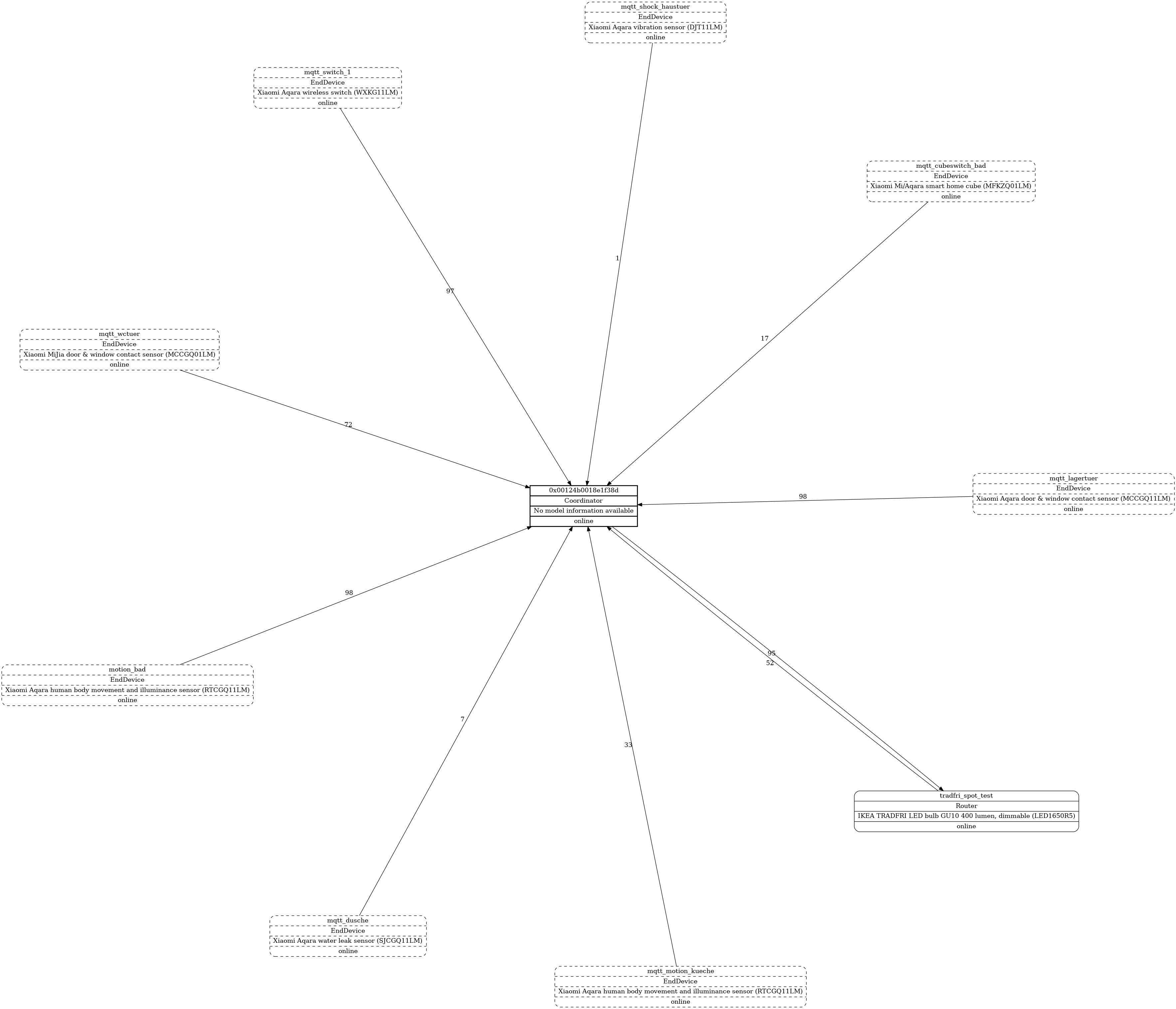
I don't know if that helps to catch the issue. But i had a very well working setup with Z2M v1.3.1 and CC2531 firmware 20190223.
After i've upgraded my stick to latest firmware (CC2531_20190425) and Z2M v1.4.0 my OpenHAB2 installation reports many errors for sensors which worked without any issue before. My Zigbee map worked before and is also broken now.
Executing the JSONPATH-transformation failed: Invalid path '$.voltage' in '{"illuminance":60,"linkquality":26,"occupancy":true}'
It seems that the new Z2M v1.4.0 cuts off some of the meta data like voltage, battery, etc.
Z2M v1.4.0 reports this values at a specific intervall but not with every state change.
Reflashing CC2531 firmware 20190223 doesn't fix the issue. Is it possible to downgrade to Z2M v1.3.1 without further problems?
The working map before the upgrade:
 alpenhase83
on 26 May 2019
alpenhase83
on 26 May 2019
@Koenkk seems some of the network scan code transplanted from zigbee-shepherd to zigbee2mqtt isn't behaving. https://github.com/Koenkk/zigbee2mqtt/blob/caff94559ecc942e5b65e7ba3b7f099d1e4eb1cc/lib/zigbee.js#L315
I get this value for every childDev:
5/29/2019, 8:28:06 AM - debug: childDev: [Circular]
So the status isn't being set properly in the scan. However, for graphviz maps this status value is ignored and replaced when the map is generated from the topology. My proposal would be to simply remove the status from network scan in zigbee.js which would only affect raw maps. Would that be a concern?
Replicating some of the code from graphviz could add the status back into raw maps if it was necessary.
clockbrain
on 29 May 2019
No that's not a concern.
Note that now all network scans are executed simultaneously which can cause a burst of zigbee commands (e.g. when having a network with 20 routers, 20 lqi scans are executed at the same time). I would recommend adding the scan requests to the queue instead (e.g. https://github.com/Koenkk/zigbee2mqtt/blob/master/lib/zigbee.js#L311). This should make things more reliable.
Koenkk
on 29 May 2019
@Koenkk Ok, I'm starting to have a look at converting the code to use the queue but its tricky as the network scan is built on layers of promise style code and inserting a callback style queue in the middle isn't straightforward. Any chance a random up to 2 second delay for each scan would suffice? That would spread the network requests.
clockbrain
on 31 May 2019
@Koenkk I've posted https://github.com/Koenkk/zigbee2mqtt/pull/1590 using random delayed start times for the network map scans which hopefully avoids network congestion. This is until I can figure out how to properly integrate with the queue system.
clockbrain
on 2 Jun 2019
With https://github.com/Koenkk/zigbee2mqtt/pull/1590 (dev branch) my network map looks much-much better. Thanks
 dh-harald
on 7 Jun 2019
dh-harald
on 7 Jun 2019
@Koenkk I've had some device routing issues which manifest themselves as network map issues. Something (?? not sure but maybe a ping) disrupted all my routers. After re-pairing them, and re-flashing the cc2531 I noticed all my devices worked but some weren't linked on the map.
Here's the type of result I get from a network lqi scan
{"ieeeAddr":"0x0000000000000000","nwkAddr":19144,"lqi":16,"depth":255,"parent":"0x00124b0012023238"}
The neighbor table on the coordinator has forgotten the 64 bit ieee address of the device and set it all to zeros. The 16 bit short address is still good though and that would be why the device still works. I got these orphan devices linked again in my network map by changing the loop filter https://github.com/Koenkk/zigbee2mqtt/blob/8ad6aee43a79a6fe59e687836928c5d942022d18/lib/extension/networkMap.js#L90
to also check the short network address
topology.filter((e) => (e.ieeeAddr === device.ieeeAddr) || (e.nwkAddr === device.nwkAddr)).forEach((e) => {
Do you think it appropriate to include this network map work around or would it be better to somehow detect and repair the ieee address. I have no idea where to start with that. (Yes I could just re-pair the end device but since I am not sure what caused it to forget it I wanted to keep one device at zeros for testing).
clockbrain
on 7 Jun 2019
@clockbrain I think a match based on the short network address is also OK (because it's also unique).
Koenkk
on 8 Jun 2019
@Koenkk PR https://github.com/Koenkk/zigbee2mqtt/pull/1611 does this short address matching.
clockbrain
on 9 Jun 2019
@Koenkk PR https://github.com/Koenkk/zigbee2mqtt/pull/1626 is a rewrite of network map scan to use the queue. It would be great if you could review the code or test before merging as it is a total rewrite and I can only test to a limited degree on my small network.
clockbrain
on 12 Jun 2019
Call for ideas - there's still a few things bothering me about the network map that I am looking into.
The direction of the arrows may not be correct. #1674 mentions this but that relates to master rather than dev which now has the direction reversed. In particular, link quality is measured at the receiving end of a link but routes on the network are a transmit side attribute. So, how to represent these both on the same map?
Also, if the network scan fails this isn't explicitly shown on the map and can leave people wondering if there map is or isn't complete. Failed scan indications would be per router so a simple approach would be another text note within the node. Any other ideas on how to represent a failed lqi or failed route scan on the map? Colouring?
clockbrain
on 29 Jun 2019
@clockbrain I am using dev version, the map looks much nicer now, I am curious what are those different kind of connections (solid, dashed, dotted)? And which nodes are shown in brackets as part of the label for connections?
milakov
on 29 Jun 2019
@milakov there are some more changes pending in PR #1676 which should improve the map further.
A description of what the map formatting signifies has been added to dev documentation https://github.com/Koenkk/zigbee2mqtt.io/blob/dev/information/mqtt_topics_and_message_structure.md which states:
The graphviz map shows the devices as follows:
- Coordinator : rectangle with bold outline
- Router : rectangle with rounded corners
- End device : rectangle with rounded corners and dashed outline
Links are labelled with link quality (0..255) and active routes (listed by short 16 bit destination address). Arrow indicates direction of messaging. Coordinator and routers will typically have two lines for each connection showing bi-directional message path. Line style is:
- To end devices : dashed lines (signifying message is retrieved by end device when it wakes)
- To and between coordinator and routers : solid line for active routes or dotted line for no active routes
The routes listed in brackets on each link are the short 16 bit addresses of ultimate destination devices for which traffic will traverse that link. Short addresses are shown in the device box alongside the full 64 bit ieee address. I find that routes build and repair over time so refreshing the map 5 or 10 minutes or longer after a restart will show a fuller set of routes than first appears. End devices don't have any routes so will always have an empty set of brackets.
Perhaps we should add a legend in the corner of each map listing these box and line styles. But I don't know how to do that in graphviz.
clockbrain
on 29 Jun 2019
@clockbrain Thank you! See below what I have, check the label I circled with red. First, it has 0x727, which is absent in the network, and 2) 0x62bc, which is actually the source.
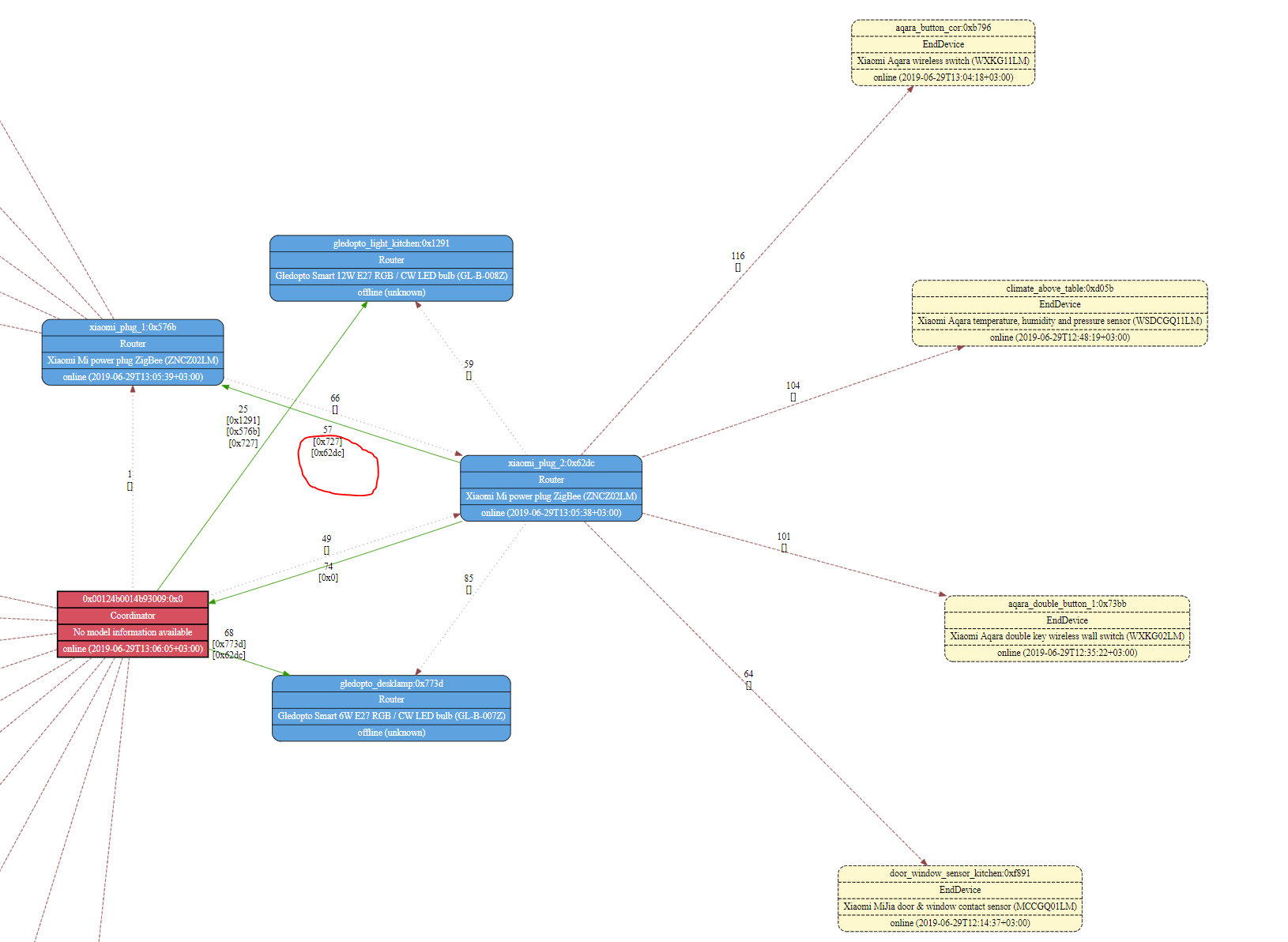
What do you think about removing empty brackets?
milakov
on 29 Jun 2019
@milakov Yeah the direction of links was a bit muddled in the dev version of network map. Should be fixed in the pending PR.
I've also removed the empty brackets at your suggestion. Thanks.
clockbrain
on 29 Jun 2019
Perhaps we should add a legend in the corner of each map listing these box and line styles. But I don't know how to do that in graphviz.
Really digging that idea to make the graph self explanatory! You could use a subgraph to render such a legend.
subgraph clusterLegend {
label = <<i>Links have different formatting and are labelled with link quality (0-255) and active routes (listed by short 16 bit destination address).<br/>Arrow indicates direction of messaging. Coordinator and routers will typically have two lines for each connection showing bi-directional message path.<br/>See colors and formatting in the example above.</i>>;
labelloc = "b";

node[shape=box];
{ rank=min; "router1" "coordinator" "router2";}
{ rank=min; "enddevice";}

"coordinator" [pos="0,0", style="bold, filled", fillcolor="#990000", fontcolor="#ffffff", label="Coordinator:0x0"];
"router1" [pos="0,0", style="rounded, filled", fillcolor="#4ea3e0", fontcolor="#ffffff", label="Router:0x481"];
"router2" [pos="0,0", style="rounded, filled", fillcolor="#4ea3e0", fontcolor="#ffffff", label="Router:0x732"];
"enddevice" [pos="0,0", style="rounded, dashed, filled", fillcolor="#fff8ce", fontcolor="#000000", label="EndDevice:0x654"];

"coordinator" -> "router1" [weight=1, color="#009900", label="active"]
"router1" -> "router2" [style="dotted", weight=0, color="#994444", label="inactive"]
"router1"-> "enddevice" [style="rounded, dashed, filled", fillcolor="#fff8ce", fontcolor="#000000", label="message is retrieved when end device wakes"]
}
Would look like this: https://postimg.cc/303523Sq
I'd also propose to remove the node-row for device type (coordinator, router, enddevice) as this is already depicted by the formatting and then explained in the legend. And I'd rather see the route ID in a separate row rather than suffixed at the end of the device name.
So something like this:
"0x000b57f111111111" [style="rounded, filled", fillcolor="#4ea3e0", fontcolor="#ffffff", label="{Device Name|0x1234|IKEA TRADFRI LED bulb E27 1000 lumen, dimmable, opal white (LED1623G12)|online (2019-06-29T14:59:40+02:00)}"];
 andreasbrett
on 29 Jun 2019
andreasbrett
on 29 Jun 2019
@andreasbrett That subgraph legend looks promising however I get this error using webgraphviz:
Warning: Not built with libexpat. Table formatting is not available. in label of graph clusterLegend
I guess that can be fixed by omitting the html formatting but I also don't know that the positioning is ideal. I'd rather the legend be in a corner or at least very distinct from the main graph but from what I've read positioning in graphviz is problematic. Anyone else have ideas for that?
In the meantime I've followed your suggestion about omitting device type and moving short address to the second row. I also sorted the route addresses for each link so they are easier to find. See latest commit to PR #1676
clockbrain
on 30 Jun 2019
The direction of the arrows may not be correct. #1674 mentions this but that relates to master rather than dev which now has the direction reversed.
Just to be clear, 1674 is about the wrong values being set as linkquality when there are multiple routers. Even without the graph, just looking at the periodic status messages, the values are wrong. (I haven't tried on dev; this is from master only)
 mikeage
on 30 Jun 2019
mikeage
on 30 Jun 2019
I guess that can be fixed by omitting the html formatting
Exactly. libexpat is used for parsing the xml/html content in the text. But this is just for rendering the graph, so I'm not sure if this client-side requirement should stop us from generating graphviz data that requires this functionality for final rendering.
Regarding positioning. That's a beast with graphviz and not something that can be done easily. I think if we used the subgraphs feature more widely it could be done. So what we could do is generate a subgraph for the legend and another subgraph for the actual network map. I think we should then be able to define how those are placed but then again this is highly dependent of the rendering type (dot vs circo vs neato...).
Found this great online graphviz renderer that helps in quickly checking out the syntax and results:
https://dreampuf.github.io/GraphvizOnline/
andreasbrett
on 30 Jun 2019
I am running dev branch. And I see a lot of messages like
Jul 09 17:29:18 hass npm[7100]:   zigbee2mqtt:warn 7/9/2019, 5:29:18 PM Ignoring late network rtg scan result for: '0x000b57fffe8a44bb'
Jul 09 17:29:18 hass npm[7100]:   zigbee2mqtt:warn 7/9/2019, 5:29:18 PM Ignoring late network lqi scan result for: '0x000d6ffffede7185'
Jul 09 17:29:18 hass npm[7100]:   zigbee2mqtt:warn 7/9/2019, 5:29:18 PM Ignoring late network lqi scan result for: '0x00158d0002ede375'
Jul 09 17:29:18 hass npm[7100]:   zigbee2mqtt:warn 7/9/2019, 5:29:18 PM Ignoring late network rtg scan result for: '0x000b57fffeb22824'
Jul 09 17:29:18 hass npm[7100]:   zigbee2mqtt:warn 7/9/2019, 5:29:18 PM Ignoring late network rtg scan result for: '0x000d6ffffede7185'
Jul 09 17:29:19 hass npm[7100]:   zigbee2mqtt:warn 7/9/2019, 5:29:19 PM Ignoring late network lqi scan result for: '0x00158d000302df88'
Jul 09 17:29:19 hass npm[7100]:   zigbee2mqtt:warn 7/9/2019, 5:29:19 PM Ignoring late network lqi scan result for: '0x000b57fffea1e56a'
Jul 09 17:29:19 hass npm[7100]:   zigbee2mqtt:warn 7/9/2019, 5:29:19 PM Ignoring late network rtg scan result for: '0x000b57fffea1e56a'
Jul 09 17:29:19 hass npm[7100]:   zigbee2mqtt:warn 7/9/2019, 5:29:19 PM Ignoring late network lqi scan result for: '0x000d6ffffeb1c9e7'
After map is already returned. It would simple, if it were indeed timeouts, but...
I see in sniffer that requests to those devices come AFTER network map is already returned, and they respond immediately.
 antst
on 9 Jul 2019
antst
on 9 Jul 2019
Just in case, there are 37 devices on the network.
antst
on 9 Jul 2019
You should also be seeing some notes on each router on the map that missed out on the scan, i.e. "no lqi scan" and/or "no rtg scan". This helps show which parts of the map are incomplete.
Network map allocates one second for each router but has to do 2 scans for each of them so this might get tight with the default queue delay set to 250ms. The log messages are when a router hasn't returned its scan result but the overall timeout has been reached and the map generated.
If you are seeing immediate responses in the sniffer but they get missed in the scan due to timeout those responses must be caught up in the queue.
Can you try either adjusting the 1000ms scan timeout factor here in the code https://github.com/Koenkk/zigbee2mqtt/blob/08c0f2b614fbb4a2df8ab09f44eca62779c55dd6/lib/zigbee.js#L458 or you might be able to decrease the default 250ms queue delay in configuration.yaml (if I understand how settings works here https://github.com/Koenkk/zigbee2mqtt/blob/08c0f2b614fbb4a2df8ab09f44eca62779c55dd6/lib/util/settings.js#L38).
clockbrain
on 9 Jul 2019
Problem is that it didn't even requested before overall time-out reached and map is delivered :)
I see in sniffer that request to this devices (and others) happens already after it delivered maps to MQTT ).
BTW, approximately 15-20 of devices are routers.
"delay" in my case is not 250 but rather 50 (I have CC2538 as router and it is capable of holding this rate and I have larger buffers in firmware)
I will try to increase 1000ms.
antst
on 9 Jul 2019
5000ms did the trick.
Butt it is strange. Why soo long.
With 200 devices it will take ages )
This queries are happening in parallel, isn't it?
I don't see how with 40 devices it can take soo long, even if half of them a blocking with timeout.
From what I see, 10 devices were time-outed. (most likely, those were legal time-outs as devices don't support this and 2 of them were definitely off) could the normally block queue for time of scan, if timeout is 40 sec (as per default 40devices*1000ms), and queue size is 5? This means that per devices time-out (LQI+RTG) is 20sec (then 10 ill devices can block queue completely). What is individual time-out per LQI/RTG scan in the code?
Do we really need to wait for replies, before sending more requests to other devices?
antst
on 10 Jul 2019
No, we don't wait for replies before sending next request. All requests are added to the queue at the same time but the queue releases them at the specified delay rate. Problem is network map timeout timer starts when requests are added to the queue rather than once all requests have left the queue.
I'll have a look at it and see if it can be changed to start timer after all requests have been initiated.
clockbrain
on 10 Jul 2019
Something does not add app here. With such long delay, it still timeouts few routers.
And, I see in sniffer, that time for both (LQI and RTG) requests/replies per device is about 500ms. Queue delay in my case is 50ms. So, this number mostly driven by delay (there are quite few requests per device, as routing and LQI tables are transferred by chunks with intermediate requests, at least according to sniffer).
500*40/5 = 4 seconds. Let's assume queue is busy with stuff not related to network scan, then it tops at 10 seconds.
And in reality it takes 100 seconds before it starts network scan and message about skipping outstanding scans.
Something is not correct here architecturally, either in networks scans, or in queue handling.
BTW, I don't get even single error 17, which means that my 50ms delay is more than enough.
antst
on 10 Jul 2019
Addition. In total, over single scan, router produced 220 ZDP requests.
And they were pushed put over 22 seconds.
This is data from sniffer.
Which is precisely fits theoretical value (220reqs*50ms/5queue_size)=2200ms.
Analysing the log:
devices which validly time-outed, did within first 20 seconds of network scan.
But there is a something strange for 1 minute after that and before network map time-outs itself.
antst
on 10 Jul 2019
If you didn't catch it, there is a question.If all requests were pushed over 2.2 seconds, and most of them replied immediately, then why some scans were time-outed after 1s, some after 10 secs, and some were skipped as outstanding in 100 secs. if timeout after request is 1s, then how some of them can live for 100s?
And side-note, I can't imagine how people live with 250ms delays in the queue )))
I am trying to rework firmware and queue in the way, that delay can be pushed safely to even lower 5ms (at max!), but this is low priority task at the moment.
antst
on 10 Jul 2019
There is only a single timeout for the entire network map. It is a single figure calculated by number of routers * 1000ms. Any responses after that time get reported as missed scans.
There can be individual timeouts for each request/response but that happens elsewhere in a different layer of the code. I think it is 10 seconds as I have seen such timeouts before but I don't know where that limit is set.
I don't know how an individual request could live for 100secs after it has been sent from the queue. Unless some device types ignore the 10sec general timeout setting?
clockbrain
on 10 Jul 2019
I guess I have to profile timings on MQTT and in Wireshark more closely, to get full picture.
antst
on 10 Jul 2019
And I have very strange suspicion.
Looks like some of my aqara switches go off itself during scanning of network map.
It was every 20 min. I changed period to 2 hours, will see, how it will behave now.
antst
on 10 Jul 2019
This issue has been automatically marked as stale because it has not had recent activity. It will be closed if no further activity occurs. Thank you for your contributions.
stale[bot]
on 8 Sep 2019
Related issues
 Underknowledge
·
4Comments
Underknowledge
·
4Comments
 jerrychong25
·
4Comments
jerrychong25
·
4Comments
 tb-killa
·
3Comments
tb-killa
·
3Comments
 sylarevan
·
5Comments
sylarevan
·
5Comments
 LCerebo
·
3Comments
LCerebo
·
3Comments
Most helpful comment
@Koenkk I've posted https://github.com/Koenkk/zigbee2mqtt/pull/1590 using random delayed start times for the network map scans which hopefully avoids network congestion. This is until I can figure out how to properly integrate with the queue system.