Zigbee2mqtt: IKEA Tradfri LED1623G12 - AF data request fails, status code: 233. MAC no ack
I have an IKEA Tradfri LED1623G12, which suddenly stopped working. When trying to change the state of the bulb I get the following error in the log:
zigbee2mqtt:error 2018-9-11 22:13:14 Zigbee publish to '0x000b57fffec2b95a', genOnOff - on - {} - null failed with error Error: AF data request fails, status code: 233. MAC no ack.
I have tried to remove and pair the bulb again and the funny thing is that it works when it is standing just next to the CC2531 router. But moving it 2 meters away it stops working and gives the error above. A range problem? But hopefully, 2 meters should not be a problem. Any suggestions?
Thank you
 tobang
All 84 comments
It looks like the router is not working correctly. When I turned it off and paired the bulb again, it paired with the coordinator. Moving it the 2 meters away as I mentioned before, apparently moved it out of range of the coordinator. Is there a way to see which devices are connected to the router and which are connected to the coordinator? How to I see if a router is working correctly?
Thank you
tobang
on 12 Sep 2018
Same issue here. zigbee2mqtt running on an Ubuntu. USB Zigbee stick with 2.4GHz external antenna. The bulb has to be within 1M from the coordinator for it to work :/
 tb205gti
on 15 Sep 2018
tb205gti
on 15 Sep 2018
Same issue: bulb is paired but same error at 1m or more
 gadaga
on 16 Sep 2018
gadaga
on 16 Sep 2018
I seem to be having the same issue, with the LED1536G5 bulb right now. I'm gonna try resetting the bulbs to reconnect them a couple of times, see if that has any bearing on the issue.
 smathev
on 27 Sep 2018
smathev
on 27 Sep 2018
Got it!
- put the bulb near the d'ongle (less than 1m)
- reset the bulb
- the bulb automatic pair with hassio
- you Can now put the bulb in the good place. ( I use it arround 10m)
gadaga
on 27 Sep 2018
Yeah, so my original problem was that they lost connection. So, I reset both of the disconnected bulbs, and now I just can't get them to pair. I've tried multiple times to reset the bulb (both 6, 7, 8 times flicking on and off - and then it gives a short off-blink and I leave the bulb turned on) - but nothing can get it to reconnect.
I've also tried removing them forcefully from zigbee2mqtt via zigbee2mqtt/bridge/config/remove, which at least was successful for one of the bulbs, the other one is still there no matter how many times I run the command. I get the "successfully removed" message from the broker/zigbee2mqtt logs - but running a zigbee2mqtt/bridge/networkmap still shows the bulb albeit offline even though it was just reset next to the sniffer. (right next to the sniffer meaning anywhere from 5cm to 1m)
Any ideas - maybe leave them turned off for a while?
smathev
on 28 Sep 2018
Currently facing this issue with a couple of bulbs.
zigbee2mqtt version 0.1.8 (commit #2e736bf)
Coordinator firmware version: '20181024' (the one optimized for bigger networks)
Here's the log:
https://hastebin.com/ekozeliwog.apache
and network map:
https://hastebin.com/tesihutuho.bash
Not experiencing any other errors, including error 205 which this newer firmware resolved.
Both bubls are paired in their current location and have been working for some days before, well, they didn't.
Edit: one of the bulbs, 0x000b57fffe978ad2, fixed itself after some hours.
Here's the current network, but I'm not sure if anything has changed.
https://hastebin.com/celumotuqi.bash
 Skeletorjus
on 7 Nov 2018
Skeletorjus
on 7 Nov 2018
@Skeletorjus can you try repairing that bulb?
 Koenkk
on 8 Nov 2018
Koenkk
on 8 Nov 2018
Yes, will do it this evening.
Is the preferred procedure to stop zigbee2mqtt, remove the lines referencing the bulb from database.db, restart zigbee2mqtt and repair it?
Skeletorjus
on 8 Nov 2018
I think that's not even needed, just factory reset the bulb.
Koenkk
on 8 Nov 2018
Alright, thanks, will give it a go and post the results.
The bulb that fixed itself (0x000b57fffe978ad2) has now stopped receiving commands again and is giving 233.
Interestingly, another bulb (0x000b57fffebeb9c7) started throwing the 205 error.
Skeletorjus
on 8 Nov 2018
@Skeletorjus My experience, once I solved it was that I needed more time between flipping the switch for the reset motion.
So, I counted "Mississippi" between each flip of the switch during the reset, IE. switch-flip, "1 Mississippi", switch-flip, "2 Mississippi", and so forth. That helped with resetting the bulb properly.
smathev
on 8 Nov 2018
Thanks, but i'm pretty much an expert at resetting bulbs at this point :-D
So, after repairing it is workin, but now a completely different bulb is giving me 183...
Skeletorjus
on 8 Nov 2018
Well, here's an update.
I had multiple 183's and long delays when commanding bulbs.
I stopped zigbee2mqtt, removed the CC2531, pushed the reset button a couple of times (does this do anything?), reinserted and restarted zigbee2mqtt.
183 errors gone, all lights working except the occasional 205 as the network propagated.
Edit: and it is VERY responsive!
Could this actually be a buffer issue?
Skeletorjus
on 8 Nov 2018
Thanks for all your hard work. I seem to have the same error after adding about 10 IKEA bulbs to my zigbee2mqtt installation. The network became very buggy with several lights giving the above error. Any tips how to fix it?
 socialstijn
on 18 Nov 2018
socialstijn
on 18 Nov 2018
Here same issue, After a power outage i'm unable to turn on/off IKEA lights resulting with an error code 233. Which is very annoying to not be able to turn on/off the lights... Using 0.2.0 of the zigbee2mqtt container deployed via docker. Have 2 other IKEA lights (LED1624G9 & LED1536G5) and those lights seemed to have less issues...
zigbee2mqtt:debug 2018-12-4 20:30:21 Received MQTT message on 'zigbee2mqtt/LED1_LED1536G5/set' with data '{"state":"ON"}'
zigbee2mqtt:info 2018-12-4 20:30:21 Zigbee publish to '0x90fd9ffffe878c07', genOnOff - on - {} - {"manufSpec":0,"disDefaultRsp":0} - null
zigbee2mqtt:error 2018-12-4 20:30:21 Zigbee publish to '0x90fd9ffffe878c07', genOnOff - on - {} - {"manufSpec":0,"disDefaultRsp":0} - null failed with error Error: AF data request fails, status code: 233. MAC no ack.
Tried re-pairing and all such things but no luck. Happens many times on every command ON or OFF and after 10 tries the light responds to the command.
Do we have any idea whats causing it?
- firmware of the IKEA lamp (Does it only affect IKEA lamps?)
- firmware of the zigbee stick (CC2531)
- zigbee-shepard
- some zigbee network rerouting or range issue?
I have no zigbee knowledge but to me it seems that the "MAC no ack" refers to acknowledgement of the zigbee device and that it didn't respond to command. Could be that the coordinator forget somehow the MAC(address) of the IKEA lamp? Or that the lamp with the issues is connected to another lamp which might be in some sleep mode?
Any ideas/tips to narrow down the problem?
 Finlandia
on 4 Dec 2018
Finlandia
on 4 Dec 2018
@Finlandia after a power outage, it may take some time to rebuild the zigbee network, most of the times waiting is enough.
Koenkk
on 5 Dec 2018
The error code 233 also appears after some successful commands to the Ikea light. I'm assuming that the network is rebuild by then?
It's really random when you receive the 233 error code, seconds later or minutes later it's fine and light turns on/off. But unusable when you have lights turned on/off at sunrise for example.
Finlandia
on 5 Dec 2018
@Finlandia are these bulbs located in distant locations? Sounds like a range issue.
Koenkk
on 5 Dec 2018
I have a similar issue, sometimes one of the LED1537R6 lamps does not respond, on a second attempt the lamp does turn on/off as requested.
Maybe relevant, the reported attributes differ. I am not sure it is always the same light failing.
 zigbee2mqtt:info 2018-12-8 00:13:58 MQTT publish, topic: 'zigbee2mqtt/<FAILING>', payload: '{"state":"ON","brightness":191,"color_temp":446,"color":{"x":0.46,"y":0.411}}'
 zigbee2mqtt:info 2018-12-8 00:13:59 MQTT publish, topic: 'zigbee2mqtt/<NOT FAILING>', payload: '{"state":"ON","color_temp":446,"brightness":191}'
 apeeters
on 8 Dec 2018
apeeters
on 8 Dec 2018
I have the same problem with an Osram Smart+ Plug:
Dec 22 16:32:30 openHABianPi npm[531]:   zigbee2mqtt:info 2018-12-22 16:32:30 Zigbee publish to '0x7cb03eaa00b0a9b2', genOnOff - on - {} - {"manufSpec":0,"disDefaultRsp":0} - null
Dec 22 16:32:31 openHABianPi npm[531]:   zigbee2mqtt:error 2018-12-22 16:32:31 Zigbee publish to '0x7cb03eaa00b0a9b2', genOnOff - on - {} - {"manufSpec":0,"disDefaultRsp":0} - null failed with error Error: AF data request fails, status code: 233. MAC no ack.
null failed with error Error: AF data request fails, status code: 233. MAC no ack.
Dec 22 16:33:04 openHABianPi npm[531]:   zigbee2mqtt:info 2018-12-22 16:33:04 Zigbee publish to '0x7cb03eaa00b0a9b2', genOnOff - off - {} - {"manufSpec":0,"disDefaultRsp":0} - null
Dec 22 16:33:05 openHABianPi npm[531]:   zigbee2mqtt:error 2018-12-22 16:33:05 Zigbee publish to '0x7cb03eaa00b0a9b2', genOnOff - off - {} - {"manufSpec":0,"disDefaultRsp":0} - null failed with error Error: AF data request fails, status code: 233. MAC no ack.
When I placed the plug into another outlet closer to the CC2531, it worked, so I thought it is a range problem. That's why I put a Philips Hue Bulb (not paired to the zigbee network but talking to a hue dimmer) next to it, which should act as a repeater. But I see no difference.
 hansblafoo
on 22 Dec 2018
hansblafoo
on 22 Dec 2018
@hansblafoo as far as I know only devices connected to the same Zigbee network act as routers (/repeaters).
 jorik90
on 24 Dec 2018
jorik90
on 24 Dec 2018
@jorik90 you are absolutely right! I managed to reset the Bulb, connected it to the Zigbee network and now, it works as a router which is also reported by zigbee2mqtt. My Osram plug works flawlessly now, so it is a range issue in my situation.
hansblafoo
on 24 Dec 2018
I'm having the same problem by the way. I have an CC2530 with an external antenna laying around, so I hope I can find some time to try changing to that in stead of the CC2531.
jorik90
on 24 Dec 2018
@jorik90 did you find some time to check out the CC2530 with the external antenna? Are the issues gone? Since I'm using the Hue bulb as router, my range issues are gone.
hansblafoo
on 3 Jan 2019
Yes I switched to the cc2530 with the cc something extra chip (from dealextreme). I've used it for around a week now and haven't seen any issues anymore. Seems like it's a range issues indeed. I did a clean install and re-paired everything, so there is a minor chance it was a configuration issue.
jorik90
on 3 Jan 2019
I have regular issues with my setup. Most of the time a few lamps fail to respond and result in error 233. After a while they sometimes recover by themselves, or I can usually fix them through power cycling, but then others start to fail.
I doubt it is a range issue since the failing lamps have another lamp within 20cm that works fine so they should be able to route through that one.
My network currently consists of
12 LED1537R6
2 LED1536G5
18 various Aqara sensors
Maybe I am running into memory limitations of CC2531? Im am running firmware CC2531ZNP-Prod_20181024.
apeeters
on 15 Jan 2019
Do you control them individually? (e.g. turn on 1 lamp, wait a few seconds, turn on other lamp).
Koenkk
on 16 Jan 2019
I haven't tried that yet. Usually control them per group (1-4 lamps), also tried controlling them sequentially, but without waiting a few seconds.
Waiting for the network to settle also does not seem to help: yesterday evening all LED1537R6 functioned, this morning errors started to occur again.
apeeters
on 16 Jan 2019
You should use group support if you want to control multiple lamps simultaneously, otherwise you will run into these kind of problems. https://github.com/Koenkk/zigbee2mqtt/blob/dev/docs/information/groups.md
Koenkk
on 16 Jan 2019
That worked really well, thanks! Groups even seems to work reliably than controlling individual lamps :)
apeeters
on 18 Jan 2019
I control single Tradfri bulb and still running to 233. MAC no ack from time to time. It seems that there is couple minutes long window, where all commands to this bulb fails, and after some time it starts to work again. There is no zigbee2mqtt restart or hardware turn off to bulb prior this outages. Any idea?
 kycera
on 25 Jan 2019
kycera
on 25 Jan 2019
Same here. All Xiaomi devices are working great, but some IKEA GU10 Tradfri bulbs are giving me 233 error. They are 2 meters away from the coordinator. I switch them on/off one by one in a scene with a delay of 1 second.
I will try to add an CC2531 router next to them later, maybe that will improve something.
 bizziebis
on 26 Jan 2019
bizziebis
on 26 Jan 2019
It could also be due to interference.
- Users have reported improved range/stability when using an USB extension cable instead of plugging the CC2531 directly into the PC
- Wifi interference, read: https://support.metageek.com/hc/en-us/articles/203845040-ZigBee-and-WiFi-Coexistence
Koenkk
on 26 Jan 2019
You should use group support if you want to control multiple lamps simultaneously, otherwise you will run into these kind of problems. https://github.com/Koenkk/zigbee2mqtt/blob/dev/docs/information/groups.md
@Koenkk I currently have an automation that should turn all lights off if some condition is met (for example if I'm not home). When I use this, or something like google assistant with "turn ALL lights off" zigbee2mqtt can't connect to the devices any longer. Is this somehow related to your answer from above?
2019-1-28 14:45:35 - info: MQTT publish: topic 'zigbee2mqtt/living_room_ceiling_mid_light/availability', payload 'online'
2019-1-28 14:45:50 - info: MQTT publish: topic 'zigbee2mqtt/living_room_ceiling_left_light/availability', payload 'online'
2019-1-28 14:45:53 - info: MQTT publish: topic 'zigbee2mqtt/living_room_ceiling_right_light/availability', payload 'online'
2019-1-28 14:45:57 - info: MQTT publish: topic 'zigbee2mqtt/stairs_light/availability', payload 'online'
2019-1-28 14:46:09 - info: Zigbee publish to device '0xd0cf5efffed828c3', genOnOff - off - {} - {"manufSpec":0,"disDefaultRsp":0} - null
2019-1-28 14:46:09 - info: MQTT publish: topic 'zigbee2mqtt/living_room_ceiling_left_light', payload '{"state":"OFF","brightness":254}'
2019-1-28 14:46:09 - info: Zigbee publish to device '0x000b57fffe30065f', genOnOff - off - {} - {"manufSpec":0,"disDefaultRsp":0} - null
2019-1-28 14:46:09 - info: Zigbee publish to device '0xd0cf5efffe72bffc', genOnOff - off - {} - {"manufSpec":0,"disDefaultRsp":0} - null
2019-1-28 14:46:09 - info: MQTT publish: topic 'zigbee2mqtt/stairs_light', payload '{"state":"OFF","brightness":254}'
2019-1-28 14:46:09 - info: Zigbee publish to group '1', genOnOff - off - {} - {"manufSpec":0,"disDefaultRsp":0} - null
2019-1-28 14:46:09 - info: Zigbee publish to device '0x90fd9ffffe32015e', genOnOff - off - {} - {"manufSpec":0,"disDefaultRsp":0} - null
2019-1-28 14:46:09 - info: MQTT publish: topic 'zigbee2mqtt/living_room_ceiling_right_light', payload '{"state":"OFF","brightness":254}'
2019-1-28 14:46:10 - info: Zigbee publish to device '0x000b57fffe30065f', genOnOff - off - {} - {"manufSpec":0,"disDefaultRsp":0} - null
2019-1-28 14:46:10 - info: Zigbee publish to device '0x90fd9ffffe32015e', genOnOff - off - {} - {"manufSpec":0,"disDefaultRsp":0} - null
2019-1-28 14:46:10 - info: MQTT publish: topic 'zigbee2mqtt/living_room_ceiling_mid_light', payload '{"state":"OFF","brightness":38}'
2019-1-28 14:46:10 - info: Zigbee publish to device '0xd0cf5efffed828c3', genOnOff - off - {} - {"manufSpec":0,"disDefaultRsp":0} - null
2019-1-28 14:46:10 - info: Zigbee publish to device '0xd0cf5efffe72bffc', genOnOff - off - {} - {"manufSpec":0,"disDefaultRsp":0} - null
2019-1-28 14:46:10 - info: Zigbee publish to group '1', genOnOff - off - {} - {"manufSpec":0,"disDefaultRsp":0} - null
2019-1-28 14:46:10 - info: MQTT publish: topic 'zigbee2mqtt/stairs_light', payload '{"state":"OFF","brightness":254}'
2019-1-28 14:46:10 - info: MQTT publish: topic 'zigbee2mqtt/living_room_ceiling_mid_light', payload '{"state":"OFF","brightness":38}'
2019-1-28 14:46:10 - info: MQTT publish: topic 'zigbee2mqtt/living_room_ceiling_left_light', payload '{"state":"OFF","brightness":254}'
2019-1-28 14:46:10 - info: MQTT publish: topic 'zigbee2mqtt/living_room_ceiling_left_light', payload '{"state":"OFF","brightness":254}'
2019-1-28 14:46:40 - error: Zigbee publish to device '0xd0cf5efffe72bffc', genOnOff - off - {} - {"manufSpec":0,"disDefaultRsp":0} - null failed with error Error: Timed out after 30000 ms
2019-1-28 14:46:41 - info: MQTT publish: topic 'zigbee2mqtt/living_room_ceiling_mid_light/availability', payload 'offline'
2019-1-28 14:46:59 - info: MQTT publish: topic 'zigbee2mqtt/living_room_ceiling_right_light/availability', payload 'offline'
2019-1-28 14:47:05 - info: MQTT publish: topic 'zigbee2mqtt/stairs_light/availability', payload 'offline'
2019-1-28 14:47:16 - info: MQTT publish: topic 'zigbee2mqtt/living_room_ceiling_left_light/availability', payload 'offline'
2019-1-28 14:47:47 - info: MQTT publish: topic 'zigbee2mqtt/living_room_ceiling_mid_light/availability', payload 'offline'
2019-1-28 14:48:05 - info: MQTT publish: topic 'zigbee2mqtt/living_room_ceiling_right_light/availability', payload 'offline'
 Bruceforce
on 28 Jan 2019
Bruceforce
on 28 Jan 2019
@Bruceforce Yes, you should group them to avoid a lot of commands.
Koenkk
on 28 Jan 2019
@Koenkk thanks for your fast reply.
So your suggestion for turning all lights off, is to make a group in zigbee2mqtt which is called "all_lights", put all the lights in this group and then turn the group off?
Wouldn't it be possible for zigbee2mqtt to just put a short waiting period if it received too many signals at once to avoid such problems? This could cause a delay which would not be that nice, but at least in my opinion a delay would be better than complete outage. In my case to fix this behavior I have to replug mit CC2531.
Bruceforce
on 28 Jan 2019
@Bruceforce could you try the latest dev branch? This has a fixed delay of 100ms between every command.
Koenkk
on 28 Jan 2019
@Koenkk I'm using
koenkk/zigbee2mqtt latest-dev dfa63bfa6746 40 hours ago 124MB
so I think I already should be using the latest dev branch. I was also using this a few minutes ago when the issue occured.
Bruceforce
on 28 Jan 2019
@Bruceforce can you check if this still occurs with zigbee2mqtt 1.1 and the latest coordinator firmware (20190109)?
Koenkk
on 30 Jan 2019
@Koenkk unfortunately this is still not working. I tried to turn all lights off and on again with google assistant
2019-1-30 09:50:46 - info: Logging to directory: '/app/data/log/2019-01-30.09-50-46'
2019-1-30 09:50:46 - info: Starting zigbee2mqtt version 1.1.0 (commit #cf7e0d1)
2019-1-30 09:50:46 - info: Starting zigbee-shepherd
2019-1-30 09:50:50 - info: zigbee-shepherd started
2019-1-30 09:50:50 - info: Coordinator firmware version: '20190109'
2019-1-30 09:50:50 - info: Currently 5 devices are joined:
2019-1-30 09:50:50 - info: stairs_light (0x000b57fffe30065f): LED1623G12 - IKEA TRADFRI LED bulb E27 1000 lumen, dimmable, opal white (Router)
2019-1-30 09:50:50 - info: living_room_ceiling_mid_light (0x90fd9ffffe32015e): LED1650R5 - IKEA TRADFRI LED bulb GU10 400 lumen, dimmable (Router)
2019-1-30 09:50:50 - info: living_room_ceiling_left_light (0xd0cf5efffed828c3): LED1650R5 - IKEA TRADFRI LED bulb GU10 400 lumen, dimmable (Router)
2019-1-30 09:50:50 - info: living_room_ceiling_right_light (0xd0cf5efffe72bffc): LED1650R5 - IKEA TRADFRI LED bulb GU10 400 lumen, dimmable (Router)
2019-1-30 09:50:50 - info: tradfri_dimmer1 (0x000b57fffe15051e): ICTC-G-1 - IKEA TRADFRI wireless dimmer (EndDevice)
2019-1-30 09:50:50 - info: Zigbee: disabling joining new devices.
2019-1-30 09:50:50 - info: Connecting to MQTT server at mqtt://mosquitto:1883
2019-1-30 09:50:50 - info: zigbee-shepherd ready
2019-1-30 09:50:50 - info: Connected to MQTT server
2019-1-30 09:50:50 - info: MQTT publish: topic 'zigbee2mqtt/bridge/state', payload 'online'
2019-1-30 09:50:50 - info: MQTT publish: topic 'zigbee2mqtt/stairs_light', payload '{"state":"OFF","brightness":254}'
2019-1-30 09:50:50 - info: MQTT publish: topic 'zigbee2mqtt/living_room_ceiling_mid_light', payload '{"state":"OFF","brightness":38}'
2019-1-30 09:50:50 - info: MQTT publish: topic 'zigbee2mqtt/living_room_ceiling_left_light', payload '{"state":"OFF","brightness":254}'
2019-1-30 09:50:50 - info: MQTT publish: topic 'zigbee2mqtt/living_room_ceiling_right_light', payload '{"state":"OFF","brightness":254}'
2019-1-30 09:50:50 - info: MQTT publish: topic 'zigbee2mqtt/tradfri_dimmer1', payload '{"brightness":255,"linkquality":39,"battery":16}'
2019-1-30 09:50:50 - info: MQTT publish: topic 'homeassistant/light/0x000b57fffe30065f/light/config', payload '{"brightness":true,"schema":"json","command_topic":"zigbee2mqtt/stairs_light/set","state_topic":"zigbee2mqtt/stairs_light","name":"stairs_light_light","unique_id":"0x000b57fffe30065f_light_zigbee2mqtt","device":{"identifiers":"zigbee2mqtt_0x000b57fffe30065f","name":"stairs_light","sw_version":"Zigbee2mqtt 1.1.0","model":"TRADFRI LED bulb E27 1000 lumen, dimmable, opal white (LED1623G12)","manufacturer":"IKEA"},"availability_topic":"zigbee2mqtt/stairs_light/availability"}'
2019-1-30 09:50:50 - info: MQTT publish: topic 'homeassistant/light/0x90fd9ffffe32015e/light/config', payload '{"brightness":true,"schema":"json","command_topic":"zigbee2mqtt/living_room_ceiling_mid_light/set","state_topic":"zigbee2mqtt/living_room_ceiling_mid_light","name":"living_room_ceiling_mid_light_light","unique_id":"0x90fd9ffffe32015e_light_zigbee2mqtt","device":{"identifiers":"zigbee2mqtt_0x90fd9ffffe32015e","name":"living_room_ceiling_mid_light","sw_version":"Zigbee2mqtt 1.1.0","model":"TRADFRI LED bulb GU10 400 lumen, dimmable (LED1650R5)","manufacturer":"IKEA"},"availability_topic":"zigbee2mqtt/living_room_ceiling_mid_light/availability"}'
2019-1-30 09:50:50 - info: MQTT publish: topic 'homeassistant/light/0xd0cf5efffed828c3/light/config', payload '{"brightness":true,"schema":"json","command_topic":"zigbee2mqtt/living_room_ceiling_left_light/set","state_topic":"zigbee2mqtt/living_room_ceiling_left_light","name":"living_room_ceiling_left_light_light","unique_id":"0xd0cf5efffed828c3_light_zigbee2mqtt","device":{"identifiers":"zigbee2mqtt_0xd0cf5efffed828c3","name":"living_room_ceiling_left_light","sw_version":"Zigbee2mqtt 1.1.0","model":"TRADFRI LED bulb GU10 400 lumen, dimmable (LED1650R5)","manufacturer":"IKEA"},"availability_topic":"zigbee2mqtt/living_room_ceiling_left_light/availability"}'
2019-1-30 09:50:50 - info: MQTT publish: topic 'homeassistant/light/0xd0cf5efffe72bffc/light/config', payload '{"brightness":true,"schema":"json","command_topic":"zigbee2mqtt/living_room_ceiling_right_light/set","state_topic":"zigbee2mqtt/living_room_ceiling_right_light","name":"living_room_ceiling_right_light_light","unique_id":"0xd0cf5efffe72bffc_light_zigbee2mqtt","device":{"identifiers":"zigbee2mqtt_0xd0cf5efffe72bffc","name":"living_room_ceiling_right_light","sw_version":"Zigbee2mqtt 1.1.0","model":"TRADFRI LED bulb GU10 400 lumen, dimmable (LED1650R5)","manufacturer":"IKEA"},"availability_topic":"zigbee2mqtt/living_room_ceiling_right_light/availability"}'
2019-1-30 09:50:50 - info: MQTT publish: topic 'homeassistant/sensor/0x000b57fffe15051e/brightness/config', payload '{"unit_of_measurement":"brightness","icon":"mdi:brightness-5","value_template":"{{ value_json.brightness }}","state_topic":"zigbee2mqtt/tradfri_dimmer1","json_attributes_topic":"zigbee2mqtt/tradfri_dimmer1","name":"tradfri_dimmer1_brightness","unique_id":"0x000b57fffe15051e_brightness_zigbee2mqtt","device":{"identifiers":"zigbee2mqtt_0x000b57fffe15051e","name":"tradfri_dimmer1","sw_version":"Zigbee2mqtt 1.1.0","model":"TRADFRI wireless dimmer (ICTC-G-1)","manufacturer":"IKEA"},"availability_topic":"zigbee2mqtt/tradfri_dimmer1/availability"}'
2019-1-30 09:50:50 - info: MQTT publish: topic 'homeassistant/sensor/0x000b57fffe15051e/battery/config', payload '{"unit_of_measurement":"%","device_class":"battery","value_template":"{{ value_json.battery }}","state_topic":"zigbee2mqtt/tradfri_dimmer1","json_attributes_topic":"zigbee2mqtt/tradfri_dimmer1","name":"tradfri_dimmer1_battery","unique_id":"0x000b57fffe15051e_battery_zigbee2mqtt","device":{"identifiers":"zigbee2mqtt_0x000b57fffe15051e","name":"tradfri_dimmer1","sw_version":"Zigbee2mqtt 1.1.0","model":"TRADFRI wireless dimmer (ICTC-G-1)","manufacturer":"IKEA"},"availability_topic":"zigbee2mqtt/tradfri_dimmer1/availability"}'
2019-1-30 09:50:50 - info: MQTT publish: topic 'zigbee2mqtt/stairs_light/availability', payload 'online'
2019-1-30 09:50:50 - info: MQTT publish: topic 'zigbee2mqtt/living_room_ceiling_mid_light/availability', payload 'online'
2019-1-30 09:50:50 - info: MQTT publish: topic 'zigbee2mqtt/living_room_ceiling_left_light/availability', payload 'online'
2019-1-30 09:50:50 - info: MQTT publish: topic 'zigbee2mqtt/living_room_ceiling_right_light/availability', payload 'online'
2019-1-30 09:50:50 - info: MQTT publish: topic 'zigbee2mqtt/tradfri_dimmer1/availability', payload 'online'
2019-1-30 09:51:14 - info: MQTT publish: topic 'zigbee2mqtt/stairs_light', payload '{"state":"OFF","brightness":254}'
2019-1-30 09:51:14 - info: MQTT publish: topic 'zigbee2mqtt/living_room_ceiling_mid_light', payload '{"state":"OFF","brightness":38}'
2019-1-30 09:51:14 - info: MQTT publish: topic 'zigbee2mqtt/living_room_ceiling_left_light', payload '{"state":"OFF","brightness":254}'
2019-1-30 09:51:14 - info: MQTT publish: topic 'zigbee2mqtt/living_room_ceiling_right_light', payload '{"state":"OFF","brightness":254}'
2019-1-30 09:51:14 - info: MQTT publish: topic 'zigbee2mqtt/tradfri_dimmer1', payload '{"brightness":255,"linkquality":39,"battery":16}'
2019-1-30 09:51:14 - info: Zigbee publish to group '2', genLevelCtrl - moveToLevelWithOnOff - {"level":255,"transtime":0} - {"manufSpec":0,"disDefaultRsp":0} - null
2019-1-30 09:51:41 - error: Failed to configure tradfri_dimmer1 (0x000b57fffe15051e) ('Error: Timed out after 10000 ms')
2019-1-30 09:52:00 - info: MQTT publish: topic 'zigbee2mqtt/stairs_light/availability', payload 'offline'
2019-1-30 09:52:10 - info: MQTT publish: topic 'zigbee2mqtt/living_room_ceiling_mid_light/availability', payload 'offline'
2019-1-30 09:52:20 - info: MQTT publish: topic 'zigbee2mqtt/living_room_ceiling_left_light/availability', payload 'offline'
2019-1-30 09:52:30 - info: MQTT publish: topic 'zigbee2mqtt/living_room_ceiling_right_light/availability', payload 'offline'
2019-1-30 09:53:01 - info: Device incoming...
2019-1-30 09:53:01 - info: MQTT publish: topic 'zigbee2mqtt/bridge/log', payload '{"type":"pairing","message":"device incoming"}'
2019-1-30 09:53:06 - info: Device incoming...
2019-1-30 09:53:06 - info: MQTT publish: topic 'zigbee2mqtt/bridge/log', payload '{"type":"pairing","message":"device incoming"}'
2019-1-30 09:53:10 - info: Device incoming...
2019-1-30 09:53:10 - info: MQTT publish: topic 'zigbee2mqtt/bridge/log', payload '{"type":"pairing","message":"device incoming"}'
2019-1-30 09:53:10 - info: MQTT publish: topic 'zigbee2mqtt/stairs_light/availability', payload 'offline'
2019-1-30 09:53:35 - info: Zigbee: allowing new devices to join.
2019-1-30 09:53:35 - info: MQTT publish: topic 'zigbee2mqtt/bridge/config', payload '{"log_level":"info","permit_join":true}'
2019-1-30 09:53:52 - info: Device incoming...
2019-1-30 09:53:52 - info: MQTT publish: topic 'zigbee2mqtt/bridge/log', payload '{"type":"pairing","message":"device incoming"}'
2019-1-30 09:54:02 - info: MQTT publish: topic 'zigbee2mqtt/living_room_ceiling_mid_light/availability', payload 'online'
2019-1-30 09:54:06 - info: MQTT publish: topic 'zigbee2mqtt/living_room_ceiling_right_light/availability', payload 'online'
2019-1-30 09:54:10 - info: MQTT publish: topic 'zigbee2mqtt/living_room_ceiling_left_light/availability', payload 'online'
2019-1-30 09:54:52 - info: MQTT publish: topic 'zigbee2mqtt/stairs_light/availability', payload 'online'
2019-1-30 09:55:02 - info: MQTT publish: topic 'zigbee2mqtt/living_room_ceiling_mid_light/availability', payload 'online'
2019-1-30 09:55:06 - info: MQTT publish: topic 'zigbee2mqtt/living_room_ceiling_right_light/availability', payload 'online'
2019-1-30 09:55:10 - info: MQTT publish: topic 'zigbee2mqtt/living_room_ceiling_left_light/availability', payload 'online'
2019-1-30 09:58:52 - info: MQTT publish: topic 'zigbee2mqtt/stairs_light/availability', payload 'online'
2019-1-30 09:59:02 - info: MQTT publish: topic 'zigbee2mqtt/living_room_ceiling_mid_light/availability', payload 'online'
2019-1-30 09:59:06 - info: MQTT publish: topic 'zigbee2mqtt/living_room_ceiling_right_light/availability', payload 'online'
2019-1-30 09:59:10 - info: MQTT publish: topic 'zigbee2mqtt/living_room_ceiling_left_light/availability', payload 'online'
2019-1-30 09:59:52 - info: MQTT publish: topic 'zigbee2mqtt/stairs_light/availability', payload 'online'
2019-1-30 10:00:02 - info: MQTT publish: topic 'zigbee2mqtt/living_room_ceiling_mid_light/availability', payload 'online'
2019-1-30 10:00:03 - info: Zigbee: allowing new devices to join.
2019-1-30 10:00:03 - info: MQTT publish: topic 'zigbee2mqtt/bridge/config', payload '{"log_level":"info","permit_join":true}'
2019-1-30 10:00:06 - info: MQTT publish: topic 'zigbee2mqtt/living_room_ceiling_right_light/availability', payload 'online'
2019-1-30 10:00:10 - info: MQTT publish: topic 'zigbee2mqtt/living_room_ceiling_left_light/availability', payload 'online'
2019-1-30 10:00:41 - info: MQTT publish: topic 'zigbee2mqtt/stairs_light', payload '{"state":"OFF","brightness":254}'
2019-1-30 10:00:41 - info: MQTT publish: topic 'zigbee2mqtt/living_room_ceiling_mid_light', payload '{"state":"OFF","brightness":38}'
2019-1-30 10:00:41 - info: MQTT publish: topic 'zigbee2mqtt/living_room_ceiling_left_light', payload '{"state":"OFF","brightness":254}'
2019-1-30 10:00:41 - info: MQTT publish: topic 'zigbee2mqtt/living_room_ceiling_right_light', payload '{"state":"OFF","brightness":254}'
2019-1-30 10:00:41 - info: MQTT publish: topic 'zigbee2mqtt/tradfri_dimmer1', payload '{"brightness":255,"linkquality":39,"battery":16}'
2019-1-30 10:00:42 - info: Zigbee publish to group '2', genLevelCtrl - moveToLevelWithOnOff - {"level":255,"transtime":0} - {"manufSpec":0,"disDefaultRsp":0} - null
2019-1-30 10:00:52 - info: MQTT publish: topic 'zigbee2mqtt/stairs_light/availability', payload 'online'
2019-1-30 10:09:53 - info: MQTT publish: topic 'zigbee2mqtt/stairs_light/availability', payload 'online'
2019-1-30 10:10:03 - info: MQTT publish: topic 'zigbee2mqtt/living_room_ceiling_mid_light/availability', payload 'online'
2019-1-30 10:10:07 - info: MQTT publish: topic 'zigbee2mqtt/living_room_ceiling_right_light/availability', payload 'online'
2019-1-30 10:10:11 - info: MQTT publish: topic 'zigbee2mqtt/living_room_ceiling_left_light/availability', payload 'online'
2019-1-30 10:10:53 - info: MQTT publish: topic 'zigbee2mqtt/stairs_light/availability', payload 'online'
2019-1-30 10:11:03 - info: MQTT publish: topic 'zigbee2mqtt/living_room_ceiling_mid_light/availability', payload 'online'
2019-1-30 10:11:07 - info: MQTT publish: topic 'zigbee2mqtt/living_room_ceiling_right_light/availability', payload 'online'
2019-1-30 10:11:11 - info: MQTT publish: topic 'zigbee2mqtt/living_room_ceiling_left_light/availability', payload 'online'
2019-1-30 10:11:14 - info: Zigbee publish to group '2', genOnOff - off - {} - {"manufSpec":0,"disDefaultRsp":0} - null
2019-1-30 10:11:14 - info: Zigbee publish to device '0x000b57fffe30065f', genOnOff - off - {} - {"manufSpec":0,"disDefaultRsp":0} - null
2019-1-30 10:11:14 - info: MQTT publish: topic 'zigbee2mqtt/stairs_light', payload '{"state":"OFF","brightness":254}'
2019-1-30 10:11:14 - info: Zigbee publish to device '0x90fd9ffffe32015e', genOnOff - off - {} - {"manufSpec":0,"disDefaultRsp":0} - null
2019-1-30 10:11:15 - info: Zigbee publish to device '0xd0cf5efffed828c3', genOnOff - off - {} - {"manufSpec":0,"disDefaultRsp":0} - null
2019-1-30 10:11:15 - info: MQTT publish: topic 'zigbee2mqtt/living_room_ceiling_mid_light', payload '{"state":"OFF","brightness":38}'
2019-1-30 10:11:15 - info: Zigbee publish to device '0xd0cf5efffe72bffc', genOnOff - off - {} - {"manufSpec":0,"disDefaultRsp":0} - null
2019-1-30 10:11:15 - info: MQTT publish: topic 'zigbee2mqtt/living_room_ceiling_left_light', payload '{"state":"OFF","brightness":254}'
2019-1-30 10:11:15 - info: Zigbee publish to group '2', genOnOff - off - {} - {"manufSpec":0,"disDefaultRsp":0} - null
2019-1-30 10:11:15 - info: Zigbee publish to group '1', genOnOff - off - {} - {"manufSpec":0,"disDefaultRsp":0} - null
2019-1-30 10:11:15 - info: MQTT publish: topic 'zigbee2mqtt/living_room_ceiling_right_light', payload '{"state":"OFF","brightness":254}'
2019-1-30 10:11:15 - info: Zigbee publish to device '0x000b57fffe30065f', genOnOff - off - {} - {"manufSpec":0,"disDefaultRsp":0} - null
2019-1-30 10:11:15 - info: Zigbee publish to device '0xd0cf5efffed828c3', genOnOff - off - {} - {"manufSpec":0,"disDefaultRsp":0} - null
2019-1-30 10:11:15 - info: Zigbee publish to group '1', genOnOff - off - {} - {"manufSpec":0,"disDefaultRsp":0} - null
2019-1-30 10:11:15 - info: Zigbee publish to device '0xd0cf5efffe72bffc', genOnOff - off - {} - {"manufSpec":0,"disDefaultRsp":0} - null
2019-1-30 10:11:15 - info: MQTT publish: topic 'zigbee2mqtt/stairs_light', payload '{"state":"OFF","brightness":254}'
2019-1-30 10:11:15 - info: MQTT publish: topic 'zigbee2mqtt/stairs_light', payload '{"state":"OFF","brightness":254}'
2019-1-30 10:11:15 - info: MQTT publish: topic 'zigbee2mqtt/living_room_ceiling_left_light', payload '{"state":"OFF","brightness":254}'
2019-1-30 10:11:15 - info: Zigbee publish to device '0x90fd9ffffe32015e', genOnOff - off - {} - {"manufSpec":0,"disDefaultRsp":0} - null
2019-1-30 10:11:16 - info: MQTT publish: topic 'zigbee2mqtt/living_room_ceiling_right_light', payload '{"state":"OFF","brightness":254}'
2019-1-30 10:11:16 - info: MQTT publish: topic 'zigbee2mqtt/living_room_ceiling_mid_light', payload '{"state":"OFF","brightness":38}'
2019-1-30 10:11:16 - info: MQTT publish: topic 'zigbee2mqtt/living_room_ceiling_mid_light', payload '{"state":"OFF","brightness":38}'
2019-1-30 10:11:16 - info: MQTT publish: topic 'zigbee2mqtt/living_room_ceiling_left_light', payload '{"state":"OFF","brightness":254}'
2019-1-30 10:11:16 - info: MQTT publish: topic 'zigbee2mqtt/living_room_ceiling_right_light', payload '{"state":"OFF","brightness":254}'
2019-1-30 10:11:16 - info: MQTT publish: topic 'zigbee2mqtt/living_room_ceiling_left_light', payload '{"state":"OFF","brightness":254}'
2019-1-30 10:11:17 - info: MQTT publish: topic 'zigbee2mqtt/living_room_ceiling_right_light', payload '{"state":"OFF","brightness":254}'
2019-1-30 10:11:41 - info: Zigbee publish to group '2', genOnOff - on - {} - {"manufSpec":0,"disDefaultRsp":0} - null
2019-1-30 10:11:41 - info: Zigbee publish to device '0x000b57fffe30065f', genOnOff - on - {} - {"manufSpec":0,"disDefaultRsp":0} - null
2019-1-30 10:11:41 - info: MQTT publish: topic 'zigbee2mqtt/stairs_light', payload '{"state":"ON","brightness":254}'
2019-1-30 10:11:41 - info: Zigbee publish to group '2', genOnOff - on - {} - {"manufSpec":0,"disDefaultRsp":0} - null
2019-1-30 10:11:41 - info: Zigbee publish to group '1', genOnOff - on - {} - {"manufSpec":0,"disDefaultRsp":0} - null
2019-1-30 10:11:42 - info: Zigbee publish to device '0x000b57fffe30065f', genOnOff - on - {} - {"manufSpec":0,"disDefaultRsp":0} - null
2019-1-30 10:11:42 - info: Zigbee publish to device '0x90fd9ffffe32015e', genOnOff - on - {} - {"manufSpec":0,"disDefaultRsp":0} - null
2019-1-30 10:11:42 - info: MQTT publish: topic 'zigbee2mqtt/stairs_light', payload '{"state":"ON","brightness":254}'
2019-1-30 10:11:42 - info: Zigbee publish to device '0xd0cf5efffed828c3', genOnOff - on - {} - {"manufSpec":0,"disDefaultRsp":0} - null
2019-1-30 10:11:42 - info: MQTT publish: topic 'zigbee2mqtt/living_room_ceiling_mid_light', payload '{"state":"ON","brightness":38}'
2019-1-30 10:11:42 - info: Zigbee publish to device '0xd0cf5efffe72bffc', genOnOff - on - {} - {"manufSpec":0,"disDefaultRsp":0} - null
2019-1-30 10:11:42 - info: MQTT publish: topic 'zigbee2mqtt/stairs_light', payload '{"state":"ON","brightness":254}'
2019-1-30 10:11:42 - info: Zigbee publish to device '0xd0cf5efffed828c3', genOnOff - on - {} - {"manufSpec":0,"disDefaultRsp":0} - null
2019-1-30 10:11:42 - info: MQTT publish: topic 'zigbee2mqtt/living_room_ceiling_left_light', payload '{"state":"ON","brightness":254}'
2019-1-30 10:11:42 - info: Zigbee publish to group '1', genOnOff - on - {} - {"manufSpec":0,"disDefaultRsp":0} - null
2019-1-30 10:11:42 - info: Zigbee publish to device '0xd0cf5efffe72bffc', genOnOff - on - {} - {"manufSpec":0,"disDefaultRsp":0} - null
2019-1-30 10:11:42 - info: MQTT publish: topic 'zigbee2mqtt/living_room_ceiling_right_light', payload '{"state":"ON","brightness":254}'
2019-1-30 10:11:42 - info: MQTT publish: topic 'zigbee2mqtt/living_room_ceiling_left_light', payload '{"state":"ON","brightness":254}'
2019-1-30 10:11:42 - info: Zigbee publish to device '0x90fd9ffffe32015e', genOnOff - on - {} - {"manufSpec":0,"disDefaultRsp":0} - null
2019-1-30 10:11:51 - info: Zigbee publish to group '2', genOnOff - off - {} - {"manufSpec":0,"disDefaultRsp":0} - null
2019-1-30 10:11:51 - info: Zigbee publish to device '0x000b57fffe30065f', genOnOff - off - {} - {"manufSpec":0,"disDefaultRsp":0} - null
2019-1-30 10:11:51 - info: Zigbee publish to device '0x000b57fffe30065f', genOnOff - off - {} - {"manufSpec":0,"disDefaultRsp":0} - null
2019-1-30 10:11:51 - info: Zigbee publish to device '0x90fd9ffffe32015e', genOnOff - off - {} - {"manufSpec":0,"disDefaultRsp":0} - null
2019-1-30 10:11:51 - info: Zigbee publish to device '0xd0cf5efffed828c3', genOnOff - off - {} - {"manufSpec":0,"disDefaultRsp":0} - null
2019-1-30 10:11:51 - info: Zigbee publish to device '0xd0cf5efffe72bffc', genOnOff - off - {} - {"manufSpec":0,"disDefaultRsp":0} - null
2019-1-30 10:11:51 - info: Zigbee publish to group '2', genOnOff - off - {} - {"manufSpec":0,"disDefaultRsp":0} - null
2019-1-30 10:11:51 - info: Zigbee publish to group '1', genOnOff - off - {} - {"manufSpec":0,"disDefaultRsp":0} - null
2019-1-30 10:11:51 - info: Zigbee publish to device '0xd0cf5efffed828c3', genOnOff - off - {} - {"manufSpec":0,"disDefaultRsp":0} - null
2019-1-30 10:11:52 - info: Zigbee publish to group '1', genOnOff - off - {} - {"manufSpec":0,"disDefaultRsp":0} - null
2019-1-30 10:11:52 - info: Zigbee publish to device '0xd0cf5efffe72bffc', genOnOff - off - {} - {"manufSpec":0,"disDefaultRsp":0} - null
2019-1-30 10:11:52 - info: Zigbee publish to device '0x90fd9ffffe32015e', genOnOff - off - {} - {"manufSpec":0,"disDefaultRsp":0} - null
2019-1-30 10:11:54 - error: Zigbee publish to group '2', genOnOff - off - {} - {"manufSpec":0,"disDefaultRsp":0} - null failed with error Error: request timeout
2019-1-30 10:11:57 - error: Zigbee publish to device '0x000b57fffe30065f', genOnOff - off - {} - {"manufSpec":0,"disDefaultRsp":0} - null failed with error Error: request timeout
2019-1-30 10:12:00 - error: Zigbee publish to device '0x000b57fffe30065f', genOnOff - off - {} - {"manufSpec":0,"disDefaultRsp":0} - null failed with error Error: request timeout
2019-1-30 10:12:03 - error: Zigbee publish to device '0x90fd9ffffe32015e', genOnOff - off - {} - {"manufSpec":0,"disDefaultRsp":0} - null failed with error Error: request timeout
2019-1-30 10:12:06 - error: Zigbee publish to device '0xd0cf5efffed828c3', genOnOff - off - {} - {"manufSpec":0,"disDefaultRsp":0} - null failed with error Error: request timeout
2019-1-30 10:12:07 - info: Zigbee publish to device '0x000b57fffe30065f', genOnOff - off - {} - {"manufSpec":0,"disDefaultRsp":0} - null
2019-1-30 10:12:07 - info: Zigbee publish to device '0xd0cf5efffed828c3', genOnOff - off - {} - {"manufSpec":0,"disDefaultRsp":0} - null
2019-1-30 10:12:07 - info: Zigbee publish to group '1', genOnOff - off - {} - {"manufSpec":0,"disDefaultRsp":0} - null
2019-1-30 10:12:07 - info: Zigbee publish to device '0xd0cf5efffe72bffc', genOnOff - off - {} - {"manufSpec":0,"disDefaultRsp":0} - null
2019-1-30 10:12:07 - info: Zigbee publish to device '0x90fd9ffffe32015e', genOnOff - off - {} - {"manufSpec":0,"disDefaultRsp":0} - null
2019-1-30 10:12:07 - info: Zigbee publish to group '2', genOnOff - off - {} - {"manufSpec":0,"disDefaultRsp":0} - null
2019-1-30 10:12:07 - info: Zigbee publish to device '0x000b57fffe30065f', genOnOff - off - {} - {"manufSpec":0,"disDefaultRsp":0} - null
2019-1-30 10:12:07 - info: Zigbee publish to device '0x90fd9ffffe32015e', genOnOff - off - {} - {"manufSpec":0,"disDefaultRsp":0} - null
2019-1-30 10:12:07 - info: Zigbee publish to device '0xd0cf5efffed828c3', genOnOff - off - {} - {"manufSpec":0,"disDefaultRsp":0} - null
2019-1-30 10:12:07 - info: Zigbee publish to device '0xd0cf5efffe72bffc', genOnOff - off - {} - {"manufSpec":0,"disDefaultRsp":0} - null
2019-1-30 10:12:08 - info: Zigbee publish to group '2', genOnOff - off - {} - {"manufSpec":0,"disDefaultRsp":0} - null
2019-1-30 10:12:08 - info: Zigbee publish to group '1', genOnOff - off - {} - {"manufSpec":0,"disDefaultRsp":0} - null
2019-1-30 10:12:09 - error: Zigbee publish to device '0xd0cf5efffe72bffc', genOnOff - off - {} - {"manufSpec":0,"disDefaultRsp":0} - null failed with error Error: request timeout
2019-1-30 10:12:12 - error: Zigbee publish to group '2', genOnOff - off - {} - {"manufSpec":0,"disDefaultRsp":0} - null failed with error Error: request timeout
2019-1-30 10:12:12 - error: Zigbee publish to device '0xd0cf5efffe72bffc', genOnOff - on - {} - {"manufSpec":0,"disDefaultRsp":0} - null failed with error Error: Timed out after 30000 ms
2019-1-30 10:12:12 - error: Zigbee publish to device '0x90fd9ffffe32015e', genOnOff - on - {} - {"manufSpec":0,"disDefaultRsp":0} - null failed with error Error: Timed out after 30000 ms
2019-1-30 10:12:15 - error: Zigbee publish to group '1', genOnOff - off - {} - {"manufSpec":0,"disDefaultRsp":0} - null failed with error Error: request timeout
2019-1-30 10:12:18 - error: Zigbee publish to device '0xd0cf5efffed828c3', genOnOff - off - {} - {"manufSpec":0,"disDefaultRsp":0} - null failed with error Error: request timeout
2019-1-30 10:12:21 - error: Zigbee publish to group '1', genOnOff - off - {} - {"manufSpec":0,"disDefaultRsp":0} - null failed with error Error: request timeout
2019-1-30 10:12:22 - error: Zigbee publish to device '0xd0cf5efffe72bffc', genOnOff - off - {} - {"manufSpec":0,"disDefaultRsp":0} - null failed with error Error: Timed out after 30000 ms
2019-1-30 10:12:22 - error: Zigbee publish to device '0x90fd9ffffe32015e', genOnOff - off - {} - {"manufSpec":0,"disDefaultRsp":0} - null failed with error Error: Timed out after 30000 ms
2019-1-30 10:12:26 - info: MQTT publish: topic 'zigbee2mqtt/living_room_ceiling_mid_light/availability', payload 'offline'
2019-1-30 10:12:30 - error: Zigbee publish to device '0x000b57fffe30065f', genOnOff - off - {} - {"manufSpec":0,"disDefaultRsp":0} - null failed with error Error: request timeout
2019-1-30 10:12:33 - error: Zigbee publish to device '0xd0cf5efffed828c3', genOnOff - off - {} - {"manufSpec":0,"disDefaultRsp":0} - null failed with error Error: request timeout
2019-1-30 10:12:36 - info: MQTT publish: topic 'zigbee2mqtt/living_room_ceiling_left_light/availability', payload 'offline'
2019-1-30 10:12:36 - error: Zigbee publish to group '1', genOnOff - off - {} - {"manufSpec":0,"disDefaultRsp":0} - null failed with error Error: request timeout
2019-1-30 10:12:37 - error: Zigbee publish to device '0xd0cf5efffe72bffc', genOnOff - off - {} - {"manufSpec":0,"disDefaultRsp":0} - null failed with error Error: Timed out after 30000 ms
2019-1-30 10:12:37 - error: Zigbee publish to device '0x90fd9ffffe32015e', genOnOff - off - {} - {"manufSpec":0,"disDefaultRsp":0} - null failed with error Error: Timed out after 30000 ms
2019-1-30 10:12:37 - error: Zigbee publish to device '0x000b57fffe30065f', genOnOff - off - {} - {"manufSpec":0,"disDefaultRsp":0} - null failed with error Error: Timed out after 30000 ms
2019-1-30 10:12:37 - error: Zigbee publish to device '0x90fd9ffffe32015e', genOnOff - off - {} - {"manufSpec":0,"disDefaultRsp":0} - null failed with error Error: Timed out after 30000 ms
2019-1-30 10:12:37 - error: Zigbee publish to device '0xd0cf5efffed828c3', genOnOff - off - {} - {"manufSpec":0,"disDefaultRsp":0} - null failed with error Error: Timed out after 30000 ms
2019-1-30 10:12:37 - error: Zigbee publish to device '0xd0cf5efffe72bffc', genOnOff - off - {} - {"manufSpec":0,"disDefaultRsp":0} - null failed with error Error: Timed out after 30000 ms
2019-1-30 10:12:45 - error: Zigbee publish to group '2', genOnOff - off - {} - {"manufSpec":0,"disDefaultRsp":0} - null failed with error Error: request timeout
2019-1-30 10:12:46 - info: MQTT publish: topic 'zigbee2mqtt/living_room_ceiling_right_light/availability', payload 'offline'
2019-1-30 10:12:56 - info: MQTT publish: topic 'zigbee2mqtt/stairs_light/availability', payload 'offline'
2019-1-30 10:13:00 - error: Zigbee publish to group '2', genOnOff - off - {} - {"manufSpec":0,"disDefaultRsp":0} - null failed with error Error: request timeout
2019-1-30 10:13:03 - error: Zigbee publish to group '1', genOnOff - off - {} - {"manufSpec":0,"disDefaultRsp":0} - null failed with error Error: request timeout
2019-1-30 10:13:33 - info: MQTT publish: topic 'zigbee2mqtt/living_room_ceiling_mid_light/availability', payload 'offline'
2019-1-30 10:13:42 - info: MQTT publish: topic 'zigbee2mqtt/living_room_ceiling_left_light/availability', payload 'offline'
2019-1-30 10:13:52 - info: MQTT publish: topic 'zigbee2mqtt/living_room_ceiling_right_light/availability', payload 'offline'
2019-1-30 10:14:02 - info: MQTT publish: topic 'zigbee2mqtt/stairs_light/availability', payload 'offline'
2019-1-30 10:14:39 - info: MQTT publish: topic 'zigbee2mqtt/living_room_ceiling_mid_light/availability', payload 'offline'
2019-1-30 10:14:48 - info: MQTT publish: topic 'zigbee2mqtt/living_room_ceiling_left_light/availability', payload 'offline'
2019-1-30 10:14:58 - info: MQTT publish: topic 'zigbee2mqtt/living_room_ceiling_right_light/availability', payload 'offline'
2019-1-30 10:15:08 - info: MQTT publish: topic 'zigbee2mqtt/stairs_light/availability', payload 'offline'
2019-1-30 10:15:45 - info: MQTT publish: topic 'zigbee2mqtt/living_room_ceiling_mid_light/availability', payload 'offline'
2019-1-30 10:15:54 - info: MQTT publish: topic 'zigbee2mqtt/living_room_ceiling_left_light/availability', payload 'offline'
2019-1-30 10:16:04 - info: MQTT publish: topic 'zigbee2mqtt/living_room_ceiling_right_light/availability', payload 'offline'
2019-1-30 10:16:14 - info: MQTT publish: topic 'zigbee2mqtt/stairs_light/availability', payload 'offline'
2019-1-30 10:16:51 - info: MQTT publish: topic 'zigbee2mqtt/living_room_ceiling_mid_light/availability', payload 'offline'
2019-1-30 10:17:00 - info: MQTT publish: topic 'zigbee2mqtt/living_room_ceiling_left_light/availability', payload 'offline'
2019-1-30 10:17:10 - info: MQTT publish: topic 'zigbee2mqtt/living_room_ceiling_right_light/availability', payload 'offline'
2019-1-30 10:17:20 - info: MQTT publish: topic 'zigbee2mqtt/stairs_light/availability', payload 'offline'
2019-1-30 10:17:57 - info: MQTT publish: topic 'zigbee2mqtt/living_room_ceiling_mid_light/availability', payload 'offline'
2019-1-30 10:18:06 - info: MQTT publish: topic 'zigbee2mqtt/living_room_ceiling_left_light/availability', payload 'offline'
Could you try increasing the delay? (https://github.com/Koenkk/zigbee2mqtt/blob/master/lib/extension/devicePublish.js#L175) to setTimeout(() => queueCallback(), 1000);
Koenkk
on 30 Jan 2019
@Koenkk I tried it with 200 and this seems to be already working. I spammed many on offs with 0 seconds delay and the "worst" I got was
2019-1-30 15:34:09 - error: Zigbee publish to group '1', genOnOff - on - {} - {"manufSpec":0,"disDefaultRsp":0} - null failed with error Error: rsp error: 17
but I could still toggle the lights without issues.
Bruceforce
on 30 Jan 2019
@Bruceforce great, could you try to find the minimal value where it keeps working and make a PR afterwards?
Koenkk
on 30 Jan 2019
@Koenkk Yes, I'll try in 10ms steps I think this would be sufficient.
Bruceforce
on 30 Jan 2019
@Koenkk I found 170 to be reliable. Should I open the PR against the dev or master branch?
Bruceforce
on 30 Jan 2019
@Bruceforce great, please open it against dev.
Koenkk
on 30 Jan 2019
Hmm.. I'm still having trouble with one of my Ikea lights.
error: Zigbee publish to device '0xd0cf5efffef57c5a', genLevelCtrl - moveToLevelWithOnOff - {"level":81,"transtime":0} - {"manufSpec":0,"disDefaultRsp":0} - null failed with error Error: AF data request fails, status code: 205. No network route. Please confirm that the device has (re)joined the network.
It's added to a group. When I send a group signal, the light reacts instantly. But when I try to control it seperatly, I get the above message.
bizziebis
on 1 Feb 2019
Can you increase the timeout value to 1000 as discussed above to clarify if this is a different issue than I was having?
Bruceforce
on 1 Feb 2019
Any updates? I just started using zigbee2mqtt and I have this problem with my first lamp connected. Running zigbee2mqtt on my Synology NAS in a docker next to home assistant docker and mqtt server docker.
There seem to be a huge delay when I toggle lights multiple times.
Multiple rows of this:
zigbee2mqtt:error 2019-3-6 17:14:06 Zigbee publish to device '0x000b57fffeeee632', genLevelCtrl - moveToLevelWithOnOff - {"level":110,"transtime":0} - {"manufSpec":0,"disDefaultRsp":0} - null failed with error Error: AF data request fails, status code: 183. APS no ack.
 Cyw00d
on 6 Mar 2019
Cyw00d
on 6 Mar 2019
@Cyw00d zigbee2mqtt has trouble reaching the device, what's the linkquality?
EDIT: can be checked using the networkmap: http://www.zigbee2mqtt.io/information/mqtt_topics_and_message_structure.html#zigbee2mqttbridgenetworkmap
Koenkk
on 6 Mar 2019
Where can I find this? It's nowhere in the logs
Cyw00d
on 6 Mar 2019
Use a mqtt client so subscribe to zigbee2mqtt/bridge/networkmap/[graphviz OR raw] (see documentation from previous post).
Koenkk
on 6 Mar 2019
Thanks, will do when I get home. The zigbee stick is in the same room as the Ikea light bulb, almost 4m apart. I'll show the linkquality later today.
Cyw00d
on 7 Mar 2019
At least the "Error: AF data request fails, status code: 233. MAC no ack." is very reproduceable to me.
this is mostly cause of a low signal strength.
but i still didnt figured out why the coordinator keeps its 0-Signal connection and isnt routing over a router thats half in the way with free sight.
This one gets very often a 233. MAC no ack too me:
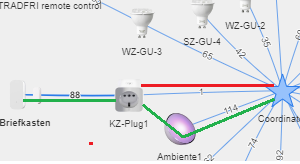
If it would use the green route, this problem would be gone.
but it seems like the firmware really hates to do coordinator -> router -> router -> enddevice
connections. i hope i can figure out why soon.
 nob0dy80
on 9 Mar 2019
nob0dy80
on 9 Mar 2019
I'm seeing the same status 233 behaviour. I've got 2 Ikea bulbs connected at the moment, one upstairs near the coordinator, and one downstairs. According to the map, the link between bulbs is strong, but it seems to prefer the weak direct route. Restarting z2m seems to improve things temporarily. I tried re-pairing, but it wouldn't work until I put it in proximity to the coordinator.
I'm looking to add some extra Xiaomi switches downstairs soon, wired and unwired, and was hoping that they'd use the downstairs bulb/router, but based on my experience with the bulb that doesn't seem likely. I'm hoping that they won't stop working randomly when the bulb drops out, and I don't really want to add a second coordinator; with the routers it doesn't seem like I should have to?
Why is it using the weak coordinator->bulb link, not the strong router->bulb link? I'd also expect the switch to pair to the upstairs bulb/router, as it's much closer to that than the coordinator.

 b4dpxl
on 9 Mar 2019
b4dpxl
on 9 Mar 2019
@b4dpxl based on the network map, you cannot determine which routes they will take. Do these 233 errors always happen? This could also be due to some temporarily interference (see http://www.zigbee2mqtt.io/how_tos/how_to_improve_network_range.html)
Koenkk
on 9 Mar 2019
I also noticed that my devices always try to connect to my coordinator directly.
I have a Tradfri outlet that has a bad connection to the coordinator, but a good connection to a Tradfri E27. However the outlet always tries to connect to the coordinator directly. Since I enabled the timeout setting I get lots of "device unavailable" in home assistant. The outlet usually stays disconnected for maximum 5 minutes (most of the time just 1 minute).
I'm using channel 26 for Zigbee, so the interference should be minimal.
Bruceforce
on 9 Mar 2019
@Koenkk no, it’s not all the time. It will work fine for a while, then drop out. I don’t know if it happens a lot and it reconnects automatically after a while, but when I notice it’s only the downstairs bulb. At that point a restart of zigbee2mqtt triggers a reconnect. Before and after a failure the direct route often drops to a very low (single digit) quality, but a restart increases that to ~40.
I’m running my dongle in a usb extension
Thanks.
b4dpxl
on 9 Mar 2019
thats what i'm saying.
@b4dpxl
go ahead an buy your switches. this are enddevices and not routers like the bulps.
coordinator -> router -> switch works fine.
as long you dont have to use two routers (coordinator -> router -> router -> switch)
i never ever see him using two routers when there is a enddevice connected to the second router
its a really strange behavior.
nob0dy80
on 10 Mar 2019
@nob0dy80 Aren't the AC wired switches, like QBKG11LM. routers? Anyway, I'm hoping for them to run _coordinator -> router upstairs -> router downstairs -> switch_, as the _coordinator -> router downstairs_ is the one that seems to be dropping out, but the switches will be downstairs too.
@Koenkk how do you tell what channel zigbee2mqtt is using by default?
I'm considering trying something like this instead of the CC2531:
https://www.aliexpress.com/item/RF-TO-USB-CC2530-CC2591-RF-switch-USB-transparent-serial-data-transmission-equipment/32975398821.html
Would that likely make much difference?
b4dpxl
on 10 Mar 2019
@b4dpxl
of cause this will make a difference ..it got an external antenna.
I'm not sure about QBKG11LM ...normally switches and sensors are enddevices. cause this one is powered 24/7 it could be a router too. You have to google.
nob0dy80
on 10 Mar 2019
Might this also have to do with the firmware? I have just upgraded it and it seems to cause these errors.
 marcschumacher
on 31 Mar 2019
marcschumacher
on 31 Mar 2019
I think, that problem is with firmware or combination firmware and hardware.
Coordinator firmware version: '20180815' with CC2531 is OK but 20190223 with CC2530+CC2591 was problem with IKEA LED1623G12
 MiloshCZ
on 1 Apr 2019
MiloshCZ
on 1 Apr 2019
I doubt if this is an issue with the firmware, perhaps it could be caused right after upgrading, but after some time this should solve itself. What also could help is re-pairing the problematic devices, but I think the biggest reason is interference/bad reception. (http://www.zigbee2mqtt.io/how_tos/how_to_improve_network_range.html)
Koenkk
on 2 Apr 2019
This issue has been automatically marked as stale because it has not had recent activity. It will be closed if no further activity occurs. Thank you for your contributions.
![stale[bot] picture](https://avatars3.githubusercontent.com/in/1724?v=4&s=40) stale[bot]
on 1 Jun 2019
stale[bot]
on 1 Jun 2019
After upgrading zigbee2mqtt from 1.4 to 1.5 these errors show up on some of my devices. Both Hue Go devices aren't working anymore. Some others have started working again by themselves.
Repairing should help
So this is still an existing, small bug. First time Ive had it though.
 SamJongenelen
on 28 Jul 2019
SamJongenelen
on 28 Jul 2019
I'm also seeing this problem. One outlet has a 160 link to a repeater, but I can't control it. But if I press the button on the outlet it reports the state correctly to Z2M.
 abmantis
on 29 Jul 2019
abmantis
on 29 Jul 2019
Same as @abmantis with an Osram smart plug.
 ondoteam
on 15 Aug 2019
ondoteam
on 15 Aug 2019
Seeing this problem on all my tradfri devices on latest firmware and software.
 seler
on 30 Sep 2019
seler
on 30 Sep 2019
@seler this error indicates network connectivity issues, you might want to try: https://www.zigbee2mqtt.io/how_tos/how_to_improve_network_range.html
Koenkk
on 30 Sep 2019
Strange that it worked for weeks and now suddenly all TRADFRI devices, even 2 meters away have this problem. :/ All other devices, even very far away Aqara sensors still work. I'll try to put repeater right next to the hub.
seler
on 30 Sep 2019
Have the same issue with socket Tradfri E1702. Can't be issue range, it sits about 3 meters from CC2530 and about the same from coordinator. I replaced it with Sonoff.
 raqua
on 8 Oct 2019
raqua
on 8 Oct 2019
Same here, I had to re-pair all the bulbs.
I have a crazy question - did you pair all your lightbulbs at once ?
Could there be a situation that pairing only lasts for a specific period of time - like year or so ?
 saikek
on 7 Jan 2020
saikek
on 7 Jan 2020
Hello everyone,
This is happening to me as well.
I have a couple of IKEA devices (2 bulbs and one socket) working as routers.
The last bulb I added works fine when is has range to reach the coordinator. However, the bulb is too far away from the coordinator, and can only connect to another lamp which is closer to it.
When I try to toggle the bulb, i get the error
zigbee2mqtt:debug 2020-01-15 22:31:44: Error: Data request failed with error: 'MAC no ack' (233)
I am attaching a screenshot of my network map.
Am I doing something wrong? The bulb MUST have direct access to the coordinator or it should work connected just to the router?
I already re-flashed the lamp, but the problem is still happening.
Thanks

 Filipe-Figueiredo
on 15 Jan 2020
Filipe-Figueiredo
on 15 Jan 2020
Hello everybody,
I have the same issue here. I have a network of a couple of Securifi Peanut Smart Plugs, and some Ikea motion Sensors.
Everything is stable and can run for weeks without any real issues. Some of the sensors are at the edge of the range, and if I plug in any plugins in the center or close bye, everything is getting better.
I have now added 4 Ikea Bulbs. Pairing and everything works. But approximately after 1 day, everything breaks down.
- If I try to send a message to the lights, I'm getting a No network route' (205). But the lights are in range because they were working well all day.
- And the Plugs crush now as well. Here I'm getting a 'MAC no ack' (233)'. And it's the same with all of them (4 Plugs). The sensors that are still in rage work. The once that are depending on the Plugs or Lights to relay the message, of course stop working.
- Just to rejoin the devices is not possible. Even if they are just next to the Raspberry/USB. If I delete them out of the Database, sometimes they can be rejoined. But when this happens, I'm pretty much ending up Repairing the whole network and pretty much starting from scratch.
- Sometimes this also happens when in the process of repairing the network. As I said, if I do it without the IKEA bulbs, I don't have those problems.
Lets say it's how it's described here that it's a range issue, and lets say the lights are out of range. How can that take my plugs down that are sitting next to the Raspberry? And I can do whatever I want, they won't find their way back.
Can we please reopen this thread?
 ChrisSantiago82
on 6 Feb 2020
ChrisSantiago82
on 6 Feb 2020
hi there, same here, just starting transition from ikea bridge to z2m, having one LED1836G9 TRADFRI bulb E27 WW 806lm and one E1743 TRADFRI on/off switch paired with sniffer CC2531 and sometimes it works, sometimes MAC no ack, distance is ridiculously short, on IKEA bridge I had like 70m range tested, this is like 4m or so and already failing... Coordinator firmware revision 20190608 ... Thx for any hint
 martyzeq
on 27 Feb 2020
martyzeq
on 27 Feb 2020
@martyzeq is your CC2531 connected through a usb extension cable?
Koenkk
on 27 Feb 2020
I have tried with an usb extention cable.
Didn't help me. And I have good connection to all other devices..
ChrisSantiago82
on 27 Feb 2020
Is this with zigbee2mqtt 1.11.0? As it contains some fixed related to the 233 error.
Koenkk
on 27 Feb 2020
@Koenkk hi, thx for hints, yes I am on extension cable and no I am on zigbee2mqtt version 1.10.0 (commit #8df6be8) so I will try up-to-date version, thx - great project!
martyzeq
on 28 Feb 2020
@Koenkk I updated to zigbee2mqtt 1.11.0, I tried two different length extension cables, slightly different position of sniffer and still loosing connections to some not-that-far devices like IKEA LED1732G11 and LED1623G12. Today I ordered sniffer with external antenna and HUE outdoor motion sensor to compare with different vendor behaviour... I will let you know about any progress I will make. Btw would it be possible to switch to different sniffer without re-pairing all my zigbee stuff? Thx
martyzeq
on 2 Mar 2020
@martyzeq it depends, everything is explained here: https://www.zigbee2mqtt.io/information/FAQ.html#what-does-and-does-not-require-repairing-of-all-devices
Koenkk
on 2 Mar 2020
The same issue here with Sengled Bulbs, paired them at 1 mtr distance,one by one, and moved them 4 mtr away from coordinator and also having the same error,no routers in the network.
CC2530 + external antenna,no usb extension.
 mercenaruss
on 10 Mar 2020
mercenaruss
on 10 Mar 2020
Related issues
 Underknowledge
·
4Comments
Underknowledge
·
4Comments
 jerrychong25
·
4Comments
jerrychong25
·
4Comments
 RefineryX
·
4Comments
RefineryX
·
4Comments
 tb-killa
·
3Comments
tb-killa
·
3Comments
 mpuff
·
3Comments
mpuff
·
3Comments
Most helpful comment
@Skeletorjus My experience, once I solved it was that I needed more time between flipping the switch for the reset motion.
So, I counted "Mississippi" between each flip of the switch during the reset, IE. switch-flip, "1 Mississippi", switch-flip, "2 Mississippi", and so forth. That helped with resetting the bulb properly.