Zigbee2mqtt: Cannot use CC2530 with RFX2401
Hi Guys,
I am a complete noob in chips and firmware flashing but would like to do my first steps in it.
I have some Xiaomi zigbee devices that are currently paired with Xiaomi gateway but I want to get rid of the gateway so I plan to use zigbee2mqtt.
I have bought CC2530 with RFX2401 that looks exactly like the last one in supported sniffer devices table and connected pins 04, 06 and 20 to the ground.
I managed to flash it using the method with Arduino instead of CCDebugger. The firmware advised in wiki was used. The only difference: I had to remove the line before the last one from the firmware since it contained the record type (05) that could not be handled by CCLib (found this advice somewhere on the net). The flash process completed successfully.
The problem is I cannot use it with zigbee2mqtt. It fails to start, reports an error, tries to fix it and then just fails with a message about timeout reached.
What I have already tried:
- change baudrate in zigbee2mqtt
- set rtscts to both true and false
- changed log level but no additional information appeared
Could someone help me please? Is there any way to make sure I have not broken it while soldering the pins?
 Ton1965
All 23 comments
Maybe off topic, but for the sake of simplicity I would start with a CC2531. (it's the only device that I'm using currently).
 Koenkk
on 24 Aug 2018
Koenkk
on 24 Aug 2018
I probably would agree to that. I just hoped to get better coverage with this device. I have seen some posts on HA forum where people complained about the coverage with CC2531 being too small. @kirovilya said CC2530 with RFX2401 provided a longer range.
BTW, @Koenkk and @kirovilya, probably some one of you could very easily answer a question that I have. I discovered that the ping 04, 06 and 20 that I soldered to the ground pin are currently connected with the metal shield that covers the chip. As I said, I am just at a very basic level and the question might be silly but anyway: is this connection ok? I assume it is since this shield should probably be also grounded, i.e. connected to the ground pin, but I am not sure.
Thanks for the reply.
Ton1965
on 25 Aug 2018
@Ton1965 hello. If you look at the picture, then these contacts do not connected with case.
https://github.com/Koenkk/zigbee2mqtt/issues/52#issuecomment-391055372
 kirovilya
on 26 Aug 2018
kirovilya
on 26 Aug 2018
Hi @kirovilya,
Thanks for your reply.
I understand that there should be no direct connection. But I measured the resistance between these pins and the shield and it is almost zero (less than 1 Ohm). So I am now wondering if the chip got broken during the soldering. I looked at the pins and cannot identify any place with short circuited pins. That is why I am asking this question: is such a low resistance ok or I should just get myself another chip?
Ton1965
on 26 Aug 2018
Guys,
I would like to share my joy! I managed to start it!
First of all I double checked the absence of any short-circuited pins. I have measured once more the resistance between the soldered pin and the chip shield and it was zero as before. BTW, I have received the same resistance between the chip shield and USB shield.
Then I inserted the chip into USB and tried to run the bridge and it gave the same errors as before. After struggling a bit more with the settings in configuration.yaml I discovered that setting 'rtscts' to false allowed the bridge to start!
I have already tried this before and got no positive results. The key difference is I killed the 'node' process each time I changed the settings. I noticed that if the bridge is killed with Ctrl-C after it had given that error message the 'node' process is still left running. Probably this background process interfered somehow with the restart with a different set of settings.
Thanks everyone for their replies! I will try now to integrate the bridge into my HA and move all the devices to it.
BTW, the 'node' process does not remain running if the bridge is killed during its normal operation.
Ton1965
on 26 Aug 2018
Hello Toni1965,
I have the same problem with the CC2530 stick. I dont know the 'rtscts' setting in the configuration.yaml.
Please show yours.
 123trs
on 26 Aug 2018
123trs
on 26 Aug 2018
Hi @123trs,
It is documented in Configuration section of the Wiki. See the last item in the list.
Ton1965
on 26 Aug 2018
Ok, found and works☺️
123trs
on 26 Aug 2018
Great to hear!
BTW, probably this information could be added to the Wiki.
Ton1965
on 27 Aug 2018
@Ton1965 Do you have it schematic? You can try to adapt my firmware to it, but if they use the same port to control RFX2401, it will work, CC2591 they use p0.7, p1.4 and p1.1 (you can find TI ref design about cc2591 to know how they wire it).
Or more simple, just buy CC2530+CC2591 and flash the firmware https://github.com/dzungpv/Z-Stack-firmware/tree/master/coordinator/CC2530_CC2591
 dzungpv
on 27 Aug 2018
dzungpv
on 27 Aug 2018
I guess this issue can be closed once the docs have been updates?
 ciotlosm
on 3 Sep 2018
ciotlosm
on 3 Sep 2018
Yes, I think so. This sticks works very stable after 'rtscts' is set to 'false'
I have not had a chance to check another firmware suggested by @dzungpv (will try after my vacation probably:-)) but this is a different issue (or not an issue at all).
Ton1965
on 4 Sep 2018
I'm having trouble with this. I've flashed the stick using cc-tool, have the pins soldered correctly but I'm using the hassio addon.
Hardware:
serial:
/dev/ttyAMA0
/dev/ttyUSB0
input:
disk:
gpio:
gpiochip0
gpiochip128
gpiochip100
audio:
0:
name: bcm2835_alsa - bcm2835 ALSA
type: ALSA
devices:
0: digital audio playback
1: digital audio playback
Flashing:
MacBook-Air:cc-tool$ sudo ./cc-tool -e -w CC2530ZNP-Test_for_CC2591.hex
Programmer: CC Debugger
Target: CC2530
Erasing flash...
Completed
Writing flash (220 KB)...
Completed (15.51 s.)
Here is my hassio addon config:
{
"data_path": "/share/zigbee2mqtt",
"homeassistant": true,
"permit_join": false,
"mqtt_base_topic": "zigbee2mqtt",
"mqtt_server": "mqtt://homeassistant",
"serial_port": "/dev/ttyUSB0",
"rtscts": false
}
And here are the debug logs from the addon:
[Info] Configuration file found. Will overwrite configurable fields with values from add-on configuration
[Info] Configuration written to /share/zigbee2mqtt/configuration.yaml
2018-10-26T06:53:54: PM2 log: Launching in no daemon mode
2018-10-26T06:53:54: PM2 log: App [npm:0] starting in -fork mode-
2018-10-26T06:53:54: PM2 log: App [npm:0] online
[email protected] start /zigbee2mqtt-0.1.8
node index.js
zigbee2mqtt:info 2018-10-26 06:53:58 Logging to directory: '/share/zigbee2mqtt/log/2018-10-26.06-53-58'
zigbee2mqtt:debug 2018-10-26 06:53:58 Removing old log directory '/share/zigbee2mqtt/log/2018-10-11.06-34-48'
zigbee2mqtt:debug 2018-10-26 06:53:59 Using zigbee-shepherd with settings: '{"net":{"panId":6754,"channelList":[11]},"dbPath":"/share/zigbee2mqtt/database.db","sp":{"baudRate":115200,"rtscts":false}}'
zigbee2mqtt:debug 2018-10-26 06:53:59 Loaded state from file /share/zigbee2mqtt/state.json
zigbee2mqtt:info 2018-10-26 06:53:59 Starting zigbee2mqtt version 0.1.8 (commit #unknown)
zigbee2mqtt:info 2018-10-26 06:53:59 Starting zigbee-shepherd
Thu, 25 Oct 2018 22:54:00 GMT zigbee-shepherd:init zigbee-shepherd booting...
Thu, 25 Oct 2018 22:54:00 GMT zigbee-shepherd:request REQ --> SYS:osalNvRead
Thu, 25 Oct 2018 22:54:03 GMT zigbee-shepherd:request RSP <-- SYS:osalNvRead
Thu, 25 Oct 2018 22:54:03 GMT zigbee-shepherd:init Coordinator initialize had an error: Error: request timeout
at CcZnp.(/zigbee2mqtt-0.1.8/node_modules/cc-znp/lib/ccznp.js:255:22)
at Object.onceWrapper (events.js:315:30)
at emitOne (events.js:116:13)
at CcZnp.emit (events.js:211:7)
at Timeout.(/zigbee2mqtt-0.1.8/node_modules/cc-znp/lib/ccznp.js:234:18)
at ontimeout (timers.js:498:11)
at tryOnTimeout (timers.js:323:5)
at Timer.listOnTimeout (timers.js:290:5)
zigbee2mqtt:info 2018-10-26 06:54:03 Error while starting zigbee-shepherd, attemping to fix... (takes 60 seconds)
zigbee2mqtt:info 2018-10-26 06:55:03 Starting zigbee-shepherd
Thu, 25 Oct 2018 22:55:03 GMT zigbee-shepherd:init zigbee-shepherd booting...
Thu, 25 Oct 2018 22:55:03 GMT zigbee-shepherd:request REQ --> SYS:osalNvRead
Thu, 25 Oct 2018 22:55:06 GMT zigbee-shepherd:request RSP <-- SYS:osalNvRead
Thu, 25 Oct 2018 22:55:06 GMT zigbee-shepherd:init Coordinator initialize had an error: Error: request timeout
at CcZnp.(/zigbee2mqtt-0.1.8/node_modules/cc-znp/lib/ccznp.js:255:22)
at Object.onceWrapper (events.js:315:30)
at emitOne (events.js:116:13)
at CcZnp.emit (events.js:211:7)
at Timeout.(/zigbee2mqtt-0.1.8/node_modules/cc-znp/lib/ccznp.js:234:18)
at ontimeout (timers.js:498:11)
at tryOnTimeout (timers.js:323:5)
at Timer.listOnTimeout (timers.js:290:5)
zigbee2mqtt:error 2018-10-26 06:55:06 Error while starting zigbee-shepherd!
zigbee2mqtt:error 2018-10-26 06:55:06 Press the reset button on the stick (the one closest to the USB) and start again
zigbee2mqtt:error 2018-10-26 06:55:06 Failed to start
{"message":"request timeout","stack":"Error: request timeout\n at CcZnp.(/zigbee2mqtt-0.1.8/node_modules/cc-znp/lib/ccznp.js:255:22)\n at Object.onceWrapper (events.js:315:30)\n at emitOne (events.js:116:13)\n at CcZnp.emit (events.js:211:7)\n at Timeout. (/zigbee2mqtt-0.1.8/node_modules/cc-znp/lib/ccznp.js:234:18)\n at ontimeout (timers.js:498:11)\n at tryOnTimeout (timers.js:323:5)\n at Timer.listOnTimeout (timers.js:290:5)"}
Any suggestions on what to try next?
 talondnb
on 26 Oct 2018
talondnb
on 26 Oct 2018
BTW, are the LEDs on the stick supposed to light at all?
talondnb
on 26 Oct 2018
@talondnb, are you using the device shown at the picture next to RFX2401 at wiki? I am using the one and it does not have any LEDs (at least none I know about).
I have been using it for several months already and it looks very stable. The only thing I changed in the configuration was that rtscts setting. If you have a different stick then you should probably change it back to true or change something else. I got the same set of messages with the wrong rtscts but I believe these messages would occur in many different cases.
Ton1965
on 26 Oct 2018
@talondnb, are you using the device shown at the picture next to RFX2401 at wiki? I am using the one and it does not have any LEDs (at least none I know about).
I have been using it for several months already and it looks very stable. The only thing I changed in the configuration was that rtscts setting. If you have a different stick then you should probably change it back to true or change something else. I got the same set of messages with the wrong rtscts but I believe these messages would occur in many different cases.
Yes, using the black dongle. There are LEDs on the PCB but don’t seem to light, D1 and D2.
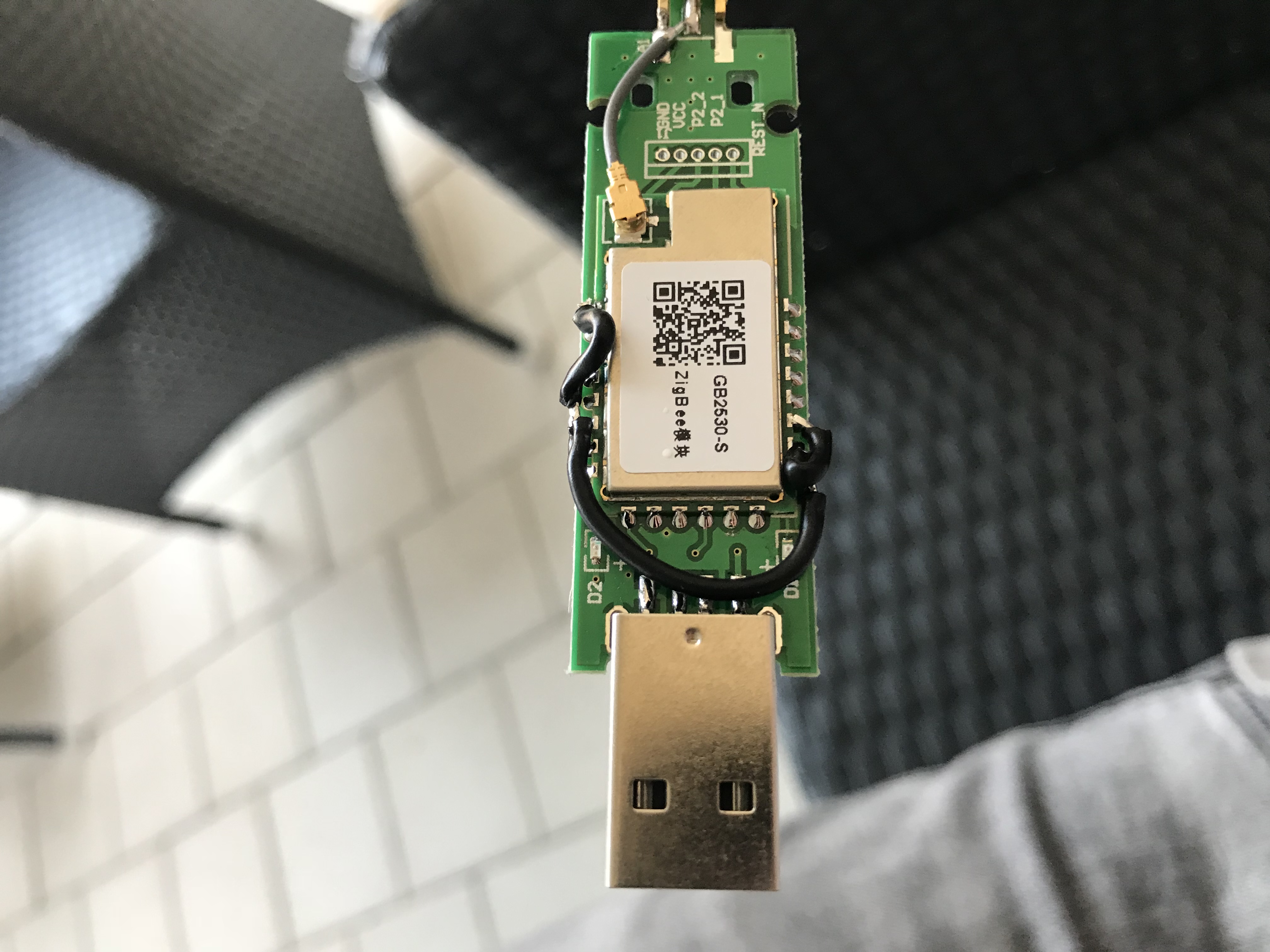
Can you reconfirm the firmware hex and method you used to flash?
talondnb
on 26 Oct 2018
Can you show the soldered to pins better it doesn't look quite right to me. The "d2" side should be the 4th pin from d2 and yours looks like the third
https://github.com/Koenkk/zigbee2mqtt/issues/52#issuecomment-391099828
 ryanbeaton
on 26 Oct 2018
ryanbeaton
on 26 Oct 2018
PS: Ive never gotten around to soldering mine but I plugged it in to see if I could help you today. I get the same output as you. "ttyUSB0" didn't look right to me but I checked and it is
~ # ls -l /dev/serial/by-id
lrwxrwxrwx    1 root     root            13 Oct 26 09:28 usb-Silicon_Labs_CP2102_USB_to_UART_Bridge_Controller_0001-if00-port0 -> ../../ttyUSB0
Can you show the soldered to pins better it doesn't look quite right to me. The "d2" side should be the 4th pin from d2 and yours looks like the third
Oh man, how embarassing. You're correct! I did it in the morning before work so was pretty rushed, thanks for the suggestion! Here's the updated work..
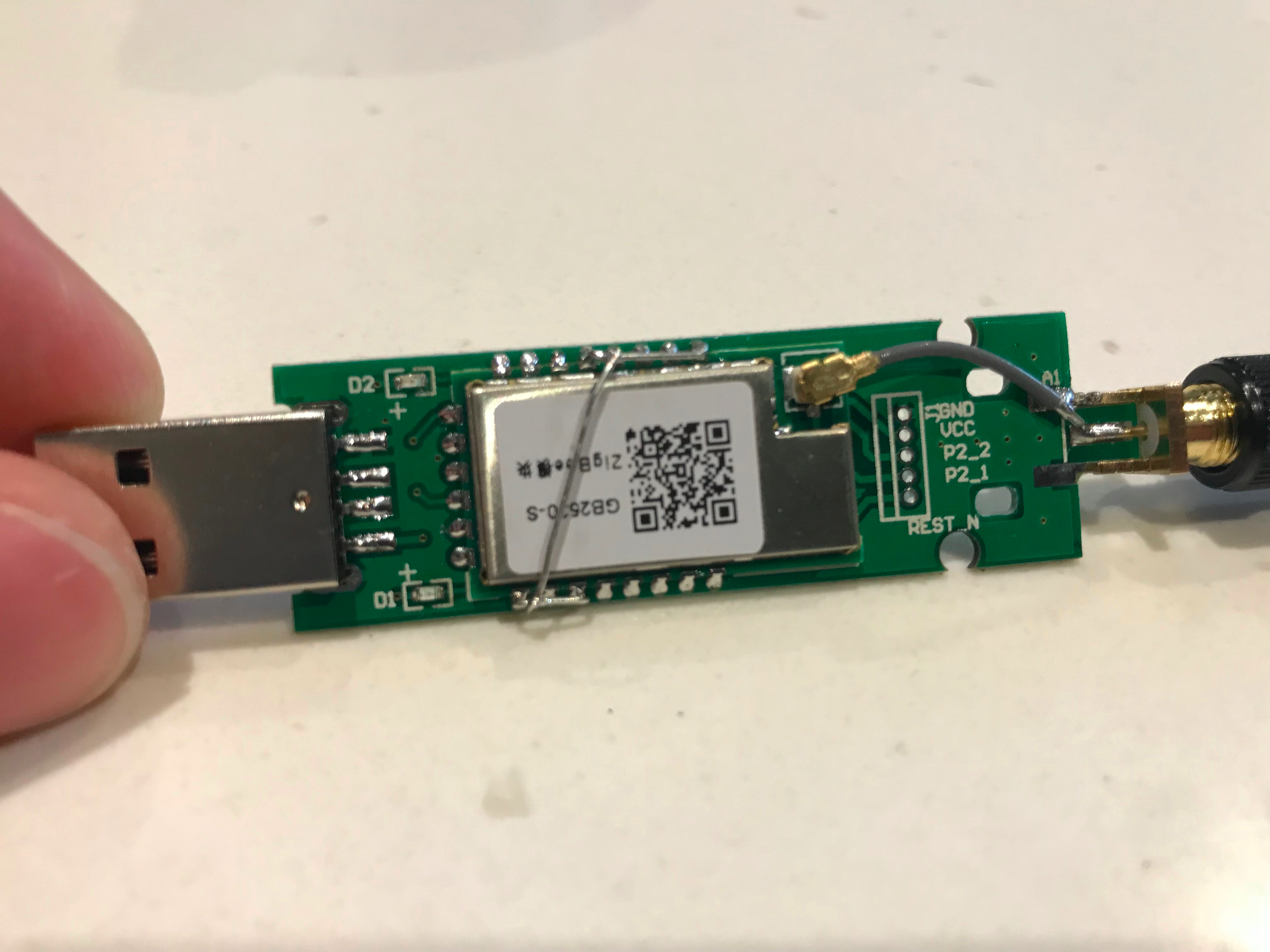
In regards to the ttyUSB0, this is what Hass.io detects upon plugging in the dongle.
Just going to give it a try again with the updated soldering..
talondnb
on 26 Oct 2018
So that was it. 😬
Thanks guys!
talondnb
on 26 Oct 2018
@talondnb , nice to hear your problem is solved! BTW, I did not even notice those LEDs :smile:
Do you observe any flashing? I never noticed anything but my stick is a little bit out of sight so probably I just missed it.
Ton1965
on 26 Oct 2018
@talondnb , nice to hear your problem is solved! BTW, I did not even notice those LEDs 😄
Do you observe any flashing? I never noticed anything but my stick is a little bit out of sight so probably I just missed it.
I've not seen them flashing, no biggie though as long as it's working! A definite improvement in signal strength I feel too.
talondnb
on 26 Oct 2018
This issue has been automatically marked as stale because it has not had recent activity. It will be closed if no further activity occurs. Thank you for your contributions.
![stale[bot] picture](https://avatars3.githubusercontent.com/in/1724?v=4&s=40) stale[bot]
on 25 Dec 2018
stale[bot]
on 25 Dec 2018
Related issues
 Courty40
·
4Comments
Courty40
·
4Comments
 LCerebo
·
3Comments
LCerebo
·
3Comments
 sylarevan
·
5Comments
sylarevan
·
5Comments
 mpuff
·
3Comments
mpuff
·
3Comments
 jwilling
·
4Comments
jwilling
·
4Comments