All 189 comments
@ciB89 if you have the controller, you can just try it, but it's more likely that will work with some tweaking.
 ciotlosm
on 7 Jun 2018
ciotlosm
on 7 Jun 2018
@ciB89 @ciotlosm I wait for my Tradfri Controller but i´m at the moment I am busy with my work.
I know that @Koenkk has also bought a controller and do some tests in the past.
Maybe he could also help.
Do you already own the controller?
Maybe we could do some hacky like we do with the "Hue dimmer switch" https://github.com/Koenkk/zigbee2mqtt/issues/36 ?
From what I know we could do the same bind for "genOnOff".
Edit: bind for "genLevelCtrl" should also work.
 tb-killa
on 7 Jun 2018
tb-killa
on 7 Jun 2018
I've got one now. It seems that the switch wants to be paired directly to the device that you want to use it with, e.g. lamp or an LED power supply. There's a pairing button on it that you are supposed to press >10 seconds until a red light turns on that indicates that the remote is paring with that device (it can be linked to ten devices). The bridge is needed for this, although it is never paired with the bridge directly (as far as I can tell from the instructions). I tried pairing it with the zigbee stick on my HA, but the red light won't turn on and debug doesn't show anything interesting either.
 ciB89
on 7 Jun 2018
ciB89
on 7 Jun 2018
Please provide your content of the database.db with your "paired" ikea device.
It would also be great if you start your instance via DEBUG=* npm start like mentioned via wiki.
About this LED i could say after doing some manual pairing with the Hue Dimmer Switch the device light is turning on action.
We could test the same code sample if you like ?
tb-killa
on 7 Jun 2018
I already spend quite some time on this:
- The button can be paired but doesnt send anything to the gateway, it looks that it can only be used when paired directly with a bulb
- The same goes for the motion sensor
- The dimmer, after some hacking, works. I will add support for it soon.
 Koenkk
on 7 Jun 2018
Koenkk
on 7 Jun 2018
@Koenkk Do you test via manual mapping like we do with the Hue Dimmer Switch ?
I found some "SmartThings" groovy Code like we show for the Hue Device, there are also the two mentioned mappings.
Sadly i doesn´t have such type of device now so maybe you could check if it could work ?
tb-killa
on 7 Jun 2018
Do you have a link to the SmartThings code?
Koenkk
on 7 Jun 2018
https://github.com/RichMercer/SmartThings/blob/master/ikea-tradfri-remote.groovy search for the "configure()"
For other one ( the second binding) has to wait until tomorrow so i could send from my PC because i save the URL on file.
tb-killa
on 7 Jun 2018
@tb-killa that looks interesting, it binds the genOnOff cluster on endpoint 1 till 4 to the coordinator. Haven't tried that before, will run some tests tomorrow.
Koenkk
on 7 Jun 2018
I have this remote control.
It is successfully connected to coordinator. But coordinator not receive it's messages.
I found why! http://faire-ca-soi-meme.fr/domotique/2018/03/14/une-telecommande-zigbee-pour-les-controler-tous/
It's send message to "group". Coordinator not endDevice in group and do not recived it's message.
I do not known what to do... May be put coordinator to group? But how?
 kirovilya
on 8 Jun 2018
kirovilya
on 8 Jun 2018
Got the remote paired with HA after I paired the driver with HA first (see #104). Receive no messages though.
Here is the database.db for the remote:
{"id":5,"type":"EndDevice","ieeeAddr":"0x90fd9ffffed97ed6","nwkAddr":24438,"manufId":4476,"epList":[1],"status":"online","joinTime":1528475316,"endpoints":{"1":{"profId":49246,"epId":1,"devId":2096,"inClusterList":[0,1,3,9,2821,4096],"outClusterList":[3,4,5,6,8,25,4096],"clusters":{}}},"_id":"v7bdc5jXYmRkWPrr"}
{"id":5,"type":"EndDevice","ieeeAddr":"0x90fd9ffffed97ed6","nwkAddr":24438,"manufId":4476,"manufName":"IKEA of Sweden","powerSource":"Battery","modelId":"TRADFRI remote control","epList":[1],"status":"online","joinTime":1528475316,"endpoints":{"1":{"profId":49246,"epId":1,"devId":2096,"inClusterList":[0,1,3,9,2821,4096],"outClusterList":[3,4,5,6,8,25,4096],"clusters":{}}},"_id":"v7bdc5jXYmRkWPrr"}
{"id":5,"type":"EndDevice","ieeeAddr":"0x90fd9ffffed97ed6","nwkAddr":24438,"manufId":4476,"manufName":"IKEA of Sweden","powerSource":"Battery","modelId":"TRADFRI remote control","epList":[1],"status":"online","joinTime":1528475316,"endpoints":{"1":{"profId":49246,"epId":1,"devId":2096,"inClusterList":[0,1,3,9,2821,4096],"outClusterList":[3,4,5,6,8,25,4096],"clusters":{"genBasic":{"dir":{"value":1},"attrs":{}},"genPowerCfg":{"dir":{"value":1},"attrs":{"65533":1,"batteryVoltage":29,"batteryPercentageRemaining":74}},"genIdentify":{"dir":{"value":3},"attrs":{"65533":1,"identifyTime":0}},"genGroups":{"dir":{"value":2},"attrs":{}},"genScenes":{"dir":{"value":2},"attrs":{}},"genOnOff":{"dir":{"value":2},"attrs":{}},"genLevelCtrl":{"dir":{"value":2},"attrs":{}},"genAlarms":{"dir":{"value":1},"attrs":{"65533":1}},"genOta":{"dir":{"value":2},"attrs":{}},"haDiagnostic":{"dir":{"value":1},"attrs":{"65533":1}},"lightLink":{"dir":{"value":3},"attrs":{"65533":1}}}}},"_id":"v7bdc5jXYmRkWPrr"}
I don't know if the coordinator can be put in a group, that article shows how to use the TRADFRI remote to control a Xiaomi plug, but still it doesn't send events to the coordinator.
Koenkk
on 8 Jun 2018
@ciB89 : please add this to your devices.js
{
        zigbeeModel: ['TRADFRI remote control'],
        model: 'TODO',
        vendor: 'IKEA',
        description: 'TODO',
        supports: 'TODO',
        fromZigbee: [],
        toZigbee: [],
    },
````

and this to  ```lib/zigbee.js ``` into the ```handleReady function```
    // TEMP: Bind Ikea Remote Control to coordinator.
    let ikearemote = '0x90fd9ffffed97ed6';
    ikearemote = this.shepherd.find(ikearemote, 1);
    let coordinator = this.shepherd.list().find((d) => d.type === 'Coordinator');
    coordinator = this.shepherd.find(coordinator.ieeeAddr, 1);
    ikearemote.bind('genOnOff', coordinator, (err) => {
        if (err) {
            console.log('FAILED TO BIND genOnOff :(');
        } else {
            console.log('GOOD TO BIND genOnOff !');
        }
    });
    //
    ikearemote.bind('genLevelCtrl', coordinator, (err) => {
        if (err) {
            console.log('FAILED TO BIND genLevelCtrl :(');
        } else {
            console.log('GOOD TO BIND genLevelCtrl !');
        }
    });
After that please start you zigbee2mqtt instance viaDEBUG=* npm start ``` and let the Remote Control in pairing mode while the instance start up.
Please provide log after you wait some time and push some of the buttons of the remote control.
tb-killa
on 8 Jun 2018
Restarting the docker in Hassio resets the custom changes to the files... I'll setup a second SD-card with Hassbian and I'll test again.
ciB89
on 11 Jun 2018
Got the following error while running. Just to make clear: The remote is currently NOT paired with the shephard.
2018-6-11 15:37:37 INFO zigbee-shepherd started
2018-6-11 15:37:37 INFO Currently 0 devices are joined:
2018-6-11 15:37:37 INFO Connecting to MQTT server at mqtt://192.168.0.41
2018-6-11 15:37:38 INFO zigbee-shepherd ready
/opt/zigbee2mqtt/lib/zigbee.js:92
        ikearemote.bind('genOnOff', coordinator, (err) => {
                   ^

TypeError: Cannot read property 'bind' of undefined
    at Zigbee.handleReady (/opt/zigbee2mqtt/lib/zigbee.js:92:20)
    at emitNone (events.js:106:13)
    at ZShepherd.emit (events.js:208:7)
    at Immediate._onImmediate (/opt/zigbee2mqtt/node_modules/zigbee-shepherd/lib/shepherd.js:89:18)
    at runCallback (timers.js:810:20)
    at tryOnImmediate (timers.js:768:5)
    at processImmediate [as _immediateCallback] (timers.js:745:5)
npm ERR! code ELIFECYCLE
npm ERR! errno 1
npm ERR! [email protected] start: `node index.js`
npm ERR! Exit status 1
npm ERR!
npm ERR! Failed at the [email protected] start script.
npm ERR! This is probably not a problem with npm. There is likely additional logging output above.
@ciB89 This failure seems to be come forward if we use this type of debugging Code without first has got the Enddevice in the database (pairing).
So lets do some practise first:
Comment out the Code Section for binding (zigbee.js).
Restart zigbee2mqtt and pair the device like a normal device so we get the needing information at startup inside the zigbee database.
After that stop zigbee2mqtt and bring the code section in work, and restart them into debug=*
If we use the new code from @Koenkk we could do the binding from the converter themselve but we would test it first :)
tb-killa
on 11 Jun 2018
The binding did work ("GOOD TO BIND genOnOff !"), but the debug does not show me anything when pressing buttons..
This only shows up periodically:
  zigbee-shepherd:request REQ --> ZDO:nodeDescReq +55s
  cc-znp:SREQ --> ZDO:nodeDescReq, { dstaddr: 5512, nwkaddrofinterest: 5512 } +55s
  serialport write 9 bytes of data +55s
  cc-znp:SRSP <-- ZDO:nodeDescReq, { status: 0 } +23ms
  zigbee-shepherd:request REQ --> ZDO:nodeDescReq +5s
  cc-znp:SREQ --> ZDO:nodeDescReq, { dstaddr: 5512, nwkaddrofinterest: 5512 } +5s
  serialport write 9 bytes of data +5s
  cc-znp:SRSP <-- ZDO:nodeDescReq, { status: 0 } +19ms
After restarting the shephard it fails the binding although I reproduce every step I had taken sofar..
ciB89
on 11 Jun 2018
Bring the Device in pairing mode again, maybe it need this twice because of standby or another situation.
It could need some sort of multiple restarts of zigbee2mqtt instance or maybe multiple usage of on / off button pressing to bring the needing informations on top.
fails could be the situations mentioned on top because i get this on the "Hue dimmer switch" too.
tb-killa
on 11 Jun 2018
We should also add some debugging console.log to check the raw data:
try put console.log after zigbee-shepherd\lib\components\af.js:693
and after zigbee-shepherd\lib\components\af.js:572
sample like this:
// Original
var coord = af.controller.getCoord();
// Added
console.log(type, msg)
and
//Original
zcl.parse(msg.data, function (err, zclData) {
                if (!err)
                    zclIncomingParsedMsgEmitter(msg, zclData);
                    // Added
                    console.log(type, msg)
            });
Now we could check deeper with DEBUG=* npm start
tb-killa
on 11 Jun 2018
So, I took out the batteries and reinserted them and that worked really well - it seems that just pressing the pairing button only works for the IKEA stuff, not so much for the shephard (the red light indicator for pairing only turns on if e.g. the driver is plugged in).
Button presses on the remote still have no effect. I spotted this though:
2018-06-11T17:51:14.477Z - error: Cannot get the Node Descriptor of the Device: 0x90fd9ffffed97ed6 (Error: Timed out after 10000 ms)
I will add the additional debugging stuff next.
ciB89
on 11 Jun 2018
This is the full log. BTW, my log.txt doesn't actually show the entire log. How can I change that? Pressing any button on the remote has still no effect/debug output.
ciB89
on 11 Jun 2018
Use hastebin next time to reduce message length. This is bloating the topic too much
ciotlosm
on 11 Jun 2018
IIRC this device and the tradfri dimmer are working with zigate and deconz.
I think the coordinator creates a dummy group (with zero members) and then the controller joins that group. I saw some info about it on the HA community forum. Will see if I can find it again...
 james-fry
on 12 Jun 2018
james-fry
on 12 Jun 2018
james-fry
on 12 Jun 2018
james-fry
on 12 Jun 2018
Is there any progress on this yet?
ciB89
on 18 Jun 2018
Not from my side, I don't know how to create a fake group using zigbee-shepherd.
Koenkk
on 18 Jun 2018
@Koenkk @kirovilya : I use the latest Version from git INFO Starting zigbee2mqtt version 0.0.0 (commit #4c4fcd7)
If i bring my remote control in pairing i got this:
zigbee-shepherd:msgHdlr IND <-- ZDO:tcDeviceInd +9s
spinlock: false []
  zigbee-shepherd:request REQ --> ZDO:nodeDescReq +75ms
  zigbee-shepherd:msgHdlr IND <-- ZDO:endDeviceAnnceInd +7ms
  zigbee-shepherd:msgHdlr IND <-- ZDO:nodeDescRsp +984ms
  zigbee-shepherd:request REQ --> ZDO:activeEpReq +5ms
  zigbee-shepherd:msgHdlr IND <-- ZDO:activeEpRsp +1s
  zigbee-shepherd:request REQ --> ZDO:simpleDescReq +3ms
  zigbee-shepherd:msgHdlr IND <-- ZDO:simpleDescRsp +1s
  zigbee-shepherd:request REQ --> AF:dataRequest, transId: 1 +85ms
  zigbee-shepherd:request RSP <-- AF:dataRequest, status: 0 +20ms
  zigbee-shepherd:msgHdlr IND <-- AF:dataConfirm, transId: 1 +949ms
/opt/zigbee2mqtt/node_modules/zcl-packet/lib/foundation.js:683
        ru[dataType](name)(this);
                    ^

TypeError: ru[dataType] is not a function
    at Dissolve.<anonymous> (/opt/zigbee2mqtt/node_modules/zcl-packet/lib/foundation.js:683:21)
    at Dissolve._transform (/opt/zigbee2mqtt/node_modules/dissolve/index.js:80:16)
    at Dissolve.Transform._read (/opt/zigbee2mqtt/node_modules/dissolve/node_modules/readable-stream/lib/_stream_transform.js:184:10)
    at Dissolve.Transform._write (/opt/zigbee2mqtt/node_modules/dissolve/node_modules/readable-stream/lib/_stream_transform.js:172:12)
    at doWrite (/opt/zigbee2mqtt/node_modules/dissolve/node_modules/readable-stream/lib/_stream_writable.js:279:12)
    at writeOrBuffer (/opt/zigbee2mqtt/node_modules/dissolve/node_modules/readable-stream/lib/_stream_writable.js:266:5)
    at Dissolve.Writable.write (/opt/zigbee2mqtt/node_modules/dissolve/node_modules/readable-stream/lib/_stream_writable.js:211:11)
    at Dissolve.Writable.end (/opt/zigbee2mqtt/node_modules/dissolve/node_modules/readable-stream/lib/_stream_writable.js:426:10)
    at FoundPayload._getObj (/opt/zigbee2mqtt/node_modules/zigbee-shepherd/node_modules/zcl-packet/lib/foundation.js:242:12)
    at getObjCB (/opt/zigbee2mqtt/node_modules/zigbee-shepherd/node_modules/zcl-packet/lib/foundation.js:51:22)
What if you do:
rm -rf node_modules
npm install
@tb-killa I do not seen this error before.
if it repeated, try put console.log in point of error, to see what dataType and name?
kirovilya
on 19 Jun 2018
@Koenkk Its a complete fresh installation, do this alright before posting.
@kirovilya this looks interesting:
After restart in Debug:
6/19/2018, 10:23:10 PM INFO Currently 1 devices are joined:
6/19/2018, 10:23:10 PM INFO unknown (0x90fd9ffffed17c15): unkown - undefined unknown (EndDevice)
It seems to be that zigbee2mqtt doesnt collect the right data from the remote.
tb-killa
on 19 Jun 2018
@tb-killa It is normal for me :) Just put block in devices.js of zigbee-shepherd-converters:
    {
        zigbeeModel: ['TRADFRI remote control'],
        model: 'E1524',
        vendor: 'IKEA',
        description: 'TRADFRI remote control',
        supports: '',
        fromZigbee: [],
        toZigbee: [],
    },
@tb-killa or try remove and rejoin remote
kirovilya
on 19 Jun 2018
@kirovilya converter entry was present. I remove and add the device multiple times.
I insert some log output inside the foundation.js file
ru.clause('variable', function (name, dataTypeParam) {
    if (!dataTypeParam) dataTypeParam = 'dataType';

    this.tap(function () {
        var dataType = getDataType(this.vars[dataTypeParam]);
        console.log(dataType)
        console.log(name)
        ru[dataType](name)(this);
    });
});
and got this log
zigbee-shepherd:msgHdlr IND <-- ZDO:tcDeviceInd +3s
spinlock: false []
  zigbee-shepherd:request REQ --> ZDO:nodeDescReq +88ms
  zigbee-shepherd:msgHdlr IND <-- ZDO:endDeviceAnnceInd +5ms
  zigbee-shepherd:msgHdlr IND <-- ZDO:nodeDescRsp +997ms
  zigbee-shepherd:request REQ --> ZDO:activeEpReq +2ms
  zigbee-shepherd:request REQ --> ZDO:nodeDescReq +103ms
  zigbee-shepherd:msgHdlr IND <-- ZDO:activeEpRsp +917ms
  zigbee-shepherd:request REQ --> ZDO:simpleDescReq +3ms
  zigbee-shepherd:msgHdlr IND <-- ZDO:simpleDescRsp +1s
  zigbee-shepherd:request REQ --> AF:dataRequest, transId: 1 +37ms
  zigbee-shepherd:request RSP <-- AF:dataRequest, status: 0 +17ms
  zigbee-shepherd:msgHdlr IND <-- AF:dataConfirm, transId: 1 +977ms
strPreLenUint8
attrData
undefined
attrData
/opt/zigbee2mqtt/node_modules/zcl-packet/lib/foundation.js:685
        ru[dataType](name)(this);
                    ^

TypeError: ru[dataType] is not a function
    at Dissolve.<anonymous> (/opt/zigbee2mqtt/node_modules/zcl-packet/lib/foundation.js:685:21)
    at Dissolve._transform (/opt/zigbee2mqtt/node_modules/dissolve/index.js:80:16)
    at Dissolve.Transform._read (/opt/zigbee2mqtt/node_modules/dissolve/node_modules/readable-stream/lib/_stream_transform.js:184:10)
    at Dissolve.Transform._write (/opt/zigbee2mqtt/node_modules/dissolve/node_modules/readable-stream/lib/_stream_transform.js:172:12)
    at doWrite (/opt/zigbee2mqtt/node_modules/dissolve/node_modules/readable-stream/lib/_stream_writable.js:279:12)
    at writeOrBuffer (/opt/zigbee2mqtt/node_modules/dissolve/node_modules/readable-stream/lib/_stream_writable.js:266:5)
    at Dissolve.Writable.write (/opt/zigbee2mqtt/node_modules/dissolve/node_modules/readable-stream/lib/_stream_writable.js:211:11)
    at Dissolve.Writable.end (/opt/zigbee2mqtt/node_modules/dissolve/node_modules/readable-stream/lib/_stream_writable.js:426:10)
    at FoundPayload._getObj (/opt/zigbee2mqtt/node_modules/zigbee-shepherd/node_modules/zcl-packet/lib/foundation.js:242:12)
    at getObjCB (/opt/zigbee2mqtt/node_modules/zigbee-shepherd/node_modules/zcl-packet/lib/foundation.js:51:22)
@tb-killa need log dataTypeParam too.
unknown datatype - strange...
kirovilya
on 19 Jun 2018
I extend the needing output
6/20/2018, 6:58:20 PM INFO MQTT publish, topic: 'zigbee2mqtt/bridge/state', payload: 'online'
  cc-znp:AREQ <-- ZDO:activeEpRsp, { srcaddr: 52708, status: 0, nwkaddr: 52708, activeepcount: 1, activeeplist: <Buffer 01> } +72ms
  zigbee-shepherd:msgHdlr IND <-- ZDO:activeEpRsp +5ms
  zigbee-shepherd:request REQ --> ZDO:simpleDescReq +6ms
  cc-znp:SRSP <-- ZDO:mgmtPermitJoinReq, { status: 0 } +18ms
  cc-znp:AREQ <-- ZDO:permitJoinInd, { duration: 255 } +1ms
  zigbee-shepherd:msgHdlr IND <-- ZDO:permitJoinInd +1ms
  cc-znp:AREQ <-- ZDO:mgmtPermitJoinRsp, { srcaddr: 0, status: 0 } +1ms
  zigbee-shepherd:msgHdlr IND <-- ZDO:mgmtPermitJoinRsp +1ms
  cc-znp:SREQ --> ZDO:simpleDescReq, { dstaddr: 52708, nwkaddrofinterest: 52708, endpoint: 1 } +1ms
  serialport write 10 bytes of data +3ms
  cc-znp:SRSP <-- ZDO:simpleDescReq, { status: 0 } +15ms
  cc-znp:AREQ <-- ZDO:simpleDescRsp, { srcaddr: 52708, status: 0, nwkaddr: 52708, len: 34, endpoint: 1, profileid: 49246, deviceid: 2096, deviceversion: 2, numinclusters: 6, inclusterlist: <Buffer 00 00 01 00 03 00 09 00 05 0b 00 10>, numoutclusters: 7, outclusterlist: <Buffer 03 00 04 00 05 00 06 00 08 00 19 00 00 10> } +911ms
  zigbee-shepherd:msgHdlr IND <-- ZDO:simpleDescRsp +2ms
  zigbee-shepherd:request REQ --> AF:dataRequest, transId: 1 +36ms
  cc-znp:SREQ --> AF:dataRequest, { dstaddr: 52708, destendpoint: 1, srcendpoint: 1, clusterid: 0, transid: 1, options: 48, radius: 30, len: 9, data: <Buffer 00 01 00 04 00 05 00 07 00> } +3ms
  serialport write 24 bytes of data +4ms
  cc-znp:SRSP <-- AF:dataRequest, { status: 0 } +13ms
  zigbee-shepherd:request RSP <-- AF:dataRequest, status: 0 +2ms
  cc-znp:AREQ <-- AF:dataConfirm, { status: 0, endpoint: 1, transid: 1 } +972ms
  zigbee-shepherd:msgHdlr IND <-- AF:dataConfirm, transId: 1 +9ms
  cc-znp:AREQ <-- AF:incomingMsg, { groupid: 0, clusterid: 0, srcaddr: 52708, srcendpoint: 1, dstendpoint: 1, wasbroadcast: 0, linkquality: 0, securityuse: 0, timestamp: 6222012, transseqnumber: 0, len: 54, data: <Buffer 18 01 01 04 00 00 42 0e 49 4b 45 41 20 6f 66 20 53 77 65 64 65 6e 05 00 00 42 16 54 52 41 44 46 5249 20 72 65 6d 6f 74 65 20 63 6f 6e 74 72 6f 6c 07 ... > } +11ms
undefined
strPreLenUint8
attrData
undefined
undefined
attrData
/opt/zigbee2mqtt/node_modules/zcl-packet/lib/foundation.js:686
        ru[dataType](name)(this);
                    ^

TypeError: ru[dataType] is not a function
    at Dissolve.<anonymous> (/opt/zigbee2mqtt/node_modules/zcl-packet/lib/foundation.js:686:21)
    at Dissolve._transform (/opt/zigbee2mqtt/node_modules/dissolve/index.js:80:16)
    at Dissolve.Transform._read (/opt/zigbee2mqtt/node_modules/dissolve/node_modules/readable-stream/lib/_stream_transform.js:184:10)
    at Dissolve.Transform._write (/opt/zigbee2mqtt/node_modules/dissolve/node_modules/readable-stream/lib/_stream_transform.js:172:12)
    at doWrite (/opt/zigbee2mqtt/node_modules/dissolve/node_modules/readable-stream/lib/_stream_writable.js:279:12)
    at writeOrBuffer (/opt/zigbee2mqtt/node_modules/dissolve/node_modules/readable-stream/lib/_stream_writable.js:266:5)
    at Dissolve.Writable.write (/opt/zigbee2mqtt/node_modules/dissolve/node_modules/readable-stream/lib/_stream_writable.js:211:11)
    at Dissolve.Writable.end (/opt/zigbee2mqtt/node_modules/dissolve/node_modules/readable-stream/lib/_stream_writable.js:426:10)
    at FoundPayload._getObj (/opt/zigbee2mqtt/node_modules/zigbee-shepherd/node_modules/zcl-packet/lib/foundation.js:242:12)
    at getObjCB (/opt/zigbee2mqtt/node_modules/zigbee-shepherd/node_modules/zcl-packet/lib/foundation.js:51:22)
@kirovilya
I started with fresh flashed stick and new zigbee2mqtt instance:
Sadly i got the error again:
  cc-znp:AREQ <-- ZDO:endDeviceAnnceInd, { srcaddr: 20585, nwkaddr: 20585, ieeeaddr: '0x90fd9ffffed17c15', capabilities: 128 } +2m
spinlock: false []
  zigbee-shepherd:request REQ --> ZDO:nodeDescReq +6ms
  cc-znp:SREQ --> ZDO:nodeDescReq, { dstaddr: 20585, nwkaddrofinterest: 20585 } +3ms
  serialport write 9 bytes of data +4ms
  zigbee-shepherd:msgHdlr IND <-- ZDO:endDeviceAnnceInd +3ms
  cc-znp:SRSP <-- ZDO:nodeDescReq, { status: 0 } +51ms
  cc-znp:AREQ <-- ZDO:nodeDescRsp, { srcaddr: 20585, status: 0, nwkaddr: 20585, logicaltype_cmplxdescavai_userdescavai: 2, apsflags_freqband: 64, maccapflags: 128, manufacturercode: 4476, maxbuffersize: 82, maxintransfersize: 82, servermask: 0, maxouttransfersize: 82, descriptorcap: 0 } +2s
  zigbee-shepherd:msgHdlr IND <-- ZDO:nodeDescRsp +8ms
  zigbee-shepherd:request REQ --> ZDO:activeEpReq +12ms
  cc-znp:SREQ --> ZDO:activeEpReq, { dstaddr: 20585, nwkaddrofinterest: 20585 } +5ms
  serialport write 9 bytes of data +3ms
  cc-znp:SRSP <-- ZDO:activeEpReq, { status: 0 } +22ms
  cc-znp:AREQ <-- ZDO:activeEpRsp, { srcaddr: 20585, status: 0, nwkaddr: 20585, activeepcount: 1, activeeplist: <Buffer 01> } +990ms
  zigbee-shepherd:msgHdlr IND <-- ZDO:activeEpRsp +2ms
  zigbee-shepherd:request REQ --> ZDO:simpleDescReq +9ms
  cc-znp:SREQ --> ZDO:simpleDescReq, { dstaddr: 20585, nwkaddrofinterest: 20585, endpoint: 1 } +2ms
  serialport write 10 bytes of data +2ms
  cc-znp:SRSP <-- ZDO:simpleDescReq, { status: 0 } +12ms
  cc-znp:AREQ <-- ZDO:simpleDescRsp, { srcaddr: 20585, status: 0, nwkaddr: 20585, len: 34, endpoint: 1, profileid: 49246, deviceid: 2096, deviceversion: 2, numinclusters: 6, inclusterlist: <Buffer 00 00 01 00 03 00 09 00 05 0b 00 10>, numoutclusters: 7, outclusterlist: <Buffer 03 00 04 00 05 00 06 00 08 00 19 00 00 10> } +998ms
  zigbee-shepherd:msgHdlr IND <-- ZDO:simpleDescRsp +10ms
  zigbee-shepherd:request REQ --> AF:dataRequest, transId: 1 +33ms
  cc-znp:SREQ --> AF:dataRequest, { dstaddr: 20585, destendpoint: 1, srcendpoint: 1, clusterid: 0, transid: 1, options: 48, radius: 30, len: 9, data: <Buffer 00 01 00 04 00 05 00 07 00> } +3ms
  serialport write 24 bytes of data +3ms
  cc-znp:SRSP <-- AF:dataRequest, { status: 0 } +12ms
  zigbee-shepherd:request RSP <-- AF:dataRequest, status: 0 +1ms
  cc-znp:AREQ <-- AF:dataConfirm, { status: 0, endpoint: 1, transid: 1 } +972ms
  zigbee-shepherd:af dispatchIncomingMsg(): type: dataConfirm, msg: [object Object] +3ms
  zigbee-shepherd:msgHdlr IND <-- AF:dataConfirm, transId: 1 +4ms
  cc-znp:AREQ <-- AF:incomingMsg, { groupid: 0, clusterid: 0, srcaddr: 20585, srcendpoint: 1, dstendpoint: 1, wasbroadcast: 0, linkquality: 18, securityuse: 0,timestamp: 16490997, transseqnumber: 0, len: 54, data: <Buffer 18 01 01 04 00 00 42 0e 49 4b 45 41 20 6f 66 20 53 77 65 64 65 6e 05 00 00 42 16 54 52 41 44 46 52 49 20 72 65 6d 6f 74 65 20 63 6f 6e 74 72 6f 6c 07 ... > } +9ms
  zigbee-shepherd:af dispatchIncomingMsg(): type: incomingMsg, msg: [object Object] +3ms
/opt/zigbee2mqtt/node_modules/zcl-packet/lib/foundation.js:683
        ru[dataType](name)(this);
                    ^

TypeError: ru[dataType] is not a function
    at Dissolve.<anonymous> (/opt/zigbee2mqtt/node_modules/zcl-packet/lib/foundation.js:683:21)
    at Dissolve._transform (/opt/zigbee2mqtt/node_modules/dissolve/index.js:80:16)
    at Dissolve.Transform._read (/opt/zigbee2mqtt/node_modules/dissolve/node_modules/readable-stream/lib/_stream_transform.js:184:10)
    at Dissolve.Transform._write (/opt/zigbee2mqtt/node_modules/dissolve/node_modules/readable-stream/lib/_stream_transform.js:172:12)
    at doWrite (/opt/zigbee2mqtt/node_modules/dissolve/node_modules/readable-stream/lib/_stream_writable.js:279:12)
    at writeOrBuffer (/opt/zigbee2mqtt/node_modules/dissolve/node_modules/readable-stream/lib/_stream_writable.js:266:5)
    at Dissolve.Writable.write (/opt/zigbee2mqtt/node_modules/dissolve/node_modules/readable-stream/lib/_stream_writable.js:211:11)
    at Dissolve.Writable.end (/opt/zigbee2mqtt/node_modules/dissolve/node_modules/readable-stream/lib/_stream_writable.js:426:10)
    at FoundPayload._getObj (/opt/zigbee2mqtt/node_modules/zigbee-shepherd/node_modules/zcl-packet/lib/foundation.js:242:12)
    at getObjCB (/opt/zigbee2mqtt/node_modules/zigbee-shepherd/node_modules/zcl-packet/lib/foundation.js:51:22)
I often reset the remote device via 4 pushes of the button on the back and get the device leaving message complete.
But after the device seems to paire again, it crashed ...
tb-killa
on 1 Jul 2018
@tb-killa It is the same error like https://github.com/Koenkk/zigbee2mqtt/issues/129 ... Something in your zigbee-network want to connect but can't :)
kirovilya
on 2 Jul 2018
@kirovilya Yes it seems to be some of this error.
I will flash the original Firmware from TI Source themselve back to my stick because i think there is some sort of break in our diy firmware.
Or maybe also use some sort of older snapshot of zigbee2mqtt from github to check if we didn´t break something in the last time.
I only know that with an older release the remote device work one time.
after that i updated and after that its broke and i got on different devices in pairing mode this crazy "crash".
tb-killa
on 2 Jul 2018
@tb-killa Yes, try to rollback to the original firmware and zigbee2mqtt. Then check the operation of the devices.
kirovilya
on 2 Jul 2018
I got it now:
spinlock: false []
spinlock: true []
2018-7-4 21:54:44 [32mINFO[39m Connecting with device...
2018-7-4 21:54:44 [32mINFO[39m MQTT publish, topic: 'zigbee2mqtt/bridge/log', payload: '{"type":"pairing","message":"connecting with device"}'
2018-7-4 21:54:49 [32mINFO[39m Connecting with device...
2018-7-4 21:54:49 [32mINFO[39m MQTT publish, topic: 'zigbee2mqtt/bridge/log', payload: '{"type":"pairing","message":"connecting with device"}'
2018-7-4 21:54:59 [32mINFO[39m Connecting with device...
2018-7-4 21:54:59 [32mINFO[39m MQTT publish, topic: 'zigbee2mqtt/bridge/log', payload: '{"type":"pairing","message":"connecting with device"}'
2018-7-4 21:55:06 [32mINFO[39m Connecting with device...
2018-7-4 21:55:06 [32mINFO[39m MQTT publish, topic: 'zigbee2mqtt/bridge/log', payload: '{"type":"pairing","message":"connecting with device"}'
2018-7-4 21:55:13 [32mINFO[39m Connecting with device...
2018-7-4 21:55:13 [32mINFO[39m MQTT publish, topic: 'zigbee2mqtt/bridge/log', payload: '{"type":"pairing","message":"connecting with device"}'
2018-7-4 21:55:20 [32mINFO[39m Connecting with device...
2018-7-4 21:55:20 [32mINFO[39m MQTT publish, topic: 'zigbee2mqtt/bridge/log', payload: '{"type":"pairing","message":"connecting with device"}'
2018-7-4 21:55:27 [32mINFO[39m Connecting with device...
2018-7-4 21:55:27 [32mINFO[39m MQTT publish, topic: 'zigbee2mqtt/bridge/log', payload: '{"type":"pairing","message":"connecting with device"}'
2018-7-4 21:55:34 [32mINFO[39m Connecting with device...
2018-7-4 21:55:34 [32mINFO[39m MQTT publish, topic: 'zigbee2mqtt/bridge/log', payload: '{"type":"pairing","message":"connecting with device"}'
2018-7-4 21:55:41 [32mINFO[39m Connecting with device...
2018-7-4 21:55:41 [32mINFO[39m MQTT publish, topic: 'zigbee2mqtt/bridge/log', payload: '{"type":"pairing","message":"connecting with device"}'
2018-7-4 21:55:48 [32mINFO[39m Connecting with device...
2018-7-4 21:55:48 [32mINFO[39m MQTT publish, topic: 'zigbee2mqtt/bridge/log', payload: '{"type":"pairing","message":"connecting with device"}'
2018-7-4 21:55:55 [32mINFO[39m Connecting with device...
2018-7-4 21:55:55 [32mINFO[39m MQTT publish, topic: 'zigbee2mqtt/bridge/log', payload: '{"type":"pairing","message":"connecting with device"}'
2018-7-4 21:55:55 [32mINFO[39m Device incoming...
2018-7-4 21:55:55 [32mINFO[39m MQTT publish, topic: 'zigbee2mqtt/bridge/log', payload: '{"type":"pairing","message":"device incoming"}'
2018-7-4 21:55:55 [32mINFO[39m New device with address 0x90fd9ffffed17c15 connected!
2018-7-4 21:55:55 [32mINFO[39m MQTT publish, topic: 'zigbee2mqtt/bridge/log', payload: '{"type":"device_connected","message":"0x90fd9ffffed17c15"}'
2018-7-4 21:55:55 [33mWARN[39m Device with modelID 'TRADFRI remote control' is not supported.
2018-7-4 21:55:55 [33mWARN[39m Please see: https://github.com/Koenkk/zigbee2mqtt/wiki/How-to-support-new-devices
2018-7-4 21:55:55 [33mWARN[39m Device with modelID 'TRADFRI remote control' is not supported.
2018-7-4 21:55:55 [33mWARN[39m Please see: https://github.com/Koenkk/zigbee2mqtt/wiki/How-to-support-new-devices
this is my database.db entry:
{"id":4,"type":"EndDevice","ieeeAddr":"0x90fd9ffffed17c15","nwkAddr":30452,"manufId":4476,"manufName":"IKEA of Sweden","powerSource":"Battery","modelId":"TRADFRI remote control","epList":[1],"status":"online","joinTime":1530734067,"endpoints":{"1":{"profId":49246,"epId":1,"devId":2096,"inClusterList":[0,1,3,9,2821,4096],"outClusterList":[3,4,5,6,8,25,4096],"clusters":{"genBasic":{"dir":{"value":1},"attrs":{"10":{},"65533":1,"zclVersion":1,"appVersion":17,"stackVersion":87,"hwVersion":1,"manufacturerName":"IKEA of Sweden","modelId":"TRADFRI remote control","dateCode":"20170302","powerSource":3,"swBuildId":"1.2.214"}},"genPowerCfg":{"dir":{"value":1},"attrs":{"65533":1,"batteryVoltage":23,"batteryPercentageRemaining":5}},"genIdentify":{"dir":{"value":3},"attrs":{}},"genGroups":{"dir":{"value":2},"attrs":{}},"genScenes":{"dir":{"value":2},"attrs":{}},"genOnOff":{"dir":{"value":2},"attrs":{}},"genLevelCtrl":{"dir":{"value":2},"attrs":{}},"genAlarms":{"dir":{"value":1},"attrs":{}},"genOta":{"dir":{"value":2},"attrs":{}},"haDiagnostic":{"dir":{"value":1},"attrs":{}},"lightLink":{"dir":{"value":3},"attrs":{}}}}},"_id":"iZKH6uOfcdRWxh97"}
I get this error too:
/node_modules/zcl-packet/lib/foundation.js:683
        ru[dataType](name)(this);
                    ^

TypeError: ru[dataType] is not a function
Will fix like here https://github.com/Koenkk/zigbee2mqtt/issues/150#issuecomment-402549850 after success
kirovilya
on 4 Jul 2018
@kirovilya Maybe you could check my log (DEBUG=*) for Data.
Maybe we see some infos about how we gould bind the device ??
https://pastebin.com/E7x33r4t
tb-killa
on 6 Jul 2018
@tb-killa it is only "pairing" log. Here no new info for me.
How I undestanging, Remote Control operate with group of EndDevice and send them messages.
But in our coordinator we can not see this messages cause we not EndDevice and not in group with Remote Control.
If we create in coordinator any endpoint like EndDevice and bind it to group of Remote - we see messages. But I do not known how to do it...
kirovilya
on 7 Jul 2018
@Koenkk @kirovilya
Does somebody test the extension frameworks ?
https://github.com/zigbeer/zive/wiki
https://github.com/zigbeer/ziee/wiki
https://github.com/zigbeer/zapp-cie/wiki
Maybe we could build simple zive or ziee application who build sample endpoint with needing acl and attributes and simple bind our endpoint 1 to this ?
I´v read the zapp-cie sample app, it provide iaszone samples too, maybe with this we could also simple integrate our motion / windows - sensors ??
tb-killa
on 5 Aug 2018
no, I did not try.
kirovilya
on 6 Aug 2018
I also didn't, but it calls the same code as we did.
Koenkk
on 7 Aug 2018
I thought that we could use Zive or Ziee for building endpoint fake Group so Devices like ikea remote or motion sensor could be Bind to it?
But if its also same as we used actually.. We have to Show..
tb-killa
on 7 Aug 2018
I closed the other Issue. I have some of this Buttons and sadly can't use them with this soultion. How did you pair the button? 10 Seconds button pressing and then?
 worf0r
on 17 Aug 2018
worf0r
on 17 Aug 2018
@worf0r press the reset button quickly 4 times (red light flashes) while keeping it close to the coordinator.
Koenkk
on 17 Aug 2018
Ok. Pairing works. When I pair Button directly with a light, the light seems to only speak with the button. Not with iobroker adapter :(
worf0r
on 20 Aug 2018
I would be quite interested in a working solution for this as well, as the tradfri remotes are quite nice, with the ability to change scenes and brightness.
I managed a workaround, but it is quite a bit hacky:
I paired a single bulb out of five with tradfri and the remote, and that bulb was imported into HA.
Next, I paired the remaining 4 bulbs with zigbee2mqtt and added them in HA.
Then I made a light group in HA containing all five bulbs:
light:
  - platform: group
    name: salon
    entities:
      - light.salon1_2
      - light.salon2
      - light.salon3
      - light.salon4
      - light.salon5_2
Then I made two automations: the first one matches the brightness and color temp of the tradfi paired bulb to the other 4
- id: '1525140123412'
  alias: salon off -> on
  trigger:
    - platform: state
      entity_id:
        - light.salon1_2
  action:
    service: light.turn_on
    entity_id:
        - light.salon2
        - light.salon3
        - light.salon4
        - light.salon5_2
    data_template:
      brightness: "{{ state_attr('light.salon1_2', 'brightness') }}"
      color_temp: "{{ state_attr('light.salon1_2', 'color_temp') }}"
the other one matches the "off" state of the tradfri bulb to the other 4:
- id: '1525140123413'
  alias: salon on -> off
  trigger:
    - platform: state
      entity_id:
        - light.salon1_2
      from: 'on'
      to: 'off'
  action:
    service: light.turn_off
    entity_id:
        - light.salon2
        - light.salon3
        - light.salon4
        - light.salon5_2
Obviously this is not a great solution as it requires that I keep the tradfri bridge working, but I'm using the ikea bulbs as router for the zigbee network and I need the range the bulbs give me...
 Edzilla2000
on 31 Aug 2018
Edzilla2000
on 31 Aug 2018
@Koenkk @kirovilya
From what we actually know .. and this seems to be the same as "deCONZ" be do...
Device is joining to coordinator .. after that we have to create dummy group ...
https://github.com/dresden-elektronik/deconz-rest-plugin/issues/23
and join the device to this group-id .. after that the remote controll sends cluster with broadcast to group-id ... we have to join now coordinator or fake end-device to this group too.
for this we have to use some sort if framework code -> https://github.com/Koenkk/zigbee2mqtt/issues/102?_pjax=%23js-repo-pjax-container#issuecomment-410548441
to build ep with known clusters like genonoff ...
Do you think this could be a solution ?
I need help to check this ...
BTW.. we should check if could open some sort of developer chat for this big project .. could be help ;)
tb-killa
on 2 Sep 2018
@tb-killa I've been thinking about this before.
But I still have not found a way to create the fake-endpoint with group on the coordinator.
I plan to sort out the zigbee-groups first. To be able to operate by including, excluding devices from zigbee-groups.
Then, learn how to bind endpoints of devices so that you can manage a group of devices.
And then think about how to create a fake device on the coordinator (I'm afraid it will not work).
but I'm still busy and have no time :(
kirovilya
on 3 Sep 2018
Anyone still working on this? I've got this remote but currently no sockets compatible with my IKEA bulbs, so it's just laying around. Would be awesome if I could utilize this remote again! :)
 RonnyAL
on 25 Sep 2018
RonnyAL
on 25 Sep 2018
As it does not seem likely to get the remote working with zigbee2mqtt, is there at least a way I can use zigbee2mqtt AND the remote to controll the light? I was not able to pair the remote with the lamp, after already pairing the lamp with zigbee2mqtt. I guess it's called pairing for a reason, but maybe there is a way?
 markusn1
on 10 Oct 2018
markusn1
on 10 Oct 2018
@markusn1 : I was able to pair a light with zigbee2mqtt AND a remote.
First, i paired the lamp (turning it of 6 times...), and then reset the remote (4 clicks?) and then long-press the remote. Now both zigbee2mqtt and the remote can control the lamp, but the status of the lamp isnt reported back to HA when changed with the remote, so that's an annoyance...
 wimpie007
on 14 Oct 2018
wimpie007
on 14 Oct 2018
https://github.com/Koenkk/zigbee2mqtt/issues/15 looks related. The switches control a group, and groups are as yet not supported - am I missing something?
 kiall
on 17 Oct 2018
kiall
on 17 Oct 2018
IKEA is pushing these hard. Especially for their new colored bulbs. Anything i can do to help? I'm not sure where to start.
 thoj
on 27 Oct 2018
thoj
on 27 Oct 2018
I was trying to connect the IKEA outlet remote E1743 but I am stuck :-/ it might be due to the same issue of group...
Following is what I did in zigbee-shepherd-converters:
in the file devices.js
{
        zigbeeModel: ['TRADFRI on/off switch'],
        model: 'E1743',
        vendor: 'IKEA',
        description: 'TRADFRI on/off switch',
        supports: 'on/off switch',
        fromZigbee: [fz.E1743_OnOff],
        toZigbee: [], // tz.onoff
    },
In the file fromZigbee
E1743_OnOff: {
        cid: 'genOnOff',
        type: 'attReport',
        convert: (model, msg, publish, options) => {
            console.log('------ model', model);
            console.log('------ msg', msg);
            console.log('------ options', options);
            return {click: 'single'};
        },
    },
But till now I didn't manage to get the console log.
Following is what I got in database.db from zigbee2mqtt:
{"id":1,"type":"Coordinator","ieeeAddr":"0x00124b0007b95bbf","nwkAddr":0,"manufId":0,"epList":[1,2,3,4,5,6],"status":"online","joinTime":1541437213,"endpoints":{"1":{"profId":260,"epId":1,"devId":5,"inClusterList":[],"outClusterList":[],"clusters":{}},"2":{"profId":257,"epId":2,"devId":5,"inClusterList":[],"outClusterList":[],"clusters":{}},"3":{"profId":261,"epId":3,"devId":5,"inClusterList":[],"outClusterList":[],"clusters":{}},"4":{"profId":263,"epId":4,"devId":5,"inClusterList":[],"outClusterList":[],"clusters":{}},"5":{"profId":264,"epId":5,"devId":5,"inClusterList":[],"outClusterList":[],"clusters":{}},"6":{"profId":265,"epId":6,"devId":5,"inClusterList":[],"outClusterList":[],"clusters":{}}},"_id":"LDQqcvbTMnvK5eFP"}
{"id":2,"type":"EndDevice","ieeeAddr":"0xd0cf5efffed6f665","nwkAddr":35663,"manufId":4476,"manufName":"IKEA of Sweden","powerSource":"Battery","modelId":"TRADFRI on/off switch","epList":[1],"status":"online","joinTime":1541437273,"endpoints":{"1":{"profId":49246,"epId":1,"devId":2080,"inClusterList":[0,1,3,9,258,4096,64636],"outClusterList":[3,4,6,8,25,258,4096],"clusters":{"64636":{"dir":{"value":1},"attrs":{}},"genBasic":{"dir":{"value":1},"attrs":{"9":226,"10":{},"11":"","65533":1,"zclVersion":3,"appVersion":17,"stackVersion":97,"hwVersion":1,"manufacturerName":"IKEA of Sweden","modelId":"TRADFRI on/off switch","dateCode":"20180507","powerSource":3,"appProfileVersion":0,"swBuildId":"1.4.018"}},"genPowerCfg":{"dir":{"value":1},"attrs":{"65533":1,"batteryVoltage":26,"batteryPercentageRemaining":16}},"genIdentify":{"dir":{"value":3},"attrs":{"65533":1,"identifyTime":0}},"genGroups":{"dir":{"value":2},"attrs":{}},"genOnOff":{"dir":{"value":2},"attrs":{}},"genLevelCtrl":{"dir":{"value":2},"attrs":{}},"genAlarms":{"dir":{"value":1},"attrs":{"65533":1}},"genOta":{"dir":{"value":2},"attrs":{}},"closuresWindowCovering":{"dir":{"value":3},"attrs":{"19":65535,"65533":1,"windowCoveringType":0,"configStatus":3,"installedOpenLimitLiftCm":0,"installedClosedLimitLiftCm":65535,"installedOpenLimitTiltDdegree":0,"windowCoveringMode":20}},"lightLink":{"dir":{"value":3},"attrs":{"65533":1}}}}},"_id":"p1mgnKwRZ8hzYO2Z"}
{"$$indexCreated":{"fieldName":"id","unique":true,"sparse":false}}
{"id":1,"type":"Coordinator","ieeeAddr":"0x00124b0007b95bbf","nwkAddr":0,"manufId":0,"epList":[1,2,3,4,5,6],"status":"online","joinTime":1541437938,"endpoints":{"1":{"profId":260,"epId":1,"devId":5,"inClusterList":[],"outClusterList":[],"clusters":{}},"2":{"profId":257,"epId":2,"devId":5,"inClusterList":[],"outClusterList":[],"clusters":{}},"3":{"profId":261,"epId":3,"devId":5,"inClusterList":[],"outClusterList":[],"clusters":{}},"4":{"profId":263,"epId":4,"devId":5,"inClusterList":[],"outClusterList":[],"clusters":{}},"5":{"profId":264,"epId":5,"devId":5,"inClusterList":[],"outClusterList":[],"clusters":{}},"6":{"profId":265,"epId":6,"devId":5,"inClusterList":[],"outClusterList":[],"clusters":{}}},"_id":"LDQqcvbTMnvK5eFP"}
{"id":2,"type":"EndDevice","ieeeAddr":"0xd0cf5efffed6f665","nwkAddr":35663,"manufId":4476,"manufName":"IKEA of Sweden","powerSource":"Battery","modelId":"TRADFRI on/off switch","epList":[1],"status":"offline","joinTime":null,"endpoints":{"1":{"profId":49246,"epId":1,"devId":2080,"inClusterList":[0,1,3,9,258,4096,64636],"outClusterList":[3,4,6,8,25,258,4096],"clusters":{"64636":{"dir":{"value":1},"attrs":{}},"genBasic":{"dir":{"value":1},"attrs":{"9":226,"10":{},"11":"","65533":1,"zclVersion":3,"appVersion":17,"stackVersion":97,"hwVersion":1,"manufacturerName":"IKEA of Sweden","modelId":"TRADFRI on/off switch","dateCode":"20180507","powerSource":3,"appProfileVersion":0,"swBuildId":"1.4.018"}},"genPowerCfg":{"dir":{"value":1},"attrs":{"65533":1,"batteryVoltage":26,"batteryPercentageRemaining":16}},"genIdentify":{"dir":{"value":3},"attrs":{"65533":1,"identifyTime":0}},"genGroups":{"dir":{"value":2},"attrs":{}},"genOnOff":{"dir":{"value":2},"attrs":{}},"genLevelCtrl":{"dir":{"value":2},"attrs":{}},"genAlarms":{"dir":{"value":1},"attrs":{"65533":1}},"genOta":{"dir":{"value":2},"attrs":{}},"closuresWindowCovering":{"dir":{"value":3},"attrs":{"19":65535,"65533":1,"windowCoveringType":0,"configStatus":3,"installedOpenLimitLiftCm":0,"installedClosedLimitLiftCm":65535,"installedOpenLimitTiltDdegree":0,"windowCoveringMode":20}},"lightLink":{"dir":{"value":3},"attrs":{"65533":1}}}}},"_id":"p1mgnKwRZ8hzYO2Z"}
I hope we will manage to link this remotes, cause they are really cool. I will keep trying but I am new with all this Zigbee stuff :p
 apiel
on 5 Nov 2018
apiel
on 5 Nov 2018
Anyone got the TRADFRI motion sensor working?
 tynor88
on 7 Nov 2018
tynor88
on 7 Nov 2018
@tynor88 it has the same issue as the button.
Koenkk
on 7 Nov 2018
To create a dummy device, it might be possible with Zive:
var ziee = new Ziee();
    ziee.init('genGroups', 'dir', { value: 1 });
    ziee.init('genLevelCtrl', 'dir', { value: 1 });
    // here it will be necessary to init all attributes...

    var localEp = new Zive({
        profId: 260,  // 'HA'
        devId: 257,   // 'dimmableLight'
        discCmds: []
    }, ziee);

    // in zigbee2mqtt should be something like this.zigbee.shepherd.mount...
    shepherd.mount(localEp, function (err, epId) {
        if (!err) {
            console.log('local endpoint mounted', epId);  // 11
            // now we have an endpoint in the coordinator
            // in my case it is endpoint 11

           // then we have to say the endpoint to join a group
           var ep = shepherd.find(getCoordinatorAddr(), epId);
           var group = 1;
           ep.bind('genLevelCtrl', group, (err) => { console.log('bind coor genLevelCtrl done', err); });
        }
    });
I still didn't managed to get action from my ikea remote... But hopefully this is the way to go, let's see, I will keep trying.
apiel
on 8 Nov 2018
Hi
Very cool,
I managed to create a group with the functionnals commands and it works, My TRADFRI on/off switch control my outlet.
to optimize all that I let you do it :-)
I added the tradfri control outlet on group 2 and
i added the trafri on off switch on group 2
and magic no bind to do
the code I used
````
const telecommande = '0x000d6ffffea4efc6';
const ep2 = this.zigbee.shepherd.find(telecommande, 1);
ep2.functional('genGroups', 'add', { groupid: 0x0002 , groupname: 'group2' } , function (err, data) {
logger.info(err);
logger.info(data);
});
````
and
````
const prise = '0x000d6ffffe2f0a14';
const ep1 = this.zigbee.shepherd.find(prise, 1);
ep1.functional('genGroups', 'add', { groupid: 0x0002 , groupname: 'group2' } , function (err, data) {
logger.info(err);
logger.info(data);
});
````
also with dummy device it's possible to have a return of status of a remote control with the group
 picsou83
on 26 Nov 2018
picsou83
on 26 Nov 2018
Might be a stupid question. But what is zive? All I could find was an abandoned repository that hasn't been updated in 2 years.
thoj
on 26 Nov 2018
@picsou83 nice :D
I have to admit that I was giving up :p Can you maybe share your code inside a fork?
Do you think it would be easily possible to had it to zigbee shepherd converter?
@thoj find the documentation there https://github.com/zigbeer/zive/wiki
apiel
on 26 Nov 2018
@picsou83 what happens when you add the coordinator to the same group as the tradfri remote control, does it report the commands?
Koenkk
on 26 Nov 2018
Hi, I tested quickly but the command to add a group to the coordinator does not work.
I think you have to create a dummy device control outlet and add this device to a group.
We will have dummy device status feedback at each press of the button.
we must also test :
.report(cId, attrId, minInt, maxInt[, repChange][, callback])
Set the report configuration of the attribute to endpoint.
I continue to test but already the management of groups works perfectly, I will try to put this weekend code on the fork.
I do not have enough skill to put my codes in zigbee shepherd converter
and sorry for my english it's google translate (french to english :-) )
picsou83
on 28 Nov 2018
@picsou83 haha french people never know how to speak english :p (I am french as well) Google translate seem to work pretty well ;-)
apiel
on 28 Nov 2018
there is the full cluster request about e1743 switch
Status: 0x00
Short Address: 0x80A5
Length: 36
EndPoint: 0x01
Profile ID: 0xC05E (ZigBee LL)
Device ID: 0x0820 (Unknown)
Input Cluster Count: 7
Cluster 0: Cluster ID: 0x0000 (General: Basic)
Cluster 1: Cluster ID: 0x0001 (General: Power Config)
Cluster 2: Cluster ID: 0x0003 (General: Identify)
Cluster 3: Cluster ID: 0x0009 (General: Alarms)
Cluster 4: Cluster ID: 0x0102 (Unknown)
Cluster 5: Cluster ID: 0x1000 (ZLL: Commissioning)
Cluster 6: Cluster ID: 0xFC7C (Unknown)
Output Cluster Count: 7
Cluster 0: Cluster ID: 0x0003 (General: Identify)
Cluster 1: Cluster ID: 0x0004 (General: Groups)
Cluster 2: Cluster ID: 0x0006 (General: On/Off)
Cluster 3: Cluster ID: 0x0008 (General: Level Control)
Cluster 4: Cluster ID: 0x0019 (General: OTA)
Cluster 5: Cluster ID: 0x0102 (Unknown)
Cluster 6: Cluster ID: 0x1000 (ZLL: Commissioning)
 deennoo
on 29 Nov 2018
deennoo
on 29 Nov 2018
Hi. Steps to manage zigbee group
Add a group on zigbee light (extension managegroup)
Bind button switch with group(extension. Managebind)
Code in my fork dev branch (https://github.com/picsou83/zigbee2mqtt/tree/dev/lib/extension)
add in https://github.com/Koenkk/zigbee2mqtt/blob/master/lib/controller.js
const Extensionmanagebind = require('./extension/managebind');
const Extensionmanagegroup = require('./extension/managegroup');
// Initialize extensions.
new Extensionmanagebind(this.zigbee, this.mqtt, this.state, this.mqttPublishDeviceState),
new Extensionmanagegroup(this.zigbee, this.mqtt, this.state, this.mqttPublishDeviceState),
`````
topic : zigbee2mqtt/bridge/managegroup
Publishing messages to this topic allows you to control Zigbee group via MQTT. Only accepts JSON messages.
Where is E.G. 0x0017880103020007
Where is group number
Where is name of groupname
Where is endpoint id where is gengroup cluster (the device must support gengroup cluster id 4)
(find epid in /opt/zigbee2mqtt/data/database.db , example :"endpoints":{"11":{"profId":49246,"epId":11,"devId":528,"inClusterList":[0,3,4,5,6,8,768,4096],"outClusterList":[25], )
Example :
An example to add group 5 with devicdID 0x0017880103020007 and endpoint 11.
{"command":"add","groupid":5,"groupname":"group5","deviceID":"0x0017880103020007","epid":11}
An example to remove group 5 with devicdID 0x0017880103020007 and endpoint 11.
{"command":"remove","groupid":5,"deviceID":"0x0017880103020007","epid":11}
An example to remove all group with devicdID 0x0017880103020007 and endpoint 11.
{"command":"removeAll","deviceID":"0x0017880103020007","epid":11}
An example to view group 5 with devicdID 0x0017880103020007 and endpoint 11.
{"command":"view","groupid":5,"deviceID":"0x0017880103020007","epid":11}
topic : zigbee2mqtt/bridge/managebind
Publishing messages to this topic allows you to control Zigbee bind via MQTT. Only accepts JSON messages.
Where deviceid1 is E.G. 0x000d6ffffe1256a9 (onoff switch)
Where is group number
Where is endpoint id of devicdis1 where is gengroup cluster (the device must support gengroup cluster id 4)
(find epid in /opt/zigbee2mqtt/data/database.db , example : ("endpoints":{"1":{"profId":260,"epId":1,"devId":266,"inClusterList":[0,3,4,5,6,8,64636],"outCluster)
Example :
An example to bind group 5 with deviceID1 0x000d6ffffe1256a9 (onoff switch) and endpoint 1.
{"command":"bindgroup","groupid":5,"deviceID1":"0x000d6ffffe1256a9","epid1":1}
An example to unbind group 5 with deviceID1 0x000d6ffffe1256a9 (onoff switch) and endpoint 1.
{"command":"unbindgroup","groupid":5,"deviceID1":"0x000d6ffffe1256a9","epid1":1}
An example to bind deviceID1 0x000d6ffffe1256a9 (onoff switch) and endpoint 1 with deviceID2 (philips hue) 0x0017880103020007 and endpoint 11.
{"command":"bindep","deviceID1":"0x000d6ffffe1256a9","epid1":1,"deviceID2":"0x0017880103020007","epid2":11}
An example to unbind deviceID1 0x000d6ffffe1256a9 (onoff switch) and endpoint 1 with deviceID2 (philips hue) 0x0017880103020007 and endpoint 11.
{"command":"unbindep","deviceID1":"0x000d6ffffe1256a9","epid1":1,"deviceID2":"0x0017880103020007","epid2":11}
````
picsou83
on 1 Dec 2018
any news on this topic?
also owning now two of these ikea buttons. They are currently in sale in Germany and very cheap (9,99€) for a 5 button switch.
If I can support somehow, let me know.
 xmace
on 5 Dec 2018
xmace
on 5 Dec 2018
I also would by more buttons if they work with zigbee2mqtt.
Unfortunately I'm not a Javascript developer, so I can't help with the development, could only test stuff.
 burberius
on 5 Dec 2018
burberius
on 5 Dec 2018
@picsou83 sorry for my ignorance but does your post mean we can use those ikea buttons somehow now? Could you help me with some steps to get the right direction?
 linuxlurak
on 13 Dec 2018
linuxlurak
on 13 Dec 2018
Same here, very interested.. these are cheap and readily available so probably a popular device..
 aaamoeder
on 14 Dec 2018
aaamoeder
on 14 Dec 2018
Same here, I just get started with the whole topic - Does it mean I can receive the taps of the remote in HASS or do I need to configure it manually in zigbee2mqtt?
 tringler
on 14 Dec 2018
tringler
on 14 Dec 2018
It doesn't work with the default software yet. I think picsou83 just posted how it can be added and he posted the complete code that he uses.
 nldroid
on 14 Dec 2018
nldroid
on 14 Dec 2018
If its added and merged will I be able to control it by HASS or I do need to manage groups in zigbee2mqtt?
tringler
on 15 Dec 2018
I think I followed the instructions of @picsou83 correctly, but I get this error:
/opt/zigbee2mqtt/lib/mqtt.js:76
        this.client.subscribe(topic);
                    ^

TypeError: Cannot read property 'subscribe' of undefined
    at MQTT.subscribe (/opt/zigbee2mqtt/lib/mqtt.js:76:21)
    at new managebind (/opt/zigbee2mqtt/lib/extension/managebind.js:13:19)
    at new Controller (/opt/zigbee2mqtt/lib/controller.js:46:13)
    at Object.<anonymous> (/opt/zigbee2mqtt/index.js:10:20)
    at Module._compile (internal/modules/cjs/loader.js:688:30)
    at Object.Module._extensions..js (internal/modules/cjs/loader.js:699:10)
    at Module.load (internal/modules/cjs/loader.js:598:32)
    at tryModuleLoad (internal/modules/cjs/loader.js:537:12)
    at Function.Module._load (internal/modules/cjs/loader.js:529:3)
    at Function.Module.runMain (internal/modules/cjs/loader.js:741:12)
I am on the latest version of zigbee2mqtt, so maybe something has changed?
 sanderdatema
on 21 Dec 2018
sanderdatema
on 21 Dec 2018
The zigbee group managing is currently WIP (https://github.com/Koenkk/zigbee2mqtt/tree/feature/groups).
This means, like @picsou83 implemented, that binding the remote to a group will (likely) be supported in a future version.
Original issue: #15
Koenkk
on 21 Dec 2018
Now that the dev branch has group support, would it be possible to use this remote?
sanderdatema
on 29 Dec 2018
No, but atleast #765 will make it possible to use this button to directly control lights (but still it wont send anything to the coordinator = no mqtt messages)
Koenkk
on 29 Dec 2018
@Koenkk no, at this time?!
Will it be possible to implement support in the future?!
 alex-savin
on 29 Dec 2018
alex-savin
on 29 Dec 2018
I thought being able to capture the events in the mqtt was the feature...
Everything else is just their normal functionality...
 EduardoOliveira
on 29 Dec 2018
EduardoOliveira
on 29 Dec 2018
Not exactly the same. Cause in the past, you could control your Ikea bulb (or outlet) either with zigbee2mqtt only or with the remote only. Now you can use both in the same time, that's already a very good news.
To be able to receive group message from zigbee2mqtt, we would have to create a dummy device (like a virtual bulb) and make it part of this group. I already gave a try but it was too much headache to find out how to do this. Maybe someone will find how to do this one day ;-)
apiel
on 29 Dec 2018
I already Was able to pair the remote to my lights and the lights to my coordinator at the same time.. But I wanted to use the remote with different lights than Ikea bulbs. Or is that already possible? Ive never tried..
ciB89
on 29 Dec 2018
@ciB89 of course you can use it with other brand. Most of them follow the same standard. Ikea, innr, hue, osram, should all work together (even if sometime there is some little issues) but you might have some bigger issue with some product like Xiaomi cause I don't think they follow the standard...
I still have some doubt about being able to use group remote with the zigbee2mqtt coordinator before the last merge. But for example, the dimmer remote from ikea, would have work cause it doesn't use the group concept.
apiel
on 29 Dec 2018
Not exactly the same. Cause in the past, you could control your Ikea bulb (or outlet) either with zigbee2mqtt only or with the remote only. Now you can use both in the same time, that's already a very good news.
To be able to receive group message from zigbee2mqtt, we would have to create a dummy device (like a virtual bulb) and make it part of this group. I already gave a try but it was too much headache to find out how to do this. Maybe someone will find how to do this one day ;-)
Exactly!
Koenkk
on 29 Dec 2018
I would like to use Ikea Remote with overwritten buttons, like an example, side buttons (now they used to change Color Temp), I would like to use them as switch between scenes.
Would it be possible in the future?!
I know that Deconz provides this option
alex-savin
on 29 Dec 2018
I would like to use Ikea Remote with overwritten buttons, like an example, side buttons (now they used to change Color Temp), I would like to use them as switch between scenes.
Would it be possible in the future?!
I know that Deconz provides this option
Maybe, I will look at it again once the binding feature has been implemented.
Koenkk
on 29 Dec 2018
@Koenkk Thank you very much!
alex-savin
on 29 Dec 2018
@apiel I'm not positive that cross-brand compatibility is a given - I tried pairing Tradfri button with my OSRAM lights but they won't recognize each other (same device pairs fine with IKEA devices). I tried it after resetting both and after pairing them to Z2M coordinator - still no luck. These instructions for using Tradfri with Hue suggest that some kind of gateway support is necessary for pairing w/other brands: https://redsilico.com/blog/ikea-tradri-remote-with-hue-hub
 2sheds
on 30 Dec 2018
2sheds
on 30 Dec 2018
@2sheds , as I said previously there might be some little issue. But for example, I have been using Osram remote with Ikea bulb. I also used Ikea remote dimmer with Osram and Innr bulb. I was also able to use the philips hue gateway with Ikea bulb.
But at the end, it was never working that's good, especially the philips hue gateway. This is the reason why I am using now my own gateway, thx to zigbee2mqtt for sharing the code ;-)
apiel
on 30 Dec 2018
I've made some progress today.
- When the remote is reset, it generates a group ID where it will sends it commands to.
- Using zigbee sniffing I found out this group ID and added the coordinator to this group.
- Once that is done, the button clicks are received by zigbee2mqtt
- Binding it to another group didn't have any effect.
Big question: how to find out the generated group ID.
Koenkk
on 6 Jan 2019
Hello @Koenkk,
Some progress for me to :-) (writing REST APIs for zigbee-shepherd)
Add group ID in the coordinator with command
zserver.controller.request('ZDO', 'extAddGroup', zcldata, function (err, data) {
and for zcl data :
var zcldata = {
endpoint: + endpointofcoordinator,
groupid: + group,
groupname: + groupname
};
bind tradfri button with group
and 👍 enjoy (no dummy device)
zigbee-shepherd:af dispatchIncomingMsg(): type: zclIncomingMsg msg: {"groupid":11,"clusterid":6,"srcaddr":51769,"srcendpoint":1,"dstendpoint":1,"wasbroadcast":0,"linkquality":15,"securityuse":0,"timestamp":4032762,"transseqnumber":0,"len":3,"data":{"0":1,"1":90,"2":0},"zclMsg":{"frameCntl":{"frameType":1,"manufSpec":0,"direction":0,"disDefaultRsp":0},"manufCode":0,"seqNum":90,"cmdId":"off","payload":{}}} +1ms
picsou83
on 6 Jan 2019
and finally, but there is work to carry it on zigbee2mqtt
directly command group :-) with controller
zserver.controller.request('AF', dataRequest, afParams, function (err, data) {
var afParams = {
dstaddr: + dstaddr,
destendpoint: + destendpoint,
srcendpoint: + srcendpoint,
clusterid: + clusterid,
transid: + transid,
options: + options,
radius: + radius,
len: + len,
data: ([+ data1, + data2, + data3])
Off command
http://192.168.1.56:3000/af?cmd=dataRequestExt&dstaddrmode=1&dstpanid=0&dstaddr=0x000000000000000a&destendpoint=1&srcendpoint=1&clusterid=6&len=3&data1=0x01&data2=0x4a&data3=0x00
on command
http://192.168.1.56:3000/af?cmd=dataRequestExt&dstaddrmode=1&dstpanid=0&dstaddr=0x000000000000000a&destendpoint=1&srcendpoint=1&clusterid=6&len=3&data1=0x01&data2=0x4a&data3=0x01
picsou83
on 6 Jan 2019
@picsou83 how did you bind the remote to the group? I tried to but this gave no results.
Koenkk
on 7 Jan 2019
@Koenkk it's very important to click on off switch just before the bind command to wake up the device
and bind ieeaddr and endpoint of end device with groupid with success
picsou83
on 7 Jan 2019
@picsou83 the bind is successful but the remote refuses to send any commands to that group. Which version of the remote control do you have? (mine is "dateCode":"20170302" and "swBuildId":"1.2.214")
Koenkk
on 7 Jan 2019
I paired up a Trådfri 5-button Remote to two Philips Hue bulbs that were previously working with zigbee2mqtt (pairing using the reset button of the remote). When doing so earlier with Trådfri bulbs they kept working with zigbee2mqtt (and the remote), but the case seems different with Hues.
I reckon I have to reset the Hues again to get them back into zigbee2mqtt control ? (which is a pity as I don't have a Philips Hue Dimmer). Or could unbind/bind help ?!
 martinrosenauer
on 7 Jan 2019
martinrosenauer
on 7 Jan 2019
@Koenkk
ok here are the steps
create group on coordinator (example 12) :
http://192.168.1.56:3000/zdo?cmd=extAddGroup&endpoint=1&group=12&groupname=group12
{"status":0}
it's possible to verify with zdo command extFindGroup
http://192.168.1.56:3000/zdo?cmd=extFindGroup&endpoint=1&group=12&groupname=group12
{"status":0,"groupid":12,"namelen":0,"groupname":{"type":"Buffer","data":[]}}
and bind on off switch with group 12 but warning the button can be linked to a single group at a time
for me unbind with group 11 and bind with group 12
http://192.168.1.56:3000/unbindgroup?ieeeAddr=0x000d6ffffe105c0a&epId=1&group=11
http://192.168.1.56:3000/bindgroup?ieeeAddr=0x000d6ffffe105c0a&epId=1&group=12
cc-znp:AREQ <-- ZDO:bindRsp, { srcaddr: 51769, status: 0 }
click on off switch (log)
zigbee-shepherd:af dispatchIncomingMsg(): type: zclIncomingMsg , msg: {"groupid":12,"clusterid":6,"srcaddr":51769,"srcendpoint":1,"dstendpoint":1,"wasbroadcast":0,"linkquality":0,"securityuse":0,"timestamp":7002652,"transseqnumber":0,"len":3,"data":{"0":1,"1":89,"2":0},"zclMsg":{"frameCntl":{"frameType":1,"manufSpec":0,"direction":0,"disDefaultRsp":0},"manufCode":0,"seqNum":89,"cmdId":"off","payload":{}}} +1ms
Type de callback non definit! > cmdOff
i also edit the af.js file of zigbee-shepherd for add debug log and button "off"
line 576 of your repo debug('dispatchIncomingMsg(): type: ' + type + ' , msg: ' + JSON.stringify(msg));
line 671 const cmdIDs = ['on', 'offWithEffect', 'off', 'step', 'stop'];
It's my version
:"IKEA of Sweden","modelId":"TRADFRI on/off switch","dateCode":"20180507","powerSource":3,"appProfileVersion":0,"swBuildId":"1.4.018"
picsou83
on 8 Jan 2019
@picsou83 I think you have a different device, do you have the on/off switch sold with the control outlet? (https://www.ikea.com/us/en/catalog/products/70364803/).
This topic is about: https://www.ikea.com/nl/nl/catalog/products/30338849/
Koenkk
on 8 Jan 2019
As I couldn't find any other way to figure out the group and didn't want to withhold you from using this device, I added support for this device in the dev branch. Note that is requires additional setup: https://github.com/Koenkk/zigbee2mqtt/blob/dev/docs/getting_started/pairing_devices.md#ikea-tradfri-remote-control-e1524
Hopefully in the future we will find a better way to support this device.
Koenkk
on 8 Jan 2019
I'am new to Zigbee, so I'am not sure where the link between controller and paired device is stored. But can setup for this device be made with a single CC2531 stick? So pair the device with zigbee2mqtt, then flash sniffer to stick, sniff the Group and then flash the stick with zigbee2mqtt again?
 kycera
on 9 Jan 2019
kycera
on 9 Jan 2019
@kycera no you need two CC2531 sticks for now, one for zigbee2mqtt, one for sniffing.
Koenkk
on 9 Jan 2019
@kycera no you need two CC2531 sticks for now, one for zigbee2mqtt, one for sniffing.
I unfortunately also only have one zigbee stick. How much does the group ID alternate? Maybe there is a pattern which could be queried with e.g. brute force method?
 NoWhere2Go19
on 9 Jan 2019
NoWhere2Go19
on 9 Jan 2019
how many group-id's are there? FFFF? cant zigbee2mqtt just listen to all? ;)
 Damme
on 9 Jan 2019
Damme
on 9 Jan 2019
@NoWhere2Go19 I've factory reset the device many times, each time resulting in a new group ID
@Damme 0xFFFF = 65535 possibilities, there is a limit on how many groups a device can be in to. This is because the group ID is stored in the group table on the CC2531.
Koenkk
on 9 Jan 2019
@picsou83 you said previously that you are writting a REST APIs for zigbee-shepherd. Is there any repo to see your code? I might be interested to give a try.
Thx
apiel
on 9 Jan 2019
@apiel I quickly copied on my git the repo zigbee-shepherd-api-rest .
it's not finish and I do not follow a developer but it works ...
I need to add swagger to use the APIs
@Koenkk actually I use https://www.ikea.com/fr/fr/catalog/products/80364794/ Kit prise connectée + télécommande
picsou83
on 10 Jan 2019
@picsou83 thx, peux-tu partager le lien du repo car j'arrive pas à le trouver. Merci :D
@picsou83 thx, could you share the link of the repo cause I can't find it.
apiel
on 11 Jan 2019
guys can we please keep this threat in English?
 brtwrs
on 11 Jan 2019
brtwrs
on 11 Jan 2019
Sorry I thought exactly the same, I actually wanted to answer in English.
I was asking to @picsou83 for the link to zigbee-shepherd-api-rest.
apiel
on 11 Jan 2019
yes it's repo https://github.com/picsou83/zigbee-shepherd-api-rest
picsou83
on 11 Jan 2019
So I successfully added the group to my config, and I also get the success message in my logs - but pressing any buttons on my remote still does not show me any messages in my logs? Am I doing something wrong?
ciB89
on 18 Jan 2019
@ciB89 can you post a screenshot of the sniffed messages and your configuration.yaml?
Koenkk
on 18 Jan 2019
Oh wait, do I need to Flash a new firmware first onto the stick?
ciB89
on 18 Jan 2019
@ciB89 that shouldn't be needed.
Koenkk
on 18 Jan 2019
Screenshot of the sniffing (mind that the group is actually 0x2818):
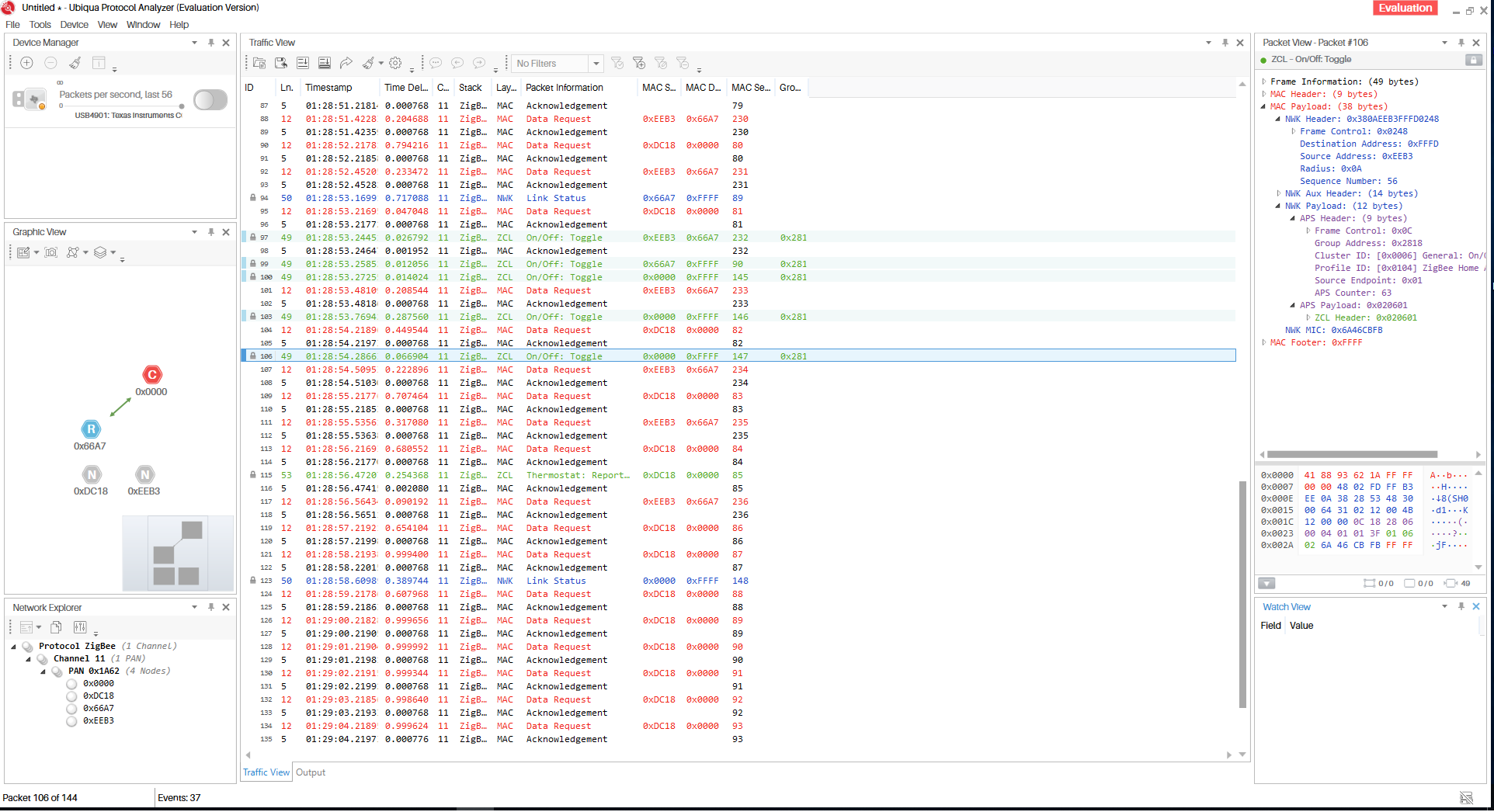
(partial) configuration.yaml:
devices:
'0x90fd9ffffed97ed6':
coordinator_group: 10264 // I put 0x2818 here but after restarting it is converted into a decimal number
friendly_name: Tradfri_remote
retain: false
ciB89
on 18 Jan 2019
@ciB89 perhaps indeed the new firmware is needed, can you verify this? (https://github.com/Koenkk/Z-Stack-firmware/tree/dev/coordinator/CC2531/bin)
Note that after a factory reset of the remote the group ID will be different.
Koenkk
on 18 Jan 2019
Hm.. ok, well currently I am not willing to repair all of my devices yet. I might try it on my secondary stick though. Is there no already compiled firmware for that version?
ciB89
on 18 Jan 2019
@ciB89 Is there no already compiled firmware for that version? what do you mean?
Koenkk
on 18 Jan 2019
@Koenkk nvm I'm stupid 🤣
ciB89
on 18 Jan 2019
As I couldn't find any other way to figure out the group and didn't want to withhold you from using this device, I added support for this device in the dev branch. Note that is requires additional setup: https://github.com/Koenkk/zigbee2mqtt/blob/dev/docs/getting_started/pairing_devices.md#ikea-tradfri-remote-control-e1524
Hopefully in the future we will find a better way to support this device.
One question before I go buy an additional zigbee sniffer: if I have the correct group of the remote, am I able to detect any of the remote's keys or just the middle one?
NoWhere2Go19
on 21 Jan 2019
@NoWhere2Go19 all of them, middle button click, and both arrows and brightness: click, long click start and long click end events.
kycera
on 21 Jan 2019
I've just ordered a second usb stick. I can use it for sniffing and it's always good to have a backup.
While i was reading the documents, i was wondering if the group ID isn't sent while pairing. The original tradfi component needs to have the group id too right? Did anyone check that? (you probably did)
nldroid
on 22 Jan 2019
@nldroid the TRADFRI remote sends the group ID using touchlink commissioning (while holding the reset button close to a bulb). This is currently not supported by the firmware (Z-Stack 1.2 HA), perhaps it will work in Z-Stack 3.0
Koenkk
on 22 Jan 2019
@nldroid the TRADFRI remote sends the group ID using touchlink commissioning (while holding the reset button close to a bulb). This is currently not supported by the firmware (Z-Stack 1.2 HA), perhaps it will work in Z-Stack 3.0
Ok, Thanks.
I've proposed an addition to the documentation to make this clear for everyone: https://github.com/Koenkk/zigbee2mqtt/compare/dev...nldroid:patch-1
nldroid
on 22 Jan 2019
@nldroid yes, but I prefer to put it into a separate paragraph called Why is this needed?. Could you make a pr?
Koenkk
on 23 Jan 2019
I'm learning to use Git so i hope that i've done it correctly. Can't seem to find a way to remove my old changed version.
nldroid
on 23 Jan 2019
I got the success message
"Successfully applied coordinator group for IKEA TRADFRI remote control (0xd0....)"
but now i'm lost. On pressing a key nothing happens in the logs. Not at zigbee2mqtt's logs, not at homassistant's.
Whats there to do next?
My config in /opt/zigbee2mqtt/data/configuration.yamllooks like this:
homeassistant: true
permit_join: true
mqtt:
base_topic: zigbee2mqtt
server: 'mqtt://192.168.10.4'
user: [...]
password: [...]
serial:
port: /dev/ttyACM0
devices:
'0x000...:
friendly_name: '0x000...'
retain: false
'0x000...':
friendly_name: '0x000...'
retain: false
'0xd0cf...':
friendly_name: '0xd0cf...'
retain: false
coordinator_group: 0x5f36
The first two devices are bulbs that perfectly work. Thanks for any hint.
linuxlurak
on 8 Feb 2019
@linuxlurak are you sure the coordinator_group: 0x5f36 ID is correct?
Koenkk
on 8 Feb 2019
@Koenkk thanks for your hint. Im quiet sure it was the right group yesterday... What are the circumstances that the group id changes? Now it seems to work again after i changed the id to the newly sniffed one.
Thanks again for your time & help!
linuxlurak
on 8 Feb 2019
@linuxlurak it changes when the button is reset (4 times press of the pair button -> red light blinking)
Koenkk
on 8 Feb 2019
Just a heads up. No issues here.
I got my 2nd usb stick so i could sniff the Zigbee traffic. I managed to get the group id and add it to Zigbee2mqtt.
Everything is working perfectly.
nldroid
on 10 Feb 2019
@nldroid what firmware version did you flasch to the usb sniffer? Both the same?
 ghost
on 10 Feb 2019
Koenkk
on 10 Feb 2019
ghost
on 10 Feb 2019
Koenkk
on 10 Feb 2019
I used exactly that howto. Used all the files from the zboss zip.
Took me a while to find out that i had to select the USB stick in the zboss software instead of s com port but after that it was quite easy.
nldroid
on 10 Feb 2019
I couldn't get registered at zboss, but I managed to get SmartRF Packet Sniffer to work with the firmware from the howto. Thanks a lot for your help.
ghost
on 10 Feb 2019
Good news!
The TRADFRI remote control can now be used without any additional setup.
To test this, flash your CC2531 with the latest dev firmware: https://github.com/Koenkk/Z-Stack-firmware/tree/dev/coordinator/CC2531/bin . (another cool thing about this firmware is that it doesn't require re-pairing of all your devices).
Please test this and let me know if it works, if it does we can remove all of the coordinator_group stuff.
Koenkk
on 17 Feb 2019
So that means more devices than just the TRADFRI remote?
 ryanbeaton
on 17 Feb 2019
ryanbeaton
on 17 Feb 2019
@ryanbeaton yes, all devices that send group commands actually.
Koenkk
on 17 Feb 2019
Very good news @Koenkk ! - I will flash it onto another CC2531 now and give it a try.
Will I have to repair all my devices afterwards or what is the easiest way to replace an existing running CC2531 with this new one in zigbee2mqtt ?
martinrosenauer
on 17 Feb 2019
@martinrosenauer I don't have any experience with switching stick without re-pairing. Reflashing the same stick does not require re-pairing (with the latest dev firmware).
Koenkk
on 17 Feb 2019
@Koenkk, ok, I will do that instead then. It should be perfectly fine to replace CC2531ZNP-Prod_20181024.hex with CC2531ZNP-Prod_20190217 then ? :)
martinrosenauer
on 17 Feb 2019
I just switched sticks and didn't need to re-pair anything. Thanks @koenkk! Love this project
brtwrs
on 17 Feb 2019
@brtwrs, e.g. existing untouched zigbee2mqtt setup but on another CC2531 with the new firmware ? (no repairing necessary)
martinrosenauer
on 17 Feb 2019
@martinrosenauer that's correct. I was surprised too;) Tried it this morning with the 15-feb firmware. I did had to make sure the stick used the right pan_id but that's shouldn't be a problem with the new firmware.
brtwrs
on 17 Feb 2019
I did had to make sure the stick used the right pan_id but that's shouldn't be a problem with the new firmware.
pan_id?
ciB89
on 17 Feb 2019
@ciB89 read this: http://www.zigbee2mqtt.io/information/flashing_without_re-pairing.html :)
brtwrs
on 17 Feb 2019
Good news!
The TRADFRI remote control can now be used without any additional setup.
To test this, flash your CC2531 with the latest dev firmware: https://github.com/Koenkk/Z-Stack-firmware/tree/dev/coordinator/CC2531/bin . (another cool thing about this firmware is that it doesn't require re-pairing of all your devices).
Please test this and let me know if it works, if it does we can remove all of the
coordinator_groupstuff.
Hi @Koenkk .. i flash the latest dev firmware of coordinator and build latest zigbee2mqtt-dev.
Work without any special needing, the tradfri remote (round 5 buttons) pair directly and all the buttons work.
Damn ... great work .. nice to see that there is so much great stuff implemented after my latest works :)
tb-killa
on 17 Feb 2019
Does it mean we can use the tradfri remote to pair bulbs like we can do with the tradfri gateway?
Edzilla2000
on 17 Feb 2019
@brtwrs, ok, flashed new CC2531 now, when is the PANID assigned to it ?
martinrosenauer
on 17 Feb 2019
Took the chance, updated to latest zigbee2mqtt, shutdown the Tinkerboard I'm running it on, replaced the CC2531 with the newly flashed one, started up and it seems to work :)
Goind to move forward with the Ikea Trådfri remotes..
@Koenkk, thanks a bunch for doing such great work helping us all!
martinrosenauer
on 17 Feb 2019
@Koenkk Last firmware - brilliant work! Can you attach a binary firmware file for updating without debugger with Serialbootloader?
kirovilya
on 17 Feb 2019
@Koenkk I confirm, now the remote can work without binding the coordinator to the group!
kirovilya
on 17 Feb 2019
@Koenkk, I can report that it works very well with my Ikea Trådfri remote, seeing each button being both pressed, hold and released.
Very, very well done!
martinrosenauer
on 17 Feb 2019
@kirovilya I will provide the remaining firmwares when this firmware is in master (updating all of them is a lot of work, especially when there are some more upcoming changes)
Koenkk
on 17 Feb 2019
I see the following error for Ikea Outlet (router) after flashing with 20190217 firmware:
Zigbee publish to device '0x000d6ffff1234567', genOnOff - off - {} - {"manufSpec":0,"disDefaultRsp":0} - null failed with error Error: AF data request fails, status code: 205. No network route. Please confirm that the device has (re)joined the network.
All other zigbee devices are working as expected
 vke
on 17 Feb 2019
vke
on 17 Feb 2019
@vke can you replug it?
Koenkk
on 17 Feb 2019
@Koenkk thank you, it helped me!
vke
on 17 Feb 2019
@Koenkk, funny enough I now have issues with 2-3 bulbs (Trådfri and Hue), where the log states
failed with error Error: AF data request fails, status code: 205. No network route. Please confirm that the device has (re)joined the network.
Haven't had any issues on the other identical CC2531 nor the earlier dev branch I was on.
Any good ideas ? (one of the bulbs are next to the CC2531). I have 36 devices in total.
martinrosenauer
on 17 Feb 2019
@martinrosenauer you have to reboot bulbs: https://github.com/Koenkk/zigbee2mqtt/issues/102#issuecomment-464490660
vke
on 17 Feb 2019
@vke, I tried repairing one of them, resetting the Trådfri (6 x off/on) and it turned out with a timeout. Was that what you meant or is reboot differently ?
martinrosenauer
on 17 Feb 2019
@martinrosenauer just power them off (1x, not 6x), no need to reset and re-pair.
vke
on 17 Feb 2019
@vke, aah - that was the first thing I tried - and just retried - and are still getting the status code: 205..
martinrosenauer
on 17 Feb 2019
The remote outlet (E1743) seem to be successfully connected. I will try in the next days to update zigbee-shepherd-converters to be able to use it with zigbee2mqtt.
apiel
on 17 Feb 2019
Oh, actually E1743 is already implemented but zigbee2mqtt is not using the latest version of zigbee-shepherd-converters.
After doing yarn add zigbee-shepherd-converters, E1743 ikea remote is working well. Very good new :D
Is there any chance to get a firmware update for CC2530 ?
apiel
on 17 Feb 2019
Amazing work @koenkk
Thank you!
 p3pp0
on 18 Feb 2019
p3pp0
on 18 Feb 2019
Tested this morning and its working well. No need to sniff the group_id.
Thanks a lot!
But, one question. How can i use it in homeassistant. Because the last action stays (maybe toggle) i'm not able to use the button twice. The trigger didn't fire the second time. Do i have to use the MQTT Trigger?
 jonnycastaway
on 18 Feb 2019
jonnycastaway
on 18 Feb 2019
You'll have to clear the state of the remote in the automation that's triggered by the button press, so the next press can be detected.
Annoyingly this isn't provided by HA by default; I had to track down a script to add the functionality. Will post an example when I get home later tonight.
 pelrun
on 18 Feb 2019
pelrun
on 18 Feb 2019
thats strange. other buttons don't have this behaviour. (aqara button for example)
@koenkk: great work!!
wimpie007
on 18 Feb 2019
Use the MQTT trigger.
Koenkk
on 18 Feb 2019
Hello,
Sometimes short adresse of end device change (error status 205 no network route)
launch command zdo/nwkAddrReq to find new short adress and update nwkaddr in database.db
picsou83
on 18 Feb 2019
Here's my method for using state triggers instead of MQTT triggers. Obviously it's extra work compared to the MQTT route, but at least you have the option: https://gist.github.com/pelrun/91feae869aa9bfe9faa610a1fbbee9b3
pelrun
on 18 Feb 2019
@Koenkk
Use the MQTT trigger.
@pelrun
Here's my method for using state triggers instead of MQTT triggers. Obviously it's extra work compared to the MQTT route, but at least you have the option: https://gist.github.com/pelrun/91feae869aa9bfe9faa610a1fbbee9b3
Thank's, i test both after work ;-)
jonnycastaway
on 18 Feb 2019
As the button is fully supported now without any additional setup, I will close this issue.
Koenkk
on 18 Feb 2019
@Koenkk any chance to update https://github.com/Koenkk/Z-Stack-firmware/tree/dev/coordinator/CC2530 ?
And why isn't it merge to master? Is still under development? Is this also the reason why zigbee2mqtt is not using the last version of zigbee-shepherd-converters?
apiel
on 18 Feb 2019
@apiel the firmware is still under test, once it's in master all firmwares will be available. (recompiling all the firmwares take a lot of time, especially when there are frequent changes).
Koenkk
on 18 Feb 2019
@Koenkk shoud I use dev branch in my docker to use this firmware to have Ikea Tradfi Button fully working? and when do you plan put this firmware into master?
 wiuwiu
on 9 Mar 2019
wiuwiu
on 9 Mar 2019
@wiuwiu zigbee2mqtt dev branch isn't required.
Soon, when zigbee2mqtt 1.2 is released (rounding up a few things atm).
Koenkk
on 9 Mar 2019
We should now implement battery reporting for the device too.
For this we could copy the needing configure part with converters from the E1743 model (we doesnt need the bind for genOnOff.
tb-killa
on 9 Mar 2019
@tb-killa could you do this?
Koenkk
on 9 Mar 2019
Yes will provide PR give me tomorrow to test.
tb-killa
on 9 Mar 2019
For the love of god please start using version numbers and proper releases for the firmware. It's literally impossible to follow tickets. I have no idea if my button doesn't work because of a) outdated zigbee2mqtt server, b) outdated cc2531 firmware c) a real issue I should be reporting.
 timdonovanuk
on 7 Apr 2019
timdonovanuk
on 7 Apr 2019
@Koenkk is there any way we can chat about how you added support for this? I am one of the developers for the ZHA component in HA and we would like to add similar support to Zigpy and its supporting radio libraries if possible. I'm on discord w/ the same handle if that works. Thanks in advance.
 dmulcahey
on 5 May 2019
dmulcahey
on 5 May 2019
@dmulcahey could you contact me on telegram? (@koenkk)
Koenkk
on 5 May 2019
I paired both a Tradfri white spectrum bulb and its button to my CC2530 and then paired the button to the bulb (long press) to be able to control it. On/off and brightness work, but sadly the left/right buttons now don't change the color temperature of the bulb anymore (I can see the clicks being reported though). The bulb is connected as IKEA TRADFRI LED bulb E26/E27 980 lumen, dimmable, white spectrum, opal white (LED1545G12).
How do I get this to work?
 vogler
on 15 May 2019
vogler
on 15 May 2019
@vogler this is a known issue see #1232
Koenkk
on 16 May 2019
Related issues
 rm2kdev
·
3Comments
rm2kdev
·
3Comments
 andreasbrett
·
3Comments
andreasbrett
·
3Comments
 pepp86
·
4Comments
pepp86
·
4Comments
 jerrychong25
·
4Comments
tb-killa
·
3Comments
jerrychong25
·
4Comments
tb-killa
·
3Comments
Most helpful comment
Good news!
The TRADFRI remote control can now be used without any additional setup.
To test this, flash your CC2531 with the latest dev firmware: https://github.com/Koenkk/Z-Stack-firmware/tree/dev/coordinator/CC2531/bin . (another cool thing about this firmware is that it doesn't require re-pairing of all your devices).
Please test this and let me know if it works, if it does we can remove all of the
coordinator_groupstuff.