Zettlr: [ENHANCEMENT] Make Version Information on Startup Optional
Description
I find the notification showing up each time I restart Zettlr a bit annoying: "You got the newest version of Zettlr".
Proposed Changes
I'd be fine with this message showing up, but only if there are actual updates. Even then, only one message would do. I understand that you might be concerned that users actually update the software, but making it possible to opt out of these notification would make the experience less intrusive, in my opinion.
Caveats
If keeping users in the loop on new versions is important, you shouldn't remove the message completely, but as suggested, only show it when new versions exist. I'd argue that it's easier to miss _actual_ update notifications, if there's "you're up-to-date" prompts each time you start the app.
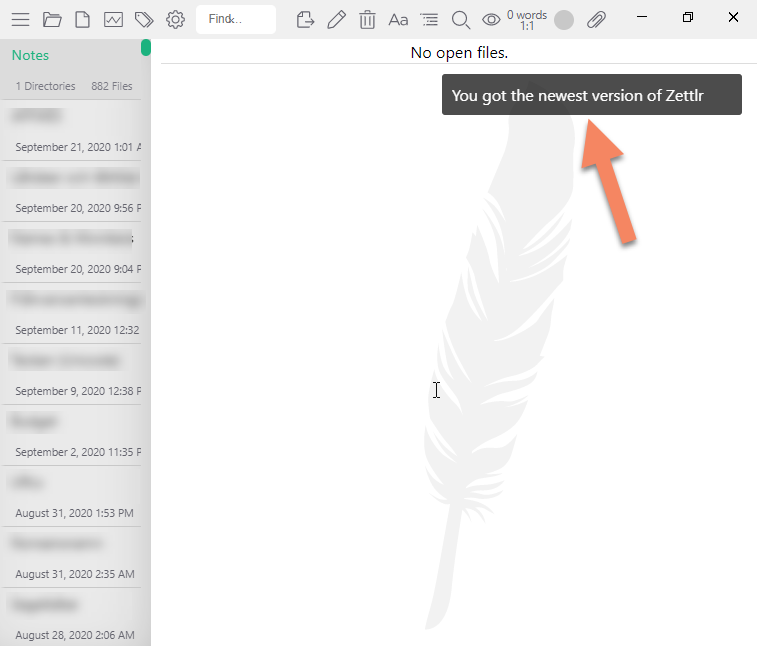
 hced
hced
All 5 comments
You are right that I want to "force" people to update, because I cannot maintain more than one single version of the app at one time, a lot of users (who are seldomly on GitHub) are pretty lazy when it comes to updating anything, and as Zettlr is Open Source either way there's only little cost in updating (apart from edge cases in big companies, etc).
As many people wanted to get rid of this, I have given it thought myself, and here's my proposal:
- The update check will still be mandatory, but instead of telling you "Hey, you got the newest version" it will only tell you that a newer version is available if there is one
- The information "Hey, there's a new version available" will only be visible in a toolbar button, and a notification will come once on program start, notifying you of this.
I want to make it less obtrusive, but still in a way that tells the user "Hey folk, you _do_ have internet, and hence you could now download the application, so DO IT!"
 nathanlesage
on 22 Sep 2020
nathanlesage
on 22 Sep 2020
Thanks Nathan. Great to hear that you're considering some options for this. There's also the option to implement periodic checks and a dialog that comes up every X days/weeks. That could be a good middle-ground where everyone wins: you get people to update and people get to not see this message at all, until next check according to set time period occur.
hced
on 22 Sep 2020
There's also the option to implement periodic checks and a dialog that comes up every X days/weeks. That could be a good middle-ground where everyone wins:
I think I'd rather have users see that there's an update available immediately. What if it's a critical security issue and malicious http content could (hypothetically) be run in Zettlr and do things on the local machine?
I do see a use case for being able to disable the notification altogether for two purposes, though:
- Distribution packagers where updates will be distributed through the distro repos on their schedule.
- Restricted environments where binaries must be whitelisted before they can be run - showing your users that there's a new version available is all well and good until they can't do anything to update; then it becomes annoying.
In saying that, I'd rather that the option to disable this notification altogether be hidden, if implemented at all, rather than easily changed through the UI, saving users from themselves.
I like your suggestion, Nathan - It's definitely an improvement on the current behaviour, and a notification that only appears when there's a new version is less likely to be ignored than one that's there at every startup!
 Kangie
on 23 Sep 2020
Kangie
on 23 Sep 2020
I do see a use case for being able to disable the notification altogether for two purposes, though:
Yeah, I was planning to implement something where users could create a certain file (or something like this) in the Zettlr settings directory, which, if present, disables the update check.
nathanlesage
on 23 Sep 2020
Sooo, everyone: It has been done! Two full work-days and about 1.000 lines of code as well as approximately two heart attacks later, the update check has been changed:
- If there is no update, you will see no output whatsoever.
- If there is an update, there will be a toolbar icon, indicating said fact.
- If you click that icon, a small popup with basic information ("New Update Available", your version, and update version) will show up.
- If you click "View changelog", you will see the old dialog as you know it, except there's no "Download" button anymore.
- Instead, you will be presented either with one (macOS), two (Windows) or four (I think…? On Linux-platforms) download choices, out of which you can select the version installed (e.g. intel vs. ARM based installers on Windows).
- If you click the button, Zettlr will automatically download the update to your Downloads folder.
- While Zettlr downloads, it will show you the progress (progress bar + percentage downloaded + ETA in minutes and seconds)
- Once it has downloaded, if you open the popup again, you will have the option to install the update. Which entails:
- Zettlr will retrieve the SHA256 checksum file
- Zettlr will verify the computed checksum of the download with the one provided
- If they match, it will open the downloaded installer (e.g. performing a programmatical "double click") and also quit the app, thereby commencing the update.
It will never get easier than this, at least if I want to retain my sanity.
P.S.: Anybody interested in looking at the strings and implement the translations? I'm through with this sh** for now and will now have a beer.
P.P.S.: Yes, I tend to overstretch the issues at hand, but prove me that it's not good once I publish the second alpha 😎
nathanlesage
on 29 Sep 2020
Related issues
 danieltomasz
·
5Comments
danieltomasz
·
5Comments
 manisabri
·
4Comments
manisabri
·
4Comments
 volt4ire
·
4Comments
volt4ire
·
4Comments
 Jos512
·
5Comments
Jos512
·
5Comments
 grst
·
4Comments
grst
·
4Comments
Most helpful comment
Sooo, everyone: It has been done! Two full work-days and about 1.000 lines of code as well as approximately two heart attacks later, the update check has been changed:
It will never get easier than this, at least if I want to retain my sanity.
P.S.: Anybody interested in looking at the strings and implement the translations? I'm through with this sh** for now and will now have a beer.
P.P.S.: Yes, I tend to overstretch the issues at hand, but prove me that it's not good once I publish the second alpha 😎