Zettlr: Broken code indents in an exported HTML file
Description
Broken code indents in an exported HTML file
Reproducing
1) Write code block with three back-ticks '`'
2) Export file into HTML
3) Look at the indents. Starting from the second line of code every line has a indent + tab-like size indent
Expected behaviour
All lines of code has a normal indentation. Without hidden tabs or spaces.
Screenshots
In editor:
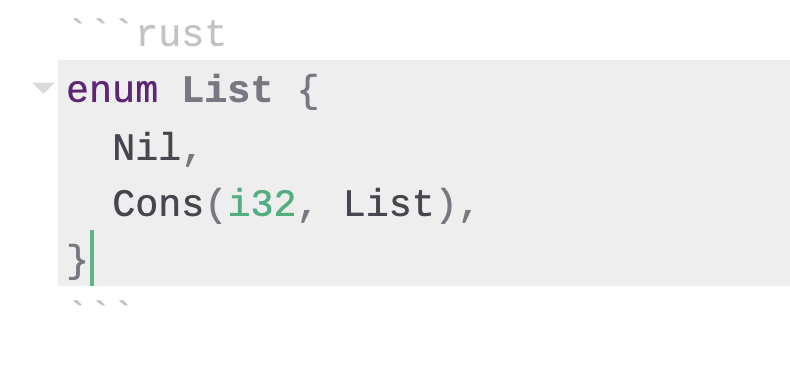
In browser:
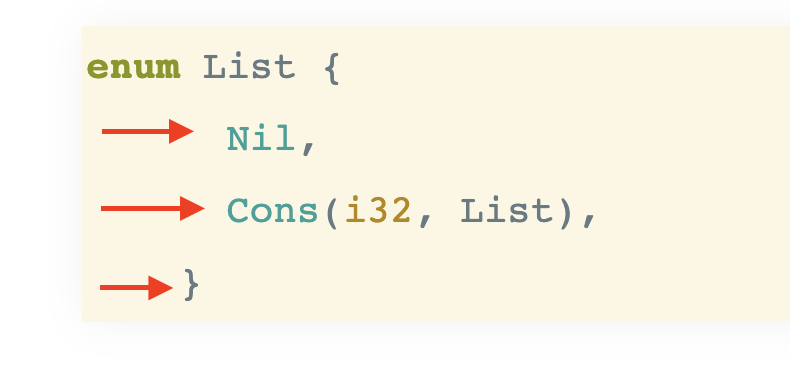
Platform
- OS and version: MacOS Catalina 10.15.6
- Zettlr Version: 1.7.4
- Screen Resolution: 2560x1600
- Chrome Version: Version 84.0.4147.105 (Official Build) (64-bit)
- Pandoc Version: 2.9.2.1
- TeX Version: 3.14159265 (TeX Live 2020)
- kpathsea Version 6.3.2
Additional info
1) After exporting in pdf format, everything works as expected.
2) I've tested it in other browsers as well. Firefox, Safari. There's still an error.
3) The problem occurs also when using other languages: JS, SH, Python
 TicTak21
All 8 comments
Thanks so much for opening up your first issue here on the repository! 🎉 We would like to warmly welcome you to the community behind the app! ☺️ We'll check in soon and have a look at your issue. In the meantime, you can check your issue and make sure it aligns with our contribution guidelines! Here's the comprehensive list:
Enhancements
An enhancement takes a feature and improves or alters its behaviour. Please make sure to argue how your proposition will aid non-technical text workers, and why it can't be emulated easily with other features or apps!
Feature requests
Feature requests introduce whole new features into the app. This requires a lot of work, so these might be turned down if the implementation costs supersede the benefits we expect to see from implementing it. Please do not be disappointed if that happens. It likely has nothing to do with your great request but simply with us and our missing resources!
You can of course always ask someone to implement this feature, because a PR with a working new feature has much higher chances of being merged! :)
Bug reports
Please note that one of the main reasons for why bug reports cannot be addressed is that there's not enough information for us to find and fix the bug you describe, so make sure you try to pinpoint the bug as close as possible.
The ideal bug report for us has two qualities:
- The bug is always reproducible, at least within a certain context. 2. We know exactly what specifically goes wrong, and there is consensus on
what should happen instead.
Please note that if you encounter behaviour that does not align with your expectations of what would happen, this might as well be simply intended behaviour and we need to simply _clarify_ why the behaviour is the way it is. This is not to be considered a bug and such issues may be closed! Suggest an enhancement instead!
But now, have a great day and thank you again!
![boring-cyborg[bot] picture](https://avatars3.githubusercontent.com/in/50386?v=4&s=40) boring-cyborg[bot]
on 4 Aug 2020
boring-cyborg[bot]
on 4 Aug 2020
Can reproduce.
The whole codeblock is contained within a <pre>, so each new line after the <pre> is declared (the first, where the codeblock opens) has the whitespace for indentation included in the line of code.
<body>
<article>
<div class="sourceCode" id="cb1"><pre class="sourceCode cpp"><code class="sourceCode cpp"><span id="cb1-1"><a href="#cb1-1" aria-hidden="true"></a><span class="kw">enum</span> List {</span>
<span id="cb1-2"><a href="#cb1-2" aria-hidden="true"></a> Nil,</span>
<span id="cb1-3"><a href="#cb1-3" aria-hidden="true"></a> Cons(i32, List),</span>
<span id="cb1-4"><a href="#cb1-4" aria-hidden="true"></a>}</span></code></pre></div>
</article>
</body>
I'll try and have a look at the way it's generating and see what can be done. Given that it all generates within ('inline' with) the article tags, it should be indented at this level. It might be as simple as wrapping each line in a <pre> instead of the whole codeblock. Messy, but it'll completely avoid unintentionally pulling in whitespace!
Edit: OK, so breaking it up line-by-line has the desired effect (no excess whitespace picked up), but it also breaks the codeblock up, so not a good solution!
 Kangie
on 12 Aug 2020
Kangie
on 12 Aug 2020
Looks like something up with Pandoc because as far as I know Zettlr doesn't touch those code blocks. Please report if this is not reproducible by using Pandoc directly!
 nathanlesage
on 12 Aug 2020
nathanlesage
on 12 Aug 2020
OK, using pandoc to directly convert a markdown document containing only:
``` rust
enum List {
    Nil,
    Cons(i32, List),
}
(there's backticks at the bottom, but they break github markdown, so...)
Results in HTML output as expected - Pandoc doesn't indent the codeblock.
I suspect this issue has to do with the way content is injected into the Zettlr html template:
<body>
...
  <article>
    $body$
  </article>
</body>
The generated content correctly replaces $body$, however as it's between the article tags in the template (and indented), we run into this issue where the <pre> tags catch the whitespace from indentation in addition to that specified in the codeblock.
EDIT: I don't have access to a machine that I can play with the template on at the moment, but I'll remove the indentation around the article tags when I do and report back here.
Kangie
on 13 Aug 2020
OK, Can confirm that removing indentation from the $body$ substitution makes this behave as expected. Note that this means while the <article> tags are indented appropriately, the content between them is not, so there's no whitespace for the <pre> to pickup.
Not sure if there's a good solution - Removing indentation will do the job, but result in less readable output (at least, as far as source goes).
If there's no 'good' solution, I'm happy to throw a quick PR together to remove the indentation there, but I'd prefer to find a decent fix. @nathanlesage, any thoughts?
EDIT: Screenshot of results:
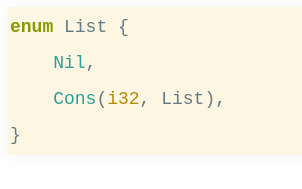
Resulting Source:
<body>
  <!-- Render in article for reader view enabling -->
    <article>
<div class="sourceCode" id="cb1"><pre class="sourceCode rust"><code class="sourceCode rust"><span id="cb1-1"><a href="#cb1-1" aria-hidden="true"></a><span class="kw">enum</span> List <span class="op">{</span></span>
<span id="cb1-2"><a href="#cb1-2" aria-hidden="true"></a>    <span class="cn">Nil</span><span class="op">,</span></span>
<span id="cb1-3"><a href="#cb1-3" aria-hidden="true"></a>    <span class="cn">Cons</span>(<span class="dt">i32</span><span class="op">,</span> List)<span class="op">,</span></span>
<span id="cb1-4"><a href="#cb1-4" aria-hidden="true"></a><span class="op">}</span></span></code></pre></div>
  </article>
</body>
</html>
So … just remove the indentation of the contents? After all, the display is more important than the source, so I'm fine with that :D
nathanlesage
on 13 Aug 2020
Pretty much. I'll take this one on and submit a PR within the next few days; bit busy tonight. :)
Kangie
on 13 Aug 2020
Lucky you I had VSCode open right now, hehe — please report back if something's still amiss!
nathanlesage
on 13 Aug 2020
Related issues
 maehr
·
3Comments
maehr
·
3Comments
 Jos512
·
5Comments
Jos512
·
5Comments
 bit-hug
·
4Comments
bit-hug
·
4Comments
 manisabri
·
4Comments
manisabri
·
4Comments
 carregal
·
5Comments
carregal
·
5Comments
Most helpful comment
OK, using pandoc to directly convert a markdown document containing only:
(there's backticks at the bottom, but they break github markdown, so...)
Results in HTML output as expected - Pandoc doesn't indent the codeblock.
I suspect this issue has to do with the way content is injected into the Zettlr html template:
The generated content correctly replaces $body$, however as it's between the article tags in the template (and indented), we run into this issue where the
<pre>tags catch the whitespace from indentation in addition to that specified in the codeblock.EDIT: I don't have access to a machine that I can play with the template on at the moment, but I'll remove the indentation around the article tags when I do and report back here.