Zettlr: Copy & Paste from HTML selection doesn't keep text layout under Windows 10
As already discussed in #217 i'm opening this issues about the copy & paste html selection under Windows 10.
 graphixillusion
All 38 comments
Now it's at least in the project, so I'll have a look at it!
 nathanlesage
on 11 Mar 2020
nathanlesage
on 11 Mar 2020
This issue has been automatically marked as stale because it has not had recent activity. It will be closed if no further activity occurs. Thank you for your contributions.
![stale[bot] picture](https://avatars3.githubusercontent.com/in/1724?v=4&s=40) stale[bot]
on 10 May 2020
stale[bot]
on 10 May 2020
This issue has been automatically closed due to inactivity. If you believe that this issue is relevant for many users and should not be closed, feel free to comment so that the admins will be notified.
stale[bot]
on 17 May 2020
If this has not been fixed by 1.7.1, please comment.
nathanlesage
on 8 Jul 2020
@nathanlesage just tried with 1.7.1, the issue is still present.
graphixillusion
on 8 Jul 2020
Ah, dammit
nathanlesage
on 8 Jul 2020
So, just for a quick refresher: The problem was what …?
nathanlesage
on 8 Jul 2020
@nathanlesage The problem is that when i copy and paste some formatted text, when i paste it into zettlr, it doesn't keep the original layout. Example:
This is the result when i copy and paste something with formatted layout into zettlr:
With Zettlr, writing professional texts is easy and motivating: Whether you are a college student, a researcher, a journalist, or an author — Zettlr has the right tools for you. Watch the video or continue reading to see what they are!

Visit our Website.

Features
Available in over a dozen languages
Tight and ever-growing integration with your favourite reference manager (such as Zotero or JabRef)
Cite with Zettlr using citeproc and your existing literature database
Four themes and dark mode support
File-agnostic writing: Enjoy full control over your own files
Keep all your notes and texts in one place — searchable and accessible
Code highlighting for many languages
Simple and beautiful exports with Pandoc, LaTeX, and Textbundle
Support for state of the art knowledge management techniques (Zettelkasten)
A revolutionary search algorithm with integrated heatmap
… and the best is: Zettlr is Open Source (FOSS)!
And this happens even with Cmd/Ctrl+V, and you are NOT holding down shift?
Could you have a look if the console says something? (Enable debug mode, then open the developer tools from the menu, then switch to the console tab)
nathanlesage
on 8 Jul 2020
@nathanlesage here the console log, after paste (ctrl+v):
vue/sidebar.css:1 Failed to load resource: net::ERR_FILE_NOT_FOUND
remote.js:20 Electron Deprecation Warning The 'remote' module is deprecated and will be disabled by default in a future version of Electron. To ensure a smooth upgrade and silence this warning, specify {enableRemoteModule: true} in the WebPreferences for this window.
(anonymous) @ remote.js:20
C:\Users\User\scoop\apps\zettlr\1.7.1\resources\app.asar\renderer\util\editor-tabs.js:102 [TABS] Synching 0 files
C:\Users\User\scoop\apps\zettlr\1.7.1\resources\app.asar\renderer\util\editor-tabs.js:102 [TABS] Synching 0 files
C:\Users\User\scoop\apps\zettlr\1.7.1\resources\app.asar\renderer\util\editor-tabs.js:102 [TABS] Synching 0 files
DevTools failed to load SourceMap: Could not load content for file:///C:/Users/User/scoop/apps/zettlr/1.7.1/resources/app.asar/node_modules/@popperjs/core/dist/umd/popper.min.js.map:
DevTools failed to load SourceMap: Could not load content for file:///C:/Users/User/scoop/apps/zettlr/1.7.1/resources/app.asar/node_modules/tippy.js/dist/tippy.umd.js.map:
DevTools failed to load SourceMap: Could not load content for file:///C:/Users/User/scoop/apps/zettlr/1.7.1/resources/app.asar/renderer/assets/showdown.js.map:
DevTools failed to load SourceMap: Could not load content for file:///C:/Users/User/scoop/apps/zettlr/1.7.1/resources/app.asar/renderer/assets/mermaid.core.js.map:
DevTools failed to load SourceMap: Could not load content for file:///C:/Users/User/scoop/apps/zettlr/1.7.1/resources/app.asar/renderer/assets/index.js.map:
DevTools failed to load SourceMap: Could not load content for file:///C:/Users/User/scoop/apps/zettlr/1.7.1/resources/app.asar/renderer/assets/all-shapes.js.map:
DevTools failed to load SourceMap: Could not load content for file:///C:/Users/User/scoop/apps/zettlr/1.7.1/resources/app.asar/node_modules/@clr/icons/clr-icons.min.css.map:
C:\Users\User\scoop\apps\zettlr\1.7.1\resources\app.asar\renderer\zettlr-editor.js:226 Uncaught TypeError: Cannot read property 'cmDoc' of undefined
    at C:\Users\User\scoop\apps\zettlr\1.7.1\resources\app.asar\renderer\zettlr-editor.js:226
    at C:\Users\User\scoop\apps\zettlr\1.7.1\resources\app.asar\node_modules\codemirror\lib\codemirror.js:2076
    at fireCallbacksForOps (C:\Users\User\scoop\apps\zettlr\1.7.1\resources\app.asar\node_modules\codemirror\lib\codemirror.js:2033)
    at finishOperation (C:\Users\User\scoop\apps\zettlr\1.7.1\resources\app.asar\node_modules\codemirror\lib\codemirror.js:2047)
    at endOperation (C:\Users\User\scoop\apps\zettlr\1.7.1\resources\app.asar\node_modules\codemirror\lib\codemirror.js:3787)
    at runInOp (C:\Users\User\scoop\apps\zettlr\1.7.1\resources\app.asar\node_modules\codemirror\lib\codemirror.js:3916)
    at handlePaste (C:\Users\User\scoop\apps\zettlr\1.7.1\resources\app.asar\node_modules\codemirror\lib\codemirror.js:8142)
    at HTMLTextAreaElement.<anonymous> (C:\Users\User\scoop\apps\zettlr\1.7.1\resources\app.asar\node_modules\codemirror\lib\codemirror.js:9303)
    at HTMLDivElement.<anonymous> (C:\Users\User\scoop\apps\zettlr\1.7.1\resources\app.asar\node_modules\codemirror\lib\codemirror.js:9342)
(anonymous) @ C:\Users\User\scoop\apps\zettlr\1.7.1\resources\app.asar\renderer\zettlr-editor.js:226
(anonymous) @ C:\Users\User\scoop\apps\zettlr\1.7.1\resources\app.asar\node_modules\codemirror\lib\codemirror.js:2076
fireCallbacksForOps @ C:\Users\User\scoop\apps\zettlr\1.7.1\resources\app.asar\node_modules\codemirror\lib\codemirror.js:2033
finishOperation @ C:\Users\User\scoop\apps\zettlr\1.7.1\resources\app.asar\node_modules\codemirror\lib\codemirror.js:2047
endOperation @ C:\Users\User\scoop\apps\zettlr\1.7.1\resources\app.asar\node_modules\codemirror\lib\codemirror.js:3787
runInOp @ C:\Users\User\scoop\apps\zettlr\1.7.1\resources\app.asar\node_modules\codemirror\lib\codemirror.js:3916
handlePaste @ C:\Users\User\scoop\apps\zettlr\1.7.1\resources\app.asar\node_modules\codemirror\lib\codemirror.js:8142
(anonymous) @ C:\Users\User\scoop\apps\zettlr\1.7.1\resources\app.asar\node_modules\codemirror\lib\codemirror.js:9303
(anonymous) @ C:\Users\User\scoop\apps\zettlr\1.7.1\resources\app.asar\node_modules\codemirror\lib\codemirror.js:9342
Okay, apparently there's an error in instantiating the document object on opening the file, which makes no sense on first sight o.O I'll have to think about this — if someone has a good idea of what might be causing this feel free to comment!
nathanlesage
on 8 Jul 2020
@nathanlesage Just a quick update about this. I'm testing the last 1.7.5 version and in the console window i just got this:
electron/js2c/renderer_init.js:82 Electron Deprecation Warning The 'remote' module is deprecated and will be disabled by default in a future version of Electron. To ensure a smooth upgrade and silence this warning, specify {enableRemoteModule: true} in the WebPreferences for this window.
(anonymous) @ electron/js2c/renderer_init.js:82
DevTools failed to load SourceMap: Could not load content for file:///C:/Users/User/scoop/apps/zettlr/1.7.5/resources/app.asar/renderer/assets/showdown.js.map:
DevTools failed to load SourceMap: Could not load content for file:///C:/Users/User/scoop/apps/zettlr/1.7.5/resources/app.asar/renderer/assets/tippy.cjs.js.map:
DevTools failed to load SourceMap: Could not load content for file:///C:/Users/User/scoop/apps/zettlr/1.7.5/resources/app.asar/renderer/assets/popper.js.map:
DevTools failed to load SourceMap: Could not load content for file:///C:/Users/User/scoop/apps/zettlr/1.7.5/resources/app.asar/renderer/assets/mermaid.core.js.map:
DevTools failed to load SourceMap: Could not load content for file:///C:/Users/User/scoop/apps/zettlr/1.7.5/resources/app.asar/renderer/assets/index.js.map:
DevTools failed to load SourceMap: Could not load content for file:///C:/Users/User/scoop/apps/zettlr/1.7.5/resources/app.asar/renderer/assets/all-shapes.js.map:
DevTools failed to load SourceMap: Could not load content for file:///C:/Users/User/scoop/apps/zettlr/1.7.5/resources/app.asar/node_modules/@clr/icons/clr-icons.min.css.map:
So no error messages when pasting like before but the pasted text is still wrong, without formatting.
graphixillusion
on 15 Aug 2020
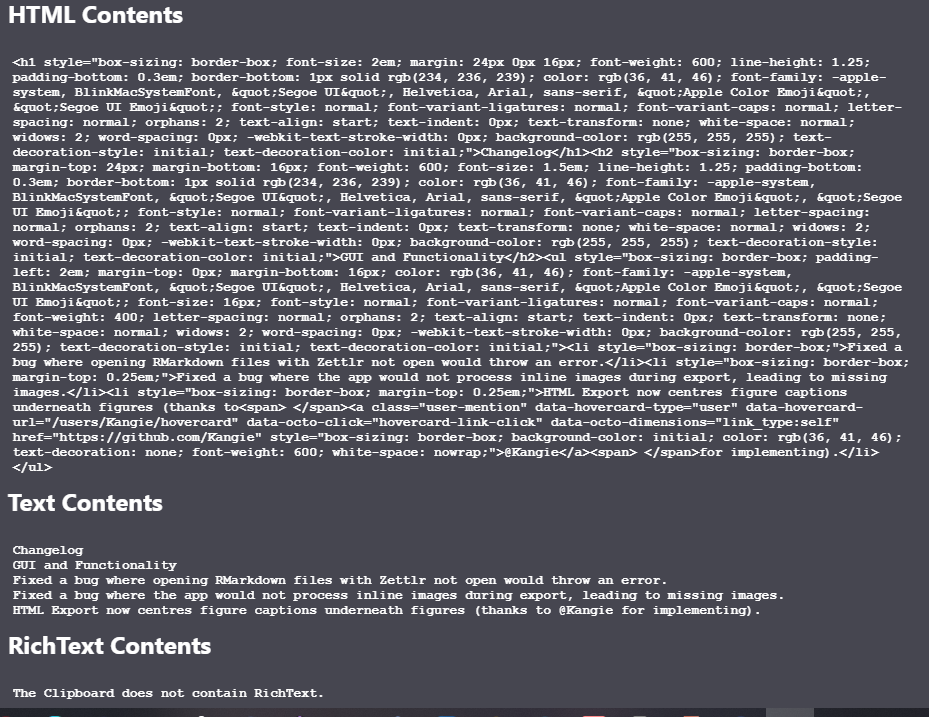
What does the clipboard say? So when you copy some text, and then select Develop -> Inspect clipboard, what do you see? Is there HTML in the clipboard?
nathanlesage
on 15 Aug 2020
@nathanlesage yep, the "Inspect Clipboard" has two sections: 1. HTML; 2. TEXT
graphixillusion
on 15 Aug 2020
Both filled, and the HTML looking like HTML?
nathanlesage
on 15 Aug 2020
I feel like this and #1053 are related to each other.
 canpolat
on 15 Aug 2020
canpolat
on 15 Aug 2020
@nathanlesage
graphixillusion
on 15 Aug 2020
Oh my god this HTML looks daunting. Zettlr makes use of Joplin-turndown for turning HTML into Markdown, soooo I will check that this weird HTML is being recognized, but if that works, it's an issue with an external library over which I do not have any control.
nathanlesage
on 15 Aug 2020
@nathanlesage If i try to paste the same thing in the WYSIWYG section inside Joplin, the text is pasted good, with the right format style. Maybe the official turndown will work better? https://github.com/domchristie/turndown
graphixillusion
on 15 Aug 2020
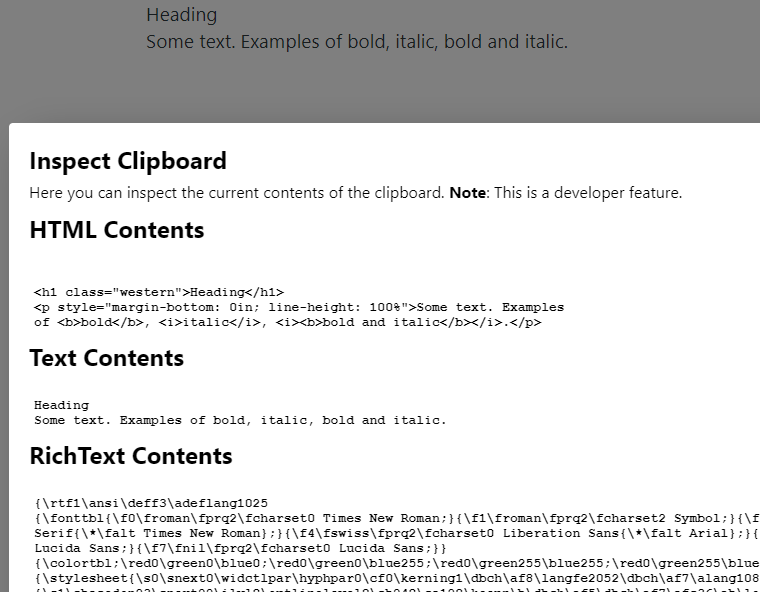
Below is a screenshot from a simpler HTML (Windows 10, Zettlr 1.7.5). I also see the Console logs about failing to load SourceMap files but I don't think they are related to this problem. Since the HTML source in my example is simpler, I suspect Zettlr is actually using the text contents instead of HTML.
canpolat
on 16 Aug 2020
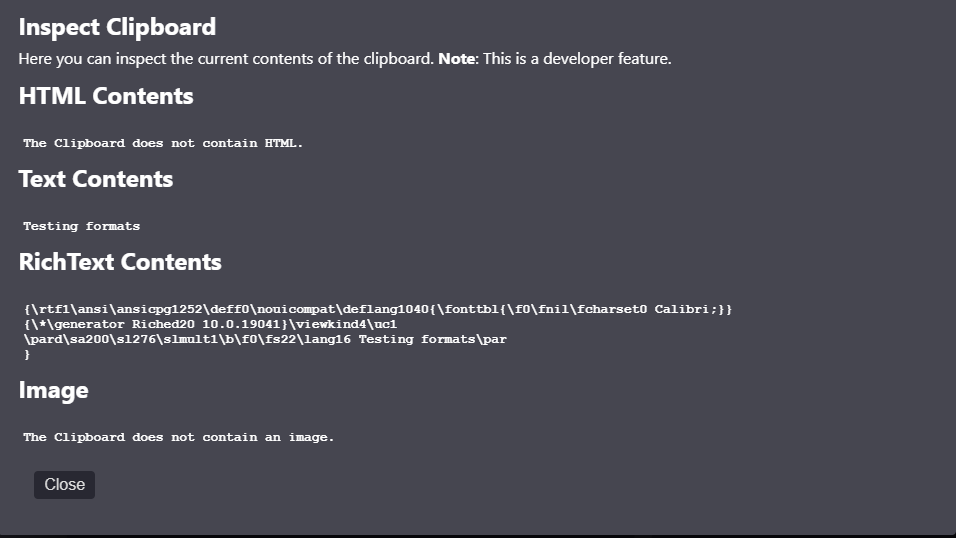
@canpolat you are right: it ignores RichText Contents too.
graphixillusion
on 16 Aug 2020
Richtext contents are being ignored because it is easier to parse HTML to Markdown, and I have not yet come across a situation where there is RTF and not HTML … but I still can't reproduce this bug locally :(
nathanlesage
on 19 Aug 2020
@nathanlesage on Windows 10?
graphixillusion
on 19 Aug 2020
No, on macOS
nathanlesage
on 22 Aug 2020
@nathanlesage at this point it's something which is happening only under Windows. I've tried on VM with a clean machine too: always the same results.
graphixillusion
on 22 Aug 2020
Ah, I think I spotted something: Apparently however you are copying something, Windows seems to not put it into the HTML-clipboard. This almost looks like it could be a bug with Electron's clipboard API – would someone mind to do a little bit of research into this …? The codebase of Zettlr itself simply taps into Electron's APIs, and as it is working as expected on macOS, I strongly suspect it's not an issue of the shared code part, but of Electron itself …
nathanlesage
on 24 Aug 2020
@nathanlesage This is another markdown application, always built upon Electron (https://github.com/marktext/marktext) which has the copy & paste working as it should, Windows too. So, at this point, i don't now if it could be something in the Electron's API itself.
graphixillusion
on 24 Aug 2020
Apparently however you are copying something, Windows seems to not put it into the HTML-clipboard.
In some of the screenshots pasted under this issue, the Develop > Inspect Clipboard dialog shows HTML content and yet pasting it does not retain the formatting. Your hypothesis does not seem to explain that situation. (Or am I missing something?)
canpolat
on 24 Aug 2020
@canpolat I was looking at one screenshot where there was nothing in the HTML clipboard, hm. The thing is: The code that reads the clipboard works the same on all platforms, so I can't think of why this code would work on macOS but not on Windows, given the assumption that the Electron APIs work just fine …
nathanlesage
on 27 Aug 2020
@nathanlesage this is very strange indeed. Could you link the part of the code which should does this?
graphixillusion
on 27 Aug 2020
@graphixillusion I think it is this line (not sure, though): https://github.com/Zettlr/Zettlr/blob/df0cbfc5ce20442f3fbbbf39db24cf4f8fc7386e/source/renderer/zettlr-editor.js#L208
The only OS specific thing I see here is '\n'. But haven't read through the whole method, so not sure if it would have an impact on the behavior.
Edit: I think this line does something that is going to always set explicitPaste to false on Windows. I officially suspect this line now.
If this is the problem, I suppose something like below could be used to fix it (copied from https://stackoverflow.com/a/14063413):
const endOfLine = require('os').EOL;
let explicitPaste = plain === changeObj.text.join(endOfLine)
Warning: I'm not a JS developer.
canpolat
on 27 Aug 2020
@canpolat This could indeed be the problem! (line 187 in the editor)
nathanlesage
on 30 Aug 2020
@nathanlesage any news about this?
graphixillusion
on 15 Nov 2020
No, which also has to do that there's no information on where this problem might occur. There's just nothing for me to start looking for the problem right now, unfortunately. As long as I don't have a lead, I can't do much :/
Looking at @canpolat's comment, however, I suspect that maybe Windows adds \r-characters additionally to the \n-characters, so what we might be needing is
let explicitPaste = plain === changeObj.text.join('\r\n') // or \n\r?
instead of just a simple newline. @canpolat want to give it a try? (If this is the cause I'll eat a copy of Windows 10 out of frustration)
nathanlesage
on 15 Nov 2020
@nathanlesage As you suggested, i just gave a try and i recompiled version 1.7.5 with this change in this line:
let explicitPaste = plain === changeObj.text.join('\r\n')
and i have a good news: like this, copy and paste works as expected under Windows!
graphixillusion
on 16 Nov 2020
and i have a good news: like this, copy and paste works as expected under Windows!
Ahhh perfect! Thank you so much :)
One last request @graphixillusion:
Would you mind testing it out if the following works as well?
let explicitPaste = plain.replace(/\r/g, '') === changeObj.text.join('\n')
What this should do is replace all cariage return chars (\r) so that only normal newlines (\n) remain. This way it should work on both Linux/macOS and Windows as well. (We have to join the changeObj to one string, as the === compares identity, which won't work with an Array as Arrays are treated as unequal with ===).
If that works, also feel free to add this in a PR which I'll merge – then you are listed as a contributor ;)
nathanlesage
on 16 Nov 2020
@nathanlesage yep, with that line works too as well. I opened a pr. thank you for the support.
graphixillusion
on 16 Nov 2020
Perfect, thanks! There's just a merge conflict which needs to be resolved before I can merge!
nathanlesage
on 16 Nov 2020
Related issues
 grst
·
4Comments
grst
·
4Comments
 danieltomasz
·
5Comments
danieltomasz
·
5Comments
 Jos512
·
5Comments
Jos512
·
5Comments
 carregal
·
5Comments
carregal
·
5Comments
 Alopex4
·
4Comments
Alopex4
·
4Comments
Most helpful comment
Okay, apparently there's an error in instantiating the document object on opening the file, which makes no sense on first sight o.O I'll have to think about this — if someone has a good idea of what might be causing this feel free to comment!