Description
after wiping the entire css style i've been working, i tried to open the css menu. But the menu won't open, and whenever i click the css menu, it renders other menu unable to open such as preference, statistics, tag manager, etc. A simple reload or restart would activate other menu, however, the custom css menu still won't open. The log has been telling me that: No command registered with the application for command win-menu.
I tried to renew the config.json file to no avail, in case the configuration has anything to do with the error
Reproducing
- open custom css
- wipe out all css code that has been written
- closing custom css
- try to re-open custom css.
Expected behaviour
CSS style would be okay again
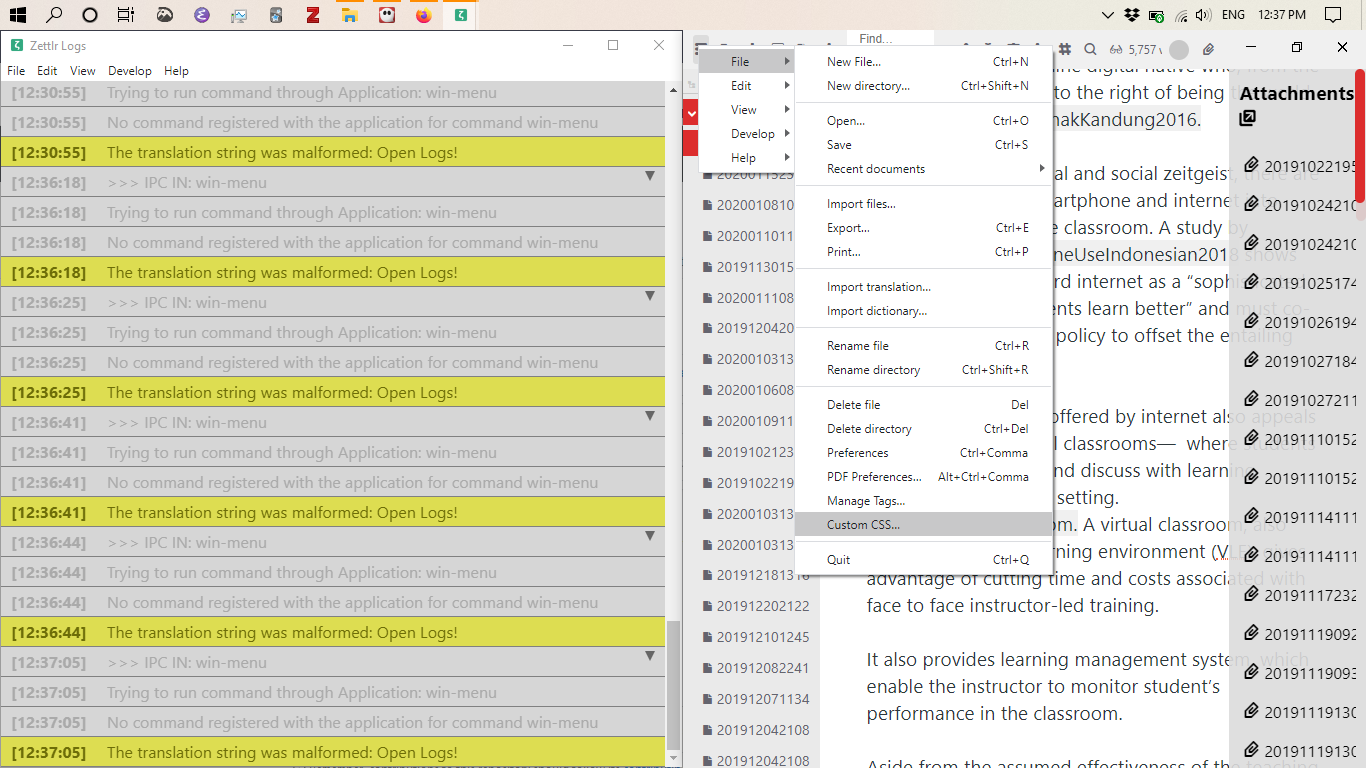
Platform
- OS and version: Windows 10, Intel(R) core(TM) i5 8250U CPU @ 1.60GHz 1.80 Ghz.
- Zettlr Version: 1.6.0-beta
- Screen Resolution: 1366 x 768
Additional information
Thank you so much 😄
 shanvrolijk
All 5 comments
Hmm … is the empty CSS-file present in the application directory?
 nathanlesage
on 18 Feb 2020
nathanlesage
on 18 Feb 2020
I confirm this on macOS 10.14.5 with 1.6.0beta4. It's even worse: none of the file-menu dialogs open after emptying out custom css: preferences, manage tags, custom css — nothing. It doesn't start working after a restart either. Zero-bytes custom.css disables all dialogs in the app. To me, it's pretty serious.
After typing just 1 letter into the custom.css and restarting the editor, dialogs are working again.
 Zverik
on 18 Feb 2020
Zverik
on 18 Feb 2020
Well, it's not that bad, because the file is always preset with a comment, and as the dialog says "modify at your own risk" ;)
Nevertheless, I suspect it has something to do with the fact that in Electron 8 they changed the underlying Node version to a newer one, which broke fs.readFileSync to return a Buffer instead of a string, as before. Maybe it has something to do with this. I'll get to it in the next few days ^.^
nathanlesage
on 18 Feb 2020
well, i haven't checked if the CSS-file is in the directoriy, I reinstall zettlr and now everything is good. You are right 😄 i modified it and suffered the risk, but I couldn't be happier for being able to tinker the css. It is the best experience i've got with zettlr these past two days. Anyway, thank you for your help 😄
shanvrolijk
on 18 Feb 2020
Aaaaand here we go!
nathanlesage
on 18 Feb 2020
Related issues
 carregal
·
5Comments
carregal
·
5Comments
 akavel
·
5Comments
akavel
·
5Comments
 tupio
·
3Comments
tupio
·
3Comments
 manisabri
·
4Comments
manisabri
·
4Comments
 rafedramzi
·
4Comments
rafedramzi
·
4Comments