Description
When writing lists, both numbered and bulleted, second and further lines for each item are indented incorrectly.
Reproducing
Write a list with items spanning two or more lines.
Expected behaviour
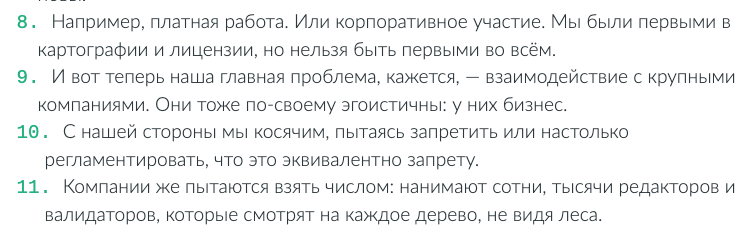
I expected for second lines to be aligned with first, that is, their first letters forming a nice row. Example:
- Today is the second birthday of Zettlr. Exactly two years, or 730 days, ago, on December 26th, 2017, version 0.5 of Zettlr was publicly released on GitHub.
- Last year we bumped the version to 1.0 as a birthday present, but as I have reiterated multiple times already, the “real” version 1.0 was reached when we released Zettlr 1.3, so this year Zettlr will not receive a major version update.
- Back then, I promised to be releasing the results of the data that has amassed over the past years to show you how an app can proliferate globally.
Platform
- OS and version: macOS 10.14.5, same for Fedora 31
- Zettlr Version: 1.5.0
- Screen Resolution: 2560×1440
 Zverik
All 11 comments
This has to do with the font. It does work with monospaced fonts (that is, currently, the Bielefeld theme). It has to do with the character widths. It is both known and (probably?) more of a feature than a bug. I'm not sure I can fix this, but well, I'll keep this open, maybe something works out.
 nathanlesage
on 7 Feb 2020
nathanlesage
on 7 Feb 2020
Thing is, for all four themes the indentation is wrong, even for the monospaced one:
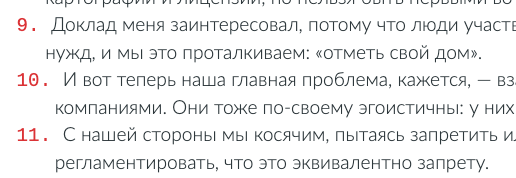
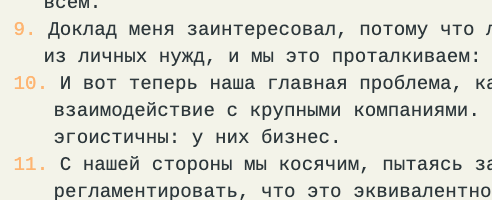
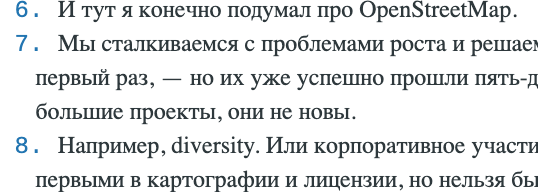
I understand you're using not built-in lists, but are approximating the formatting using spaces or calculated indents, but let's keep this one as a possible enhancement. It still looks weird to me :)
Zverik
on 7 Feb 2020
I understand you're using not built-in lists, but are approximating the formatting using spaces or calculated indents, but let's keep this one as a possible enhancement
In fact, it's one of these instances where I stackoverflowed back in the day:
nathanlesage
on 7 Feb 2020
Thanks for pointing out the code — I guess I could try tweaking it a bit on holidays.
Zverik
on 7 Feb 2020
What I found after experimenting: that - 2 in like 393 looked suspicious, so I removed it. After that, lists in Berlin, Bielefeld and KMS themes were aligned perfectly. But it was not the case for themes with serif fonts (Frankfurt) or a default sans-serif fonts that I use: - 1 worked perfectly with the latter, while - 2 works well for the Frankfurt theme. Tweaking this number feels wrong: there should be a better uniform solution. Will think about that a bit more.
Zverik
on 10 Feb 2020
If that helps: This hack is based upon adding and removing padding at the left hand of the final rendered line, so maybe a negative indent might work. I've tinkered with that thought for some time but didn't have time to test it out
nathanlesage
on 10 Feb 2020
Removing the additional space in the first span (containing -) and using the following css for the second span (containing the actual text) works for me:
margin-left: 0.3em;
text-indent: 0em;
display: inline-flex;
Btw: What is the reason not to use the default <ul> html constructs?
 tobiasdiez
on 19 Mar 2020
tobiasdiez
on 19 Mar 2020
Btw: What is the reason not to use the default
<ul>html constructs?
Well, it's not simply HTML, it's an editor. That means a completely different approach. In editors/syntax highlighting, spans are default, not <ul> or any other HTML elements.
nathanlesage
on 19 Mar 2020
This issue has been automatically marked as stale because it has not had recent activity. It will be closed if no further activity occurs. Thank you for your contributions.
![stale[bot] picture](https://avatars3.githubusercontent.com/in/1724?v=4&s=40) stale[bot]
on 19 May 2020
stale[bot]
on 19 May 2020
This should be fixed now, at least on the first indentation level. The problems for deeper levels is tracked at https://github.com/Zettlr/Zettlr/issues/578, so I'll this issue now.
tobiasdiez
on 8 Jun 2020
@tobiasdiez Okay, I just closed that other one because I thought it was done as well…? At least for me in Bordeaux-theme it works even up to level 4 or 5 (but this can very well be a case of "Works on my machine™", so feel free to re-open the one)
nathanlesage
on 8 Jun 2020
Related issues
 Alopex4
·
4Comments
Alopex4
·
4Comments
 klaus7
·
4Comments
klaus7
·
4Comments
 bit-hug
·
4Comments
bit-hug
·
4Comments
 shanvrolijk
·
5Comments
shanvrolijk
·
5Comments
 tedesmac
·
5Comments
tedesmac
·
5Comments