When implementing a Zettelkasten, what you might want to do is have the option to quickly enter new thoughts into it. Therefore, we'll implement a Tray icon enabling a quick entry. This feature is targeted towards the 1.4 release, if possible.
Proposed solution
- In the preferences, enable the Tray QuickNote and set several options for easy access, such as:
- The folder in which they are placed automatically
- File name patterns (such as:
%id %firstline.mdfor example)
- When you have a thought or find something online, simply click on the Tray icon to bring up the quick entry window
- Enter the thought using standard Markdown, highlighted using Zettlr's theme
- Add links, tags and what else you need
- Possibly overwrite the target folder and the filename
- Click "Create" and have the note added to your Zettelkasten.
ToDos
- [ ] Add a window class
- [ ] Add a service provider for the Tray Window
- [ ] Add a command to enter the final note
- [ ] Solve the Tray limitations on Linux systems. See the Tray Class Documentation
- [ ] Testing
 nathanlesage
All 12 comments
Oh, I forgot that I need to ask for help from you:
WINDOWS USERS: How are such quick windows commonly done on Windows? Is this concept even applied on Windows so far? If so, how would you think it would fit best into your current Windows workflow so that the window doesn't distract you?
LINUX USERS: How are these things done on Linux? Please bear in mind that internally, the app can only see "Linux or not Linux" and cannot distinguish between different Linux distributions. I would like to find a common solution that works for all Linux distributions equally good.
Please share your thoughts here so that we can work out a solution that works best for all of us without reinventing the wheel :)
nathanlesage
on 1 May 2019
Remembers me to this: ;)
https://www.thedigitalmarketingguy.net/articles/windows/disable-or-remove-send-to-onenote-in-windows.html
Why not just adding a try icon with fields like for now.
"Open Zettlr"
"New Quicknote" (Opens Zettlr with an Draft (no File name, not saved) or Opens quicknote window)
"Close Zettlr"
When clicking on the tray I would rather like to open the real Zettlr.
--
I don't know of any apps for Linux that integrated something like that.
 yashha
on 13 Dec 2019
yashha
on 13 Dec 2019
Opening a draft is currently not possible, files have to be created prior to editing … so this would have to wait until the tabbed mode is implemented :(
nathanlesage
on 14 Dec 2019
i would add also “search note” or “search note in current folder “ option
 danieltomasz
on 29 Feb 2020
danieltomasz
on 29 Feb 2020
This issue has been automatically marked as stale because it has not had recent activity. It will be closed if no further activity occurs. Thank you for your contributions.
![stale[bot] picture](https://avatars3.githubusercontent.com/in/1724?v=4&s=40) stale[bot]
on 10 May 2020
stale[bot]
on 10 May 2020
Tray is a nice to have, although may be not for 1.7. Let's not lose this to the stalebot.
 Zverik
on 12 May 2020
Zverik
on 12 May 2020
Let's not lose this to the stalebot.
Stalebot, collector of souls
nathanlesage
on 13 May 2020
WINDOWS USERS: How are such quick windows commonly done on Windows? Is this concept even applied on Windows so far? If so, how would you think it would fit best into your current Windows workflow so that the window doesn't distract you?
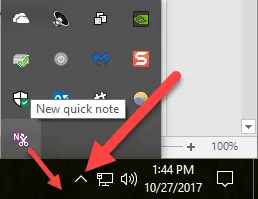
I don't know how technical a response you are looking for, but as far as I know, Microsoft OneNote impelements this. Here is an old description about the functionality without the taskbar icon. They have an icon in the notification area, something like this:
 canpolat
on 11 Jul 2020
canpolat
on 11 Jul 2020
@canpolat Thanks!
nathanlesage
on 13 Jul 2020
Lets start with just a simple tray icon. Click and it will show zettlr , currently that is only thing missing
 v3ss0n
on 4 Oct 2020
v3ss0n
on 4 Oct 2020
Having a tray icon and configurable system-wide shortcut would be great, at least for Windows.
Such quick note should be created from a configurable template, where one could use macros, like current date and time.
 marcinsmialek
on 8 Oct 2020
marcinsmialek
on 8 Oct 2020
yeah tray is only thing preventing me from using this great tool.
i am now using joplin and looking forward to change.
v3ss0n
on 9 Oct 2020
Related issues
 shanvrolijk
·
5Comments
shanvrolijk
·
5Comments
 grst
·
4Comments
grst
·
4Comments
 asielen
·
5Comments
asielen
·
5Comments
 Noisecommander
·
3Comments
Noisecommander
·
3Comments
 Kangie
·
4Comments
Kangie
·
4Comments