Zettlr: A JavaScript error occured in the main process
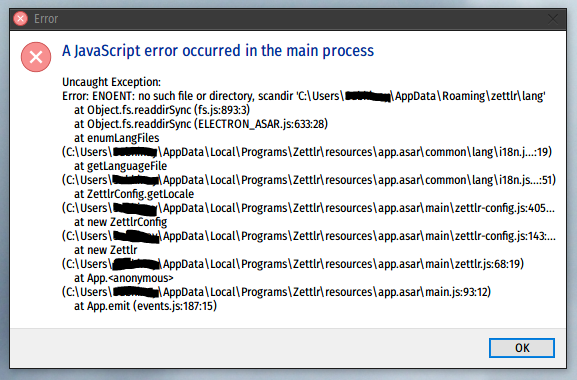
After installing the new 1.1.0, I get this when running the .exe
As mentioned above, just running the .exe would give an error
Run normally.
Screenshots
Platform
- OS: Windows 10
- OS Version: 17763.292
- Zettlr Version: 1.1.0
I did a new install as well as try installing for all users and single user. Same error.
 subi54
All 14 comments
The same thing occurs with the Debian package. I added some info on Reddit...
 samarulmeu
on 8 Feb 2019
samarulmeu
on 8 Feb 2019
Yes, it's one of the most stupid mistakes I've ever made — the lang directory is not created on app boot, even though it is required shortly thereafter.
The new binaries with the errors fixed are currently uploading …
Sorry for the horrible release 🙈
 nathanlesage
on 8 Feb 2019
nathanlesage
on 8 Feb 2019
😱 the gall!
My prized pitchfork & torch finally gets the victim it deserves.
subi54
on 8 Feb 2019
So, the new binaries are now up (I simply replaced the malicious ones).
Would you care trying to re-download the files and test whether it works now?
And P.S.: Please remind me before the next release to start a beta phase so that you guys can test it out and yell at me for all the stupid errors I made before releasing it into the wild 🙈
nathanlesage
on 8 Feb 2019
Don't be so hard on yourself! You're doing a great job!
I downloaded the new package and it's working.
Now I'm struggling with the CSS, but this is my problem.
samarulmeu
on 8 Feb 2019
Works perfectly now. Simply updating over the bugged one worked.
Also links like this: [hello[alt]](www.hel.lo) are not being rendered. A lot of apps don't, they offset this by having users use backslashes like so: [hello\[alt\]](www.hel.lo). Should this be a new issue or should I just let this be?
Another thing, shouldn't #tags be searchable when clicking them?
@samarulmeu is right. Don't be too hard on yourself. You are doing an amazing job.
Edit: Happy to alpha/beta test. 👍
subi54
on 8 Feb 2019
Ah, thank you :)
@samarulmeu Check out the custom-css guide I've put online yesterday, and also try to take a look at the theme LESS-files (in the resource-directory of this GitHub repository) on how they achieve styling. This may be a good start! In case, just get back to me, I'm sure I can help you out!
Concerning the links, @subi54 , these are one of my next targets, there's still a lot to do =/
If you want, you can for sure enter some links, and see what Zettlr does, and report here what happens and what should happen instead!
Concerning the tags: They are indeed clickable — did you hold down the Alt-key?
nathanlesage
on 8 Feb 2019
@nathanlesage CSS works wonders. My ❤️ font at my preferred size. My bad about the clickable tags, I did not know about the Alt. Apologies.
subi54
on 8 Feb 2019
@nathanlesage Thank you very much for the CSS guide. I don't know how I missed it. I was browsing in the middle of browsing the source.
And about the release, Zettlr is closer and closer to the perfect markdown editor. I think that it does now 80% of what I need.
Please continue to develop it.
samarulmeu
on 8 Feb 2019
Thank you so much for these warm words! Of course I will. After all I'll be writing my whole dissertation using it, so it's more of a must for me =D
nathanlesage
on 8 Feb 2019
I don't want to open another thread. Maybe is just something I don't get it right.
In linux the #tag or the links to a file [[file.md]], although i press the Alt key, are not clickable.
Is just a Windows feature?
samarulmeu
on 8 Feb 2019
@samarulmeu Nope, this should work on every operating system. BUT we've found out some weeks (or months?) earlier that some Linux distributions reserve Alt+Click for dragging around the window itself — which means that Zettlr can't know when you Alt-Clicked. I wanted to update this at some point so that you can choose which key to hold down, but I didn't manage until now :S
nathanlesage
on 9 Feb 2019
@nathanlesage You are right. Unfortunately I am using one of this distros (Ubuntu based, so I think that all Ubuntu distros are affected). I tried to change the combination for window dragging (<Super>+Click), but the tags were not searchable. I will wait for when you'll have the time to make an improvement. Anyhow, the new release is nice... Keep up the good work!
samarulmeu
on 11 Feb 2019
@samarulmeu Alright, I'll see to it. Please see the new issue I opened pertaining that problem: #100
Ah, it's issue number 100, what a nice number :)
nathanlesage
on 11 Feb 2019
Related issues
 rafedramzi
·
4Comments
rafedramzi
·
4Comments
 Alopex4
·
4Comments
Alopex4
·
4Comments
 volt4ire
·
4Comments
volt4ire
·
4Comments
 bit-hug
·
4Comments
bit-hug
·
4Comments
 tupio
·
3Comments
tupio
·
3Comments