Zettlr: Feature: Respect macOS Mojave Appearance
Beginning with macOS Mojave, Apple has introduced a dark mode to the operating system itself. Since then, people have been enjoying the ability to switch between light and dark mode. Zettlr also supports a dark mode and it would be good to enable users to set an option to have Zettlr automatically switch its mode based on the operating system's theme.
Thankfully, since Electron 4.0, which Zettlr is using, Electron itself offers an API to set the application's theme according to the mode of the operating system. Zettlr will therefore integrate an option to enable users to have the app automatically switch its theme based on the underlying operating system's theme.
Simple instructions are to be found here
 nathanlesage
All 25 comments
Just a heads-up that Windows 10 has had a dark mode for apps for a long time, and since Build 1809 has a generalized OS dark theme as well. It would be good to generalize this issue, and its title, so that it is OS-agnostic.

 Jaifroid
on 28 Dec 2018
Jaifroid
on 28 Dec 2018
Ah, well, if the Electron API supports it, I would integrate this as well!
nathanlesage
on 28 Dec 2018
Alright, did some research, and obviously the hipsters from electron only support macOS dark mode. Was to be expected 🙄
Let's hope Windows support is coming soon (Or, do you think the invertedColourScheme may be the thing we were looking for @Jaifroid …?)
For reference, it's all mac-ish over here: https://electronjs.org/docs/api/system-preferences
nathanlesage
on 18 Jan 2019
That's quite funny, considering Microsoft now owns Electron (with its acquisition of GitHub)!
I don't know whether the invertedColorScheme Boolean would be triggered with the Windows 10 dark app mode. Probably access to the dark app mode API would only be available if we package Zettlr as a Store app (this wouldn't be difficult, and could be done under #47). I think the system dark mode for Windows is quite new, so it should get incorporated into the API at some point.
Would you consider having an override switch in the app, so that the user can set dark mode independently of the system? A lot of Store apps have this. The option is something like a three-way switch: Light, Dark, System default.
Jaifroid
on 18 Jan 2019
… erm, this switch is already what you can achieve by pressing Ctrl+Alt+L. What I would need the API for would only be the recognition of a theme switch by the OS
nathanlesage
on 18 Jan 2019
On another note: We all know what happens if Microsoft thinks it's progressive … 🙄 So no surprise here!
nathanlesage
on 18 Jan 2019
OK, so how would this feature interact with the Night mode toggle? What I'm suggesting is a tri-state switch in settings. Its default would be "System theme" (or similar), and it would have another two state: Dark and Light.
As for MS, let's hope they don't ruin things. They do seem to have a genuine enthusiasm for Open Source. They have to earn developers' trust, though...
Jaifroid
on 18 Jan 2019
I am currently of thinking to be implementing a switch that can be triggert by the operating system switching between modes or (additionally) sunrise/sunset. So what would happen is: Operating System/time switches the theme -> Zettlr automatically triggers a Cmd+Alt+L-command. I.e. if you don't want dark mode right at that time, you can fast switch back.
It's basically an automation for a shortcut, to be honest =D
nathanlesage
on 18 Jan 2019
Personally, I would like to know that there is a setting that will keep the app dark (or light) no matter what system changes occur. I wouldn't want the app to change its appearance without my giving it permission to do so, as that would be distracting and annoying. But presumably this would be an option only?
The idea of sunset-sunrise is great (so long as it's an option I can explicitly set/unset -- personally I prefer to use dark mode with Zettlr all the time).
Anyway, just my tuppence!
Jaifroid
on 18 Jan 2019
Nah, don't worry! Of course it'll be a strictly opt-in option!
I currently envision settings as such:
Automatically switch modes …
never(default)on sunset/sunriseon Operation System theme change(macOS only)
nathanlesage
on 18 Jan 2019
A short notice: This feature will be postponed until electron fixes the bug filed under issue https://github.com/electron/electron/issues/16418 as Zettlr had to move back to version 3.x.x of Electron.
nathanlesage
on 4 Feb 2019
As Zettlr has moved to Electron 5 beta this should again be possible as per https://github.com/electron/electron/issues/16418#issuecomment-475370590
 foss-
on 25 Mar 2019
foss-
on 25 Mar 2019
Yep, I‘m already on it. Today I committed a patch that makes the switch from light mode to dark mode much nicer to the eye, the next step will be the auto-switcher.
nathanlesage
on 25 Mar 2019
About Dark Mode: I have some eye condition that makes it so I can no longer read bright screen (aka, no black text on light background), so Dark Mode is a blessing. Is there any chance for the Zettlr's pref window to also use the dark theme? As it is now, it's really hard for me to read it and change any setting: I can use it but, well, you see what I mean ;)
Edit: I have the same difficulties on Mac as on on Windows, btw.
 davidbosman
on 26 Mar 2019
davidbosman
on 26 Mar 2019
I'm sorry to hear this :/
I kept the dialogs the same design for consistency reasons, but I totally see your point!
Until I find a solution on how to do this well, please give the following CSS code a try, which will exchange colours in the dialog windows:
body .modal .dialog {
    background-color: #333;
    color: white;
}

body .modal .dialog label {
    color: white;
}

body .modal .dialog .ui-tabs-nav .ui-tabs-tab a {
    color: white;
}

body .modal .dialog ul.dicts-list li.dicts-list-item {
    background-color: #666;
}

body .modal .dialog ul.dicts-list li.dicts-list-item:hover {
    background-color: #999;
}

body .modal .dialog input[type="text"] {
    background-color: #999;
    color: white;
}
It will result in dialogs looking like this:
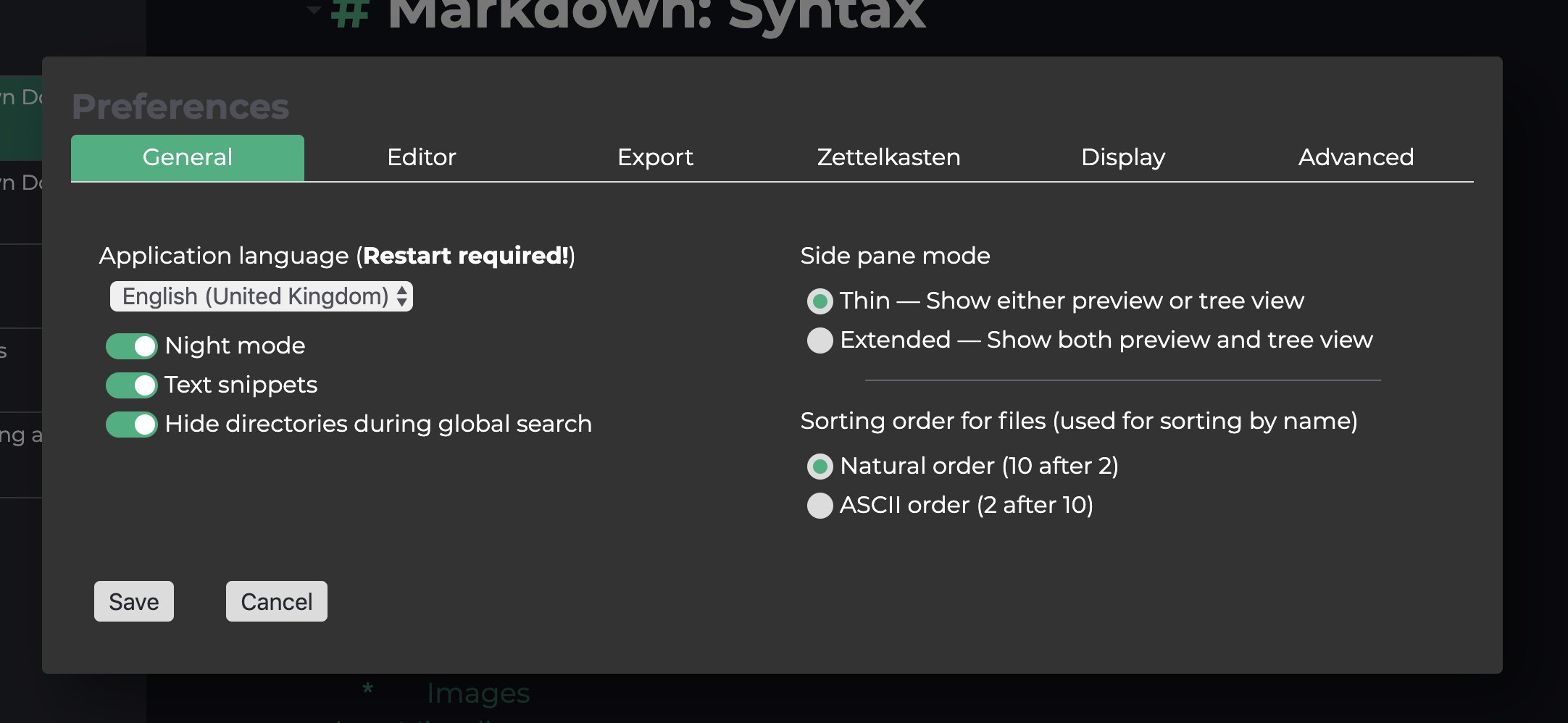
EDIT: Copy that CSS into your Custom CSS dialog!
nathanlesage
on 26 Mar 2019
Wow, it's working great. Thank you so much :)
davidbosman
on 26 Mar 2019
I'm glad I could help :)
nathanlesage
on 26 Mar 2019
@Jaifroid I'll get to implementing the dark mode options for Zettlr now. Would you mind inquiring into whether or not there's an Electron event sent out if Windows switches to dark mode so that I can add it in the feature development? Thanks in advance <3
nathanlesage
on 11 Apr 2019
Ah damn, worry no more. Just found this: https://github.com/electron/electron/issues/15316
So Windows dark mode has to wait until this issue is closed …
nathanlesage
on 12 Apr 2019
OK, thanks for checking, @nathanlesage . You should at least support isInvertedColorScheme, as this will detect High Contrast inverted colour schemes, which a lot of people use, for example if they want to use Word with a black background and light/coloured text. Presumably that's easy to add into your code. I can test it, as I myself use High Contrast fairly often. An issue concerning this is marked as resolved here: https://github.com/electron/electron/pull/15493.
Jaifroid
on 12 Apr 2019
Implemented! Please give it a test run, if you have time :)
nathanlesage
on 13 Apr 2019
@Jaifroid Just tested the colour switching on Windows 10. It does work, albeit as expected only with the high-contrast theme, not with the built-in Night Mode for apps. So still waiting for https://github.com/electron/electron/issues/15316 ...
nathanlesage
on 15 Apr 2019
@nathanlesage sorry to be slow, I'm travelling and away from my computer, but very glad to hear you were able to test!
Jaifroid
on 15 Apr 2019
This is still not solved, the default dialog are white in dark mode, and using the css make part of the code in custom CSS unreadable ( I am writing this from Catalina)
 danieltomasz
on 13 May 2020
danieltomasz
on 13 May 2020
the default dialog are white in dark mode
This is a different issue, this issue here was only about integration with the OS.
nathanlesage
on 13 May 2020
Related issues
 carregal
·
5Comments
carregal
·
5Comments
 shanvrolijk
·
5Comments
shanvrolijk
·
5Comments
 bit-hug
·
4Comments
bit-hug
·
4Comments
 Kangie
·
4Comments
Kangie
·
4Comments
 asielen
·
5Comments
asielen
·
5Comments