Zeroclickinfo-goodies: Calculator: Edge Cases
Description
For Calculator IA edge cases, please comment them below this issue and someone will fix them in due course.

People to notify
@duckduckgo/duckduckhack-contributors
Instant Answer Page: https://duck.co/ia/view/calculator
 pjhampton
All 17 comments
In Calculator IA, ∀ x ∈ - Z . Factorial(x) = -Factorial(-x).
In some cases whenever we need factorial of a negative number ,we take it as, -Infinity.
The factorial function is defined for non-negative integers only.
0!=1
n!=n×(n−1)!, ∀ n ∈ Z
However, we can generalize the factorial function to the Gamma function
Γ(x)=∫∞0tx−1e−tdt.
Note that the Gamma function is undefined for nonpositive integers, though it is defined for every other number, including complex numbers.
Here's a link that I found helpful : https://mathoverflow.net/questions/10124/the-factorial-of-1-2-3
 Survivor75
on 28 Jul 2017
Survivor75
on 28 Jul 2017
@pjhampton calculator doesn't give the result when trying to calculate roots multiple times
Query
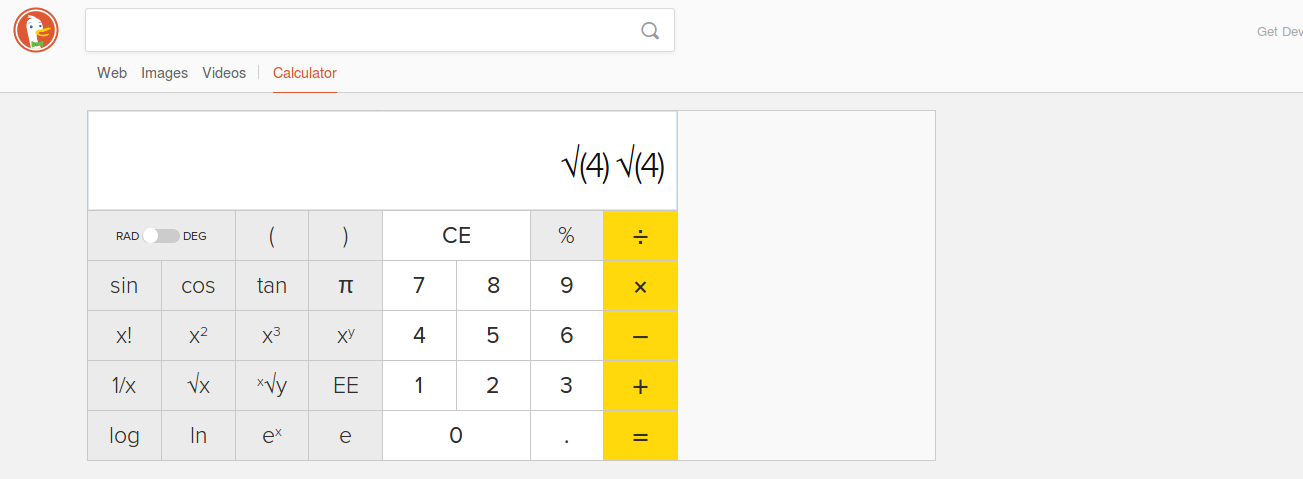
Response
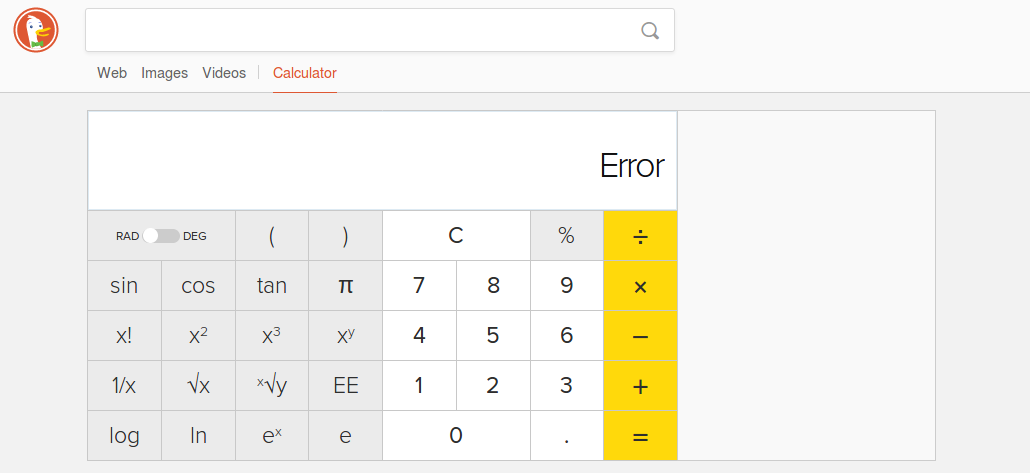
Answer: It should display 2
I was thinking of making this as a separate issue since it is not an edge case but a case that is perhaps missed (or not implemented) but was :fearful: to do so.
 adityatandon007
on 5 Aug 2017
adityatandon007
on 5 Aug 2017
Yeah, this is an edge case. I can fix soon 👍
pjhampton
on 5 Aug 2017
Hey, I would like to try but don't know what can be the patch for this. The
calc code has changed a lot from what it used to be. Can you guide me what
changes I have to make to fix this. If i can't then of course you can
always take it.
adityatandon007
on 6 Aug 2017
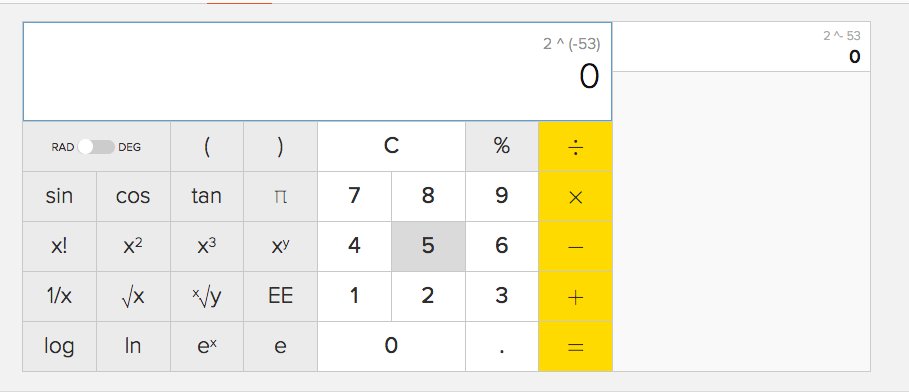
 tagawa
on 8 Sep 2017
tagawa
on 8 Sep 2017
Calculator can't correctly multiply with percentages with more than two decimal places. An extra %25 is added to the URL which seems to mess things up. Example:
304*3.1%
Answer: 9.424
304*3.10%
Answer: 9.424
304*3.100%
Answer: 912
304*3.1000%
Answer: 9120
tagawa
on 28 Nov 2017
Just for clarification. The only correct answer is with 2 decimal places?
On Tue, 28 Nov 2017, 09:34 Daniel Davis, notifications@github.com wrote:
Calculator can't correctly multiply with percentages with more than two
decimal places. An extra %25 is added to the URL which seems to mess
things up. Example:304*3.1%
Answer: 942.4304*3.10%
Answer: 9.424304*3.100%
Answer: 912304*3.1000%
Answer: 9120—
You are receiving this because you are on a team that was mentioned.
Reply to this email directly, view it on GitHub
https://github.com/duckduckgo/zeroclickinfo-goodies/issues/4391#issuecomment-347465500,
or mute the thread
https://github.com/notifications/unsubscribe-auth/ANKFpceq3zAshDOIFVJ5M2nkWVLLq4KOks5s69O4gaJpZM4OmW7T
.
 philipmiesbauer
on 28 Nov 2017
philipmiesbauer
on 28 Nov 2017
I checked up and the answer to 304*3.1% is also 9.424. so that is correct.
The extra %25 you are referring to is the URL encoded prevent character, %.
The seems to be an issue in the calculation, the URL is working fine.
On Tue, 28 Nov 2017, 09:41 Philip Miesbauer, philip.miesbauer@gmail.com
wrote:
Just for clarification. The only correct answer is with 2 decimal places?
On Tue, 28 Nov 2017, 09:34 Daniel Davis, notifications@github.com wrote:
Calculator can't correctly multiply with percentages with more than two
decimal places. An extra %25 is added to the URL which seems to mess
things up. Example:304*3.1%
Answer: 942.4304*3.10%
Answer: 9.424304*3.100%
Answer: 912304*3.1000%
Answer: 9120—
You are receiving this because you are on a team that was mentioned.
Reply to this email directly, view it on GitHub
https://github.com/duckduckgo/zeroclickinfo-goodies/issues/4391#issuecomment-347465500,
or mute the thread
https://github.com/notifications/unsubscribe-auth/ANKFpceq3zAshDOIFVJ5M2nkWVLLq4KOks5s69O4gaJpZM4OmW7T
.
philipmiesbauer
on 28 Nov 2017
I have raised an issue on the IA.
On Tue, 28 Nov 2017, 09:48 Philip Miesbauer, philip.miesbauer@gmail.com
wrote:
I checked up and the answer to 304*3.1% is also 9.424. so that is correct.
The extra %25 you are referring to is the URL encoded prevent character, %.
The seems to be an issue in the calculation, the URL is working fine.On Tue, 28 Nov 2017, 09:41 Philip Miesbauer, philip.miesbauer@gmail.com
wrote:Just for clarification. The only correct answer is with 2 decimal places?
On Tue, 28 Nov 2017, 09:34 Daniel Davis, notifications@github.com
wrote:Calculator can't correctly multiply with percentages with more than two
decimal places. An extra %25 is added to the URL which seems to mess
things up. Example:304*3.1%
Answer: 942.4304*3.10%
Answer: 9.424304*3.100%
Answer: 912304*3.1000%
Answer: 9120—
You are receiving this because you are on a team that was mentioned.
Reply to this email directly, view it on GitHub
https://github.com/duckduckgo/zeroclickinfo-goodies/issues/4391#issuecomment-347465500,
or mute the thread
https://github.com/notifications/unsubscribe-auth/ANKFpceq3zAshDOIFVJ5M2nkWVLLq4KOks5s69O4gaJpZM4OmW7T
.
philipmiesbauer
on 28 Nov 2017
Another one: log 0.000159154944
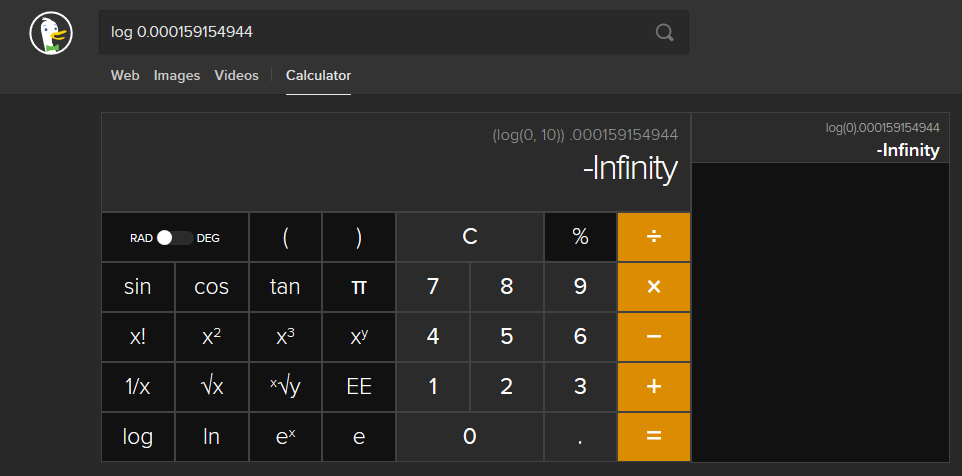
 mintsoft
on 5 Dec 2017
mintsoft
on 5 Dec 2017
Input: 0^0
Answer: 1
This is not correct
 AlterationBrick
on 6 Feb 2018
AlterationBrick
on 6 Feb 2018
@AlterationBrick I puzzled over this a bit and finally caved in and searched for it from a few sources. It's a fun question to contemplate.
It looks like 0^0 actually is considered equal to 1 in an algebraic sense. Although there's a lot more to its meaning in different contexts. That's expanded upon both in Wikipedia and Quora.
My intuition here is that given the "numbers on a calculator" context, 1 or undefined would both be acceptable results here.
Is there a different result that you would suggest should be displayed instead?
 DavidGinzberg
on 6 Feb 2018
DavidGinzberg
on 6 Feb 2018
Yeah, I am running with 1 being the correct answer. Regardless, this is a math.js evaluation. The best we can do is override it :-)
pjhampton
on 6 Feb 2018
Since we are never going to make everybody happy with either answer is it
worth linking the answer to the Wikipedia article for further explanation?
On Tue, 6 Feb 2018, 10:32 Peter Hampton, notifications@github.com wrote:
Yeah, I am running with 1 being the correct answer. Regardless, this is a
math.js evaluation. The best we can do is override it :-)—
You are receiving this because you are on a team that was mentioned.
Reply to this email directly, view it on GitHub
https://github.com/duckduckgo/zeroclickinfo-goodies/issues/4391#issuecomment-363380393,
or mute the thread
https://github.com/notifications/unsubscribe-auth/ANKFpTnxRKrJnUJ9zEvMifs_6wCV4H0wks5tSCo1gaJpZM4OmW7T
.
philipmiesbauer
on 6 Feb 2018
Yes, we cannot satisfy everyone, but I think we should stick with 1 here just because wiki says so.
adityatandon007
on 6 Feb 2018
Thanks for the responses; I was judging the answer against the output of my
TI-83+ which gives a domain error, but it seems that the consensus in
computing is to grant 0^0 the value of 1. In interests of convenience and
consistency it seems valid to keep it this way. I did not realize that I
had stumbled onto a centuries-old mathematical debate...
On Feb 6, 2018 8:09 AM, "Aditya Tandon" notifications@github.com wrote:
Yes, we cannot satisfy everyone, but I think we should stick with 1
here just because wiki says so.—
You are receiving this because you were mentioned.
Reply to this email directly, view it on GitHub
https://github.com/duckduckgo/zeroclickinfo-goodies/issues/4391#issuecomment-363417211,
or mute the thread
https://github.com/notifications/unsubscribe-auth/AQH8aRtb9_OkOhw2NENp5JF7z394u8bmks5tSE8BgaJpZM4OmW7T
.
AlterationBrick
on 6 Feb 2018
Not sure if intentional but inconvenient: enabling caps lock will disable key shorcuts, i.e. pressing "p" for Pi or "c" for cosine will no longer work whilst caps lock is enabled.
 ghost
on 15 Feb 2018
ghost
on 15 Feb 2018
Related issues
 moollaza
·
14Comments
moollaza
·
14Comments
 GuiltyDolphin
·
13Comments
pjhampton
·
11Comments
GuiltyDolphin
·
13Comments
pjhampton
·
11Comments
 atomic1fire
·
15Comments
atomic1fire
·
15Comments
 unhammer
·
14Comments
unhammer
·
14Comments
Most helpful comment
Just for clarification. The only correct answer is with 2 decimal places?
On Tue, 28 Nov 2017, 09:34 Daniel Davis, notifications@github.com wrote: