Zero-to-jupyterhub-k8s: "504: Gateway Time-out" when accessing the proxy-public External-IP from Linux Ubuntu 16.04 machine
Contents of config.yaml
I've been trying to install the Kubernettes and JupyterHub via my Linux Ubuntu 16.04 machine.
Having followed the instructions on "zero-to-jupyterhub.readthedocs.io" all the way from
creating a Kubernetes cluster on Google Cloud (https://zero-to-jupyterhub.readthedocs.io/en/latest/google/step-zero-gcp.html),
to "Setting up JupyterHub" page (https://zero-to-jupyterhub.readthedocs.io/en/latest/setup-jupyterhub.html)
I ended up with a seemingly up and running JupyterHub and its corresponding proxy-public External IP, but once I try it in the browser, I get a "504: Gateway time-out" (images attached).

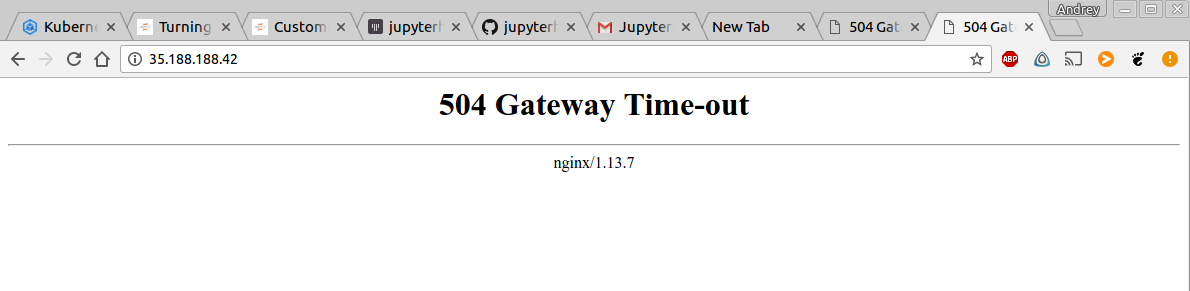
Anyone know what might be the issue?
 UsDAnDreS
All 6 comments
Thank you for writing an issue! You made it very easy for me to grasp the situation with the screenshots and all, I appreciate it!
What does it say if you write kubectl get pods --namespace=uh-test-jupyter ?
When you ran the following command, did you write --version=v0.6 ?
helm install jupyterhub/jupyterhub \
    --version=v0.6 \
    --name=<YOUR-RELEASE-NAME> \
    --namespace=<YOUR-NAMESPACE> \
    -f config.yaml`
 consideRatio
on 11 Jun 2018
consideRatio
on 11 Jun 2018
Dear condeRatio, thanks for such swift response!
What does it say if you write kubectl get pods --namespace=uh-test-jupyter ?

When you ran the following command, did you write --version=v0.6 ?
helm install jupyterhub/jupyterhub
--version=v0.6
--name=
--namespace=
-f config.yaml`
Yes, I ran it precisely like that, as was mentioned in (https://zero-to-jupyterhub.readthedocs.io/en/latest/setup-jupyterhub.html)
On another note - when I did all of these steps in Google Cloud Console (setting up the Kubernetes cluster + Helm + JupyterHub), it worked fine and I could connect to the External IP. But it was tough for me to keep working in that Cloud Console (configuring Jupyter, the environment, files, etc etc), so I'm trying to do it directly from my Linux machine
UsDAnDreS
on 11 Jun 2018
Aha!!!
I notice that the hub Pod hub-8cd589cb9-cg7lc (controlled by a ReplicaSet hub-8cd589cb9, controlled by a Deployment hub) is Pending, I wonder why? It is probably because no Node (hardware) has resources enough to take on the job of running the Pod.
Can you run kubectl get nodes and also kubectl describe nodes?
consideRatio
on 12 Jun 2018
Did you choose a n1-standard-1 machine perhaps? I actually use a n1-standard-1 machine to contain my hub and proxy etc, but I have optimized some stuff (key: reduce the hub and proxy requested CPU resources) allowing that in the config.yaml.
gcloud container clusters create <YOUR-CLUSTER> \
    --num-nodes=3 \
    --machine-type=n1-standard-2 \
    --zone=us-central1-b`
@consideRatio You are absolutely on the money, and I am an absolute liar.
I completely forgot that I shrunk my "num-nodes" from 3 down to 1, and the "machine-type" from n1-standard-2 to n1-standard-1, because it was charging money at a considerable rate with previous settings (albeit I haven't even started doing anything, as I'm still extremely new to the whole thing).
I had (and still do) nothing besides "proxy: secretToken ..." two lines in my 'config.yaml', and yet to understand how to adjust it in order to optimize stuff as you said.
Thanks so much!
UsDAnDreS
on 12 Jun 2018
@UsDAnDreS I'm happy to have helped you! I opened #717, I hope to address z2jh guides pricey suggestions and perhaps optimize it to be more cost efficient by default.
I appreciate your clear communication and the screenshots! It reduces a lot of time for me as a reader!
consideRatio
on 12 Jun 2018
Related issues
 jgerardsimcock
·
4Comments
jgerardsimcock
·
4Comments
 gsemet
·
3Comments
gsemet
·
3Comments
 betatim
·
4Comments
betatim
·
4Comments
 sgibson91
·
3Comments
consideRatio
·
4Comments
sgibson91
·
3Comments
consideRatio
·
4Comments
Most helpful comment
@consideRatio You are absolutely on the money, and I am an absolute liar.
I completely forgot that I shrunk my "num-nodes" from 3 down to 1, and the "machine-type" from n1-standard-2 to n1-standard-1, because it was charging money at a considerable rate with previous settings (albeit I haven't even started doing anything, as I'm still extremely new to the whole thing).
I had (and still do) nothing besides "proxy: secretToken ..." two lines in my 'config.yaml', and yet to understand how to adjust it in order to optimize stuff as you said.
Thanks so much!