Zero-to-jupyterhub-k8s: Notes from aleks (South Big Data Hub) meeting
Just had a meeting helping Aleksandr Blekh set up a JupyterHub for the South Big Data Hub. Here are some notes that we should follow up on:
- Performance is not standard across Firefox vs. Chrome - we had issues getting the UI to work in firefox.
- [ ] TODO: recommend using google chrome
- [x] TODO: We need to update the z2jh guide to use the online shell not the SDK
- The issue he'd had before was something about read-only filesystems when running
helm init. Worth following up on? - [ ] TODO: We need to remove the clusterrolebinding bit on helm
[x] TODO: Add 'nbgitpuller' to the "prepopulating" guide
[x] TODO: Make sure
<your-release-name>is called this everywhere (that's what it's called in the helm upgrade section, and it may already be fine, just want to double check)- [x] TODO: Double check that the docker image that's in there works properly. I remember this didn't work at a recent workshop
- QUESTION: quick search doesn't show up on the default page, is this the case for anybody else?
- [x] TODO: make clear that the expanding and contracting size of cluster section is only for gcloud
Errors
We ran into the following error when trying to use a different docker image for the JHub. We tried both the jupyter scipy image and the jupyter minimal image, and both resulted in the same error:
`Timed out waiting for the condition`
- QUESTION: Is nbgitpuller installed w/ repo2docker?
Other notes
- Aleks may be interested in getting z2jh working with open stack
- this is their project: https://matin.gatech.edu/about/hubzero
- Something like 200 users
- https://matin.gatech.edu:9012/hub/login
cc @yuvipanda
 choldgraf
All 93 comments
I'll make a PR to fix many of these in z2jh once we figure out the docker image problem
choldgraf
on 25 Oct 2017
https://github.com/jupyterhub/zero-to-jupyterhub-k8s/pull/238 sorts out the clusterrole stuff in helm. Note that as of Kubernetes 1.8 (which will probably be default in a month or so) all the clusterrole / clusterrolebinding stuff will be completely required. The current default is basically 'everyone is root!' which is great UX wise but bad security wise. With 1.8, this is no longer the default, so we gotta adapt.
 yuvipanda
on 26 Oct 2017
yuvipanda
on 26 Oct 2017
@choldgraf Hi Chris, I just discovered this (will subscribe). Thank you for creating this issue and capturing detailed notes from our meeting. I have tried moving forward with this effort and I have both good and bad news.
The good news is that I was able to successfully update the cluster with a different JupyterHub image (your Errors section above). Specifically, I installed the jupyter/datascience-notebook image (tag: da2c5a4d00fa, which corresponds to latest as of today). I think that the issue we have experienced was due to a specific tag, that is, that specific image of minimal-notebook was, if not broken, not playing well with this GKE-based Kubernetes cluster. Another good news is that I was able to run our planned example notebooks without any problems.
The bad news is that, at some point, JupyterHub became unusable, due to refreshing the user home page forever (see attached screenshot). This is very frustrating, to a point that I started thinking again of using MATIN JH instance for the Oct 31 workshop. Nevertheless, I would appreciate help with that refresh issue as well as - if that is fixed - some direction on how to install nbgitpuller on my cluster: which node to attach to and how (kubectl attach?) as well as how to handle the lack of (or lack of access to) git in the JH image (which is very strange, considering its focus).

 ablekh
on 28 Oct 2017
ablekh
on 28 Oct 2017
Some additional output (Cloud Shell) from my current attempts:
aleksandr_blekh@sbdh-jupyterhub-184020:~$ kubectl --namespace=sbdh-jhub get pods
NAME                                READY     STATUS              RESTARTS   AGE
hub-deployment-1179676071-c9x4q     1/1       Running             0          1h
jupyter-alex                        0/1       ContainerCreating   0          9s
proxy-deployment-1227971824-ffdhs   1/1       Running             0          1h
aleksandr_blekh@sbdh-jupyterhub-184020:~$ kubectl --namespace=sbdh-jhub get pods
NAME                                READY     STATUS              RESTARTS   AGE
hub-deployment-1179676071-c9x4q     1/1       Running             0          1h
jupyter-alex                        0/1       ContainerCreating   0          15s
proxy-deployment-1227971824-ffdhs   1/1       Running             0          1h
aleksandr_blekh@sbdh-jupyterhub-184020:~$ kubectl --namespace=sbdh-jhub get pods
NAME                                READY     STATUS    RESTARTS   AGE
hub-deployment-1179676071-c9x4q     1/1       Running   0          1h
jupyter-alex                        1/1       Running   1          21s
proxy-deployment-1227971824-ffdhs   1/1       Running   0          1h
aleksandr_blekh@sbdh-jupyterhub-184020:~$ kubectl --namespace=sbdh-jhub get pods
NAME                                READY     STATUS    RESTARTS   AGE
hub-deployment-1179676071-c9x4q     1/1       Running   0          1h
jupyter-alex                        0/1       Error     1          31s
proxy-deployment-1227971824-ffdhs   1/1       Running   0          1h
Note Error listed for my JH container, which manifested in the following error message on the Web:
500 : Internal Server Error
Spawner failed to start [status=1]
I tried to attach to the container(s) and/or get logs to investigate the issue, but so far failed. Any thoughts?
ablekh
on 28 Oct 2017
hmmm - so it works the first time, but then stops working after that. Does that happen after you log out / log back in? Or turn off / turn back on the server?
Could you paste the output of
kubectl --namespace=sbdh-jhub logs jupyter-alex?
(see this page for more helpful debugging info https://zero-to-jupyterhub.readthedocs.io/en/latest/debug.html)
choldgraf
on 28 Oct 2017
It has been happening without me logging out / back in. Here is the output of the kubectl logs command:
[W 2017-10-28 17:23:04.072 alex configurable:168] Config option `open_browser` not recognized by `SingleUserNotebookApp`.  Did you mean `browser`?
/opt/conda/lib/python3.6/site-packages/traitlets/config/configurable.py:84: UserWarning: Config option `cookie_name` not recognized by `HubOAuth`.
  self.config = config
Traceback (most recent call last):
  File "/opt/conda/lib/python3.6/site-packages/traitlets/traitlets.py", line 528, in get
    value = obj._trait_values[self.name]
KeyError: 'oauth_client_id'

During handling of the above exception, another exception occurred:

Traceback (most recent call last):
  File "/opt/conda/bin/jupyterhub-singleuser", line 6, in <module>
    main()
  File "/opt/conda/lib/python3.6/site-packages/jupyterhub/singleuser.py", line 455, in main
    return SingleUserNotebookApp.launch_instance(argv)
  File "/opt/conda/lib/python3.6/site-packages/jupyter_core/application.py", line 267, in launch_instance
    return super(JupyterApp, cls).launch_instance(argv=argv, **kwargs)
  File "/opt/conda/lib/python3.6/site-packages/traitlets/config/application.py", line 657, in launch_instance
    app.initialize(argv)
  File "<decorator-gen-7>", line 2, in initialize
  File "/opt/conda/lib/python3.6/site-packages/traitlets/config/application.py", line 87, in catch_config_error
    return method(app, *args, **kwargs)
  File "/opt/conda/lib/python3.6/site-packages/notebook/notebookapp.py", line 1368, in initialize
    self.init_webapp()
  File "/opt/conda/lib/python3.6/site-packages/jupyterhub/singleuser.py", line 393, in init_webapp
    self.init_hub_auth()
  File "/opt/conda/lib/python3.6/site-packages/jupyterhub/singleuser.py", line 388, in init_hub_auth
    if not self.hub_auth.oauth_client_id:
  File "/opt/conda/lib/python3.6/site-packages/traitlets/traitlets.py", line 556, in __get__
    return self.get(obj, cls)
  File "/opt/conda/lib/python3.6/site-packages/traitlets/traitlets.py", line 535, in get
    value = self._validate(obj, dynamic_default())
  File "/opt/conda/lib/python3.6/site-packages/traitlets/traitlets.py", line 593, in _validate
    value = self._cross_validate(obj, value)
  File "/opt/conda/lib/python3.6/site-packages/traitlets/traitlets.py", line 599, in _cross_validate
    value = obj._trait_validators[self.name](obj, proposal)
  File "/opt/conda/lib/python3.6/site-packages/traitlets/traitlets.py", line 907, in __call__
    return self.func(*args, **kwargs)
  File "/opt/conda/lib/python3.6/site-packages/jupyterhub/services/auth.py", line 439, in _ensure_not_empty
    raise ValueError("%s cannot be empty." % proposal.trait.name)
ValueError: oauth_client_id cannot be empty.
hmmm - are you trying to use user authentication? And can you paste the content of your config.yaml file?
choldgraf
on 28 Oct 2017
Re: user authentication - No, currently, I'm using whatever is set up as default in the JH image, that is, no user authentication at all. The following is the contents of my config.yaml file:
hub:
  # output of first execution of 'openssl rand -hex 32'
  cookieSecret: "..."
proxy:
  # output of second execution of 'openssl rand -hex 32'
  secretToken: "..."

singleuser:
  image:
    name: jupyter/datascience-notebook
    tag: da2c5a4d00fa
hmm - can you try with a different docker image? I'm a bit worried that the jupyter-datascience image isn't configured to work with JupyterHub. Let's try building one with repo2docker (which will build an image assuming you're using JupyterHub to serve it). Do you want to give that a shot or alternatively I can try and then give you the URL of the image.
choldgraf
on 28 Oct 2017
If you could build a new suitable image, I would appreciate it. Ideally, it should contain most popular Python packages, including numpy and matplotlib, as well as git. Let me know, if you want to meet on WebEx - I am available pretty much all afternoon today ...
ablekh
on 28 Oct 2017
@choldgraf I think I might know what is going on. Check out the following snippet from jupyter/docker-stacks repo's README (https://github.com/jupyter/docker-stacks#other-tips-and-known-issues):
Every notebook stack is compatible with JupyterHub 0.5 or higher. When running with JupyterHub, you must override the Docker run command to point to the start-singleuser.sh script, which starts a single-user instance of the Notebook server. See each stack's README for instructions on running with JupyterHub.
ablekh
on 28 Oct 2017
ah yeah, I bet that's it. OK lemme build an image...will do this when I get back home in a bit
choldgraf
on 28 Oct 2017
hmmm, although it does look like that script exists in the datascience docker image: https://github.com/jupyter/docker-stacks/tree/master/datascience-notebook
we should try with a r2d-built image anyway
choldgraf
on 28 Oct 2017
Yes, the script, indeed, does exist in each of the jupyter/docker-stacks repos. I am currently trying to figure out how / whether it is possible to specify it instead of the default one. If not, then, as you're suggesting, building a new image is the way to go (though I am trying to avoid it).
ablekh
on 28 Oct 2017
I refreshed on Docker documentation and think we can override the default command in the image like this:
hub:
  # output of first execution of 'openssl rand -hex 32'
  cookieSecret: "..."
proxy:
  # output of second execution of 'openssl rand -hex 32'
  secretToken: "..."

singleuser:
  image:
    name: jupyter/datascience-notebook
    tag: da2c5a4d00fa
    command: start-singleuser.sh
Can you put the course materials in a public github repo and add me as an owner?
choldgraf
on 28 Oct 2017
I've just tried to verify my suggestion by adding relevant command to config.yaml and updating the cluster with new settings. Unfortunately, the original issue still persists. I will think what else could be done, but it looks like your suggestion (rebuilding the image) is the way to go. I look forward to hearing from you.
ablekh
on 28 Oct 2017
OK - give me a couple of minutes ...
ablekh
on 28 Oct 2017
I'm having some git environment issues on my PC ... Could you create the repo? The content is attached.
python_courses.zip
ablekh
on 28 Oct 2017
Or you could use one I've already created. Upon your acceptance of invite, I will convert you into an owner.
ablekh
on 28 Oct 2017
cool, just accepted
choldgraf
on 28 Oct 2017
Initiated repo transfer to you ...
ablekh
on 28 Oct 2017
ok can you give this a shot:
https://hub.docker.com/r/choldgraf/sbdh/tags/
there's only one tag in there (v1)...see if that results in the same reboot errors.
(sorry it took so long, actually had to install ubuntu on my new laptop first)
choldgraf
on 29 Oct 2017
(also you shouldn't need the command: line in config.yaml, just FYI)
choldgraf
on 29 Oct 2017
OK, after a second attempt (starting a new / non-existent user session), it seems to work (partially) - thank you! Having said that, so far only the home page works - when I tried to create a new notebook, JH could not connect to relevant kernel (see log below). Any thoughts?
[I 2017-10-28 23:20:39.527 aleks handlers:170] Creating new notebook in
[I 2017-10-28 23:20:44.653 aleks kernelmanager:98] Kernel started: 6595826c-e843-47d1-a5db-e8212ab29399
[I 2017-10-28 23:20:45.490 aleks handlers:193] Adapting to protocol v5.1 for kernel 6595826c-e843-47d1-a5db-e8212ab29399
[W 2017-10-28 23:20:45.491 aleks log:47] 400 GET /user/aleks/api/kernels/6595826c-e843-47d1-a5db-e8212ab29399/channels?session_id=7C28011107AB4CEF8D88444D9E637DE4 (10.16.0.1) 159.99ms referer=None
[W 2017-10-28 23:20:52.871 aleks handlers:257] Replacing stale connection: 6595826c-e843-47d1-a5db-e8212ab29399:7C28011107AB4CEF8D88444D9E637DE4
[W 2017-10-28 23:21:23.867 aleks handlers:257] Replacing stale connection: 6595826c-e843-47d1-a5db-e8212ab29399:7C28011107AB4CEF8D88444D9E637DE4
[W 2017-10-28 23:22:00.388 aleks handlers:257] Replacing stale connection: 6595826c-e843-47d1-a5db-e8212ab29399:7C28011107AB4CEF8D88444D9E637DE4
[I 2017-10-28 23:22:44.691 aleks handlers:181] Saving file at /Untitled1.ipynb
[W 2017-10-28 23:22:44.806 aleks handlers:257] Replacing stale connection: 6595826c-e843-47d1-a5db-e8212ab29399:7C28011107AB4CEF8D88444D9E637DE4
[W 2017-10-28 23:22:52.916 aleks handlers:257] Replacing stale connection: 6595826c-e843-47d1-a5db-e8212ab29399:7C28011107AB4CEF8D88444D9E637DE4
[W 2017-10-28 23:23:23.972 aleks handlers:257] Replacing stale connection: 6595826c-e843-47d1-a5db-e8212ab29399:7C28011107AB4CEF8D88444D9E637DE4
[W 2017-10-28 23:23:41.636 aleks handlers:257] Replacing stale connection: 6595826c-e843-47d1-a5db-e8212ab29399:7C28011107AB4CEF8D88444D9E637DE4
[W 2017-10-28 23:24:00.453 aleks handlers:257] Replacing stale connection: 6595826c-e843-47d1-a5db-e8212ab29399:7C28011107AB4CEF8D88444D9E637DE4
[W 2017-10-28 23:24:44.917 aleks handlers:257] Replacing stale connection: 6595826c-e843-47d1-a5db-e8212ab29399:7C28011107AB4CEF8D88444D9E637DE4
[W 2017-10-28 23:24:56.872 aleks handlers:257] Replacing stale connection: 6595826c-e843-47d1-a5db-e8212ab29399:7C28011107AB4CEF8D88444D9E637DE4
[W 2017-10-28 23:25:41.679 aleks handlers:257] Replacing stale connection: 6595826c-e843-47d1-a5db-e8212ab29399:7C28011107AB4CEF8D88444D9E637DE4
Also, when creating a terminal session, it gets created, but terminal window is invisible in the new tab.
ablekh
on 29 Oct 2017
hmmm, but it seems to be working OK from a jupyterhub standpoint? Does the kernel connect properly when you run code in one notebook?
Also, what kind of kernel do these notebook expect? Perhaps they're expecting python 2 but it doesn't exist?
choldgraf
on 29 Oct 2017
No, that's my point - I cannot run any code in a notebook, since it could not connect to the kernel. A panel on the notebook page says "Connecting to kernel", then it times out with the following message:
A connection to the notebook server could not be established. The notebook will continue trying to reconnect. Check your network connection or notebook server configuration.
Here is the most recent log (for the latest session I just described):
```
[I 2017-10-28 23:37:23.604 aleks handlers:170] Creating new notebook in
[I 2017-10-28 23:37:25.660 aleks kernelmanager:98] Kernel started: 9dd1033f-1be1-4ee7-8e08-d2b3d8801a59
[I 2017-10-28 23:37:26.445 aleks handlers:193] Adapting to protocol v5.1 for kernel 9dd1033f-1be1-4ee7-8e08-d2b3d8801a59
[W 2017-10-28 23:37:26.447 aleks log:47] 400 GET /user/aleks/api/kernels/9dd1033f-1be1-4ee7-8e08-d2b3d8801a59/channels?session_id=4D8A6784A9C443D7935B661CC4B0B9CB (10.16.0.1) 319.68ms referer=None
[W 2017-10-28 23:37:27.579 aleks handlers:257] Replacing stale connection: 9dd1033f-1be1-4ee7-8e08-d2b3d8801a59:4D8A6784A9C443D7935B661CC4B0B9CB
[W 2017-10-28 23:37:49.649 aleks handlers:257] Replacing stale connection: 9dd1033f-1be1-4ee7-8e08-d2b3d8801a59:4D8A6784A9C443D7935B661CC4B0B9CB
[W 2017-10-28 23:38:13.674 aleks handlers:257] Replacing stale connection: 9dd1033f-1be1-4ee7-8e08-d2b3d8801a59:4D8A6784A9C443D7935B661CC4B0B9CB
[W 2017-10-28 23:38:41.714 aleks handlers:257] Replacing stale connection: 9dd1033f-1be1-4ee7-8e08-d2b3d8801a59:4D8A6784A9C443D7935B661CC4B0B9CB
[W 2017-10-28 23:39:17.730 aleks handlers:257] Replacing stale connection: 9dd1033f-1be1-4ee7-8e08-d2b3d8801a59:4D8A6784A9C443D7935B661CC4B0B9CB
[I 2017-10-28 23:39:25.616 aleks handlers:181] Saving file at /Untitled.ipynb
[W 2017-10-28 23:39:27.619 aleks handlers:257] Replacing stale connection: 9dd1033f-1be1-4ee7-8e08-d2b3d8801a59:4D8A6784A9C443D7935B661CC4B0B9CB
````
ablekh
on 29 Oct 2017
ah - I just checked the metadata of those ipynb files, and they're python 2 not 3. The environment I'm installing w/ environment.yml is for python 3. I'll build another w/ python 2, gimme one sec.
choldgraf
on 29 Oct 2017
I see. No problem - take your time ... UPDATE: Could you build one with support for both Python 2 and 3 (if not, I guess, Python 3 would be preferred, since most code in our sample content is P3-compatible)?
ablekh
on 29 Oct 2017
hmmm - I think it'll be easier to keep it w/ one language. It is possible to use multiple kernels, but might be overkill for this one. I uploaded another image (tag == 'v2') with two of the notebooks set to python 3 kernel (notebooks 1 and 2). Could you give that a shot?
choldgraf
on 29 Oct 2017
I updated the cluster with your new image, but the issue remains. I suspect that I doing something wrong (or you haven't propagated the notebooks 1/2), because I also don't see the notebooks 1/2 you mentioned.
ablekh
on 29 Oct 2017
Can you give me the IP of your deployment?
choldgraf
on 29 Oct 2017
ablekh
on 29 Oct 2017
Hmm, I was able to create a notebook, though I didn't have any notebooks in my home dir... Hmm
choldgraf
on 29 Oct 2017
Hmm ... Does the notebook show that it is connected to a kernel? Can you run some code in it?
I just confirmed via GKE console that a single-user server, indeed, is running your latest image. I also found the following interesting info, which might shed some light on what is going on. Finally, based on my brief search, the issue might be related with how WebSockets interact with GKE's firewalls / load balancing ...
apiVersion: v1
kind: Pod
metadata:
  creationTimestamp: 2017-10-29T01:41:51Z
  labels:
    app: jupyterhub
    component: singleuser-server
    heritage: jupyterhub
    hub.jupyter.org/username: "11"
  name: jupyter-11
  namespace: sbdh-jhub
  resourceVersion: "292171"
  selfLink: /api/v1/namespaces/sbdh-jhub/pods/jupyter-11
  uid: 5626fb9e-bc4a-11e7-8242-42010a800034
spec:
  containers:
  - args:
    - jupyterhub-singleuser
    - --user="11"
    - --cookie-name="jupyter-hub-token-11"
    - --base-url="/user/11"
    - --hub-host=""
    - --hub-prefix="/hub/"
    - --hub-api-url="http://10.19.240.77:8081/hub/api"
    - --ip="0.0.0.0"
    - --port=8888
    env:
    - name: EMAIL
      value: 11@local
    - name: JPY_API_TOKEN
      value: cee14c4f0a4a4822bd5ee875e49236d7
    - name: JPY_COOKIE_NAME
      value: jupyter-hub-token-11
    - name: JPY_BASE_URL
      value: /user/11
    - name: GIT_AUTHOR_NAME
      value: "11"
    - name: JPY_USER
      value: "11"
    - name: JPY_HUB_PREFIX
      value: /hub/
    - name: JUPYTERHUB_API_TOKEN
      value: cee14c4f0a4a4822bd5ee875e49236d7
    - name: MEM_GUARANTEE
      value: "1073741824"
    - name: GIT_COMMITTER_NAME
      value: "11"
    - name: JPY_HUB_API_URL
      value: http://10.19.240.77:8081/hub/api
    image: choldgraf/sbdh:v2
    imagePullPolicy: IfNotPresent
    lifecycle: {}
    name: notebook
    ports:
    - containerPort: 8888
      name: notebook-port
      protocol: TCP
    resources:
      requests:
        memory: "1073741824"
    terminationMessagePath: /dev/termination-log
    terminationMessagePolicy: File
    volumeMounts:
    - mountPath: /home/jovyan
      name: volume-11
    - mountPath: /var/run/secrets/kubernetes.io/serviceaccount
      name: no-api-access-please
      readOnly: true
  dnsPolicy: ClusterFirst
  nodeName: gke-sbdh-jhub-default-pool-84ddf97a-h3tf
  restartPolicy: Always
  schedulerName: default-scheduler
  securityContext:
    fsGroup: 1000
    runAsUser: 1000
  serviceAccount: default
  serviceAccountName: default
  terminationGracePeriodSeconds: 30
  tolerations:
  - effect: NoExecute
    key: node.alpha.kubernetes.io/notReady
    operator: Exists
    tolerationSeconds: 300
  - effect: NoExecute
    key: node.alpha.kubernetes.io/unreachable
    operator: Exists
    tolerationSeconds: 300
  volumes:
  - name: volume-11
    persistentVolumeClaim:
      claimName: claim-11
  - emptyDir: {}
    name: no-api-access-please
status:
  conditions:
  - lastProbeTime: null
    lastTransitionTime: 2017-10-29T01:41:58Z
    status: "True"
    type: Initialized
  - lastProbeTime: null
    lastTransitionTime: 2017-10-29T01:42:08Z
    status: "True"
    type: Ready
  - lastProbeTime: null
    lastTransitionTime: 2017-10-29T01:41:58Z
    status: "True"
    type: PodScheduled
  containerStatuses:
  - containerID: docker://cf5d6802671f1c7e79f090651cc88b40fcc79d9997d17573c474a35d77eb3f5d
    image: choldgraf/sbdh:v2
    imageID: docker-pullable://choldgraf/sbdh@sha256:325396468149c3d0ff9e23723ffb0dddd4c44dad24bd9518612dd6afcb26ffa4
    lastState: {}
    name: notebook
    ready: true
    restartCount: 0
    state:
      running:
        startedAt: 2017-10-29T01:42:08Z
  hostIP: 10.128.0.2
  phase: Running
  podIP: 10.16.0.35
  qosClass: Burstable
  startTime: 2017-10-29T01:41:58Z
Yep, I was able to import numpy. What browser are you on?
On Sat, Oct 28, 2017, 7:26 PM Aleksandr Blekh notifications@github.com
wrote:
Hmm ... Does the notebook show that it is connected to a kernel? Can you
run some code in it?I just confirmed via GKE console that a single-user server, indeed, is
running your latest image. I also found the following interesting info,
which might shed some light on what is going on. Finally, based on my brief
search, the issue might be related with how WebSockets interact with GKE's
firewalls / load balancing ...apiVersion: v1
kind: Pod
metadata:
creationTimestamp: 2017-10-29T01:41:51Z
labels:
app: jupyterhub
component: singleuser-server
heritage: jupyterhub
hub.jupyter.org/username: "11"
name: jupyter-11
namespace: sbdh-jhub
resourceVersion: "292171"
selfLink: /api/v1/namespaces/sbdh-jhub/pods/jupyter-11
uid: 5626fb9e-bc4a-11e7-8242-42010a800034
spec:
containers:
- args:
- jupyterhub-singleuser
- --user="11"
- --cookie-name="jupyter-hub-token-11"
- --base-url="/user/11"
- --hub-host=""
- --hub-prefix="/hub/"
- --hub-api-url="http://10.19.240.77:8081/hub/api"
- --ip="0.0.0.0"
- --port=8888
env:
- name: EMAIL
value: 11@local
- name: JPY_API_TOKEN
value: cee14c4f0a4a4822bd5ee875e49236d7
- name: JPY_COOKIE_NAME
value: jupyter-hub-token-11
- name: JPY_BASE_URL
value: /user/11
- name: GIT_AUTHOR_NAME
value: "11"
- name: JPY_USER
value: "11"
- name: JPY_HUB_PREFIX
value: /hub/
- name: JUPYTERHUB_API_TOKEN
value: cee14c4f0a4a4822bd5ee875e49236d7
- name: MEM_GUARANTEE
value: "1073741824"
- name: GIT_COMMITTER_NAME
value: "11"
- name: JPY_HUB_API_URL
value: http://10.19.240.77:8081/hub/api
image: choldgraf/sbdh:v2
imagePullPolicy: IfNotPresent
lifecycle: {}
name: notebook
ports:
- containerPort: 8888
name: notebook-port
protocol: TCP
resources:
requests:
memory: "1073741824"
terminationMessagePath: /dev/termination-log
terminationMessagePolicy: File
volumeMounts:
- mountPath: /home/jovyan
name: volume-11
- mountPath: /var/run/secrets/kubernetes.io/serviceaccount
name: no-api-access-please
readOnly: true
dnsPolicy: ClusterFirst
nodeName: gke-sbdh-jhub-default-pool-84ddf97a-h3tf
restartPolicy: Always
schedulerName: default-scheduler
securityContext:
fsGroup: 1000
runAsUser: 1000
serviceAccount: default
serviceAccountName: default
terminationGracePeriodSeconds: 30
tolerations:
- effect: NoExecute
key: node.alpha.kubernetes.io/notReady
operator: Exists
tolerationSeconds: 300- effect: NoExecute
key: node.alpha.kubernetes.io/unreachable
operator: Exists
tolerationSeconds: 300
volumes:- name: volume-11
persistentVolumeClaim:
claimName: claim-11- emptyDir: {}
name: no-api-access-please
status:
conditions:- lastProbeTime: null
lastTransitionTime: 2017-10-29T01:41:58Z
status: "True"
type: Initialized- lastProbeTime: null
lastTransitionTime: 2017-10-29T01:42:08Z
status: "True"
type: Ready- lastProbeTime: null
lastTransitionTime: 2017-10-29T01:41:58Z
status: "True"
type: PodScheduled
containerStatuses:- containerID: docker://cf5d6802671f1c7e79f090651cc88b40fcc79d9997d17573c474a35d77eb3f5d
image: choldgraf/sbdh:v2
imageID: docker-pullable://choldgraf/sbdh@sha256:325396468149c3d0ff9e23723ffb0dddd4c44dad24bd9518612dd6afcb26ffa4
lastState: {}
name: notebook
ready: true
restartCount: 0
state:
running:
startedAt: 2017-10-29T01:42:08Z
hostIP: 10.128.0.2
phase: Running
podIP: 10.16.0.35
qosClass: Burstable
startTime: 2017-10-29T01:41:58Z—
You are receiving this because you were mentioned.
Reply to this email directly, view it on GitHub
https://github.com/jupyterhub/zero-to-jupyterhub-k8s/issues/237#issuecomment-340232905,
or mute the thread
https://github.com/notifications/unsubscribe-auth/ABwSHejmj560sQKy0MONfnJhsBx8mU8Vks5sw-JAgaJpZM4QGs_l
.
choldgraf
on 29 Oct 2017
Firefox. Trying to test this on Chrome now ...
ablekh
on 29 Oct 2017
FWIW, I'm testing it out on my phone haha. Just tried logging our and in, and importing matplotlib, and it worked
choldgraf
on 29 Oct 2017
Ha! Cool. I just tested in Chrome and it still cannot connect to the kernel ... :-(
ablekh
on 29 Oct 2017
One thing that I have figured out, though, is the reason for not seeing the JH user homepage (was stuck on refresh page). Basically, the cluster did not have enough resources and some pods were unschedulable. I've increased the cluster size to two nodes and now it works OK.
ablekh
on 29 Oct 2017
Man that is confusing. I'll try from another computer when I get home. Do you have any non standard settings with cookies? I'm pretty confused as to why the notebooks aren't copied to my home folder.
Can you add me as an owner to the cloud project? Maybe I can debug more quickly there.
choldgraf
on 29 Oct 2017
Ahh I see. Makes sense. I'll try again
choldgraf
on 29 Oct 2017
Just tried starting a pod but it seems to be erroring. Any errors with kubectl? You can also try deleting the hub and proxy pods. Sometimes thats needed to clear stuff out.
choldgraf
on 29 Oct 2017
Re: cookie settings - not sure, but will take a look. BTW, out of curiosity, I tried to run a notebook via my phone (Windows Mobile) and, to my surprise, the connection to kernel seems to be successful. Sure, I will add you to the cloud project ...
ablekh
on 29 Oct 2017
Re: starting your pod - Yeah, this is the same situation: too many pods for modest resources. Let me delete some unused pods ... Try again in a couple of minutes.
ablekh
on 29 Oct 2017
Specifically try deleting the hub and proxy. They'll be restarted automatically
choldgraf
on 29 Oct 2017
Done. I left your session pods intact (let me know, if you want me to delete them as well). The restarted hub and proxy pods are ready.
ablekh
on 29 Oct 2017
Can I use your Berkeley e-mail address, when adding to the cloud project?
ablekh
on 29 Oct 2017
OK, pod spun up fine. Still no files in there though. I bet we can get that working with nbgitpuller in a pinch though
choldgraf
on 29 Oct 2017
Yep!
choldgraf
on 29 Oct 2017
Just added you to the project as another owner. Re: ndgitpuller - great, I'd appreciate your help w/ that.
ablekh
on 29 Oct 2017
I'm still experiencing the same kernel connection issue after cluster refresh. It very well might be my PC / browser environment issue (even though I am using default settings in Chrome, so not sure what might affect it ...).
ablekh
on 29 Oct 2017
what kind of desktop are you running? There are definitely edge-cases in terms of user environments that haven't been tested. Maybe it's something around that?
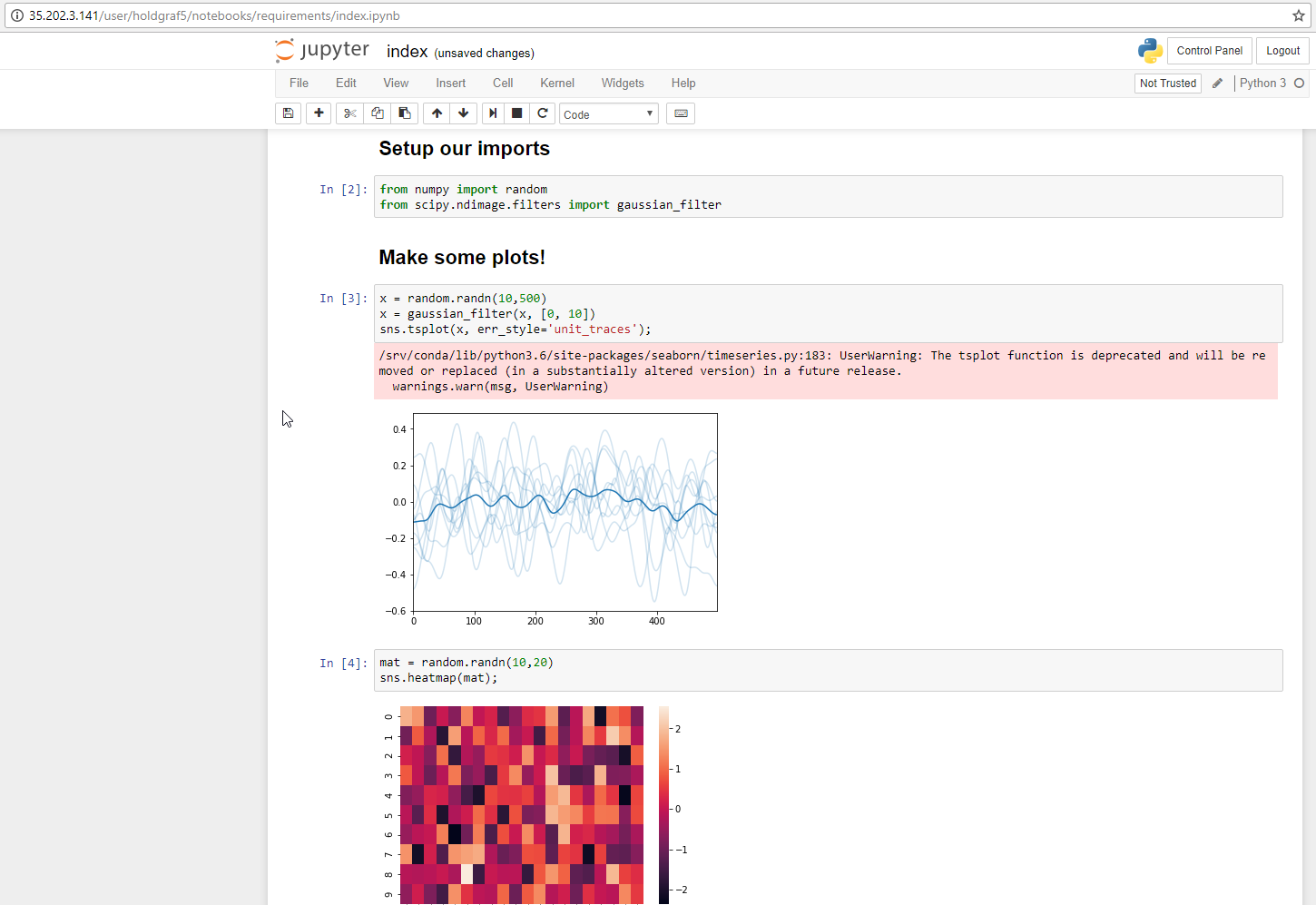
I can confirm that nbgitpuller is installed on the machine. Used it to pull the binder-examples/requirements repo and the notebook runs!
choldgraf
on 29 Oct 2017
My PC is nothing fancy - just a Windows 7 laptop. Great to hear that everything works for you and, thus, I assume, will work for all (most/some?) of the attendees on Oct 31. How exactly did you use nbgitpuller?
ablekh
on 29 Oct 2017
yeah - any chance you have access to another computer? I've tried on a windows 10 machine as well as on Ubuntu and it worked in both cases.
nbgitpuller works by giving users a URL that automatically pulls in a repository for them. The URL structure is:
myjupyterhub.org/hub/user-redirect/git-pull?repo=<your-repo-url>&branch=<your-branch-name>&subPath=<subPath>
So in this case, what I tried was:
http://35.202.3.141/hub/user-redirect/git-pull?repo=https://github.com/binder-examples/requirements&branch=master
and it worked!
choldgraf
on 29 Oct 2017
EIther way, what do you say that we call it a night for now? We can try to figure out why the files aren't showing up tomorrow. Or in a pinch I'll push the python materials to github and they can just be pulled in with nbgitpuller. What do you think?
choldgraf
on 29 Oct 2017
Sure, let's call it a night. I greatly appreciate your help. Please feel free to push the materials to the cluster. Ping me tomorrow via e-mail when you are available ... Have a good night!
ablekh
on 29 Oct 2017
will do so! thanks for your patience as well...we'll get there :-)
if you want, we can resize the cluster to 1 node for the night. Either way we won't be eating up much computational resources, but just FYI!
choldgraf
on 29 Oct 2017
My pleasure. Sure, we will get there and beyond :-) I will resize the cluster for the night.
ablekh
on 29 Oct 2017
note to self: I think this bit in the config.yaml will solve our files problems:
https://zero-to-jupyterhub.readthedocs.io/en/latest/user-experience.html#advanced-topic-pre-populating-user-s-home-directory-with-notebooks
choldgraf
on 29 Oct 2017
So FYI, I added the course materials to the github repo. Here's the nbgitpuller link:
http://35.202.3.141/hub/user-redirect/git-pull?repo=https://github.com/choldgraf/sbdh-jhub-oct31&branch=master
The more I think about it, this may be a better way to do the file distribution anyway (it's much more flexible than baking the course materials into the image itself). LMK if that works for you!
choldgraf
on 29 Oct 2017
Thank you. I agree - it is definitely a much more flexible and relatively straightforward approach.
ablekh
on 29 Oct 2017
Out of curiosity, I looked at your Data8 main repo (great work, BTW!) and tried to build and launch relevant server via Binder. It worked perfectly (https://hub.mybinder.org/user/data-8-materials-fa17-ayzii00l), and, more importantly, I'm not experiencing any kernel connection issues, even when using Firefox. This, I think, suggests that the issue with SBDH cluster is related to JH and/or cluster configurations or their interactions. Just some food for thought ...
ablekh
on 29 Oct 2017
That's good to know re: Binder etc. I believe they have different setups in terms of authentication etc...these are wrinkles we still def need to sort out! When the new version of the helm chart is released we'll need to re-ping these issues and see if they're now resolved (should be sometime this or next week for the release).
IMO it's fine telling people this is beta software, and some bugs are still being ironed out (e.g. there's a weird 503 redirect bug people run into on JupyterHub that definitely has been fixed in the latest release, just not in the helm chart yet)
And yep - the setup we use here is almost the same as the one that Binder uses (the main difference being that Binder does copy all the files into the user's home directory).
choldgraf
on 30 Oct 2017
@choldgraf Quick question: what is your experience, if any, with GKE Cluster Autoscaler? I've just enabled it tonight to avoid manual scaling up of the cluster for the workshop's Wed demo (approx. 60 users). However, if the Autoscaler doesn't work well, I can always scale up the cluster manually. Current settings are: min. # of nodes: 3; max: 12 (didn't remember the rule-of-thumb numbers per user you mentioned). Also, could you do a favor and briefly try to access the cluster as a user - I've just tried and nbgitpuller gave me an error ...
ablekh
on 31 Oct 2017
hmmm - I haven't played with autoscaling myself. I think @yuvipanda has?
But for the workshop I'd recommend just manually scaling it up. Better to
play with new features on less of a timetable :-)
On Mon, Oct 30, 2017 at 7:06 PM Aleksandr Blekh notifications@github.com
wrote:
@choldgraf https://github.com/choldgraf Quick question: what is your
experience, if any, with GKE Cluster Autoscaler? I've just enabled it
tonight to avoid manual scaling up of the cluster for the workshop's Wed
demo (approx. 60 users). However, if the Autoscaler doesn't work well, I
can always scale up the cluster manually. Current settings are: min. # of
nodes: 3; max: 12 (didn't remember the rule-of-thumb numbers per user you
mentioned). Also, could you do a favor and briefly try to access the
cluster as a user - I've just tried and nbgitpuller gave me an error ...—
You are receiving this because you were mentioned.
Reply to this email directly, view it on GitHub
https://github.com/jupyterhub/zero-to-jupyterhub-k8s/issues/237#issuecomment-340638235,
or mute the thread
https://github.com/notifications/unsubscribe-auth/ABwSHb0OUlGwRB5PLbJqXxY5evygNbd_ks5sxoC2gaJpZM4QGs_l
.
choldgraf
on 31 Oct 2017
All right - I will follow your advice. Will manually scale up the cluster to 10 nodes before the workshop demo. Based on this JupyterHub capacity planning discussion, it should be more than enough for 60+ users.
ablekh
on 31 Oct 2017
a quick note: if you're on the free tier of google cloud, you may run into some quota issues (e.g. @yuvipanda mentioned that you may run into disk issues because the quota is relatively low for free tier projects)
choldgraf
on 31 Oct 2017
Thank you for letting me know. Are you talking about vCPU/RAM or disk quota or both? I hope that we will avoid quota issues, but, worst case, wouldn't Google automatically start charging my credit card associated with the GC project? Anyway, I am more concerned about the nbgitpuller issue - please take a look ...
ablekh
on 31 Oct 2017
I think disk quota is what we usually hit first...you can always turn off persistent storage to avoid this though ( there are instructions in the z2jh guide for that https://zero-to-jupyterhub.readthedocs.io/en/latest/user-experience.html#turn-off-per-user-persistent-storage)
choldgraf
on 31 Oct 2017
Actually, I think that 10 GB or even 5 GB mentioned in the z2jh guide is too much, because Renata will likely have time to demonstrate only 1-2 notebooks, which implies minimal overhead in terms of storage. Having said that, generally, I would like to clarify that storage used for user sessions is related to the configuration option Boot disk size in GB (per node) (100 GB).
In terms of CPU limits, here is a relevant snippet from GCP Free Tier FAQ:
During the free trial, your project can have no more than 8 cores (or virtual CPUs) running at the same time.
So, considering that currently the cluster uses n1-standard-2 VMs (2 vCPUs), max. number of machines (nodes) that we can have via free tier option would be 4. That seems to not be enough to sustain (simple/light) workload of around 60 users, right? I see no restrictions in terms of disk space, though ...
ablekh
on 31 Oct 2017
mmm, from a CPU standpoint that should be OK. people get a % of a CPU so it's not 1 CPU per person (though you can alter these settings in a similar-ish way that you can with RAM)
choldgraf
on 31 Oct 2017
Understood. What about RAM? What is a default limit for RAM that JH image is configured with, if any? Could / should we limit RAM per user session to prevent potential issues with performance?
ablekh
on 31 Oct 2017
I think default is each user is guarantee 1G of ram: https://zero-to-jupyterhub.readthedocs.io/en/latest/user-experience.html#set-user-memory-and-cpu-guarantees-limits
choldgraf
on 31 Oct 2017
I see. So, in this case, 60 users would require at least 60 GB of RAM, whereas our (max.) 4 nodes can offer only 4 x 7.5 = 30 GB. Any thoughts?
ablekh
on 31 Oct 2017
ah - yep that's right. So you can either up the size of the cluster (which is tough on a free plan) or you could reduce the memory each person is guaranteed. If the notebooks don't do anything crazy this should be OK.
If worst comes to worst, you can always have some of the participants use binder or something :-)
choldgraf
on 31 Oct 2017
Sure, but for Binder, the postBuild-related issue should be fixed. I thought I shared info about it with you ...
As for the memory limit/guarantee, I think that it is feasible to update the config.yaml as follows:
singleuser:
    memory:
       limit: 0.5G
       guarantee: 0.5G
Thanks a lot, @ablekh and @choldgraf for making this happen! I've been sick / swamped, so this is great!
I just saw your last message, and want to let you know that for 0.4 there's a bug that'll cause '0.5G' to not work - only non-fractional units are supported. 512M should work just fine though!
yuvipanda
on 31 Oct 2017
My pleasure, @yuvipanda. I couldn't have done this without great help from @choldgraf. I hope that you're already feeling better/well.
Thank you for your previous and latest advice / comments. I will use 512M to try to stay within free tier limits.
ablekh
on 31 Oct 2017
I'm feeling better! I'd also recommend turning off persistent storage just to avoid possible issues. Also run a helm upgrade command right after resizing the cluster up to make sure that all images are present on all the nodes... Otherwise for some people starting can take a long time!
yuvipanda
on 31 Oct 2017
hey @ablekh how did this go?
choldgraf
on 1 Nov 2017
Hey @choldgraf, I've just recently returned from the campus. Today's demo went very well.
Again, I want to express my appreciation to you for your invaluable help with preparing for this workshop. Also, thanks to @yuvipanda for his advice and to the whole team for great work on JupyterHub and _Zero to JupyterHub_ Guide.
I hope that we will continue and expand our collaboration on JupyterHub in context of SBDH educational projects as well as other related projects at MATIN platform and Georgia Tech. I also hope to collaborate with you on Binder and other projects of mutual interest. Let's stay in touch!
ablekh
on 1 Nov 2017
wohoo! that's great to hear. It was a fun getting the deployment up-and-running, thanks for taking the time to do so. Looking forward to seeing what comes next!
choldgraf
on 2 Nov 2017
Thank you, Chris! The next will most likely be replicating and making more scalable and flexible the cluster on Azure (Microsoft awarded SBDH some cloud credits; BTW, does K8s offer an ability to export cluster configuration as YAML or such?) as well as (for MATIN platform) trying to figure out and document JH cluster deployment on OpenStack. Please let me know when z2jh guide is updated for Azure and, perhaps, for OpenStack (for the latter, I'll be happy to create/contribute, based on the progress of my learning).
ablekh
on 2 Nov 2017
sounds good! will let you know when we update the guide for Azure deployment. Their new container services is a step in the right direction! I hear it's a bit buggy still but I'm sure it will improve!
choldgraf
on 2 Nov 2017
actually, @ablekh if you have some time to play around with the new Azure kubernetes engine, that would be really useful information for the JHub project. We've played around with it enough to know that it's buggy, but hopefully this will improve in the future. Basically, once we have kubernetes running on Azure, the rest of the z2jh guide should be the same. If you have a chance to play around with it + get a kubernetes deployment running, please do open an issue / PR / etc because that'd be a big help to people.
choldgraf
on 2 Nov 2017
Hi @ablekh, Nice to see you here. I'm happy that @choldgraf helped you through the details. Please keep the suggestions and feedback coming. It's very helpful. Thanks.
 willingc
on 2 Nov 2017
willingc
on 2 Nov 2017
@choldgraf Sure, I will definitely play around with it; not sure about the timing, though. Will keep you posted and open issues/PRs as needed. Happy to help. :-)
Hi @willingc, nice to see you, too. :-) Hope you're doing well. Thank you for kind words and all your (and the rest of the teams') hard work on these awesome projects (JupyterHub and Binder[Hub]). It is my pleasure to contribute to them as much as I can.
ablekh
on 2 Nov 2017
I did not read through this long issue. Can we open a new issue with what remains of this summarized?
I think the initial parts may be addressed already though.
My opinion about TODO: recommend using google chrome is that we should not try to maintain such statement. This is now up to JupyterLab etc I'd say.
I also did not understand the part about clusterrolebinding for helm, perhaps this was something outdated when RBAC was not supported for various cloud providers? It is now enabled by default on AWS.
ping @choldgraf @ablekh
 consideRatio
on 4 Sep 2018
consideRatio
on 4 Sep 2018
@consideRatio Basically, this issue covers a mix of notes from my meeting/interactions with Chris a while ago and some past issues, which are not relevant anymore: (1) "Cannot connect to kernel" and Chrome-related info was related to some Web sockets issue in JupyterHub that seems to have been fixed since and (2) RBAC-related info was likely related to RBAC being disabled by default on Azure at the time of writing. Thus, I think that this issue may be closed, since it doesn't seem to contain any outstanding problems.
ablekh
on 4 Sep 2018
@ablekh ah excellent thanks for your help summarizing this!
consideRatio
on 4 Sep 2018
@consideRatio My pleasure. Thanks to all for help and congratulations on releasing v0.7 (will test soon)!
ablekh
on 4 Sep 2018
Related issues
 jonathanballs
·
3Comments
jonathanballs
·
3Comments
 UsDAnDreS
·
4Comments
consideRatio
·
4Comments
consideRatio
·
3Comments
UsDAnDreS
·
4Comments
consideRatio
·
4Comments
consideRatio
·
3Comments
 jgerardsimcock
·
4Comments
jgerardsimcock
·
4Comments
Most helpful comment
I'm feeling better! I'd also recommend turning off persistent storage just to avoid possible issues. Also run a helm upgrade command right after resizing the cluster up to make sure that all images are present on all the nodes... Otherwise for some people starting can take a long time!