- [X] I understand that YTMDesktop have NO affiliation with Google or YouTube.
- [X] I verified that there is no open issue for the same subject.
Describe the bug
opening the remote controle webpage produce an error . ( reloading page, reproduce the error each time )
To Reproduce
Steps to reproduce the behavior:
- Go to settings
- enable remote control
- click on the link button

- see the popup error
Expected behavior
more details about the error ?
Screenshots
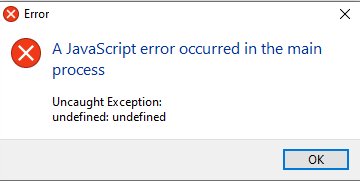
Environment (please complete the following information):
- YTMDesktop version: 1.12.0
- OS: Windows
- OS version: 19041.388
- Arch: x64
- Installation way: .exe
Another question, is it a documentation available for this remote control ? ( I just want to retrieve the current played song title )
 thib3113
All 19 comments
Hello this problem was solved try this version of the application. https://github.com/ytmdesktop/ytmdesktop/releases/download/v1.12.0-beta/YouTube.Music.Desktop.App.Setup.1.12.0.exe
 ZombieAnidata
on 7 Aug 2020
ZombieAnidata
on 7 Aug 2020
Original post: https://github.com/ytmdesktop/ytmdesktop/issues/253#issuecomment-666615378
ZombieAnidata
on 7 Aug 2020
Hello this problem was solved try this version of the application. https://github.com/ytmdesktop/ytmdesktop/releases/download/v1.12.0-beta/YouTube.Music.Desktop.App.Setup.1.12.0.exe
404 not found for me .
thib3113
on 7 Aug 2020
Hello this problem was solved try this version of the application. https://github.com/ytmdesktop/ytmdesktop/releases/download/v1.12.0-beta/YouTube.Music.Desktop.App.Setup.1.12.0.exe
404 not found for me .
I don't have the original file right now but i will give you an an copy later. (It is an older beta version 1.12.0)
ZombieAnidata
on 7 Aug 2020
v1.12.1 final has fixed it https://github.com/ytmdesktop/ytmdesktop/releases/download/v1.12.1/YouTube.Music.Desktop.App.Setup.1.12.1.exe
 adlerluiz
on 7 Aug 2020
adlerluiz
on 7 Aug 2020
v1.12.1 final has fixed it https://github.com/ytmdesktop/ytmdesktop/releases/download/v1.12.1/YouTube.Music.Desktop.App.Setup.1.12.1.exe
404 not found for me .
Did you have a documentation for this api ? or just a way to retrieve the current song played ?
thib3113
on 8 Aug 2020
Try again, now live.
API Doc - https://github.com/ytmdesktop/ytmdesktop/wiki/Remote-Control-API
adlerluiz
on 8 Aug 2020
@adlerluiz same error with v1.12.1 ...
thib3113
on 8 Aug 2020
@adlerluiz same error with v1.12.1 ...
Try this http://localhost:9863/info
ZombieAnidata
on 8 Aug 2020
@adlerluiz same error with v1.12.1 ...
Try this http://localhost:9863/info
please access this link and send the screenshot
adlerluiz
on 8 Aug 2020
I try ... but now I got this when enabling the remote control

same if I run it with administrator mode / nothing listen on this port ... I'll retry after a reboot
And I try to build the project, but it fail each times, so I think I doesn't have the correct node version ... ( a node-RT seems to need vs2015, node 8 seems to work, but electron-builder's dependency fail with node 8 . )
thib3113
on 8 Aug 2020
have you checked your firewall?
adlerluiz
on 8 Aug 2020
Maybe this can help you - https://medium.com/@myolisi/how-to-fix-error-eacces-permission-denied-8080-in-nodejs-66d6cd5b2ed5
adlerluiz
on 8 Aug 2020
Maybe this can help you - https://medium.com/@myolisi/how-to-fix-error-eacces-permission-denied-8080-in-nodejs-66d6cd5b2ed5
I can't check for the firewall for the moment, but seems strange, in general if firewall lock the port, the app can listen, but others computer can't talk to this port. I'll check when I'm back .
About the link, I already check, no other other programs listen on this port ...
thib3113
on 8 Aug 2020
right, I wait for try fix it
adlerluiz
on 8 Aug 2020
Ok, so finally, it's the firewall ... When I will try to add an exception, I see youtube music desktop is already here ... two times ... removing the two, restarting youtube music desktop, the app ask the firewall rights ... and thats fine ( for this error ) .
So, always the undefined undefined error, and the /info return :
{
   "app":{
      "version":"1.12.1"
   },
   "server":{
      "name":"PC-TO-TSE",
      "listen":[
         {
            "name":"Hamachi",
            "ip":"25.55.228.68"
         },
         {
            "name":"Ethernet 2",
            "ip":"192.168.9.100"
         },
         {
            "name":"VMware Network Adapter VMnet1",
            "ip":"192.168.252.1"
         },
         {
            "name":"Wi-Fi",
            "ip":"192.168.9.101"
         },
         {
            "name":"Hamachi",
            "ip":"25.55.228.68"
         },
         {
            "name":"Ethernet 2",
            "ip":"192.168.9.100"
         },
         {
            "name":"VMware Network Adapter VMnet1",
            "ip":"192.168.252.1"
         },
         {
            "name":"Wi-Fi",
            "ip":"192.168.9.101"
         }
      ],
      "port":9863,
      "isProtected":true,
      "connections":0
   }
}
I made some changes, can you test it for me? I'm building and I'll give you the download link
adlerluiz
on 8 Aug 2020
adlerluiz
on 8 Aug 2020
it's work now . Just it do a strange visual with multi interfaces ... But I'll open another issue I think :)
thib3113
on 9 Aug 2020
Related issues
 restinginlove
·
5Comments
restinginlove
·
5Comments
 lolrepeatlol
·
4Comments
lolrepeatlol
·
4Comments
 cebl-hg
·
7Comments
cebl-hg
·
7Comments
 error7404
·
3Comments
error7404
·
3Comments
 rhwendt
·
7Comments
rhwendt
·
7Comments