Ypimagepicker: crash because of high memory usage
app crashes when iCloud photo library is turn on , the app memory usage hits up to 1000 (the range between 300 - 1000 ) when i start scrolling throw the library , there is 445 photos and videos (227 from iCloud )
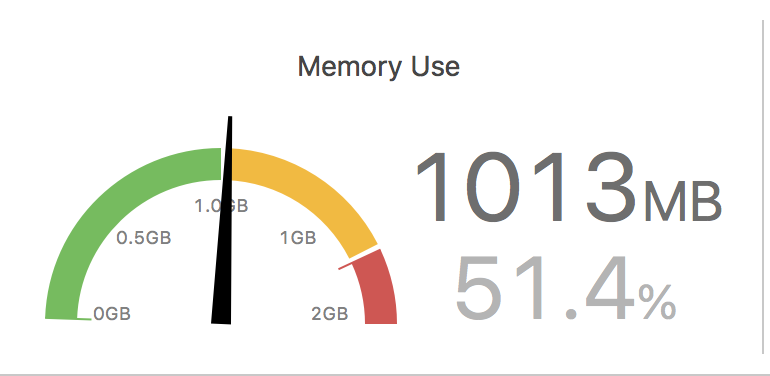
- Device: ipad pro 9.8
- OS: iOS 11.4.1
 oah2008
All 8 comments
Hey @oah2008,
Thanks for reporting the issue,
Would you be able to try on a phone device to see if this happens as well?
Works fine on the phones I tried, so it looks like an iPad-only issue :)
Thanks,
 s4cha
on 12 Sep 2018
s4cha
on 12 Sep 2018
i tested on iPhone 6s plus (IOS 11.4.1) and it worked fine , .so it is an iPad issue :)
anyway this is warning messages that printed in the log when the app crash on the iPad (in case if you need it)
** note : it is impossible to use this library on the iPad when iCloud photo library is turn on , sometimes it crashes as soon as you open the photo library , and if you scroll it will crash immediately
YPImagePickerExample[4459:883620] [ImageManager] Unable to load image data
YPImagePickerExample(4459,0x1758b3000) malloc: * mach_vm_map(size=25182208) failed (error code=3)
error: can't allocate region
** set a breakpoint in malloc_error_break to debug
2018-09-13 06:05:26.698168+0300 YPImagePickerExample[4459:884013] [Unknown process name] CGSImageDataLock: Cannot allocate memory
2018-09-13 06:05:26.689223+0300 YPImagePickerExample[4459:883963] [Unknown process name] CGSImageDataLock: Cannot allocate memory
Message from debugger: Terminated due to memory issue
** thanks for this great library 🥇
oah2008
on 13 Sep 2018
I have the same problem under ios 11 ipad pro:

When you scroll through the library in the below line the app crashes due to memory. It crashes also if you resize the film roll line.
The console logs says:
Multiple Times:
[ImageManager] Unable to load image data, /var/mobile/Media/PhotoData/Mutations/DCIM/100APPLE/IMG_0642/Adjustments/FullSizeRender.jpg
and than " [ops] Communications error: Connection interrupted Message from debugger: Terminated due to memory issue"
And this was without the iCloud Photo Library turned on.
There are some Panorama and live photos in the camera roll.
Any help fixing this would be appreciated.
 datacosmos
on 8 Oct 2018
datacosmos
on 8 Oct 2018
OK I have played around with this for a while and found out that there is a correlation between the setting config.library.numberOfItemsInRow and the crashes:
- With config.library.numberOfItemsInRow = 1 or 2 I can scroll with normal speed and resize the roll view to full screen and scroll for a long time, it crashes only when I scroll really insanely fast through the photos.
- With more numberOfItemsInRow(e.g. 5) the app crashes quickly after beginning to scroll - even slowly.
Perhaps this is due to the higher resolution of the ipad and the image previews take up more memory and the scrolling creates too many parallel resizing process flooding the system memory ?
While scrolling the memory profiler shows that the app itself comsumes up to 70MB - but "other processes" are eating up all the free memory.
I hope this helps somehow.
datacosmos
on 8 Oct 2018
this exactly what i did, when i reported about this issue the numberOfItemsInRow was setting to 6 and the app was crashing immediately when i start scrolling throw the library (fast or slow)
however before two weeks i changed numberOfItemsInRow to 3 and i noticed the difference , the app will crash only if you scroll super-fast , unlike when you set the number Of Items In Row to number higher than 4 (in this case it will crash immediately)
and somehow i forget to mention what i did to fix the problem , the app still crashes but the possibilities for that to happen is low (only if the user scroll super-fast using ipad) but it's a good workaround until @s4cha fix this bug
oah2008
on 9 Oct 2018
Just two other points:
- With numberOfItemsInRow=3 I see only two photos in one row and in the middle column there is just whitespace. And when I resize the camera roll view to max the app crashes also.
- On iPads I have only one row of photos on the camera roll view (see my attached screenshot above) (instead of 2-3 rows on iPhones), I would like to have the same distribution between the preview pane an the roll on the iPad. I.e. one smaller preview image and 3 rows of thumbnail photos of the camera roll. Is this a configuration setting?
datacosmos
on 9 Oct 2018
this is my settings :
config.targetImageSize = .original
config.library.onlySquare = false
config.library.numberOfItemsInRow = 3
config.library.spacingBetweenItems = 2
with this settings iPad and iPhone will have the same number of rows on the camera roll view
oah2008
on 9 Oct 2018
I'm experience memory related crashes too. Message from debugger: Terminated due to memory issue. In my case it results from scrubbing through cover images quickly on a single video selection. I'm running it on an iPhone 6 on iOS 12.1.1.
Edit: Sorry - totally forgot I'm running a beta version on this device!
 TomWFox
on 19 Nov 2018
TomWFox
on 19 Nov 2018
Related issues
 esabunor
·
5Comments
esabunor
·
5Comments
 roarapps
·
4Comments
roarapps
·
4Comments
 Sieniek
·
5Comments
Sieniek
·
5Comments
 DamascenoRafael
·
6Comments
DamascenoRafael
·
6Comments
 nickeyzzz
·
6Comments
nickeyzzz
·
6Comments
Most helpful comment
OK I have played around with this for a while and found out that there is a correlation between the setting config.library.numberOfItemsInRow and the crashes:
Perhaps this is due to the higher resolution of the ipad and the image previews take up more memory and the scrolling creates too many parallel resizing process flooding the system memory ?
While scrolling the memory profiler shows that the app itself comsumes up to 70MB - but "other processes" are eating up all the free memory.
I hope this helps somehow.