Yolov3: Train YOLOv3-SPP from scratch to 62.6 [email protected]
Hi,
Thanks for sharing your work !
I would like what is your configuration for the training of yolov3.cfg to get 55% MAP ?
We tried 100 epochs but we got a MAP (35%) who don't really change much more. And the test loss start diverge a little.
Why you give a very high loss gain for the confidence loss ?
Thanks in advance for your reply.

 Aurora33
All 151 comments
@Aurora33 the mAPs reported in https://github.com/ultralytics/yolov3#map are using the original darknet weights files. We are still trying to determine the correct loss function and optimal hyperparameters for training in pytorch. There are a few issues open on this, such as https://github.com/ultralytics/yolov3/issues/205 and https://github.com/ultralytics/yolov3/issues/12. A couple things of note:
- The plotted mAPs are at 0.1 conf_thres (for speed during training). If you run test.py directly it will run mAP at 0.001 conf_thres, which will produce a higher mAP.
- Your LR scheduler may or may not have applied here, depending on how you set your number of epochs argument in the argparser
--epochs. - Darknet training uses multi_scale by default, with scaling from 50% to 150% of your default size.
- Darknet training also involves several steps I believe, including training on other datasets and altering layers. You can read about this more in the YOLOv2 and YOLOv3 papers: https://pjreddie.com/publications/
- This implementation lacks the 0.7 ignore theshold in the original darknet, which is on our TODO list but not yet implemented.
 glenn-jocher
on 1 Jun 2019
glenn-jocher
on 1 Jun 2019
I also get 38% mAP until 170 epoches on COCO dataset, and the mAP don't really change much more
 majuncai
on 12 Jun 2019
majuncai
on 12 Jun 2019
@majuncai can you post your results? Did you use --multi-scale? We have made quite a few updates recently, in particular to multi-scale, which is required to achieved the best results, as well as training to the last epoch specified in order for the LR scheduler to take effect.
glenn-jocher
on 12 Jun 2019
@glenn-jocher

I didn't change any parameters, I didn't use multi-scale.
majuncai
on 13 Jun 2019
@glenn-jocher

majuncai
on 13 Jun 2019
@majuncai I see. The main things I noticed is that your LR scheduler has not taken effect, since it only kicks in at 80% and 90% of the epoch count. The mAP typically increases significantly after this. Also multi-scale training has a large effect. Lastly, we reinterpreted the darknet training settings so that we believe you only need 68 epochs for full training.
All of these changes have been applied in the last few days. I recommend you git pull and train from scratch to 68 epochs. Then you can plot your results and upload them again here using the following command:
from utils.utils import *; plot_results()
glenn-jocher
on 13 Jun 2019
Hi Glenn, thanks for your great work. For classification loss, YOLO V3 paper said they don't use softmax, but nn.CrossEntropyLoss() actually contain softmax. And the paper contains ignore_threshold. Could these affect the overall mAP?
 XinjieInformatik
on 13 Jun 2019
XinjieInformatik
on 13 Jun 2019
@XinjieInformatik yes these could affect the mAP greatly, in particular the ignore threshold. For some reason we've gotten reduced mAP with BCELoss for the classification than with CELoss. I don't know why. This may be a PyTorch phenomenon, as simpler tasks like MNIST also train better with CELoss than BCELoss in PyTorch.
glenn-jocher
on 13 Jun 2019
@glenn-jocher Hi, I am curious about how the provided yolov3.pt is obtained. Is it transformed from yolov3.weight or trained with the code you shared?
 fereenwong
on 16 Jun 2019
fereenwong
on 16 Jun 2019
@fereenwong yolov3.pt is exported from yolov3.weights.
glenn-jocher
on 18 Jun 2019
@glenn-jocher Just finished an experiment training on the full COCO dataset from scratch, using the default hyperparameter values. My model was YOLOv3-320, and I trained to 200 epochs with multi-scale training on and rectangular training off. After running test.py, I managed to get 47.4 mAP, which unfortunately is not the 51.5 corresponding to pjreddie's experiment.
I can try training again but this time to 273 epochs, although it seems that each stage before the learning rate decreased per the scheduler had already plateaued, so I don't think it would benefit much. Is there a comprehensive TODO list that you think will improve mAP? I notice you mentioned the 0.7 ignore threshold. What do you mean by this? I searched through the darknet repo and didn't get any relevant 0.7 hits.
 ktian08
on 25 Jul 2019
ktian08
on 25 Jul 2019
@ktian08 ah, thanks for the update! This is actually a bit better than I was expecting at this point, since we are still tuning hyperparameters. The last time we trained fully we trained 320 also to 100 epochs and ended up at 0.46 mAP below (no multiscale, no rect training), using older hyps from about a month aqo. Remember the plots are at conf_thres 0.1, test.py runs natively at conf_thres 0.001 which adds a few percent mAP compared to the training plots. Can you post a plot of your training results using from utils import utils; utils.plot_results() and a copy of your hyp dictionary from train.py?
0.70 is a threshold darknet uses to not punish anchors which aren't the best but still have an iou > 0.7. We use a slightly different method in this repo, which is the hyp['iou_t'] parameter.
Yes I also agree that training seems to be plateauing too quickly. This could be because our hyp tuning is based on epoch 0 results only, so it may be favoring aspects that aggressively increase mAP early on, which may not be best for training later epochs. Our hyp evolution code is:
python3 train.py --data data/coco.data --img-size 320 --epochs 1 --batch-size 64 --accumulate 1 --evolve

glenn-jocher
on 25 Jul 2019


Ah, I see. My repo currently does have the reject boolean set to True, so it is thresholding by iou_t, just by a different value. Are you saying darknet uses 0.7 for this value?
I have not begun evolving hyperparameters yet, as the ones I've used were the default ones for yolov3-spp I believe. However, I've modified my train script to evolve every opt.epochs because that's how I interpreted the script rather than evolving based on the first epoch. To accomplish this, I've also changed train to output the best_result (based on 0.5 * mAP + 0.5 * f1) rather than the result from the last epoch so print_mutations has the correct value. I'll try evolving the hyperparameters based on a smaller number of epochs > 1 and let you know if I get better results.
ktian08
on 25 Jul 2019
@ktian08 ah excellent. Hmm, your results are very different than the ones I posted. The more recent results should see almost 0.15 mAP starting at epoch 0, whereas yours start around 0.01 at epoch 0 and increase slowly from there.
Clearly my plots show faster short term results, but I don't know if they are plateauing lower or higher than yours, its hard to tell.
No, the 0.7 value corresponds to a different type of iou thresholding in darknet. In this repo if iou < hyp['iou_t'] then no match is made. This prevents large anchors from attempting to match with small targets and vice versa. This parameter seems to evolve to 0.20-0.35 typically. In your version its at 0.3689, whereas now we have 0.194, though the latest unpublished hyperparameters show a best value of 0.292.
Unfortunately we are resource constrained so we can't evolve as much as we'd like. Ideally you'd probably want to run the evolution off of the result say the first 10 or 20 epochs, but we are running it off of epoch 0 results, which allows us to evolve many more generations, even as its unclear if epoch 0 success correlates 100% with epoch 273 success.
Also beware that we have added the augmentation parameters to the hyp dictionary, so you may want to git pull to get the latest. You can also evolve your own hyperparameters using the same code I posted before, or if you want you could contribute to our hyp study as well by evolving to a cloud bucket we have.
glenn-jocher
on 25 Jul 2019
Right, I think you start at 0.15 mAP because you load in the darknet weights as your default setting. I modified the code so I'm truly training COCO from scratch.
I'll pull the new hyperparameters and try evolving within 10-20 epochs then. Thanks!
ktian08
on 25 Jul 2019
@ktian08 ah yes this makes sense then, we are looking at apples to oranges.
Regarding fitness, I set it as the average of mAP and F1, because I saw that when I set it as only mAP, the evolution would favor high R and low P to reach the highest mAP, so I added the F1 in attempt to balance it.
https://github.com/ultralytics/yolov3/blob/df4f25e610bc31af3ba458dce4e569bb49174745/train.py#L342-L343
If you are doing lots of training BTW, you should install Nvidia Apex for mixed precision if you haven't already. This repo will automatically use it if it detects it.
glenn-jocher
on 25 Jul 2019
@ktian08 I've added a new issue https://github.com/ultralytics/yolov3/issues/392 which illustrates our hyperparameter evolution efforts in greater detail.
As I mentioned, with unlimited resources you would ideally evolve the full training results:
python3 train.py --data data/coco.data --img-size 320 --epochs 273 --batch-size 64 --accumulate 1 --evolve
But since we are resource constrained we evolve epoch 0 results instead, under the assumption that what's good for epoch 0 is good for full training. This may or may not be true, we simply are not sure at this point.
python3 train.py --data data/coco.data --img-size 320 --epochs 1 --batch-size 64 --accumulate 1 --evolve
OK, I'll try installing Apex and evolving to as many epochs as I can. Earlier, I made a mistake calculating the mAP for my experiment, as I didn't pass in the --img-size parameter to test.py and thus my model tested on size 416 images. My newly calculated mAP is 47.4.
ktian08
on 25 Jul 2019
@ktian08 ah I see. I forgot to mention that you should use the --save-json flag with test.py, as the official COCO mAP is usually about 1% higher than what the repo mAP code reports. You could try best.pt also instead of last.pt:
python3 test.py --weights weights/best.pt --img-size 320 --save-json
glenn-jocher
on 26 Jul 2019
Yep, already using --save-json and best.pt!
ktian08
on 26 Jul 2019
@ktian08 I updated the code a bit to add a --img-weights option to train.py. When this is set the dataloader selects images randomly weighted by their value, which is defined as the type of objects they have and how well the mAP is evolving on those exact objects. If mAP is low on hair dryers for example, and there are few hair dryers in the dataset, then many more images of hairdryers will be selected than say images of people.
This seems to show better mAP, at least during the first few epochs, both when training from darknet53 as well as when training with no backbone (0.020 to 0.025 mAP first epoch at 416 without backbone). I don't know what effect it will have long term however. I am currently training a 416 model to 273 epochs using all the default settings with the --img-weights flag. I just started this, so I should have results out in about a week, and then I'll share here.
glenn-jocher
on 30 Jul 2019
@glenn-jocher Does training seem to improve using --img-weights based on your experiments so far? I am currently retraining on new hyperparameters I got from evolving, but despite the promising mAPs gotten during evolution, I see that the mAP for my new experiment is pretty much the same as my control experiment ~60 epochs in.
ktian08
on 2 Aug 2019
@ktian08 I might be seeing a similar effect. It's possible that the first few epochs are much more sensitive to the hyperparameters, and small changes in them eventually converge to the same result after 50-100 epochs.
I'm not sure the conclusion to draw from this, other than hyperparameter searches based on quick results (epoch 0, epoch 1 results etc.) may not be as useful as they appear. Oddly enough I also saw about no change in mAP at the baseline img-size when using --multi-scale, even after 30-40 epochs.
glenn-jocher
on 2 Aug 2019
@glenn-jocher Hmm... I trained to 20 epochs while tuning hyperparameters but when I compare the 20th epoch even I don't see the 7 mAP increase that I should've seen.
Maybe --img-size reduces AP for the classes doing well during training, so that the mAP in the end is the same regardless.
I noticed that pjreddie describes multi-scale training much differently in the YOLO9000 paper than what is being implemented here (scaling from /1.5 to * 1.5). He says every 10 batches he chose a new dimension from 320 to 608 as long as it was divisible by 32, allowing for a much larger range for YOLOv3-320, which might help. Does his YOLOv3 repo also implement it like this, or is it your way?
ktian08
on 2 Aug 2019
@ktian08 here is the current comparison using all default settings (416, no multi-scale, etc). I'll update daily (about 40 epochs/day). Training both the full 273.
- Orange is baseline
python3 train.py - Blue is experiment
python3 train.py --img-weights

glenn-jocher
on 2 Aug 2019
@ktian08 this should implement it as closely as possible to darknet. Every 10 batches (i.e. every 640 images) the img-size is randomly rescaled from 1/1.5 to 1*1.5, rounded to the nearest 32-multiple, so from 288-640 for img-size 416 or from 224-480 for img-size 320.
I've run AlexyAB/darknet to verify and it does the same.
glenn-jocher
on 2 Aug 2019
how one should set hyper parameters for custom data single class? As data are different from coco we should make some changes in hyperparameters. Any hint on that. Thank you
 sanazss
on 2 Aug 2019
sanazss
on 2 Aug 2019
@sanazss You can try tune the hyperparameters using the --evolve flag, which will automatically search for the best hyperparameters based on finding the best value for a metric (fitness, set to 0.5f1 + 0.5mAP). You could also try manually tuning some hyperparameters like learning rate based on the graphs generated from results.txt.
ktian08
on 2 Aug 2019
Ideally you want your loss terms to have similar magnitudes, so you could manually see if any of your loss terms (GIoU, Confidence, Classification) is different than the others and adjust the weights a bit to get started, and then if you get some decent results from there (nonzero mAP) you can do python3 train.py --evolve on your custom data. This will evolve your hyperparameters looking for the best fitness based on random mutations. The results are recorded in evolve.txt. You probably want to run your evolve loop a few hundred times (200-300 evolutions seems to produce stable results).
glenn-jocher
on 2 Aug 2019
Thank you for your prompt reply. Should I use opt.evolve= true. I am running train.py and I think it runs in normal way doesn’t save hyperparameters. Could you guid me on this? Thank you
sanazss
on 2 Aug 2019
Its important to keep in mind that evolution is pretty advanced topic, that you get into when you are at the end of the road in terms of what you can achieve with the default setup. Since you are just getting started you should simply train your custom data to 300 epochs, and only then if you are unsatisfied with the results, and further training is not improving them (i.e. training to 400, 500 epochs), only then should you start exploring your more advanced options.
glenn-jocher
on 2 Aug 2019
Also if you are in a position to collect more data, this should also be higher on your list than tuning the hyperparameters. This is all very experimental, and its not proven to have significant effect on the final mAP yet.
glenn-jocher
on 2 Aug 2019
Thank you for your advice
sanazss
on 2 Aug 2019
The latest. --img-weights is blue. It seems to produce better results at first but trends worse than the baseline (green) at higher epochs. Orange is using INTER_AREA cv2 resize when loading the images rather than the baseline's INTER_LINEAR. Orange may seem a tiny bit better, but the INTER_AREA function is much slower than INTER_LINEAR, it adds about 10% to each epoch time.
In general --img-weights seems to be a fail, but I´ll let it run another day to make sure.

glenn-jocher
on 3 Aug 2019
I've updated the code to save each component (GIoU, Conf, Class) of the validation losses, and I've added a new plotting function which helps see when overtraining starts to occur in each loss component. I got a very interesting result on our baseline model, which is at 100 epochs so far. It appears GIoU loss is doing fine, as both train and val GIoU losses are still trending downward, however the other two loss components show diverging fortunes, with clear overtraining in the Classification loss, and overtraining starting to gradually occur as well in Objectness loss (Confidence).
I'm open to suggestions about what to do with this information. My instinct is to lower the loss gains on Class significantly (maybe cut them in half), and also on Conf a bit. Conf/Class losses can be switched to BCE/CE from the current BCE/BCE setup also. Any ideas?
from utils.utils import *; plot_results_overlay()

glenn-jocher
on 5 Aug 2019
@glenn-jocher Managed to get 50.5 mAP on YOLOv3-320, just 1 mAP off (using --save-json)! These were my hyperparameters and results:


I trained using 273 epochs, batch size=32, accumulate=2, multiscale on, and GIoU loss. I did not use --img-weights. These hyperparameters were gotten by evolving to 20 epochs for ~15 or so generations.
ktian08
on 6 Aug 2019
@glenn-jocher I also think your instinct to lower the hyperparameters for conf, obj make sense since they seem to be dominating the loss (I think mine are x2 yours currently). So is the current loss implemented with BCE for class, i.e. all the incorrect classes are grouped as one "incorrect class," rather than calculating cross entropy for all classes? I think switching to CE would make it harder to overfit these loss terms. What was the reasoning behind BCE or CE? It seems that the original YOLO paper has like a MSE thing going on for class score difference.
ktian08
on 6 Aug 2019
@ktian08 this is fantastic!!! I think this is the first time the repo has produced >50 mAP from scratch!!
50.5 mAP is only -1.9 from 52.4 darknet mAP using python3 test.py --img-size 320 --save-json, but this is extremely close. The gap used to be around -10 mAP a few months back. A few things I noticed:
- Your test loss is constantly decreasing, this is exactly what we want, there is no overfitting!
- Your mAP jump on the first LR scheduler step is huge, almost 10%, much larger than before. I wonder what part of this is due to the new hyps and how much is due to training 73 epochs more.
- Our evolution suspicions were correct: maximizing final mAP requires evolving hyperparams on a longer timeline (i.e. 5-10% of the total epochs seems to be a good guideline).
- The evolved LR and momentum are very aggressive, and your hyp['momentum'] value has actually hit the artificial ceiling I placed there of 0.97. I put a ceiling on the value because I saw that when this approached 0.99 the epoch 0 mAPs all fell to near 0. You should raise the ceiling to 0.98, though probably not 0.99. I'll raise this to 0.98 in my next commit.
https://github.com/ultralytics/yolov3/blob/68a5f8e2078a853623d17ca6a11bfa2ce3ea4aba/train.py#L387-L392
UPDATE: python3 test.py --img-size 320 --save-json is returning 52.3 mAP now, so the correct comparison is 52.3 - 50.5 = -1.8.
glenn-jocher
on 6 Aug 2019
@ktian08 about your CE vs BCE question: In the past I've always observed PyTorch CE loss outperforming BCE loss, even on pure classification problems like MNIST. I don't know if this is due to PyTorch's specific implementation of the two (I have not tested this in TensorFlow for example), or whether there is some basis in theory/mathematics for this result.
https://github.com/ultralytics/mnist
For most of the past year I've used CE for classification loss (due to the better MNIST results I saw firsthand), but a few months ago I realized that balancing the classification CE loss and the objectness BCE loss might be causing problems (since our object detection problem has a multi-component loss function), so I switched classification to BCE under the assumption that the obj and cls loss would play better together over the course of training if they were the same loss type.
So it's definitely a worthwhile experiment putting CE loss back for cls. The main issue though is that hyp['cls'] is then a complete unknown, so you'd need to search for a good value for it, possibly starting from the current value. Or maybe a better solution would be to add a new hyp called hyp['cls_ce'], and freeze all the other hyperparameters and search for this one. That would make it easier for people to use the bce hyps if they have a multilabel task. hyp['cls_pw'] would go unused, so you can leave as is and forget about it. The change itself is very simple, you would just comment the 3 BCE lines and uncomment the 1 CE line in the loss function:
https://github.com/ultralytics/yolov3/blob/68a5f8e2078a853623d17ca6a11bfa2ce3ea4aba/utils/utils.py#L317-L323
glenn-jocher
on 6 Aug 2019
Hello,
Nice work. Thanks for the sharing. I would like to know is you used the
option --evolve ?
Thanks in advance for your reply.
Zhe
On Tue, Aug 6, 2019 at 2:21 AM Kane Tian notifications@github.com wrote:
@glenn-jocher https://github.com/glenn-jocher Managed to get 50.5 mAP
on YOLOv3-320, just 1 mAP off! These were my hyperparameters and results:
[image: Screen Shot 2019-08-05 at 5 14 02 PM]
https://user-images.githubusercontent.com/25041372/62502497-9a22c400-b7a4-11e9-8466-d35695e496d9.png
[image: Screen Shot 2019-08-05 at 5 02 12 PM]
https://user-images.githubusercontent.com/25041372/62502523-c1799100-b7a4-11e9-9a91-c0635a6e4f0e.png
I trained using 273 epochs, batch size=32, accumulate=2, multiscale on,
and GIoU loss. I did not use --img-weights. These hyperparameters were
gotten by evolving to 20 epochs for ~15 or so generations.—
You are receiving this because you were mentioned.
Reply to this email directly, view it on GitHub
https://github.com/ultralytics/yolov3/issues/310?email_source=notifications&email_token=AKI7IS3W6HG7CSCUMQV5U33QDC72NA5CNFSM4HR3QZB2YY3PNVWWK3TUL52HS4DFVREXG43VMVBW63LNMVXHJKTDN5WW2ZLOORPWSZGOD3TOJKA#issuecomment-518448296,
or mute the thread
https://github.com/notifications/unsubscribe-auth/AKI7ISZ3CZSROGVQE2UUJEDQDC72NANCNFSM4HR3QZBQ
.
--
Zhe LI
Aurora33
on 6 Aug 2019
@glenn-jocher To clarify, my experiment was actually run on YOLOv3-320, not YOLOv3-320spp. I just ran test.py and got 51.7 mAP for pjreddie's pretrained weights, so the difference is -1.2 currently for me. We can try the suggested momentum and loss changes. Did you ever use MSE for the class and object scores?
@Aurora33 Yes, I used --evolve to arrive at my current hyperparameters. Evolving from a previous (in July) commit's hyperparameters allowed my mAP to increase by ~3 mAP.
ktian08
on 6 Aug 2019
@ktian08 oh wow even better. The README is showing 51.8 mAP there, but if fire up a colab instance today yes I also currently see 51.7 mAP, so yes we are only -1.2 mAP with your hyperparameters, incredible.
I've always used -spp since it gives you an almost free +1-2 mAP, but I'm pretty sure what helps yolov3 with also help yolov3-spp.
I think we should probably commit your hyperparameters to the master branch, and then I was thinking of using them as a starting point for another search, perhaps to 27 epochs this time (10% of the total), using python3 train.py --data data/coco.data --img-size 320 --epochs 27 --batch-size 32 --accumulate 2 --multi-scale --evolve.
Oh, BTW, if you do --batch-size 64 --accumulate 1 this should produce the same results as --batch-size 32 --accumulate 2, but will train faster... though --multi-scale at --batch-size 64 might also cause a CUDA out of memory error.
Also forget about the --img-weights, it seems to hurt more than it helps.
glenn-jocher
on 7 Aug 2019
@ktian08 BTW, since the momentum parameter is so close to its ceiling, we should lower the amount it varies from it's parent each mutation. I've called this inter-generation variation 'sigma' in the code. Most of the hyps have sigmas of 0.15-0.20, allowing them to vary greatly from one generation to the next, but momentum is especially sensitive, so I had lowered it previously to 0.05 sigma, and I've lowered it again to 0.02 sigma in the latest commit. This plot gives an example of how an offspring's hyp values will vary given a parent with a hyp value of 1.0, assuming 0.02 sigma (orange), and 0.01 sigma (blue).

This sigma value is tricky to set, because when you just start evolving you want great variation from one generation to the next (to ideally scan the vast n-d parameter space efficiently), but as you evolve to a more mature solution (like what you have now), it may be wise to reduce the sigmas, in much the same way as the LR is reduced in the later stages of training a neural network.
glenn-jocher
on 7 Aug 2019
@glenn-jocher Sounds good! My teammates may look more into training to get the desired remaining mAP. Could I get collaborator access and push my hyperparameters/some of the training code that generated these hyperparameters? I pulled like in mid-July, so our codebases are quite different, but I implemented by hand some of the changes you've made.
ktian08
on 7 Aug 2019
@ktian08 @glenn-jocher I just finished a traing like @ktian08. I got a MAP 50.2%. I trained the model exactly like @ktian08 but with the latest code in the master.
The loss of confidence overfitting at the end ?

There are strange detections in sample images:


Detections with original yoloV3:


I found there is more false positive in our model than yoloV3
Aurora33
on 14 Aug 2019
@Aurora33 oh very interesting. @ktian08 trained with --multi-scale and did not use the darknet53.conv.74 backbone to get his results.
Since this model is trained with different hyperparameters it will have a different --conf-thres that you'll want to apply to it. As you can see all of the confidences are higher than with the default weights, so you may want to raise your conf-thres above the default setting in detect.py.
glenn-jocher
on 14 Aug 2019
@Aurora33 also remember, with more FPs come more TPs. In zidane.jpg the ultralytics trained model found both ties, whereas original yolov3 did not. Its a bit of a double edged sword. The important thing is that your results exist on one point of the P-R curve, and you are free to move to any other point on the curve by varying --conf-thres. From your comments you seem to prioritize P over R, but other applications may prefer the reverse. mAP is the area under the P-R curve.
glenn-jocher
on 14 Aug 2019
@Aurora33 ah one last quirk I forgot to mention: our in-house mAP code is consistently lower than pycocotools, the official coco mAP tool. To get the pycocotools mAP, (first make sure pycocotools is installed) use the --save-json flag:
python3 test.py --weights weights/best.pt --cfg/yolov3.cfg --img-size 320 --save-json
Thanks for your quick reply.
I trained the model with multi-scale but also with darknet.conv74.conf.
How you saw the confidences are higher than the default weights ?
Aurora33
on 14 Aug 2019
@Aurora33 did you get your mAP with the --save-json flag? Pycocotools typically reports 1% higher mAP than what we get with our in-house code.
Sorry I was reading your images backwards. Confidences are a bit lower, but for example if you run detect.py --conf-thres 0.6 then you will reduce some of your TPs, like handbag.
glenn-jocher
on 14 Aug 2019
@glenn-jocher Yes, i got AP (IOU=0.5) 50.2%. I also raised conf-thres to delete the FPs...But the question i have is how original yolo did. It performs a little better and stable than my version. :-)
Aurora33
on 14 Aug 2019
@Aurora33 Ah, original YOLOv3 320 reports 51.5 [email protected] using the darknet testing code, and 51.8 [email protected] using detect.py --save-json in this repo. See https://github.com/ultralytics/yolov3#map.
glenn-jocher
on 14 Aug 2019
@Aurora33 BTW, we've opened up a new issue https://github.com/ultralytics/yolov3/issues/453 regarding overfitting on val Confidence.
glenn-jocher
on 14 Aug 2019
@ktian08 @Aurora33 I just realized, the anchors in yolov3.cfg are pre-optimized for 416-size training, so you two may be getting subpar results due to this. I believe the darknet 320 results come from training 416 with multiscale, and then testing at 320/416/608.
I'm updating the training pipeline to suggest kmeans anchors automatically before training starts, which will help everyone, including custom data set users, but also us for COCO. Since we are training primarily on 320 images, we may be getting a subpar mAP due to the anchors being 416-optimized.
I'm not sure how multi-scale factors into all this, I need to think about it a bit more. multi-scale has not actually been shown to improve mAP by the way. In my comparisons to 10% training it has no effect, good or bad, and beware that default training already includes zoom in and out using the affine transform. The current j series hyps specify a random uniform scale of 'scale': 0.1059, # image scale (+/- gain) to each image regardless of --multi-scale usage.
Until the automatic scanning is in place, you can manually do a kmeans search with your exact img-size and anchor count like this (for coco):
from utils.utils import *; kmeans_targets(path='../coco/trainvalno5k.txt', n=9, img_size=320)
Reading labels (117263 found, 0 missing, 0 empty for 117263 images): 100%|██████████| 117263/117263 [00:13<00:00, 8422.13it/s]
kmeans anchors (n=9, img_size=320, IoU=0.00/0.18/0.57-min/mean/best): 10,11, 24,29, 66,37, 38,69, 64,129, 125,82, 249,97, 131,202, 270,219
Hi @glenn-jocher
Thank you for your great work!
What is bugging me is that it seems very difficult to replicate the training result of the original darknet weights. In YoloV3 paper, not too much details is mentioned about hyperparameter tuning. And by examine the source code of Darknet, it seem not too much scaling is applied to each term of the loss function (or derivative of the loss function). I wonder if you know anyone successfully trained from pretrained backbone (Darknet53.conv.74) and get similar result as the original implementation, in any framework?
My worry is that although YOLOv3 surpass other NN architectures in the speed/AP tradeoff, other NN architectures are much easier to train to the result published. But YOLOv3 is so hard to replicate. Any thoughts on that?
Thank you again!
 wuhy08
on 13 Sep 2019
wuhy08
on 13 Sep 2019
Dear @glenn-jocher,
I have some questions related to the best training procedure.
1/ can you please explain how to get the 50.2 % mAP using the evolve flag (it is not very straightforward)
2/ Do we need to train 273 epochs to get the best results? I thought 68 were enough.
3/ it seems that the best checkpoint is not always the best. Sometimes the last checkpoint is achieving better results in other resolutions.
It is interesting to check the last checkpoint results after training,
Thanks a lot!
 ahmedtalbi
on 15 Sep 2019
ahmedtalbi
on 15 Sep 2019
@ahmedtalbi
- The hyps have already been evolved, so just train normally:
python3 train.py - Original darknet trained to 273 epochs.
- best.pt or last.pt can both be tested after training.
glenn-jocher
on 16 Sep 2019
@wuhy08 yes it is difficult to replicate training results of original darknet weights. Training was nonlinear in their case, i.e. they created a backbone, used it to initialize training, changed this during training etc, so training normally on Darknet will not reproduce the same mAP either I believe.
Yes you are right that darknet does not seem to apply effort to loss balancing and hyperparameter tuning.
Backbone does not seem to matter much, and in the comparison we have here actually produced worse results (50.2 mAP vs 50.5, see above results in this issue).
If you train with the default settings this repo should be within 1% of original darknet: https://github.com/ultralytics/yolov3/issues/310#issuecomment-518448296
glenn-jocher
on 16 Sep 2019
See this for a testing example. Testing with the default settings (--batch-size 32, img-size 416) works fine of most cards with at least 10 GB of memory.
https://colab.research.google.com/drive/1G8T-VFxQkjDe4idzN8F-hbIBqkkkQnxw#scrollTo=0v0RFtO-WG9o
glenn-jocher
on 16 Sep 2019
@Aurora33 the mAPs reported in https://github.com/ultralytics/yolov3#map are using the original darknet weights files. We are still trying to determine the correct loss function and optimal hyperparameters for training in pytorch. There are a few issues open on this, such as #205 and #12. A couple things of note:
- The plotted mAPs are at 0.1 conf_thres (for speed during training). If you run test.py directly it will run mAP at 0.001 conf_thres, which will produce a higher mAP.
- Your LR scheduler may or may not have applied here, depending on how you set your number of epochs argument in the argparser
--epochs.- Darknet training uses multi_scale by default, with scaling from 50% to 150% of your default size.
- Darknet training also involves several steps I believe, including training on other datasets and altering layers. You can read about this more in the YOLOv2 and YOLOv3 papers: https://pjreddie.com/publications/
- This implementation lacks the 0.7 ignore theshold in the original darknet, which is on our TODO list but not yet implemented.
@ktian08 ah I see. I forgot to mention that you should use the
--save-jsonflag with test.py, as the official COCO mAP is usually about 1% higher than what the repo mAP code reports. You could try best.pt also instead of last.pt:
python3 test.py --weights weights/best.pt --img-size 320 --save-json
Hello, I used the train.py you gave to train my model, and the P curve and F1 curve I got fell from a high value to less than 0.1 each time in the last step of training.How can I solve this problem?
 YOULANCHAI
on 21 Sep 2019
YOULANCHAI
on 21 Sep 2019
@Aurora33 oh very interesting. @ktian08 trained with --multi-scale and did not use the darknet53.conv.74 backbone to get his results.
Since this model is trained with different hyperparameters it will have a different
--conf-thresthat you'll want to apply to it. As you can see all of the confidences are higher than with the default weights, so you may want to raise your conf-thres above the default setting in detect.py.
@Aurora33 the mAPs reported in https://github.com/ultralytics/yolov3#map are using the original darknet weights files. We are still trying to determine the correct loss function and optimal hyperparameters for training in pytorch. There are a few issues open on this, such as #205 and #12. A couple things of note:
- The plotted mAPs are at 0.1 conf_thres (for speed during training). If you run test.py directly it will run mAP at 0.001 conf_thres, which will produce a higher mAP.
- Your LR scheduler may or may not have applied here, depending on how you set your number of epochs argument in the argparser
--epochs.- Darknet training uses multi_scale by default, with scaling from 50% to 150% of your default size.
- Darknet training also involves several steps I believe, including training on other datasets and altering layers. You can read about this more in the YOLOv2 and YOLOv3 papers: https://pjreddie.com/publications/
- This implementation lacks the 0.7 ignore theshold in the original darknet, which is on our TODO list but not yet implemented.
Hello, I used the train.py you gave to train my model, and the P curve and F1 curve I got fell from a high value to less than 0.1 each time in the last step of training.How can I solve this problem?
YOULANCHAI
on 21 Sep 2019
@YOULANCHAI yes this is normal. The last epoch tests at 0.001 conf-thresh (better mAP), vs 0.01 for all other epochs (faster).
glenn-jocher
on 25 Sep 2019
@ktian08 @Aurora33 we've tuned hyperparameters and instituted a mosaic dataloader (see readme) which now produces (no backbone, multiscale) results of 53.3mAP@320 and 57.5mAP@416 using the current default settings. This produces better results than darknet at 320 and 416, but not 608 (probably need to use larger img-size for that).
The training command to achieve this is:
$ python3 train.py --data data/coco.data --img-size 416 --batch-size 16 --accumulate 4 --multi-scale --prebias
The results tested at 416 are:
$ python3 test.py --img-size 416 --save-json --weights weights/best.pt
 Average Precision  (AP) @[ IoU=0.50:0.95 | area=   all | maxDets=100 ] = 0.371
 Average Precision  (AP) @[ IoU=0.50      | area=   all | maxDets=100 ] = 0.575
 Average Precision  (AP) @[ IoU=0.75      | area=   all | maxDets=100 ] = 0.393
 Average Precision  (AP) @[ IoU=0.50:0.95 | area= small | maxDets=100 ] = 0.165
 Average Precision  (AP) @[ IoU=0.50:0.95 | area=medium | maxDets=100 ] = 0.408
 Average Precision  (AP) @[ IoU=0.50:0.95 | area= large | maxDets=100 ] = 0.527
 Average Recall     (AR) @[ IoU=0.50:0.95 | area=   all | maxDets=  1 ] = 0.309
 Average Recall     (AR) @[ IoU=0.50:0.95 | area=   all | maxDets= 10 ] = 0.480
 Average Recall     (AR) @[ IoU=0.50:0.95 | area=   all | maxDets=100 ] = 0.501
 Average Recall     (AR) @[ IoU=0.50:0.95 | area= small | maxDets=100 ] = 0.275
 Average Recall     (AR) @[ IoU=0.50:0.95 | area=medium | maxDets=100 ] = 0.542
 Average Recall     (AR) @[ IoU=0.50:0.95 | area= large | maxDets=100 ] = 0.683

glenn-jocher
on 25 Oct 2019
@glenn-jocher What do you mean by mosaic dataloader? Do you mind pasting a link?
I'm continuing on @ktian08 's work
 louistang5
on 31 Oct 2019
louistang5
on 31 Oct 2019
@louistang5 yes, multiple images are loaded at once in a mosaic:

glenn-jocher
on 2 Nov 2019
Hi @glenn-jocher ,
Thank you for your great work! I've been following this repo since last year, and I am glad that you've been able to reproduce and exceed the results from the original authors and AlexeyAB.
I'd like to share my training results using your repo as follow:
Training command (on 4 RTX 2080 Ti):
python train.py --data data/coco.data --img-size 320 --epochs 273 --batch-size 64 --accumulate 1 --multi-scale
Results from training:
Average Precision (AP) @[ IoU=0.50:0.95 | area= all | maxDets=100 ] = 0.34046
Average Precision (AP) @[ IoU=0.50 | area= all | maxDets=100 ] = 0.53354
Average Precision (AP) @[ IoU=0.75 | area= all | maxDets=100 ] = 0.35533
Average Precision (AP) @[ IoU=0.50:0.95 | area= small | maxDets=100 ] = 0.13441
Average Precision (AP) @[ IoU=0.50:0.95 | area=medium | maxDets=100 ] = 0.37608
Average Precision (AP) @[ IoU=0.50:0.95 | area= large | maxDets=100 ] = 0.50283
Average Recall (AR) @[ IoU=0.50:0.95 | area= all | maxDets= 1 ] = 0.29061
Average Recall (AR) @[ IoU=0.50:0.95 | area= all | maxDets= 10 ] = 0.44660
Average Recall (AR) @[ IoU=0.50:0.95 | area= all | maxDets=100 ] = 0.46511
Average Recall (AR) @[ IoU=0.50:0.95 | area= small | maxDets=100 ] = 0.21699
Average Recall (AR) @[ IoU=0.50:0.95 | area=medium | maxDets=100 ] = 0.51715
Average Recall (AR) @[ IoU=0.50:0.95 | area= large | maxDets=100 ] = 0.66345
273 epochs completed in 94.134 hours.
Results from testing best.pt on img-size 416:
python test.py --save-json --img-size 416 --weights weights/best.pt
Namespace(batch_size=16, cfg='cfg/yolov3-spp.cfg', conf_thres=0.001, data='data/coco.data', device='', img_size=416, iou_thres=0.5, nms_thres=0.5, save_json=True, weights='weights/best.pt')
Average Precision (AP) @[ IoU=0.50:0.95 | area= all | maxDets=100 ] = 0.36592
Average Precision (AP) @[ IoU=0.50 | area= all | maxDets=100 ] = 0.56643
Average Precision (AP) @[ IoU=0.75 | area= all | maxDets=100 ] = 0.38656
Average Precision (AP) @[ IoU=0.50:0.95 | area= small | maxDets=100 ] = 0.18145
Average Precision (AP) @[ IoU=0.50:0.95 | area=medium | maxDets=100 ] = 0.39801
Average Precision (AP) @[ IoU=0.50:0.95 | area= large | maxDets=100 ] = 0.51010
Average Recall (AR) @[ IoU=0.50:0.95 | area= all | maxDets= 1 ] = 0.30655
Average Recall (AR) @[ IoU=0.50:0.95 | area= all | maxDets= 10 ] = 0.47708
Average Recall (AR) @[ IoU=0.50:0.95 | area= all | maxDets=100 ] = 0.49770
Average Recall (AR) @[ IoU=0.50:0.95 | area= small | maxDets=100 ] = 0.29048
Average Recall (AR) @[ IoU=0.50:0.95 | area=medium | maxDets=100 ] = 0.53917
Average Recall (AR) @[ IoU=0.50:0.95 | area= large | maxDets=100 ] = 0.66408
I guess if I repeat the same training but with img-size=416 and then test on 608 then the results will be higher. Will keep you posted soon with the training command below:
python train.py --data data/coco.data --img-size 416 --epochs 273 --batch-size 64 --accumulate 1 --multi-scale
Regards,
@ktian08 @Aurora33 we've tuned hyperparameters and instituted a mosaic dataloader (see readme) which now produces (no backbone, multiscale) results of 53.3mAP@320 and 57.5mAP@416 using the current default settings. This produces better results than darknet at 320 and 416, but not 608 (probably need to use larger img-size for that).
The training command to achieve this is:
$ python3 train.py --data data/coco.data --img-size 416 --batch-size 16 --accumulate 4 --multi-scale --prebiasThe results tested at 416 are:
$ python3 test.py --img-size 416 --save-json --weights weights/best.pt
 Average Precision  (AP) @[ IoU=0.50:0.95 | area=   all | maxDets=100 ] = 0.371
 Average Precision  (AP) @[ IoU=0.50      | area=   all | maxDets=100 ] = 0.575
 Average Precision  (AP) @[ IoU=0.75      | area=   all | maxDets=100 ] = 0.393
 Average Precision  (AP) @[ IoU=0.50:0.95 | area= small | maxDets=100 ] = 0.165
 Average Precision  (AP) @[ IoU=0.50:0.95 | area=medium | maxDets=100 ] = 0.408
 Average Precision  (AP) @[ IoU=0.50:0.95 | area= large | maxDets=100 ] = 0.527
 Average Recall     (AR) @[ IoU=0.50:0.95 | area=   all | maxDets=  1 ] = 0.309
 Average Recall     (AR) @[ IoU=0.50:0.95 | area=   all | maxDets= 10 ] = 0.480
 Average Recall     (AR) @[ IoU=0.50:0.95 | area=   all | maxDets=100 ] = 0.501
 Average Recall     (AR) @[ IoU=0.50:0.95 | area= small | maxDets=100 ] = 0.275
 Average Recall     (AR) @[ IoU=0.50:0.95 | area=medium | maxDets=100 ] = 0.542
 Average Recall     (AR) @[ IoU=0.50:0.95 | area= large | maxDets=100 ] = 0.683
 thoang3
on 4 Nov 2019
thoang3
on 4 Nov 2019
@thoang3 awesome!! That's a nice setup. I just finished training 416 --multi-scale on COCO again and now I get these results. 320 and 416 improve over darknet but 608 lags for some reason. It may have to do with the resizing that test.py runs, I was thinking maybe I should only shrink images but not expand them when they are loaded for inference during testing. Oh also, I found that using last.pt produces better results than best.pt.
python train.py --data data/coco.data --img-size 416 --epochs 273 --batch-size 32 --accumulate 2 --multi-scale --prebias
| 320 | 416 | 608
--- | --- | --- | ---
YOLOv3-SPP this repo last68.pt | 0.539 | 0.587 | 0.601
YOLOv3-SPP this repo last67.pt | 0.538 | 0.579 | 0.594
YOLOv3-SPP this repo (last49.pt) | 0.537 | 0.577 | 0.591
YOLOv3-SPP darknet (yolov3-spp.weights) |0.523 | 0.568 | 0.607
YOLOv3-SPP 416 this repo last68.pt
Average Precision (AP) @[ IoU=0.50:0.95 | area= all | maxDets=100 ] = 0.382
Average Precision (AP) @[ IoU=0.50 | area= all | maxDets=100 ] = 0.587
Average Precision (AP) @[ IoU=0.75 | area= all | maxDets=100 ] = 0.402
Average Precision (AP) @[ IoU=0.50:0.95 | area= small | maxDets=100 ] = 0.175
Average Precision (AP) @[ IoU=0.50:0.95 | area=medium | maxDets=100 ] = 0.422
Average Precision (AP) @[ IoU=0.50:0.95 | area= large | maxDets=100 ] = 0.543
Average Recall (AR) @[ IoU=0.50:0.95 | area= all | maxDets= 1 ] = 0.316
Average Recall (AR) @[ IoU=0.50:0.95 | area= all | maxDets= 10 ] = 0.492
Average Recall (AR) @[ IoU=0.50:0.95 | area= all | maxDets=100 ] = 0.512
Average Recall (AR) @[ IoU=0.50:0.95 | area= small | maxDets=100 ] = 0.278
Average Recall (AR) @[ IoU=0.50:0.95 | area=medium | maxDets=100 ] = 0.557
Average Recall (AR) @[ IoU=0.50:0.95 | area= large | maxDets=100 ] = 0.695
YOLOv3-SPP 416 darknet (yolov3-spp.weights)
Average Precision (AP) @[ IoU=0.50:0.95 | area= all | maxDets=100 ] = 0.337
Average Precision (AP) @[ IoU=0.50 | area= all | maxDets=100 ] = 0.568
Average Precision (AP) @[ IoU=0.75 | area= all | maxDets=100 ] = 0.350
Average Precision (AP) @[ IoU=0.50:0.95 | area= small | maxDets=100 ] = 0.152
Average Precision (AP) @[ IoU=0.50:0.95 | area=medium | maxDets=100 ] = 0.359
Average Precision (AP) @[ IoU=0.50:0.95 | area= large | maxDets=100 ] = 0.496
Average Recall (AR) @[ IoU=0.50:0.95 | area= all | maxDets= 1 ] = 0.279
Average Recall (AR) @[ IoU=0.50:0.95 | area= all | maxDets= 10 ] = 0.432
Average Recall (AR) @[ IoU=0.50:0.95 | area= all | maxDets=100 ] = 0.460
Average Recall (AR) @[ IoU=0.50:0.95 | area= small | maxDets=100 ] = 0.257
Average Recall (AR) @[ IoU=0.50:0.95 | area=medium | maxDets=100 ] = 0.494
Average Recall (AR) @[ IoU=0.50:0.95 | area= large | maxDets=100 ] = 0.623
Hi @glenn-jocher ,
Finally I've got the training results! Phew!!!! I didn't expect it'd take 10 days for this. Test results after training (416):
Average Precision (AP) @[ IoU=0.50:0.95 | area= all | maxDets=100 ] = 0.37487
Average Precision (AP) @[ IoU=0.50 | area= all | maxDets=100 ] = 0.57700
Average Precision (AP) @[ IoU=0.75 | area= all | maxDets=100 ] = 0.39644
Average Precision (AP) @[ IoU=0.50:0.95 | area= small | maxDets=100 ] = 0.17072
Average Precision (AP) @[ IoU=0.50:0.95 | area=medium | maxDets=100 ] = 0.40540
Average Precision (AP) @[ IoU=0.50:0.95 | area= large | maxDets=100 ] = 0.53444
Average Recall (AR) @[ IoU=0.50:0.95 | area= all | maxDets= 1 ] = 0.31117
Average Recall (AR) @[ IoU=0.50:0.95 | area= all | maxDets= 10 ] = 0.48396
Average Recall (AR) @[ IoU=0.50:0.95 | area= all | maxDets=100 ] = 0.50363
Average Recall (AR) @[ IoU=0.50:0.95 | area= small | maxDets=100 ] = 0.27170
Average Recall (AR) @[ IoU=0.50:0.95 | area=medium | maxDets=100 ] = 0.54213
Average Recall (AR) @[ IoU=0.50:0.95 | area= large | maxDets=100 ] = 0.69389
273 epochs completed in 240.003 hours.
python test.py --save-json --img-size 608 --weights weights/last.pt
Namespace(batch_size=16, cfg='cfg/yolov3-spp.cfg', conf_thres=0.001, data='data/coco.data', device='', img_size=608, iou_thres=0.5, nms_thres=0.5, save_json=True, weights='weights/last.pt')
Average Precision (AP) @[ IoU=0.50:0.95 | area= all | maxDets=100 ] = 0.38385
Average Precision (AP) @[ IoU=0.50 | area= all | maxDets=100 ] = 0.58747
Average Precision (AP) @[ IoU=0.75 | area= all | maxDets=100 ] = 0.40926
Average Precision (AP) @[ IoU=0.50:0.95 | area= small | maxDets=100 ] = 0.21912
Average Precision (AP) @[ IoU=0.50:0.95 | area=medium | maxDets=100 ] = 0.42343
Average Precision (AP) @[ IoU=0.50:0.95 | area= large | maxDets=100 ] = 0.48429
Average Recall (AR) @[ IoU=0.50:0.95 | area= all | maxDets= 1 ] = 0.31655
Average Recall (AR) @[ IoU=0.50:0.95 | area= all | maxDets= 10 ] = 0.50559
Average Recall (AR) @[ IoU=0.50:0.95 | area= all | maxDets=100 ] = 0.52866
Average Recall (AR) @[ IoU=0.50:0.95 | area= small | maxDets=100 ] = 0.35205
Average Recall (AR) @[ IoU=0.50:0.95 | area=medium | maxDets=100 ] = 0.57015
Average Recall (AR) @[ IoU=0.50:0.95 | area= large | maxDets=100 ] = 0.64792
@thoang3 ahh yes, these look identical to the results I saw a couple weeks ago! Since then I realized that obj hyperparameter needs to be scaled by img-size when training since it was evolved at 320. A fix has been applied for this now, so mAP should increase a bit now as well. Using this model you have now, you should see better [email protected]:0.95 across all resolutions compared to darknet, and better [email protected] at 320 and 416, but not 608.
One last change you can do to increase your [email protected]:0.95 is to increase your testing nms_thresh from 0.5 to 0.6 or 0.7.
glenn-jocher
on 14 Nov 2019
@glenn-jocher Thank you for your info! I just wanted to test the training to verify that training is stable and potentially will lead to the desired mAP. I think with these tests, everybody now could feel highly confident to use your repo for their own projects.
My only concern now is the training time! Like I mentioned above, put accuracy aside, I didn't expect it'd take 10 days (with 4 RTX 2080Ti GPUs, on 416x416) to train 273 epochs (believe it or not I wanted to stop a few times, especially when I saw there's no accuracy improvement for tens of epochs haha, but now we know it might be due to the error you have just fixed). Last time I trained on 320 but with 1 GPU, and it took only around 4 days. Based on my observation, it seems like the GPUs are never fully utilized, but only fluctuate around 30-60% (perhaps that means we can increase batch size?). I have never trained full COCO on AlexeyAB darknet, but I have the feeling it would be faster to train full COCO on 416x416 using his repo. Let me know your thought on this!
thoang3
on 15 Nov 2019
@thoang3 yes its always a long training time on full coco. That said, your speeds are much slower than mine. I trained in about 5 days using a V100 on GCP. It's very important to install Nvidia Apex for mixed precision training though (it's automatically used if installed), as this will almost double your speed, and of course to use the largest batch size (up to --batch-size 64 --accumulate 1 if possible).
If Apex is installed correctly you will see this message at the start of training and testing:
Using CUDA Apex device0 _CudaDeviceProperties(name='Tesla T4', total_memory=15079MB)
If it is not found or installed incorrectly it will display this:
Using CUDA device0 _CudaDeviceProperties(name='Tesla T4', total_memory=15079MB)
https://github.com/ultralytics/yolov3/blob/fa7c517ece0719a03d0746db40a79ebd6c8ad3e1/train.py#L12-L17
glenn-jocher
on 15 Nov 2019
Hey @glenn-jocher
I am running into
AttributeError: 'DistributedDataParallel' object has no attribute 'class_weights'
when i giving the --img-weights option?

One more thing, based on your recommendation i installed nvidia apex, its showing apex_device0 for one of my gpu but not for the other, is this expected?
Using CUDA Apex device0 _CudaDeviceProperties(name='GeForce GTX 1080 Ti', total_memory=11175MB)
device1 _CudaDeviceProperties(name='GeForce GTX 1080 Ti', total_memory=11178MB)
 shahidammer
on 20 Nov 2019
shahidammer
on 20 Nov 2019
@shahidammer --img-weights is not recommended currently, it was found to lead to early overtraining. Though perhaps this might be less of an issue now with the mosaic loader in place.
The apex install is correct, it only shows on the first line.
glenn-jocher
on 20 Nov 2019
@shahidammer the --img-weights error has been fixed in https://github.com/ultralytics/yolov3/commit/e58f0a68b6325e93d9ce98f66bcc3abb4b75a04e, so you should be good to go to use that option now.
glenn-jocher
on 20 Nov 2019
Thank you @glenn-jocher.
shahidammer
on 21 Nov 2019
Hi, thanks for your codes, I tried 50 epochs in yolov3 with image size 320, here are my results
Average Precision (AP) @[ IoU=0.50:0.95 | area= all | maxDets=100 ] = 0.282
Average Precision (AP) @[ IoU=0.50 | area= all | maxDets=100 ] = 0.470
Average Precision (AP) @[ IoU=0.75 | area= all | maxDets=100 ] = 0.292
Average Precision (AP) @[ IoU=0.50:0.95 | area= small | maxDets=100 ] = 0.095
Average Precision (AP) @[ IoU=0.50:0.95 | area=medium | maxDets=100 ] = 0.299
Average Precision (AP) @[ IoU=0.50:0.95 | area= large | maxDets=100 ] = 0.433
Average Recall (AR) @[ IoU=0.50:0.95 | area= all | maxDets= 1 ] = 0.248
Average Recall (AR) @[ IoU=0.50:0.95 | area= all | maxDets= 10 ] = 0.384
Average Recall (AR) @[ IoU=0.50:0.95 | area= all | maxDets=100 ] = 0.401
Average Recall (AR) @[ IoU=0.50:0.95 | area= small | maxDets=100 ] = 0.158
Average Recall (AR) @[ IoU=0.50:0.95 | area=medium | maxDets=100 ] = 0.440
Average Recall (AR) @[ IoU=0.50:0.95 | area= large | maxDets=100 ] = 0.590
 cjnjuwhy
on 3 Dec 2019
cjnjuwhy
on 3 Dec 2019
What is the original size of your images?
 FranciscoReveriano
on 3 Dec 2019
FranciscoReveriano
on 3 Dec 2019
What tricks are you used to improve the the MAP from 57.7 mAP to 59.2?
 miracle-fmh
on 4 Dec 2019
miracle-fmh
on 4 Dec 2019
@miracle-fmh better --nms_thres, better hyperparameters, slight increase in default --multi-scale.
glenn-jocher
on 6 Dec 2019
Hi @glenn-jocher.
Does the hyperparameters have the universality or it depends on the network you trained? Cause I want to train a new-designed yolo architechture with your code and of course, I need to train from scratch.
 Ringhu
on 16 Dec 2019
Ringhu
on 16 Dec 2019
How were you able to plot these graphs? I am sorry, pretty new to YOLO. Would be grateful. Currently I am just able to plot mAP and loss. I would also like to plot the graphs as you plotted above. I am using darknet to train my custom dataset on yolov3. Windows
 priyankasinghvi
on 16 Dec 2019
priyankasinghvi
on 16 Dec 2019
@Ringhu hyperparameters are optimized for COCO, which covers a broad range of most object detection problems. You can always optimize your own hyperparameters on your own custom problem also. See https://github.com/ultralytics/yolov3/issues/392
@priyankasinghvi once you train, your results are saved to results.txt and plotted automatically as results.png. See https://github.com/ultralytics/yolov3/wiki/Train-Custom-Data
glenn-jocher
on 16 Dec 2019
Hi @glenn-jocher , I have currently trained on AlexyAB's repo. on my own custom dataset. using darknet.exe detector train .......data files here ....cfg files here . I do not have the ultralytics repo. Any idea on how to generate a confusion matrix? or IoU plots?
priyankasinghvi
on 18 Dec 2019
@priyankasinghvi a confusion matrix is typically only generated for classification tasks. YOLOv3 is an object detection task. I don't know what you mean by IOU plots. The commands to get started training here are very simple, you can use your same exact labelled data you trained on darknet with. See https://github.com/ultralytics/yolov3/wiki/Train-Custom-Data
glenn-jocher
on 18 Dec 2019
@glenn-jocher thank you. That just opened my eyes. Like a fool I was looking at producing a conf matrix. But i forgot to recall the basics. Thank you again!
priyankasinghvi
on 18 Dec 2019
@ktian08 @Aurora33 we've tuned hyperparameters and instituted a mosaic dataloader (see readme) which now produces (no backbone, multiscale) results of 53.3mAP@320 and 57.5mAP@416 using the current default settings. This produces better results than darknet at 320 and 416, but not 608 (probably need to use larger img-size for that).
The training command to achieve this is:
$ python3 train.py --data data/coco.data --img-size 416 --batch-size 16 --accumulate 4 --multi-scale --prebiasThe results tested at 416 are:
$ python3 test.py --img-size 416 --save-json --weights weights/best.pt
 Average Precision  (AP) @[ IoU=0.50:0.95 | area=   all | maxDets=100 ] = 0.371
 Average Precision  (AP) @[ IoU=0.50      | area=   all | maxDets=100 ] = 0.575
 Average Precision  (AP) @[ IoU=0.75      | area=   all | maxDets=100 ] = 0.393
 Average Precision  (AP) @[ IoU=0.50:0.95 | area= small | maxDets=100 ] = 0.165
 Average Precision  (AP) @[ IoU=0.50:0.95 | area=medium | maxDets=100 ] = 0.408
 Average Precision  (AP) @[ IoU=0.50:0.95 | area= large | maxDets=100 ] = 0.527
 Average Recall     (AR) @[ IoU=0.50:0.95 | area=   all | maxDets=  1 ] = 0.309
 Average Recall     (AR) @[ IoU=0.50:0.95 | area=   all | maxDets= 10 ] = 0.480
 Average Recall     (AR) @[ IoU=0.50:0.95 | area=   all | maxDets=100 ] = 0.501
 Average Recall     (AR) @[ IoU=0.50:0.95 | area= small | maxDets=100 ] = 0.275
 Average Recall     (AR) @[ IoU=0.50:0.95 | area=medium | maxDets=100 ] = 0.542
 Average Recall     (AR) @[ IoU=0.50:0.95 | area= large | maxDets=100 ] = 0.683
Hi @glenn-jocher , a quick question. In the training command above, you used image size 416. Then you have the result for both image size 320 and 416. Did you used the same trained weights and ran testing on different image sizes? In my case, I'm only interested in image size of 320. If I train from scratch with image size 320, will I be able to reproduce the same mAP you have here (I mean 53.3mAP for 320) ?
louistang5
on 20 Dec 2019
@louistang5 see https://github.com/ultralytics/yolov3#reproduce-our-results
To reproduce our results you should use our training command, otherwise your results will obviously differ.
glenn-jocher
on 20 Dec 2019
Updated results:

glenn-jocher
on 17 Feb 2020
Nice. I am currently re-training at 640. 100 more epochs to go.
FranciscoReveriano
on 17 Feb 2020
@glenn-jocher I have two major questions
- I have to get into trouble in understanding the output of yolov3 training results. Can you give me a general breakthrough on it? here is the part of the output information I want to an explanation for
v3 (mse loss, Normalizer: (iou: 0.750000, cls: 1.000000) Region 94 Avg (IOU: -nan, GIOU: -nan), Class: -nan, Obj: -nan, No Obj: 0.506638, .5R: -nan, .75R: -nan, count: 0
v3 (mse loss, Normalizer: (iou: 0.750000, cls: 1.000000) Region 106 Avg (IOU: 0.345226, GIOU: 0.263841), Class: 0.294111, Obj: 0.583763, No Obj: 0.539357, .5R: 0.200000, .75R: 0.000000, count: 5
- The other major question I have is can I change the parameter values for confidence threshold and IOU threshold. I am using https://github.com/AlexeyAB/darknet . when I test should I have to use the same confidence threshold and IOU threshold as I have used for the training?
this is how I train and test
training
!./darknet detector train data/trainer.data cfg/yolov3.cfg darknet53.conv.74 | tee backup/yolo-malaria.txt
testing
!./darknet detector test data/trainer.data cfg/yolov3.cfg backup/yolov3_final.weights -thresh 0.1 -iou_thresh 0.3 data/img/plasmodium.jpg
 ghost
on 22 Feb 2020
ghost
on 22 Feb 2020
@feulhak your output and questions are all related to alexeyab/darknet. This is ultralytics/yolov3, a completely different repo. To train on this repo see https://github.com/ultralytics/yolov3/wiki/Train-Custom-Data
glenn-jocher
on 22 Feb 2020
@glenn-jocher Thanks for the code. But may I ask why you set the conf_thres so low like that? I usually run evaluate on threshold of 0.5.
 tienthegainz
on 3 Mar 2020
tienthegainz
on 3 Mar 2020
@tienthegainz mAP is the area under the P-R curve. To get the full curve you must go all the way down to zero confidence.
glenn-jocher
on 3 Mar 2020
Latest results, 42.8 [email protected]:0.95. Training plots:

glenn-jocher
on 31 Mar 2020
Hi Glenn,
Thanks very much for creating this repo. I learned a lot from here.
I trained my own data. With only one class, the result is very good. GIOU is 0.4 and [email protected] is 0.96. But when I trained with 2 classes, the result is quite bad. After running 95 epochs, GIOU is 2.5 and [email protected] is 0, and it seems the GIoU is not decreasing.
I used the existing hyper-parameters and the multi-scale is set to true and rectangular training is set to False.
My dataset is quite small, each class has about 400 images.
Could you give me some advice about which part should I change to increase my mAP value?
 Jelly123456
on 6 Apr 2020
Jelly123456
on 6 Apr 2020
@Jelly123456 oh that's really interesting. Is the 2 class dataset composed of the 1-class dataset plus another class? Can you see if you can train the second class as it's own dataset as well?
If both 1-class datasets train well, but when combined into a 2-class dataset train poorly, that would be very informative. I have not run any experiment like this myself.
The best way to show your results is to use your results.png file created after training.
glenn-jocher
on 6 Apr 2020
@glenn-jocher .
Is the 2 class dataset composed of the 1-class dataset plus another class?
=> Yes.
Can you see if you can train the second class as it's own dataset as well?
=> I trained just now and the result is quite good. With just 10 epochs, I can get 99% [email protected].
The result of just one class.

The result of two classes:

The two classes of my dataset are cruise and container.
cruise:

container:

Jelly123456
on 6 Apr 2020
@Jelly123456 thanks, I see the example images. Can you train 1-class: cruise, and then 1-class: container, and show the both results.png and test_batch0.png files for each training please?
Also, we've made changes to the burnin recently that should avoid the spikes you are seeing early on in the validation losses. You can git clone again, or git pull from inside the yolov3 folder to get these updates.
glenn-jocher
on 6 Apr 2020
@Jelly123456 after seeing your results and a few others I realized the high class loss on low-class count datasets was directly linked to the fact that we had tuned to coco (with 80 classes). I've introduced a balancing mechanism which should fix this part of your problem in c7f93bae403ed9cf9bd50319a29485643d2438ad
    c = nn.BCELoss()
    input = torch.tensor([0.001, 0.001, 0.001, 0.001, 0.8])  # four negative and 1 positive sample
    target = torch.tensor([0., 0., 0., 0., 1.])
    for i in range(4):  # test different class counts
        loss = c(input[i:], target[i:]) * len(input[i:])
        print(loss)

tensor(0.22715)
tensor(0.22614)
tensor(0.22514)
tensor(0.22414)
@glenn-jocher, the new code works very well and solved my problem. Thanks very much.
Jelly123456
on 10 Apr 2020
Great!
glenn-jocher
on 10 Apr 2020
@glenn-jocher The meaning of the horizontal and vertical coordinates of each picture below.Thanks very much.
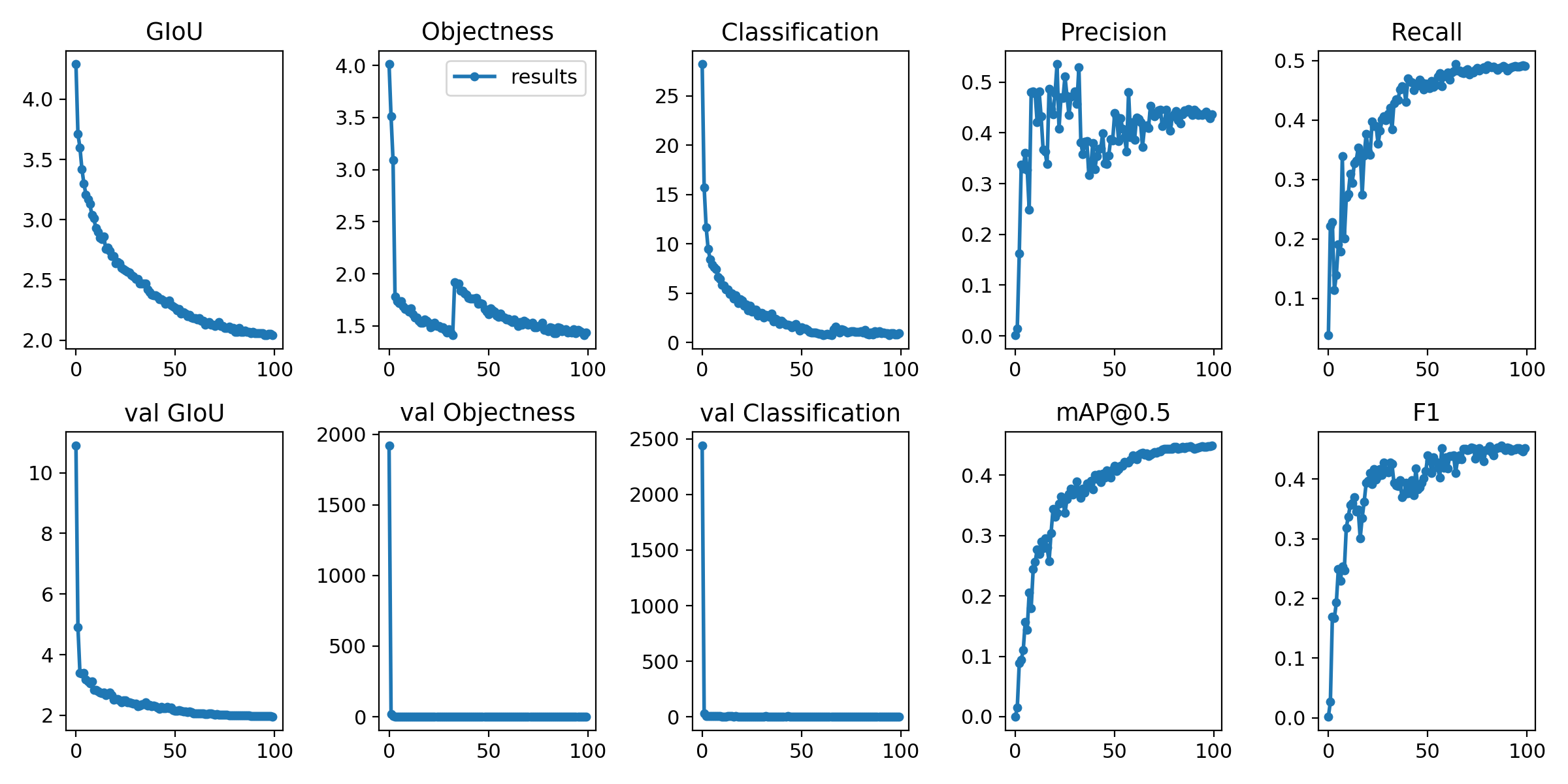
 fangle-shu
on 21 Apr 2020
fangle-shu
on 21 Apr 2020
@fangle-shu you have epochs on the x axis, and the losses or metrics on the y axis. Your mAP at epoch 100 is about 0.45, but you have not trained long enough. You should train until you see your validation losses begin too increase.
glenn-jocher
on 21 Apr 2020
@glenn-jocher
why [email protected] some species is really low such as boat only 0.284?
do you solve the problem?
 junglezhao
on 22 Apr 2020
junglezhao
on 22 Apr 2020
It’s normal. Those typically have less examples in the training data.
glenn-jocher
on 22 Apr 2020
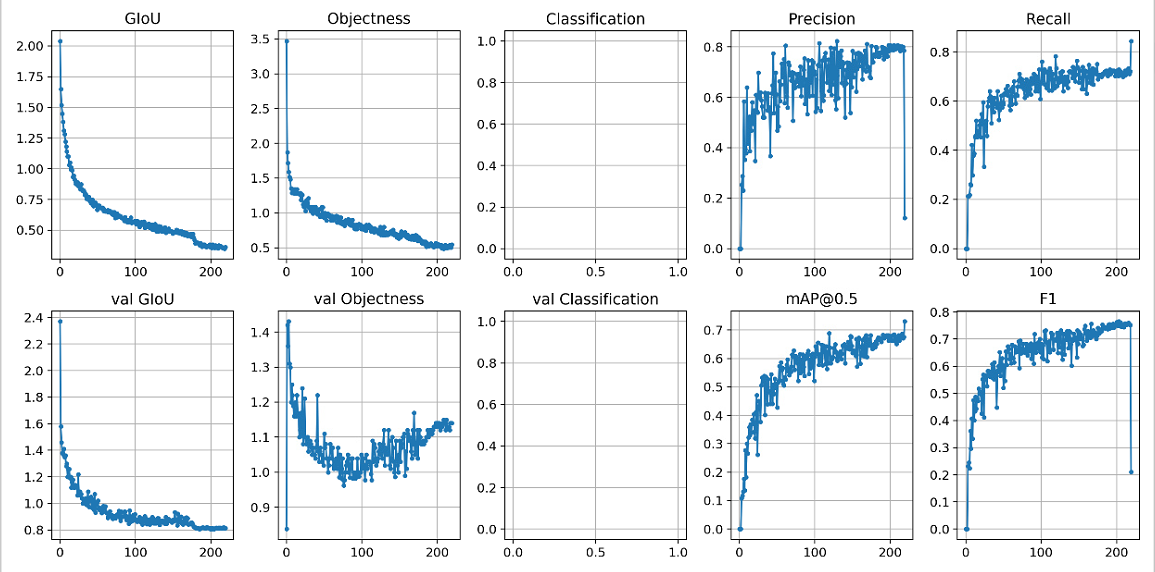
@glenn-jocher I train yolov3 on 1-class task, and at the last epoch, Precision and F1 drop dramatically, and MAP and Recall increase, is it normal, I have no idea of why the results at the last epoch seem abnormal.
 yangxu351
on 23 Apr 2020
yangxu351
on 23 Apr 2020
@yangxu351 your code is out of date. Please git pull or clone a new copy.
glenn-jocher
on 23 Apr 2020
@yangxu351 your code is out of date. Please
git pullor clone a new copy.
@glenn-jocher Thanks. I get the latest version, but it seems still abnormal at the last epoch, could you give me a suggestion?
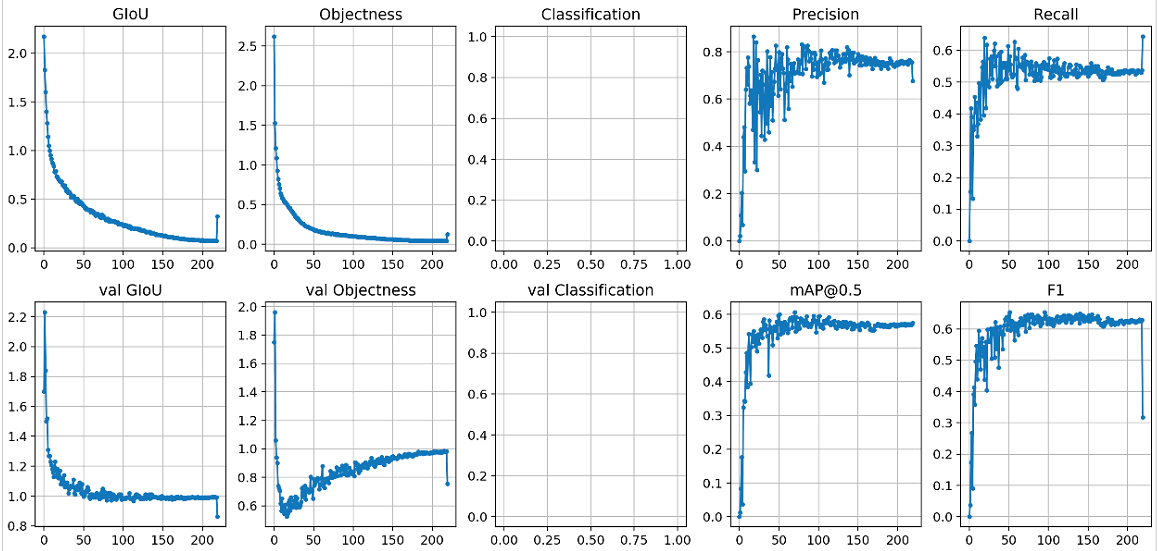
yangxu351
on 25 Apr 2020
@yangxu351 ah, it seems the new code actually performed worse than the old code, that's odd. I think you may want to train from --weights '' rather than using the pretrained weights, as you are overtraining very early on.
About your last epoch question, test.py will use pycocotools to compute stats on last epoch if your data file appears to be a cooc dataset. If you rename your *.data to another name it should stop doing this.
glenn-jocher
on 25 Apr 2020
@yangxu351 ah, it seems the new code actually performed worse than the old code, that's odd. I think you may want to train from --weights '' rather than using the pretrained weights, as you are overtraining very early on.
About your last epoch question, test.py will use pycocotools to compute stats on last epoch if your data file appears to be a cooc dataset. If you rename your *.data to another name it should stop doing this.
@glenn-jocher Thanks. I changed my training data, so the results are different from previous.
Yes, I didn't use the pretrained weights, is it necessary to use the pretained weights to address the overtraining?
For the last epoch, I adjusted my dataset in coco-format, and prepared the necessary json files,and also want to compute the stats on last epoch, does this phenomenon occur even in the coco dataset?
yangxu351
on 25 Apr 2020
@yangxu351 starting from pretrained weights will make overtraining happen earlier. --weights default pretrained weights are yolov3-spp-ultralytics.pt, so specify --weights '' to avoid using these.
See https://github.com/ultralytics/yolov3#reproduce-our-results
glenn-jocher
on 25 Apr 2020
@glenn-jocher I got all the results with weights='', but all the results you've seen are overtraining early, I‘m confused.
python3 train.py --weights '' --cfg yolov3-spp-1cls.cfg --epochs 220 --batch 8
yangxu351
on 25 Apr 2020
@yangxu351 the current settings are for coco-like datasets, if yours is substantially different, you may need to tune your settings yourself.
glenn-jocher
on 26 Apr 2020
Great tutorials and explanations! Really appreciate them!
I am training yolo for small object detection such as cigarettes, and find metrics are not good. I was told one way is to split the images into more pieces (such as 13 by 13) and increase the number of anchor boxes. May I ask where are these parameters are in the cfg? Also, do you have any overall suggestion on small object detection? Thanks so much!
I see there is a parameter named "anchors" under [yolo]. Not sure whether they are what I am looking for.
 rightly0716
on 2 May 2020
rightly0716
on 2 May 2020
@rightly0716 if you have small objects you'll want to train at larger --img-size, up to the native image resolution:
https://github.com/ultralytics/yolov3/blob/b0b52eec53e43548430f823e4d60032fab163228/train.py#L383
You can also recompute your anchors for your custom dataset here, and plug them back into your cfg in place of the default anchors.
https://github.com/ultralytics/yolov3/blob/b0b52eec53e43548430f823e4d60032fab163228/utils/utils.py#L693-L700
glenn-jocher
on 3 May 2020
Good point on recalculating the anchors! Will try it out. Do we usually set n=9 in the kmean function? Do you think increasing it a bit may help small object theoretically?
Thanks so much again!!
rightly0716
on 3 May 2020
@rightly0716 its all about AB testing. If you want to know if more anchors works better for you, then train with 9, and train with more, and compare.
glenn-jocher
on 3 May 2020
Hello!I want to know if there is any paper about yolov3-spp structure?I only found YOLOV3 paper..
 kuangsangudu
on 4 May 2020
kuangsangudu
on 4 May 2020
@kuangsangudu see https://arxiv.org/abs/1406.4729 for SPP and https://arxiv.org/abs/1804.02767 for yolov3
glenn-jocher
on 4 May 2020
Hi, Glenn! Thanks for your great work first. when I update your version in Jan 2020 where [email protected]:0.95 is about 39.1@416 to latest version where [email protected]:0.95 is about 41.2@416 with manual modification of code and hyper param such as cosine lr, burn_in(warmup) and ema, but the result is [email protected]:0.95 is about 33.0@384 and latest version gets [email protected]:0.95=34.2@384 when training only 50 epochs for comparison. Would you mind tell me important improvements which actually improve mAP for last 4 months?
 HwangQuincy
on 21 May 2020
HwangQuincy
on 21 May 2020
@HwangQuincy too many to list specifically. You can browse the commit history. Current mAPs are here:
https://github.com/ultralytics/yolov3#map
glenn-jocher
on 21 May 2020
@glenn-jocher Thanks for your quick response, at my first thought, there should be 1-2 remarkable commits which improve mAPs significantly
HwangQuincy
on 21 May 2020
@HwangQuincy just what you mention: cosine lr, burnin, ema, hyperparams, multiscale.
glenn-jocher
on 21 May 2020
@glenn-jocher Another question is why not use mp.spawn and DistributedSampler for higher speed when training model with multi_gpu from scratch? Would this influence mAP reslut?
HwangQuincy
on 21 May 2020
@HwangQuincy Can you try this and report back updated (before and after) multi GPU training speed?
glenn-jocher
on 21 May 2020
@glenn-jocher Speed is about 12-13 min/epoch using mp.spwan and 17-18 min/epoch without mp.spwan when training with 2 RTX2080Ti GPU without multi-scales and img size = 384. This improvement should be from the avoidance of well-known PIL problem as mentioned in the Pytorch doc.
HwangQuincy
on 22 May 2020
@glenn-jocher BTW, My model aims to be applicable to multiple datasets such as COCO, Citiscapes, BDD100K etc. So I can't use optimal anchors setting for COCO with kmeans, and prefer to using anchor-free or SSD-like anchors setting. When using standard loss _* average*_ function in SSD or RetinaNet, different anchor setting produce negligible [email protected]:0.95 difference, but worse than your mAP result with the same anchor setting. Maybe the hyper params such as 'giou':3.54 and cls': 37.4 is overfitted with COCO?
HwangQuincy
on 22 May 2020
@glenn-jocher Speed is about 12-13 min/epoch using mp.spwan and 17-18 min/epoch without mp.spwan when training with 2 RTX2080Ti GPU without multi-scales and img size = 384. This improvement should be from the avoidance of well-known PIL problem as mentioned in the Pytorch doc.
That's an amazing improvement! Are you using apex as well? Can you verify that this doesn't adversely harm single-gpu training times? If so please submit a PR and we will try to get it fast tracked.
@glenn-jocher BTW, My model aims to be applicable to multiple datasets such as COCO, Citiscapes, BDD100K etc. So I can't use optimal anchors setting for COCO with kmeans, and prefer to using anchor-free or SSD-like anchors setting. When using standard loss _* average*_ function in SSD or RetinaNet, different anchor setting produce negligible [email protected]:0.95 difference, but worse than your mAP result with the same anchor setting. Maybe the hyper params such as 'giou':3.54 and cls': 37.4 is overfitted with COCO?
The hyperparams were evolved on COCO, so its possible they may be overfitted for the dataset, but given the variation and size of coco it might be pretty hard to overfit. We routinely train custom datasets with the same or similar hyps. Best practices is to balance the 3 losses, so if one is much larger than the others I would reduce it to match for example. You can also reduce the iou threshold hyp['iou_t'] to increase recall, and you can also fit your own anchors using the kmeans/evolution function:
https://github.com/ultralytics/yolov3/blob/002884ae5ea5b5e5597c277143094699a948c214/utils/utils.py#L654-L659
Our goal is also to make the most robust model training possible for all custom datasets.
glenn-jocher
on 22 May 2020
@glenn-jocher Yes, we use apex for mixed precision training, but I never compare with single-gpu training for mAP result due to long training time for comparison, so I doubt whether DistributedSampler will influence mAP results
HwangQuincy
on 23 May 2020
@glenn-jocher Meanwhile, I don't like using kmeans for searching optimized anchors, as mentioned in Yolov4 paper, optimized anchors only improve 0.9%mAP, but highly depend on dataset
HwangQuincy
on 23 May 2020
@HwangQuincy our function uses kmeans for an initial guess (but you can also supply your own initial guess), then the anchors are optimized with a genetic algorithm for 1000 generations. But if you don't want to use it, then just supply whatever you prefer in the cfg.
There's typically no such thing as 'anchor free', I'm pretty sure that's just marketing buzz. When you see that it typically means the anchors are correlated to the output layer stride rather than the training labels.
Ok got it on the training. Can you submit a PR for mp spawn then and we will review?
glenn-jocher
on 23 May 2020
There's typically no such thing as 'anchor free', I'm pretty sure that's just marketing buzz. When you see that it typically means the anchors are correlated to the output layer stride rather than the training labels.
I'm pretty sure that CenterNet (Objects as points) is an anchor-free approach. Most any keypoint-style detector would work similarly and they do not rely on anchor priors.
 HamsterHuey
on 23 May 2020
HamsterHuey
on 23 May 2020
@HamsterHuey ah that's a good point. I haven't played around with centernet so I'm not too familiar with their method. The main thing which 'anchors' is that they are simply a normalization of the outputs. All neural networks perform best when the inputs and outputs are normalized (i.e. mean of 0 and standard deviation of 1), not only for CNNs but even for the simplest regression networks, so this practice is really widespread across all ML.
glenn-jocher
on 23 May 2020
@glenn-jocher - While it is true that anchors help regress out bboxes, they are also a bit of a hack in a way (imo) to overcome the other aspect of Yolo and similar anchor-based approaches due to their output featuremap being substantially lower dimensional (spatially) compared to the input image. So now you have a "grid-cell" which in YoloV2 was 32x smaller than the input image dimensions so a 416 x 416 image resulted in a 13 x 13 output set of "grid-cells". The problem with grid-cells is that now each grid-cell needs to be able to make predictions for all objects whose center lies within its cell, and often-times there are several objects within a grid-cell due to the large reduction-factor / network-stride associated with each cell. So you have anchor boxes to help regress out box dimensions, and a pretty complicated set of logic in the loss function that determines which anchor gets assigned a ground-truth annotation for a given grid-cell, how to handle loss calcs for the other non-assigned anchors, etc.
Keypoint-styled networks like centernet discard a lot of this because their output featuremap size is much larger (only 4X smaller than input image), so they can directly have each "grid-cell" only be responsible for a single class detection. Since each cell is responsible for a single detection, there is no need to have anchor boxes or any complex assignment of ground-truth annotations to the correct anchor for loss calculations. It simplifies the loss function drastically, and most surprisingly, the bbox width and height dimensions can directly be regressed out via an L1 loss.
Like @HwangQuincy , I've not been a big fan of anchor boxes as they have always seemed more of a band-aid to fix a limitation of the underlying approach to detection as you now have a coupling between your trained network weights and the dataset you trained on. The implications on transfer-learning are also not often noted, but if you need to tweak the number of anchors for your final dataset of interest, you are still stuck with the COCO anchors if you wish to rely on the pretrained COCO weights to start from. All that being said, I don't think customized anchors make a huge difference one way or the other. It's always struck me as a bit of a hacky way to overfit to a specific dataset to eke out max performance, but that's just my opinion 😃
Btw, nice job keeping up with maintaining this repo and bringing some sanity to the world of Pytorch forks of Yolo 😄
HamsterHuey
on 23 May 2020
@HamsterHuey yes, this is a pretty good summary. Actually the original yolo was anchor free, regressing the width and height directly as you say the keypoint detectors do. Do the keypoint detectors do the regression in a normalized space, or is it actual pixel coordinates?
The strides in yolov3 are 32, 16, and 8, though you could add additional layers for say stride 64 or stride 4. It would be nice to unify the outputs somehow into a more uniform strategy as you say, i.e. simply use the stride 8 output and a single anchor per grid cell for example, but there are tradeoffs involved in these other approaches, which is probably why we are where are today with the anchors.
I looked at the centernet repo BTW, and it seems to produce lower mAP than this repo, at a much slower inference time, so its possible you are seeing some of the tradeoffs in practice there. I'm open to new ideas of course though. Our mission is to produce the most robust and usable training and detection repos across all possible custom datasets, so anchor robustness is part of that.
BTW, we have been developing a new repo these last couple months that should be released publicly in the next few weeks. It aims to improve training robustness and user friendliness across the training process, and of course improve training results as well. This new repo includes an anchor analysis before training to inform of best possible recall (BPR) etc given the supplied settings, a step which is missing now.
glenn-jocher
on 23 May 2020
Nice to hear about your new repo. Out of curiousity, do you have a documentation somewhere of the differences between the regular Yolov3 SPP vs the ultralytics approach that helped achieve the higher results as listed in the main Readme? I'd love to get a sense of the main learnings you've had on that front.
I think comparing detectors is always hard as the Yolov4 paper also shows, because there are so many pieces to maximizing performance on a given dataset. As the jump from YoloV3 -> YoloV3-SPP -> YoloV3-SPP-Ultralytics shows, there are many tweaks one can make to eke out more performance. I don't necessarily think CenterNet is better, though it also has not been optimized nearly as much as some of the work that has gone on both here with your tireless efforts, and @AlexeyAB 's efforts on his darknet fork.
To your question regarding the loss function in centernet, the width and height are directly regressed out in grid-cell space (so 4X reduced coordinate space compared to the input image coordinate space). Having spent a lot of time with a custom YoloV2 implementation and now with CenterNet, I will say that some of the things that I like about the latter are that the loss function is astonishingly simple and easy to understand and compute which results in less bottlenecks when training, and also it does pretty well at inference without the need for NMS which can be nice in compute limited situations. But I think there are always tradeoffs in any approach, so I'm always curious to see how different approaches do and also to learn of new findings that improve performance.
HamsterHuey
on 23 May 2020
@HamsterHuey ah that's very interesting, I didn't realize you could skip the NMS there.
Yes this is true that the loss function is very complicated here, in particular with regard to constructing the targets appropriately and with the matching anchors to labels as you mentioned.
And yes you are also correct that the implementation matters a lot, as even identical architectures can return greatly different results.
glenn-jocher
on 23 May 2020
@HamsterHuey and to answer your question, we do not have a consolidated changelist unfortunately. With limited resources the documentation unfortunately takes a backseat to the development work. Hopefully at some point later this year we can write a paper to document the new repo.
glenn-jocher
on 23 May 2020
@glenn-jocher I have found the reason that cause the mAP difference, It's due to I set accumulate=num_gpus * original accumulate, when setting batch_size = original batch_size / num_gpus (it is correct when we use DistributedSampler as given in pytorch examples)
HwangQuincy
on 24 May 2020
@HwangQuincy our function uses kmeans for an initial guess (but you can also supply your own initial guess), then the anchors are optimized with a genetic algorithm for 1000 generations. But if you don't want to use it, then just supply whatever you prefer in the cfg.
There's typically no such thing as 'anchor free', I'm pretty sure that's just marketing buzz. When you see that it typically means the anchors are correlated to the output layer stride rather than the training labels.
Ok got it on the training. Can you submit a PR for mp spawn then and we will review?
Sorry, I have modified your original code, and the modification includes the loss computation, target(positive samples) generation, and network model definition (without .cfg) for faster new model introduction. Thus my code with mp.spawn can't immediately submitted. When I have a idle time, I will submit a PR with mp.spawn and DistributedSampler
HwangQuincy
on 24 May 2020
@HamsterHuey The anchor-free includes key-points based and center-based. As well known, Yolov1 is the first of center-based anchor-free method. I prefer to the center-based anchor-free method, and guess there is no performance gap between key-points based and center-based anchor-free method provided the annotation is in form of bounding box. As stated in ATSS (https://arxiv.org/pdf/1912.02424.pdf), there is no significant performance gap between center-based anchor-free and anchor based methods
HwangQuincy
on 24 May 2020
then the anchors are optimized with a genetic algorithm for 1000 generations.
Hi, any suggestions to find the code about the genetic algorithm for optimized anchors?
 selous123
on 25 May 2020
selous123
on 25 May 2020
@selous123
https://github.com/ultralytics/yolov3/blob/d6d6fb5e5bceb6e4bf7e5b0e05918b9de668219e/utils/utils.py#L655-L660
@HwangQuincy maybe I'll try to implement mp spawn on my own, as the improvement does seem worth the effort. Can you point me to the best example you know to get started?
glenn-jocher
on 25 May 2020
@glenn-jocher Sorry to reply so late, the best example as I known is https://github.com/pytorch/examples/blob/master/imagenet/main.py, where the mp.spawn is used for distributed training.
BTW, when using mp.spwan with accumulate, accumulate should be kept unchanged.
HwangQuincy
on 27 May 2020
Ok got it, thanks! I’ll try it out this week.
glenn-jocher
on 27 May 2020
Ok got it, thanks! I’ll try it out this week.
'degrees': 1.98 * 0, # image rotation (+/- deg)
'translate': 0.05 * 0, # image translation (+/- fraction)
'scale': 0.05 * 0, # image scale (+/- gain)
'shear': 0.641 * 0} # image shear (+/- deg)
the parameters take no effect when training? When train my own dateset ,should I use --evolve or how to change the parameter in hyp?
 feixiangdekaka
on 28 May 2020
feixiangdekaka
on 28 May 2020
@feixiangdekaka yes, your observation is correct, a number multiplied by zero will be zero.
glenn-jocher
on 28 May 2020
@glenn-jocher I found that you set the parameter world_size=1 during the initialization of distributed training. What is the special significance of this
if device.type != 'cpu' and torch.cuda.device_count() > 1 and torch.distributed.is_available():
        dist.init_process_group(backend='nccl',  # 'distributed backend'
                                init_method='tcp://127.0.0.1:9999',  # distributed training init method
                                world_size=1,  # number of nodes for distributed training
                                rank=0)  # distributed training node rank
Why not use default parameters so that all available processes can be used automatically
 TAOSHss
on 1 Jun 2020
TAOSHss
on 1 Jun 2020
@TAOSHss I believe these are the pytorch defaults from a tutorial code that was used for multi gpu training. We've received comments recently that mp spawns performs better in multi gpu contexts btw.
glenn-jocher
on 1 Jun 2020
This issue is stale because it has been open 30 days with no activity. Remove Stale label or comment or this will be closed in 5 days.
![github-actions[bot] picture](https://avatars.githubusercontent.com/in/15368?v=4&s=40) github-actions[bot]
on 2 Jul 2020
github-actions[bot]
on 2 Jul 2020
@glenn-jocher Speed is about 12-13 min/epoch using mp.spwan and 17-18 min/epoch without mp.spwan when training with 2 RTX2080Ti GPU without multi-scales and img size = 384. This improvement should be from the avoidance of well-known PIL problem as mentioned in the Pytorch doc.
@HwangQuincy is there a chance you might be able to help us with our multi-GPU strategy for https://github.com/ultralytics/yolov5? A couple users are working on a DDP PR (https://github.com/ultralytics/yolov5/pull/401) with mixed results. Since you got an mp.spawn implementation working here so well I thought you might be the best expert to consult on this. Our current multi-gpu strategy with YOLOv5 is little changed from what we have here, it is DDP with world size 1. It's producing acceptable results, but I don't want to leave any improvements on the table if we can incorporate them.
glenn-jocher
on 15 Jul 2020
Related issues
 Sibozhu
·
4Comments
Sibozhu
·
4Comments
 aluds123
·
4Comments
aluds123
·
4Comments
 Deep-Learner
·
5Comments
Deep-Learner
·
5Comments
 Aria20155
·
3Comments
Aria20155
·
3Comments
 yoga-0125
·
4Comments
yoga-0125
·
4Comments
Most helpful comment
@ktian08 @Aurora33 we've tuned hyperparameters and instituted a mosaic dataloader (see readme) which now produces (no backbone, multiscale) results of 53.3mAP@320 and 57.5mAP@416 using the current default settings. This produces better results than darknet at 320 and 416, but not 608 (probably need to use larger img-size for that).
The training command to achieve this is:
The results tested at 416 are: