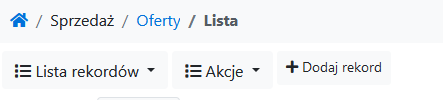
Yetiforcecrm: [Question] [PL][ENG] Is it possible to hide the "Add Record" button in the selected module?
Czy jest możliwość, aby ukryć przycisk "Dodaj rekord" w wybranym module?
_Is it possible to hide the "Add Record" button in the selected module?_
Chce zachować uprawnienia do tworzenia rekordu, dodawanie rekordu odbywa się tylko przez mapowanie, a nie bezpośrednio w module.
_I want to keep the record creation permissions, adding the record is done only through the mapping, not directly in the module._
 vdpawel
All 6 comments
You need to change rights to profiles to disable ability to create records. This button will dissapear
 vovpff
on 16 Jul 2020
vovpff
on 16 Jul 2020
Thanks for the answer, I can't do that because then I can't generate the record by mapping as well.
vdpawel
on 16 Jul 2020
@vdpawel in this case you need to change code of system to add condition of this button appearance like if module is yourmodule then button disabled. I think this can be done by templates modification.
vovpff
on 16 Jul 2020
Thank you, I have followed your advice.
In the file
/layouts/basic/modules/Vtiger/ListViewHeader.tpl
I put the appropriate condition into the line displaying the button:
{include file = \ App \ Layout :: getTemplatePath ('ButtonLink.tpl', $ MODULE) BUTTON_VIEW = 'listView' CLASS = 'mr-sm-1 mb-1 c-btn-block-sm-down'}
Works!
vdpawel
on 21 Jul 2020
@vdpawel could you share your code instead original?
vovpff
on 21 Jul 2020
{if $MODULE != "SQuotes" && $MODULE != "SSingleOrders"}
{include file=\App\Layout::getTemplatePath('ButtonLink.tpl', $MODULE) BUTTON_VIEW='listView' CLASS='mr-sm-1 mb-1 c-btn-block-sm-down'}
{/if}
vdpawel
on 21 Jul 2020
Related issues
 Raggazzoo
·
3Comments
vovpff
·
3Comments
Raggazzoo
·
3Comments
vovpff
·
3Comments
 skramanzia
·
3Comments
skramanzia
·
3Comments
 johntonji
·
3Comments
johntonji
·
3Comments
 serbiaserbia
·
3Comments
serbiaserbia
·
3Comments
Most helpful comment
{if $MODULE != "SQuotes" && $MODULE != "SSingleOrders"}
{include file=\App\Layout::getTemplatePath('ButtonLink.tpl', $MODULE) BUTTON_VIEW='listView' CLASS='mr-sm-1 mb-1 c-btn-block-sm-down'}
{/if}