Yetiforcecrm: [QUESTION][4.3.74][Calendar] How can I add another field to Quick create view?
Question
How can I add an existing field ("Send notification" field) to Quick create view in Calendar module?
In other modules you can add it editing a field:
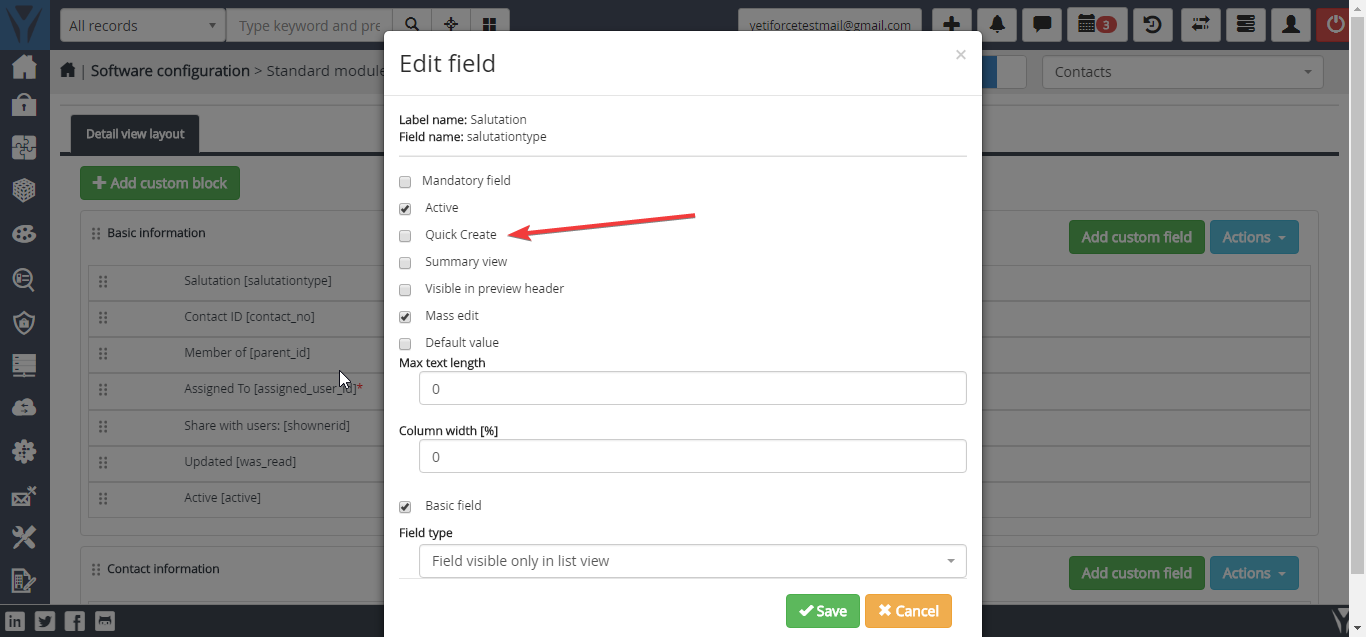
But on Calendar module you can't edit any field.
Your Environment
- YetiForce Version used: 4.3.74
- Browser name and version: Google Chrome
- Operating System and version: Windows 10
❔ question
 MacarenaReina
All 3 comments
@MacarenaReina try to choose Events in picklist:
 vovpff
on 19 Jan 2018
vovpff
on 19 Jan 2018
In the Calendar module the possibility of editing is very limited.
Most basic changes require editing in the code, among others here https://github.com/YetiForceCompany/YetiForceCRM/tree/developer/modules/Calendar
 matteoms
on 19 Jan 2018
matteoms
on 19 Jan 2018
try this:
in the table DataBase 'vtiger_field'
filter where the column 'tablename' = 'vtiger_activity'
change the column 'quickcreate' to 0 for activate
and change order of fields with 'quickcreatesequence'
 WalterLuis
on 19 Jan 2018
WalterLuis
on 19 Jan 2018
👍4
Was this page helpful?
0 / 5 - 0 ratings
Related issues
 ldgbc
·
3Comments
vovpff
·
3Comments
ldgbc
·
3Comments
vovpff
·
3Comments
 RedMoon27
·
3Comments
RedMoon27
·
3Comments
 serbiaserbia
·
3Comments
serbiaserbia
·
3Comments
 PDMeira
·
3Comments
PDMeira
·
3Comments
Most helpful comment
try this:
in the table DataBase 'vtiger_field'
filter where the column 'tablename' = 'vtiger_activity'
change the column 'quickcreate' to 0 for activate
and change order of fields with 'quickcreatesequence'