Yetiforcecrm: [Question] PDF Quote Template
Hi,
I am trying to create a Quote PDF Template but I do not know what to add on "Edit Document Contents"
How I wish the basic PDF Templates like "Invoice" and "Quote" came with the installation.
Can someone please help me out?
 MyBlissIT
All 11 comments
What you want to add? be specific :)
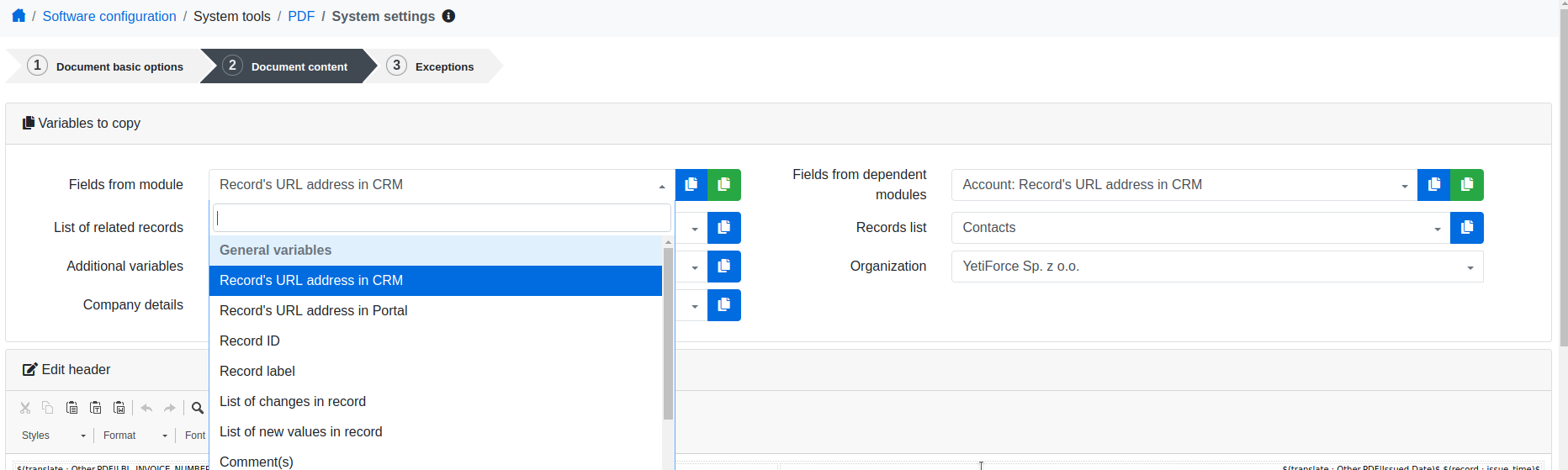
here you have variables that you can copy and paste inside the template
 neuronetio
on 31 May 2019
neuronetio
on 31 May 2019
i have the same problem. i try to find the related fields but i can not. Where is the quote fields? i want to create a pdf template for Quote but i can not. Here is my print screen . http://prntscr.com/nz1sn8
After that i want to create a manually workflow to sent an email with above PDF file attachment. Could you help me please ?
thank you
 Giorgos-Hellene
on 7 Jun 2019
Giorgos-Hellene
on 7 Jun 2019
Use picklist "field from module" and blue button to copy field variable.
For PDF mailing you need to add workflow with send PDF action.
 vovpff
on 8 Jun 2019
vovpff
on 8 Jun 2019
Use picklist "field from module" and blue button to copy field variable.
For PDF mailing you need to add workflow with send PDF action.
thank you for your reply !
ok this is easy but i can not find the product fields or services fields of Quote. Take a look on print screen please http://prntscr.com/nzcubk. how can I choose specific fields? for example: i want only the fields Unit price, Purchase, Tax and Gross on my pdf file or email.
how can i do it ?
Giorgos-Hellene
on 8 Jun 2019
 mariuszkrzaczkowski
on 10 Jun 2019
mariuszkrzaczkowski
on 10 Jun 2019
could i change the width of table? i want to define the width. for example 80%
Giorgos-Hellene
on 13 Jun 2019
try this as source around table variable
<div style="width:80%">
your stuff
</div>
Fine! we have the code for custom quote table.
$(inventory : type=table columns=name,qty,price href=yes)$
it works very well !
Is there the same for PaymentIn and PaymentOut? i want to create custom table of any field.
Thank you !
Giorgos-Hellene
on 4 Jul 2019
What exactly do you want to show?
$(relatedRecordsList : PaymentIn)$
mariuszkrzaczkowski
on 4 Jul 2019
Thank you for your reply!
i want to show only Payment Name, value and status.
Giorgos-Hellene
on 4 Jul 2019
I will give you an example with Contacts module
$(relatedRecordsList : Contacts|firstname,lastname,modifiedtime|)$
https://github.com/YetiForceCompany/YetiForceCRM/blob/developer/app/TextParser.php#L717
 konadrian
on 15 Jul 2019
konadrian
on 15 Jul 2019
Related issues
 skramanzia
·
3Comments
skramanzia
·
3Comments
 MacarenaReina
·
3Comments
MacarenaReina
·
3Comments
 PDMeira
·
3Comments
PDMeira
·
3Comments
 serbiaserbia
·
3Comments
serbiaserbia
·
3Comments
 scsikid
·
3Comments
scsikid
·
3Comments