Yetiforcecrm: [Question] output_buffering
Oh hi there! 😄😄😄
My output_buffering = On, but yeti installer is a lier and says that it is output_buffering = 1
why?
 waran70
All 25 comments
@waran70 Join the club buddy, mine does the same thing. Also the recommended error reporting is set correctly yet the CRM says it isn't. I was told the 5.1 update addressed that stuff but it really didn't for me and it was buggy so I reverted my CRM instance back to 5.0 which is still not perfect but at least workable.
It's like updates are released but not fully tested. Why would you have to go and add language translations after installing an update? Shouldn't an update account for all of that stuff and bring about enhancements instead of more problems? I love the system and the platform and all of the hard work these guys put into it but geez if you're going to provide something, at least ensure it's ready for prime time before you release it you know what I mean?
I cringe every time an update comes out and wonder what will be broken this time and what has been removed that we depend on. Is what it is I guess.
 acsinsurancegroup
on 18 Mar 2019
acsinsurancegroup
on 18 Mar 2019
Sorry to add myself to the conversation like this. Is it an idea to have a group of some users that are willing to do some extensive testing prior to any release? Better to prevent than cure.
 alagmouch
on 18 Mar 2019
alagmouch
on 18 Mar 2019
Use:
output_buffering = "On"
in php.ini
Check values in .user.ini too,
and restart PHP and Apache
sudo systemctl restart php (version)
sudo systemctl restart apache2.service
 elvissaba
on 18 Mar 2019
elvissaba
on 18 Mar 2019
@waran70 if elvissaba did not sovled your problem.
Check description of configuration in php.ini sometimes 1 mean ON.
If does not, firstable check from where your php take configs
- Create new php file "test.php" for example, fill it useing
<?php phpinfo(); ?> - open this file using you local server: http://you_domain/test.php
- and look for these: (should be in top of file)
Configuration File (php.ini) Path
Loaded Configuration File
Scan this dir for additional .ini files
and you should change setting in Loaded configuration Path.
if solution above don't help check also configuration of etc/php/your_php_version/cli/php.ini and you can change it there too.
If above won't help you can try third way:
Find the file called "conf.d" that is directory, path to this file should be in "Scan this dir for additional .ini files" in test.php. There are other config files overriding php.ini. So you can create you own
00-yeti_requirements.ini you must know the parametre 00 mean override rest of .ini files in directory so be smart with it.
edit and insert there all requirements of yeti you need upload. Save, restart Apache and should work (same you can do for php and cli if they are divided, sometimes it happen).
I couldn't turn Cache this way because firstable i have to go to 10-opcache.ini and insert opcache=on etc, the rest configs se sucked form 00-yeti_requirements.ini. So be smart and keep trying and certainly you can do it.
In future you can edit configuration in one file and that is great advantage!!! You don't have to scroll for thousnds of file, all in one. I think it's best way, in that file i keep few scripts to insert configuration to my DB for Yeti and it's great comfortable :), as i said AllInOne.
// it's not completely safe but I took care and "make it safe" 😄
I hope I'll help.
 mrzewnicki
on 18 Mar 2019
mrzewnicki
on 18 Mar 2019
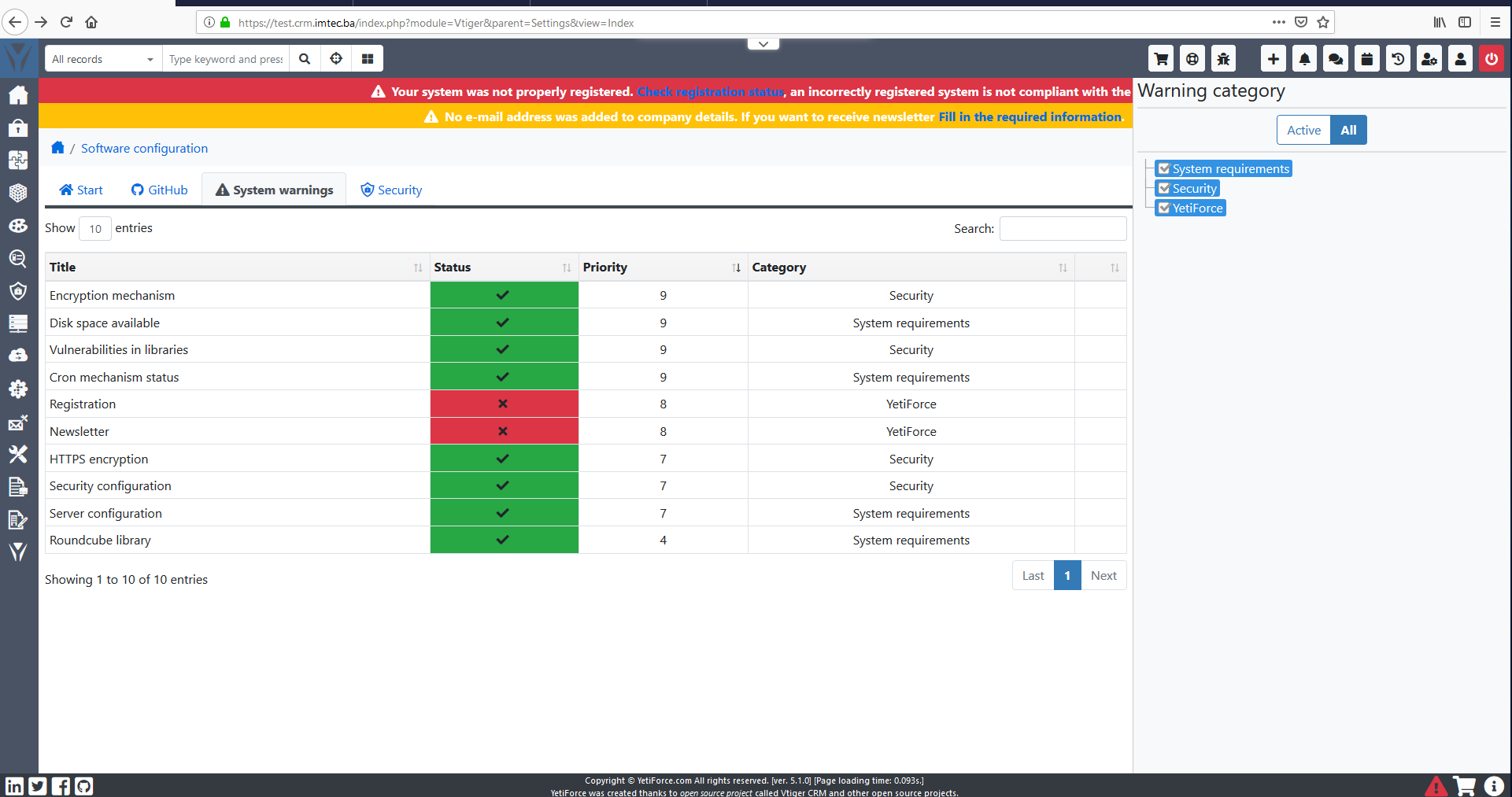
I had a lot of problems with two separate .ini (CLI and FPM) and other issues (version 5.1)
After 2 days...Voila! (only registration and newsletter awaiting verification marked as problem)
elvissaba
on 18 Mar 2019
@alagmouch That would be a great way to prevent a lot of these issues. I for one definitely agree it's a whole lot better to prevent than to cure, no doubt.
@elvissaba I tried your suggestion and the error still persists on my end. Thanks anyway.
@mrzewnicki tried all of your suggestions and the error still persists on my end. Thanks anyway.
acsinsurancegroup
on 18 Mar 2019
@acsinsurancegroup @waran70 did you check which ini files are loaded by php? Probably output_buffering = On is being overwritten by output_buffering = 1 somewhere in an ini file loaded afterwards.
To check which ini files are loaded (if you have access to ssh of course):
php --ini
alagmouch
on 18 Mar 2019
I had a lot of problems with two separate .ini (CLI and FPM) and other issues (version 5.1)
After 2 days...Voila! (only registration and newsletter awaiting verification marked as problem)
So the most important config missing... O.o
waran70
on 18 Mar 2019
In the configuration verification panel shows which ini files are loaded but you have to watch out for htaccess
 mariuszkrzaczkowski
on 19 Mar 2019
mariuszkrzaczkowski
on 19 Mar 2019
@alagmouch Yes I have SSH and this was the result of the search. As you can see, the loaded configuration file is /etc/php.ini looking below.
[root@mail ~]# php --ini
Configuration File (php.ini) Path: /etc
Loaded Configuration File: /etc/php.ini
Scan for additional .ini files in: /etc/php.d
Additional .ini files parsed: /etc/php.d/00-ioncube-loader.ini,
/etc/php.d/curl.ini,
/etc/php.d/dom.ini,
/etc/php.d/fileinfo.ini,
/etc/php.d/gd.ini,
/etc/php.d/imap.ini,
/etc/php.d/json.ini,
/etc/php.d/mbstring.ini,
/etc/php.d/mysql.ini,
/etc/php.d/mysqli.ini,
/etc/php.d/pdo.ini,
/etc/php.d/pdo_mysql.ini,
/etc/php.d/pdo_sqlite.ini,
/etc/php.d/phar.ini,
/etc/php.d/sqlite3.ini,
/etc/php.d/wddx.ini,
/etc/php.d/xmlreader.ini,
/etc/php.d/xmlwriter.ini,
/etc/php.d/xsl.ini,
/etc/php.d/zend_extensions_psa.ini,
/etc/php.d/zip.ini
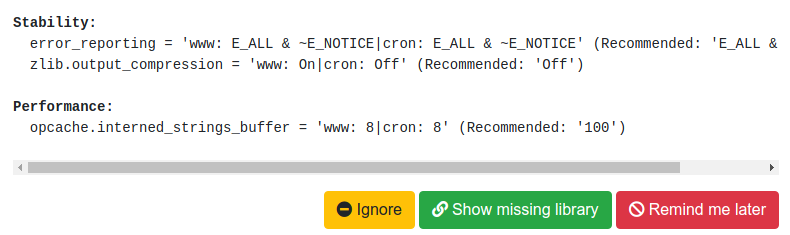
For me the issue is not output_buffering and I think I misread the original thread by @waran70 because it's the zlib.output_compression = that it's lying to me about. I think this has to be the same issue @waran70 is having as well but could be wrong.
Bottom line is I have mine set as recommended, but still shows up as incorrect in the system warnings area. This is exactly what my System Warnings area shows and will post a screenie as well.
zlib.output_compression = 'www: On|cron: Off' (Recommended: 'Off') and here's a screenie of that issue
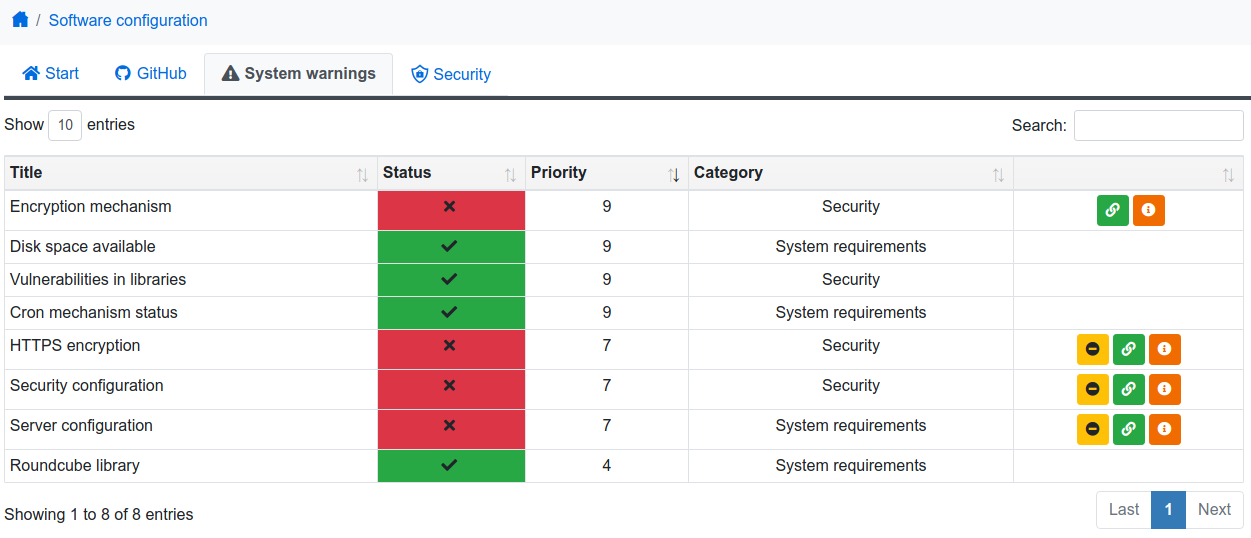
And this is my whole System Warnings area
@mariuszkrzaczkowski Thanks for your guidance as well, but nothing in my htaccess file shows anything about the settings I personally am having issues with.
acsinsurancegroup
on 19 Mar 2019
I had a lot of problems with two separate .ini (CLI and FPM) and other issues (version 5.1)
After 2 days...Voila! (only registration and newsletter awaiting verification marked as problem)So the most important config missing... O.o
So I'm assuming you fixed your issue @waran70 and if so was it any specific suggestion above that fixed it or what worked for you?
acsinsurancegroup
on 19 Mar 2019
@acsinsurancegroup in that case make sure you change it in the .user.ini in the root directory of YetiForceCRM and the public_html directory (subdirectory). The .user.ini files are read also, and zlib.output_compression = "On" by default in those two files.
alagmouch
on 19 Mar 2019
@alagmouch There was no user.ini file in the root directory but I did find it and change it in the public_html directory and the error no longer shows up in the System Warnings area for the zlib.output_compression but the errors for the error_reporting although set correctly is still there nagging me. Thanks for helping me get rid of that one at least :)
Also, this recommended setting:
Performance:
opcache.interned_strings_buffer = 'www: 8|cron: 8' (Recommended: '100')
I cannot do because everytime I have tried to change that to the 100 recommended setting, it crashes my server. Any suggestions on how to eliminate those issues?
acsinsurancegroup
on 19 Mar 2019
That's good to hear @acsinsurancegroup. Most welcome. The error_reporting is indeed a strange one. Did you try setting the error_reporting to another setting and reload/restart the services and then set it back again to the correct values and then reload/restart again?
I was able to set the www for opcache.interned_strings_buffer to 100 only. Once I did this for cron, the services crashed. I assume that memory limitation might be the cause.
Here is some info about this parameter. It's quite performance related I guess. Even if you are not able to get the 100, try to have it on 50 and see what happens. I am thinking of changing it for both to 50 (for www and cron), and ignore the error. Until I'm upgrading the internal memory to 2GB (is currently 1GB only).
Would be good to have a checkbox in each error in YetiForceCRM that allows you to ignore the error for now, if not a crucial one of course.
alagmouch
on 19 Mar 2019
@alagmouch Yes sir one down more to go lol. I tried it after your suggestion but still no luck.
I changed the opcache to the 50 and it didn't crash the server but here's what I have now:
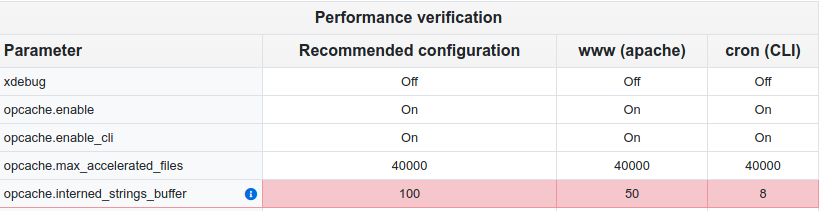
What I don't understand is how do you set one setting for Apache and a separate setting for Cron?
Either way, when I initially updated the system to version 5.1 it did quit showing all errors except for the opcache.interned_strings_buffer the problem however was that update to me was buggy so I reverted my system back to 5.0 and the overall performance to me was better.
I totally agree with you. Non crucial errors you should have an ignore option. Would make it easier I guess but in the end I guess the issue was still not actually be resolved.
The documentation you mentioned is really vague as the article itself suggested. Who knows man, it's working when it's all said and done so I guess it doesn't really matter in the grand scheme of things lol.
acsinsurancegroup
on 20 Mar 2019
The www settings are set in either the vhost file of apache, or in the .user.ini in the CRM directory (I believe). I use nginx, so I set it in a custom config file, using a separate php-fpm pool, which is referred to by the vhost config file of the virtual domain. In combination with some settings that I allow in the .user.ini.
The cron settings are the system settings that apply when you run the php binary from the binary directory in a shell command (at least, that is what I understand from it). So, in this case only the system wide (global) settings apply. You have to adjust the global ini files for php. The vhost settings are not considered here. So they will differ from one another. And YetiForce shows you this difference.
alagmouch
on 20 Mar 2019
Gotcha, thanks for clarifying that for me. I'll check all of those out and see what I can find and maybe something there is causing these headaches for me. Again man, really appreciate all the help. Thanks and God Bless!
acsinsurancegroup
on 20 Mar 2019
Most welcome. Same to you.
alagmouch
on 20 Mar 2019
Try this:
when opcache.interned_strings_buffer =100 , you must modify some memory settings:
opcache.memory_consumption = 512 and memory_limit = 1024M
and
zlib.output_compression = Off
this is my server config log:

elvissaba
on 21 Mar 2019
Thanks @elvissaba. That looks nice indeed. Will test it out later on and see if I can get like that somehow. Although, my issue might be that my cloud server is not having more than 1GB of memory. But, I will still test it.
alagmouch
on 21 Mar 2019
Just set opcache.memory_consumption=512 (default is 128 in your .ini) if you want to use opcache.interned_strings_buffer =100. I have 6GB of RAM on VPS and had same issue.
elvissaba
on 21 Mar 2019
That helped indeed! Changed the opcache.memory_consumption to 250 and made the changes to opcache.interned_strings_buffer, and it went well. Thanks a lot @elvissaba. I'm sure that @acsinsurancegroup will find this useful too.
alagmouch
on 21 Mar 2019
@elvissaba @alagmouch Wow, that was it. I set mine to 512 and no more issues with the string buffer setting at 100. Thanks so much for that suggestion @elvissaba that did it for me man.
acsinsurancegroup
on 21 Mar 2019
@acsinsurancegroup in that case make sure you change it in the .user.ini in the root directory of YetiForceCRM and the public_html directory (subdirectory). The .user.ini files are read also, and zlib.output_compression = "On" by default in those two files.
Comment zlib.output_compression = "On" or set it to "Off" in those files
elvissaba
on 22 Mar 2019
@elvissaba @alagmouch Wow, that was it. I set mine to 512 and no more issues with the string buffer setting at 100. Thanks so much for that suggestion @elvissaba that did it for me man.
I'm glad to hear that
elvissaba
on 22 Mar 2019
Related issues
 PDMeira
·
3Comments
PDMeira
·
3Comments
 Raggazzoo
·
3Comments
Raggazzoo
·
3Comments
 johntonji
·
3Comments
johntonji
·
3Comments
 vovpff
·
3Comments
vovpff
·
3Comments
 serbiaserbia
·
3Comments
serbiaserbia
·
3Comments
Most helpful comment
Comment zlib.output_compression = "On" or set it to "Off" in those files