Yetiforcecrm: non admin user cannot create any records
Issue
Any user that is created in any of the default, or created roles cannot add new records to any part of the system.
A board of management user for example cannot create anything, not a new project nor an invoice, as soon as I tick the admin box then that user can.
I have looked everywhere and just cannot find an option that seems to relate to this, I have also done a reinstall on another server, tried creating users in all the roles available, but just cannot figure it out.
Any help would be greatly appreciated.
Actual Behavior
non admin users cannot create any new records.
Expected Behavior
users to be able to add records such as invoices, new projects, quotes etc.
How to trigger the error
any non admin user that is created has this problem, as soon as the admin box is ticked for a user then they can create records.
Your Environment
- YetiForce Version used: 4.3
- Browser name and version: Chrome Version 63.0.3239.132
- Environment name and version: Centos 7
- Operating System and version: Centos 7
 YESMUN
All 34 comments
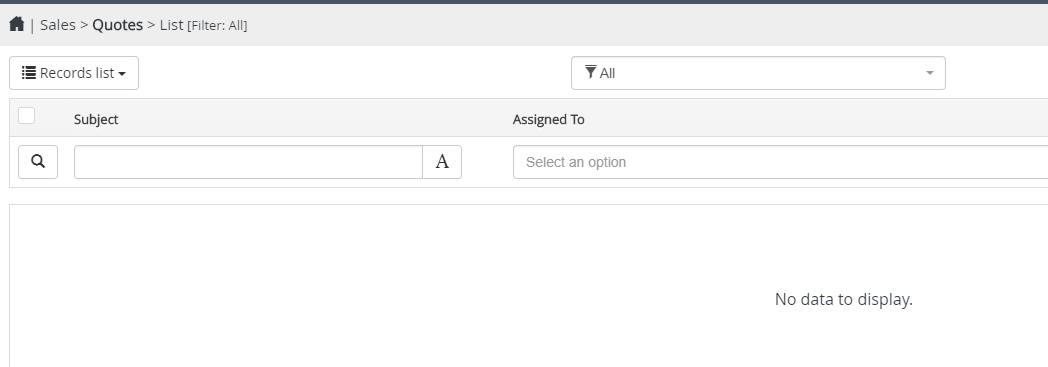
I have checked through the whole subcategory and still cannot find anything relating to my problem, I simply do not have the option to add a record when logged in as a non admin user.
YESMUN
on 1 Feb 2018
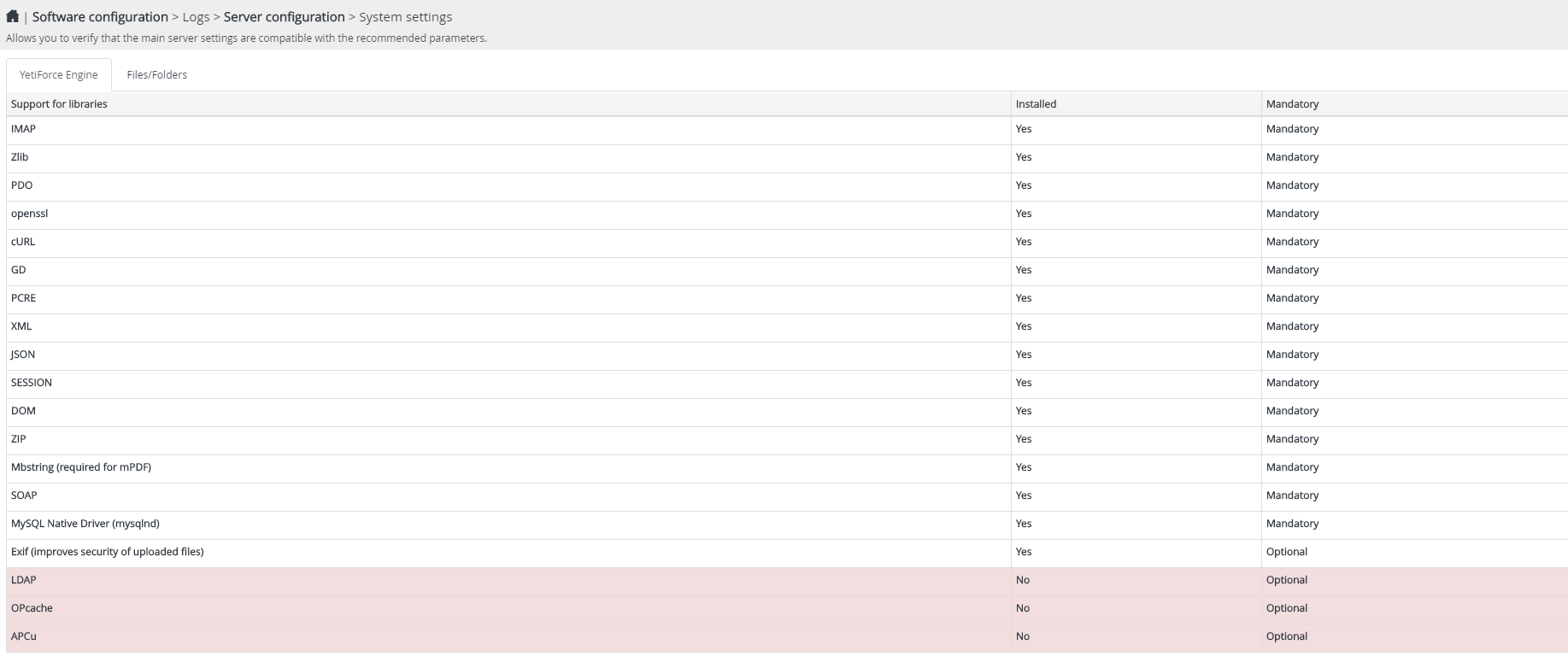
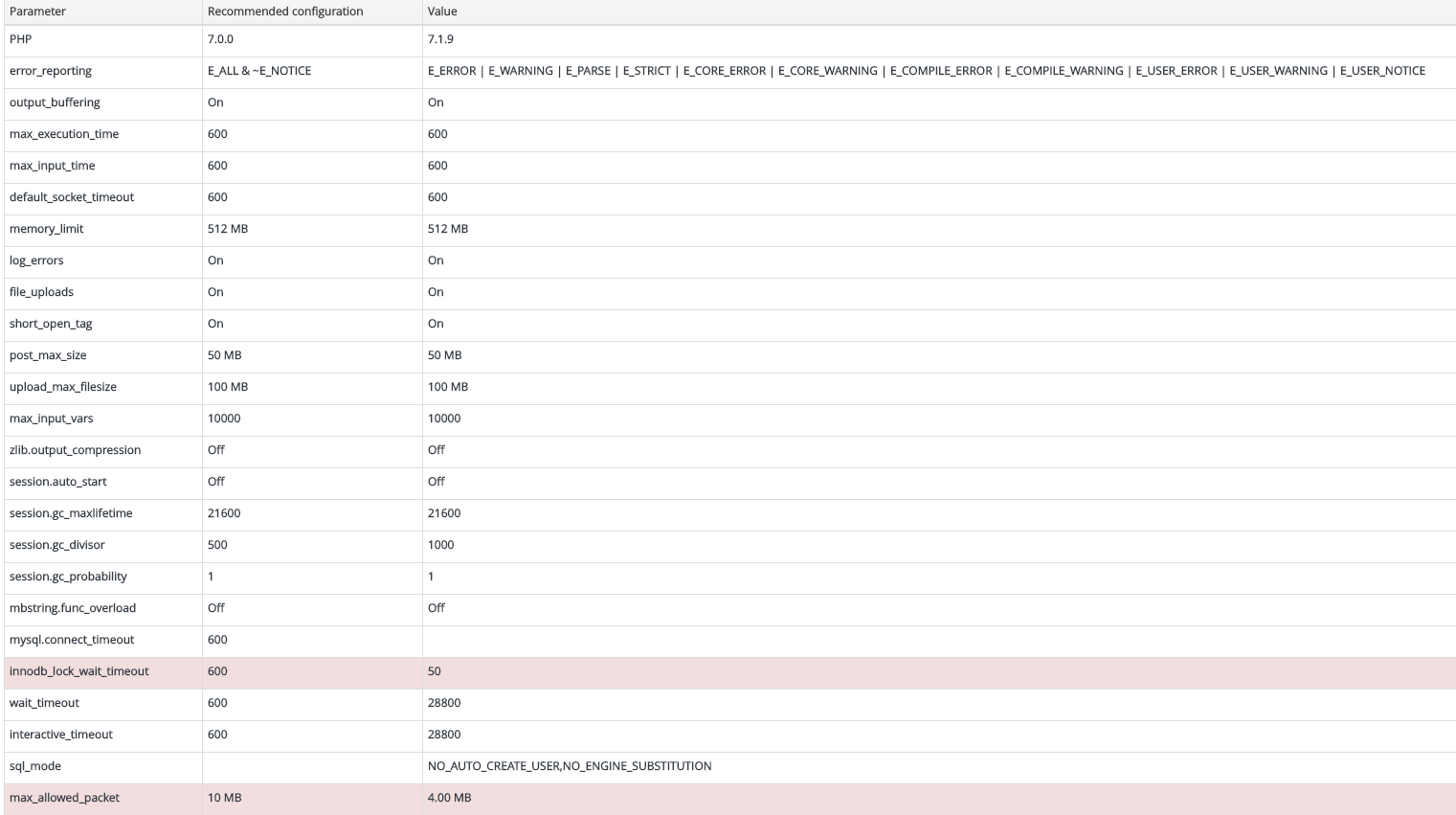
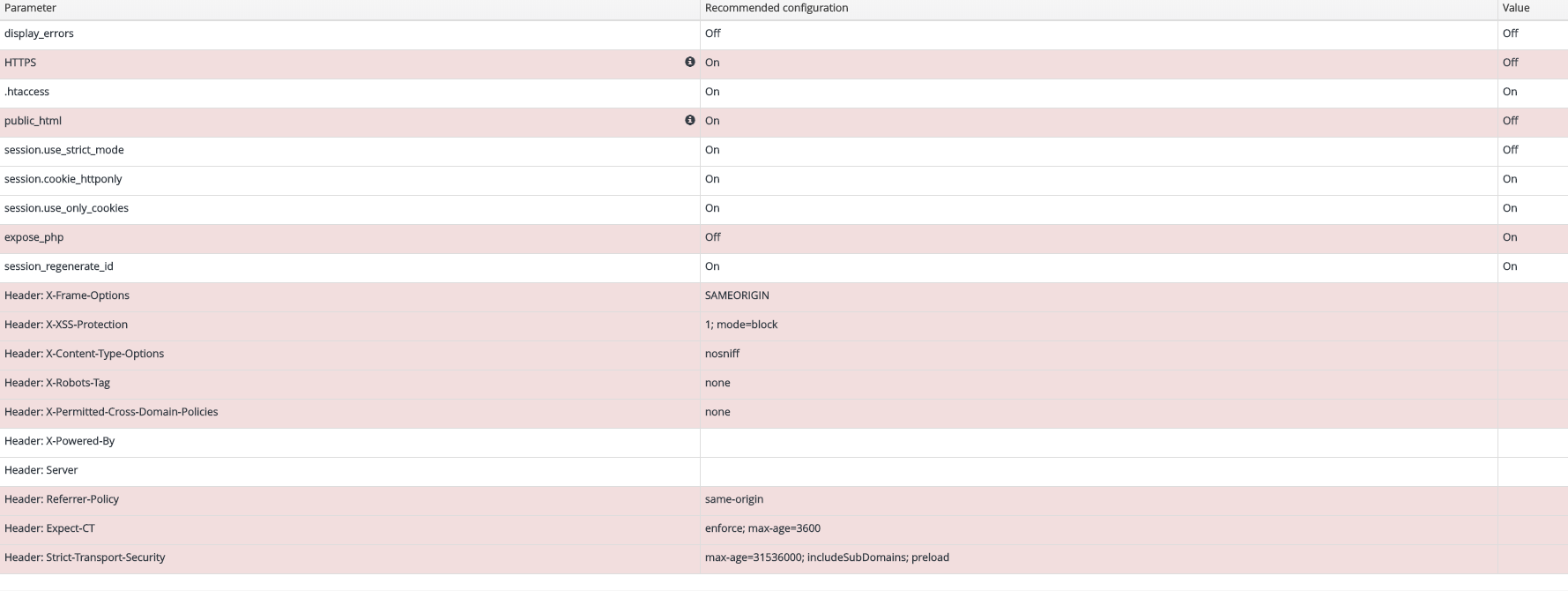
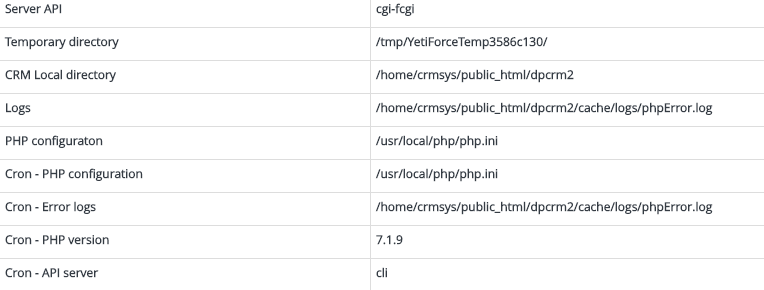
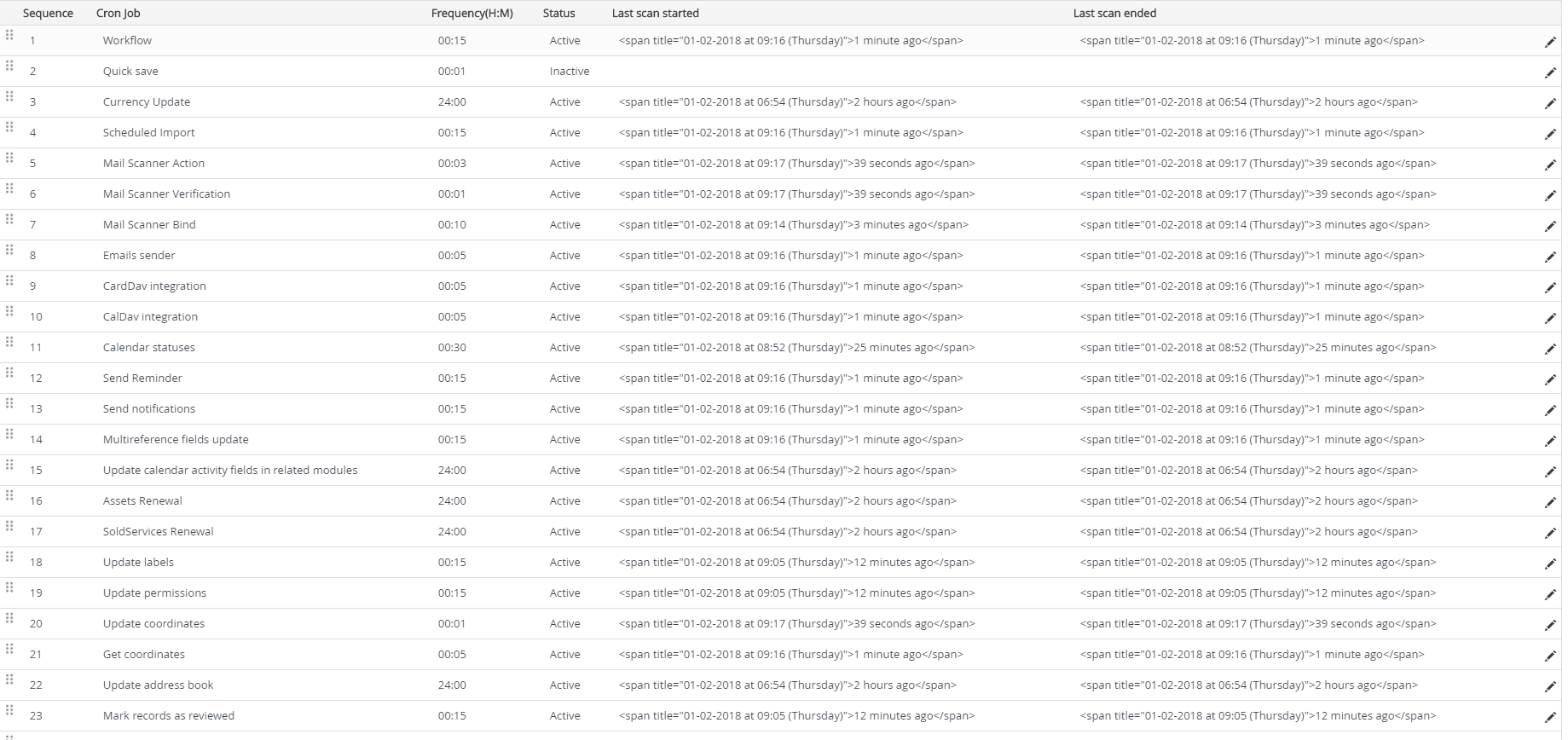
@YESMUN check your server config firs. 2nd check your cron.
 vovpff
on 1 Feb 2018
vovpff
on 1 Feb 2018
Thank vovpff, I have checked both, here are the screenshots:
YESMUN
on 1 Feb 2018
And my crons look ok:

YESMUN
on 1 Feb 2018
This is a fresh install, and then trying to create the user, that is where the issue is.
Is there any requirements before creating a user for them to be able to add and edit records?
YESMUN
on 1 Feb 2018
Anyone have any suggestions?
YESMUN
on 5 Feb 2018
I have exactly the same problem. If you're not an administrator you cannot create any records whatsoever.
 torqueing
on 14 Feb 2018
torqueing
on 14 Feb 2018
check the logs
 mariuszkrzaczkowski
on 14 Feb 2018
mariuszkrzaczkowski
on 14 Feb 2018
In my log I have repeating over and over:
[15-Feb-2018 15:00:01 Africa/Harare] PHP Notice: Undefined index: SERVER_PORT in /home/crmsys/public_html/dpcrm2/vendor/yetiforce/RequestUtil.php on line 107
[15-Feb-2018 15:00:01 Africa/Harare] PHP Notice: Undefined index: SERVER_PORT in /home/crmsys/public_html/dpcrm2/vendor/yetiforce/RequestUtil.php on line 107
[15-Feb-2018 15:00:01 Africa/Harare] PHP Notice: Undefined property: OSSMailScanner::$column_fields in /home/crmsys/public_html/dpcrm2/modules/Vtiger/models/Record.php on line 564
[15-Feb-2018 15:00:01 Africa/Harare] PHP Notice: Undefined property: OSSMailScanner::$column_fields in /home/crmsys/public_html/dpcrm2/modules/Vtiger/models/Record.php on line 564
[15-Feb-2018 15:01:01 Africa/Harare] PHP Notice: Undefined index: SERVER_PORT in /home/crmsys/public_html/dpcrm2/vendor/yetiforce/RequestUtil.php on line 107
[15-Feb-2018 15:01:01 Africa/Harare] PHP Notice: Undefined property: OSSMailScanner::$column_fields in /home/crmsys/public_html/dpcrm2/modules/Vtiger/models/Record.php on line 564
[15-Feb-2018 15:02:01 Africa/Harare] PHP Notice: Undefined index: SERVER_PORT in /home/crmsys/public_html/dpcrm2/vendor/yetiforce/RequestUtil.php on line 107
[15-Feb-2018 15:02:01 Africa/Harare] PHP Notice: Undefined property: OSSMailScanner::$column_fields in /home/crmsys/public_html/dpcrm2/modules/Vtiger/models/Record.php on line 564
[15-Feb-2018 15:02:01 Africa/Harare] PHP Notice: Undefined property: OSSMail::$column_fields in /home/crmsys/public_html/dpcrm2/modules/Vtiger/models/Record.php on line 564
[15-Feb-2018 15:03:01 Africa/Harare] PHP Notice: Undefined index: SERVER_PORT in /home/crmsys/public_html/dpcrm2/vendor/yetiforce/RequestUtil.php on line 107
[15-Feb-2018 15:03:01 Africa/Harare] PHP Notice: Undefined property: OSSMailScanner::$column_fields in /home/crmsys/public_html/dpcrm2/modules/Vtiger/models/Record.php on line 564
[15-Feb-2018 15:04:01 Africa/Harare] PHP Notice: Undefined index: SERVER_PORT in /home/crmsys/public_html/dpcrm2/vendor/yetiforce/RequestUtil.php on line 107
[15-Feb-2018 15:04:01 Africa/Harare] PHP Notice: Undefined property: OSSMailScanner::$column_fields in /home/crmsys/public_html/dpcrm2/modules/Vtiger/models/Record.php on line 564
[15-Feb-2018 15:05:01 Africa/Harare] PHP Notice: Undefined index: SERVER_PORT in /home/crmsys/public_html/dpcrm2/vendor/yetiforce/RequestUtil.php on line 107
[15-Feb-2018 15:05:01 Africa/Harare] PHP Notice: Undefined index: SERVER_PORT in /home/crmsys/public_html/dpcrm2/vendor/yetiforce/RequestUtil.php on line 107
[15-Feb-2018 15:05:01 Africa/Harare] PHP Notice: Undefined property: OSSMailScanner::$column_fields in /home/crmsys/public_html/dpcrm2/modules/Vtiger/models/Record.php on line 564
[15-Feb-2018 15:05:01 Africa/Harare] PHP Notice: Undefined property: OSSMail::$column_fields in /home/crmsys/public_html/dpcrm2/modules/Vtiger/models/Record.php on line 564
[15-Feb-2018 15:05:01 Africa/Harare] PHP Notice: Undefined property: OSSMailScanner::$column_fields in /home/crmsys/public_html/dpcrm2/modules/Vtiger/models/Record.php on line 564
[15-Feb-2018 15:06:01 Africa/Harare] PHP Notice: Undefined index: SERVER_PORT in /home/crmsys/public_html/dpcrm2/vendor/yetiforce/RequestUtil.php on line 107
[15-Feb-2018 15:06:01 Africa/Harare] PHP Notice: Undefined property: OSSMailScanner::$column_fields in /home/crmsys/public_html/dpcrm2/modules/Vtiger/models/Record.php on line 564
YESMUN
on 15 Feb 2018
PHP Notice = incorrect server configuration
mariuszkrzaczkowski
on 15 Feb 2018
I have very little in my Yetiforce logs, do you mean server logs?
Maybe I am looking in the wrong place?
torqueing
on 16 Feb 2018
The log file I looked at is in root/cache/logs/phpError.log (the root folder is the top level of your yetiforce install)
I have the errors but they don't do much with helping me figure out what is stopping normal users from being able to add records.
YESMUN
on 18 Feb 2018
This is what is occurring in mine:
[18-Feb-2018 14:09:43 Europe/London] PHP Notice: Only variables should be passed by reference in /home/a571104/portal.accounting-pro.ie/vendor/yetiforce/QueryField/DateField.php on line 76
[18-Feb-2018 14:09:43 Europe/London] PHP Notice: Only variables should be passed by reference in /home/a571104/portal.accounting-pro.ie/vendor/yetiforce/QueryField/DateField.php on line 76
[18-Feb-2018 14:09:44 Europe/London] PHP Notice: Undefined variable: value in /home/a571104/portal.accounting-pro.ie/vendor/yetiforce/Request.php on line 249
[18-Feb-2018 14:09:44 Europe/London] PHP Notice: Undefined variable: value in /home/a571104/portal.accounting-pro.ie/vendor/yetiforce/Request.php on line 249
[18-Feb-2018 14:09:44 Europe/London] PHP Notice: Undefined variable: data in /home/a571104/portal.accounting-pro.ie/modules/Leads/dashboards/LeadsBySource.php on line 65
[18-Feb-2018 14:09:44 Europe/London] PHP Notice: Undefined index: name in /home/a571104/portal.accounting-pro.ie/modules/Leads/dashboards/LeadsBySource.php on line 104
[18-Feb-2018 14:09:44 Europe/London] PHP Notice: Undefined variable: value in /home/a571104/portal.accounting-pro.ie/vendor/yetiforce/Request.php on line 249
[18-Feb-2018 14:09:44 Europe/London] PHP Notice: Undefined index: start in /home/a571104/portal.accounting-pro.ie/modules/Vtiger/dashboards/Calendar.php on line 32
[18-Feb-2018 14:10:09 Europe/London] PHP Notice: Undefined offset: 29 in /home/a571104/portal.accounting-pro.ie/include/utils/UserInfoUtil.php on line 373
[18-Feb-2018 14:10:09 Europe/London] PHP Notice: Undefined offset: 30 in /home/a571104/portal.accounting-pro.ie/include/utils/UserInfoUtil.php on line 373
[18-Feb-2018 14:10:09 Europe/London] PHP Notice: Undefined offset: 32 in /home/a571104/portal.accounting-pro.ie/include/utils/UserInfoUtil.php on line 373
[18-Feb-2018 14:10:09 Europe/London] PHP Notice: Undefined offset: 53 in /home/a571104/portal.accounting-pro.ie/include/utils/UserInfoUtil.php on line 373
[18-Feb-2018 14:10:09 Europe/London] PHP Notice: Undefined offset: 29 in /home/a571104/portal.accounting-pro.ie/include/utils/UserInfoUtil.php on line 373
[18-Feb-2018 14:10:09 Europe/London] PHP Notice: Undefined offset: 30 in /home/a571104/portal.accounting-pro.ie/include/utils/UserInfoUtil.php on line 373
[18-Feb-2018 14:10:09 Europe/London] PHP Notice: Undefined offset: 32 in /home/a571104/portal.accounting-pro.ie/include/utils/UserInfoUtil.php on line 373
[18-Feb-2018 14:10:09 Europe/London] PHP Notice: Undefined offset: 53 in /home/a571104/portal.accounting-pro.ie/include/utils/UserInfoUtil.php on line 373
[18-Feb-2018 14:10:09 Europe/London] PHP Notice: Undefined offset: 3 in /home/a571104/portal.accounting-pro.ie/modules/Users/models/Privileges.php on line 109
[18-Feb-2018 14:10:09 Europe/London] PHP Notice: Undefined offset: 29 in /home/a571104/portal.accounting-pro.ie/include/utils/UserInfoUtil.php on line 373
[18-Feb-2018 14:10:09 Europe/London] PHP Notice: Undefined offset: 30 in /home/a571104/portal.accounting-pro.ie/include/utils/UserInfoUtil.php on line 373
[18-Feb-2018 14:10:09 Europe/London] PHP Notice: Undefined offset: 32 in /home/a571104/portal.accounting-pro.ie/include/utils/UserInfoUtil.php on line 373
[18-Feb-2018 14:10:09 Europe/London] PHP Notice: Undefined offset: 53 in /home/a571104/portal.accounting-pro.ie/include/utils/UserInfoUtil.php on line 373
[18-Feb-2018 14:10:17 Europe/London] PHP Notice: Undefined offset: 29 in /home/a571104/portal.accounting-pro.ie/include/utils/UserInfoUtil.php on line 373
[18-Feb-2018 14:10:17 Europe/London] PHP Notice: Undefined offset: 30 in /home/a571104/portal.accounting-pro.ie/include/utils/UserInfoUtil.php on line 373
[18-Feb-2018 14:10:17 Europe/London] PHP Notice: Undefined offset: 32 in /home/a571104/portal.accounting-pro.ie/include/utils/UserInfoUtil.php on line 373
[18-Feb-2018 14:10:17 Europe/London] PHP Notice: Undefined offset: 53 in /home/a571104/portal.accounting-pro.ie/include/utils/UserInfoUtil.php on line 373
[18-Feb-2018 14:10:17 Europe/London] PHP Notice: Undefined offset: 29 in /home/a571104/portal.accounting-pro.ie/include/utils/UserInfoUtil.php on line 373
[18-Feb-2018 14:10:17 Europe/London] PHP Notice: Undefined offset: 30 in /home/a571104/portal.accounting-pro.ie/include/utils/UserInfoUtil.php on line 373
[18-Feb-2018 14:10:17 Europe/London] PHP Notice: Undefined offset: 32 in /home/a571104/portal.accounting-pro.ie/include/utils/UserInfoUtil.php on line 373
[18-Feb-2018 14:10:17 Europe/London] PHP Notice: Undefined offset: 53 in /home/a571104/portal.accounting-pro.ie/include/utils/UserInfoUtil.php on line 373
[18-Feb-2018 14:10:17 Europe/London] PHP Notice: Undefined index: LISTVIEWMASSACTION in /home/a571104/portal.accounting-pro.ie/modules/Vtiger/views/List.php on line 283
[18-Feb-2018 14:10:17 Europe/London] PHP Notice: Undefined offset: 29 in /home/a571104/portal.accounting-pro.ie/include/utils/UserInfoUtil.php on line 373
[18-Feb-2018 14:10:17 Europe/London] PHP Notice: Undefined offset: 30 in /home/a571104/portal.accounting-pro.ie/include/utils/UserInfoUtil.php on line 373
[18-Feb-2018 14:10:17 Europe/London] PHP Notice: Undefined offset: 32 in /home/a571104/portal.accounting-pro.ie/include/utils/UserInfoUtil.php on line 373
[18-Feb-2018 14:10:17 Europe/London] PHP Notice: Undefined offset: 53 in /home/a571104/portal.accounting-pro.ie/include/utils/UserInfoUtil.php on line 373
torqueing
on 18 Feb 2018
So this is the function function getPermittedModuleIdList()
and the line is if ($seq_value === 0 && $profileTabsPermission[$tabid] === 0) {
It is a problem with the globalPermission profile:
if ($is_admin === false && $profileGlobalPermission[1] == 1 &&
        $profileGlobalPermission[2] == 1) {
torqueing
on 18 Feb 2018
This is not an error in the code only in the server configuration
mariuszkrzaczkowski
on 19 Feb 2018
you must give us full logs without this we will not find the reason for the error
https://yetiforce.com/en/knowledge-base/documentation/developer-documentation/item/debugging
mariuszkrzaczkowski
on 19 Feb 2018
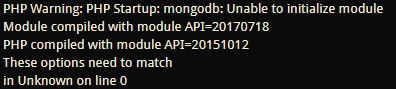
I am getting that error in my apache log, could that be causing a problem?
YESMUN
on 19 Feb 2018
In cache/logs there is only errors, index.html and phpError.log
torqueing
on 20 Feb 2018
I have tried it on a different server of mine and the result is the same:
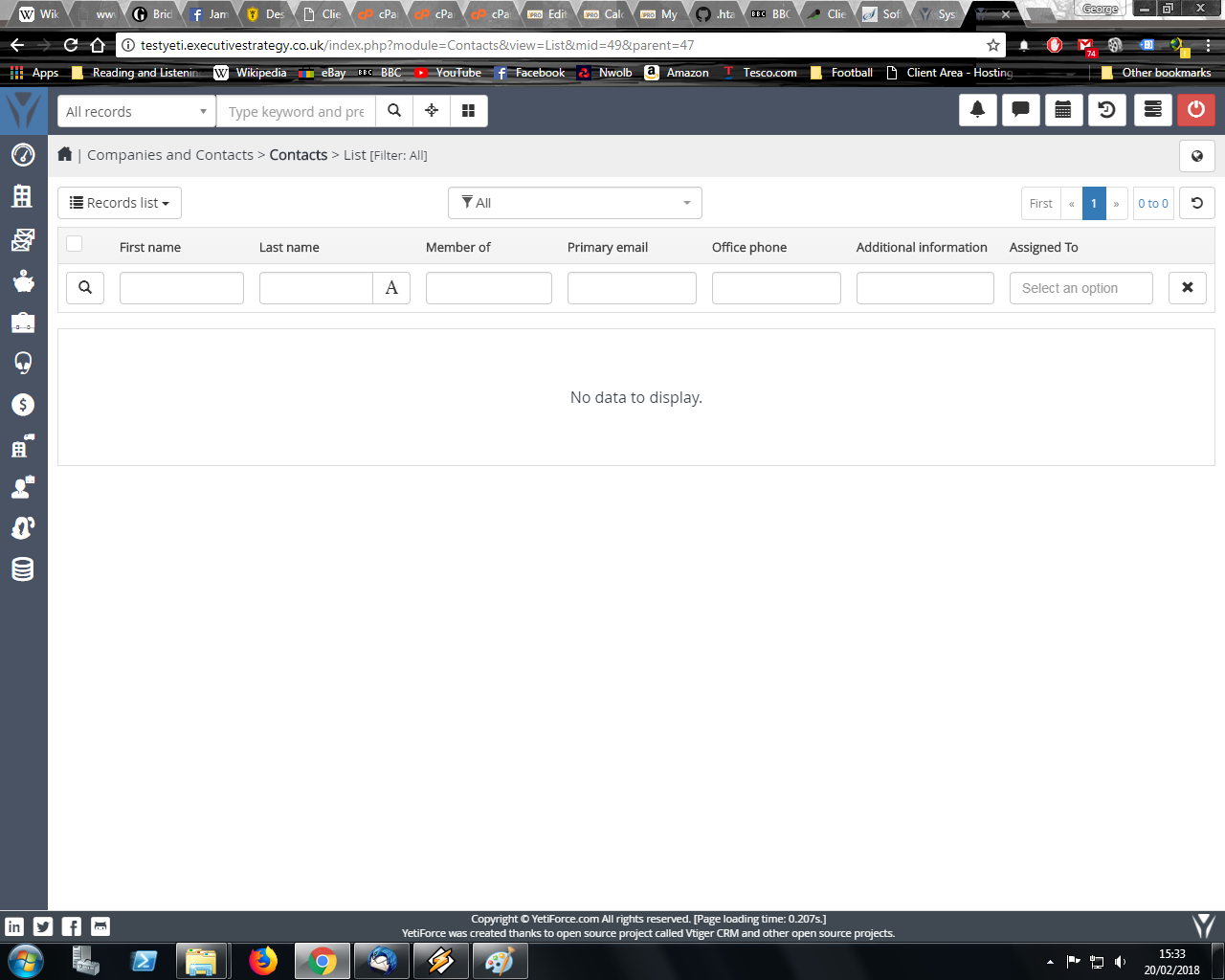
Second server:
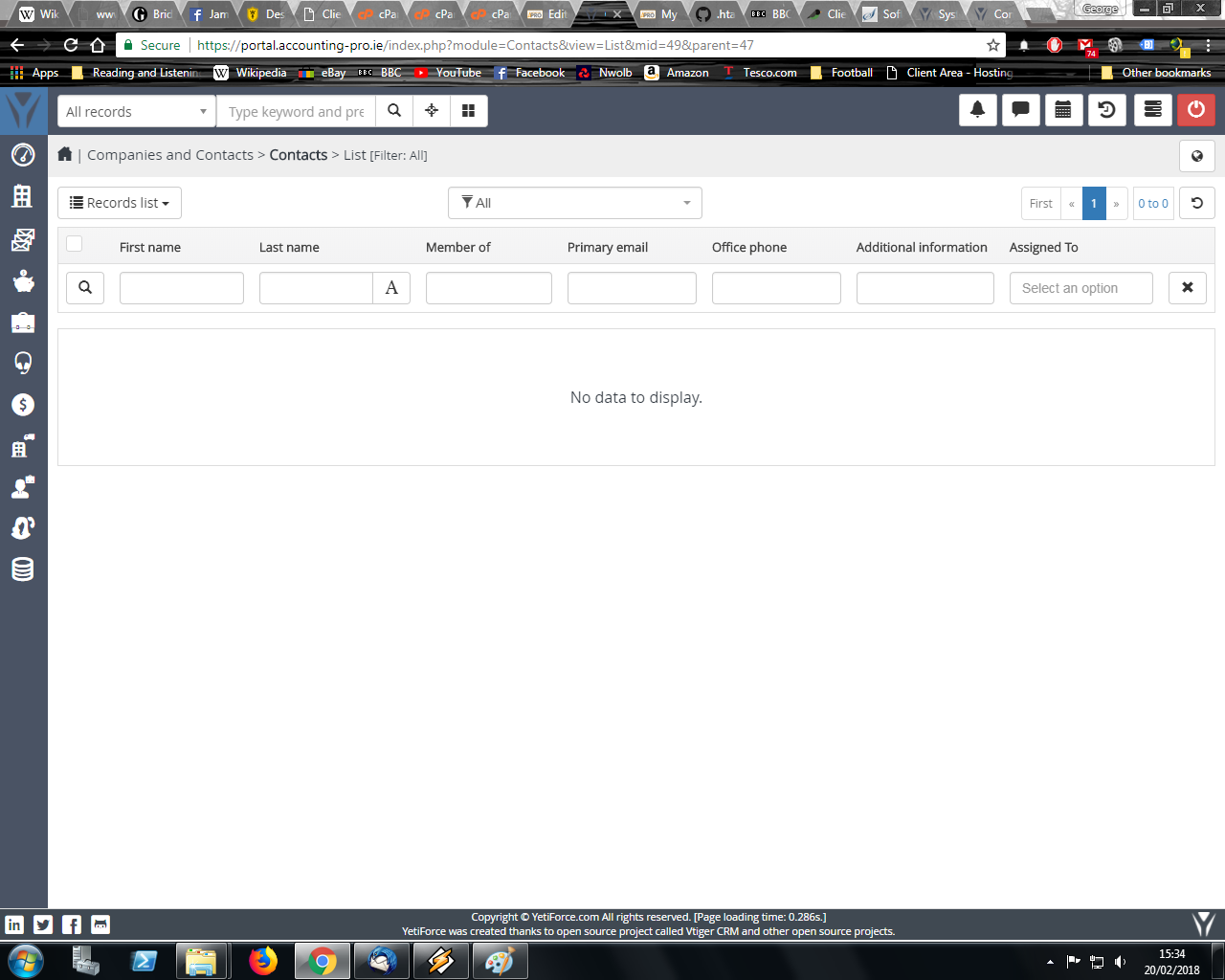
I'm aware that it could be a configuration error but is there any way to hunt down the problem. It would be useful for the future because these are two normally configured servers using average setting for average users.
I'd have no problems writing up an example for your documentation
torqueing
on 20 Feb 2018
I have given the user a sales profile so he/she should be able to read/write/create but not delete. But the add record isn't there
torqueing
on 20 Feb 2018
Can you try to trigger it on gitdev?
mariuszkrzaczkowski
on 20 Feb 2018
Sure, how would I go about doing that? If you want we can chat by email.
Btw, I can write up a troubleshooting page for YetiForce and submit it to you to help with your documentation afterwards if you want?
torqueing
on 21 Feb 2018
It seems very strange that it is a server config error when a user set as admin can create the records without a problem.
I create a user as board of management without admin privileges and the user cannot create anything such as projects or invoices or anything, there simply is no add record button for the user. Then login as admin and tick the box to set the user as an admin and then that user can now create records and everything works.
Of course this in not suitable as now that user also has the capability of adjusting all the settings an admin user can, but everything does work.
So how is it that the server configuration is causing this? Surely if it was a server configuration error then even the admin users would not be able to create records?
YESMUN
on 23 Feb 2018
Btw, I have tried both the Softaculous installation and installing it manually and the result is identical. Also the logs from both YESMUN and I show PHP Notices, not errors or warnings and relate to undefined properties
torqueing
on 23 Feb 2018
I tested on 4 instances of crm in different versions and it always works for me creating records.
mariuszkrzaczkowski
on 23 Feb 2018
upload all fix packs https://github.com/YetiForceCompany/YetiForceCRM/releases/tag/4.3.0
and run the code:
App\Db\Fixer::baseModuleTools();
App\Db\Fixer::defOrgField();
App\Db\Fixer::profileField();
@mariuszkrzaczkowski I uploaded all the fixes, where do I run that code?
YESMUN
on 23 Feb 2018
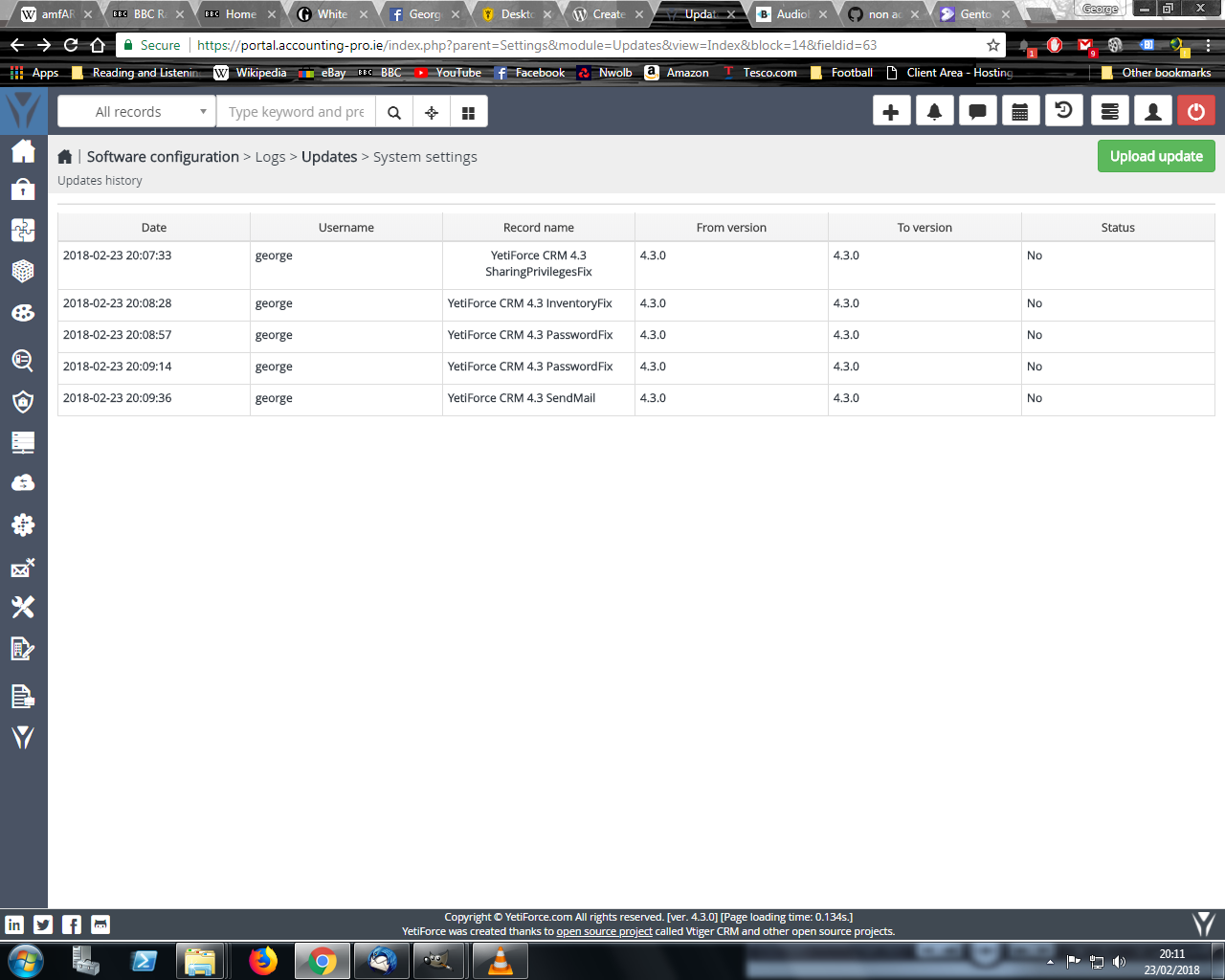
I have uploaded it to the server (as in the image) but like YESMUN I am finding difficulty finding a way to execute the patches. Anyway I think they are already installed:
torqueing
on 23 Feb 2018
Marius, would it help if I gave you access to the server? This is the only problem between us putting YetiForce into production or staying with vTiger (with which creating records is no problem for users)
torqueing
on 28 Feb 2018
 Rianek
on 17 Mar 2018
Rianek
on 17 Mar 2018
Is it possible someone can explain the problem and fix in english for the benefit of future users?
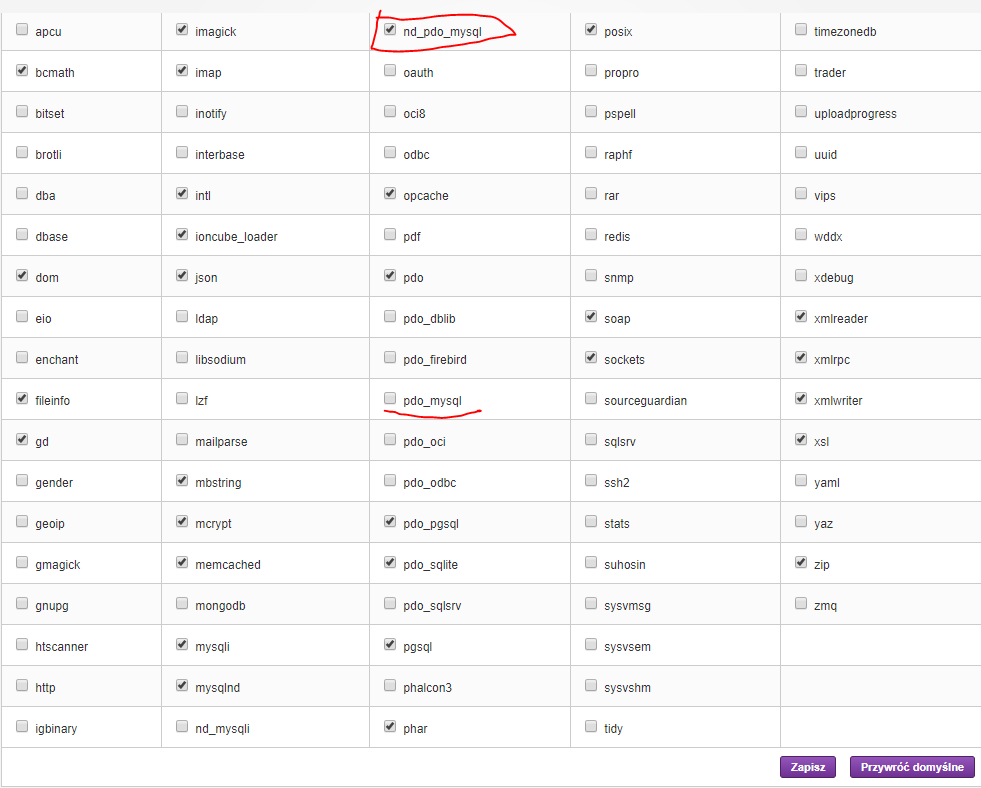
Do you need to have nd_pdo_mysql enabled and pdo_mysql disabled or vice versa?
torqueing
on 21 Mar 2018
Hi
You must nd_pdo_mysql disabled.
Rianek
on 21 Mar 2018
There are many problems while using yetiforce. Did you solve this issue?
 crpak
on 23 Mar 2018
crpak
on 23 Mar 2018
Hi @crpak
I installed it on a server running cPanel instead of Centos Web Panel which most of my servers run on and that sorted out the problem for me.
Also setting the cron to run the php file instead of the .sh file.
YESMUN
on 12 Apr 2018
Related issues
 serbiaserbia
·
3Comments
serbiaserbia
·
3Comments
 Raggazzoo
·
3Comments
Raggazzoo
·
3Comments
 MacarenaReina
·
3Comments
serbiaserbia
·
3Comments
vovpff
·
3Comments
MacarenaReina
·
3Comments
serbiaserbia
·
3Comments
vovpff
·
3Comments