Yaru: Overflowing text in ethernet connections settings
Actual Behavior
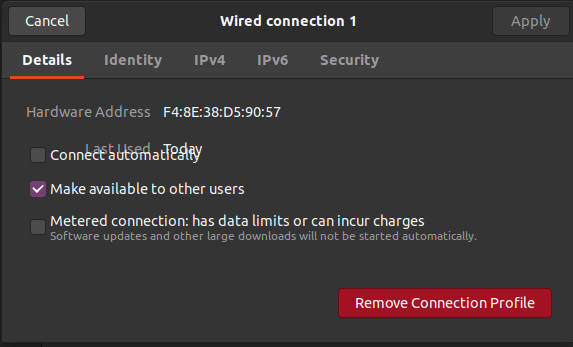
In the "connections" settings panel, for ethernet connections; the text overlaps. This happens in all versions of Yaru on eon
Steps to Reproduce the Problem
- Open settings
- Go to Network
- Add a new wired connection (default settings are OK)
- Click on the gear next to the new wired connection.
It specifically happens with a wired connection which _is not used_. That's why you can only see it _after_ you add a second wired connection
Yaru version
default version on bionic.
PS: these instructions in the issue template seem out of date. They still talk about communitheme.
 galgalesh
All 4 comments
How nice to hear from you again @galgalesh 👋😀
Did you check if the issue also occurs in Adwaita?
 madsrh
on 1 May 2020
madsrh
on 1 May 2020
Hi @madsrh it's nice to see you too! Ubuntu 20.04 looks so great! Such an awesome job!
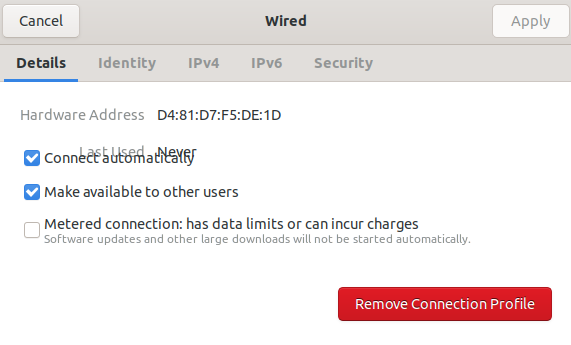
The issue also happens in Adwaita:
galgalesh
on 3 May 2020
Hi @galgalesh, welcome back 😊
It seems a problem within the application. Have you already reported this behaviour in its bug tracker?
 clobrano
on 5 May 2020
clobrano
on 5 May 2020
I opened a new issue here: https://gitlab.gnome.org/GNOME/gnome-control-center/-/issues/991
Do I close this issue?
galgalesh
on 6 May 2020
Related issues
 matthewpaulthomas
·
3Comments
matthewpaulthomas
·
3Comments
 chrisjbillington
·
3Comments
matthewpaulthomas
·
3Comments
chrisjbillington
·
3Comments
matthewpaulthomas
·
3Comments
 sicklylife-jp
·
3Comments
sicklylife-jp
·
3Comments
 snydox
·
3Comments
snydox
·
3Comments
Most helpful comment
I opened a new issue here: https://gitlab.gnome.org/GNOME/gnome-control-center/-/issues/991
Do I close this issue?