Yaru: Dash: same icon for snap-store and gnome-software
Hi,
By default Ubuntu 20.04 ships with snap-store. The classic gnome-software is still available.
If both are installed the dash shows same icon and label _Ubuntu Software_:
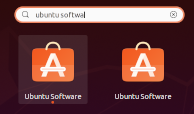
Of course this is confusing.
No problems with the dock-bar. Each software shows a different icon and label (_Snap Store_ and _Ubuntu Software_):

Cheers!
 jeremie2
All 18 comments
Hi @jeremie2, thanks for taking time to contribute.
@kenvandine, do you think this is something to fix in gnome-shell?
 clobrano
on 10 Apr 2020
clobrano
on 10 Apr 2020
The deb of gnome-software should actually drop the Ubuntu Software icon. I'll get that fixed in focal.
 kenvandine
on 10 Apr 2020
kenvandine
on 10 Apr 2020
Thanks for reporting this, here's a bug link for reference https://bugs.launchpad.net/ubuntu/+source/gnome-software/+bug/1872111
kenvandine
on 10 Apr 2020
Maybe we also have the gnome-software icon name overwritten in yaru and need to drop it
 Feichtmeier
on 10 Apr 2020
Feichtmeier
on 10 Apr 2020
ubuntusoftware is icon name
 Bonandry
on 11 Apr 2020
Bonandry
on 11 Apr 2020
We definitely want to keep the ubuntusoftware icon in the theme as snap-store.ubuntu-software now uses it. That's the identity you get when you are on an Ubuntu Desktop. Only other distros it is displayed as Snap Store.
kenvandine
on 11 Apr 2020
Wouldn't it be more logical to have the same snap-store icon cross-distro? From a branding perspective? That snaps are cross-distro is one of the point of having snaps at all, isn't it.
What's the alternative? Just drop the Yaru icon for gnome-software and ship the gnome-software one?
 real-amano
on 14 Apr 2020
real-amano
on 14 Apr 2020
The behavior of the app is different on Ubuntu vs other distros. On Ubuntu
it presents itself as "Ubuntu Software" and is a true replacement for the
previous "ubuntu-software" deb package. We need it to be clear that this
is more than just a Snap Store UI, it's used for apt packages and firmware
updates as well. When run on other ditros, it is presented as "Snap Store"
and only handles snap packages.
On Tue, Apr 14, 2020 at 3:32 PM real-amano notifications@github.com wrote:
Wouldn't it be more logical to have the same snap-store icon cross-distro?
From a branding perspective? That snaps are cross-distro is one of the
point of having snaps at all, isn't it.What's the alternative? Just drop the Yaru icon for gnome-software and
ship the gnome-software one?—
You are receiving this because you were mentioned.
Reply to this email directly, view it on GitHub
https://github.com/ubuntu/yaru/issues/2144#issuecomment-613639422, or
unsubscribe
https://github.com/notifications/unsubscribe-auth/AAANMBIGIWMXIQ5ONHO2AJLRMS26LANCNFSM4MFOLNWA
.
--
Ubuntu - "I am what I am because of who we all are"
kenvandine
on 14 Apr 2020
All valid points. Thanks for clarification. Since the Snap store will be the default in Ubuntu it makes sense that it will carry the "Ubuntuish" Yaru icon.
real-amano
on 14 Apr 2020
org.gnome.Software and ubuntusoftware icons are very similar and causes confusion for users that choose to install gnome-software for flatpak support. Could we update the org.gnome.Software icon Yaru to ensure it's obviously different? Maybe even drop the themed icon so it falls back to the upstream icon?
kenvandine
on 27 Apr 2020
@ubuntujaggers, would you like to have a try with org.gnome.Software icon, or do we just drop the symlink?
clobrano
on 27 Apr 2020
Whatever we do, I'd really like to see it SRU'd to 20.04. Let me know if there's anything I can do to help with that.
kenvandine
on 27 Apr 2020
I'm at a loss to explain the behaviour where one icon is on the grid and a different icon is on the launcher for the same app 🤔
As for Gnome software, if it doesn't ship by default any more, let's leave at as upstream, rather than trying to have our own icon for it 👍
 ubuntujaggers
on 27 Apr 2020
ubuntujaggers
on 27 Apr 2020
After a quick attempt at Yarufying the upstream icon, I now vote for keeping upstream 😄

 madsrh
on 27 Apr 2020
madsrh
on 27 Apr 2020
That's actually a nice concept Mads!
ubuntujaggers
on 27 Apr 2020
We would only need to drop the one symlink from software store to gnome software
Feichtmeier
on 28 Apr 2020
Okay, I'm doing this branch and I don't have the same behaviour as others, possibly because I didn't do a fresh install before upgrading. I have the following installed:
- "Software" - this seems to be Gnome Software and has the orange bag icon
- "Snap Store" - this is the Snap Store and has the non-Yaru icon with sharp corners
Is there an easy way for me to get to the same point with my software stores as new 20.04 users?
ubuntujaggers
on 28 Apr 2020
Okay, I'm doing this branch and I don't have the same behaviour as others, possibly because I didn't do a fresh install before upgrading. I have the following installed:
* "Software" - this seems to be Gnome Software and has the orange bag icon
* "Snap Store" - this is the Snap Store and has the non-Yaru icon with sharp corners
Is there an easy way for me to get to the same point with my software stores as new 20.04 users?
Yes, popey explained here what's going on.
The Ubuntu Software relised with 20.04 comes from this "alternative" channel: __latest/stable/ubuntu-20.04__
So if you run:
sudo snap refresh snap-store --channel=latest/stable/ubuntu-20.04
you should have it.
jeremie2
on 28 Apr 2020
Related issues
Feichtmeier
·
3Comments
Feichtmeier
·
3Comments
 matthewpaulthomas
·
3Comments
matthewpaulthomas
·
3Comments
 chrisjbillington
·
3Comments
chrisjbillington
·
3Comments
 CDrummond
·
3Comments
CDrummond
·
3Comments
Most helpful comment
After a quick attempt at Yarufying the upstream icon, I now vote for keeping upstream 😄
https://gitlab.gnome.org/GNOME/gnome-software/-/blob/master/data/icons/hicolor/scalable/org.gnome.Software.svg