Yaru: Remove button pressed shadows on soft keyboard during login
I am using the adwaita light theme
When I press any key on the virtual keyboard in the login screen, all the buttons(keys) have a shadow for the pressed effect. I am trying to remove the shadow.
I tried adding removing the shadow in the main.rc sty;e "button" but that did not change the behavior.
engine "pixmap"
{
image {
function = SHADOW
}
}
any suggestions would be really appreciated!
Thanks!
 AshtonMartin
All 13 comments
Hi @AshtonMartin,
I am using the adwaita light theme
I believe you meant "Yaru light", right?
 clobrano
on 25 Oct 2018
clobrano
on 25 Oct 2018
Yes. The code I am trying to modify is in yaru/gtk/src/light/gtk-2.0/main.rc
AshtonMartin
on 25 Oct 2018
When I press any key on the virtual keyboard in the login screen, all the buttons(keys) have a shadow for the pressed effect. I am trying to remove the shadow.
screen keyboard style is defined in gnome-shell/.../_common.scss.
What's the reason you want to remove it?
clobrano
on 27 Oct 2018
The fix for that won't be in the GTK2 theme files, the virtual keyboard uses a couple SVG assets that are found in the yaru/gnome-shell/src and the colors used are defined in yaru/gnome-shell/src/gnome-shell-sass/_common.scss
The onscreen keyboard got an overhaul with the last GNOME release so they actually need to be updated still, both the colors used in the _common.scss file and maybe the SVGs.
Edited as I commented without doing enough research.
 godlyranchdressing
on 27 Oct 2018
godlyranchdressing
on 27 Oct 2018
@godlyranchdressing, I tested the on screen keyboard, but it looks good to me. Could you show me what's the problem?
clobrano
on 30 Oct 2018
@clobrano Whoops, I only just saw your post.
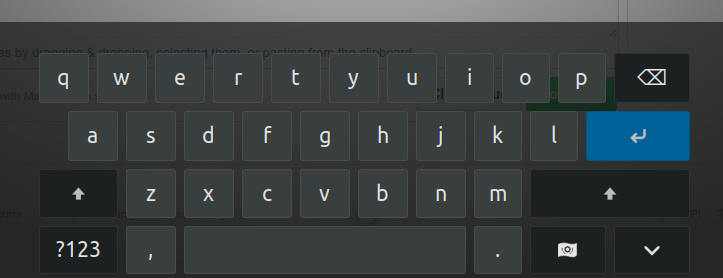
I'm still on 18.04 if that matters though, maybe it looks different on your system.
godlyranchdressing
on 2 Nov 2018
sorry @godlyranchdressing, I still don't get what the problem is :(
clobrano
on 2 Nov 2018
@clobrano that's what the keyboard looks like on Adwaita, it doesn't match the rest of the theme. Adwaita's/GNOME's touchscreen keyboard updated while we were working on Yaru so its styling was overwritten by upstream.
godlyranchdressing
on 2 Nov 2018
@godlyranchdressing, I see now, but it doesn't seem the same problem this bug is talking about
clobrano
on 2 Nov 2018
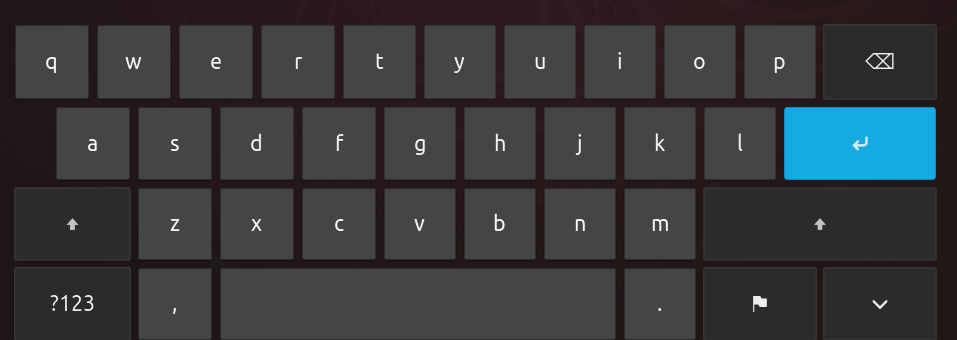
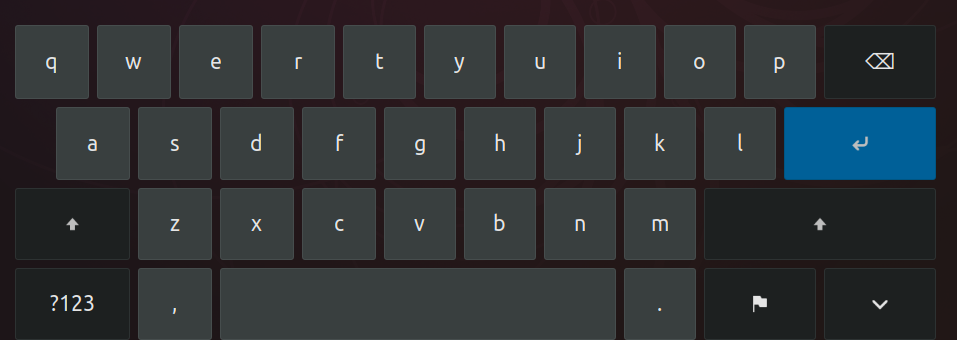
@AshtonMartin could you take a screenshoot of the on screen keyboard with the issue? If it's the same you see in login screen you can use the gnome screenshot tool, if in the login screen the keyboard is different, please take a picture with a camera/phone at least
Thanks
clobrano
on 8 Nov 2018
@godlyranchdressing Shall we create a separate issue for the styling mismatch?
 madsrh
on 9 Nov 2018
madsrh
on 9 Nov 2018
@madsrh Yeah, I think so. I thought maybe @AshtonMartin was seeing the shadow from the unstyled Adwaita keyboard but now I'm really lost to be honest. :sweat_smile:
godlyranchdressing
on 9 Nov 2018
I think @godlyranchdressing did a great job and I didn't find any more issues in the new style. Anyone against closing this?
 Feichtmeier
on 3 Dec 2018
Feichtmeier
on 3 Dec 2018
Related issues
 YamiYukiSenpai
·
3Comments
YamiYukiSenpai
·
3Comments
 snydox
·
3Comments
snydox
·
3Comments
 chrisjbillington
·
3Comments
chrisjbillington
·
3Comments
 sicklylife-jp
·
3Comments
sicklylife-jp
·
3Comments
 CDrummond
·
3Comments
CDrummond
·
3Comments