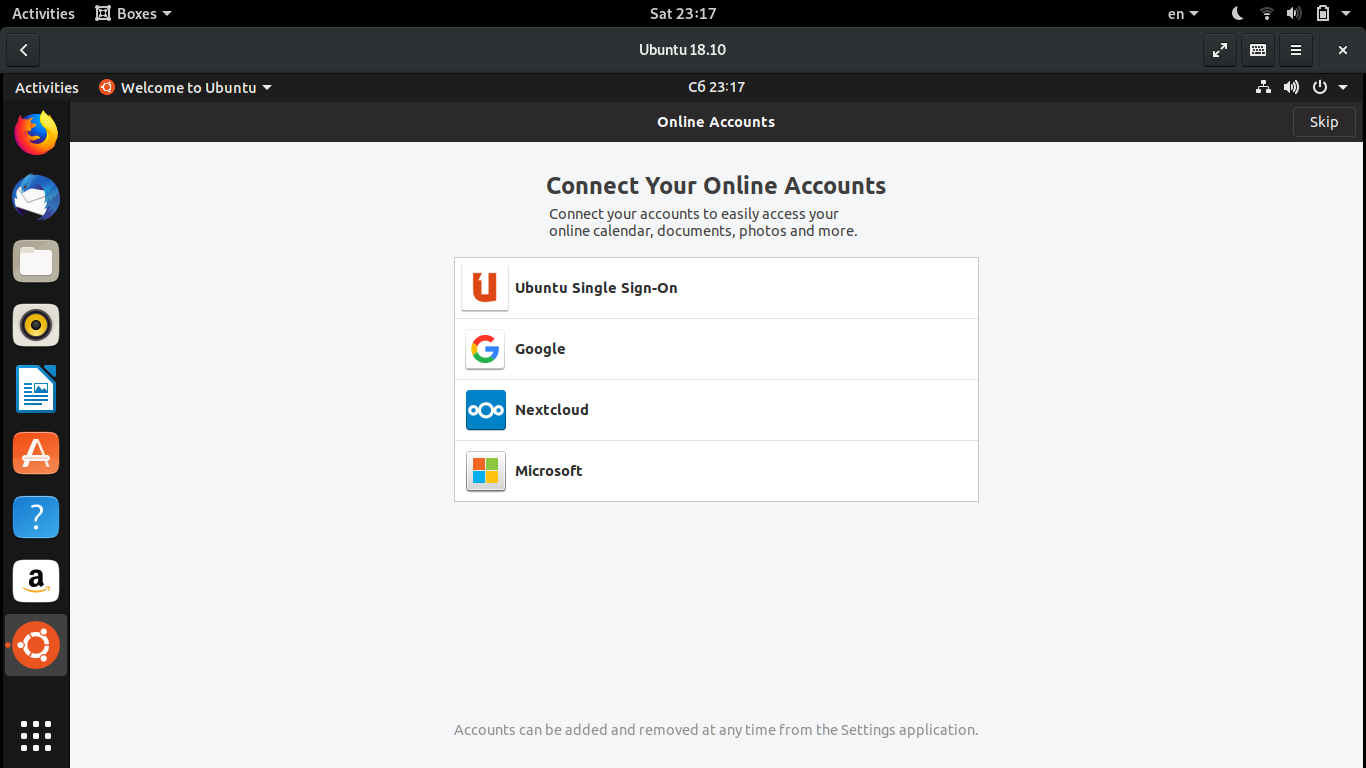
Yaru: "Welcome to Ubuntu" icon isn't squared
Expected Behavior
The icon has the same shape as other apps
Actual Behavior
It's circular.
Steps to Reproduce the Problem
- Install Ubuntu
- Reboot
- Look at the bottom left corner
Specifications
Default Ubuntu 18.10 image.
ii yaru-theme-icon 18.10.6 all Yaru icon theme from the Ubuntu Community
 Exalm
Exalm
All 13 comments
There is actually an icon for this made by jaggers or snwh some time ago
We need to investigate why the app isn't using it
 Feichtmeier
on 23 Oct 2018
Feichtmeier
on 23 Oct 2018
Does anyone know the command to start that welcome app?
Feichtmeier
on 8 Nov 2018
I got it. Just run in terminal:
/usr/lib/gnome-initial-setup/gnome-initial-setup
 dawidpotocki
on 13 Nov 2018
dawidpotocki
on 13 Nov 2018

From 18.04
[Desktop Entry]
Name=Initial Setup
Icon=preferences-system
Exec=/usr/lib/gnome-initial-setup/gnome-initial-setup
Terminal=false
Type=Application
StartupNotify=true
Categories=GNOME;GTK;System;
OnlyShowIn=GNOME;
NoDisplay=true
X-GNOME-Bugzilla-Bugzilla=GNOME
X-GNOME-Bugzilla-Product=gnome-initial-setup
X-GNOME-Bugzilla-Component=general
X-GNOME-Bugzilla-Version=unknown
X-Ubuntu-Gettext-Domain=gnome-initial-setup
Feichtmeier
on 14 Nov 2018
From 18.10
[Desktop Entry]
Name=Initial Setup
Exec=/usr/lib/gnome-initial-setup/gnome-initial-setup
Terminal=false
Type=Application
StartupNotify=true
Categories=GNOME;GTK;System;
OnlyShowIn=GNOME;
NoDisplay=true
X-GNOME-Bugzilla-Bugzilla=GNOME
X-GNOME-Bugzilla-Product=gnome-initial-setup
X-GNOME-Bugzilla-Component=general
X-GNOME-Bugzilla-Version=unknown
X-Ubuntu-Gettext-Domain=gnome-initial-setup
Feichtmeier
on 14 Nov 2018
Thath's strange, when you run it after the first time, that squared system settings icon is used. I fear that this round circle of friends logo/ubuntu icon is somehow applied within a script when you start ubuntu the first time?
@didrocks could you point me to someone who works on this gnome-initial-setup for ubuntu? I think it could be sebastien bacher but I don't find his github handle
Feichtmeier
on 14 Nov 2018
He doesn't really use github (and he is not the only one maintaining it). The easiest way to communicate with the desktop team is to go on #ubuntu-desktop on freenode (IRC). I think @clobrano who is around in our desktop channel can talk about it if you can't join?
 didrocks
on 15 Nov 2018
didrocks
on 15 Nov 2018
The best would be to open a bug on launchpad (https://bugs.launchpad.net/ubuntu/+source/gnome-initial-setup/+filebug). The issue could also be a gnome-shell desktop/icon/binary matching issue, but we can reassign there if needed
 seb128
on 15 Nov 2018
seb128
on 15 Nov 2018
@seb128
Thanks for replying! I open this on launchpad later this day!
Just for writing it down somewhere
This is the existing icon
https://github.com/ubuntu/yaru/blob/master/icons/src/fullcolor/apps/welcome-app.svg
Which is symlinked to
https://github.com/ubuntu/yaru/blob/master/icons/Suru/48x48/apps/ubuntu-welcome-app.png
Feichtmeier
on 15 Nov 2018
Thath's strange, when you run it after the first time, that squared system settings icon is used
@Feichtmeier, I can't reproduce this, it always uses the circular icon in my VM.
I will open the bug on lp
 clobrano
on 15 Nov 2018
clobrano
on 15 Nov 2018
Thanks Carlo!
I think 1) the icon linked in the . Desktop file is overwritten but 2) the icon=... Is wrong and should be icon=ubuntu-welcome-app
Feichtmeier
on 15 Nov 2018
clobrano
on 15 Nov 2018
I copy here the what I wrote on the ticket
There are 4 gnome-initial-setup.desktop files in my system
/usr/share/applications/gnome-initial-setup.desktop
/usr/share/gdm/greeter/applications/gnome-initial-setup.desktop
/usr/share/ubuntu/applications/gnome-initial-setup.desktop
/usr/share/ubuntu-wayland/applications/gnome-initial-setup.desktop
the first two, defines
Icon:preferences-system
while the others
Icon:ubuntu-logo-icon
I believe this is the problem
that said, this does not seem a Yaru problem. I am going to close this ticket, feel free to reopen it if we need to do something on our side
clobrano
on 15 Nov 2018
Related issues
 8none1
·
3Comments
8none1
·
3Comments
 snydox
·
3Comments
snydox
·
3Comments
 madsrh
·
3Comments
madsrh
·
3Comments
 Muqtxdir
·
3Comments
Muqtxdir
·
3Comments
 eaglersdeveloper
·
3Comments
eaglersdeveloper
·
3Comments
Most helpful comment
The best would be to open a bug on launchpad (https://bugs.launchpad.net/ubuntu/+source/gnome-initial-setup/+filebug). The issue could also be a gnome-shell desktop/icon/binary matching issue, but we can reassign there if needed