Yaru: The colon in the lockscreen clock is square
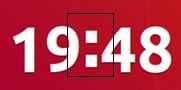
The colon in the lockscreen clock is square, but in Ubuntu font it is round.
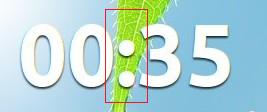
After installing the fonts-cantarell colon is becoming round.
 eaglersdeveloper
All 18 comments
I cannot reproduce the issue, however I honestly don't understand how this could be a theme issue
 clobrano
on 8 Sep 2018
clobrano
on 8 Sep 2018
Without Cantarell fonts in system:
With Cantarell fonts:
eaglersdeveloper
on 8 Sep 2018
Very nice catch.
I wonder if this clock is using Ubuntu font at all.
I can't tell from the numbers look alone
 Feichtmeier
on 8 Sep 2018
Feichtmeier
on 8 Sep 2018
But as Carlo said, very doubtful that this can be fixed with css
Feichtmeier
on 8 Sep 2018
Did you check if this also happens in cosmic?
Feichtmeier
on 8 Sep 2018
No, I can't.
eaglersdeveloper
on 8 Sep 2018
The problem is that Gnome shell is not using Ubuntu font in the first place.
below is how we define font preferences for Gnome shell
The font used seems indeed to be the last one Sans-Serif and not Ubuntu, when Cantarell is installed is used, because it is preferred to Sans-Serif. I proved this replacing, in the line above, Ubuntu with another font I have installed and this way that font is used instead of Cantarell
Edit: Ubuntu font is not used in lockscreen's clock at least. I am not 100% sure it is not used in the rest of the shell
clobrano
on 9 Sep 2018

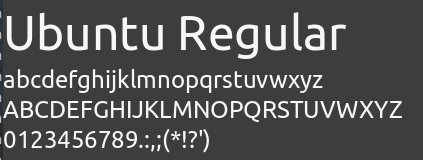
This is Ubuntu font for reference
Feichtmeier
on 9 Sep 2018
Also, colon in Ubuntu font is circular, not squared
clobrano
on 9 Sep 2018
To me, it seems that the shell is using Ubuntu font in the panel, but not in lockscreen's clock, where it falls back to a different font, unless cantarell is installed
clobrano
on 9 Sep 2018
what happens if we remove cantarell from the assigment
Feichtmeier
on 9 Sep 2018
what happens if we remove cantarell from the assigment
the clock keeps the squared colon
clobrano
on 9 Sep 2018
Digits font is exactly Ubuntu. I recognize it everywhere.
eaglersdeveloper
on 9 Sep 2018
Hang on, hang on, hang on. I think I remember something relevant from the #gnome-design irc room; iirc, the clock uses the ratio symbol, and not the colon (since the ratio symbol is designed to be perfectly centered and the colon is not). Can anyone confirm that this is what's happening here, and if so, the ratio symbol in Ubuntu may be squared?
EDIT: Or, more likely, Ubuntu font doesn't have the ratio symbol needed, causing the fallback.
 polyjitter
on 10 Sep 2018
polyjitter
on 10 Sep 2018
I tried to double check what @taciturasa said and it actually seems that Ubuntu font does not have "ratio" symbol (moreover, colon doesn't seem to be squared in Ubuntu, see below).
I think this is a font issue (missing symbol), so we can close it

clobrano
on 13 Sep 2018
We can create a bug report in Ubuntu font repository in Launchpad.
eaglersdeveloper
on 16 Sep 2018
It's true that gnome-shell uses RATIO instead of COLON in default date time formatting.
Rather than propose new symbol or different style in a particular font, I'd suggest try to override the default date time format to replace RATIO with COLON.
There are a number of extensions are able to do this. For me I use Clock Override, and to achieve a style Wed Jan 2 16:19:02 simply typed %a %b %e %H:%M:%S(use colon this time of course).
@taciturasa @eaglersdeveloper @clobrano Thank you guys, the discussion above, especially the RATIO part directly helped with mine theme font problem.
 slimtom95
on 2 Jan 2019
slimtom95
on 2 Jan 2019
I'd suggest try to override the default date time format to replace RATIO with COLON
This is out of the scope of this project and gnome has a reason to use ratio instead
clobrano
on 2 Jan 2019
Related issues
 mivoligo
·
3Comments
mivoligo
·
3Comments
 madsrh
·
3Comments
madsrh
·
3Comments
 pojntfx
·
3Comments
pojntfx
·
3Comments
 snydox
·
3Comments
snydox
·
3Comments
 chrisjbillington
·
3Comments
chrisjbillington
·
3Comments