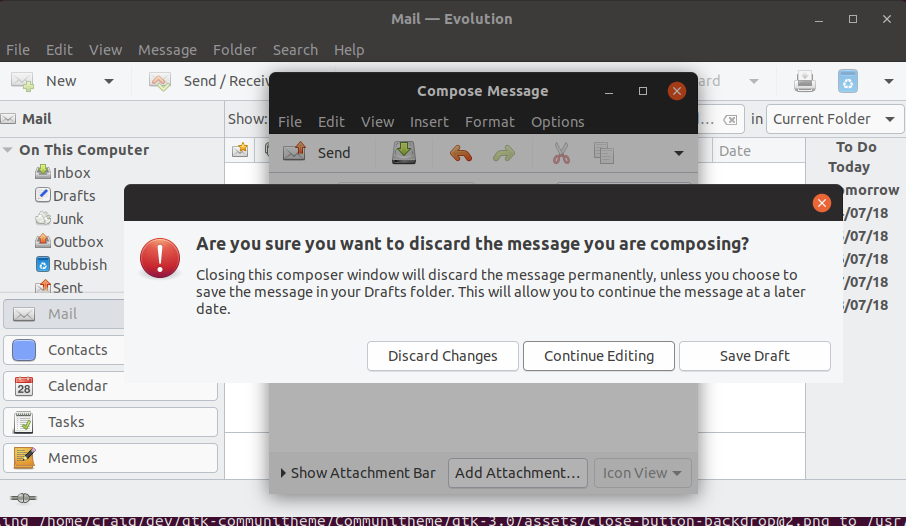
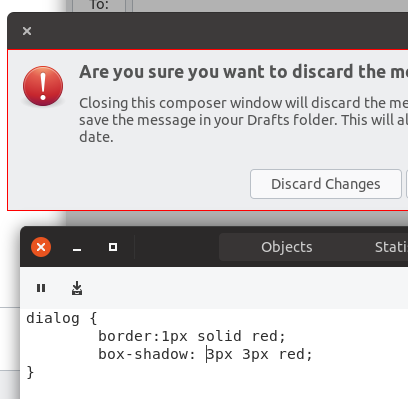
As can be seen in the following screenshot, the confirmation dialog has no shadow. Which is OK when the message window (its parent) is larger then it, but looks odd otherwise. Perhaps a slight shadow should always be added to these?
 CDrummond
All 17 comments
Nice catch! That would be awkward to ship!
 Feichtmeier
on 2 Jul 2018
Feichtmeier
on 2 Jul 2018
@madsrh Not sure why you have tagged this gtk2-theme, evolution is a gtk3 app.
CDrummond
on 2 Jul 2018
@CDrummond maybe because it looks very old school? ;D Just a little joke! :dancer:
Feichtmeier
on 2 Jul 2018
Not sure we can do much with css here. I did fix another type of modaldialog today (so no wasted time :D)
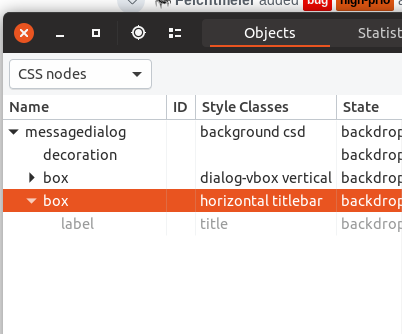
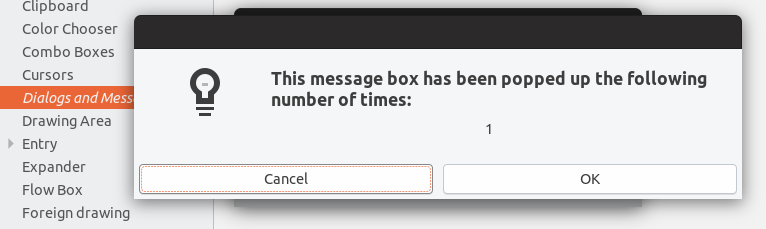
but this one seems different. Its root is called dialog only, but it's not THE window, but a child of it, so I cannot get control of the whole window decoration
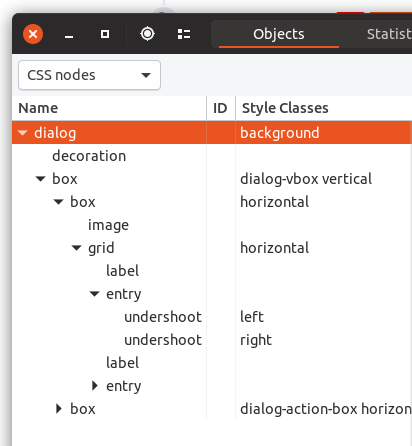
as you can see I can add a border, but the box-shadow does nothing since it is not the main/root widget
 clobrano
on 8 Jul 2018
clobrano
on 8 Jul 2018
Yeah, adding a border here might be the best that can be done. Ambiance has no shadow, or border, and Adwaita has no shadow.
CDrummond
on 9 Jul 2018
I haven't thought about adding a border, I'll check the effect later
clobrano
on 9 Jul 2018
Hi @clobrano @CDrummond
See this thread here https://github.com/horst3180/arc-theme/issues/8
Maybe you'll get an idea how to go about it.
 Paz-it
on 10 Jul 2018
Paz-it
on 10 Jul 2018
Unfortunately what suggested in the thread mentioned by @Paz-it is what I did for modal-dialog, but did not work for dialog. However, I just observed the following:
This is "normal" dialog window
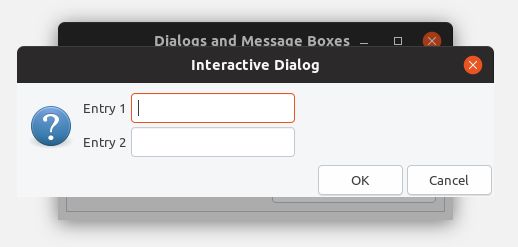
This is the same window after a Xorg restart (ALT-r)
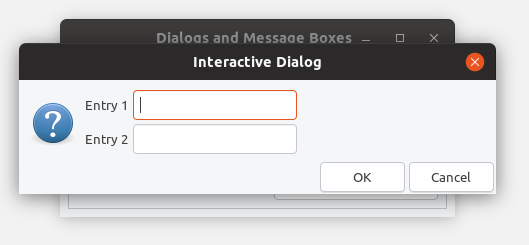
it looks like something is wrong here
EDIT: instead, the modal-dialog is exactly the same in both cases, this is because it actually lacks of the shadow definition, but I can fix that in a next PR
clobrano
on 11 Jul 2018
@clobrano ... Maybe?
messagedialog.csd decoration {
- border -radius 4px
box-shadow: 0 8px 8px rgba(0, 0, 0, 0.26),0 0 0 1px rgba(0, 0, 0, 0.18);} ---/// just to test - the values can be changed.
Paz-it
on 11 Jul 2018
@clobrano is there any relation to the "big" gtk dialogue change that was made several months ago? Or is it a gtk2 dialogue?
Feichtmeier
on 11 Jul 2018
@Paz-it thank you, but that is for message dialog, which as said is fixable. message-dialog and dialog are different things
@Feichtmeier they are both gtk3 dialogs. I am using gtk3-demo from gtk-3-example package that shows also the source code of the example
clobrano
on 11 Jul 2018
@Feichtmeier gave me an idea, can it be Gnome-shell related dialog? :thinking: ...
Paz-it
on 12 Jul 2018
@Paz-it no. I think it's also fixed with that PR :D
Feichtmeier
on 12 Jul 2018
The dialog comes from the window, so no shell. I am going to ask upstream if there is something they can do about this gtk-dialog
clobrano
on 12 Jul 2018
How can this be closed? Dialog as shown in original message still does not have a shadow.
To recreate:
- Start evolution - press 'cancel' at the welcome dialog (
- Start to compose a new message - text in subject or body
- Close editor dialog - warning should now be shown
CDrummond
on 13 Jul 2018
@CDrummond this has been closed automatically when PR has been merged, but if you go through the messages I said I will ask upstream why restarting the shell draws the shadows below the window.
My understanding is that if it was a communitheme issue, redraw should not change anything
clobrano
on 13 Jul 2018
@clobrano fair point! Sorry, I should have read the PR more closely :-( And I can confirm restarting the shell does produce a shadow.
CDrummond
on 13 Jul 2018
Related issues
 snydox
·
3Comments
Feichtmeier
·
3Comments
Feichtmeier
·
3Comments
snydox
·
3Comments
Feichtmeier
·
3Comments
Feichtmeier
·
3Comments
 mivoligo
·
3Comments
Feichtmeier
·
3Comments
mivoligo
·
3Comments
Feichtmeier
·
3Comments
Most helpful comment
Unfortunately what suggested in the thread mentioned by @Paz-it is what I did for modal-dialog, but did not work for dialog. However, I just observed the following:
This is "normal" dialog window

This is the same window after a Xorg restart (ALT-r)

it looks like something is wrong here
EDIT: instead, the modal-dialog is exactly the same in both cases, this is because it actually lacks of the shadow definition, but I can fix that in a next PR