Yaru: Issue with window corners in Firefox without titlebar
 jim3872
All 30 comments
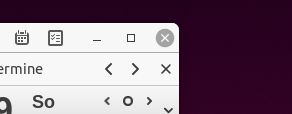
With the new version of firefox you can remove the title bar. This causes issue with the window corners

jim3872
on 19 Feb 2018
@jim3872 Thanks for reporting this issue. Do you know if this issue applies to other GTK themes as well, like this bug?
 madsrh
on 19 Feb 2018
madsrh
on 19 Feb 2018
It does it too with united-Ubuntu-darker which has a similar title bar with the rounded corners. Square cornered themes look OK to me.

will check with Pop OS theme since it is also similar
jim3872
on 20 Feb 2018
I changed the title to make it more descriptive
 clobrano
on 21 Feb 2018
clobrano
on 21 Feb 2018
Thanks.
It looks like its ubiquitous with all themes with rounded corners, including the Pop OS theme
jim3872
on 21 Feb 2018
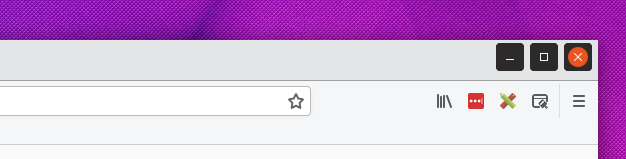
There is also a problem if we use a light theme :
 Huluti
on 10 Mar 2018
Huluti
on 10 Mar 2018
This is a beta feature in nightly builds of Firefox. Any bugs are most likely not caused by this theme which is why I would vote to close this thread. Can be easily reopened if issues remain with stable builds and this theme alone.
Also see omgUbuntu that this are universal issues of Firefox.
 ya-d
on 11 Mar 2018
ya-d
on 11 Mar 2018
As per @ya-d comment, any bug related to nightly/beta builds will be addressed in the future if still present in more stable versions
clobrano
on 12 Mar 2018
Things have changed:
Before:
Today:
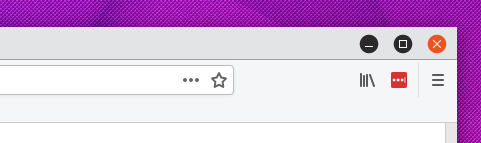
How the buttons are handled? Maybe they have a background color that could be transparent.
Huluti
on 6 May 2018
Hi @Huluti, we are trying this circular buttons, so I think the problem is actually the same as before
clobrano
on 6 May 2018
Hi @clobrano, yes but do there will be a solution to make these buttons looks correct when the headerbar is not dark?
Huluti
on 6 May 2018
Wasn't this a beta feature? How do you enable it?
clobrano
on 6 May 2018
Yes the problem is visible when you enable the light theme and the CSD feature of Firefox Nightly which removes the titlebar. That's why there is no dark headerbar and why the buttons look ugly. It's indeed a "beta" feature but any software without a dark headerbar could be affected.
Huluti
on 6 May 2018
Alright, sorry but I don't have firefox nightly now to test it, I'll try something later this week
clobrano
on 6 May 2018
The problem is that atm the circle is always drawn:
&:not(.close) {
@include draw_circle($c) ;
&:backdrop:hover{@include draw_circle(darken($headerbar_fg_color,50%), $close:true)}
}
When you change it to
&:not(.close) {
&:hover {
@include draw_circle($c) ;
&:backdrop:hover{@include draw_circle(darken($headerbar_fg_color,50%), $close:true)}
}
}
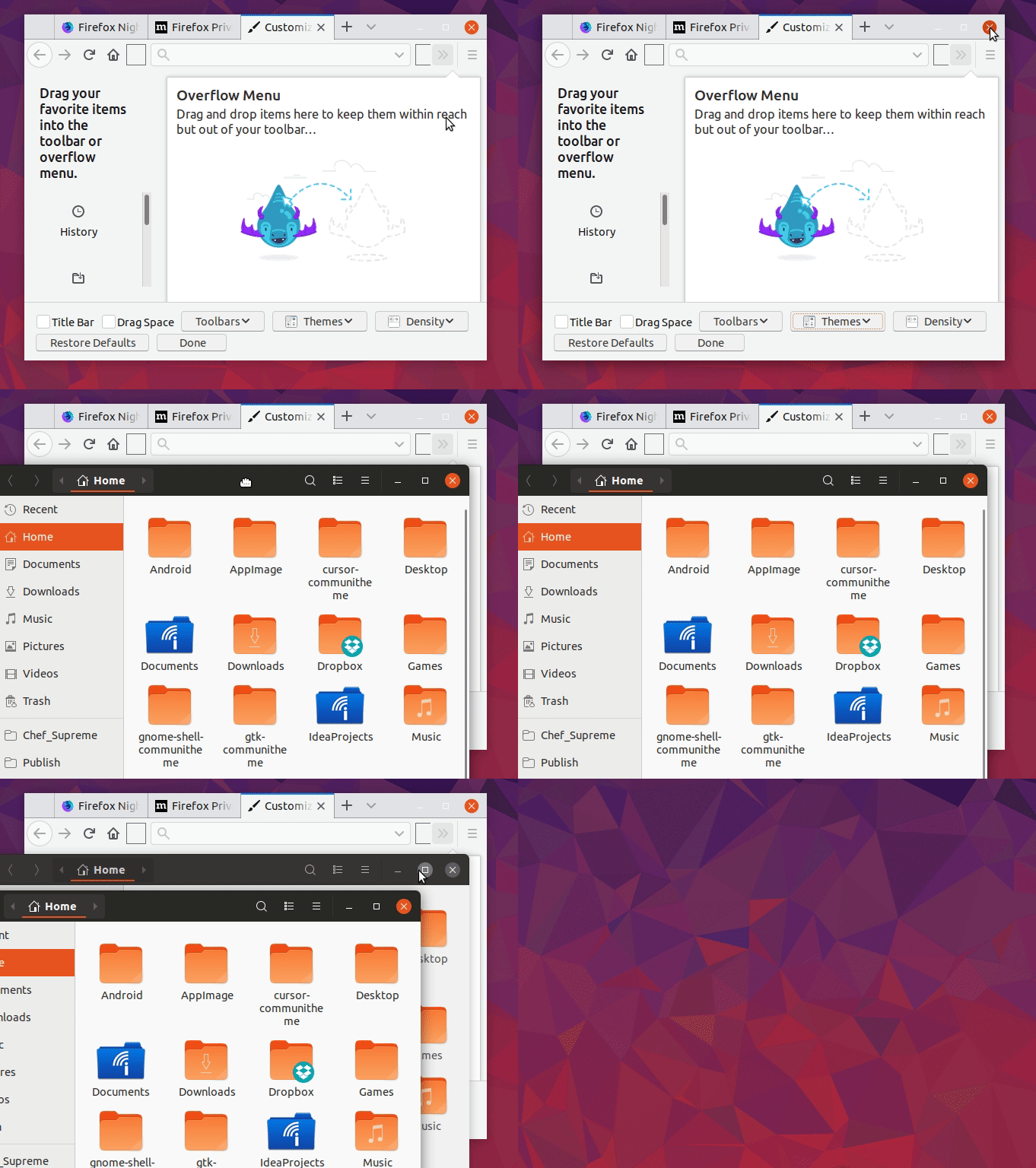
Firefox-nightly looks like this (though you would have to change the whole theme to the firefox "light theme" to reproduce your issue, no idea if we want to got this far with this theme that we support custom skins in firefox, there is a default/light/dark and other custom themes. only the default theme tries to look like the gtk theme):
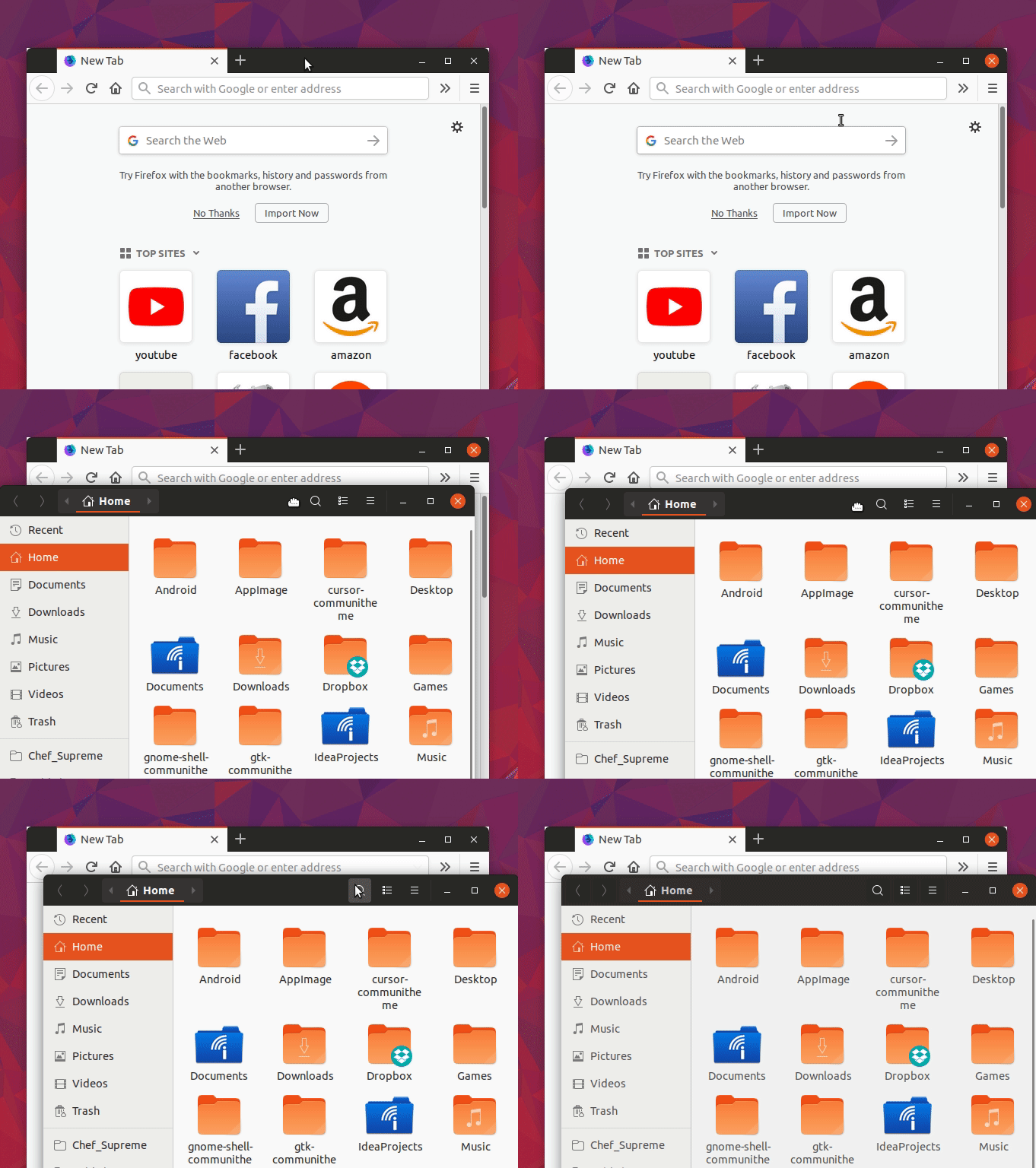
with default theme (just found another issue though, ugly white borders -.- that firefox...):
 Feichtmeier
on 6 May 2018
Feichtmeier
on 6 May 2018
Any updates on this issue ?
 jmaris
on 16 Oct 2018
jmaris
on 16 Oct 2018
We removed the roundness of firefox. I don't know if firefox fixed the issue with the white border bleed :man_shrugging:
If yes, we can remove the custom styling
Feichtmeier
on 16 Oct 2018
Hey, despite the last comment and the issue having been closed this is still happening and has been recently reported to launchpad and confirmed: https://bugs.launchpad.net/ubuntu/+source/firefox/+bug/1828728
Given the importance of firefox in ubuntu, I think this is an important issue.
 memeplex
on 9 Jun 2019
memeplex
on 9 Jun 2019
There might have been a regression in Firefox: https://bugzilla.mozilla.org/show_bug.cgi?id=1408360
memeplex
on 9 Jun 2019
Thanks @memeplex, but the last time we tried our tweak wasn't working anymore. We can try again, but as you saw it's a Firefox issue
clobrano
on 9 Jun 2019
Yes, fair enough, it seems Firefox will have this regression with every odd release :p
memeplex
on 9 Jun 2019
I see Adwaita-dark sets a dark color for the pointy edges, the problem is still there but it's less visible.
memeplex
on 9 Jun 2019
I've informed of the regression in every related closed issue and also opened a new issue https://bugzilla.mozilla.org/show_bug.cgi?id=1558065
memeplex
on 9 Jun 2019
@clobrano https://bugzilla.mozilla.org/show_bug.cgi?id=1408360#c38. What do you think?
memeplex
on 15 Sep 2019
Hi @memeplex, thanks for reporting the status. I replied directly on bugzilla, since I can reproduce the bug on latest Firefox with Fedora
clobrano
on 15 Sep 2019
Found that layers.acceleration.force-enabled in about:config removes the white corners (for me) and also shows content with more than 60 FPS too
 phaitonican
on 21 Sep 2019
phaitonican
on 21 Sep 2019
Indeed! Thanks for letting us know.
I don't know what this means, but I can report it on the original Firefox
ticket, thanks
On Sat, 21 Sep 2019 at 23:28, phaitonican notifications@github.com wrote:
Found that layers.acceleration.force-enabled in about:config removes the
white corners (for me) and also shows content with more than 60 FPS too—
You are receiving this because you were mentioned.
Reply to this email directly, view it on GitHub
https://github.com/ubuntu/yaru/issues/179?email_source=notifications&email_token=AAWAAHQ42T5A6XT4YK65Z5DQK2GZNA5CNFSM4ERK5US2YY3PNVWWK3TUL52HS4DFVREXG43VMVBW63LNMVXHJKTDN5WW2ZLOORPWSZGOD7IZ66Q#issuecomment-533831546,
or mute the thread
https://github.com/notifications/unsubscribe-auth/AAWAAHWDJ2B35KVTEHJ3FNDQK2GZNANCNFSM4ERK5USQ
.
clobrano
on 22 Sep 2019
Found that
layers.acceleration.force-enabledinabout:configremoves the white corners (for me) and also shows content with more than 60 FPS too
Thank you, thank you! Have been looking for this for ages.
 ghost
on 14 Jan 2020
ghost
on 14 Jan 2020
Just gonna add that setting gfx.webrender.all = true took care of the issue for me.
 pkulak
on 8 Feb 2020
pkulak
on 8 Feb 2020
Found that
layers.acceleration.force-enabledinabout:configremoves the white corners (for me) and also shows content with more than 60 FPS tooThank you, thank you! Have been looking for this for ages.
wow this worked! @didrocks
Feichtmeier
on 9 Feb 2020
Related issues
 matthewpaulthomas
·
3Comments
Feichtmeier
·
3Comments
madsrh
·
3Comments
madsrh
·
3Comments
matthewpaulthomas
·
3Comments
matthewpaulthomas
·
3Comments
Feichtmeier
·
3Comments
madsrh
·
3Comments
madsrh
·
3Comments
matthewpaulthomas
·
3Comments
Most helpful comment
Found that
layers.acceleration.force-enabledinabout:configremoves the white corners (for me) and also shows content with more than 60 FPS too