Xrdp: Drive redirection does not work
I can´t redirect drives, even using the ./configure --enable-fuse command. I've tried all the branchs of neutrinolabs/xrdp, and installing in various Debian and Ubuntu distros. The clipboard files works perfectly in both ways, but the drive redirection looks simply does not exist, despite the thinclient_drive folder always appear. What can I be missing?
 entercloudbr
All 11 comments
What client are you using?
Do you know how to run xrdp and xrdp-sesman in foreground?
You can see more output and maybe the fail.
 jsorg71
on 27 Jan 2016
jsorg71
on 27 Jan 2016
I'm using the Remote Desktop Connection client of Windows 10, for access a Kubuntu 15.10 as my last attempt. The only thing that appears in the thinclient_drive is a oculted ".clipboard" folder.
entercloudbr
on 27 Jan 2016
I'm having similar problem on ubuntu 15.10 with X11rdp, windows 10 remote desktop client. In my case thinclient_drive was not even created. Output of xrdp-sesman -ns and xrdp -ns attached as xrdp-logs.zip, created by running script -f LOGFILE_NAME and then executing those commands, on two scenarios:
- package from master:
thinclient_drivenot created, drive redirection does not work - package from ppa
https://code.launchpad.net/~kxteam/+archive/ubuntu/daily:xrdp_clientcreated, drive redirection works
On both cases a clean environment was used (apt-get purge xrdp, rm -rf /etc/xrdp), and rsakeys created manually after installation (xrdp-keygen xrdp /etc/xrdp/rsakeys.ini)
I tried using /etc/xrdp from the ppa on master installation (in case it was a config issue), same result: drive redirection does not work on master.
A simple grep does not show significant difference in the log files. Is there anything particular I should be looking for?
# egrep -i "fail|err|fuse|drive|redirect|rdpdr|chansrv" *.log
sesman-master.log:chansrv::main: using log file [/home/588886054/xrdp-chansrv.log]
sesman-master.log:process_message_channel_setup: chan name 'rdpdr' id 0 flags 00000000
sesman-master.log:xrdp-chansrv [3225452964]: xcommon_init: connected to display ok
sesman-master.log:xrdp-chansrv [3225452967]: sound_init:
sesman-master.log:xrdp-chansrv [3225453145]: drdynvc_process_capability_response: DVC version 3 selected
sesman-master.log:[3225453145]: CLIPBOARD  clipboard_data_in: 1668 : ERROR: clipboard_data_in: unknown clip_msg_id 6
sesman-master.log:xrdp-chansrv [3225453199]: scard_init:
sesman-master.log:chansrv:smartcard_pcsc [3225453200]: scard_pcsc_init:
sesman-master.log:rdpDeferredUpdateCallback: skipping
sesman-master.log:xrdp-sessvc: WM is dead (waitpid said 26878, errno is 0) exiting...
sesman-master.log:xrdp-chansrv [3225475351]: scard_deinit:
sesman-master.log:chansrv:smartcard_pcsc [3225475351]: scard_pcsc_deinit:
sesman-ppa.log:chansrv::main: using log file [/home/588886054/xrdp-chansrv.log]
sesman-ppa.log:process_message_channel_setup: chan name 'rdpdr' id 0 flags 00000000
sesman-ppa.log:xrdp-chansrv [3225824737]: child_signal_handler:
sesman-ppa.log:xrdp-chansrv [3225824738]: child_signal_handler: child pid -1
sesman-ppa.log:xrdp-chansrv [3225824740]: xcommon_init: connected to display ok
sesman-ppa.log:xrdp-chansrv [3225824741]: sound_init:
sesman-ppa.log:[3225824809]: CLIPBOARD  clipboard_data_in: 1665 : ERROR: clipboard_data_in: unknown clip_msg_id 6
sesman-ppa.log:xrdp-chansrv [3225824910]: drdynvc_process_capability_response: DVC version 3 selected
sesman-ppa.log:xrdp-chansrv [3225824947]: scard_init:
sesman-ppa.log:chansrv:smartcard_pcsc [3225824947]: scard_pcsc_init:
sesman-ppa.log:rdpDeferredUpdateCallback: skipping
sesman-ppa.log:rdpDeferredUpdateCallback: skipping
sesman-ppa.log:xrdp-sessvc: WM is dead (waitpid said 31207, errno is 0) exiting...
sesman-ppa.log:rdpDeferredUpdateCallback: skipping
sesman-ppa.log:xrdp-chansrv [3225835503]: child_signal_handler:
sesman-ppa.log:xrdp-chansrv [3225835503]: child_signal_handler: child pid -1
sesman-ppa.log:xrdp-chansrv [3225835503]: scard_deinit:
sesman-ppa.log:chansrv:smartcard_pcsc [3225835503]: scard_pcsc_deinit:
xrdp-master.log:[20160208-16:39:59] [DEBUG] xrdp_mm_connect_chansrv: chansrvconnect successful
xrdp-master.log:[20160208-16:39:59] [INFO ] The following channel is allowed: rdpdr (0)
xrdp-master.log:[20160208-16:40:21] [ERROR] Listening socket is in wrong state we terminate listener
xrdp-ppa.log:xrdp_process_main_loop: libxrdp_process_incomming failed
xrdp-ppa.log:error unknown xrdp_sec_process_mcs_data tag 0xc006 size 8
xrdp-ppa.log:error unknown xrdp_sec_process_mcs_data tag 0xc00a size 8
xrdp-ppa.log:[20160208-16:46:10] [DEBUG] xrdp_mm_connect_chansrv: chansrvconnect successful
xrdp-ppa.log:[20160208-16:46:10] [INFO ] The following channel is allowed: rdpdr (0)
 fajarnugraha
on 8 Feb 2016
fajarnugraha
on 8 Feb 2016
@fajarnugraha, could you make a simple tutorial for my Ubuntu MATE 15.10 32-bits (Kubuntu is out of my project by now) redirect drives correctly, assuming that I already have a clean install???
entercloudbr
on 8 Feb 2016
@lorenzoverbicaro : try #312
fajarnugraha
on 8 Feb 2016
After further testing, and comparing it with https://github.com/metalefty/X11RDP-RH-Matic (which provides working drive redirection on centos 6), it seems that the issue is partly due to X11rdp-o-matic.sh
# ./X11rdp-o-matic.sh --justdoit --nox11rdp --noinstall
Okay, will just do the install from start to finish with no user interaction...
----------------------------------------------------------------------
Will not build and package x11rdp
----------------------------------------------------------------------
Will not install anything on the system but will build the packages
----------------------------------------------------------------------
Using the following xrdp configuration : --prefix=/usr --sysconfdir=/etc --localstatedir=/var --enable-fuse
----------------------------------------------------------------------
Debian package version number will be : 0.9.0+master
----------------------------------------------------------------------
Waiting 5 seconds. Press CTRL+C to abort
It's suppose to enable fuse, but the resulting xrdp-0.9.0+master/debian/rules does not enable it
...
# main packaging script based on dh7 syntax
%:
        dh $@  --with autotools-dev

# dh_make generated override targets
# This is example for Cmake (See https://bugs.debian.org/641051 )
#override_dh_auto_configure:
#       dh_auto_configure -- \
#       -DCMAKE_LIBRARY_PATH=$(DEB_HOST_MULTIARCH)
...
So I use a custom debian/rules, and now it works
...
%:
    dh $@

override_dh_auto_configure: patch
    ./bootstrap
    dh_auto_configure -- \
    --enable-fuse --enable-jpeg
...
Full tree and build instructions on https://github.com/ubuntu-xrdp/xrdp , which also includes startup script fix for ubuntu
fajarnugraha
on 9 Feb 2016
Reposting my comment from issue #312
Things that helped me get drive redirection working.
1). Make sure the linux user is a member of the following groups. fuse, tsusers
2) Make sure the windows rdp client is configured properly by unchecking printers and smart cards. Anything but clipboard and drives breaks the system for some reason.
I guess it would be appropriate to create a new bug stating if "Printers" is selected from the RDP Client, drive redirection breaks.
 therevoman
on 17 Feb 2016
therevoman
on 17 Feb 2016
i'm experiencing this as well
Ubuntu 18.04.1 LTS
XRDP v0.9.5
Microsoft Remote Desktop Client (for mac) v10.2.2
upon signing in via RDP, i see a thinclient_drives entry in the Files GUI but it doesn't work:
ls -a /home/me/thinclient_drives
ls: cannot access '/home/me/thinclient_drives': Transport endpoint is not connected
checking XRDP status:
systemctl status xrdp
● xrdp.service - xrdp daemon
   Loaded: loaded (/lib/systemd/system/xrdp.service; enabled; vendor preset: enabled)
   Active: active (running) since Fri 2018-11-02 10:25:24 PDT; 1h 33min ago
     Docs: man:xrdp(8)
           man:xrdp.ini(5)
 Main PID: 2731 (xrdp)
    Tasks: 2 (limit: 4915)
   CGroup: /system.slice/xrdp.service
           ├─2731 /usr/sbin/xrdp
           └─9171 /usr/sbin/xrdp

Nov 02 10:58:16 me-nuc xrdp[9171]: (9171)(140256312317760)[DEBUG] xrdp_wm_log_msg: started connecting
Nov 02 10:58:17 me-nuc xrdp[9171]: (9171)(140256312317760)[INFO ] lib_mod_log_peer: xrdp_pid=9171 connected to X11rdp_pid=9174 X11r
Nov 02 10:58:17 me-nuc xrdp[9171]: (9171)(140256312317760)[DEBUG] xrdp_wm_log_msg: connected ok
Nov 02 10:58:17 me-nuc xrdp[9171]: (9171)(140256312317760)[DEBUG] xrdp_mm_connect_chansrv: chansrv connect successful
Nov 02 10:58:17 me-nuc xrdp[9171]: (9171)(140256312317760)[DEBUG] Closed socket 16 (AF_INET6 ::1 port 49544)
Nov 02 10:58:17 me-nuc xrdp[9171]: (9171)(140256312317760)[INFO ] The following channel is allowed: rdpdr (0)
Nov 02 10:58:17 me-nuc xrdp[9171]: (9171)(140256312317760)[INFO ] The following channel is allowed: rdpsnd (1)
Nov 02 10:58:17 me-nuc xrdp[9171]: (9171)(140256312317760)[INFO ] The following channel is allowed: cliprdr (2)
Nov 02 10:58:17 me-nuc xrdp[9171]: (9171)(140256312317760)[INFO ] The following channel is allowed: drdynvc (3)
Nov 02 10:58:17 me-nuc xrdp[9171]: (9171)(140256312317760)[DEBUG] The allow channel list now initialized for this session
copy+paste works fine both ways. printer and smart card support is unchecked in my RDP client.
fuse appears to be available but i do not have fuse or tsusers groups (nor do they exist on the system).
ls -al /dev/fuse
crw-rw-rw- 1 root root 10, 229 Nov  2 10:09 /dev/fuse
groups
me adm cdrom sudo dip plugdev lpadmin sambashare
any suggestions you could send my way, would be much appreciated :pray::+1:
 busticated
on 2 Nov 2018
busticated
on 2 Nov 2018
Works for me. I built my own packages though.
https://github.com/ubuntu-pkg/xrdp/blob/ubuntu-devel/UBUNTU-BUILD.md
https://github.com/ubuntu-pkg/xrdp/releases
https://github.com/ubuntu-pkg/xorgxrdp/releases
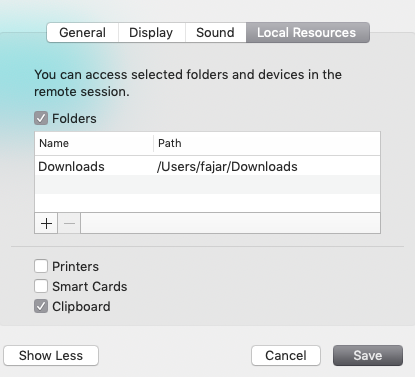
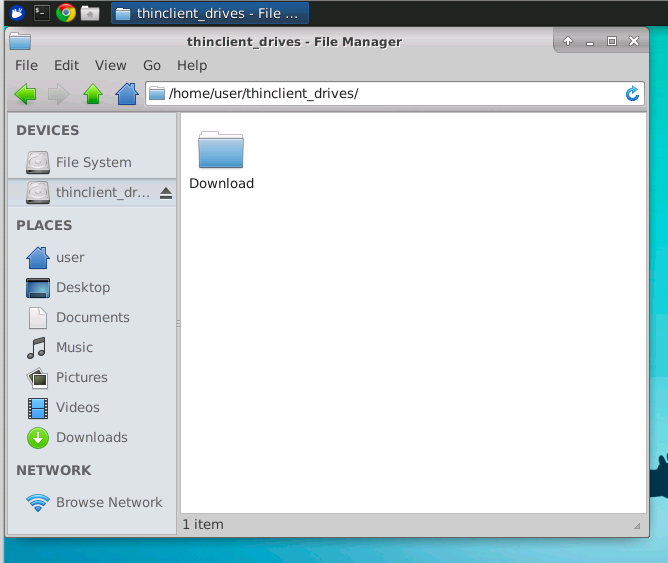
MS RDP 10.2.2 for mac
fajarnugraha
on 2 Nov 2018
lol. i rebooted and now it works. 🤦♂️ 👍
busticated
on 3 Nov 2018
there was probably some unmounting error on your last session. Next time something like this happens, I believe you can run (as root)
fusermount -u /home/me/thinclient_drives
fajarnugraha
on 3 Nov 2018
Related issues
 eduardolucioac
·
3Comments
jsorg71
·
7Comments
eduardolucioac
·
3Comments
jsorg71
·
7Comments
 donkey
·
6Comments
donkey
·
6Comments
 fpemud
·
8Comments
fpemud
·
8Comments
 Vraiment
·
6Comments
Vraiment
·
6Comments
Most helpful comment
Reposting my comment from issue #312
Things that helped me get drive redirection working.
1). Make sure the linux user is a member of the following groups. fuse, tsusers
2) Make sure the windows rdp client is configured properly by unchecking printers and smart cards. Anything but clipboard and drives breaks the system for some reason.
I guess it would be appropriate to create a new bug stating if "Printers" is selected from the RDP Client, drive redirection breaks.