The bottom bar that reports what an import script is doing at a certain moment and also displays links when I hover over them slowly gets overwritten with a a white zone. This zone increases if I switch tabs after a certain period of time. Quickly switching back and forth doesnt do anything. Logging out by leaving the machine unattended and logging in later also increases this zone.
 EnforcerE
All 7 comments
Hi! Thanks for the interest in XOWA!
The bottom bar that reports what an import script is doing at a certain moment and also displays links when I hover over them slowly gets overwritten with a a white zone. This zone increases if I switch tabs after a certain period of time. Quickly switching back and forth doesnt do anything. Logging out by leaving the machine unattended and logging in later also increases this zone.
Hmm. I wasn't able to reproduce this. Can you try my steps below and let me know what else I should be doing? Or can you post a screenshot with the increasing white zone. Thanks!
- Went to home/wiki/Dashboard/Import/Online
- Clicked
downloadnext tosimple.wikipedia.org - While the wiki was downloading
- Went to home/wiki/Help/Contents and hovered over links
- Opened up other tabs in home and switched back and forth
The status bar at the bottom still showed messages without any increased white zone
 gnosygnu
on 29 Jul 2020
gnosygnu
on 29 Jul 2020
Yes, I reported it too in #770
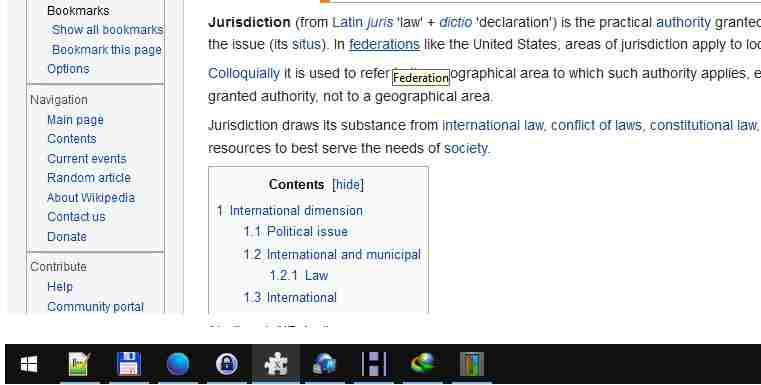
Here is it again appearing after I keep app for long time in background and after I resumed laptop from sleep.
Eventually I have to exit app and start it again just to for example see download progress for images, because looks like I won't be downloading whole image databases but of only few articles manually.
As for text disappearing even when xowa app is freshly started, when still all text in status bar is visible, that is correct too.
What we mean when we say it is disappearing is that it only disappears if last text of progress in status bar not changing in long time. For example when one big file is downloading of background images, and as long as next image did not start downloading, and we put cursor on some link, then previous text won't reappear no matter what. It only reappears when next image starts downloading, or during displaying of fast changes of text and numbers during import, but during slow phases of import where nothing changes for a long time, we can't get text back. Meaning, it only reappears only when it changes (e.g. if it disappeared when image 5 of 10 was downloading, it will reappear only when image 6 of 10 starts downloading).
Don't get confused, these are two separate issues. One is text disappearing because of white space taking over, when app is long time in background, when switching apps, when app moves into page file, when pc is in sleep, and this may be difficult to reproduce. Another issue is text changing it's content to last action or cursor position, and only changing it back to last import or download action IF PROGRESS TEXT CHANGES (like from downloading image 1 of 2 to downloading image 2 of 2)
Here is today's screenshot:
 ghost
on 29 Jul 2020
ghost
on 29 Jul 2020
I would like to add my pennies as well
I use a Windows 10 machine
If I start xowa-gui and hover over a link
for example
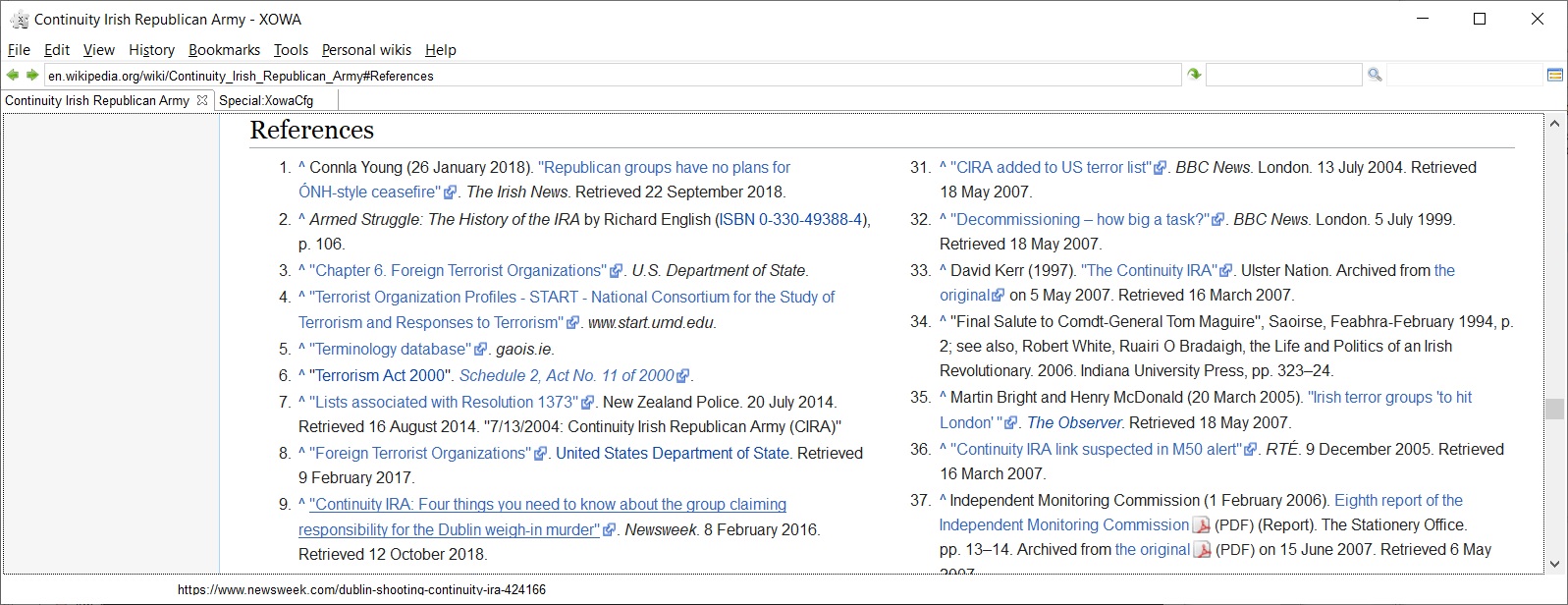
Although my cursor is not shown, I am hovering over reference 9
the link is https://www.newsweek.com/dublin-shooting-continuity-ira-424166
Even with this fresh start, looking closely at the status bar the letters that have descenders (that is p, g and y) are already trimmed - the bottom part of these letters are covered (by white)
If I now maximise and then restore the window and again hover over reference 9 - a little bit is trimmed
I have repeated this process (maximising and restoring) five times
this is the result

It seems the position of the status bar is slowly moving down
I suspect that login on a few times will have the same effect
 desb42
on 29 Jul 2020
desb42
on 29 Jul 2020
Cool. Thanks for the feedback @NijazM and @desb42 !
The problem is related to SWT (the UI toolkit) and its limited customization options. In this case, I'm trying to center a text box inside another one (to get a border-less text box if I remember correctly) and the resizes are throwing off my calcs.
I'll spend an hour to look at it this weekend to see if it can be fixed. However, given problems like #24, I don't have high hopes
gnosygnu
on 30 Jul 2020
I would also like to add that the ctrl+f search function is also affected by this (the black bar on the bottom is my desktop).

EnforcerE
on 30 Jul 2020
@EnforcerE : Yup, point noted. Same bug for both. Thanks!
gnosygnu
on 31 Jul 2020
I spent a few hours over the weekend, and couldn't find an easy fix. I think at this point, I need to change the find bar / progress bar to use a plain SWT Text box instead of the custom widget with border/margin. This will make the UI a bit ugly, but it's better than being buggy.
Will try again this week.
Other developer notes below.
- desb42@'s steps of restoring / maximizing window work best for reproducing (strangely, it doesn't reproduce find box)
- Problem is here, as for some reason, the
outer's y-coordinate keeps drifting down by 1 pixel: https://github.com/gnosygnu/xowa/blob/341d2e13a43bb91e40b0c0204a750a5f56780a26/150_gfui/src/gplx/gfui/kits/swts/Swt_core__frames.java#L42 - Have tried creating a different custom textBox with border/margin using
paintControl, but the caret behavior requires a lot of extra code
gnosygnu
on 3 Aug 2020
Related issues
 Ope30
·
3Comments
Ope30
·
5Comments
Ope30
·
4Comments
Ope30
·
8Comments
gnosygnu
·
10Comments
Ope30
·
3Comments
Ope30
·
5Comments
Ope30
·
4Comments
Ope30
·
8Comments
gnosygnu
·
10Comments
Most helpful comment
I would like to add my pennies as well
I use a Windows 10 machine
If I start xowa-gui and hover over a link

for example
Although my cursor is not shown, I am hovering over reference 9
the link is
https://www.newsweek.com/dublin-shooting-continuity-ira-424166Even with this fresh start, looking closely at the status bar the letters that have descenders (that is
p,gandy) are already trimmed - the bottom part of these letters are covered (by white)If I now maximise and then restore the window and again hover over reference 9 - a little bit is trimmed

I have repeated this process (maximising and restoring) five times
this is the result
It seems the position of the status bar is slowly moving down
I suspect that login on a few times will have the same effect