Xmrig: How to optimize 2X Xeon system (32 threads)
How should I setup the 2 CPU Intel Xeon E5-2670 system for maximum performance?
I'm getting 800 H/s on default settings.
CPU Properties
CPU Type    2x OctalCore Intel Xeon E5-2670, 2800 MHz (28 x 100)
CPU Alias   Sandy Bridge-EP
CPU Stepping    C2
Instruction Set x86, x86-64, MMX, SSE, SSE2, SSE3, SSSE3, SSE4.1, SSE4.2, AVX, AES
Original Clock  2600 MHz
Min / Max CPU Multiplier    12x / 26x
Engineering Sample  No
L1 Code Cache   32 KB per core
L1 Data Cache   32 KB per core
L2 Cache    256 KB per core  (On-Die, ECC, Full-Speed)
L3 Cache    20 MB  (On-Die, ECC, Full-Speed)
 difunktor
All 47 comments
I'm having exactly the same CPU in dual socket setup.
First, you have to set large pages:
echo always | sudo tee /sys/kernel/mm/transparent_hugepage/enabled
sudo sysctl -w vm.nr_hugepages=128
next, use this config to get around 940H/s
{
    "algo": "cryptonight",  // cryptonight (default) or cryptonight-lite
    "av": 0,                // algorithm variation, 0 auto select
    "background": false,    // true to run the miner in the background
    "colors": true,         // false to disable colored output
    "cpu-affinity": "0xFFFFF",   // set process affinity to CPU core(s), mask "0x3" for cores 0 and 1
    "cpu-priority": 5,   // set process priority (0 idle, 2 normal to 5 highest)
    "donate-level": 2,      // donate level, mininum 1%
    "log-file": null,       // log all output to a file, example: "c:/some/path/xmrig.log"
    "max-cpu-usage": 99,    // maximum CPU usage for automatic mode, usually limiting factor is CPU cache not this option.
    "print-time": 30,       // print hashrate report every N seconds
    "retries": 3,           // number of times to retry before switch to backup server
    "retry-pause": 10,      // time to pause between retries
    "safe": false,          // true to safe adjust threads and av settings for current CPU
    "threads": null,        // number of miner threads
    "pools": [
        {
            "url": "",   // URL of mining server
            "user": "",                        // username for mining server
            "pass": "x",                       // password for mining server
            "keepalive": true,                 // send keepalived for prevent timeout (need pool support)
            "nicehash": false                  // enable nicehash/xmrig-proxy support
        }
    ],
    "api": {
        "port": 0,                             // port for the miner API https://github.com/xmrig/xmrig/wiki/API
        "access-token": null,                  // access token for API
        "worker-id": null                      // custom worker-id for API
    }
}
a line of logs from my system:
Dec 18 15:20:45 xmrig xmrig[3632]: [2017-12-18 15:20:45] speed 2.5s/60s/15m 937.5 936.4 936.1 H/s max: 948.5 H/s
For maximum performance you shouldn't do anything on this system, except mining.
Hope this helps.
 podwhitehawk
on 18 Dec 2017
podwhitehawk
on 18 Dec 2017
im not getting anything close to those numbers on my dual 2670's using this config. Only about 350-390H/s
 Burksdb
on 7 Jan 2018
Burksdb
on 7 Jan 2018
you won't get 900H/s+ unless it's your own dedicated\baremetal system with no load on it.
podwhitehawk
on 7 Jan 2018
Do you have an idea, what cpu-affinity should look like on Dual CPU Intel Xeon E5620? Each one have 4 cores (8 threads). I've been running one instance of xmrig with 12 threads, so far best I can get from it is 326 H/s, on dedicated server machine.
 curious0101
on 10 Feb 2018
curious0101
on 10 Feb 2018
are you running it on linux too?
podwhitehawk
on 10 Feb 2018
Yes
On 10 Feb 2018 8:04 a.m., "SiruS" notifications@github.com wrote:
are you running linux too?
—
You are receiving this because you commented.
Reply to this email directly, view it on GitHub
https://github.com/xmrig/xmrig/issues/240#issuecomment-364634487, or mute
the thread
https://github.com/notifications/unsubscribe-auth/ABkfOQe_n1xf-btI8TuuWunur3EYNes2ks5tTU2RgaJpZM4Q2TR5
.
curious0101
on 10 Feb 2018
try to use "0xFFF", this way you'll pin to first 8 real cores + next 4 HT cores.
podwhitehawk
on 10 Feb 2018
I compiled my own xmrig last night, and enabled huge pages in Linux. So I went up from 326H/s to 380 H/s. All on null affinity.
Then I tried affinity 0xFFF. Hashrate dropped back to 361 H/s. Below result from htop with 0xFFF:

Looks like, half of second physical CPU is not being used. Instead, first 12 cores are being used (which would be all first CPU cores and 4 second CPU cores?).
Please note, I have some other tasks running in the background sometimes (single threaded programs). But Max hashrate figure will tell the truth.
Below is load with null affinity, 380H/s max:

And here output from xmrig miner, first running with 0xFFF, then I restarted it with null:
`[2018-02-10 10:07:30] speed 2.5s/60s/15m 330.5 309.7 307.6 H/s max: 361.5 H/s
[2018-02-10 10:08:30] speed 2.5s/60s/15m 235.7 313.1 306.7 H/s max: 361.5 H/s
[2018-02-10 10:08:36] new job from cryptonight.eu.nicehash.com:3355 diff 200007
[2018-02-10 10:09:20] new job from cryptonight.eu.nicehash.com:3355 diff 200007
[2018-02-10 10:09:30] speed 2.5s/60s/15m 277.6 284.5 304.2 H/s max: 361.5 H/s
[2018-02-10 10:09:47] Ctrl+C received, exiting
[2018-02-10 10:09:47] no active pools, stop mining
nv04@nv04 ~/xmrig/build $ ./xmrig
- VERSIONS: XMRig/2.4.4 libuv/1.8.0 gcc/5.4.0
- HUGE PAGES: available, enabled
- CPU: Intel(R) Xeon(R) CPU E5620 @ 2.40GHz (2) x64 AES-NI
- CPU L2/L3: 4.0 MB/24.0 MB
- THREADS: 12, cryptonight, av=1, donate=5%
- POOL #1: cryptonight.eu.nicehash.com:3355
- COMMANDS: hashrate, pause, resume
[2018-02-10 10:09:48] use pool cryptonight.eu.nicehash.com:3355 159.8.13.248
[2018-02-10 10:09:48] new job from cryptonight.eu.nicehash.com:3355 diff 200007
[2018-02-10 10:10:07] new job from cryptonight.eu.nicehash.com:3355 diff 200007
[2018-02-10 10:10:21] new job from cryptonight.eu.nicehash.com:3355 diff 200007
[2018-02-10 10:10:47] new job from cryptonight.eu.nicehash.com:3355 diff 200007
[2018-02-10 10:10:52] speed 2.5s/60s/15m 371.9 359.9 n/a H/s max: 369.6 H/s
[2018-02-10 10:11:28] new job from cryptonight.eu.nicehash.com:3355 diff 200007
[2018-02-10 10:11:52] speed 2.5s/60s/15m 377.7 375.0 n/a H/s max: 379.0 H/s
[2018-02-10 10:12:07] new job from cryptonight.eu.nicehash.com:3355 diff 200007
[2018-02-10 10:12:47] new job from cryptonight.eu.nicehash.com:3355 diff 200007
[2018-02-10 10:12:52] speed 2.5s/60s/15m 378.6 375.7 n/a H/s max: 379.0 H/s
`
curious0101
on 10 Feb 2018
my bad, I've made a mistake counting real and HT cores.
so in linux, real cores are lower numbers followed by HT cores.
I'll try to schematically draw a CPU cores sequence in your case:
RRRR_RRRR_HHHH_HHHH_,
where R - real core, H - HT core, bold is core from CPU1 and italic - from _CPU2_
so in order to reach max hashrate you should use all real cores + 2xHT cores from each CPU socket.
try to use mask "0xFFAA"
hope this time you'll see bigger numbers :)
podwhitehawk
on 11 Feb 2018
also, some sources are telling that it's a bad idea using HT cores, so you could use --av=2 flag when running xmrig with mask like "0xEE" or "0x77" to load 3 from 4 real cores on each CPU socket.
this way you'll see only 6 cores loaded out of 12 threads available, but may see slightly less hashrate.
and please remember, that running any other CPU activity on the same system will lower your hashrate.
podwhitehawk
on 11 Feb 2018
one more thing I've just noticed from your logs posted above:
follow build instructions here if you're building xmrig yourself (using gcc 7.x known to give small performance increase).
podwhitehawk
on 11 Feb 2018
Thanks for your replies. New GCC increased max hashrate from 380 to 381.3 :)
Now, I will try few masks you quoted.
curious0101
on 11 Feb 2018
Here's result from 0xFFAA mask, 12 threads:

max. hashrate went up to 381.9. Looks like load is not distributed evenly?
0xEE, 6 threads, av=2:

max. hashrate 333.
0x77, 6 threads, av=2:
in progress
curious0101
on 11 Feb 2018
try to invert mask, as it's not using real cores (maybe I'm bad at creating custom masks)
eg. "0xAAFF"
podwhitehawk
on 11 Feb 2018
0x77:

max hashrate: 333
curious0101
on 11 Feb 2018
0xAAFF, 6 threads, av=2:

max hashrate: 333
curious0101
on 11 Feb 2018
I am reverting back to best one, which was:
0xFFAA, 12 threads, av=1 = 381 H/s
Waiting for further ideas:) Thanks for your help!
curious0101
on 11 Feb 2018
did you try "0xAAFF" without --av=2? it was meant to try without setting --av parameter.
podwhitehawk
on 11 Feb 2018
0xAAFF, 12 threads, av=1

max hashrate = 382.5
That's the best so far:)
curious0101
on 11 Feb 2018
Share your favourite crypto address, I will send you a tip. Also, I have few Ryzen 1600 and 1600X processors. THey have 6 real cores, and 6 HT ones. Currently, I run them on affinity=null, threads=null, av=0, it's taking 69% of CPU power. Results:
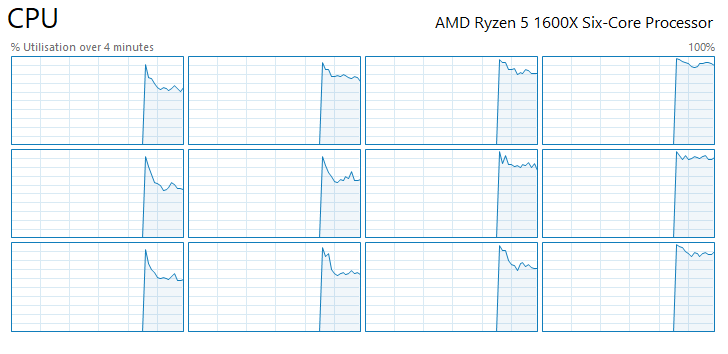
I got them on windows, output:
 * VERSIONS:     XMRig/2.4.4 libuv/1.18.0 gcc/7.2.0
 * HUGE PAGES:   available, enabled
 * CPU:          AMD Ryzen 5 1600X Six-Core Processor            (1) x64 AES-NI
 * CPU L2/L3:    3.0 MB/16.0 MB
 * THREADS:      8, cryptonight, av=1, donate=5%
 * POOL #1:      cryptonight.eu.nicehash.com:3355
 * COMMANDS:     hashrate, pause, resume
[2018-02-13 10:29:18] use pool cryptonight.eu.nicehash.com:3355 159.8.13.248
[2018-02-13 10:29:18] new job from cryptonight.eu.nicehash.com:3355 diff 200007
[2018-02-13 10:29:19] new job from cryptonight.eu.nicehash.com:3355 diff 200007
[2018-02-13 10:30:13] speed 2.5s/60s/15m 372.4 n/a n/a H/s max: 403.5 H/s
[2018-02-13 10:30:22] speed 2.5s/60s/15m 306.8 367.8 n/a H/s max: 403.5 H/s
[2018-02-13 10:30:54] new job from cryptonight.eu.nicehash.com:3355 diff 200007
[2018-02-13 10:31:22] speed 2.5s/60s/15m 360.8 375.7 n/a H/s max: 407.7 H/s
[2018-02-13 10:32:22] speed 2.5s/60s/15m 390.9 348.0 n/a H/s max: 413.1 H/s
windows is a bit different, you have to use just only one odd or even core to get access to real core (yes, it's confusing, but real core is always paired with SMT/HT core and doesn't have respective number like in linux).
one more thing - according to this reddit thread, Ryzen 5 1600/1600X processor actually consists of 2 NUMA nodes (think of it as dual socket/processor system) in one package. each NUMA node consists of 3 real cores paired with 8MB of cache and with ability to run SMT (simultaneous multithreading) doubling logical threads.
this gives us an idea how we should use this CPU to squeeze max performance out of it.
here is schema we are going to use:
_S_RSRSR|SRSR_S_R
where S - SMT core, R - real core, | - just a separator between NUMA nodes, bold and _italic_ - cores we are gonna use.
so mask to use even cores would be "0xEAB". (with this you should see load on CPUs: 0,1,3,5,7,9,10,11)
you could also try mask for odd cores: "0xD57", but I guess it will give you the same performance as using "0xEAB" mask.
you should probably get a bit over 500 H/s with this.
XMR: 49gyD8cw4bpNNRtyJC8zHBDqifwoVhaHM7US8Has1eMvRJye4tvuus6RNzMx14c4PH5JffvuHHkevSCn1MJwm3e1PzuNAV2
ETN: etnk1suJcD59fVdoG6aiQ5fUDTksbeUvJ3LsrBjWkhJU8emyZ12VH9T8r6uaTP4MWQb3w6BVh5EtN6B7AqEfveZB31K2VUKw1R
thanks for tips!
and please, return back to us and share the results :)
podwhitehawk
on 13 Feb 2018
Hashrate max: 530H/s
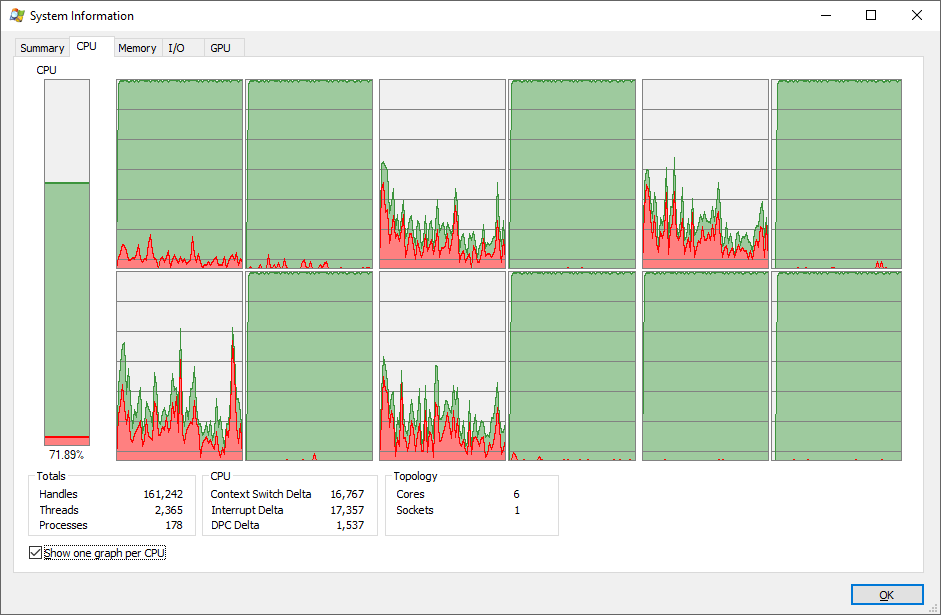
Above is screenshot from Process Explorer. As you can see, xmrig usage is on core 0, which is being used by windows system (red color on the graph). I gave it realtime priority as well. core 0 usage is coliding with windows, GUI is becoming sluggish under current cpu usage. Maybe we can move core0 usage into other core? Any thoughs?
curious0101
on 13 Feb 2018
that's interesting.
try this one instead - "0xEBA", it will use cores 1,3,4,5,7,9,10,11
podwhitehawk
on 13 Feb 2018
EDIT: UPDATED
0xEBA gives max 493 H/s:
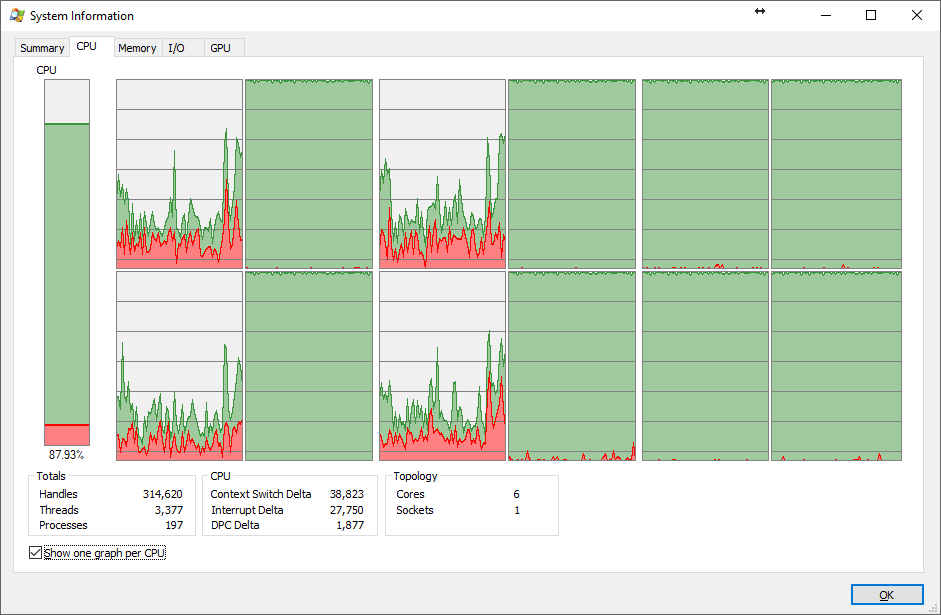
I've left it running, that's the result.
Which wallet you are using for Monero? My mobile one Coinomi doesn't support it.
curious0101
on 13 Feb 2018
I've noticed high CPU usage on last screenshot - 88% overall (but should be somewhere ~67%), it will lead to hashrate drop cause of effect known as "cache poisoning" and cryptonight miners are heavily relying on clean L3 cache. compare load to previous screenshot when you had 530h/s.
just as an example: my home i5-6600 CPU can hash at 220h/s when nothing running except system itself. and I've noticed significant drop to 160-180h/s when I have just only web browser idling in the background.
if you can - try to temporarily closeexit ANY activity on target machine, even those running in tray (torrent clients, driver control panels, etc) and watch for max hashrate you can get from that hardware.
p.s. here is my monero (XMR) address, thanks again.
I can't withdraw Monero from my exchange unless it's 250 USD worth of :O Shocking. Can I send you BURST, LTC, BCH or BTC?:)
I will try further testing on my windows rig with everything closed. Thanks
curious0101
on 13 Feb 2018
nvm then, maybe someday.
happy mining :)
podwhitehawk
on 13 Feb 2018
You were right, I left empty windows running and I reached 530 H/s on 0xEBA, which is exactly the same as 0xEAB:)
curious0101
on 15 Feb 2018
Who know what is maximum we can got from 2xE5-2660v1 ?
It is 20MB cash on each CPU and total 20 thread in config.
Maximum i see 715 in log, but on pools on statistics -1140 in peak and 690 in 24 Hour Avg. Hash Rate.
Thanks.
 minzak
on 22 Mar 2018
minzak
on 22 Mar 2018
@bizlevel you should have similar performance as TS, use config from https://github.com/xmrig/xmrig/issues/240#issuecomment-352457614
podwhitehawk
on 22 Mar 2018
Nope, on defaults - without cpu-affinity I got best perfomance ~ 710 H/s with 20 thread on 2xe5-2660v1. And this 710 on compiled version, on default binary tittle less. It is maximum on this cpu?
minzak
on 23 Mar 2018
I've never seen this particular CPU in action, however I'm sure you can get better performance.
there are a bunch of factors that may affect performance:
- huge pages. have you enabled it?
- system type. is it baremetal installation or anything else? describe please.
- system load. are you running anything else on that machine?
podwhitehawk
on 23 Mar 2018
This is hp z820 own wirkstation, baremetal, latest debian i can install any os. Huge page is avilable and enabled, only miner works nothing else. Also other miners not getting more like xmr-stack. I manualy was added and chech rates many time and various types. Also I trying use diff cores of cpu for th for last 4 thread. No matter what is 17 or 29. P.s. i can give you root ssh - for experience and checks, just write in private.
minzak
on 23 Mar 2018
Тю блин, а шо нашою не міг відповісти)
minzak
on 23 Mar 2018
Hi. I have been mining for quite some time on a pair of 2670 v1, in Windows. With nothing else running, I can get 950 h/s from both processors. Once I run a browser or anything else, it affects the hash rate. I have spent too much time exploring each and every bios setting change - which pretty much mean mostly everything set at it's default, except for "memory interleaving" disabled (which only made something like 20 h/s a difference on both processors).
At this point I feel I have tried every combination of every setting in XMRIG. I have also scanned google and never found anyone else reporting anything more than this hash rate.
(2) 2670, 20mb l3 cache; 20 threads.
 DrStein99
on 24 Mar 2018
DrStein99
on 24 Mar 2018
It is correct to put not 20 streams, but 18! Unexpectedly we receive bigger hashrate. I used the frequency memory of 1600 in the two-channel mode.
https://clip2net.com/s/3ThEall
{
"algo": "cryptonight", // cryptonight (default) or cryptonight-lite
"av":0, // algorithm variation, 0 auto select
"background": false, // true to run the miner in the background
"colors": true, // false to disable colored output
"cpu-affinity": null, // set process affinity to CPU core(s), mask "0x3" for cores 0 and 1
"cpu-priority": null, // set process priority (0 idle, 2 normal to 5 highest)
"donate-level": 1, // donate level, mininum 1%
"log-file": null, // log all output to a file, example: "c:/some/path/xmrig.log"
"max-cpu-usage": 75, // maximum CPU usage for automatic mode, usually limiting factor is CPU cache not this option.
"print-time": 60, // print hashrate report every N seconds
"retries": 5, // number of times to retry before switch to backup server
"retry-pause": 5, // time to pause between retries
"safe": false, // true to safe adjust threads and av settings for current CPU
"threads": 18, // number of miner threads
"pools": [
{
"url": "stellite.ingest.cryptoknight.cc:16221", // URL of mining server
"user": "SEiSma33nKD8fVrxVpfQYg2qHxbFECZfQKeMfYy9GYmUDREifaj8QEqNM5CLJzU1zWGKQY8Zowi2Sb2yPvtY5FGpj6vYHq7p6vK14yPimcPrb", // username for mining server
"pass": "x", // password for mining server
"keepalive": true, // send keepalived for prevent timeout (need pool support)
"nicehash": false, // enable nicehash/xmrig-proxy support
"variant": 1 // algorithm PoW variant
}
],
"api": {
"port": 0, // port for the miner API https://github.com/xmrig/xmrig/wiki/API
"access-token": null, // access token for API
"worker-id": null // custom worker-id for API
}
}
The maximum speed later time was established by 967.5hash.
Also there has to be an increase speed approximately for 5-10% if to expose memory in the four-channel mode (to insert into the correct nests).
 nordtorf
on 8 Apr 2018
nordtorf
on 8 Apr 2018
Nope, in my variants 2x E5-2660v1 on 18 threads show less (near 660) then on 20 threads (up to 710).
I think it is my maximum.
Thanks to all.
minzak
on 8 Apr 2018
Means, any parameters in Bios, for example, a turbo mode, a hipertreading, QPI Link= aren't included?, or still what parameters.
https://c2n.me/3ThU3Aj
Whether long pages are included?
Perhaps the processor - Engineering sample?
nordtorf
on 8 Apr 2018
At last!
I found and disabled CECP Mode and also set PCI latency timer to 64
And i got 855!
@nordtorf Thanks a lot!
P.S. BIOS in Branded PC to small for tuning. (

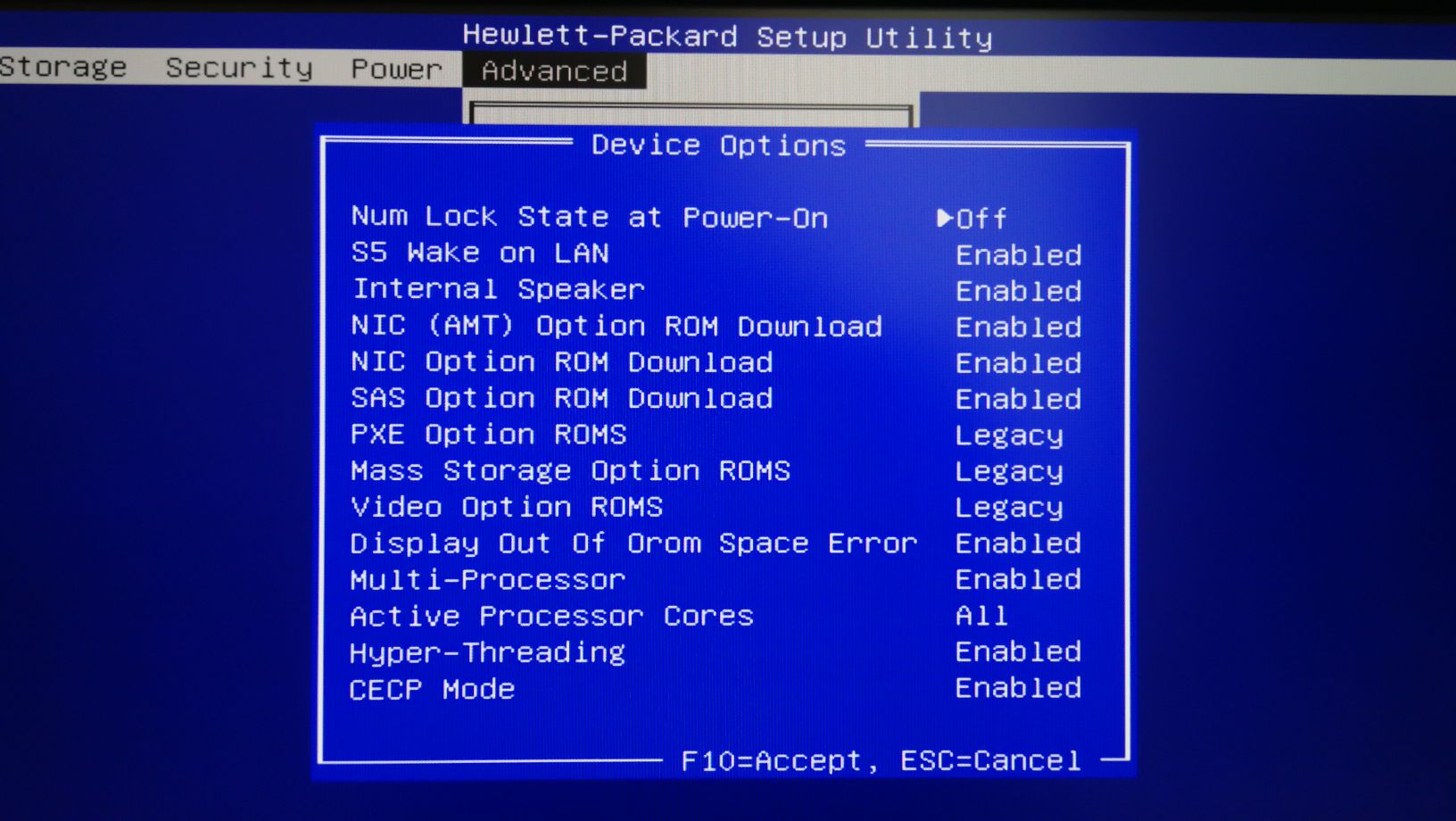
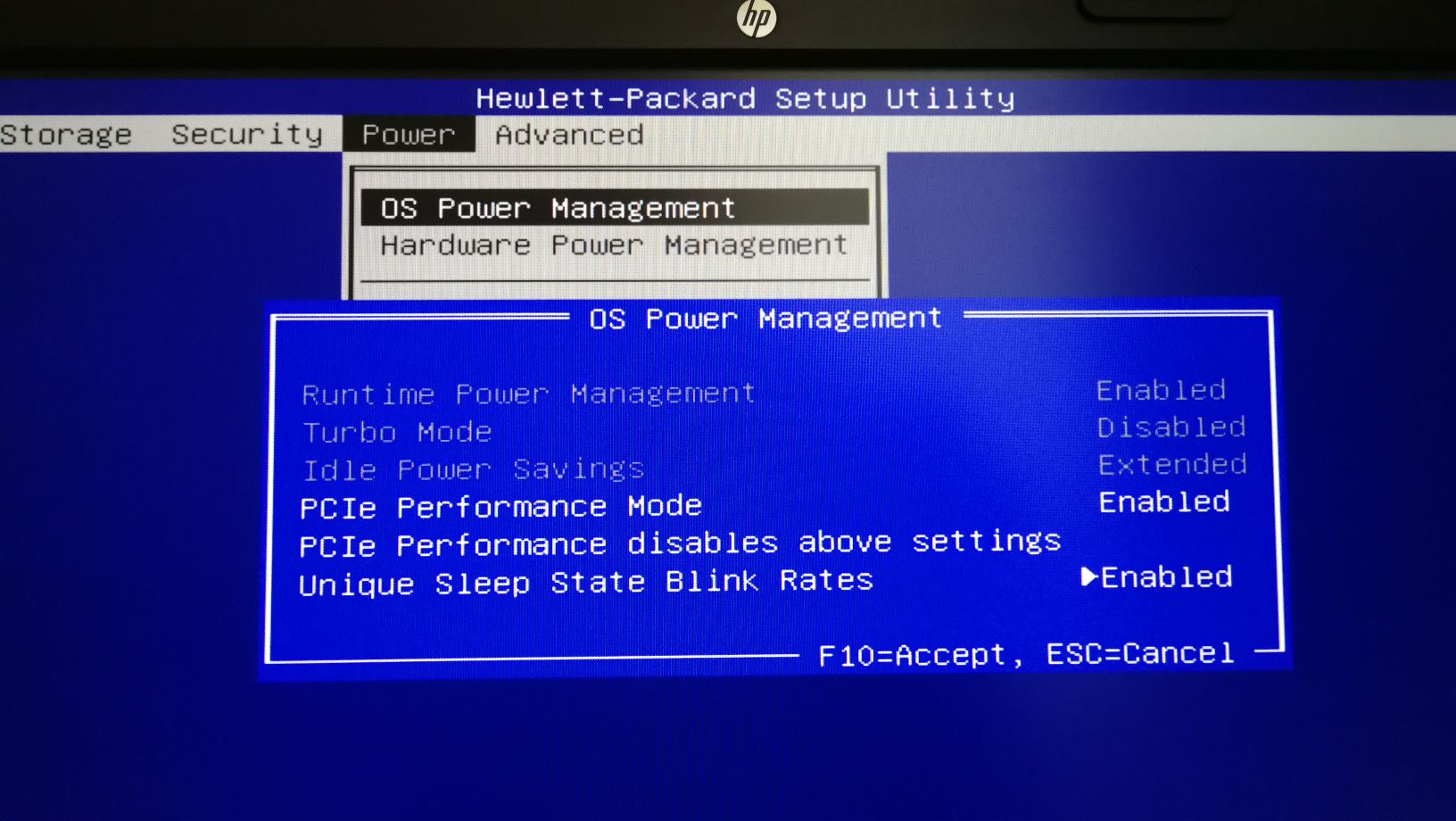

minzak
on 8 Apr 2018
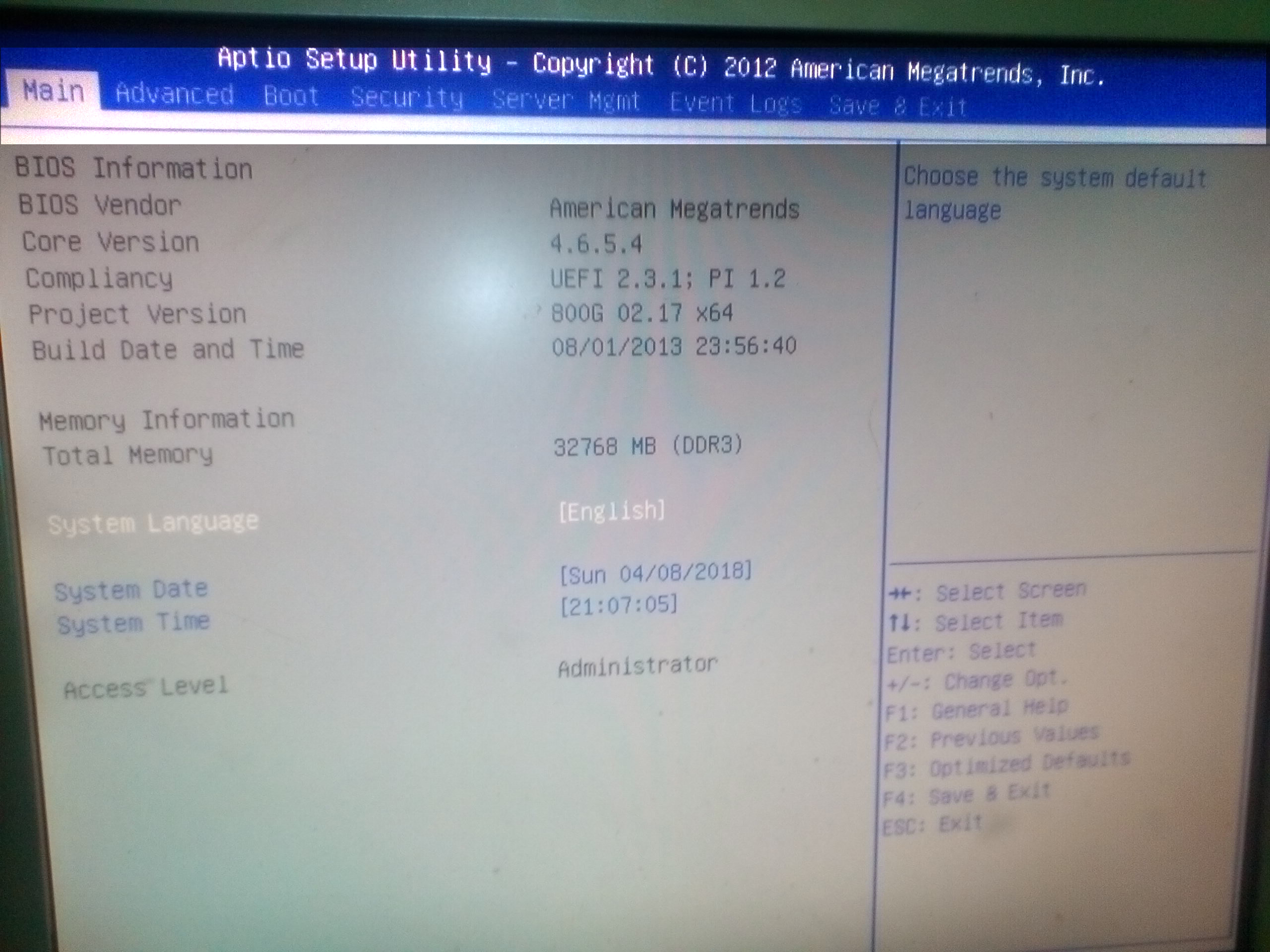
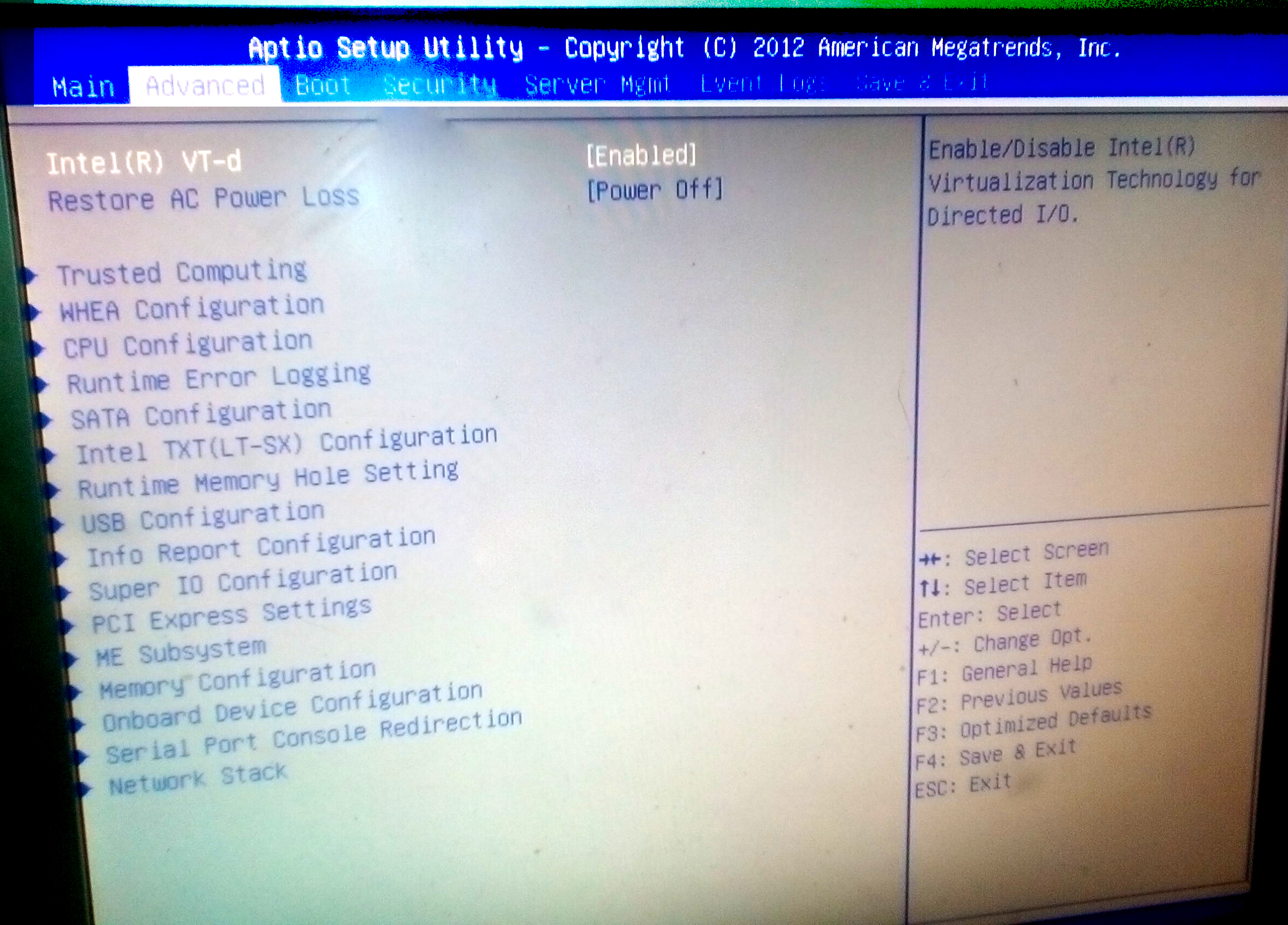


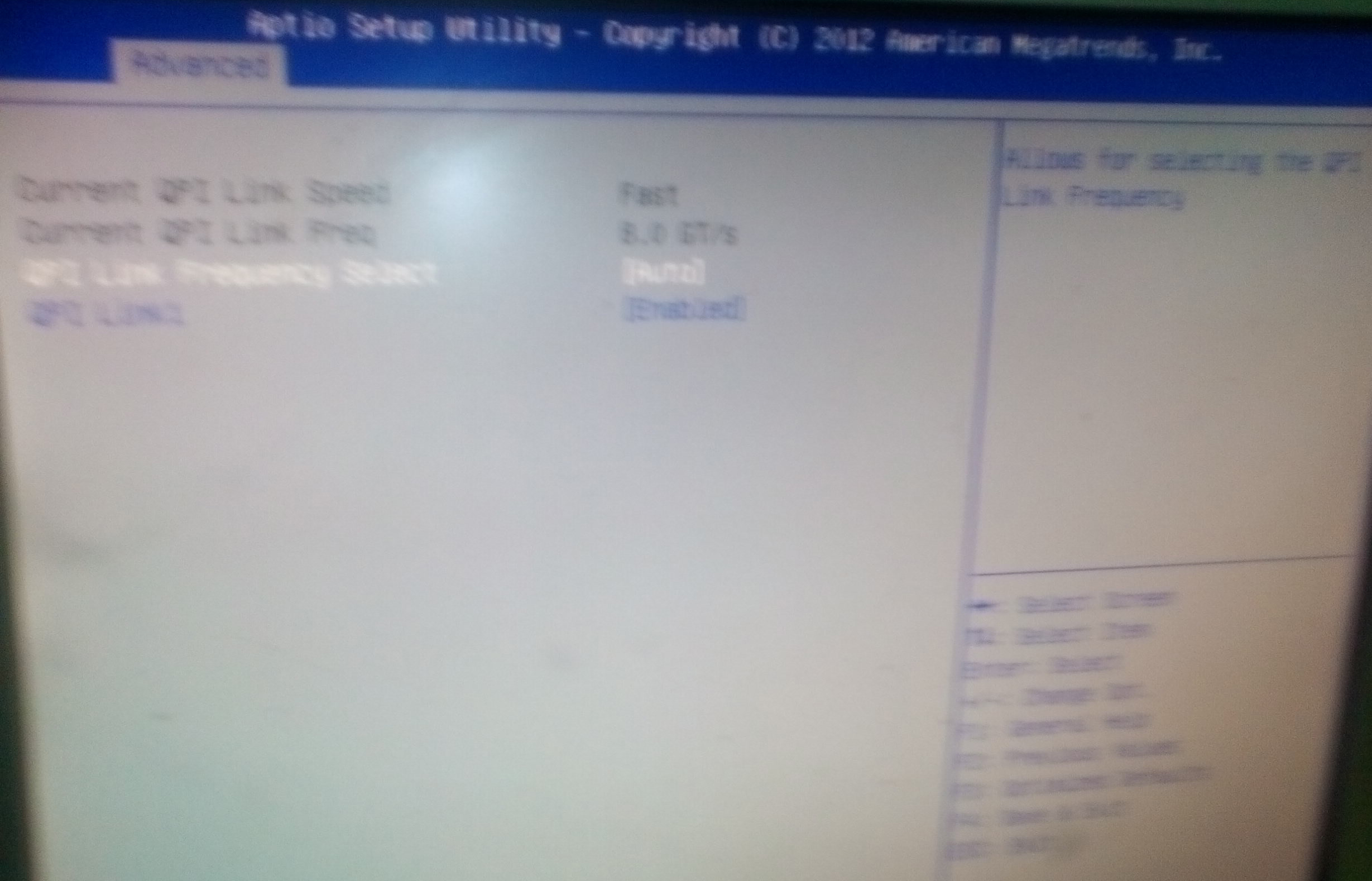

Sorry for the low quality pictures,
QPI=8Gb/s
The memory works in 2-channel mode, despite the option included in the BIOS (since it is small, 2 banks per processor, and you need 4 banks).
nordtorf
on 8 Apr 2018
In the first - E5-2670 - has more CPU speed clock than E5-2660.
But if i not mistake, memory almost not need, only L3 Cache.
Also i has 4 RDIMM x16Gb in 2-channel mode:
root@z820:~# lshw -short -C memory
H/W path            Device      Class          Description
==========================================================
/0/0                            memory         64KiB BIOS
/0/1/5                          memory         512KiB L1 cache
/0/1/6                          memory         2MiB L2 cache
/0/1/7                          memory         20MiB L3 cache
/0/4/9                          memory         512KiB L1 cache
/0/4/a                          memory         2MiB L2 cache
/0/4/b                          memory         20MiB L3 cache
/0/4b/0                         memory         16GiB DIMM DDR3 Synchronous Registered (Buffered) 1600 MHz (0.6 ns)
/0/4b/7                         memory         16GiB DIMM DDR3 Synchronous Registered (Buffered) 1600 MHz (0.6 ns)
/0/5f/0                         memory         16GiB DIMM DDR3 Synchronous Registered (Buffered) 1600 MHz (0.6 ns)
/0/5f/7                         memory         16GiB DIMM DDR3 Synchronous Registered (Buffered) 1600 MHz (0.6 ns)
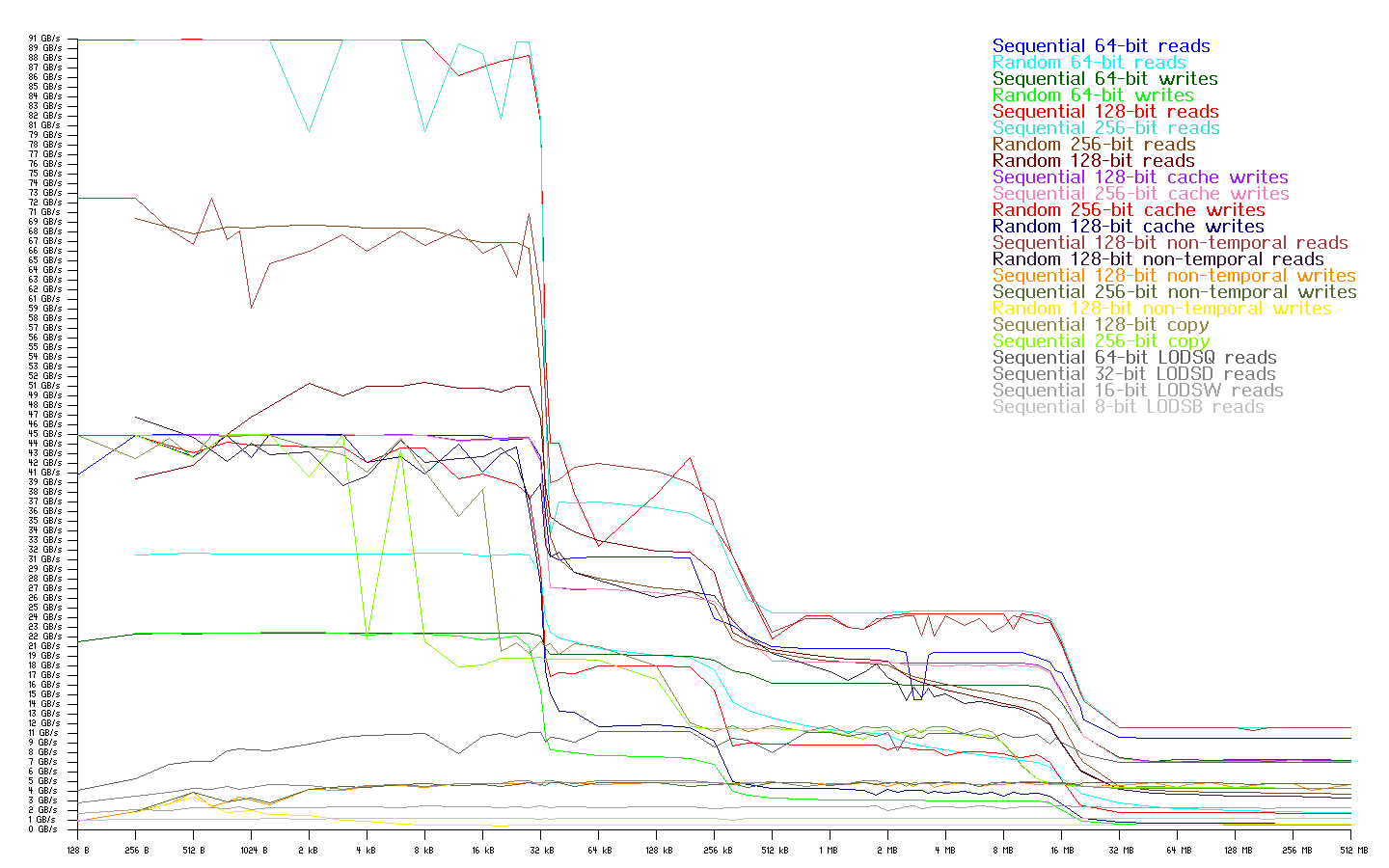
And need to test memory speed, for example, i found:
https://zsmith.co/archives/bandwidth-1.5.1.tar.gz
Because different mode - different result.
root@z820:/usr/src/bandwidth-1.5.1# ./bandwidth64 --fastest --limit --nice
minzak
on 8 Apr 2018
If this issue still actual, please check v2.99.2-beta release #1077.
Thank you.
 xmrig
on 29 Jul 2019
xmrig
on 29 Jul 2019
It very Nice! 690H/s vs 755H/s
XMRig/2.14.4 gcc/8.3.0
 * ABOUT        XMRig/2.14.4 gcc/8.3.0
 * LIBS         libuv/1.24.1 OpenSSL/1.1.1c microhttpd/0.9.62
 * CPU          Intel(R) Xeon(R) CPU E5-2660 0 @ 2.20GHz (2) x64 AES -AVX2
 * CPU L2/L3    8.0 MB/40.0 MB
 * THREADS      20, cryptonight, av=0, donate=2%
 * ASSEMBLY     auto:intel
 * POOL #1      pool.supportxmr.com:3333 variant auto
 * COMMANDS     hashrate, pause, resume
[2019-07-29 21:39:56] configuration saved to: "/opt/xmrig/config.json"
[2019-07-29 21:39:56] use pool pool.supportxmr.com:3333  94.130.12.27
[2019-07-29 21:39:56] new job from pool.supportxmr.com:3333 diff 10000 algo cn/r height 1889279
[2019-07-29 21:39:57] READY (CPU) threads 20(20) huge pages 20/20 100% memory 40960 KB
[2019-07-29 21:39:58] accepted (1/0) diff 10000 (49 ms)
...
| THREAD | AFFINITY | 10s H/s | 60s H/s | 15m H/s |
|      0 |       -1 |    26.7 |     n/a |     n/a |
|      1 |       -1 |    39.6 |     n/a |     n/a |
|      2 |       -1 |    27.1 |     n/a |     n/a |
|      3 |       -1 |    40.1 |     n/a |     n/a |
|      4 |       -1 |    40.4 |     n/a |     n/a |
|      5 |       -1 |    39.9 |     n/a |     n/a |
|      6 |       -1 |    40.2 |     n/a |     n/a |
|      7 |       -1 |    39.9 |     n/a |     n/a |
|      8 |       -1 |    26.2 |     n/a |     n/a |
|      9 |       -1 |    39.9 |     n/a |     n/a |
|     10 |       -1 |    38.8 |     n/a |     n/a |
|     11 |       -1 |    39.6 |     n/a |     n/a |
|     12 |       -1 |    26.7 |     n/a |     n/a |
|     13 |       -1 |    39.6 |     n/a |     n/a |
|     14 |       -1 |    39.9 |     n/a |     n/a |
|     15 |       -1 |    40.3 |     n/a |     n/a |
|     16 |       -1 |    26.9 |     n/a |     n/a |
|     17 |       -1 |    26.8 |     n/a |     n/a |
|     18 |       -1 |    26.2 |     n/a |     n/a |
|     19 |       -1 |    27.1 |     n/a |     n/a |
[2019-07-29 21:43:05] speed 10s/60s/15m 691.9 n/a n/a H/s max 692.3 H/s
And XMRig/2.99.2-beta gcc/8.3.0
 * ABOUT        XMRig/2.99.2-beta gcc/8.3.0
 * LIBS         libuv/1.24.1 OpenSSL/1.1.1c hwloc/1.11.12
 * CPU          Intel(R) Xeon(R) CPU E5-2660 0 @ 2.20GHz (2) x64 AES -AVX2
                L2:4.0 MB L3:40.0 MB 16C/32T NUMA:2
 * DONATE       2%
 * ASSEMBLY     auto:intel
 * POOL #1      pool.supportxmr.com:3333 algo cn/r
 * COMMANDS     hashrate, pause, resume
[2019-07-29 21:51:52.501] use pool pool.supportxmr.com:3333  94.130.12.27
[2019-07-29 21:51:52.501] new job from pool.supportxmr.com:3333 diff 10000 algo cn/r height 1889282
[2019-07-29 21:51:52.501] CPU use profile  cn  (20 threads) scratchpad 2048 KB
[2019-07-29 21:51:54.090] CPU READY threads 20(20) huge pages 20/20 100% memory 40960 KB (1590 ms)
[2019-07-29 21:52:03.487] accepted (1/0) diff 10000 (51 ms)
[2019-07-29 21:52:24.866] new job from pool.supportxmr.com:3333 diff 10000 algo cn/r height 1889282
[2019-07-29 21:52:29.786] accepted (2/0) diff 10000 (52 ms)
|    CPU THREAD | AFFINITY | 10s H/s | 60s H/s | 15m H/s |
|             0 |        0 |    27.0 |     n/a |     n/a |
|             1 |        1 |    26.9 |     n/a |     n/a |
|             2 |        2 |    44.5 |     n/a |     n/a |
|             3 |        3 |    44.4 |     n/a |     n/a |
|             4 |        4 |    44.4 |     n/a |     n/a |
|             5 |        5 |    44.8 |     n/a |     n/a |
|             6 |        6 |    44.5 |     n/a |     n/a |
|             7 |        7 |    45.3 |     n/a |     n/a |
|             8 |       16 |    27.0 |     n/a |     n/a |
|             9 |       17 |    26.9 |     n/a |     n/a |
|            10 |        8 |    27.7 |     n/a |     n/a |
|            11 |        9 |    27.5 |     n/a |     n/a |
|            12 |       10 |    44.9 |     n/a |     n/a |
|            13 |       11 |    44.6 |     n/a |     n/a |
|            14 |       12 |    44.6 |     n/a |     n/a |
|            15 |       13 |    44.9 |     n/a |     n/a |
|            16 |       14 |    45.2 |     n/a |     n/a |
|            17 |       15 |    45.6 |     n/a |     n/a |
|            18 |       24 |    27.7 |     n/a |     n/a |
|            19 |       25 |    27.5 |     n/a |     n/a |
[2019-07-29 21:52:31.776] speed 10s/60s/15m 756.1 n/a n/a H/s max 758.7 H/s
And interested - autoselect Core and HT for 2xCPU it is now is optimal? Not need to manual edit?
minzak
on 29 Jul 2019
Looks good 40 MB L3 cache ideally fit 20 threads, but CPUs has only 16 physical cores, so miner create extra 4 HT threads to utilize cache, and it cause 8 threads with about 27 H/s per core.
Thank you.
xmrig
on 30 Jul 2019
Yes, all is correct! And for now i think this issue is fixed, an may be closed.
minzak
on 30 Jul 2019
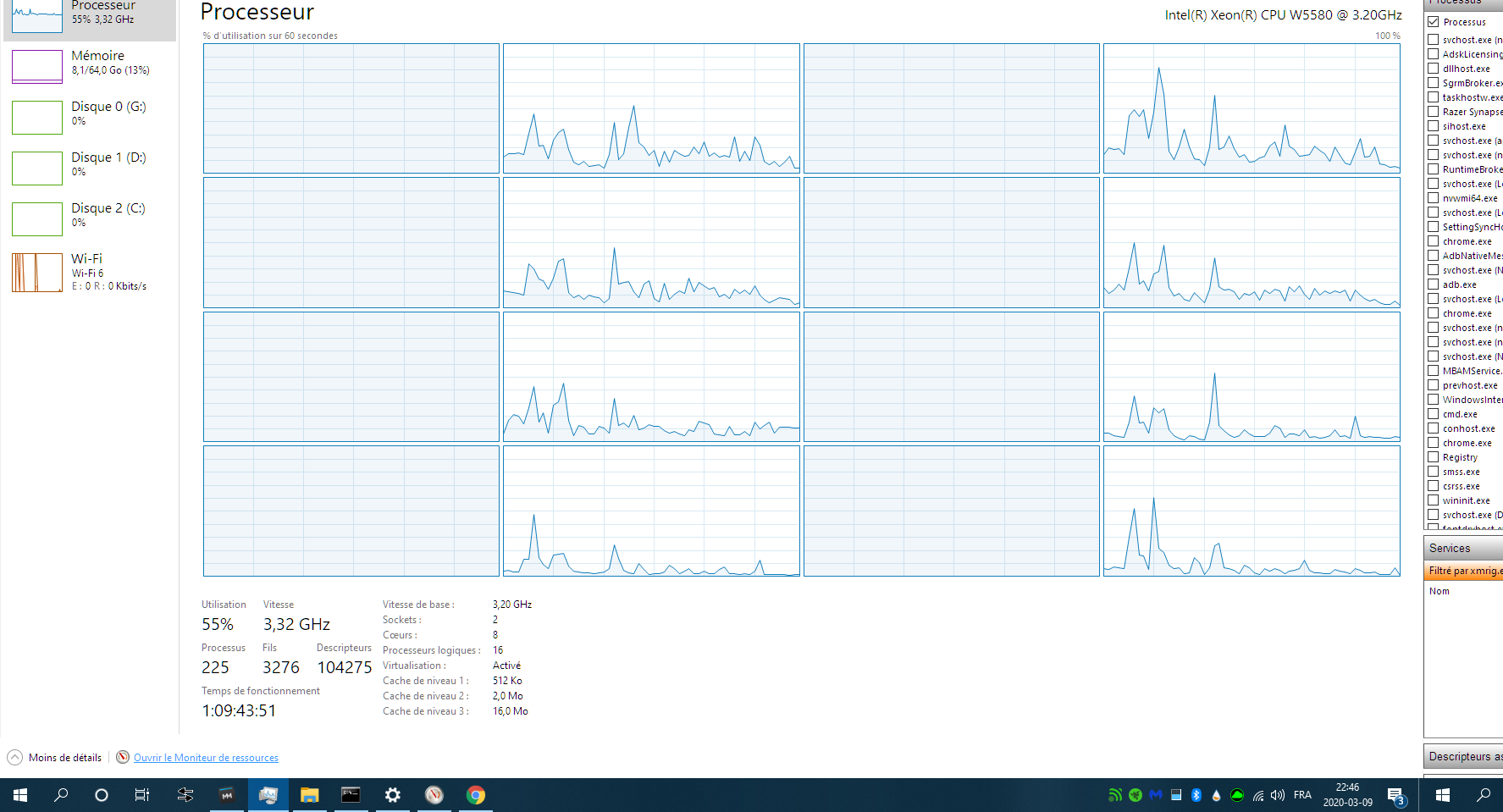
I don't know if I am having the same issue but XMrig seems to be using only 1 of my processors in an HP z800 workstation, is it possible to use both of them?
 mgrenier25
on 10 Mar 2020
mgrenier25
on 10 Mar 2020
@mgrenier25 Your CPU has only 8 MB of L3 cache, so best option is use 4 threads per CPU and 8 in total, seems all correct.
Thank you.
xmrig
on 10 Mar 2020
Related issues
 Prostoname1
·
15Comments
Prostoname1
·
15Comments
 ibrahimk157
·
16Comments
ibrahimk157
·
16Comments
 riverlj
·
20Comments
riverlj
·
20Comments
 losiel
·
16Comments
losiel
·
16Comments
 2010phenix
·
24Comments
2010phenix
·
24Comments
Most helpful comment
You were right, I left empty windows running and I reached 530 H/s on 0xEBA, which is exactly the same as 0xEAB:)