Xlpagertabstrip: Update to Swift 4
Before submitting issues ...
- Make sure you are using XLPagerTabStrip latest release or master branch version.
- Make sure your Xcode version is the latest stable one.
- Check if the issue was already reported or fixed. We add labels to each issue in order to easily find related issues. If you found a match add a brief comment "I have the same problem" or "+1".
- Please do not use the issue tracker for personal support requests. Stack Overflow is a better place for that where a wider community can help you!
When submitting issues, please provide the following information to help maintainers to fix the problem faster:
- Environment: XLPagerTabStrip, Xcode and iOS version you are using.
- In case of reporting errors, provide Xcode console output of stack trace or code compilation error.
- Any other additional detail such as example code that you think it would be useful to understand, reproduce and solve the problem.
 keyhan76
All 25 comments
Please update to swift 4.
I got some warnings converting my project from swift 3.1 to swift 4
keyhan76
on 21 Sep 2017
Ok now it has some bugs
the tab bar of XLPager is black and the labels positions has modified in Swift 4
and ruined everything
please fix it as soon as possible
it's image:

keyhan76
on 21 Sep 2017
+1
 amurovsky
on 26 Sep 2017
amurovsky
on 26 Sep 2017
+1
 chrisferdian
on 26 Sep 2017
chrisferdian
on 26 Sep 2017
+1
 CharlesAE
on 27 Sep 2017
CharlesAE
on 27 Sep 2017
+1
 zhouzidan
on 27 Sep 2017
zhouzidan
on 27 Sep 2017
Open ButtonBarPagerTabStripViewController.swift file.
In ButtonBarPagerTabStripViewController class, remove UICollectionViewDelegate protocol and implement UICollectionViewDelegateFlowLayout protocol.
 koko-js478
on 27 Sep 2017
koko-js478
on 27 Sep 2017
@allen-rahman solution works great!
Thank u man
keyhan76
on 27 Sep 2017
Welcome
koko-js478
on 28 Sep 2017
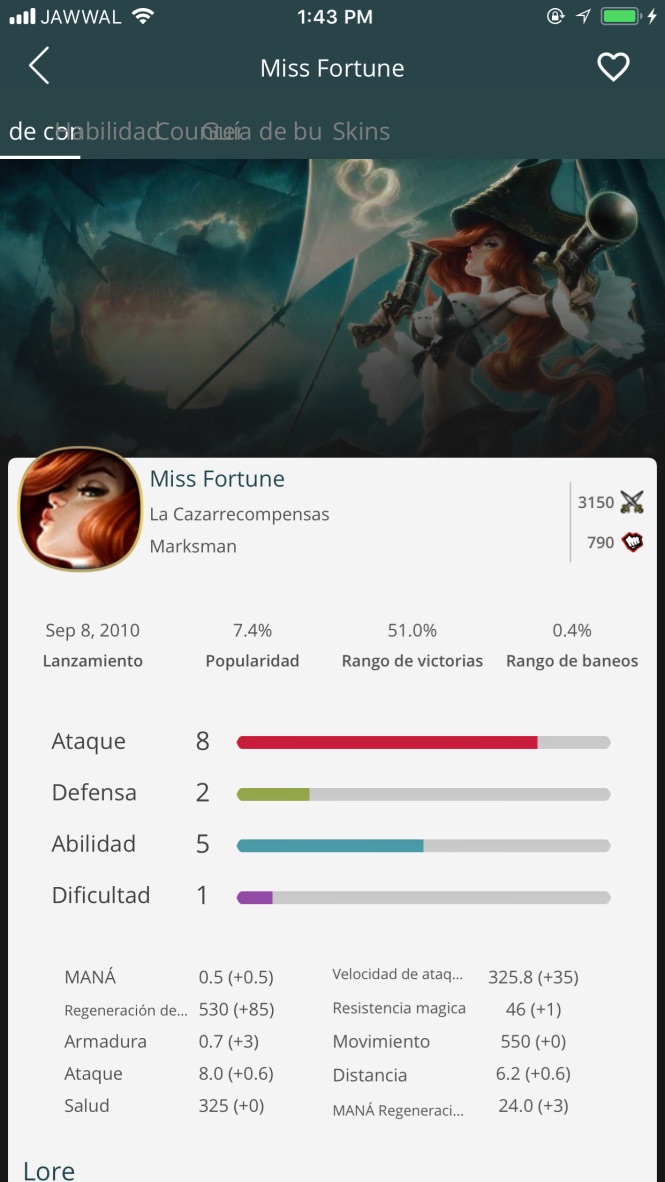
@allen-rahman same problem :(
 ahmedsafadii
on 30 Sep 2017
ahmedsafadii
on 30 Sep 2017
+1
 happiehappie
on 3 Oct 2017
happiehappie
on 3 Oct 2017
+1
 scinfu
on 3 Oct 2017
scinfu
on 3 Oct 2017
+1
I'm using xib and faced with the same issue.
 joelorenz20
on 5 Oct 2017
joelorenz20
on 5 Oct 2017
@ahmedsafadii May I test with your partial codes?
koko-js478
on 6 Oct 2017
@allen-rahman what exactly do you want see ?
ahmedsafadii
on 6 Oct 2017
code which makes the screen with storyboard.
koko-js478
on 9 Oct 2017
func pageMenuStyle(){
    settings.style.buttonBarBackgroundColor = UIColor("294548")
    settings.style.buttonBarItemBackgroundColor = UIColor("294548")
    settings.style.selectedBarBackgroundColor = UIColor.white
    settings.style.buttonBarItemFont = UIFont(name: "OpenSans", size: 15)!
    settings.style.selectedBarHeight = 2
    settings.style.buttonBarMinimumLineSpacing = 0
    settings.style.buttonBarItemTitleColor = .white
    settings.style.buttonBarItemsShouldFillAvailableWidth = true
    settings.style.buttonBarLeftContentInset = 0
    settings.style.buttonBarRightContentInset = 0


    changeCurrentIndexProgressive = { (oldCell: ButtonBarViewCell?, newCell: ButtonBarViewCell?, progressPercentage: CGFloat, changeCurrentIndex: Bool, animated: Bool) -> Void in
        guard changeCurrentIndex == true else { return }
        oldCell?.label.textColor = UIColor.gray
        newCell?.label.textColor = UIColor.white
    }

}
}
ahmedsafadii
on 9 Oct 2017
@allen-rahman
ahmedsafadii
on 9 Oct 2017
First question, did you call settings.style change before super.viewDidLoad()?
You should call settings.style.* before super.viewDidLoad()
And What's your XCode version?
koko-js478
on 9 Oct 2017
yeah i did and the xcode version is 9
ahmedsafadii
on 10 Oct 2017
After your super.viewDidLoad(), add this:
        buttonBarItemSpec = ButtonBarItemSpec.cellClass(width: { _ -> CGFloat in
            return 150  // <-- Your desired width
        })
 LifetimeCode
on 11 Oct 2017
LifetimeCode
on 11 Oct 2017
strange it works now like charm don't know what happened i just remove the library from the pod and install it again and it works :/
ahmedsafadii
on 11 Oct 2017
Happy to hear that.
koko-js478
on 12 Oct 2017
Hello, i have implemented XLPagerTabStrip in Swift 4 but childView don't show contentView. Any one know what is the issue.
 Inderpal610
on 6 Dec 2017
Inderpal610
on 6 Dec 2017
After your
super.viewDidLoad(), add this:buttonBarItemSpec = ButtonBarItemSpec.cellClass(width: { _ -> CGFloat in return 150 // <-- Your desired width })
Thank solution works
 sushil7271
on 1 Dec 2018
sushil7271
on 1 Dec 2018
Related issues
 andrewabdalla
·
6Comments
andrewabdalla
·
6Comments
 unittesting0
·
3Comments
unittesting0
·
3Comments
 bishalg
·
5Comments
bishalg
·
5Comments
 emrecanozturk
·
5Comments
emrecanozturk
·
5Comments
 Ta7an
·
4Comments
Ta7an
·
4Comments
Most helpful comment
Open ButtonBarPagerTabStripViewController.swift file.
In ButtonBarPagerTabStripViewController class, remove UICollectionViewDelegate protocol and implement UICollectionViewDelegateFlowLayout protocol.