Xiaomi-pro-hackintosh: Enhanced plist configuration, need help (no sound, no internal wifi)
Need help with plist. I don't have much knowledge. But with this config.plist I have working touchpad, brightness and etc. No sound yet.
With 1.3.5 or 6 or 7, can not get to work Touchpad and brightness.
Which option refers to touchpad and brightness?
Nor kexts nor drivers changed, only tried different plist.
 Trilis29
All 111 comments
@Trilis29 take a look on my repo: https://github.com/dawidmalina/xiaomi-mi-pro-15.6-enhanced still not perfect but at least it will cover touchpad and brightness (even during installation).
 dawidmalina
on 31 Mar 2020
dawidmalina
on 31 Mar 2020
Oh nice, will try, what's uhd630 config for?
Trilis29
on 31 Mar 2020
No, use regular one.
dawidmalina
on 31 Mar 2020
Can't boot to 15.4 kernel panic with your uefi, 1 of 5 times loaded.
TouchPad does not work, brightness works. No sound. Do you have Bluetooth working?
Mine config.plist is overfilled but boots and works without a problem. Don't know why yours not booting me correctly.
Does iMessage work for you?
Edit: TouchPad works no gestures, there is new kext with gestures working
Trilis29
on 31 Mar 2020
Did you use only config or full EFI? There are some updated versions.
dawidmalina
on 31 Mar 2020
I didn't try IMessage but lan connection is working fine. Currently I'm working on audio so if you don't mind working on gestures I would be more then happy.
dawidmalina
on 1 Apr 2020
According audio. I know that codec is: Realtek ALC256. I've check all profiles with and without fallowing fixes: FixHPET, FixIPIC, FixRTC, FixTMR and ResetHDA but non of them works. I mean I was able to see audio device with some profiles but no sound (or tab crash) when I was trying to play YT.
dawidmalina
on 1 Apr 2020
I didn't try IMessage but lan connection is working fine. Currently I'm working on audio so if you don't mind working on gestures I would be more then happy.
Gestures is working later I will upload you the kexts which I use, working perfect on 15.4
Sound only through headphones.
Tried your full EFI doesn't work for me good, my efi folders works great (mine is ugly and need to delete plenty of stuff, but hey it works :D), except small flaws. HIDPI does not work with highest setting "more space", got some distortion on screen.
Trilis29
on 1 Apr 2020
I've started all over again and I've used v1.3.7 release. To get to the same point the only changes which are needed:
- add Acpi Patch
                <dict>
                    <key>Comment</key>
                    <string>Acpi Patch</string>
                    <key>Disabled</key>
                    <false/>
                    <key>Find</key>
                    <data>oAqTU1RBUwE=</data>
                    <key>Replace</key>
                    <data>oAqRCv8L//8=</data>
                </dict>
- use
SSDT-PNLFCFL.amlinstead ofSSDT-PNLF.aml - add
VoodooPS2Controller.kextpluginsVoodooPS2Mouse.kextandVoodooPS2Trackpad.kext - update
device-idandig-platform-idaccordingly
@stevezhengshiqi do you think this changes can be added into your repo? I would rather go without extra fork.
dawidmalina
on 2 Apr 2020
Trilis29
on 2 Apr 2020
@dawidmalina This repository is only for 2017/2018 version. Enhanced version is not supported, so I won't add specific config for the enhanced version. Also, VoodooPS2Mouse.kext and VoodooPS2Trackpad.kext are not needed for I2C trackpad devices.
For 10th Gen devices, there're more delicate things need to handle with. For example, people have to disable AWAC device and enable Legacy RTC. Here's an example: https://github.com/acidanthera/OpenCorePkg/blob/master/Docs/AcpiSamples/SSDT-AWAC.dsl
Also, SSDT-LGPA and SSDT-TPD0 are 17/18 version only. SSDT-USB also need to be updated to support enhanced version.
 stevezhengshiqi
on 2 Apr 2020
stevezhengshiqi
on 2 Apr 2020
I'm still tooooo newbie in this area. I went through this guide https://khronokernel.github.io/Getting-Started-With-ACPI/ and https://fewtarius.gitbook.io/laptopguide/ but generated EFI was not even bootable.
@stevezhengshiqi would you be able to help us? For sure I can provide ACPI dump (DSDT.aml) if needed and test all alpha versions.
I see that you already have lot's of experience and maybe @daliansky could be a home for enhanced version similarly as few other laptops.
dawidmalina
on 10 Apr 2020
Small update. With the latest release (v1.3.8) gestures works perfectly even during installation 👍
@stevezhengshiqi thanks for the hint with SSDT-AWAC.aml as now I don't need to add extra rtc acpi patch in the config.plist. Of course SSDT-PNLFCFL.aml should be used instead of SSDT-PNLF.aml.
dawidmalina
on 15 Apr 2020
@stevezhengshiqi maybe you could helps us with sound? Working only through headphones and really bad quality. Can't run on internal speakers
Trilis29
on 17 Apr 2020
@Trilis29 Currently I am really busy on preparing the finals. I will try to have a look at it when I have time.
stevezhengshiqi
on 18 Apr 2020
Great thanks, I am also looking for info.
Trilis29
on 18 Apr 2020
@stevezhengshiqi maybe you could tell what info do you need from enhanced laptop to present you, I can gather everything to you, when you have some spare time you could check upon :)
Trilis29
on 6 May 2020
The ACPI folder generated by Fn+F4 and ioreg by IORegistryExplorer may help. I don't have much time looking at these, but these files are helpful for anyone else who wants to have a deeper look.
stevezhengshiqi
on 7 May 2020
origin.zip
miproenhanced.zip
uploaded both files, if you have time, take a look
Trilis29
on 14 May 2020
Hi, i have the same issues, are there any news?
 khaled-sudo
on 25 May 2020
khaled-sudo
on 25 May 2020
@Trilis29 I build an AppleALC with codec configuration for XiaoMi-Pro Enhanced. Could u take a try? No guarantee for working though.
<key>PciRoot(0x0)/Pci(0x1f,0x3)</key>
<dict>
    <key>hda-gfx</key>
    <string>onboard-1</string>
    <key>layout-id</key>
    <integer>99</integer>
</dict>
NOTE: layout-id's data type should be integer and set the value to 99.
~AppleALC-1.5.0-RELEASE.zip~
UPDATE:
- Minor style fix
AppleALC-1.5.0-RELEASE.zip
stevezhengshiqi
on 4 Jun 2020
Just have a check, layout-id 57 (decimal) should also work, seems no need to patch AppleALC.
stevezhengshiqi
on 5 Jun 2020
ok will try, thanks
Trilis29
on 5 Jun 2020
Hi, I tried this config but still not work
khaled-sudo
on 5 Jun 2020
whatever, i noticed that audio doesn't work neither on windows when i turn on pc with clover
khaled-sudo
on 5 Jun 2020
whatever, i noticed that audio doesn't work neither on windows when i turn on pc with clover
delete audiodxe driver
Trilis29
on 5 Jun 2020
whatever, i noticed that audio doesn't work neither on windows when i turn on pc with clover
delete audiodxe driver
already deleted
khaled-sudo
on 5 Jun 2020
whatever, i noticed that audio doesn't work neither on windows when i turn on pc with clover
delete audiodxe driver
already deleted
great i disable it and it works, thanks
khaled-sudo
on 5 Jun 2020
Just have a check, layout-id 57 (decimal) should also work, seems no need to patch AppleALC.
tried patched one, and non patched with 57 and 99 integer, still no luck ;/
Also reinstalled fresh install with OC. Sound device is showing and etc, but no sound through internal speakers.
Trilis29
on 7 Jun 2020
AppleALC alc: @ failed to find IOHDACodecVendorID, retrying 0
with 57
 agassecond
on 7 Jun 2020
agassecond
on 7 Jun 2020
Just have a check, layout-id 57 (decimal) should also work, seems no need to patch AppleALC.
tried patched one, and non patched with 57 and 99 integer, still no luck ;/
Also reinstalled fresh install with OC. Sound device is showing and etc, but no sound through internal speakers.
Please Can you send me your EFI folder ??
 sciro24
on 9 Jun 2020
sciro24
on 9 Jun 2020
Hi does anyone have a fully functional EFI for the improved edition? Actually I only have problems with (audio, bluetooth and wifi)
sciro24
on 13 Jun 2020
Same problems still
Trilis29
on 13 Jun 2020
Same problems still
can you left me your telegram contact?
sciro24
on 13 Jun 2020
You may contact me if needed some info
@agasecond
agassecond
on 14 Jun 2020
You may contact me if needed some info
@agassecond
I could not find you on telegram
sciro24
on 15 Jun 2020
Someone have news about hackintosh on enhanced edition ( i7 10501U)
sciro24
on 15 Jun 2020
still cant get sound to work (
soz wrong telegram link @agasecond
agassecond
on 16 Jun 2020
My telegram @Trilis29
Trilis29
on 16 Jun 2020
Hi guys, are there any news?
khaled-sudo
on 29 Jun 2020
Sadly no news, no idea how to fix this sound (
Tried building applealc, using voodoohda etc. So far only works through connected headphones.
As for wifi, still waiting zxystd to finish itwlmx for v2 ac9560 as for new it stucks on uploading firmware.
If someone can assist in sound would be nice...
agassecond
on 29 Jun 2020
By the way, anyone has working internal Bluetooth?
Trilis29
on 29 Jun 2020
Hi, someone have news about ( AUDIO - BT INTERNAL - WIFI INTERNAL ) ?
and someone tried to use Big Sour on enhanced edition ?
sciro24
on 23 Jul 2020
BT and WIFI won't work if you don't have macOS compatible card. About installing macOS in this laptop, how do you get internet connection in macOS installer? I'm stuck, cause I can't get internet connection no matter what. Tried android usb tethering, usb to ethernet adapter and nothing works. I would also enjoy if someone could create repository for this laptop.
 nekiro
on 23 Jul 2020
nekiro
on 23 Jul 2020
BT and WIFI won't work if you don't have macOS compatible card. About installing macOS in this laptop, how do you get internet connection in macOS installer? I'm stuck, cause I can't get internet connection no matter what. Tried android usb tethering, usb to ethernet adapter and nothing works. I would also enjoy if someone could create repository for this laptop.
Just download full installer, you don't need internet, later on usb wifi
Trilis29
on 25 Jul 2020
Audio is very hard to get working on this laptop, but I might get it working soon.
nekiro
on 29 Jul 2020
Thumbs up mon, if you need any assistance contact me by telegram given above.
agassecond
on 29 Jul 2020
Audio is very hard to get working on this laptop, but I might get it working soon.
thank you
sciro24
on 29 Jul 2020
I created a repo for the enhanced edition, if you want to contribute feel free to do it
https://github.com/ravnized/XiaoMi-Pro-enhanced-Hackintosh/tree/master
Im gonna try my best to keep it updated
 ravnized
on 29 Jul 2020
ravnized
on 29 Jul 2020
would be nice to see working/non working thins on this repo )
agassecond
on 29 Jul 2020
updated!
ravnized
on 29 Jul 2020
So apparently to make sound work, we need to patch applealc with pathmap and others, which I dont know how to do.
@daliansky might help us as he probably did it already.
Here is the full codec linux dump, which is required to create new layout id for this notebook.
codec_dump0.txt
nekiro
on 30 Jul 2020
with the newest intel wifi kexts, wifi is working!!! :) There is new AppleALC, but ca't get speakers to work
Trilis29
on 3 Aug 2020
with the newest intel wifi kexts, wifi is working!!! :) There is new AppleALC, but ca't get speakers to work
please, can you send me the link for download of new intel wifi kext ?
sciro24
on 3 Aug 2020
https://github.com/OpenIntelWireless/itlwm/issues/214
you can find it in this thread
agassecond
on 3 Aug 2020
OpenIntelWireless/itlwm#214
you can find it in this thread
after downloading it and putting it in the EFI folder, what should I do? thank you so much
sciro24
on 3 Aug 2020
OpenIntelWireless/itlwm#214
you can find it in this threadafter downloading it and putting it in the EFI folder, what should I do? thank you so much
Use heliport and you can connect to wifi
Trilis29
on 3 Aug 2020
updated my repo for working wifi
ravnized
on 3 Aug 2020
Still no progress with speakers sound, and that makes me sad
agassecond
on 5 Aug 2020
Still no progress with speakers sound, and that makes me sad
:(
sciro24
on 5 Aug 2020
I tried to make it work, correct layout it, applealc patching and everything, no matter what it wont work. Headpones and mic is working but speakers just wont. This is very bizzare.
nekiro
on 5 Aug 2020
Anyone got account access to wechat groups regarding our model? might be there some answers...
agassecond
on 5 Aug 2020
Anyone got account access to wechat groups regarding our model? might be there some answers...
Would be perfect, how can i access?
sciro24
on 5 Aug 2020
Anyone got account access to wechat groups regarding our model? might be there some answers...
or maybe a telegram group if you want
sciro24
on 5 Aug 2020
Created new repository for this notebook. Check it out: https://github.com/nekiro/Xiaomi-Notebook-Pro-15-6-Enhanced-Hackintosh
nekiro
on 8 Aug 2020
Is there any news about sound (speakers) topic?
dawidmalina
on 15 Aug 2020
Is there any news about sound (speakers) topic?
Wasn't you not interested in this topic?
nekiro
on 15 Aug 2020
Well. To be honest I was "forced" to move to linux becouse of the need to have working system with wifi and audio as a must from my side. I am still watching the project and I am glad that you have made so progress. Having sound would be last stoper.
dawidmalina
on 15 Aug 2020
Well, speakers as last barrier really stops me as well, but it seems there is no ppl around who can really make it work. I am still trying time to time to build new applealc, with custom layouts platforms but...
agassecond
on 17 Aug 2020
I don't have also knowledge about the custom platforms and layouts:( But there is one thing that might be important (it's fully my guessing) - looking through existing layouts I found that some of the layouts contains signal processing for section: IntSpeaker. For example:
| Layout | SignalProcessing | SoftwareDSP |
| --------- | ----------------------- | ------------- |
| layout16 | yes | DspFunction0
DspFunction1
DspFunction2
DspFunction3
DspFunction4
DspFunction5
DspFunction6
DspFunction7
DspFunction8
DspFunction8
DspFunction10 |
| layout17 | yes | DspFunction0
DspFunction1
DspFunction2
DspFunction3 |
| layout22 | yes | DspFunction0
DspFunction1
DspFunction2 |
| layout23 | yes | DspFunction0
DspFunction1
DspFunction2
DspFunction3 |
| layout28 | yes | DspFunction0
DspFunction1
DspFunction2 |
| layout76 | yes | DspFunction0
DspFunction1
DspFunction2
DspFunction3 |
| layout57 | no | - |
Have no clue what those functions does but maybe this is important part which is missing?
dawidmalina
on 17 Aug 2020
afaik it is for better sound quality to remove noise etc, and in general case to make sound work it is recommended to remove all dsp functions, mb i am wrong tho
https://www.analog.com/ru/design-center/landing-pages/001/beginners-guide-to-dsp.html
agassecond
on 17 Aug 2020
Hi, someone have some news for speaker ?
sciro24
on 26 Aug 2020
I have asked for help on some forums, and trying with different custom layouts etc, but still no luck.
agassecond
on 26 Aug 2020
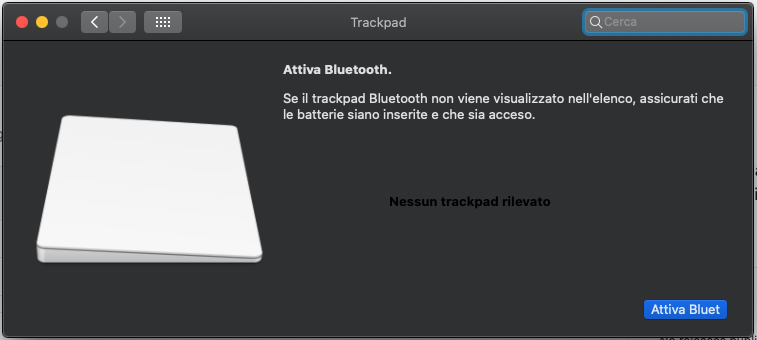
I'm trying the latest efi you uploaded, I don't know why the trackpad is not recognized. how can I do ?
sciro24
on 14 Sep 2020
Are you sure you got same laptop model and using whole efi folder? Because trackpad works without any modification here with Catalina. If you still not able to make it work contact me by telegram given above.
agassecond
on 14 Sep 2020
Funny thing but I've just discovered similar issue on ubuntu 18.04 (no sound from the speakers, only with headset). When I used ubuntu 20.04 (livecd) and switched again to ubuntu 18 sound was back again.
I compared codec dumps from all scenarios and there were some differences:
27c27
<   Converter: stream=1, channel=0
---
>   Converter: stream=0, channel=0
29c29
<     rates [0x60]: 44100 48000
---
>     rates [0x560]: 44100 48000 96000 192000
39c39
<   Converter: stream=1, channel=0
---
>   Converter: stream=0, channel=0
41c41
<     rates [0x60]: 44100 48000
---
>     rates [0x560]: 44100 48000 96000 192000
67c67
<   Converter: stream=1, channel=0
---
>   Converter: stream=0, channel=0
@nekiro do you think it is relevant?
dawidmalina
on 19 Sep 2020
dont think rates matters here... also i got sound working on ubuntu 20
agassecond
on 20 Sep 2020
Rates probably not but what about Converter: stream=0 instead of Converter: stream=1?
dawidmalina
on 20 Sep 2020
@dawidmalina if you can reproduce it, write down following pamars:
processing coefficient 0x36 and 46 on NID 20 (two commands to get one param hda-verb 0x20 0x500 0x36, hda-verb 0x20 0xc00 0)
also need proc coefs 3 and 4 on nid 57
and proc coefs 2 on nid 53
agassecond
on 2 Oct 2020
@agassecond if I understood you correctly those are the values from U20 where sound is working:
hda-verb /dev/snd/hwC0D0 0x20 0x500 0x36
nid = 0x20, verb = 0x500, param = 0x36
value = 0x0


md5-3ce60782f7552b608f2a685c3141e277


hda-verb /dev/snd/hwC0D0 0x20 0xc00 0


md5-3ce60782f7552b608f2a685c3141e277


nid = 0x20, verb = 0xc00, param = 0x0
value = 0x5757


md5-3ce60782f7552b608f2a685c3141e277


hda-verb /dev/snd/hwC0D0 0x20 0x500 0x46


md5-3ce60782f7552b608f2a685c3141e277


nid = 0x20, verb = 0x500, param = 0x46
value = 0x0


md5-3ce60782f7552b608f2a685c3141e277


hda-verb /dev/snd/hwC0D0 0x20 0xc00 0


md5-3ce60782f7552b608f2a685c3141e277


nid = 0x20, verb = 0xc00, param = 0x0
value = 0xf4


md5-3ce60782f7552b608f2a685c3141e277


hda-verb /dev/snd/hwC0D0 0x57 0x500 0x3


md5-3ce60782f7552b608f2a685c3141e277


nid = 0x57, verb = 0x500, param = 0x3
value = 0x0


md5-3ce60782f7552b608f2a685c3141e277


hda-verb /dev/snd/hwC0D0 0x57 0xc00 0


md5-3ce60782f7552b608f2a685c3141e277


nid = 0x57, verb = 0xc00, param = 0x0
value = 0x9a3


md5-3ce60782f7552b608f2a685c3141e277


hda-verb /dev/snd/hwC0D0 0x57 0x500 0x4


md5-3ce60782f7552b608f2a685c3141e277


nid = 0x57, verb = 0x500, param = 0x4
value = 0x0


md5-3ce60782f7552b608f2a685c3141e277


hda-verb /dev/snd/hwC0D0 0x57 0xc00 0


md5-3ce60782f7552b608f2a685c3141e277


nid = 0x57, verb = 0xc00, param = 0x0
value = 0x822c


md5-3ce60782f7552b608f2a685c3141e277


hda-verb /dev/snd/hwC0D0 0x53 0x500 0x2


md5-3ce60782f7552b608f2a685c3141e277


nid = 0x53, verb = 0x500, param = 0x2
value = 0x0


md5-3ce60782f7552b608f2a685c3141e277


hda-verb /dev/snd/hwC0D0 0x53 0xc00 0


md5-3ce60782f7552b608f2a685c3141e277


nid = 0x53, verb = 0xc00, param = 0x0
value = 0x1000
Well, i investigate some regarding these proc coefs and tried to make it work on mac but still failed.
Here is one note https://www.kernel.org/doc/Documentation/sound/hd-audio/realtek-pc-beep.rst
That on some realtek codecs a hidden beep generator on 1a need and to make speaker work one have to set some undocumented proc coefs on nid 20 (that is vendor widget).
I dumped linux hda-verb on working sound it is in attach with my comments.
Also I build hda-decode-verb that allows to decode full command from that log to readable output.
https://drive.google.com/file/d/1UuulXun2ecP68MNNY4BSyfaczjL3HEMc/view?usp=sharing
Another part is dump from windows with coefs using rthddump.exe
pluggedwith internal in seems.txt
headphonesunplugged.txt
I tried to set that coefs myself, but still didnt get sound from speaker.
So at this stage I see 2 options:
1) Get codec init from either linux kernel (https://github.com/torvalds/linux/blob/master/sound/pci/hda/patch_realtek.c)
that i put some efforts but still not able to get through enable.beep, it looks we need this part.
or get this init part using https://github.com/Conmanx360/QemuHDADump
that will allow to write all command verbs during codec init and reproduce it.
2) There is a comment in realtek.c that on some codecs we need to correct pcm bitrates but i dont see this part in my linux dump, so it might be in init state -> still need qemu dump
3) We are in bad state because sound through speaker is handled by dsp soc etc that are not supported in applealc/opencore yet.
I am little tired with it, so if someone can help with gathering qemu dump would be great.
agassecond
on 3 Oct 2020
please someone help him
sciro24
on 8 Oct 2020
I want but it is the rocket science for me )
 ildarnm
on 9 Oct 2020
ildarnm
on 9 Oct 2020
@sciro24 it is not recognized as you need to use VoodooPS2 instead unless @Trilis29 figured out how to use properly VoodooI2C (I know he was trying to work on this topic).
dawidmalina
on 10 Oct 2020
we have fixed sciro24 problem long time ago mon ) was just little mess with voodoo in library/extensions. Currently trackpad works with non modified latest voodooi2c release with little fixes to TPD0 init / osi-xosi right from repo.
As for sound I am currently dont have time for investigation, mb i will try later but dont know when soz.
agassecond
on 12 Oct 2020
Perfect thank you very much, I hope you can find a solution for the sound that would make this hackintosh perfect =)
sciro24
on 12 Oct 2020
@agassecond thanks for sharing this. I was not aware of that. One small question about little fixes to TPD0 init / osi-xosi right from repo do you mean we can use https://github.com/daliansky/XiaoMi-Pro-Hackintosh/blob/master/ACPI/SSDT-TPD0.aml just as is or we need to use some custom version? What about osi-xosi where we can find that patch?
dawidmalina
on 12 Oct 2020
We have several repos for our version, for example one from @nekiro https://github.com/nekiro/Xiaomi-Notebook-Pro-15-6-Enhanced-Hackintosh
It is posted in this thread btw ).
Sadly last time i checked it was not fully functional with latest bios update as far as i remember, so i modified some files etc. but it might be because of my investigations on different aspects regarding sound/performance/wifi/bt compatibility, so i dont really like to post my current version.
If someone can check and report problems with nekiro's EFI version, i will find time to create repo myself.
agassecond
on 12 Oct 2020
I am using this one: https://github.com/ravnized/XiaoMi-Pro-Enhanced-Hackintosh. But this one and the one you've mentioned are still using VoodooPS2 not VoodooI2C. Would be good if you could at least share SSDT-TPD0.aml and SSDT-GPIO.aml and config.plist.
dawidmalina
on 13 Oct 2020
Hey guys, I haven't been here for a while, On my old EFI, VoodooPS2 is used for keyboard only, still strange that keyboard works entering password, but doesn't work on macos.
Trilis29
on 13 Oct 2020
First, thank you all for the great effort with this laptop..
If I may add an observation.. on linux (Ubuntu & Manjaro) when the laptop resumes from suspend there is no sound.. not sure if that helps at all..
 mBilG
on 25 Oct 2020
mBilG
on 25 Oct 2020
hi, someone have news about the speaker audio
sciro24
on 1 Nov 2020
Hello, sorry for the insistence, does anyone know if there is a way to improve wifi performance? I notice that it takes me a long time to connect to a network, and the browsing speed is very low. thanks a lot
sciro24
on 8 Nov 2020
@sciro24 No. Read here: https://openintelwireless.github.io/itlwm/FAQ.html#performance-sucks
 larryare
on 8 Nov 2020
larryare
on 8 Nov 2020
Actually in the past few days i made some research to make a layout
I made a folder with:
- The Linux Dump
- The Inform File, extracted file with extra information like Pin Complex Pin Default
- The Codec.txt folder with a bunch of file, like graphs and dump converted in dec
Codec.zip
ravnized
on 30 Nov 2020
Does it works?
agassecond
on 30 Nov 2020
still developing
ravnized
on 30 Nov 2020
@stevezhengshiqi could you please take a look at this?
ravnized
on 30 Nov 2020
@ravnized codec information has already been implemented in AppleALC 256 layout 57. I don’t have actual machine to figure out why there’s no sound.
stevezhengshiqi
on 30 Nov 2020
@stevezhengshiqi If you need any information from real machine I can provide it to you.
Or debug together. Currently from hda-verb scripts i can clearly see, that switches to speakers and amplifiers are working correctly, power up and down nodes etcs and there is a stream ongoing on speakers but no sound still. So, it is either some hidden manufacturer proc coefs or i have no idea what. From both Linux and Windows Realtek coef dumps I tried to set popular coefs manually but to no avail.
Got it from https://github.com/torvalds/linux/blob/master/sound/pci/hda/patch_realtek.c
alc256_init
alc_update_coefex_idx(codec, 0x57, 0x04, 0x0007, 0x1)
alc_update_coef_idx(codec, 0x46, 3 << 12, 0);
alc_update_coefex_idx(codec, 0x57, 0x04, 0x0007, 0x4); /* Hight power */
alc_update_coefex_idx(codec, 0x53, 0x02, 0x8000, 1 << 15); /* Clear bit */
alc_update_coefex_idx(codec, 0x53, 0x02, 0x8000, 0 << 15);
/*
 * Expose headphone mic (or possibly Line In on some machines) instead
 * of PC Beep on 1Ah, and disable 1Ah loopback for all outputs. See
 * Documentation/sound/hd-audio/realtek-pc-beep.rst for details of
 * this register.
 */
alc_write_coef_idx(codec, 0x36, 0x5757);
Didnt tried these sections yet:
alc_headset_mode_unplugged
coef_fw coef0256[] = {
WRITE_COEF(0x1b, 0x0c4b), /* LDO and MISC control /
WRITE_COEF(0x45, 0xd089), / UAJ function set to menual mode /
WRITE_COEF(0x06, 0x6104), / Set MIC2 Vref gate with HP /
WRITE_COEFEX(0x57, 0x03, 0x09a3), / Direct Drive HP Amp control /
UPDATE_COEFEX(0x57, 0x05, 1<<14, 0), / Direct Drive HP Amp control(Set to verb control)*/
alc_headset_mode_mic_in
coef_fw coef0256[] = {
UPDATE_COEFEX(0x57, 0x05, 1<<14, 1<<14), /* Direct Drive HP Amp control(Set to verb control)/
WRITE_COEFEX(0x57, 0x03, 0x09a3),
WRITE_COEF(0x06, 0x6100), / Set MIC2 Vref gate to normal */
agassecond
on 30 Nov 2020
Great news everyone )
I come back and make sound works.
Might use this custom build of applealc until I create a normal version and pull request to AppleAlc repo with it.
Use layout 69
AppleALC.kext.zip
agassecond
on 21 Dec 2020
The internal speakers work!
But when I installed this kext, the sound quality in the headphones became poor.
First, the sound is quieter than it was
Secondly, I don't hear a voice, but only music
UPD:
Hm, I changed the balance settings right as screenshot and the headphones work well!
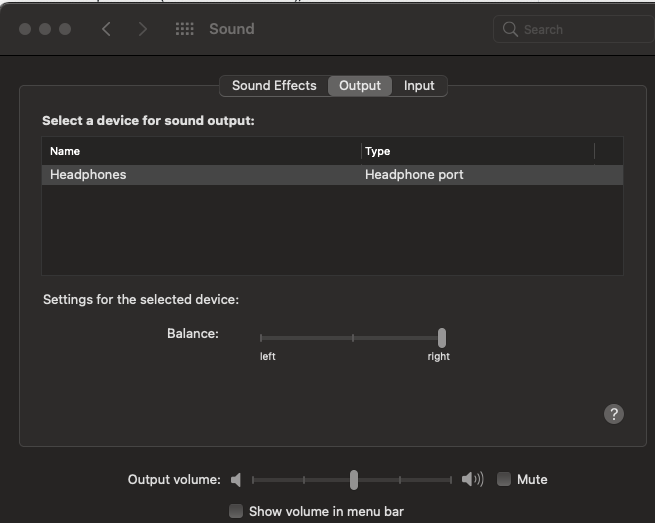
ildarnm
on 22 Dec 2020
Really strange, anyone else got same problem?
Might be some trails of codec comander, or jackretask or alike programs interference.
agassecond
on 22 Dec 2020
Really strange, anyone else got same problem?
Might be some trails of codec comander, or jackretask or alike programs interference.
Same problem here, i used the same "fix"
ravnized
on 22 Dec 2020
well first i started from the list of 1100 commands and now comes down to only 2, that allow to enable sound. Seems i need to include more coefficients
agassecond
on 23 Dec 2020
Ok, looks sound balance commands are here
0x02050036
0x02045757
either use hda-verb to send it,
hda-verb 0x02 0x500 0x36
hda-verb 0x02 0x457 0x57
Or add to ping config in applealc info.plist to our codec (search agasecond string)
Sequence matters!!!!!
agassecond
on 23 Dec 2020
Ok, here it comes, 82kb size (compared to 1.2mb full version). I have tested with rebooting to windows and back and now seems all ok.
AppleALC.kext.zip
agassecond
on 24 Dec 2020
also I created repo with my efi, works fine with BigSur, including native wifi, i2c trackpad, etc
agassecond
on 24 Dec 2020
also I created repo with my efi, works fine with BigSur, including native wifi, i2c trackpad, etc
@stevezhengshiqi @agassecond , can we merge them and expand this repo?
 MarFre22
on 24 Dec 2020
MarFre22
on 24 Dec 2020
@MarFre22 @agassecond I can do that, but it needs some time.
stevezhengshiqi
on 25 Dec 2020
@stevezhengshiqi , if you need help, please tell, I can help with bash script if you like.
MarFre22
on 25 Dec 2020
Related issues
 fang0814
·
6Comments
fang0814
·
6Comments
 cook1e0
·
7Comments
cook1e0
·
7Comments
 spita90
·
4Comments
spita90
·
4Comments
 orhan-drsn
·
7Comments
orhan-drsn
·
7Comments
 rajibxo
·
7Comments
rajibxo
·
7Comments
Most helpful comment
Great news everyone )
I come back and make sound works.
Might use this custom build of applealc until I create a normal version and pull request to AppleAlc repo with it.
Use layout 69
AppleALC.kext.zip