Xdrip: Libre 2 - (xDrip+ + LibreLink patched) vs. (xDrip+ + MiaoMiao2)
I'm new to the FreeStyle Libre 2, and I was wondering what would you choose (and why) if you had the opportunity. Which method gives you the most accurate results, LibreLink 2.3 patched app with xDrip+, or the MiaoMiao2 with xDrip+?
Thank you for time and effort, and waiting for your opinions!
 DavidAG2000
All 74 comments
Should be the same, both use the data from the freestyle libre sensor 2 itself. With the patched app you dont need an extra device, that already made my decision for the patched app. In my oppinion miaomiao is only helpfluu if you use libre 1 sensors. Perhaps if you are a looper (having a automated pump aswell) the miaomiao can have advanteges, but i dont do that thats why i cant tell.
 twinko
on 3 Aug 2020
twinko
on 3 Aug 2020
But I thought that the patched app gave you the processed values by Abbott, and MiaoMiao just the raw values. Isn't that true?
DavidAG2000
on 3 Aug 2020
Both (miamia and libre) use a routine to handle the raw data. Im not 100% sure about the miaomiao algorithm and didnt found a comparison between both, but i guess the libre one is tested a lot :)
twinko
on 3 Aug 2020
Hi,
I've just received my first FreeStyle Libre 2 sensor (until yesterday I was using Libre 1). I was very happy with my Miao Miao 2 and Xdrip, but now I found that is not working anymore (I get the "Checksum failed" error everytime, there's no way to make it works).
Then, you guys wrote above that we don't need the Miao Miao 2 anymore, we can use the LibreLink app patched with xDrip+??? is there any guide to do that? where/how can I find the patched app??
Thank you!
 jomonba1
on 4 Aug 2020
jomonba1
on 4 Aug 2020
@jomonba1 read this guide. at the bottom its in englisch:
https://github.com/TinoKossmann/LibreLink-xDrip-Patch
If you read this here is another guide for how to youse xdrip in combination with the patched libre app
https://androidaps.readthedocs.io/en/latest/EN/Configuration/xdrip.html#xdrip-freestyle-libre (you can change the language on the left side of the page)
twinko
on 4 Aug 2020
Having used both setups as well as MM1 and Libre 1 before, I am now confidently using Libre2 with only the patched app.
Recently I was calibrating the Libre2 in XDrip+ and I have now stopped that completely. Reason being is that calibrations were always throwing off the values. I get that the slope calibration should provide a better approximation but in my experience it was not working well. I did all the right things, wait until BG is stable, do a sensor change, no carbs for 3 hours prior, low stress during calibration, initial calibration of 2 BG tests. Then the next few days I would do a calibration when I woke up as BG was stable from during the previous night.
A user on Gitter (twinko, I think) mentioned that they were not using calibrations with Libre2, this peaked my interest so I set aside 2 weeks to try this. Here is what I found.
Setup: Libre2 with LibreLink patched app. XDrip+ and AAPS (Eros-0.3-2.7 build for Omnipod)
Goal: Minimalistic approach - as few devices and tubes as well as creating as little waste as possible (easier for traveling with site/sensor changes)
Cons:
1 hour lost sensor readings: You do lose 1 hour of readings during a sensor change. With the MM device you can insert a new sensor and start it while getting reading from the old, I miss that but 1 hour out of 24 missing every 2 weeks is acceptable to me.
Warmup and stabilization period for me in reality it is about 6 hours. After the 1 hour warm up, readings are close but not exact +/- (15-20 mg/dL). I have found that after 6 hours, the sensor dials in and my differences between BG and sensor about about +/- (4 mg/dL).
No on demand BG refresh from xDrip+ via BT (can be done with NFC manual scan). Sometimes I like to refresh between the 5 minute intervals to see where I am at when things are rising or falling rapidly. This was nice with the MM as I could always query a refresh in xDrip+, however with the Libre2 you have to wait your 5 minutes until the next BT signal is sent. A manual NFC scan works as a workaround but it was nice to just refresh in the app. Not a deal breaker, just convenience.
Patched app is only available on Android devices. Before AAPS, I was looping with Loop and Spike. However, due to lack of availability of a patched app on IOS, MM is the only option to get readings from Libre2 on the IOS platform. I moved to AAPS firstly because I use the Omnipod and wanted to assist with the Eros branch development but also because Spike was having app store problems and not being updated as rapidly as xDrip+ for new CGM sources. I do prefer the Android platform over IOS as I think it is more open but this is a personal preference. Also carrying 2 phones was counter to my minimalistic approach, although I am now considering dedicated small phone just for looping (IE Unihertz Atom or Jelly2)
Pros:
No need for an additional device to charge, look after, change stickers, etc. One less thing to fail in the loop.
No need for constant or every 3 day calibrations. I didn't calibrate too much but the first day 2 initialization calibrations and then a few hours later 1-2 additional calibrations. Then next morning I would calibrate. If things looked good, then I would wait a few days and do a check calibration (if the BG was not off by more than 4 mg/dL then I would not log the calibration, if it was I would log and then repeat a few days later). Mostly, I test my BG in the first hour after sensor warm up and then 3-6 hours later but I don't enter the calibrations. I have learned that values will be off the first 6 hours but then become very stabil afterwards and stay that way for the entire 14 days.
Readings in XDrip+ and AAPS matching readings in LibreLink app for the occasional manual scan validated with BG.
No delay in readings to interpret results. XDrip+ just posts what is sent via BT to the LibreLink app
No need to constantly look at xDrip+ for values. Values are sent to AAPS from xDrip+ and generally agree with the LibreLink app results. I open xDrip+ to review nightly sugars in more details and check Nighscout and Tidepool uploads but outside of that I am living in AAPS. Before with MM, I was constantly checking xDrip+ to refresh, deal with signal loss, etc. This has simplified my setup.
Going into water or wet areas - With the MM, I was OK in the shower (aside from the spikes due to temperate but this was more a Libre1 sensor issue than the MM) but going into the swimming pool, hot tub, lake or sea I would always have to take my MM off. This meant sticker change upon returning, etc. I always had to be aware of the water and what was on my body before going in either on purpose or accidentally. With the new setup Omnipod and Libre2 only, I just go into the water without worry. If it is going to be an extended period of time, I just set a temp basal and leave the RL and Phone on the shore. If it is longer and I want to bring them with in a waterproof floating bag, then I do. I recently upgraded my RL case to a waterproof wireless charging one with a one way valve. I have had moments in the past where I have been pushed into pools or accidentally fell in streams (I blame my dog). This just help overall to again take the worry away from these situations.
I know this minimalistic setup is not for everyone so I understand if you have different preferences or different results. I also know that there are people who love calibrating and feel safer the more exact the number is. For me, I can accept that 6 hours every 2 weeks with be a little unclear and I plan for it (change in the evening and watch it carefully without food and then adding food when stabil). But after the senor dials in the values with the LibreLink patched app, it is pretty much autopilot from there on out and I spend a lot less time dealing with connection issues, etc that were introduced with the MM device. Don't get me wrong, I loved my MM device and could not have looped the Libre1 without it, OOPAlgorithm AND calibrations. However, I have found that the Libre2 is so exact (not perfect mind you) that the tolerances are within my acceptable levels to loop and not need to constantly check and refresh the values.
 teleriddler
on 4 Aug 2020
teleriddler
on 4 Aug 2020
@twinko Hi! thank you for your reply!!!
Let me say that I am quite noob with this, I am using the FreeStyle libre sensors since last 6 moths and as I said, I was very happy with my MM2 + FreeStyle libre 1 + xDrip app... now I've got the Libre 2 and nothing is working...
Then, if I understood properly, I won't need the MM2 anymore, is that correct? If I am able to patch the LibreLink App (not sure if I will... I think it will bevery hard... - no videos on youtube, shit shit shit - ) it will send the data to the xDrip app via BT, without the MM2 device? is that correct???
jomonba1
on 4 Aug 2020
@twinko Hi! thank you for your reply!!!
Let me say that I am quite noob with this, I am using the FreeStyle libre sensors since last 6 moths and as I said, I was very happy with my MM2 + FreeStyle libre 1 + xDrip app... now I've got the Libre 2 and nothing is working...
Then, if I understood properly, I won't need the MM2 anymore, is that correct? If I am able to patch the LibreLink App (not sure if I will... I think it will bevery hard... - no videos on youtube, shit shit shit - ) it will send the data to the xDrip app via BT, without the MM2 device? is that correct???
Correct.
DavidAG2000
on 4 Aug 2020
@twinko Hi! thank you for your reply!!!
Let me say that I am quite noob with this, I am using the FreeStyle libre sensors since last 6 moths and as I said, I was very happy with my MM2 + FreeStyle libre 1 + xDrip app... now I've got the Libre 2 and nothing is working...
Then, if I understood properly, I won't need the MM2 anymore, is that correct? If I am able to patch the LibreLink App (not sure if I will... I think it will bevery hard... - no videos on youtube, shit shit shit - ) it will send the data to the xDrip app via BT, without the MM2 device? is that correct???
as mentiones by David, yes tahts correct. No worries, just follow the guides step by step, its not that hard.
twinko
on 5 Aug 2020
@teleriddler You can insert the new sensor at night and have two sensors for 6-8 hours so next morning, when the old sensor expires, all you have to do is scan the new sensor and wait one hour. That way you will probably avoid the 6 hours of wrong data.
In my case xDrip+ loses data quite often and I have to scan the sensor to make it work again. I don't know if it's a xDrip or patched app problem. Next time I'll activate Alarms in LibreLink and see if they work despite xDrip don't to try to isolate the problem. Have you had any data losing problem?
Regards
 JimZam
on 5 Aug 2020
JimZam
on 5 Aug 2020
@teleriddler
In my case xDrip+ loses data quite often and I have to scan the sensor to make it work again
I guess that happens while you are sleeping right? if so, plug the charger to your phone during the night and problem fixed.
jomonba1
on 5 Aug 2020
Thank you for your help but no, this is not the case. It is random. Any other idea?
JimZam
on 5 Aug 2020
Thank you for your help but no, this is not the case. It is random. Any other idea?
this never happend to me but i followed the description here: https://androidaps.readthedocs.io/en/latest/EN/Configuration/xdrip.html#xdrip-freestyle-libre (you can change the language on the left side of the page)
twinko
on 5 Aug 2020
Thank you twinko, thst's how I have it. I'll check it again in case I have missed something.
Regards
Edit: my mistake, I don't have this options enabled since the parched app sends data to xDrip and bluetooth is not necesary. This are the instructions I followed:
https://androidaps.readthedocs.io/en/latest/EN/Hardware/Libre2.html
JimZam
on 5 Aug 2020
try to enable bluetooth, perhaps it helps. you need to troubleshoot it.
twinko
on 5 Aug 2020
@twinko
Hey I've been checking the procedure to get the Librelink app patched.... And OMG!!!!
Does anyone have the app already patched ready to share??? It would be much easier for people who does not know anything about adding commands... You would say it's very easy, just follow the instructions (but it's not so easy for me) 🤯
jomonba1
on 7 Aug 2020
@twinko
Hey I've been checking the procedure to get the Librelink app patched.... And OMG!!!!
Does anyone have the app already patched ready to share??? It would be much easier for people who does not know anything about adding commands... You would say it's very easy, just follow the instructions (but it's not so easy for me) 🤯
whats so hard about following a step by step instruction? just do whats written down in every step? der is 0% knowledge needed.
twinko
on 8 Aug 2020
@JimZam
I guess those instructions are for Linux right? You said ”Just don't follow this instructions" but the command instructions look for Linux, anyway I will use Windows...
I will arrive home next Monday, I will try to follow the links shared by @twinko step by step... Did you patched the app?? 😁
jomonba1
on 8 Aug 2020
@jomonba1 #
Did you patched the app??
I did. Did you?
Good luck.
JimZam
on 8 Aug 2020
@JimZam
No I didn't. I'm not at home until Monday.
Could be possible you to send me the patched app by email? Is that possible? 😅
I would really appreciate ☺️
[email protected]
jomonba1
on 8 Aug 2020
@twinko @JimZam
Hi guys, I am trying to patch the app and with my 0% knowledge, following the links given above

1- I downloaded the FreeStyle LibreLink DE_v2.4.2.apk (I put it directly on _C:\Windows_)
2- I didn't do it.
3- I downloaded the apktool.bat and the apktool.jar (I downloaded the version 2.3.4 since I am using windows and it is said that the latest version has some issues) and then I am following the instructions "here"

I guess the point 6 from this, match with the point 5: _Use the apktool: apktool d -o librelink [FILENAME_OF_THE_DOWNLOADED_APK]_
I've tried several commands but I guess I am missing something, see the following:

I am so sorry, but let me say that this is the first time in my life that I write a command, please excuse my ignorance 😅
jomonba1
on 10 Aug 2020
My instructions are easier. And you can't patch version 2.4, only 2.3.
JimZam
on 10 Aug 2020
@JimZam can you paste the link again?
by the way... the app 2.4 is more accurate than the 2.3.... is there any problem with that? I mean... can I trust with that data?
jomonba1
on 10 Aug 2020
@JimZam can you paste the link again?
by the way... the app 2.4 is more accurate than the 2.3.... is there any problem with that? I mean... can I trust with that data?
Both are official apps by Abbott, so it's not a big deal.
DavidAG2000
on 10 Aug 2020
I didn't post a link, I wrote the instructions. You can find them in your mail Inbox because you probably receive an email whenever someone post here.
And if 2.3 is not accurate enough for you stick to version 2.4.
@DavidAG2000 If it were easy to patch 2.4 they would have done it, don't you think?.
JimZam
on 10 Aug 2020
@jomonba1 @JimZam
JimZam is right follow his instruction. The english version of the links i posted ist much more complicated than the german one.
twinko
on 10 Aug 2020
https://www.youtube.com/watch?v=ezpGM2jR89A
much easier, even I was able to do it...
jomonba1
on 10 Aug 2020
In the end you can copy and paste, great. But this fork doesn't allow you to update data to Abbott servers. Use the smos-gh fork. You will have to patch the app in you mobile with Lucky Patcher but, in case of troubles, you can uninstall and install it again and the alarms will continue working because it updates data to Abbott. When you log in again (in case of reinstallation) data are downloaded and the alarms keeps on working and so xdrip receiving data.
And you need the original and the patched app. Install the original, uninstall and try to install the patched one. It'll not be possible so follow the instructions to patch it.
JimZam
on 10 Aug 2020
@JimZam https://androidaps.readthedocs.io/en/latest/EN/Hardware/Libre2.html this is the link you posted, but it's not explained the way to patch the app. I just says _"For legal reasons, the so-called patching has to be done by yourself. Use search engines to find the corresponding links."_
Anyway, I went through the step 1 (_"Step 1: Build your own patched LibreLink-App"_) with the video from Youtube.
Then I installed again xDrip. I configured xDrip according the Step 2 from your link (_Step 2: Install and configure xDrip+ app_)
Then "_Step 3: Start sensor_" I started the sensor with “Start Sensor” and “not today”, but xDrip+ is not working... nothing happens.
Then on the main screen I did this:

But the result is the same... this one:

xDrip is not taking values. I watched on System Status this:

Does it mean that the sensor is connected??
jomonba1
on 10 Aug 2020
I insist, you should patch the smos-gh fork, but again it's up to you...
You have to star the sensor after installing the patched app, you can't use a previously started sensor. Alarms in the app should work and then data is send to xdrip. If you don't receive alarms from the app or you don't see the red lines in the main graph where the lower and higher glucose limits should be then the patched app is not working.
And the way to patch the app was at the beggining. In fact this link was at the bottom of the post.
JimZam
on 10 Aug 2020
@JimZam hey friend, first of all thank you for your time... I really appreciate.
you should patch the smos-gh fork, but again it's up to you... no idea what you mean by that... I want to do it, believe me, but I don't know what you mean by "_you should patch the smos-gh fork_"
I've been about 3 days without any senor on my arm (as I said I was out of home and I needed the fu**ing patched app) so I've been during the last 3 days doing like old style (only 4-5 BG per day).
On the other hand, the FreeStyle Librelink patched app is showing this:
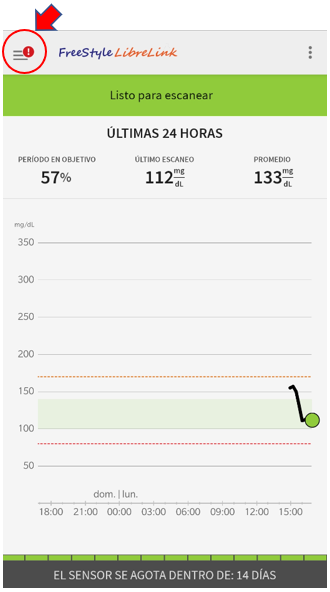
I swear that I started the sensor with this app, but I think something is not working neighter... by the way, I thought that on this app, the blood values were automatically added, but they are not, you have to scan the sensor, otherwise the data is not flowing....
JimZam, could you please post again the link that you are talking about (I can't see it)
jomonba1
on 10 Aug 2020
Everything is ok, all you have to do is configure xdrip and in a couple of minutes it should be showing data. You started the sensor before selecting the source, you said. I don't know if this is even possible... Check if the app sends alarms. Put the lower in 120 or the higher in 100 so with your glucose it should show a message. Wait a couple of minutes and if it doesn't there is something wrong with your configuration. Check everything the link says, location, bluetooth, notifications, battery permissions...
This is the brunch you should use, but the resulting app should be patched again with Lucky Patcher:
https://github.com/smos-gh/LibreLink-xDrip-Patch
Don't do it now, wait 14 days until your sensor expires because if not your patched app will not work again. This is the good part of this brunch, you can reinstall the patched app and the alarms keep on working.
JimZam
on 10 Aug 2020
@JimZam
Unbelievable... I just restarted the phone and as soon as it switched on everything was working...
Now the red exclamation disappeared and the xDrip is showing values...
I owe you 1 million beers and a sugar free cake!!!
jomonba1
on 10 Aug 2020
I'm closer than you think...
Saludos
JimZam
on 10 Aug 2020
@jomonba1 Yo también, como creador de este hilo, soy español. ¡Enhorabuena por haberlo conseguido!
DavidAG2000
on 10 Aug 2020
thank you!
anyway... the date is not been sending through LibreLink Up, so my doc is not able to see all the data...
so, for now it is working but not enought.
I will try the second variant another day.
@JimZam I insist, you should patch the smos-gh fork, but again it's up toyou...`` still don't know what is this.
jomonba1
on 10 Aug 2020
thank you!
anyway... the date is not been sending through LibreLink Up, so my doc is not able to see all the data...
so, for now it is working but not enought.
I will try the second variant another day.
@JimZamI insist, you should patch the smos-gh fork, but again it's up toyou...`` still don't know what is this.
It's another GitHub page with the instructions for patching Abbott's app with LibreLink connection.
The app that you just patched blocks all connections to Abbott's server for the patch not being detected.
DavidAG2000
on 10 Aug 2020
@DavidAG2000 Yeah, I know. Seen you at other forums...
@jomonba1 Use https://github.com/smos-gh/LibreLink-xDrip-Patch when you patch instead the direction in the video. Then patch again with Lucky Patcher in your mobile.
JimZam
on 10 Aug 2020
@JimZam hey friend, if you have already the app properly patched and working, with the option that the data can be sent to the doc... Why don't you share it? Is that forbidden? 🙄
I'm spending a lot of time to learn how to do something that I won't probably do again in my entire life...
Look, I was not starting a sensor since last Friday because I had not that patched app, because as it is said the sensor must be started by the patched app...
For me this is crazy, we are talking about my life... I would appreciate if you share that file (if this is not forbidden, of course). If not I will keep on asking to succeed on this.
Keep in mind when you say Use https://github.com/smos-gh/LibreLink-xDrip-Patch when you patch instead the direction in the video. Then patch again with Lucky Patcher in your mobile I have no idea about what you are talking 😅
I hope you can understand
jomonba1
on 10 Aug 2020
Minute 4:26 of your video, the command must be
git clone https://github.com/smos-gh/LibreLink-xDrip-Patch
Answer "n" to the question. The rest is the same.
Wait 14 days and when your sensor stops uninstall your patched app, go to Google Play/Settings/Play Protect/Settings in the up-right corner/Disable both options.
Install the new patched app and run it. I'll tell "Verification Failed" or something like that.
Go to:
https://www.luckypatchers.com/download/
in your phone and install the app.
See Method 5 video:
https://www.luckypatchers.com/video-tutorials/
The options you have to check to patch the app are Auto Mode and Other Patches Extreme Mode. Follow the instructions and that's all.
Reenable Play Protect.
JimZam
on 11 Aug 2020
@JimZam done! (at least the first part, still have to do the luckypatchers stuff)
I will come back in 14 days to tell you the ending of this long long story 😅
Anyway, thank you very much 💪🏽
PD: still don't understand why you didn't share the patched app 🤔
jomonba1
on 11 Aug 2020
Don't you feel great when you do things on your own? :-)
JimZam
on 11 Aug 2020
PD: still don't understand why you didn't share the patched app 🤔
I think this could be a legal isse due to changing closed source code from abbott and sharing it.
twinko
on 12 Aug 2020
And because in the future probably the patched app will stop working or we'll need version 2.4 and will have to patch again, or he'll need to compile Androidaps because it's such a great app as xDrip+, and there is no need to beg for the app, it's better to ask for help and DIY, there are a lot of people in github and gitter willing to help.
Regards
JimZam
on 12 Aug 2020
Don't you feel great when you do things on your own? :-) not really, this is not like I want to patch an app to see free movies or something like that, I was needing it "for living", remember that I was 3 days without monitoring my blood sugar. As it has been so urgent for me I didn't learn too much... I just did what you guys told me to do, nothing else.
I think this could be a legal isse due to changing closed source code from abbott and sharing it. this I could understand.
And because in the future probably the patched app will stop working or we'll need version 2.4 and will have to patch again and this as well, I guess in the future I will be able to do it again.
But let me say that this was not a matter of following "step by step" instructions. For me has not been that easy and I am sure that many people are in the same situation like me.
In any case @JimZam and @twinko thank you very much because without your help I would never have made it 💪🏽
Next step (on the next sensor) try to make it works with the luckypatchers stuff.
jomonba1
on 12 Aug 2020
You have been without this app for a long time, you could even have used Libre 2 with MM2:
https://medium.com/@miaomiaoreader/how-to-make-libre-us-14-days-sensors-work-with-miaomiao2-on-xdrip-35b431a40940
and, when you have the app patched, make the change as you are doing in 12-13 days (in fact if you had followed my instructions, you wouldn't have had to patch it again). It is easier to ask for the app than try to do it yourself but sometimes it's not the right way. I don't mind to help but I'm not sending the patched app (for a lot of reasons but also because I hope people to make an effort and do really thing that they will have to do again in the future). And I hope you will be able to teach someone else who need it because only if your mobile phone is rooted you will be able to access the Lucky Patcher's patched up.
Ask whenever you need it.
Take care
JimZam
on 12 Aug 2020
You have been without this app for a long time, you could even have used Libre 2 with MM2:
https://medium.com/@miaomiaoreader/how-to-make-libre-us-14-days-sensors-work-with-miaomiao2-on-xdrip-35b431a40940
and, when you have the app patched, make the change as you are doing in 12-13 days (in fact if you had followed my instructions, you wouldn't have had to patch it again). It is easier to ask for the app than try to do it yourself but sometimes it's not the right way. I don't mind to help but I'm not sending the patched app (for a lot of reasons but also because I hope people to make an effort and do really thing that they will have to do again in the future). And I hope you will be able to teach someone else who need it because only if your mobile phone is rooted you will be able to access the Lucky Patcher's patched up.
Ask whenever you need it.
Take care
Yesterday I patched the LibreLink app with LibreView access with a non-rooted Android, and Lucky Patcher with your instructions 💯
DavidAG2000
on 12 Aug 2020
@DavidAG2000 only if your mobile phone is rooted you will be able to access the Lucky Patcher's patched up You can share the patched app BUT only if your phone is rooted you'll be able to share the twice-patched app.
JimZam
on 12 Aug 2020
@DavidAG2000
only if your mobile phone is rooted you will be able to access the Lucky Patcher's patched upYou can share the patched app BUT only if your phone is rooted you'll be able to share the twice-patched app.
I could access to the .apk. In fact, I uploaded it to my Google Drive. I don't know if it works with another phones, but I tried to reinstall it on mine and, indeed, it worked.
DavidAG2000
on 12 Aug 2020
I don't think so. You have probably uploaded the one you patched in your computer. AFAIK you can't access the file in Lucky Patcher's directory unless you are root.
JimZam
on 12 Aug 2020
I don't think so. You have probably uploaded the one you patched in your computer. AFAIK you can't access the file in Lucky Patcher's directory unless you are root.
Nope, it was the Lucky Patcher's one. I could access to the .apk without being root :)
DavidAG2000
on 12 Aug 2020
Good for you. Share "how to" with us, jomonba1'll thank you (my phone is rooted)
JimZam
on 12 Aug 2020
Good for you. Share "how to" with us, jomonba1'll thank you (my phone is rooted)
There you go, buddy. It's a video.
DavidAG2000
on 12 Aug 2020
Great.
JimZam
on 12 Aug 2020
hi were i can find some info how to make the miamiao 1 work with xdrip and Libre 2 ? i already tried what MiaoMiao webpage says that is to update the miaomiao firmware and install the OOPalgorithm but still cant get any data on xdrip
 VladRodrig
on 19 Nov 2020
VladRodrig
on 19 Nov 2020
VladRodrig did you update the mm1 fw? what does the logs show when you try
to get the data.
You can see the firmware version in the xdrip status page under BT.
On Thu, 19 Nov 2020 at 22:58, VladRodrig notifications@github.com wrote:
hi were i can find some info how to make the miamiao 1 work with xdrip and
Libre 2 ? i already tried what MiaoMiao webpage says that is to update the
miaomiao firmware and install the OOPalgorithm but still cant get any data
on xdrip—
You are receiving this because you are subscribed to this thread.
Reply to this email directly, view it on GitHub
https://github.com/NightscoutFoundation/xDrip/issues/1394#issuecomment-730633357,
or unsubscribe
https://github.com/notifications/unsubscribe-auth/AB4TBZF4AUB3JIO37D2QTMLSQWBIVANCNFSM4PSBFQ7A
.
 tzachi-dar
on 19 Nov 2020
tzachi-dar
on 19 Nov 2020
VladRodrig did you update the mm1 fw? what does the logs show when you try to get the data. You can see the firmware version in the xdrip status page under BT.
…
On Thu, 19 Nov 2020 at 22:58, VladRodrig @.*> wrote: hi were i can find some info how to make the miamiao 1 work with xdrip and Libre 2 ? i already tried what MiaoMiao webpage says that is to update the miaomiao firmware and install the OOPalgorithm but still cant get any data on xdrip — You are receiving this because you are subscribed to this thread. Reply to this email directly, view it on GitHub <#1394 (comment)>, or unsubscribe https://github.com/notifications/unsubscribe-auth/AB4TBZF4AUB3JIO37D2QTMLSQWBIVANCNFSM4PSBFQ7A .
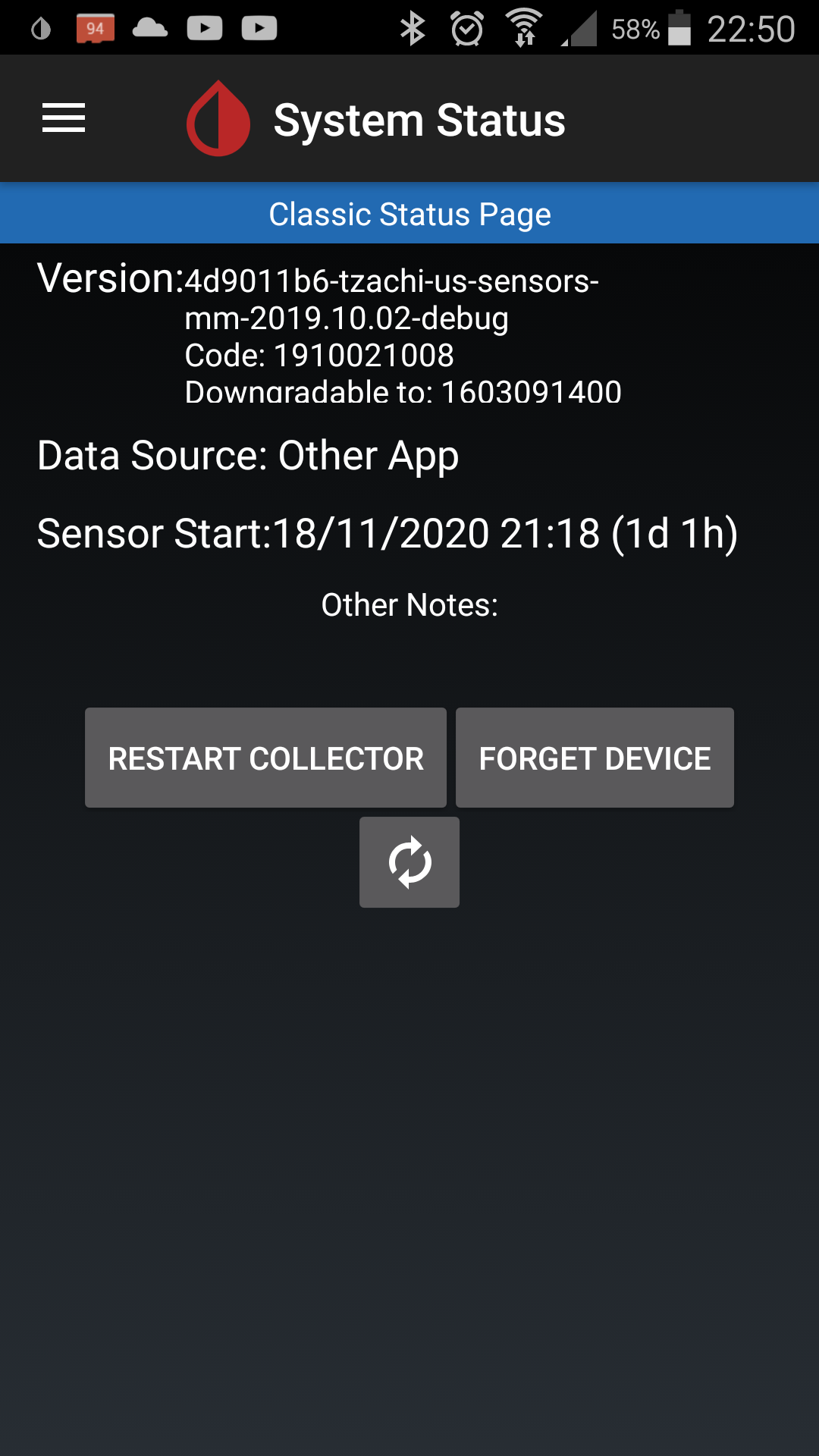
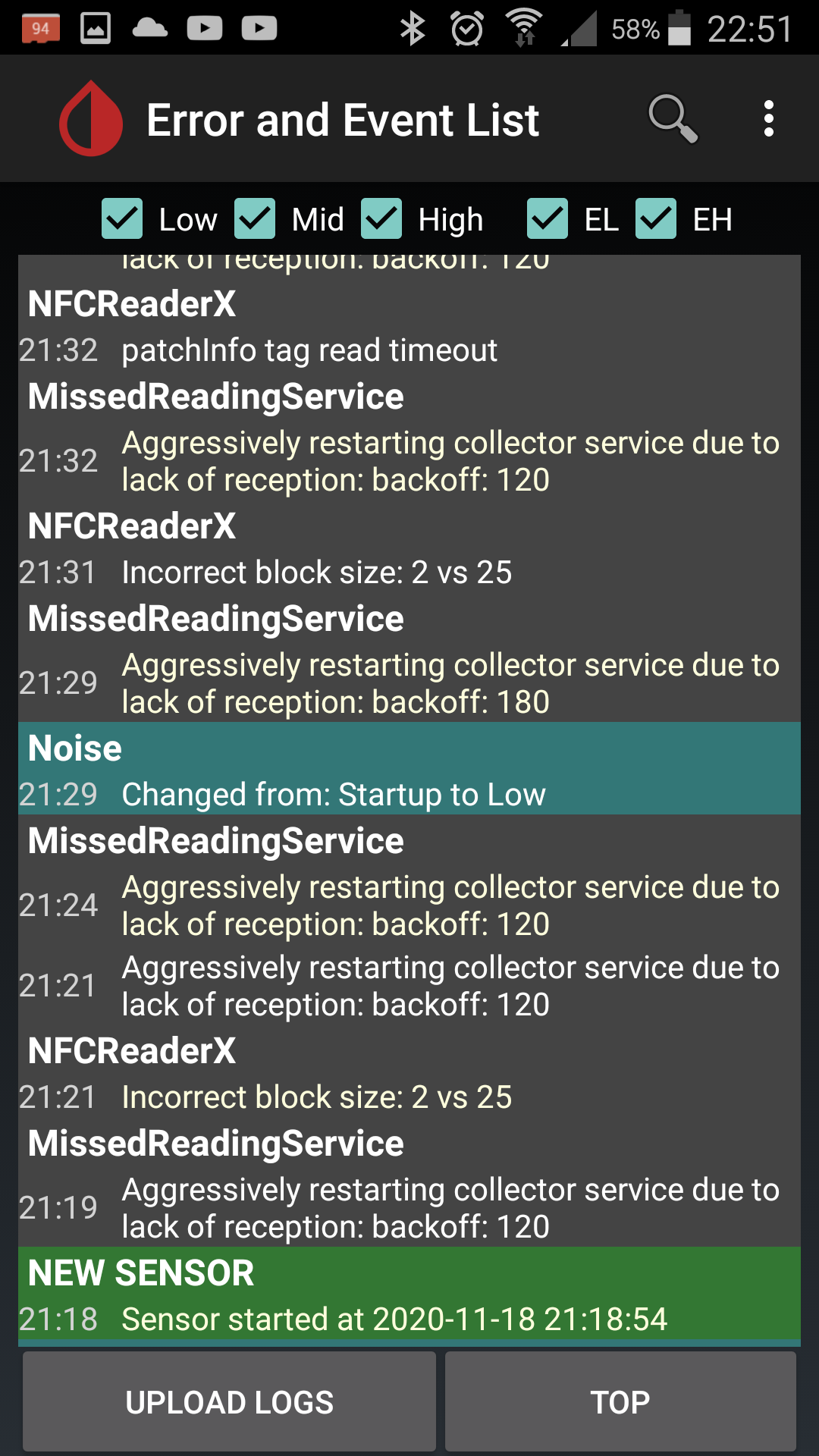
weird after reinstall this version and start using this config i only have this in the status panel but yes i updated the miaomiao 1 to v3.9
i see US sensor... its not US sensor im using europe sensor that comed from the miaomiao updade or the OOPalgorithm app
VladRodrig
on 19 Nov 2020
hi were i can find some info how to make the miamiao 1 work with xdrip and Libre 2 ? i already tried what MiaoMiao webpage says that is to update the miaomiao firmware and install the OOPalgorithm but still cant get any data on xdrip
you dont need to use. miaomiao with. Libre 2. you can have a direct connection. i only use libre2 and xdrip. no miaomiao needed
twinko
on 20 Nov 2020
hi were i can find some info how to make the miamiao 1 work with xdrip and Libre 2 ? i already tried what MiaoMiao webpage says that is to update the miaomiao firmware and install the OOPalgorithm but still cant get any data on xdrip
you dont need to use. miaomiao with. Libre 2. you can have a direct connection. i only use libre2 and xdrip. no miaomiao needed
what are the steps needed to be done for that to happen ? librelink patch ?
VladRodrig
on 20 Nov 2020
hi were i can find some info how to make the miamiao 1 work with xdrip and Libre 2 ? i already tried what MiaoMiao webpage says that is to update the miaomiao firmware and install the OOPalgorithm but still cant get any data on xdrip
you dont need to use. miaomiao with. Libre 2. you can have a direct connection. i only use libre2 and xdrip. no miaomiao needed
what are the steps needed to be done for that to happen ? librelink patch ?
yes you can Read more above in this thread
twinko
on 20 Nov 2020
@twinko to use the libre patch we need to start the sensor with the Libre patch app or we can start it with the reader and use the app after ?
VladRodrig
on 21 Nov 2020
VladRodrig did you update the mm1 fw? what does the logs show when you try to get the data. You can see the firmware version in the xdrip status page under BT.
…
On Thu, 19 Nov 2020 at 22:58, VladRodrig @.*> wrote: hi were i can find some info how to make the miamiao 1 work with xdrip and Libre 2 ? i already tried what MiaoMiao webpage says that is to update the miaomiao firmware and install the OOPalgorithm but still cant get any data on xdrip — You are receiving this because you are subscribed to this thread. Reply to this email directly, view it on GitHub <#1394 (comment)>, or unsubscribe https://github.com/notifications/unsubscribe-auth/AB4TBZF4AUB3JIO37D2QTMLSQWBIVANCNFSM4PSBFQ7A .
@tzachi-dar the firmware is the .39 i have it connect, but i only get reading sometimes after 2 or 3 hours, and it onlys says the glicemia im having at the moment, and doenst show no graph at all during all day
VladRodrig
on 21 Nov 2020
@twinko to use the libre patch we need to start the sensor with the Libre patch app or we can start it with the reader and use the app after ?
You need to start it with the LibreLink patched app.
DavidAG2000
on 21 Nov 2020
UPDATE of this THREAD:
Initially, I started it to compare which method was the most accurate (and, therefore, better), i.e., to see if the patched app was more accurate than the Libre 2 + MM2 and vice-versa.
Nowadays, having used the patched app for months and comparing it with my first results using Libre 2 + MM2, I can strongly assure that THE PATCHED APP GIVES FAR BETTER RESULTS than the MM2, having this last one as a great disadvantage the false "calibrations" in xDrip+.
Having said this, the patched app gets the gold award from me, not only because it's more comfortable, but because its accuracy.
I hope that this will be helpful for some of you, as I started this thread to get the answer to this.
Having this information as a resolution, I'm closing this thread now.
DavidAG2000
on 21 Nov 2020
@VladRodrig im sorry you have to suffer throught this, perhaps i'll write a short tutoriol on how to link xdrip with libre 2 using the patched app, referencing everything you need to do or translate it. Moreover i would like to add the pairig to a miband.
I'll need to contact the devs/moderators where to put it.
But you will learn a lot, and you will do it, even if it takes 2 days :)
And yes i think this thread could be closed now, even though its a great spot to let people know, miaomiao is not needed anymore and they can get rid of this extra tool
twinko
on 22 Nov 2020
@VladRodrig It's really easy to patch the app if you use linux. If not it's a bit more compicated but not too much. The easiest way is shown in this video:
https://www.youtube.com/watch?v=ezpGM2jR89A&feature=emb_logo
Install the original app, remove it and install the patched one. Follow this instructions to activate the sensor:
https://androidaps.readthedocs.io/en/latest/EN/Hardware/Libre2.html
The patched app doesn't send data to Abbott. If you need this feature replace the git clone order in minute 4:26 of the video for this one:
git clone https://github.com/smos-gh/LibreLink-xDrip-Patch
and answer No to the question.
To be able to send data to Abbott, you have to patch it again, this time in your mobile:
Go to Google Play Store/Setting/Play Protect then click in the icon up in the right and disable both options.
Install the patched app.
Go to:
https://www.luckypatchers.com/download/
in your phone and install the app.
See Method 5 video:
https://www.luckypatchers.com/video-tutorials/
this is what we are going to use. The options you have to check to patch the app are Auto Mode and Other Patches Extreme Mode. Follow the instructions and that's all. Make a copy of the resultiig app and reenable all Google Play options.
Any doubt ask here or send me a private.
Regards
JimZam
on 22 Nov 2020
@JimZam @VladRodrig
Hi, I am based in the USA and got my first libre 2 sensors without the reader which I was not told about. The sensor is on my arm and un-usable and I am out of work and insurance. So I started to do some research and found certain articles on how to patch the libre 2 from DE, however using the apkeasytool on Windows PC. I was able to follow instructions but seems that it does not look like the pictures I have seen above the messages.
I have the UK version running on another phone pointing towards Goggle play store the UK through VPN and country. The app does not recognize the sensor. (I guess they modified it for the USA)
If that's the case, what App should I use to modify? NFC READ app picks up the data values?
Am I having an issue with the patch on Windows 10? How do I set that up environment variables (C:\Program Files (x86)\GnuWin32\bin)?
Also, I generated an RSA key within Keystore but, I don't believe this is the case. I am a newbie and will try anything and learn to perfect what I need. I know the app loads and complains abt google play protect, where I bypass and install, but it can not read the senor.
Any advice or steps will be appreciated, guys.
 Akap00r
on 3 Dec 2020
Akap00r
on 3 Dec 2020
@Akap00r do you have a device like miaomiao2?
Is there an application for your device?
tzachi-dar
on 3 Dec 2020
@tzachi-dar noni do not have this device and realized it would cost me more than buying the reader. I just have Libre link us app. However it won't recognize the sensor.
Akap00r
on 3 Dec 2020
On Sep 06 02:40 I have posted a version of xDrip in https://gitter.im/LibreOOPAlgorithm/Lobby that might work (to be honest a small chance that it would work).
You can read above it, and try to scan with xDrip maybe it will work.
tzachi-dar
on 3 Dec 2020
Yes I downloaded Xdrip but issue here is to get the sensor started. I see a NFC command but is there something else I need to do and should I remove the libre link US from my android 10 phone
Akap00r
on 3 Dec 2020
@Akap00r i know that Glimp S can start sensors but i never did it myself,, take some time and read about it first , im sure you can get LibreLink out of the playstore and that will be a better option.... if you like Email me and i can try to help you vlad.[email protected]
VladRodrig
on 4 Dec 2020
Hi. I am from the UK and am wanting to patch the libre app for libre2.
Reading this thread do I take it I must use the 2.3 german apk? The release is now 2.5.2 and the 2.5.2 apk is available from various places (I did not want to root my phone)?
My previous non patched libre app has been automatically updated to 2.5.2 (though the libre itself is still version 1 - I am hoping libre2 will be available generally from January here).
I presume the patches cannot simply be changed to amend the com.freestyle.libre.app.de parts...
And that there is something in the patches specific to the 2.3 version?
I just wanted to be very clear and ask if I MUST use the 2.3 version without rewriting lots of code?
Thank you.
 sumnera
on 9 Dec 2020
sumnera
on 9 Dec 2020
Hi. I am from the UK and am wanting to patch the libre app for libre2.
Reading this thread do I take it I must use the 2.3 german apk? The release is now 2.5.2 and the 2.5.2 apk is available from various places (I did not want to root my phone)?
My previous non patched libre app has been automatically updated to 2.5.2 (though the libre itself is still version 1 - I am hoping libre2 will be available generally from January here).
I presume the patches cannot simply be changed to amend the com.freestyle.libre.app.de parts...
And that there is something in the patches specific to the 2.3 version?I just wanted to be very clear and ask if I MUST use the 2.3 version without rewriting lots of code?
Thank you.
Yes you must use the 2.3 later versions are not patched and the patches from 2.3 are not applicable to later versions. You will not notice a difference. Moreover you wont use the libreapp anymore (only for starting the sensor). Xdrip will be your new friend :)
twinko
on 9 Dec 2020
Related issues
 opasha
·
9Comments
opasha
·
9Comments
 malloy139
·
6Comments
malloy139
·
6Comments
 dideldum
·
7Comments
dideldum
·
7Comments
 arsinn
·
10Comments
arsinn
·
10Comments
 aeonsablaze
·
12Comments
aeonsablaze
·
12Comments
Most helpful comment
Having used both setups as well as MM1 and Libre 1 before, I am now confidently using Libre2 with only the patched app.
Recently I was calibrating the Libre2 in XDrip+ and I have now stopped that completely. Reason being is that calibrations were always throwing off the values. I get that the slope calibration should provide a better approximation but in my experience it was not working well. I did all the right things, wait until BG is stable, do a sensor change, no carbs for 3 hours prior, low stress during calibration, initial calibration of 2 BG tests. Then the next few days I would do a calibration when I woke up as BG was stable from during the previous night.
A user on Gitter (twinko, I think) mentioned that they were not using calibrations with Libre2, this peaked my interest so I set aside 2 weeks to try this. Here is what I found.
Setup: Libre2 with LibreLink patched app. XDrip+ and AAPS (Eros-0.3-2.7 build for Omnipod)
Goal: Minimalistic approach - as few devices and tubes as well as creating as little waste as possible (easier for traveling with site/sensor changes)
Cons:
1 hour lost sensor readings: You do lose 1 hour of readings during a sensor change. With the MM device you can insert a new sensor and start it while getting reading from the old, I miss that but 1 hour out of 24 missing every 2 weeks is acceptable to me.
Warmup and stabilization period for me in reality it is about 6 hours. After the 1 hour warm up, readings are close but not exact +/- (15-20 mg/dL). I have found that after 6 hours, the sensor dials in and my differences between BG and sensor about about +/- (4 mg/dL).
No on demand BG refresh from xDrip+ via BT (can be done with NFC manual scan). Sometimes I like to refresh between the 5 minute intervals to see where I am at when things are rising or falling rapidly. This was nice with the MM as I could always query a refresh in xDrip+, however with the Libre2 you have to wait your 5 minutes until the next BT signal is sent. A manual NFC scan works as a workaround but it was nice to just refresh in the app. Not a deal breaker, just convenience.
Patched app is only available on Android devices. Before AAPS, I was looping with Loop and Spike. However, due to lack of availability of a patched app on IOS, MM is the only option to get readings from Libre2 on the IOS platform. I moved to AAPS firstly because I use the Omnipod and wanted to assist with the Eros branch development but also because Spike was having app store problems and not being updated as rapidly as xDrip+ for new CGM sources. I do prefer the Android platform over IOS as I think it is more open but this is a personal preference. Also carrying 2 phones was counter to my minimalistic approach, although I am now considering dedicated small phone just for looping (IE Unihertz Atom or Jelly2)
Pros:
No need for an additional device to charge, look after, change stickers, etc. One less thing to fail in the loop.
No need for constant or every 3 day calibrations. I didn't calibrate too much but the first day 2 initialization calibrations and then a few hours later 1-2 additional calibrations. Then next morning I would calibrate. If things looked good, then I would wait a few days and do a check calibration (if the BG was not off by more than 4 mg/dL then I would not log the calibration, if it was I would log and then repeat a few days later). Mostly, I test my BG in the first hour after sensor warm up and then 3-6 hours later but I don't enter the calibrations. I have learned that values will be off the first 6 hours but then become very stabil afterwards and stay that way for the entire 14 days.
Readings in XDrip+ and AAPS matching readings in LibreLink app for the occasional manual scan validated with BG.
No delay in readings to interpret results. XDrip+ just posts what is sent via BT to the LibreLink app
No need to constantly look at xDrip+ for values. Values are sent to AAPS from xDrip+ and generally agree with the LibreLink app results. I open xDrip+ to review nightly sugars in more details and check Nighscout and Tidepool uploads but outside of that I am living in AAPS. Before with MM, I was constantly checking xDrip+ to refresh, deal with signal loss, etc. This has simplified my setup.
Going into water or wet areas - With the MM, I was OK in the shower (aside from the spikes due to temperate but this was more a Libre1 sensor issue than the MM) but going into the swimming pool, hot tub, lake or sea I would always have to take my MM off. This meant sticker change upon returning, etc. I always had to be aware of the water and what was on my body before going in either on purpose or accidentally. With the new setup Omnipod and Libre2 only, I just go into the water without worry. If it is going to be an extended period of time, I just set a temp basal and leave the RL and Phone on the shore. If it is longer and I want to bring them with in a waterproof floating bag, then I do. I recently upgraded my RL case to a waterproof wireless charging one with a one way valve. I have had moments in the past where I have been pushed into pools or accidentally fell in streams (I blame my dog). This just help overall to again take the worry away from these situations.
I know this minimalistic setup is not for everyone so I understand if you have different preferences or different results. I also know that there are people who love calibrating and feel safer the more exact the number is. For me, I can accept that 6 hours every 2 weeks with be a little unclear and I plan for it (change in the evening and watch it carefully without food and then adding food when stabil). But after the senor dials in the values with the LibreLink patched app, it is pretty much autopilot from there on out and I spend a lot less time dealing with connection issues, etc that were introduced with the MM device. Don't get me wrong, I loved my MM device and could not have looped the Libre1 without it, OOPAlgorithm AND calibrations. However, I have found that the Libre2 is so exact (not perfect mind you) that the tolerances are within my acceptable levels to loop and not need to constantly check and refresh the values.