Xdrip: G6 / 8G: "Cannot send calibration older than 1 hour to transmitter"
- G6 8Gxxxx, Firmware 2.18.2.88 and running xDrip+ nightly 2020-03-25
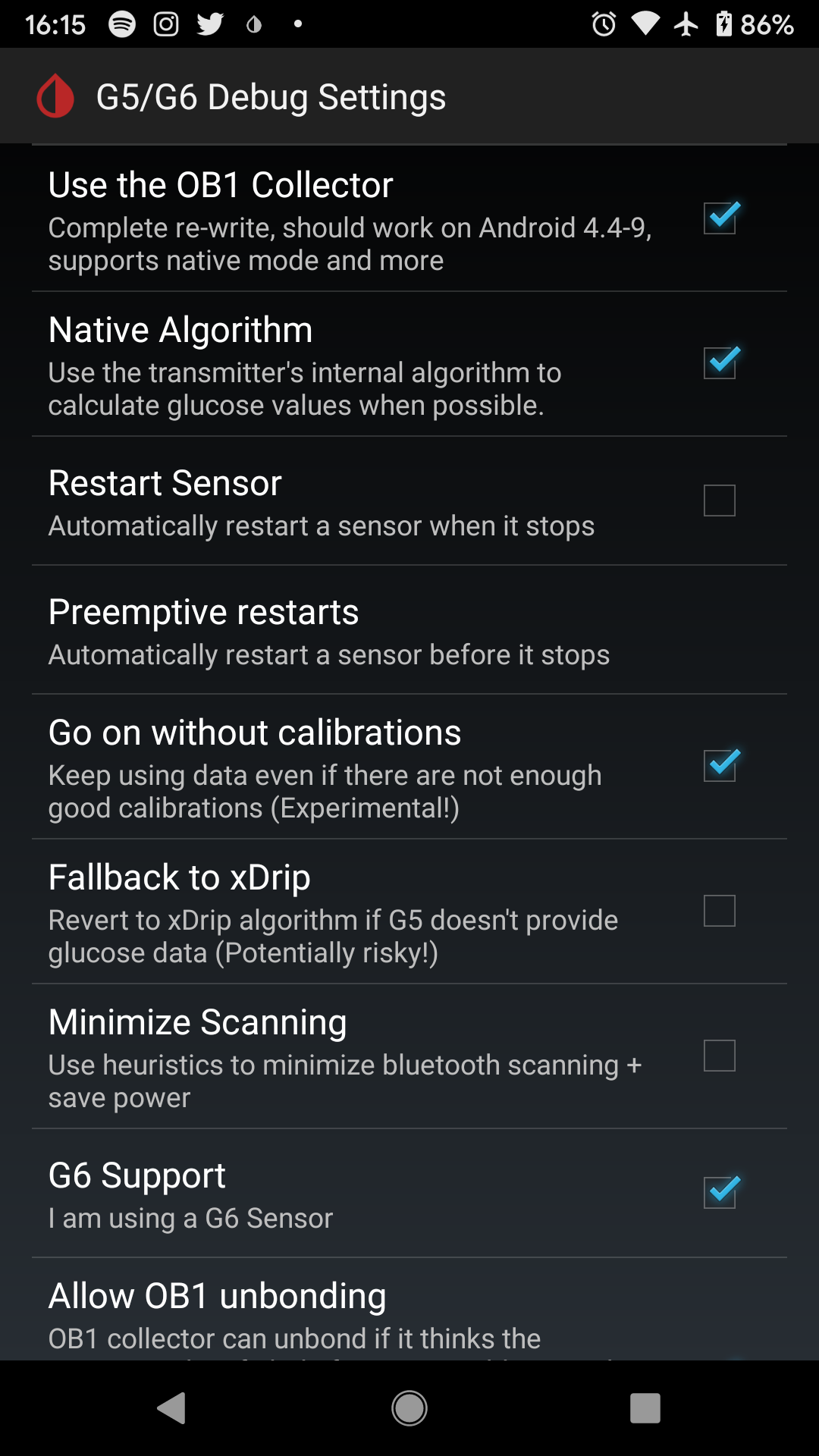
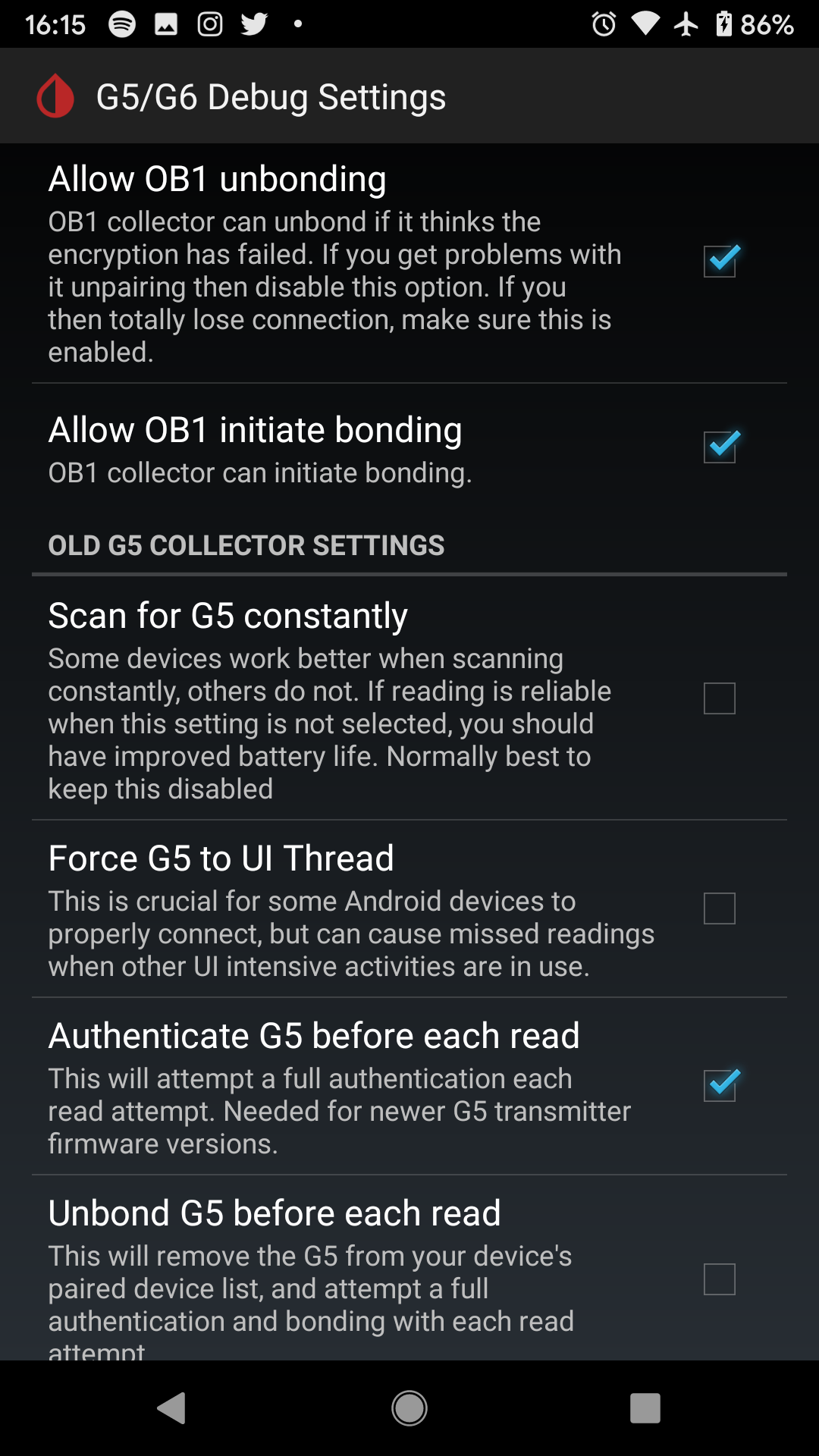
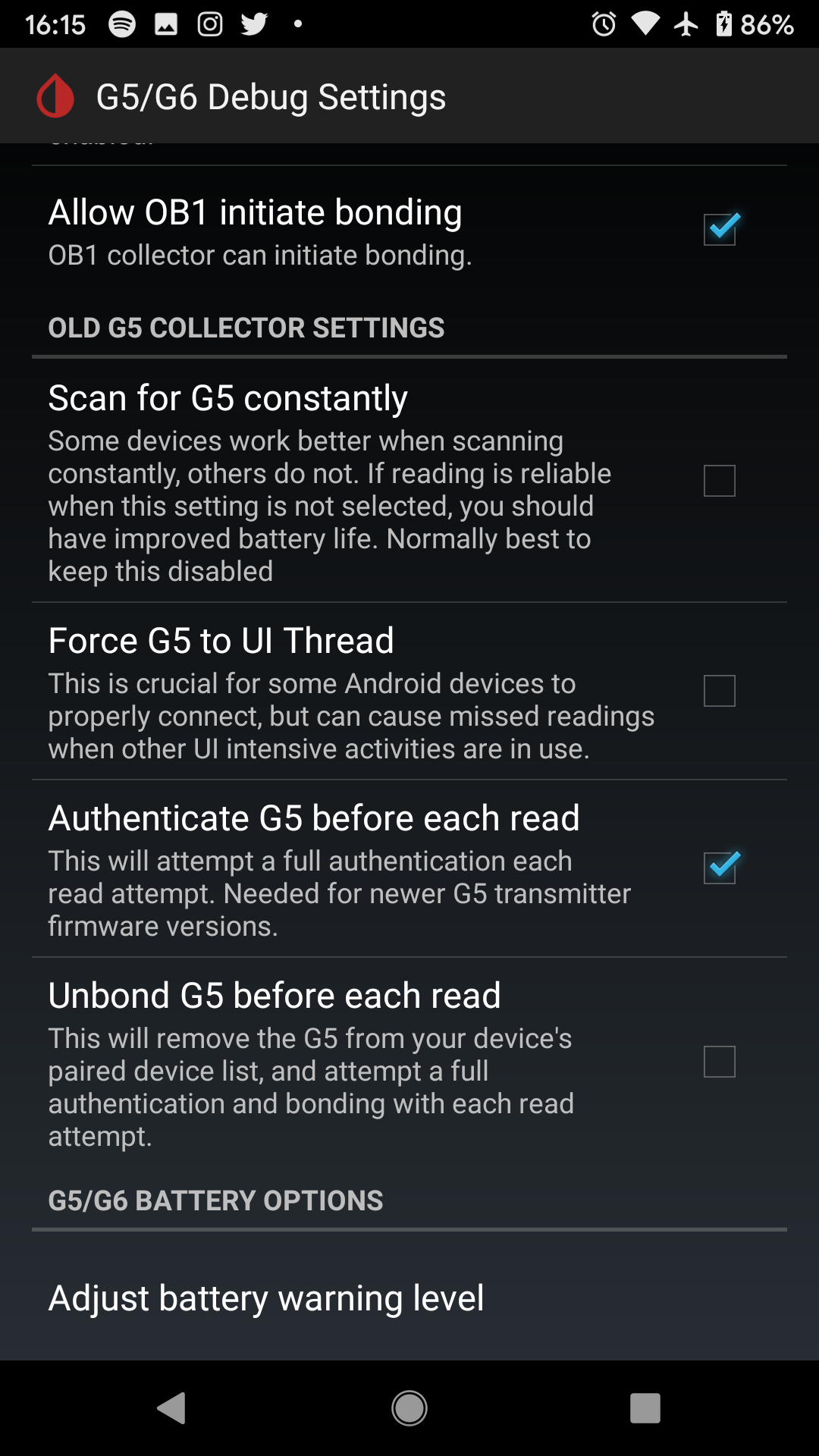
- Using G5/G6 settings OB1, Native, Allow OB1 unbonding and Allow OB1 initiate bonding; all remaining options are OFF.
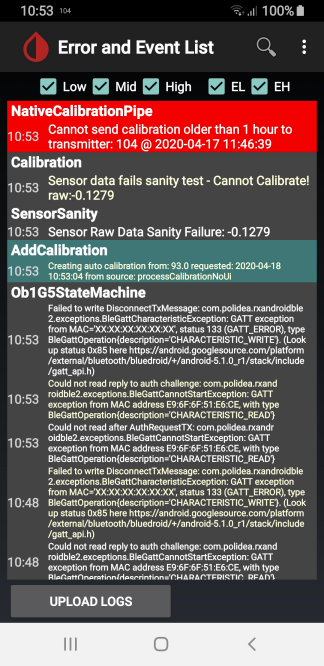
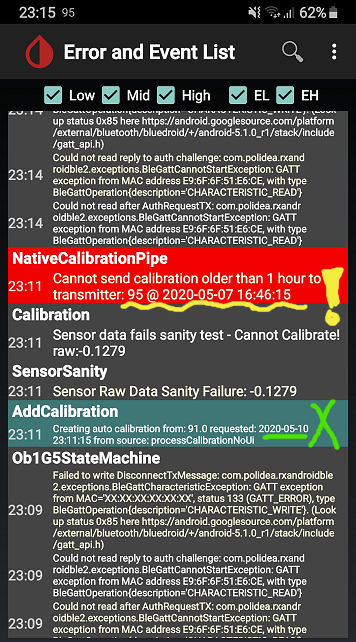
When calibrating using the syringe icon I always get the error message "_Cannot send calibration older than 1 hour to transmitter_" (see screenshot). Why is that?
Running xDrip+ on Samsung A8 - phone's time setting is fine, see also timestamp in screenshot. I can only calibrate with the "Initial Calibration" menu, this works most of the time but people are recommending always using the syringe calibration. Does not work for me :-(
 emp-00
All 43 comments
I've been having the same issue, but I think it's only when I enter a calibration code of 0000 (e.g. when I restart a sensor). Is that the same for you?
 justinthomas
on 21 Apr 2020
justinthomas
on 21 Apr 2020
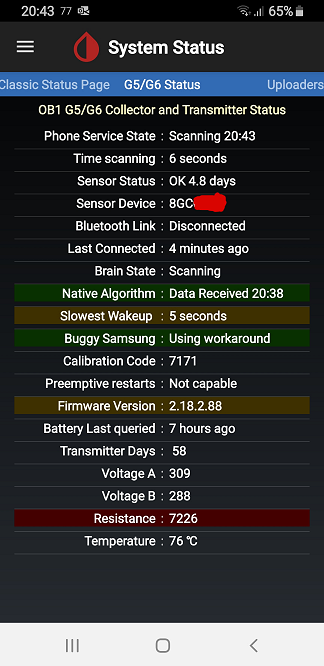
Thanks for the feedback but clear "NO" - I am always entering the calibration code, see in screenshot below (here 7171). Do you see the "Initial Calibration" menu item? In my case it's always there and this is the only way for me to enter calibrations. Anybody else having this issue?
emp-00
on 21 Apr 2020
Yes, I do have the "Initial Calibration" item in the menu, and it is the only way I can currently calibrate. I also get the exact same errors that you're describing. I had this issue previously and a complete wipe and re-install of xDrip fixed it. However, I ended up back in the same scenario, but I haven't yet identified the specific trigger. I assumed it was the sensor restart, but it appears that's not the case. I'll let you know if it goes back to normal after starting a new sensor (probably within a couple days). If not, I'll wipe and pay more attention as I configure things to see if I can pinpoint the trigger.
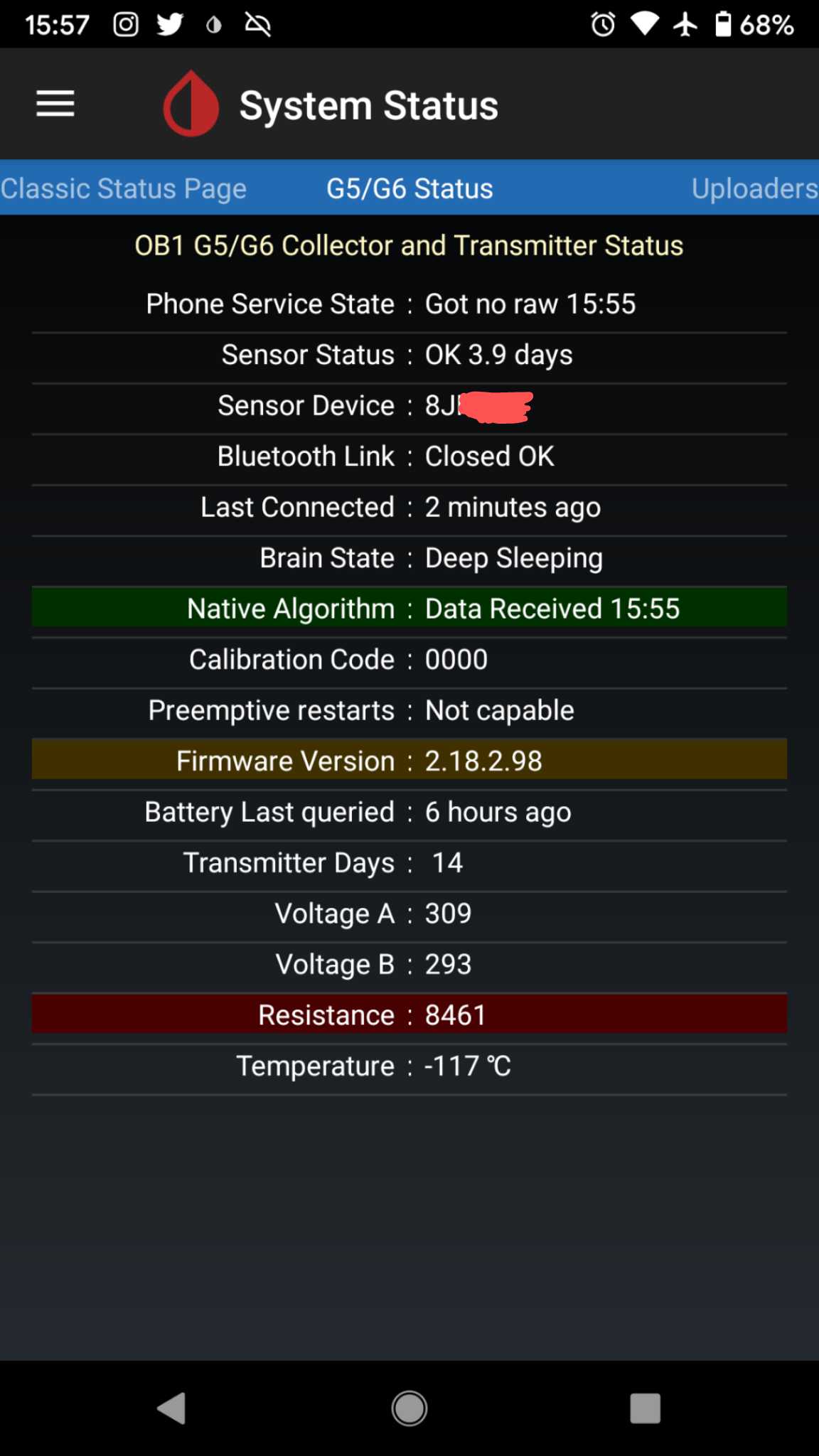
Some more details about my config:
- Original Pixel, running Android 10
xDrip version: d0011d1-2020.03.25
Data Source: G6 Native
- Status page:
- G5/G6 Settings
justinthomas
on 21 Apr 2020
I also do sensor restarts (stop session, pop out, wait 15min, pop back in => start session). When re-starting I always enter the initial calibration code (never used 0000 before). My G5/G6 debug settings differ in some switches (see my config above). So all of that's is probably not the trigger...
I have done frequent xDrip updates by downloading a more recent nightly or by using the auto-update function. Currently we're both using the same version 03/25 - we could upgrade to the latest alpha from April 19th but probably this does not fix our problem - I'm monitoring the changelog and saw no hint these updates solve our problem.
Maybe @jamorham or any other specialist can have a look and give us a good hint. I'm sure we're not the only ones...
emp-00
on 21 Apr 2020
Just documenting some troubleshooting. I started a new sensor with the calibration code. After warmup, I get the same rejection errors and see the Initial Calibration option in the hamburger menu. I backed up my settings, uninstalled xDrip, reinstalled, and restored the settings. I ignored all prompts to start the sensor (since it was already started). Once connected again, I was in the same situation. Next, I stopped the sensor, uninstalled xDrip, popped out the transmitter, reinstalled, and did not restore settings. Followed setup and wizard as if setting up for the first time. I'll report back with my findings once warmup is done and I'm awake.
justinthomas
on 23 Apr 2020
Unfortunately, no luck. In addition to the steps mentioned above, I
- Started the sensor using the https://github.com/NightscoutFoundation/xDrip/commit/8c4987f16f5481f73ecdbe62de2c26cc7fe7d218 version (buddy said it was working for him)
- Started the sensor using Dexcom's app before switching to xDrip
neither of which fixed the issue.
Next, I'm going to dive into the code to investigate the specific errors to see if I can figure anything out from that perspective.
justinthomas
on 23 Apr 2020
Thanks @justinthomas ... Here's the code - looks like xDrip is confused by somehow reading a wrong timestamp thinking the current time is "older than 1 hour" ? Is this a bug or a wrong setting in our phones? I'm using "automatic date and time provided by network" in my Android settings. Time displayed is correct. So maybe xDrip is in a different "timezone"??? I travelled from EU to the US and back 8 weeks ago. Maybe this confused xDrip? Had no issues with wrong timestamps during my travels though...
public static void addCalibration(final int glucose, final long timestamp) {
final long since = msSince(timestamp);
[...]
if (since > HOUR_IN_MS) {
final String msg = "Cannot send calibration older than 1 hour to transmitter: " + glucose + " @ " + JoH.dateTimeText(timestamp);
JoH.static_toast_long(msg);
UserError.Log.wtf(TAG, msg);
return;
}
emp-00
on 23 Apr 2020
I have good news to help get functional again! I downgraded to the 2019.10.27 Nightly Build and calibration seems to work now. I had an issue with Bluetooth dropping communication, but I think it was because I had a permission set incorrectly. I'm not giving up on digging in deeper, but I just needed something stable to fall back to for own psychological well-being. @emp-00, hopefully this will help you as well!
The G5/G6 settings I currently have toggled on for this version:
- Use the OB1 Collector
- Native Algorithm
- Go on without calibrations
- G6 Support
- Allow OB1 unbonding
- Allow OB1 initiate bonding
- Authenticate G5 before each read
@emp-00, following up on your message...
I doubt it's a wrong phone setting since I haven't changed anything in my phone other than downgrading the version of xDrip. I'm curious, did you happen to start a transmitter in a different timezone? Though, I don't have any reason to think that could be the root cause since I was having the issue within days of starting a new transmitter and did not change time zones.
justinthomas
on 26 Apr 2020
Oh, another thing to note is that the Initial Calibration section of the hamburger menu is still there in my current working configuration, so it's presence is not sufficient to claim that the ideal calibration approach is not working.
Instead of checking that menu, I've been monitoring the G5/G6 status tab to ensure that a single calibration is queued immediately after an attempt to calibrate, and then confirming that the calibration was transmitted and accepted by the transmitter by viewing the Events Log. Note that when using the "Initial Calibration" menu item, it queues two calibrations even if only one is entered, but the ideal calibration approach only queues one.
justinthomas
on 26 Apr 2020
Thanks justinthomas for your efforts! That's encouraging!
I have JUST restarted my tx after another 10 days: first reading +100 mg/dL too high (as "always") and calibrated down by -20% with the Initial Calibration function. As you mentioned always (2) calibrations are queued with this method, confirmed. Tx accepted this first calibration! Damn I'm LUCKY :-) !! The last time I did this I had to restart once more due to "confused calibration" messages. Does anybody know if 20% or a fixed -XX mg/dL is the limit which makes the tx accept calibrations? And how long must I wait until the next calibrations step can be entered without crash?
Now I JUST saw your posting. I have to wait now for 1 or better 2 hours (anbody knows better?) before the next calibration (I'm still almost 50 mg/dL off). Then I will try the syringe again. Have changed my settings as per your suggestion above (switched these 2 ON: "Go on without Calibrations" and "Authenticate G5 before each..."). Maybe this is doing the trick already? Will let you know.
If this does not work I might consider reverting to the 2019.10.27 Nightly Build as per your suggestion. However, hopefully this gives the developers (@jamorham) already the decisive hint which change after 10.27 introduced this bug that @justinthomas and myself are describing here. Let's keep on digging!
emp-00
on 26 Apr 2020
@justinthomas : yes, I had calibrated during my travels in another timezone... no idea if this caused the problem though. do you have an idea why xDrip+ thinks the current time is "older than 1 hour"? The message obviously appears due to the code snippet above which indicates that one of the two compared variables are "wrong". maybe due to time-zone changes? which code has changed in xDrip after the 10.27 revision possibly causing this issue? any ideas?
emp-00
on 26 Apr 2020
having exactly the same issue
 sashasochka
on 29 Apr 2020
sashasochka
on 29 Apr 2020
have you tried to revert to the 2019.10.27 Nightly Build as mentioned by @justinthomas above? I have not yet had the time to test this... currently my sensor is running fine - had to calibrate 3 times in small steps and now OK but still cannot use the syringe for calibration, nothing changed. now we are 3 people with this issue and at least one lead to fix this ... any more ideas?
emp-00
on 29 Apr 2020
I have also this issue. Will try to downgrade to the mentioned version
 7kilobytes
on 30 Apr 2020
7kilobytes
on 30 Apr 2020
FYI, I'm now running the 2019.12.22 Nightly build and have been able to calibrate.
justinthomas
on 2 May 2020
Thanks @justinthomas. We're getting closer!
I've now checked the xDrip+ changelog since 2019.12.22 finding only the following 3 changes dealing with calibrations (in chronological order). We could test these updates one after the other and then hopefully find the change leading to our issues:
@12.31. https://github.com/jamorham/xDrip-plus/commit/9b1312d846bac632a1bb73faf2a159d767be206f
@01.28. https://github.com/jamorham/xDrip-plus/commit/d587a4ecdf15e9554f228ecd3f6fa1e4b987be2f
@02.20. https://github.com/jamorham/xDrip-plus/commit/33e5f3563eecda22405b50a3646e841755c58142
@7kilobytes and @sashasochka - please also post your findings, have you found a solution?
emp-00
on 2 May 2020
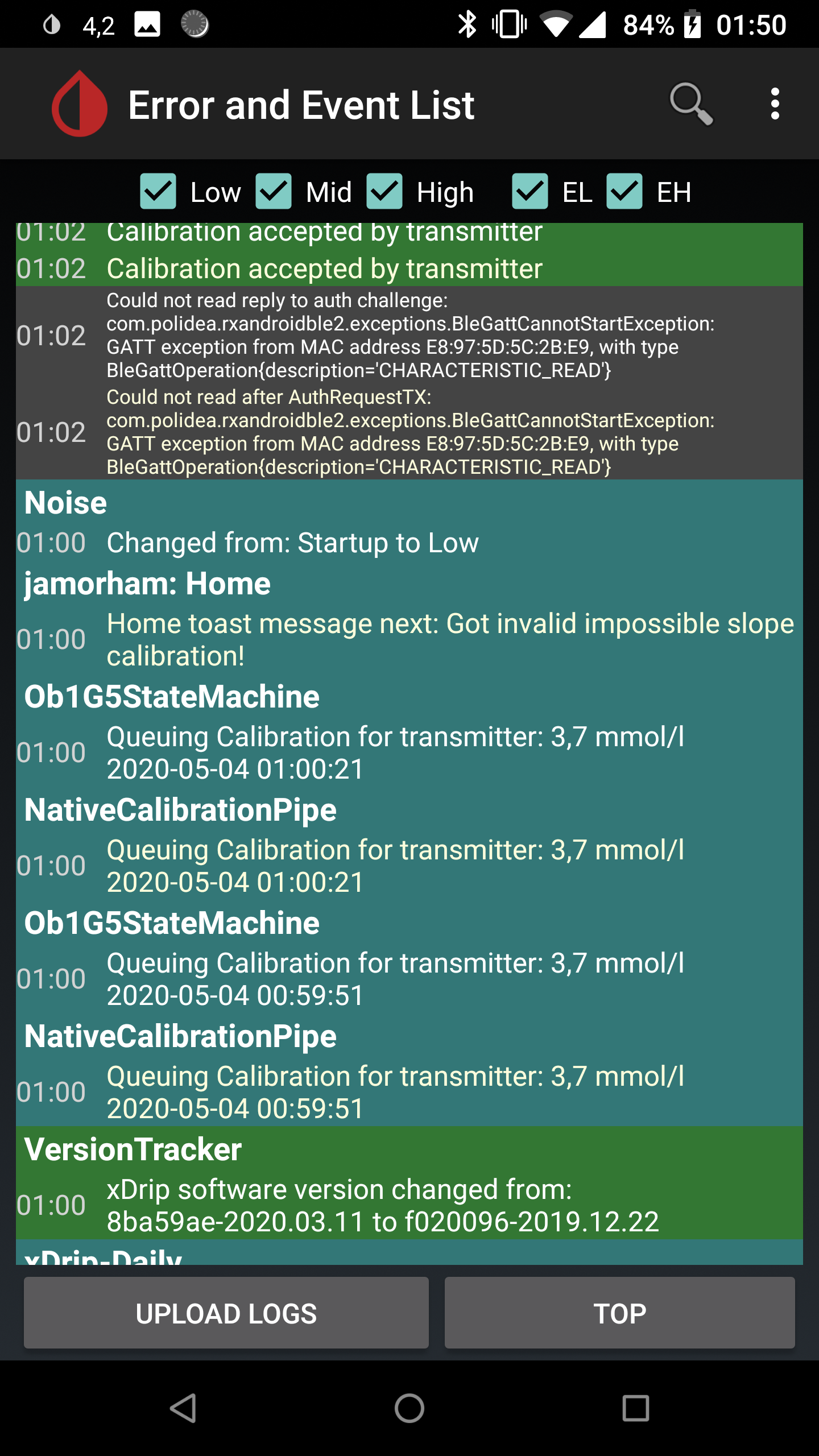
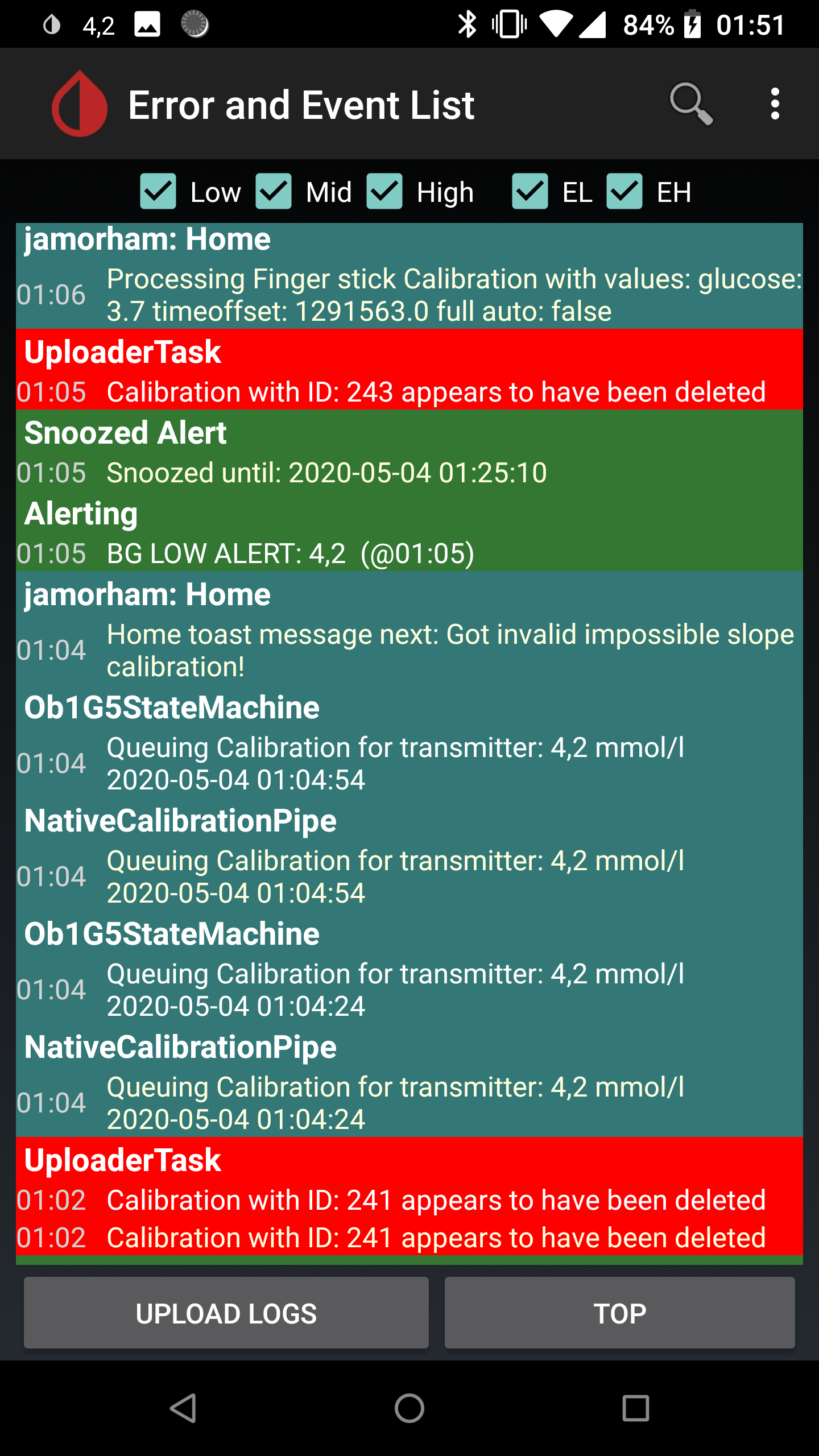
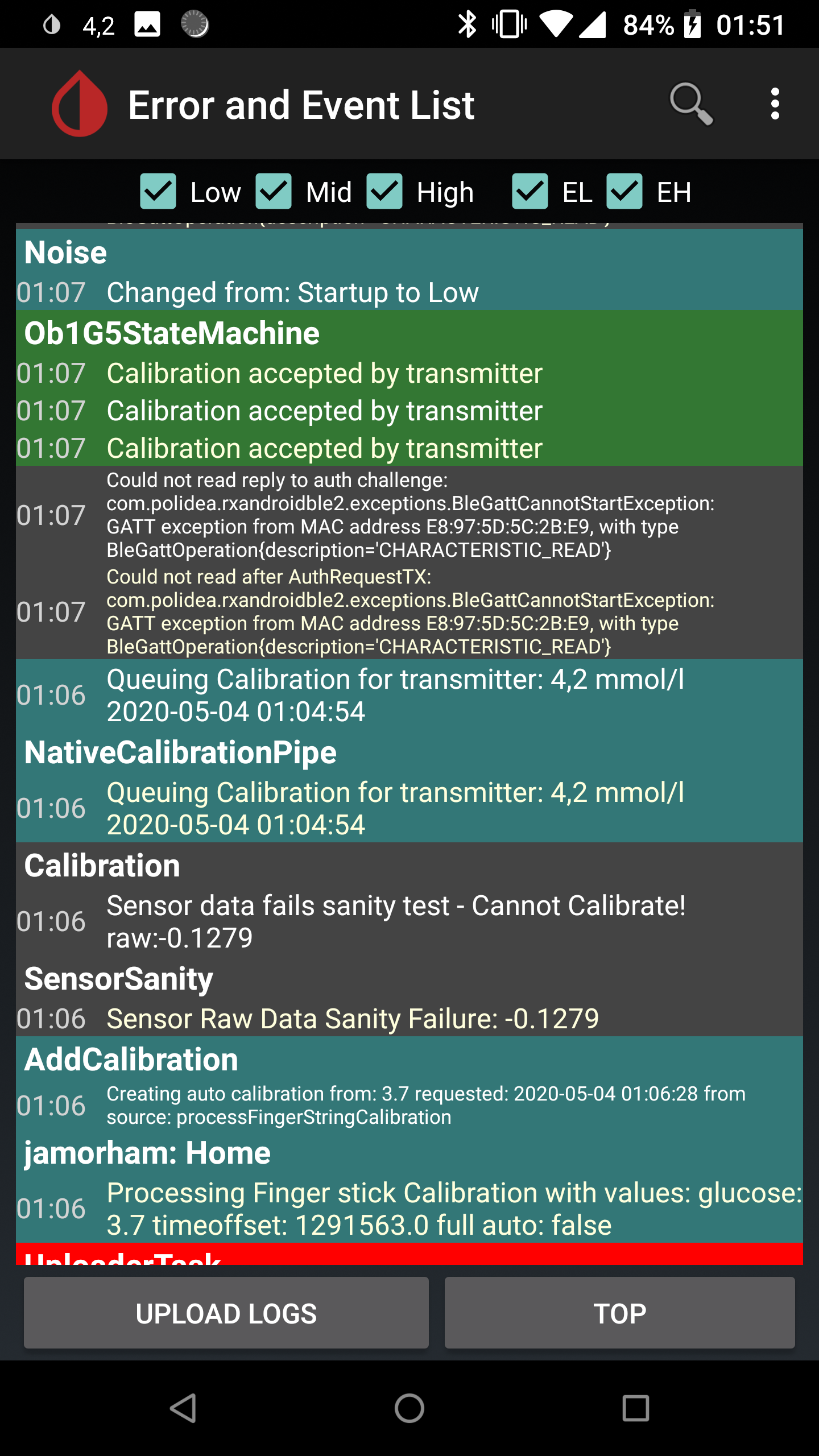
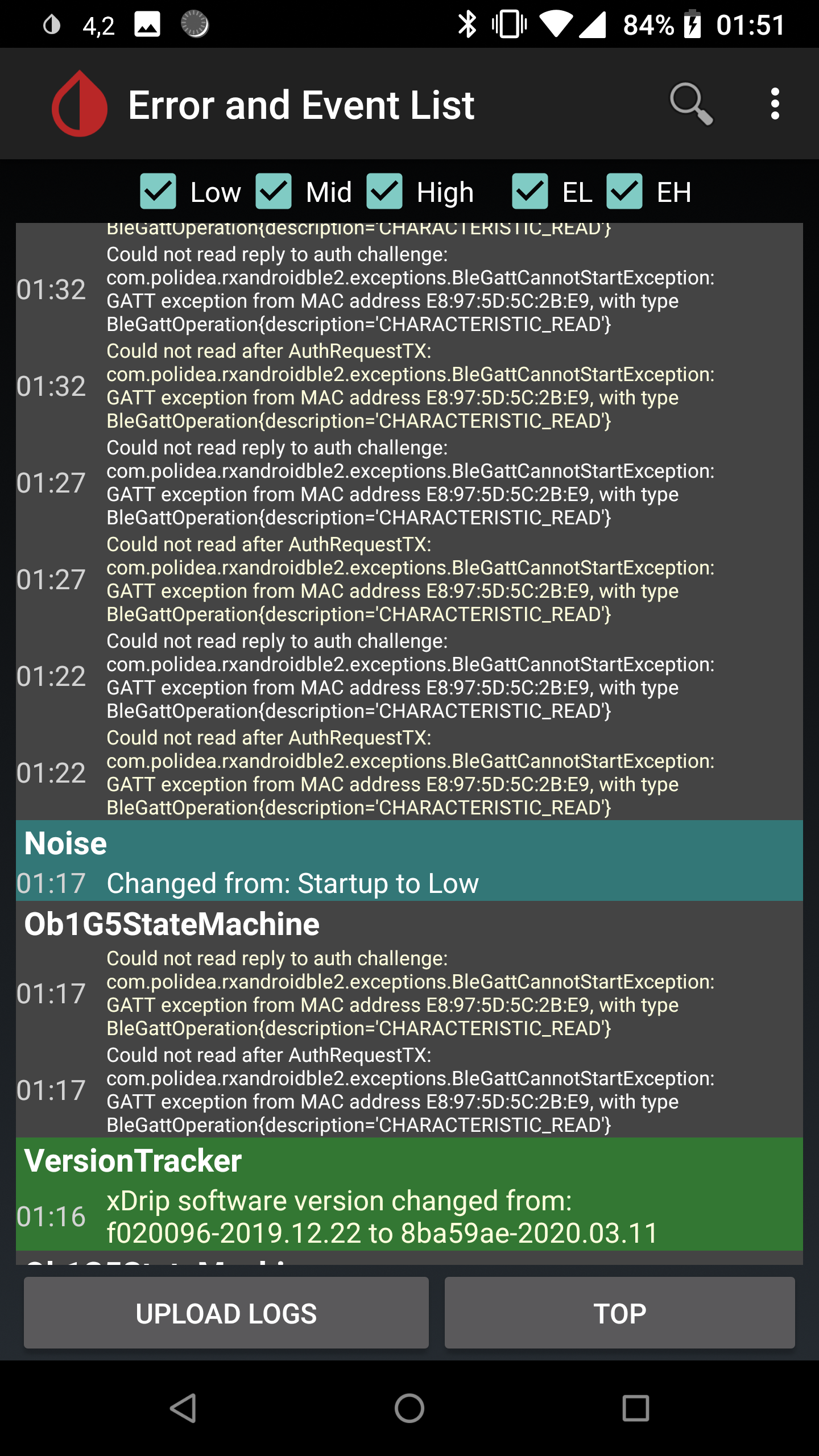
It seems I could also calibrate the sensor on the version 2019.12.22, but after that I could not enter BG values. Logs contain strange lines "Calibration with ID: # appears to have been deleted, but I did not delete anything :-/
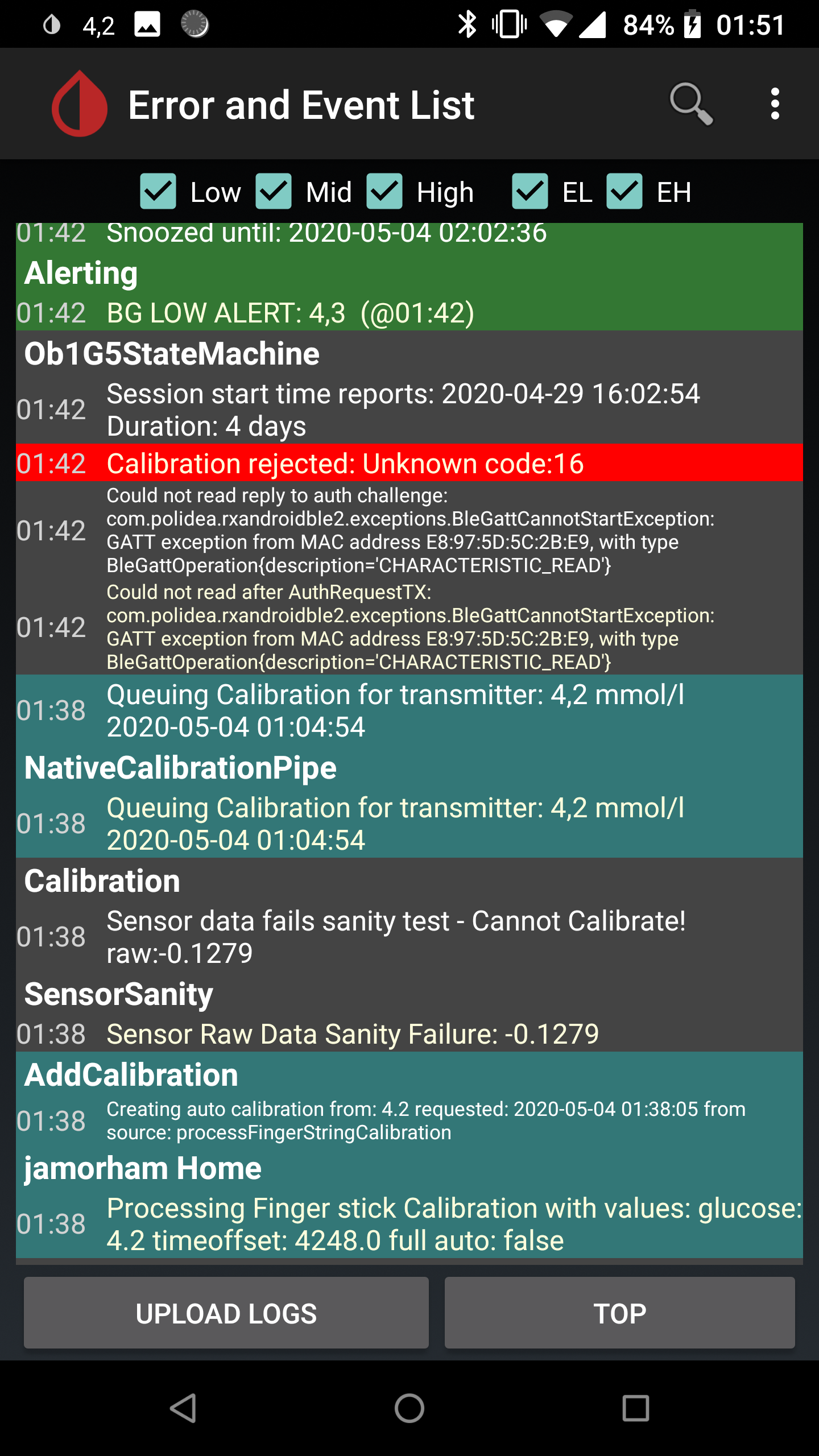
Also I saw "Sensor Raw Data Sanity Failure: -0.1279" and "Sensor data fails sanity test - Cannot Calibrate! raw:-0.1279" lines in the log.
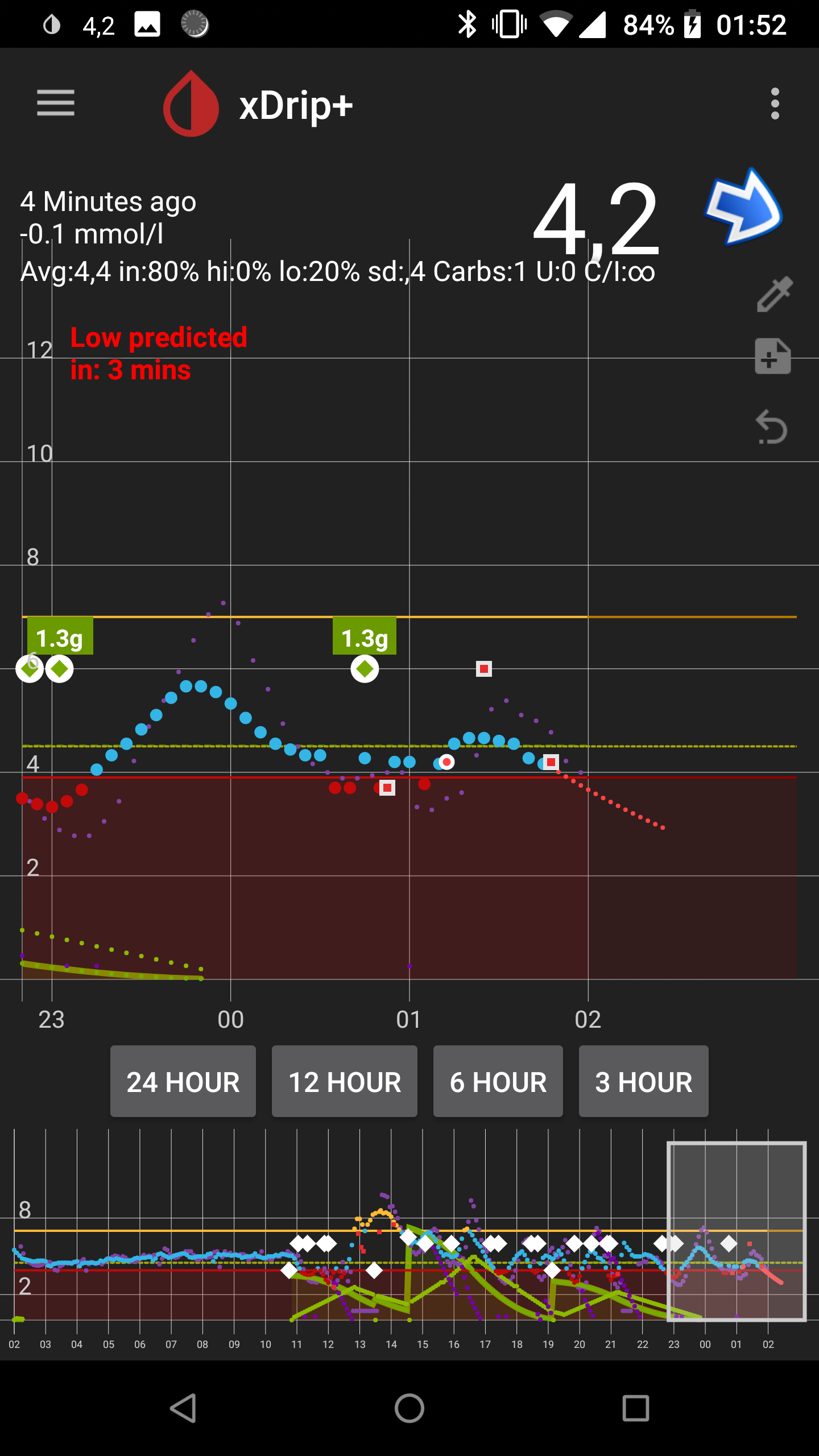
Then I have switched to the latest version 2020.03.11 and could enter BG values, but calibration was rejected with unknown code: 16.
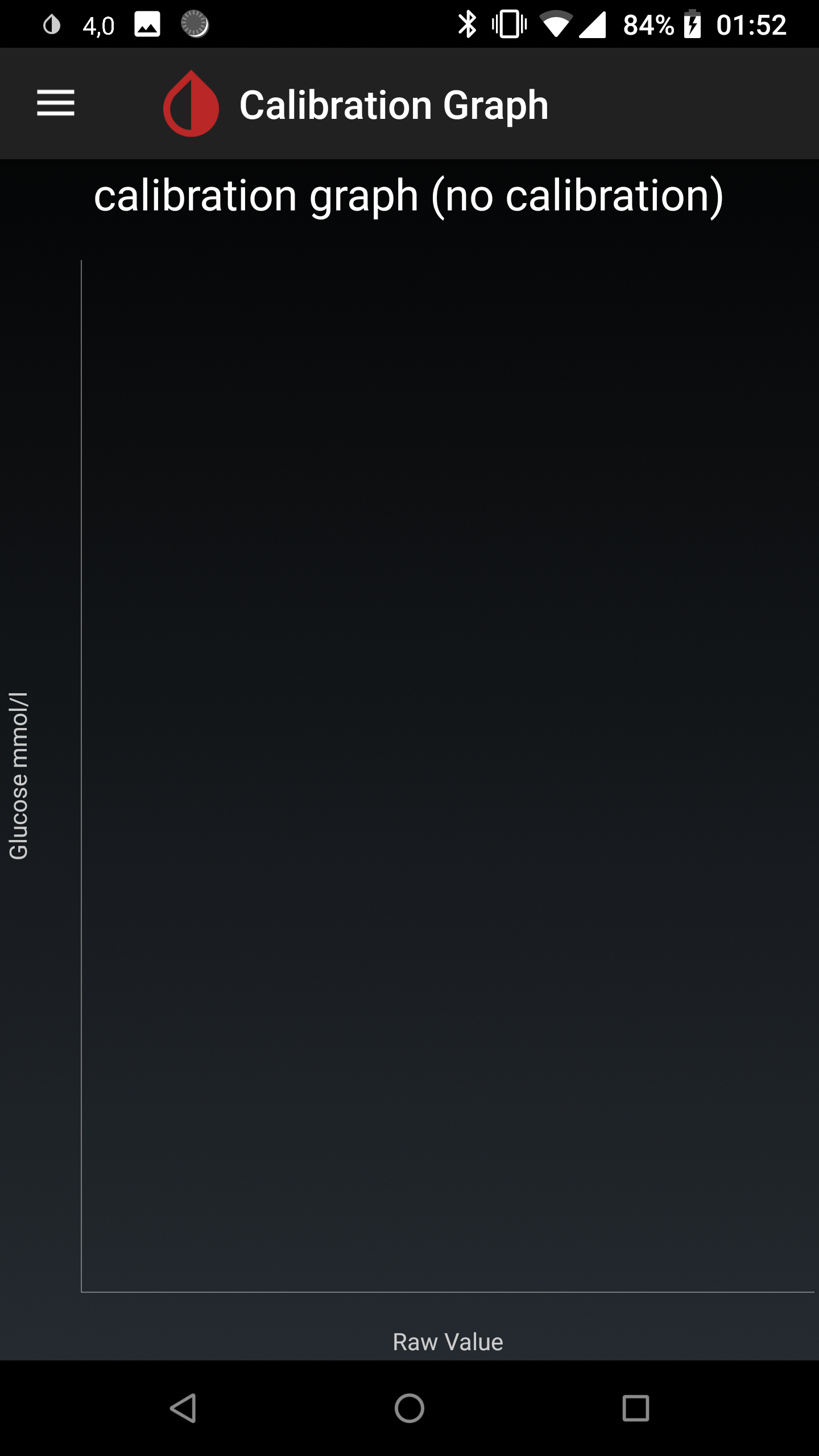
Calibration graph is empty.
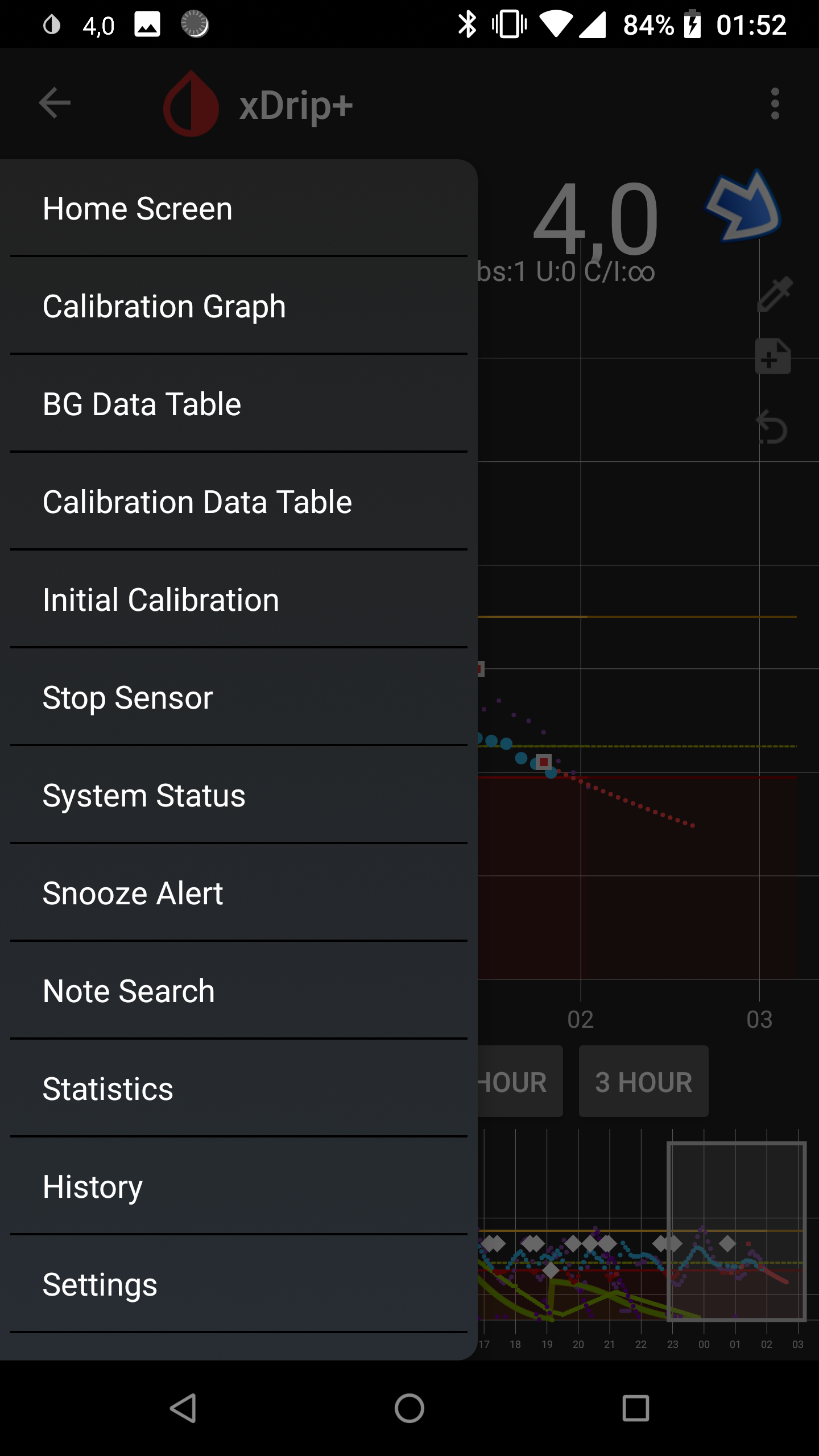
"Initial calibration" is always present in the menu.

7kilobytes
on 4 May 2020
@emp-00 Haha, that change on 12.31 (https://github.com/NightscoutFoundation/xDrip/commit/d587a4ecdf15e9554f228ecd3f6fa1e4b987be2f) is the reason I chose to try the 12.22 build. It looked suspicious to me too 😄 I'll update to the next release that includes that commit and report if that breaks the calibration.
@7kilobytes Can you elaborate on what you mean by could not enter BG values? I wouldn't worry about the "Calibration appears to have been deleted" errors - those appear related to an UploaderTask (perhaps you upload data to some online service?). My suspicion (though, I'm certainly not even close to experienced here) is that it's a result of the "Cannot Calibrate" error which is a failed attempt to add the calibration to the xDrip algorithm rather than (or perhaps in addition to) the G6 native algorithm. I think the calibration graph is also for the xDrip alogorithm, which is apparently not necessary (or even possible) for the newer G6 transmitters, so I also wouldn't worry about that either. If I recall correctly, I still get the "Sensor Raw Data Sanity Failure" and "Sensor data fails sanity test - Cannot Calibrate!" messages, even though the calibration is successful. Based on your logs, it looks like yours was too. Though, the plots don't look like it's consistent. Were you changing versions in between those calibration attempts?
The main things to look for is that a calibration is queued. For example:

and that it is then accepted:

justinthomas
on 9 May 2020
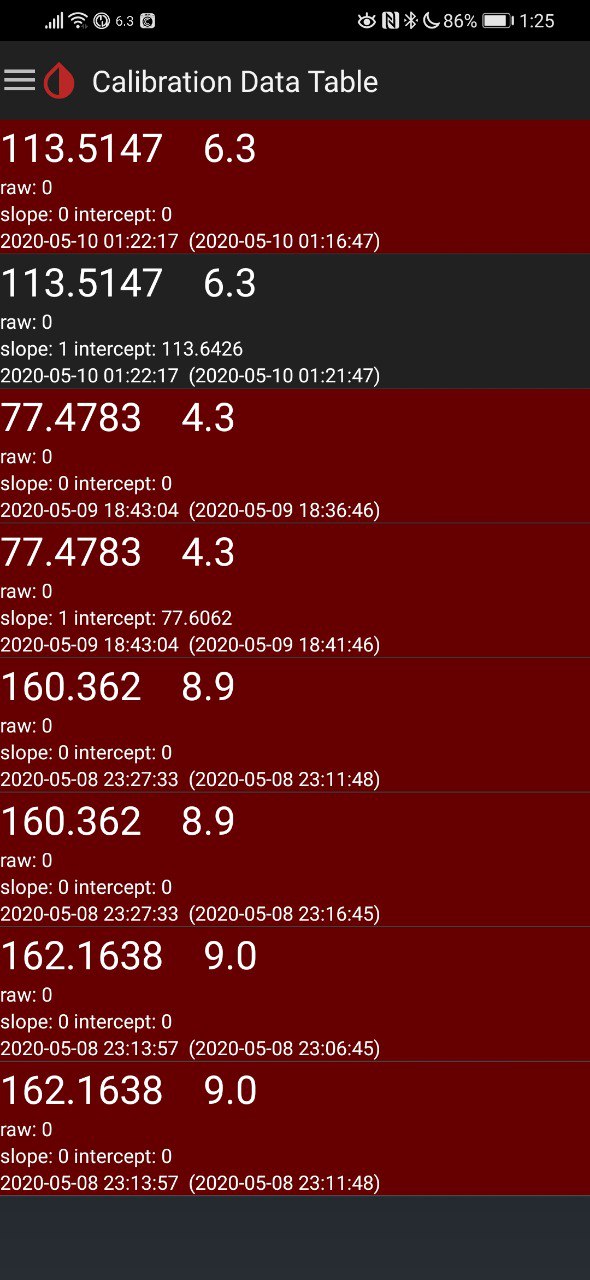
tried 12.22 version, still getting the impossible slope error when entering two 6.3 values in the initial calibration dialog (while the last sensor value was 7.4). One of the values seem to be accepted though (same thing happens on the last versions for me).
sashasochka
on 10 May 2020
@sashasochka Hmm, my Calibration Data Table is empty despite the fact that I have successfully calibrated. It looks like your raw value is always 0, so mathematically, it makes sense that it wouldn't be able to calibrate. I've heard in some other forums that the raw values are not provided by the newer versions of the G6, and so we have to use the Native Algorithm (see G5/G6 Debug Settings, Native Algorithm). Do you have that checked? If so, is the rest of your configuration the same as mine?
justinthomas
on 10 May 2020
settings are exactly the same @justinthomas
sashasochka
on 10 May 2020
@justinthomas: my Calibration Data Table looks similar to the one posted by @sashasochka ; we're all running in native mode and I guess that's normal as you mentioned (no raw data provided by 8G+ transmitters any more => only native calibration possible).
I'm also still calibrating with the "Initial Calibration" menu since the syringe option still does not work. Very interesting to learn that you have no entries in the Calibration Data Table! That's very strange to me. How do you send calibrations to the transmitter? Maybe you're using a Dexcom receiver thus circumventing xDrip?
emp-00
on 10 May 2020
Could there be an issue with a state machine where somehow the app thinks it's not using native node even when the box is checked?
I'm not using the dexcom receiver. When I calibrate, I use either the syringe icon or auto using a Bluetooth glucometer, both of which have been working for me since I dropped back to the 12.22 release.
Trying to think of anything else that could be different... I did completely wipe and reinstall (including manually reconfiguring) xDrip several times during my debugging. Could there be a bug with settings that persist when upgrading rather than a fresh install?
Also, I have now upgraded to the 12.31 release and have still been able to calibrate.
justinthomas
on 10 May 2020
Do you still enter the calibration code or again back to using "0000" as in your first post above? I'm always entering the code - also when restarting the sensor. I never did otherwise since it's recommended when using the (mandatory) native mode.
Still I need to significantly calibrate "down" the BG after sensor restarts since first readings are always ~100 mg/dL too high. Also need to be VERY careful and enter max ~20% difference to actual values and wait a few hours between calibrations, otherwise I get "Confused Calibration" errors. How do you manage this when even using auto calibration with your BG meter? These "confused" errors are nasty for me since mostly only "pop out" and "restart" procedure helps -> back again giving 100 mg difference... Does this NOT happen when using the syringe calibration function?
emp-00
on 10 May 2020
Interesting plot twist... I just updated to the original version that I was having trouble with (2020-03-25) and according to the logs and indications, it calibrated successfully. My calibration was really close to the measured - I didn't see my BG jump to correct, so I can't confirm it actually made a difference, but I certainly didn't get the original "Cannot send calibration older than 1 hour to transmitter" error that I was getting before.
justinthomas
on 10 May 2020
@emp-00 I use the correct calibration code when I start a new sensor and only use the "0000" calibration code when I'm restarting a sensor (which I really only do when my current session is tracking well with very low noise). The updates that I've done most recently are in the middle of a sensor session, so there was no need to enter a calibration code.
Wow, I've never seen an error of 100 mg/dL, even after a restart! Last I chatted with Dexcom, an error that large was grounds for starting a new sensor. Personally, if I saw that on a new sensor, I'd call and ask for a replacement. Though, if it's after a restart, I wouldn't expect them to do so.
justinthomas
on 10 May 2020
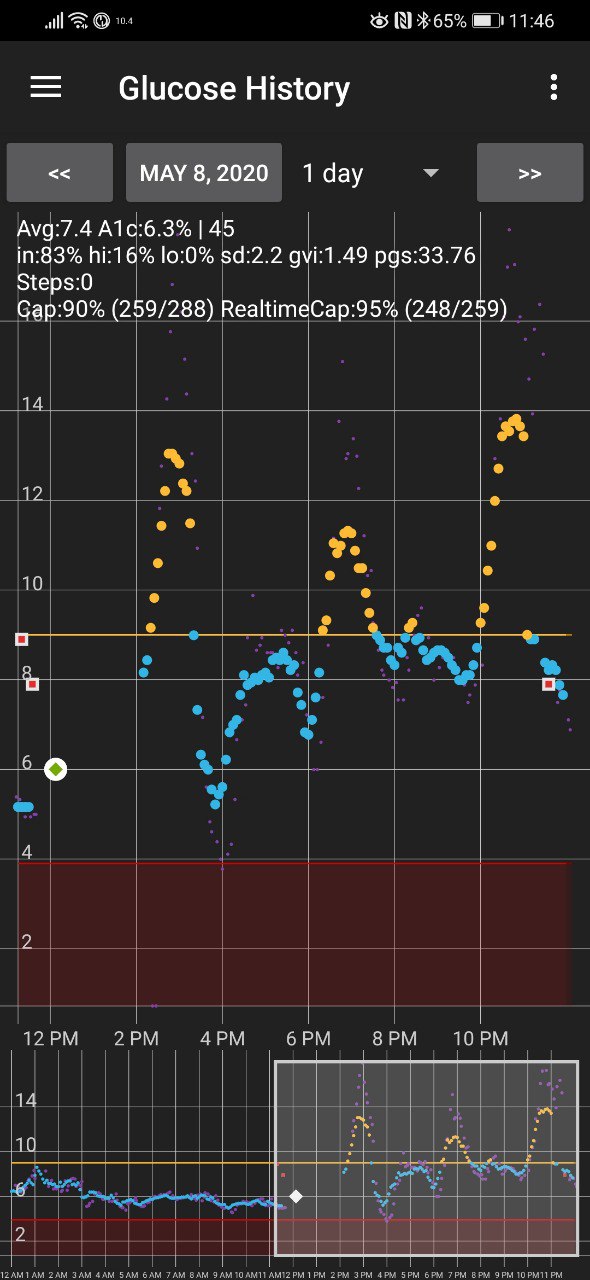
This is what happened to the data when I restarted it (gap with missed readings) It was too high until I checked against finger pricking (right side) - I tried to enter calibrations which the app rejected but then suddenly the data self corrected by a massive jump down.
2 days later it's still about 15% higher than it should be but not that huge 40% diff anymore.
Btw, what's the benefit of using 0000 instead of the real sensor code when restarting? I used the original sensor code.
sashasochka
on 10 May 2020
@justinthomas : Interesting! what's the advantage of using the "0000" code after a restart? How did you get to this idea?
I practically always have the +100 mg/dL error after each sensor restart (done >10 times). Maybe you don't because of using the "0000" code?? Actually this large BG offset has been reported many times -> Seen/read it on different forums as well as in the jamorham gitter room. I'm 100% sure not the only one having this. After 2-3 calibrations the sensor is tracking again nicely with blood BG, so it's not a permanent issue. Actually this offset was not surprising to me since it also happened with 80/81 sensors using the nice preemptive restart functionality. Reason for this offset from my understanding is the "insertion trauma" causing initially too low readings which is compensated by the transmitter. When RESTARTING a sensor the transmitter also thinks it needs to compensate the trauma - even though this is wrong since it's a sensor restart and the trauma does not occur again. That's why this trauma offset always needs to be calibrated down.
Actually you're the first reporting this is NOT happening after a sensor restart! Would like to understand this better, see question above.
emp-00
on 10 May 2020
I'm still running xDrip latest alpha 2020-03-25: Just tested using the "syringe calibration" once again and still getting the "Cannot send calibration older than 1 hour to transmitter" error. See screenshot.
This time looking closely:
- The error message says "...older than 1 hour... 95@2020-05-07 16:46 (yellow marked)
- This is actually the timestamp and calibration value of my LAST/PREVIOUS calibration done with the "Initial Calibration" menu item after my last sensor restart 3 days ago!
- Just now I had entered 91 mg/dL with the syringe fuction on 2020-05-10 (see green marked log entry!)
==> xDrip seems to look at the PREVIOUS but not the ACTUAL calibration and then cancels it because it's "too old"! This is the problem! @jamorham: Can you have a look into this issue? It looks like a software bug. THANKS!!
emp-00
on 10 May 2020
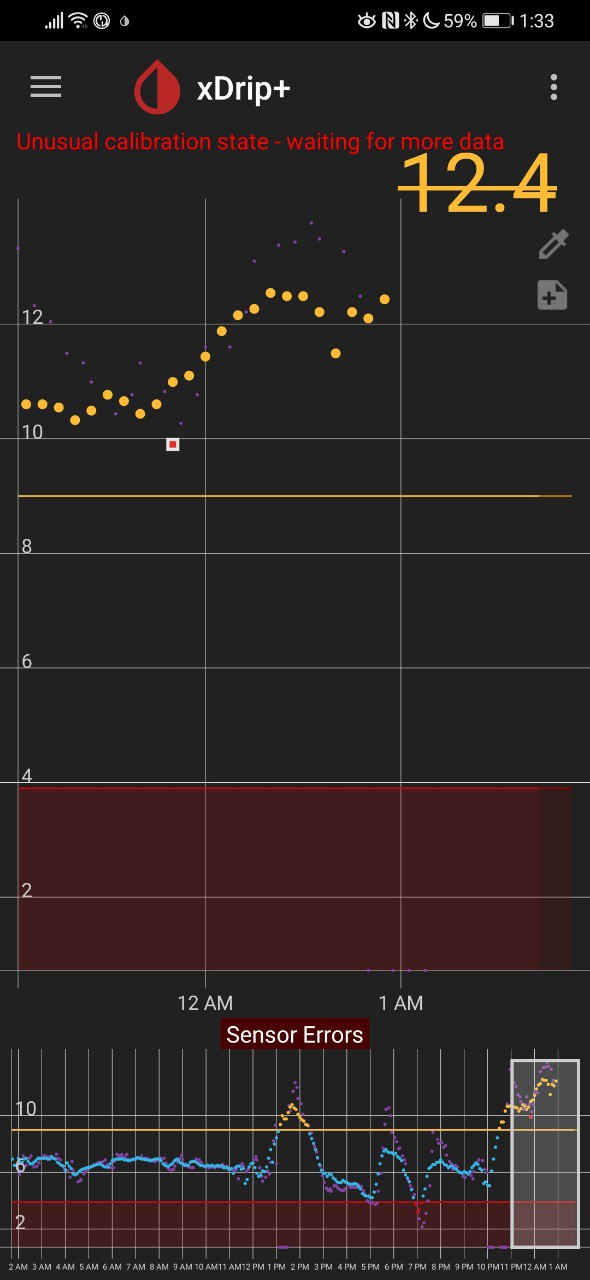
My probably irrelevant update.
The transmitter now says there is a sensor error. I enabled the "fallback to xdrip" option and seeing the below screenshot.
It says "unusual calibration state" - it seems like if I was able to calibrate it it would have still worked for a bit of time.
sashasochka
on 11 May 2020
Hm, I also noticed the initial calibration menu option is gone even though the calibration data table shows everything in the red.
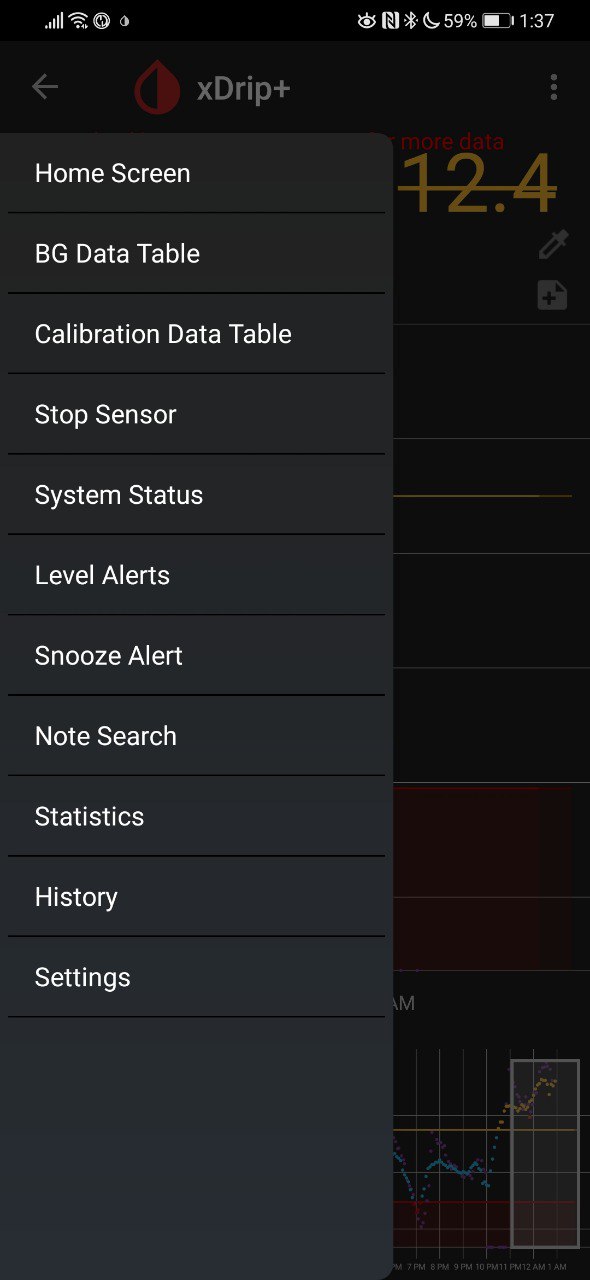
P.s. after resetting all calibrations (even though in xdrip they were all disabled anyways) sensor is working again
sashasochka
on 11 May 2020
The issue described by @emp-00 shows that it refuses to create the new calibration record because the sensor sanity fails because there is no raw data. (see the screenshot for the log details) In that case it defaults to the last valid calibration which is why the timestamp is wrong.
xDrip shouldn't be doing this and looking at the code paths it seems to me that its possible it is treating syringe entered blood tests values differently depending on another setting.
Check in Less Common Settings -> Advanced Calibration -> Use Treatment BG values is set to Automatic mode
 jamorham
on 11 May 2020
jamorham
on 11 May 2020
For me automatic mode is on
sashasochka
on 11 May 2020
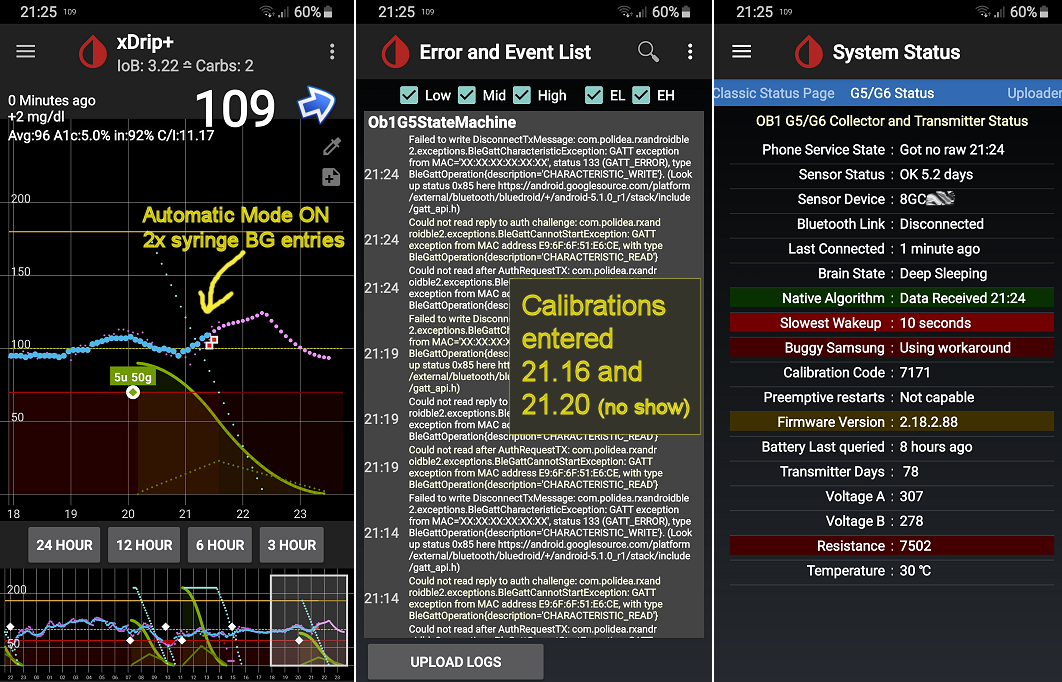
@jamorham : Thanks for your feedback. I had indeed set "Advance Calibration/Use Treatment BG values" to "Ask me every time". Have now switched to "Automatic mode" as proposed!
Just tested 2 calibrations. Result: Entering BG via the syringe icon now leads to "red squares" shown in the BG trend (never seen before, new to me) BUT no calibration is being scheduled (System status), no entries to Calibration Data Table and absolutely nothing regarding calibration showing up in the Event Log. See screenshots. In short words => only red squares appearing but nothing else happens. Menu item "Initial Calibration" also still showing. No success....
emp-00
on 11 May 2020
Now it worked!! I additionally switched "Advanced Calibration/Automatic Calibration (experimental)" ON ---> now when using the syringe "(1) calibration" is sent to the tx and it's accepted, showing in Event Log!! Interestingly though, in the "Calibration Data Table" the syringe calibrations do NOT appear. The "Initial Calibration" menu item is also still available.
What's now the recommendation: Calibrating via syringe or Initial Calibration? What's the difference other than (1) vs. (2) calibrations are being queued? I heard syringe is "better" for G6 but why?
emp-00
on 11 May 2020
I believe that this issue and other related issues should be resolved in the 26th may nightly. Please test and let me know. thanks
jamorham
on 26 May 2020
Entered blood glucose value through syringe. Then pressed it and calibrated using the value. Got sensor sanity value error followed by cannot submit older than 1 hour error.
Tried "initial calibration" dialog - "impossible slope" error.
Version 2020.05.26
sashasochka
on 28 May 2020
Automated meter readings (Contour Next One) to Dex G6 via xDrip (20200526) show the same error.
 Pogman
on 12 Jun 2020
Pogman
on 12 Jun 2020
Has this been fixed for anyone @Pogman @emp-00 @justinthomas ?
sashasochka
on 11 Jul 2020
I'm good - see my reply in this thread on May 11 and the comments before leading to "my" solution
emp-00
on 11 Jul 2020
emp-00's workaround works good for automated calibration, the only thing to be wary of is that it will always calibrate without giving you a choice so got to be sure sg is fairly flat when doing a bg check or cal may be a bit messed up.
Pogman
on 13 Jul 2020
Just switched to G6. I have this issue on Alpha 20200713 (8Hxxx TX), using Caresens BT calibrations. Since I'm looping, all auto calibration settings are turned off. I'm set to "Ask every time".
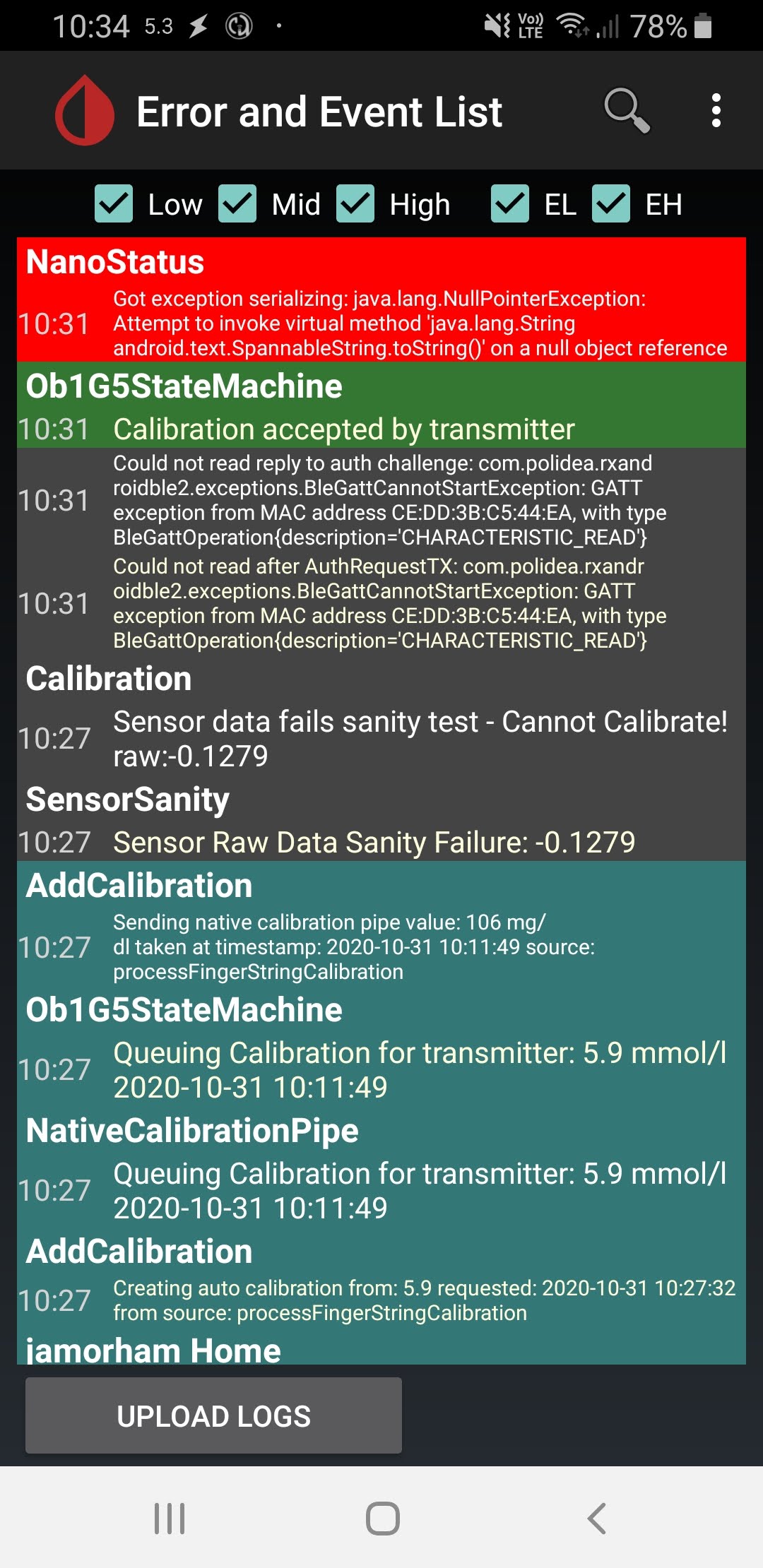
Process for me is to test with my BT meter, then after 10-15 minutes I tap the red square and accept the calibration if I like it. The G6 seems to accept the calibration (see logs), but I get the slope error in xDrip, and the red square does not turn to a circle. I haven't tested accepting the calibration ~45 mintues, but on G5 this used to trigger the >1hr error.
Edit: 3rd clibration didn't take. It was sent to the TX, but I have no acceptance in my logs :( Below is a screenshot after the 2nd successful calibration.
 old-square-eyes
on 30 Oct 2020
old-square-eyes
on 30 Oct 2020
@jamorham I have tried nightly and still no change. I also tried temporarily enabling auto calibrations as you and @emp-00 suggested, it said waiting 15 mins, but it didn't even queue in Status, and after 15 minutes what looked flat to me there were no logs confirming the G6 did or did not get the calibration. Repeated later and had same results.
I guess I just want to know if this is a cosmetic xDrip thing or whether calibrations are indeed not making it to the G6.
old-square-eyes
on 31 Oct 2020
Related issues
 gruoner
·
5Comments
gruoner
·
5Comments
 opasha
·
9Comments
opasha
·
9Comments
 xannasavin
·
10Comments
xannasavin
·
10Comments
 ARkaine2
·
3Comments
ARkaine2
·
3Comments
 malloy139
·
6Comments
malloy139
·
6Comments