Xdrip: Android 10 BLE + G6 - Stuck in "scanning"
I have a reproduceable problem with XDrip being stuck in Scanning.
1) Reboot the device on Android 10
2) Brain state is stuck in scanning
Solution:
1) Forget device in G5/G6 Status screen
2) Next cycle it sucessfully reconnects and works from that point on... Until I reboot again/or the transmitter fails to connect once because of range etc.
Oneplus 7 Pro on the official Android 10 Version. Newest XDrip Nightly from October 11.
 nshtg
nshtg
All 196 comments
Same problem
 17gubbar
on 22 Oct 2019
17gubbar
on 22 Oct 2019
Same problem.
 lkpod
on 23 Oct 2019
lkpod
on 23 Oct 2019
Does my fix ("Forget device" in System status screen of XDrip) work for you too? For me it's an 100% success rate so far!
nshtg
on 23 Oct 2019
It works, but i found a workaround for the problem now read #1067 :)
17gubbar
on 23 Oct 2019
Also besure to turn of bt watchdog and untick the ob1 collector allowed to unbond.
17gubbar
on 23 Oct 2019
This did help, but mine keeps asking for calibrations right after I hit forget device. im on a pixel 4 xl.
ok, i think it FINALLY worked. it rejected my calibrations, then a few minutes later it says warming up
 ThoR294
on 25 Oct 2019
ThoR294
on 25 Oct 2019
I have the same issue. OnePlus 7 pro on Android 10 beta 4.
 borijess
on 29 Oct 2019
borijess
on 29 Oct 2019
Also besure to turn of bt watchdog and untick the ob1 collector allowed to unbond.
Can you post a pic of your settings here?


borijess
on 29 Oct 2019
Same issue with pixel 3 android 10. Getting this error:

 yumtime
on 1 Nov 2019
yumtime
on 1 Nov 2019
Same issues on OnePlus 7 Pro Android 10.0.1 with G6. Reverted phone back to Android 9.5 & saw good operation. OnePlus refreshed my BT firmware, returned to 10.0.1 and BT problems returned. Other BT devices (audio & car) work fine. XDrip to G6 is the only BT problem I'm seeing. G6 drops occur even while BT audio device is operating.
While phone is charging, link to G6 is solid & works all night. Within minutes of unplugging from power, Xdrip looses connection to G6 sensor.
 edisiENt
on 3 Nov 2019
edisiENt
on 3 Nov 2019
@edisiENt
Have you tried forgetting the transmitter to see if it gets picked up again?
nshtg
on 3 Nov 2019
@edisiENt
Have you tried forgetting the transmitter to see if it gets picked up again?
Yes I have but it works for alittle while the the same thing again
borijess
on 3 Nov 2019
Yes. While on battery power, the only way I can get Xdrip to acquire new data from my G6 transmitter is to tell Xdrip to forget the device via SystemStatus, turn-off bluetooth manually, then Restart Collector. Frequently, multiple Restart Collectors are required but eventually Xdrip will read from my G6 transmitter.
I definitely have the opinion that Xdrip to G6 transmitter link is much more stable while the phone is connected to power/charging. This makes me wonder whether there is some new Android10 BT power state that Xdrip isn't dealing with correctly.
edisiENt
on 4 Nov 2019
@jamorham
Any idea what may cause these problems on Android 10? As more and more providers push out Android 10 updates this becomes kind of an urgent probem.
nshtg
on 4 Nov 2019
I don't know, there are often regressions in the Bluetooth stack with new android versions and manufacturer interpretations of those. I don't have any test devices which are using Android 10, what is the cheapest device on which these problems are reproducible?
 jamorham
on 4 Nov 2019
jamorham
on 4 Nov 2019
I don't know, there are often regressions in the Bluetooth stack with new android versions and manufacturer interpretations of those. I don't have any test devices which are using Android 10, what is the cheapest device on which these problems are reproducible?
Maybe a OnePlus 6t. They just got Android 10 and you can get one for 300 dollars
borijess
on 4 Nov 2019
I don't know, there are often regressions in the Bluetooth stack with new android versions and manufacturer interpretations of those. I don't have any test devices which are using Android 10, what is the cheapest device on which these problems are reproducible?
Is there anything we users with devices showing the problems can do to help you diagnose & resolve? Your having to purchase devices to replicate issues doesn't seem like a reasonable burden for you to carry. Could a nightly update have extra BT diagnostics or are there additional options in the existing logging capabilities?
edisiENt
on 4 Nov 2019
I second edisiENt's question. I can reproduce the problem 100% of the time by just going out of transmitter range once, should make debugging quite easy. Have 0 experience with android development but plenty c++/coding experience in general.
If you are located somewhere in europe I might be able to send you my backup phone to test with it.
nshtg
on 4 Nov 2019
I second edisiENt's question. I can reproduce the problem 100% of the time by just going out of transmitter range once, should make debugging quite easy. Have 0 experience with android development but plenty c++/coding experience in general.
If you are located somewhere in europe I might be able to send you my backup phone to test with it.
Same I can help too. Once out of range it doesn't want to reconnect.
borijess
on 5 Nov 2019
@nshtg If you keep the app open with the xDrip screen showing and then go out of range does the problem occur? You can use the Event Log screen to keep the phone constantly awake and in xDrip.
jamorham
on 5 Nov 2019
@jamorham
Yes, though this time I got stuck in "Connection request" instead of scanning. Normally my transmitter connects around x1:30 and x6:30'ish times.
No errors logged in the event log.


Keep in mind normally the connection request is send at around X1 minutes, so the "second" connection request is actually too late.
After forgetting the device and restarting the collector it connected fine on the next cycle and started to work again.
nshtg
on 5 Nov 2019
Just updated my OnePlus 6T and found this thread. Had to create an account to reply, but if I can help as well let me know. If not I'll be following closely.
As it seems quite a few of us use Pixel/OnePlus devices that will be getting early OS grades, we may can get 10 to 20 of us chip in $10 or so to buy a Pixel 3a as a reference device. It will get 3 years of guaranteed updates. I would gladly contribute $10-$20 every 3 years to help with this project.
 BenMc19
on 5 Nov 2019
BenMc19
on 5 Nov 2019
Just updated my OnePlus 6T and found this thread. Had to create an account to reply, but if I can help as well let me know. If not I'll be following closely.
As it seems quite a few of us use Pixel/OnePlus devices that will be getting early OS grades, we may can get 10 to 20 of us chip in $10 or so to buy a Pixel 3a as a reference device. It will get 3 years of guaranteed updates. I would gladly contribute $10-$20 every 3 years to help with this project.
Same will donate.
borijess
on 5 Nov 2019
I'd donate $30 to that!
nshtg
on 5 Nov 2019
Just an update, the solution that @Webifi posted in #1009 has worked for me. It involves forgetting the device in bluetooth settings and in xdrip app, and keeping both apps open in split screen as the phone scans for bluetooth devices and xdrip collector restarts and looks for device. Thought I would share if anyone here is still looking for a solution. I am on a OnePlus 6T running stable Android 10.
BenMc19
on 6 Nov 2019
Just an update, the solution that @Webifi posted in #1009 has worked for me. It involves forgetting the device in bluetooth settings and in xdrip app, and keeping both apps open in split screen as the phone scans for bluetooth devices and xdrip collector restarts and looks for device. Thought I would share if anyone here is still looking for a solution. I am on a OnePlus 6T running stable Android 10.
I have the OnePlus 7 pro on Android 10 and still have issues. Can you post you exact instructions on how you did it? What are your Bluetooth settings? Can you walk away from phone and it will reconnect?
borijess
on 6 Nov 2019
@borijess
Well I literally just posted a response a few minutes ago. Same issue. Things will work great until it misses a reading. Every now and then it may regain signal, but most of the time it simply cannot regain it unless manually forgetting device and reconnecting.
Go to that link and check my latest post. I have an old android device that I tested with my same transmitter to confirm that it is the Android 10 update causing issues, not the transmitter itself.
BenMc19
on 6 Nov 2019
@borijess
Tried something after my last comment. I deleted the app completely (it was the latest stable version), and re-downloaded the November 2nd nightly version. Not sure if it was the fact that i deleted the app, or if something in the newer nightlies, but i haven't had any issues, and I have walked away a few times, forcing a missed reading, then it reconnected.
BenMc19
on 7 Nov 2019
@borijess
The author of that thread also confirmed he is running the latest nightly build, not the stable build. So that is 2 of us on Android 10, he on the Pixel and me on OnePlus, with good success. May want to give that a try.
Not sure what is being experimented with on the nightly, but feels and acts just as stable as the stable version. No issues with crashes at all.
BenMc19
on 7 Nov 2019
OnePlus 6 on Android 10 (updated last night) on the Nov 2 nightly with G6 and same issues as everyone else. Forgetting the transmitter will make it work a little while but then stops working.

Seems to be stuck in scanning. It did connect while I was sleeping about an hour ago but looking at theogs I see it restarting the collector service many times throughout the night so clearly it wasn't staying connected consistently.
 misterblack1
on 9 Nov 2019
misterblack1
on 9 Nov 2019
I turned on some additional logging as requested in another thread:

I forgot the transmitter and restarted collector. It worked for a while and then failed again.
misterblack1
on 9 Nov 2019

Meant to attach this to previous post and it wouldn't let me add a picture while editing. More logs going back a little further showing when it stopped getting readings.
misterblack1
on 9 Nov 2019
Yeah, this was a major Android upgrade, probably going to take some time to figure it out. It works at long enough intervals without requiring a manual restart that that inconvenience still outweighs the inconvenience of carrying around the dexcom receiver. If it gets worse, I may elect to carry a second older Android phone as opposed to the dexcom receiver.
I wear a Wear OS watch daily, so i may also try to force Wear Collection as well. I just replaced my dying transmitter, so far on a fresh transmitter I'm going on 24 hours without any issues. We'll see.
BenMc19
on 9 Nov 2019
If you can't get x-drip going on android 10, you could also try side-loading the modified official dexcom app, instead of carrying around the receiver.
(I certainly prefer x-drip to Dexcom's app, but it did work for me in a pinch on my Pixel 3a when I was having trouble getting x-drip to work.)
@misterblack1 That transmitter battery is looking kinda long in the tooth.
 Webifi
on 9 Nov 2019
Webifi
on 9 Nov 2019
Interesting observation. Having zero issues while my phone is connected to my wireless headphones. Travelling today and I've noticed as long as BT is active there is zero issue connecting to the G6 transmitter. See the screenshot.
OnePlus 6 + G6 + Nightly Nov 2 + Android 10

misterblack1
on 10 Nov 2019
I upgraded to android 10 a few days ago, at first it did not connect at all, split screen with some changes mentioned here helped and I am now able to connect, _but_ it constantly loses connection and i have to go in and do forgot device and restart collector.
Is there a way to automate this? whenever it fails to connect for 10 minutes it should automagically forget device and restart?
Using android 10 on OnePlus 6T
 ElyeM
on 11 Nov 2019
ElyeM
on 11 Nov 2019
I upgraded to android 10 a few days ago, at first it did not connect at all, split screen with some changes mentioned here helped and I am now able to connect, _but_ it constantly loses connection and i have to go in and do forgot device and restart collector.
Is there a way to automate this? whenever it fails to connect for 10 minutes it should automagically forget device and restart?
Using android 10 on OnePlus 6T
I have granted "Modify System Settings" permission to xdrip and It works great now.
ElyeM
on 13 Nov 2019
I have granted "Modify System Settings" permission to xdrip and It works great now.\
You likely have the "Bluetooth Watchdog" set which will reset bluetooth when it's not getting readings for 20 minutes. (Settings -> Less Common -> Bluetooth) Can you confirm?
This isn't workable for anyone who uses their bluetooth for headsets, streaming music, etc.... as it interrupts those. It also will almost certainly increase battery drain on your phone.
misterblack1
on 15 Nov 2019
I find that xDrip seems to reconnect on it's own from time to time which means almost always the reading history is downloaded from the transmitter. (Meaning no gaps.) It just means alerting is useless because it's almost always not getting data regularly.... unless I am using my Bluetooth 5.0 headphones (Wireless Bullets 2) then xDrip+ stays connected indefinitely. (It takes maybe 20-30 minutes before xDrip reconnects to the transmitter then it stays connected. )
For me, I don't need to go and forget the transmitter -- it will just periodically connect on its own. Losing alerts really does suck though........
Incidentally, my Xiaomi fitness watch which is uses BLE has no issue staying connected to my phone after the Android 10 update.
misterblack1
on 15 Nov 2019
I have granted "Modify System Settings" permission to xdrip and It works great now.\
You likely have the "Bluetooth Watchdog" set which will reset bluetooth when it's not getting readings for 20 minutes. (Settings -> Less Common -> Bluetooth) Can you confirm?
That is not the case. I don't use the watchdog and need the permission to use XDrip at all.
nshtg
on 16 Nov 2019
I have granted "Modify System Settings" permission to xdrip and It works great now.\
That is not the case. I don't use the watchdog and need the permission to use XDrip at all.
I've always had that setting enabled, but like everyone else, it's very intermittent and always stuck in scanning.


misterblack1
on 18 Nov 2019
I granted that permission too and it was more miss than hit. Still disconnected a ton.
borijess
on 18 Nov 2019
Yeah, same here. Seems about 2 or 3 times a day I have to forget and reconnect. Although inconvenient, still worth going through the hassle to use xDrip on phone than the Dexcom receiver. Hopefully with more phones getting Android 10 it'll get fixed.
BenMc19
on 18 Nov 2019
I take back my last comment that modify system settings fixed the issue, I still constantly loose readings and have to click forget device and restart collector.
ElyeM
on 20 Nov 2019
I take back my last comment that modify system settings fixed the issue, I still constantly loose readings and have to click forget device and restart collector.
Same.
borijess
on 20 Nov 2019
I take back my last comment that modify system settings fixed the issue, I still constantly loose readings and have to click forget device and restart collector.
Just to try, if you have a Fitbit app in use on the phone. If yes, try to deinstall it, and check if that betters the Situation without that app. (I think we shortly talked about that in the gitter Channel, but I'm not sure)
 MasterPlexus
on 20 Nov 2019
MasterPlexus
on 20 Nov 2019
I don't have the Fitbit app.
ElyeM
on 21 Nov 2019
The reported problems, eg Android 10 not reconnecting after a period of time may be google brutalizing developers again with changes to the permissions model in Android 10.
Can anyone with this problem please try the Nov 22 nightly and see if it helps at all. Please also visit the settings page at least once to see if it requests any additional permissions. Thanks.
I don't yet have an Android 10 physical handset to test with so I am only guessing at a resolution as I haven't been able to reproduce it myself and have been receiving conflicting bug reports.
jamorham
on 22 Nov 2019
The reported problems, eg Android 10 not reconnecting after a period of time may be google brutalizing developers again with changes to the permissions model in Android 10.
Can anyone with this problem please try the Nov 22 nightly and see if it helps at all. Please also visit the settings page at least once to see if it requests any additional permissions. Thanks.
I don't yet have an Android 10 physical handset to test with so I am only guessing at a resolution as I haven't been able to reproduce it myself and have been receiving conflicting bug reports.
Trying it now. Had to accept the permissions in settings and had to do a forget and restart collector. So far working. Real test is walking away for a while to see if it reconnects. I will let u know and thank you for time and effort resolving this.
borijess
on 22 Nov 2019
The reported problems, eg Android 10 not reconnecting after a period of time may be google brutalizing developers again with changes to the permissions model in Android 10.
Can anyone with this problem please try the Nov 22 nightly and see if it helps at all. Please also visit the settings page at least once to see if it requests any additional permissions. Thanks.
I don't yet have an Android 10 physical handset to test with so I am only guessing at a resolution as I haven't been able to reproduce it myself and have been receiving conflicting bug reports.
Ok I tried it and walked away for 10 minutes. It has not reconnected after 50 minutes. I had to forget and restart collector.
borijess
on 22 Nov 2019
Just downloaded 11/22/19 build and have it warming up now - I left OB1 Collector checked, please let me know otherwise - Running on OnePlus 7T.
 jedduff123
on 22 Nov 2019
jedduff123
on 22 Nov 2019
I'd be fine if this fixed the problems with occasionaly losing connection at night while the phone is by my side. Forgetting the transmitter once when I have been out of range is no big problem for me.
nshtg
on 22 Nov 2019
The reported problems, eg Android 10 not reconnecting after a period of time may be google brutalizing developers again with changes to the permissions model in Android 10.
Can anyone with this problem please try the Nov 22 nightly and see if it helps at all. Please also visit the settings page at least once to see if it requests any additional permissions. Thanks.
I don't yet have an Android 10 physical handset to test with so I am only guessing at a resolution as I haven't been able to reproduce it myself and have been receiving conflicting bug reports.
Aftet latest nightly it works in my android 10 again, but i also had a new update from my manufacture (oneplus) claiming they resolved bt issues in android 10 update 10.0.6 so i dont know wich one fixed the issue 😃 still getting error in logs tho. And xdrip gets stuck in scanning if you use airplane mode and activates it again.. And u have to reset collector.
@jamorham
17gubbar
on 25 Nov 2019
The reported problems, eg Android 10 not reconnecting after a period of time may be google brutalizing developers again with changes to the permissions model in Android 10.
Can anyone with this problem please try the Nov 22 nightly and see if it helps at all. Please also visit the settings page at least once to see if it requests any additional permissions. Thanks.
I don't yet have an Android 10 physical handset to test with so I am only guessing at a resolution as I haven't been able to reproduce it myself and have been receiving conflicting bug reports.Aftet latest nightly it works in my android 10 again, but i also had a new update from my manufacture (oneplus) claiming they resolved bt issues in android 10 update 10.0.6 so i dont know wich one fixed the issue still getting error in logs tho. And xdrip gets stuck in scanning if you use airplane mode and activates it again.. And u have to reset collector.
@jamorham
I am on the latest update and it works for a while but you eventually start to miss readings. And if you walk away from phone it will not reconnect unless you forget collector. I am on the OnePlus 7pro beta 6 Android 10
borijess
on 25 Nov 2019
I'm on a 6T so not sure if my update is the latest that the 7/7T has, but it hasn't helped. When i start a sensor over, it will work for 12 to 24 hours, then it will miss, and I can manually forget and reconnect, but once it starts missing, it stops sticking unless i fully reset the app.
I'm going to carry a cheap backup phone with me simply to be the receiver from now on, as it's on an older version of Android. Keep us updated for those of you still that are still testing it. Thanks in advance!
BenMc19
on 26 Nov 2019
@jamorham
Can anyone with this problem please try the Nov 22 nightly and see if it helps at all. Please also visit the settings page at least once to see if it requests any additional permissions. Thanks.
The update didn't fix any of the problems. My device still randomly loses connection (especially at night when not charging) and will never reconnect.
nshtg
on 26 Nov 2019
I agree the latest update did not fix the issue. I even went into settings and accepted the new permission.
borijess
on 26 Nov 2019
It seems these random diseconnects (not out-of-range) preferably happen in times when the phone is not used and not being charged, e.g. at night. During daily usage I haven't seen a single connection loss in 4-5 days.
nshtg
on 26 Nov 2019
It seems these random diseconnects (not out-of-range) preferably happen in times when the phone is not used and not being charged, e.g. at night. During daily usage I haven't seen a single connection loss in 4-5 days.
It's happened to me during daily use constantly.
borijess
on 26 Nov 2019
It seems these random diseconnects (not out-of-range) preferably happen in times when the phone is not used and not being charged, e.g. at night. During daily usage I haven't seen a single connection loss in 4-5 days.
Hi, I also experience these disconnects on Android 9 (OnePlus 7; xDrip+ Nov 22 nightly) after exactly one hour not activating the display (every night). It only happens when the phone is not being charged. It seems that this has nothing to do with Android 10 and is an aggressive battery saving function of newer (OnePlus) devices that kills bluetooth. The disconnects do happen a lot faster, when the following settings in Settings > Battery > Battery optimisation > (burger bar top right) advanced optimisation are activated (active by default). I hope this information might help fixing the issue.
 loop2016
on 26 Nov 2019
loop2016
on 26 Nov 2019
Note I have battery optimisation deactivated for xdrip !
nshtg
on 26 Nov 2019
It seems these random diseconnects (not out-of-range) preferably happen in times when the phone is not used and not being charged, e.g. at night. During daily usage I haven't seen a single connection loss in 4-5 days.
Hi, I also experience these disconnects on Android 9 (OnePlus 7; xDrip+ Nov 22 nightly) after exactly one hour not activating the display (every night). It only happens when the phone is not being charged. It seems that this has nothing to do with Android 10 and is an aggressive battery saving function of newer (OnePlus) devices that kills bluetooth. The disconnects do happen a lot faster, when the following settings in Settings > Battery > Battery optimisation > (burger bar top right) advanced optimisation are activated (active by default). I hope this information might help fixing the issue.
When I was on Android pie on the OnePlus 7pro. I had a capture rate of 100 percent. If I walked away from phone it reconnected in a matter of minutes. Android pie was not an issue for xdrip. Android 10 is and I also have the xdrip app not to be optimized.
borijess
on 26 Nov 2019
I said to much, problem just occures multiple times again :( stupid android 10
17gubbar
on 27 Nov 2019
I concur with @nshtg and @borijess, I believe it is Android 10. I had Android 9 on my OnePlus for a whole year and it worked flawlessly. I have always turned off all battery optimization, so i do believe if you leave them on it will affect xdrip regardless of which software you are on.
BenMc19
on 27 Nov 2019
I'm thinking the only way this is going to get resolved is if I can reproduce the problem using an actual handset that has the issue.
jamorham
on 27 Nov 2019
Send me your paypal and I'll done 50€ to help you purchase a pixel3a or sth like that .)
nshtg
on 27 Nov 2019
Same. Bet you can get one for $250 or so this week. $50 from me as well if you decide to go that route. That phone should get you 2 more years of updates, maybe 3.
BenMc19
on 27 Nov 2019
I can donate aswell. Now i lost connection for 1hour, but then it reconnected whiout reseting transmitter, so i guess latest op update made something better, but its buggy af :/
17gubbar
on 27 Nov 2019
The disconnects do happen a lot faster, when the following settings in Settings > Battery > Battery optimisation > (burger bar top right) advanced optimisation are activated (active by default). I hope this information might help fixing the issue.
I tested last night after disabling both those optimizations by OnePlus and I had no disconnects even though my phone was not charging!

nshtg
on 28 Nov 2019
The disconnects do happen a lot faster, when the following settings in Settings > Battery > Battery optimisation > (burger bar top right) advanced optimisation are activated (active by default). I hope this information might help fixing the issue.
I tested last night after disabling both those optimizations by OnePlus and I had no disconnects even though my phone was not charging!
OnePlus 7 pro and mine has always been off and it still has issues.
borijess
on 28 Nov 2019
okay lets see if we can get a Pixel 3a for this testing. Can everyone who wants to donate for it please send me an email with the amount you're willing to donate to jamorham at gmail with the subject "pixel donation" and I'll see how things look. Thanks.
jamorham
on 28 Nov 2019
is not nightscout foundation willing to pay for test devices? I remember they told us that.
 gregorybel
on 28 Nov 2019
gregorybel
on 28 Nov 2019
okay lets see if we can get a Pixel 3a for this testing. Can everyone who wants to donate for it please send me an email with the amount you're willing to donate to jamorham at gmail with the subject "pixel donation" and I'll see how things look. Thanks.
How do we pm you email?
borijess
on 28 Nov 2019
@borijess If you use Gmail, you can attach a payment using the attachment paperclip.
For me, I'm willing to donate regardless of how it is used simply for the fact that for 4 years I've used this free app with no ads.
I wish you would put in a donate option within the app for those that are willing to support the development even more easily.
BenMc19
on 28 Nov 2019
@gregorybel yes I have also asked the foundation for assistance.
Anyone interested please just send me an email, please don't attach any payments to the email itself.
jamorham
on 28 Nov 2019
@gregorybel yes I have also asked the foundation for assistance.
Anyone interested please just send me an email, please don't attach any payments to the email itself.
What's your email?
borijess
on 28 Nov 2019
okay lets see if we can get a Pixel 3a for this testing. Can everyone who wants to donate for it please send me an email with the amount you're willing to donate to jamorham at gmail with the subject "pixel donation" and I'll see how things look. Thanks.
nshtg
on 28 Nov 2019
borijess
on 28 Nov 2019
So I don't know if the issue is fixed for me but this is the only difference I did since before where it would stop working and now it has worked for almost 5 days straight. With a capture rate if 99 to 100 percent on my OnePlus 7 pro beta 6 Android 10.
The only difference I have is I two watched connected to Android Wear. My Ticwatch pro 4g and my sony Smartwatch 3. I turned off my sony watch and the wear app keeps trying to connect to it. Maybe this keeps the Bluetooth active and does not allow it to get stuck. Just a thought if you have an extra wear watch add it to wear and turn it off and see how the app works for you. I am currently on the Nov 22 nightly.


borijess
on 6 Dec 2019
@jamorham can I just state I think this is a firmware issue rather than an Android 10? My 80{G,W} sensors have different behavior than my 81s. I get a Dexcom4X 1.6.5.25 which displays the same behavior listed here, but the Dexcom P7 1.6.5.25 on Android 10 is nothing but stable. I still see the GATT exception, it just doesn't affect the delivery of results to the handset on the P7 firmware, the statuses that come off the BT stack are 22 and 133.
 akacase
on 7 Dec 2019
akacase
on 7 Dec 2019
@akacase
The firmware versions you listed (1.6.5.25) are the same. The 4X and P7 are just the two last digits of the transmitter ID.
nshtg
on 7 Dec 2019
@nshtg Thanks for the clarification, P7's are very stable on 10 -- I'm on latest December patch with a Pixel 2. I still think there's a BLE problem with Android 10, just stating that transmitter might play a roll as well.
akacase
on 7 Dec 2019
Has anyone tried the Android Wear trick I suggested earlier? I have not lost data in 7 days.
borijess
on 7 Dec 2019
Has anyone tried the Android Wear trick I suggested earlier? I have not lost data in 7 days.
Mine was not Android Wear but I did have a Bluetooth headset on for 8h straight in a flight connected at the same time. Made no difference, it lost connectivity a dozen times. OP7Pro on Android 10
 LanFeusT23
on 9 Dec 2019
LanFeusT23
on 9 Dec 2019
Has anyone tried the Android Wear trick I suggested earlier? I have not lost data in 7 days.
Mine was not Android Wear but I did have a Bluetooth headset on for 8h straight in a flight connected at the same time. Made no difference, it lost connectivity a dozen times. OP7Pro on Android 10
No I have two watches paired. One is connected and the other is trying to connect. Pair a device and turn it off and the wear app will continue to try and connect. See it that helps. Went 7 straight days without a single forget and restart collector.
borijess
on 9 Dec 2019
I don't have two Android Wear devices to test this with unfortunately
LanFeusT23
on 9 Dec 2019
I don't have two Android Wear devices to test this with unfortunately
Just use the one watch and turn it off so it keeps looking for device.
borijess
on 9 Dec 2019
I have no Android Wear at all, I was testing this with Bluetooth connected headphones and that didn't work.
However, I was away from home when this happened all week. Upon coming home and my phone connecting to my car it has not stopped working since.
To test this I rebooted my phone at work, within a few minutes the app lost connection, walked to my car, reconnected, and it's been working perfectly fine since. So it seems your theory is correct @borijess
LanFeusT23
on 10 Dec 2019
I have no Android Wear at all, I was testing this with Bluetooth connected headphones and that didn't work.
However, I was away from home when this happened all week. Upon coming home and my phone connecting to my car it has not stopped working since.
To test this I rebooted my phone at work, within a few minutes the app lost connection, walked to my car, reconnected, and it's been working perfectly fine since. So it seems your theory is correct @borijess
Mine worked for 7 days straight without having to do a forget collector. After the 7 days it started to act up again. I am back on my sony Smartwatch 3 as collector. Once I change my sensor again I will try the phone. It could be a fresh sensor helps to complete a better connection.
borijess
on 10 Dec 2019
Okay, the Nightscout Foundation have provided me funding to get a Pixel 3a for testing. I will get one ordered ASAP and see if we can get to the bottom of this Android 10 issue.
jamorham
on 15 Dec 2019
Okay, the Nightscout Foundation have provided me funding to get a Pixel 3a for testing. I will get one ordered ASAP and see if we can get to the bottom of this Android 10 issue.
This news is an early Christmas gift! Thank you!
borijess
on 15 Dec 2019
Okay, the Nightscout Foundation have provided me funding to get a Pixel 3a for testing. I will get one ordered ASAP and see if we can get to the bottom of this Android 10 issue.
That's great, just to make sure is there anyone with a 3a that can confirm that they have this issue? Perhaps it is only OnePlus? I have a OnePlus and others here that complain also do.
ElyeM
on 16 Dec 2019
Okay, the Nightscout Foundation have provided me funding to get a Pixel 3a for testing. I will get one ordered ASAP and see if we can get to the bottom of this Android 10 issue.
That's great, just to make sure is there anyone with a 3a that can confirm that they have this issue? Perhaps it is only OnePlus? I have a OnePlus and others here that complain also do.
I have a OnePlus 7 pro with the issue.
borijess
on 16 Dec 2019
@ElyeM it's well established at this point that Pixel devices are affected as well, so don't worry. I can confirm this for my Pixel 4 XL.
 no92
on 16 Dec 2019
no92
on 16 Dec 2019
Using a 1.6.5.25 transmitter and using the pixel 3a with android build number QQ1A.191205.011 and xDrip version from 12th Dec 2019 I have so far been unable to reproduce the problem.
I've tried rebooting and going out of range but am still receiving a very high capture rate.
jamorham
on 18 Dec 2019
Using a
1.6.5.25transmitter and using the pixel 3a with android build numberQQ1A.191205.011and xDrip version from 12th Dec 2019 I have so far been unable to reproduce the problem.I've tried rebooting and going out of range but am still receiving a very high capture rate.
How old is the sensor u have on?
borijess
on 18 Dec 2019
The sensor age should have no bearing on whether there are problems with the phone is connecting to the transmitter via bluetooth.
jamorham
on 19 Dec 2019
Though I have not seen disconnects in the past 7 days either. Maybe Google fixed some problems with the ble stack?
nshtg
on 19 Dec 2019
Running the latest beta 7 on the OnePlus 7pro and the issue still exists.
borijess
on 19 Dec 2019
Using a
1.6.5.25transmitter and using the pixel 3a with android build numberQQ1A.191205.011and xDrip version from 12th Dec 2019 I have so far been unable to reproduce the problem.I've tried rebooting and going out of range but am still receiving a very high capture rate.
@jamorham 80.... transmitters have no problems for me, what's the serial on the one you're running? the 81.... and above all display the erratic reading issue.
akacase
on 20 Dec 2019
For what it's worth, I am on my second full day since reinstalling and setting up xdrip, and I haven't had any issues yet either. I will say before i would have a span of 2 or 3 days of working well before it disconnected, so I'll report back in a few days as well. I have gotten a .1 update on my OnePlus 6T a week or so ago maybe that was it.
BenMc19
on 20 Dec 2019
Since reconnecting with my car, xDrip has maintained connection with the sensor pretty well for a week now. Today however out of nowhere and without installing anything new it has been disconnecting constantly.
A reboot, followed by reconnecting to the car fixed the issue it seems. Really strange.
Android 10 on OP7 Pro
LanFeusT23
on 21 Dec 2019
I jinxed myself. It disconnected and took an hour to reconnect. Once it finally did it randomly disconnected again and it's been over an hour hasn't been able to reconnect yet.

BenMc19
on 21 Dec 2019
I think I am now seeing the problem with the pixel 3a. Interesting how it takes so long to appear. From what I can tell so far it looks exactly like a bluetooth stack issue within Android. I am now working on workarounds but because the problem takes so long to appear this could be really difficult to know when it is properly solved.
jamorham
on 21 Dec 2019
I think I am now seeing the problem with the pixel 3a. Interesting how it takes so long to appear. From what I can tell so far it looks exactly like a bluetooth stack issue within Android. I am now working on workarounds but because the problem takes so long to appear this could be really difficult to know when it is properly solved.
That is great news you are now seeing it. It's funny how it work great for a while. Then once it disconnects the issue becomes more severe.
borijess
on 21 Dec 2019
I have found that one it happens once, the frequency of it happening drastically increases. The forget and reconnect strategy massages it back for a short time then it happens again, so hopefully that helps.
BenMc19
on 22 Dec 2019
I think I am now seeing the problem with the pixel 3a. Interesting how it takes so long to appear. From what I can tell so far it looks exactly like a bluetooth stack issue within Android. I am now working on workarounds but because the problem takes so long to appear this could be really difficult to know when it is properly solved.
I just downloaded the 22nd update. Any changes to the Bluetooth? I see it restarted app and cleared collector. Phone connected within minutes will update later.
borijess
on 22 Dec 2019
Please try the Dec 22nd nightly which is available now. I believe this will at least partially resolve the issue.
jamorham
on 22 Dec 2019
Please try the Dec 22nd nightly which is available now. I believe this will at least partially resolve the issue.
So far it's working with some missed reading here and there but reconnects at the 10 minute mark after a missed reading. I can deal with that as along as it keeps connecting. ONEPLUS 7 pro beta 7 Android 10.
borijess
on 22 Dec 2019
Please try the Dec 22nd nightly which is available now. I believe this will at least partially resolve the issue.
I can confirm i walked away, it missed a reading, and picked up next interval when i was back in range. Excellent job so far!
Did it end up being something in Android 10 itself? Still trying to work some more stuff out? Can't say thank you enough for the hard work!
BenMc19
on 23 Dec 2019
Please try the Dec 22nd nightly which is available now. I believe this will at least partially resolve the issue.
I can confirm i walked away, it missed a reading, and picked up next interval when i was back in range. Excellent job so far!
Did it end up being something in Android 10 itself? Still trying to work some more stuff out? Can't say thank you enough for the hard work!
So far it's been reconnecting when losing connection. I had phone next to me and it disconnected for more than 15 minutes. Then reconnected so and has been working. Thank you for the great work. Very much appreciated for all that deal with type 1.
borijess
on 23 Dec 2019
On the latest nightly, so far so good. Thanks jamorham!
ElyeM
on 25 Dec 2019
I've recently upgraded to the 12/22 nightly (after I received the recent Android 10 OTA upgrade.) Once I allowed location access permission for xdrip, it's been working perfectly.
Thank you for such a great piece of software.
Jason
 jlecount
on 25 Dec 2019
jlecount
on 25 Dec 2019
Yes the problem certainly seems to me to be a regression in the android bluetooth stack in android 10. I haven't looked in detail at the android source to see what they've changed but each new android version usually brings new bluetooth issues. One of the reasons this one bites so hard is because of a workaround which the OB1 collector uses to get around other bugs/issues in the bluetooth stack from android 8 and 8.1.
jamorham
on 27 Dec 2019
No disconnects so far since you released the 22.12 version!
Any idea when dexcom will start to send you 8G/8H transmitters with 2.x firmware? ;)
nshtg
on 27 Dec 2019
I have a OpePlus 7 Pro with Android 10.3 & use a Dexcom G6. I was seeing this problem multiple times per hour for several days before I upgraded to 22-Dec nightly. In the 3 days since I installed that version, the problem has not recurred.
This is a huge improvement, thank you @jamorham! I'll continue monitoring & report again in a few days.
Is there some mechanism we should use to report these BT issues back to Google or our device manufacturers?
edisiENt
on 28 Dec 2019
Please try the Dec 22nd nightly which is available now. I believe this will at least partially resolve the issue.
Just got a update for the nightly. What is the changelog? I am afraid to try it cause the 22nd nightly has been working great.
borijess
on 31 Dec 2019
I'm having the same troubles using my Pixel XL. This only began when I started using a new transmitter starting with 81J. I've uploaded logs hoping to help. The issue never presented itself with I first received Android 10 several months back. Sadly, the issue is still present with the latest nightly, 12/31.
 aaroecker
on 2 Jan 2020
aaroecker
on 2 Jan 2020
The latest update is causing alot of missed readings and long disconnects. Had to have back to the 22nd nightly. Working better once I switched back on my OnePlus 7 pro.
borijess
on 2 Jan 2020
I rolled my OnePlus 6 back to Android 9 (And am holding off the Android 10 update.) I went back to the stable release of Xdrip because the nightly I was running on Android 9 was causing crazy random battery drain issues. (Phone would get hot.) Are all the people running Nightly Dec-22 having no issues now it's been a while since it was out?
misterblack1
on 7 Jan 2020
I rolled my OnePlus 6 back to Android 9 (And am holding off the Android 10 update.) I went back to the stable release of Xdrip because the nightly I was running on Android 9 was causing crazy random battery drain issues. (Phone would get hot.) Are all the people running Nightly Dec-22 having no issues now it's been a while since it was out?
OnePlus 7 pro beta 8 Android 10. No issues with nightly Dec 22nd. Tried the nightly we got on the 31st and it was missing alot of readings so I rolled back to the 22nd it works perfect for me.
borijess
on 7 Jan 2020
I rolled my OnePlus 6 back to Android 9 (And am holding off the Android 10 update.) I went back to the stable release of Xdrip because the nightly I was running on Android 9 was causing crazy random battery drain issues. (Phone would get hot.) Are all the people running Nightly Dec-22 having no issues now it's been a while since it was out?
OnePlus 7 (latest Stock Android 9). Dec 22nd and Dec 31st xDrip+ worked/works fine.
loop2016
on 7 Jan 2020
12/22 and 12/31 builds do not work on my Pixel XL running Android 10.
aaroecker
on 7 Jan 2020
OnePlus 7 Pro on Android 10.2.0 & 10.3.0 work well with releases from 22/Dec onwards. I can walk out of range & my phone reconnected within two cycles. I do not see the extended periods with teh phone searching for a connection or connections dropping across very short range.
I've tried rebooting, uninstalling & reinstalling XDrip, & leaving my phone for extended periods. XDrip resumes normal operation without difficulty now. Releases 22/Dec & beyond have resolved this issue for me.
edisiENt
on 10 Jan 2020
Everything works really really well. I only have one issue. Once every 2 days or so, it will forget my device, and it refuses to re-pair. It looks like when it misses, the app is now automatically forgetting it and reconnecting (I may be wrong about this). So every once in a while when it forgets it, it doesn't re-pair. Force closing the app, doing the thing where you bring up bluetooth menu in split screen, nothing works, except rebooting the phone. Once I reboot the phone, it will re-pair perfectly. Like I said this only happens twice a week or so.
BenMc19
on 10 Jan 2020
Disconnect still occuring in the latest 1/9 release. Force close, clear cache, and turning Bluetooth off/on solves the problem for a little while.
aaroecker
on 12 Jan 2020
Disconnect still occuring in the latest 1/9 release. Force close, clear cache, and turning Bluetooth off/on solves the problem for a little while.
I have disconnecting on the two versions after the 22nd one. The best one for my OnePlus 7pro is the 22nd nightly.
borijess
on 12 Jan 2020
I have also crazy battery drain issues after latest two versions 30-40% xdrip only :/
17gubbar
on 12 Jan 2020
I had several disconnects yesterday. I adjusted the Bluetooth settings and made the the rest of the evenings with no disconnects. I've uploaded logs for review. 🤞🤞
aaroecker
on 12 Jan 2020
I had several disconnects yesterday. I adjusted the Bluetooth settings and made the the rest of the evenings with no disconnects. I've uploaded logs for review.
What Bluetooth settings did you change?
borijess
on 12 Jan 2020
I had several disconnects yesterday. I adjusted the Bluetooth settings and made the the rest of the evenings with no disconnects. I've uploaded logs for review.
What Bluetooth settings did you change?
See attached photos. Take this with a grain of salt.


aaroecker
on 12 Jan 2020
Overall 1/9 release is running ok. I did lose connection overnight; force close and clearing of the cache brought things back. At times 10-15 minutes will go by between readings. It can be hard to see where these occur as bg numbers always back fill.
aaroecker
on 13 Jan 2020
You can enable XDrip to show you which values were backfilled.
nshtg
on 13 Jan 2020
You can enable XDrip to show you which values were backfilled.
Where is that setting?
aaroecker
on 13 Jan 2020
xDrip+ Display Settings > Graph Settings > Show backfilled Data
nshtg
on 13 Jan 2020
Still loosing connection on January release.. I'm getting desperate.
Using a OnePlus 7 Pro on Android 10 probably gonna use my Galaxy S9 for my next sensor
 1337Reis
on 14 Jan 2020
1337Reis
on 14 Jan 2020
Still loosing connection on January release.. I'm getting desperate.
Using a OnePlus 7 Pro on Android 10 probably gonna use my Galaxy S9 for my next sensor
I have the OnePlus 7pro. I would say go back to the nightly from the 22nd. It works perfect on my phone.
borijess
on 14 Jan 2020
I've been fine up until today. Now I'm dead in the water again. Updated to latest nightly, didn't help
Ughhhhh
ThoR294
on 15 Jan 2020
@borijess just switched to my galaxy s9 running android 9, works like a charm now...
1337Reis
on 15 Jan 2020
Try clearing the data in the system bluetooth apps and then doing a fresh install of xDrip+. This will clear all of your saved connected bluetooth devices. Slowly start to add you bluetooth devices back starting with xDrip+. An additional bluetooth device may be conflicting with your xDrip+ connection.
aaroecker
on 15 Jan 2020
Try clearing the data in the system bluetooth apps and then doing a fresh install of xDrip+. This will clear all of your saved connected bluetooth devices. Slowly start to add you bluetooth devices back starting with xDrip+. An additional bluetooth device may be conflicting with your xDrip+ connection.
I just remembered this is a new transmitter. Wonder if it has something to do with that
ThoR294
on 15 Jan 2020
Try clearing the data in the system bluetooth apps and then doing a fresh install of xDrip+. This will clear all of your saved connected bluetooth devices. Slowly start to add you bluetooth devices back starting with xDrip+. An additional bluetooth device may be conflicting with your xDrip+ connection.
I just remembered this is a new transmitter. Wonder if it has something to do with that
This bug only became a problem for me once I began using a new transmitter.
aaroecker
on 15 Jan 2020
This one starts with 81. Firmware ends in 27. Not sure if that makes a difference
ThoR294
on 15 Jan 2020
Now I'm dead in the water. I thought I got my watch to work but then I did something and broke that. Now it won't restart the sensor at all. Guess I'll use a new one
ThoR294
on 15 Jan 2020
Sensor restarting is not really the issue we discuss in this thread. This is about regular sensors in the normal 10 day period not working anymore.
nshtg
on 15 Jan 2020
That's exactly my issue.
ThoR294
on 15 Jan 2020
My sensor was about to get to day 10 and it just stopped working and it won't restart no matter what
ThoR294
on 15 Jan 2020
Have you tried using the official Dexcom receiver to see if the sensor is dead or if it really is a xDrip problem?
nshtg
on 15 Jan 2020
I can dig up my receiver and try that.
ThoR294
on 15 Jan 2020
So I let xdrip sit and it asked for calibrations. It took them but kept erroring out. I set my ticwatch pro as the collector and let it sit overnight. Woke up and my watch is reading it fine. I don't wanna go back to phone now and have it break lol
ThoR294
on 16 Jan 2020
OnePlus owners running Android 10 - whats your current status, how's xdrip running in terms of stability with the BT connection? I still have Android 9 on my OP device and am hesitant to install the upgrade to Android 10...
 Pentagit
on 28 Jan 2020
Pentagit
on 28 Jan 2020
OnePlus owners running Android 10 - whats your current status, how's xdrip running in terms of stability with the BT connection? I still have Android 9 on my OP device and am hesitant to install the upgrade to Android 10...
I have the OnePlus 7pro and the 12/22 version works great for me.
borijess
on 28 Jan 2020
Mine will lose connection maybe once or twice a day tops, not really that
big of an issue anymore. I just restart the collector and it works.
On Tue, Jan 28, 2020 at 11:28 AM Penta notifications@github.com wrote:
OnePlus owners running Android 10 - whats your current status, how's xdrip
running in terms of stability with the BT connection? I still have Android
9 on my OP device and am hesitant to install the upgrade to Android 10...—
You are receiving this because you commented.
Reply to this email directly, view it on GitHub
https://github.com/NightscoutFoundation/xDrip/issues/1061?email_source=notifications&email_token=AASVYGSMGIHUEASJ7NHUMY3RACBONA5CNFSM4JCJ4CX2YY3PNVWWK3TUL52HS4DFVREXG43VMVBW63LNMVXHJKTDN5WW2ZLOORPWSZGOEKEST7Q#issuecomment-579414526,
or unsubscribe
https://github.com/notifications/unsubscribe-auth/AASVYGRUIBEGTKJ56LMKAQTRACBONANCNFSM4JCJ4CXQ
.
LanFeusT23
on 28 Jan 2020
OnePlus owners running Android 10 - whats your current status, how's xdrip running in terms of stability with the BT connection? I still have Android 9 on my OP device and am hesitant to install the upgrade to Android 10...
I am still hesitating to update to Android 10 on my OnePlus 7 with the latest xDrip+. I sometimes also lose the connection and have to restart the collector. Perhaps once a week. Would you recommend to update to Android 10?
loop2016
on 28 Jan 2020
Connection works flawlessly on my OP7pro with latest official Android 10.
nshtg
on 28 Jan 2020
Connection works flawlessly on my OP7pro with latest official Android 10.
What version of xdrip are you on?
borijess
on 28 Jan 2020
I have a Pixel on Android 10 and still lose connection several times a day.
aaroecker
on 28 Jan 2020
Yeah I just updated my OnePlus 6 to Android 10 again and have less issues, but still have issues. May need to roll back to 12/22.... I'm running on the latest as of a few days ago.
misterblack1
on 29 Jan 2020
I just updated my OnePlus 7 to Android 10 (Oxygen 10.3.0.GM57AA) and this time xDrip+ (2020-01-29) kept working. Wonderful! Thanks to everyone involved.
loop2016
on 31 Jan 2020
Yesterday I updated xdrip to the latest nightly release (29.1.2020).
After that I updated my Galaxy S9 and it works fine now. No reading errors or other issues, might gonna try next sensor on my Oneplus again. It sucks to always have your company device with you ^-^
1337Reis
on 4 Feb 2020
Anyone with Huawei p30pro on android 10 and working xdrip without connection errors? :) hesitating doing that upgrade to android 10..
 Ferdinandoz
on 13 Feb 2020
Ferdinandoz
on 13 Feb 2020
I have been getting a ton of missed readings on the 12/22 version ever since I upgraded to the beta 9 ONEPLUS 7 pro Android 10. Anyone else experience this? It worked great up until beta 9.
borijess
on 17 Feb 2020
I have been getting a ton of missed readings on the 12/22 version ever since I upgraded to the beta 9 ONEPLUS 7 pro Android 10. Anyone else experience this? It worked great up until beta 9.
I only have missed readings twice a month. Everything works like a charm. Update to Android 10 (official release!) didn't change connectivity. I am using Oneplus 7, always the latest nightly xDrip+.
loop2016
on 17 Feb 2020
I have a more or less stable connection. But only if my phone is plugged in at night. Otherwise I'll lose connection at about 4:30am until my alarm goes off. Xdrip has every permission, is not battery optimized and works flawlessly except for this. As long as I charge my phone overnight I have no disconnection at all. Ever.
Phone: OnePlus 7
OS: Android 10 / OxygenOS 10.0.3
Xdrip: edf05f9-2020-01.29 (but all versions since Dec 22nd run ok).
It is of utmost importance to disable deep optimization and sleep standby optimization on your OnePlus device and also disable battery saving for the xdrip app.
Pentagit
on 20 Feb 2020
I have a more or less stable connection. But only if my phone is plugged in at night. Otherwise I'll lose connection at about 4:30am until my alarm goes off. Xdrip has every permission, is not battery optimized and works flawlessly except for this. As long as I charge my phone overnight I have no disconnection at all. Ever.
Phone: OnePlus 7
OS: Android 10 / OxygenOS 10.0.3
Xdrip: edf05f9-2020-01.29 (but all versions since Dec 22nd run ok).It is of utmost importance to disable deep optimization and sleep standby optimization on your OnePlus device and also disable battery saving for the xdrip app.
Hi Penta, I could resolve the issue with the disconnects at night (screen turned off for more than one hour; charger not connected).
Phone: OnePlus 7
OS: Android 10 / OxygenOS 10.3.0.GM57AA
xDrip+: 20200207-c0b1e91 (I forgot to update for a while. Now updated to 20200220-33e5f35)
Android Battery Settings -> Battery Optimization -> Advanced Optimization:
- "Adaptive Battery" on
- "Sleep standby optimization" off
and the xDrip+ app set to "Intelligent Control"
I activated the following settings in xDrip+:
Bluetooth Settings:
- Turn on Bluetooth
- Bluetooth Watchdog
- Close GATT on BLE disconnect
- Use background scans
G5/G6 Debug Settings:
- Use the OB1 Collector
- Native Algorithm
- Minimize Scanning
- G6 Support
- Allow OB1 unbonding
- Allow OB1 initiate bonding
Other misc options:
- Run collector in foreground
- Battery Optimization prompt
Since updating to xDrip+ 2019 Dec 22+ and changing the settings as listed above the problems at night vanished. I hope this helps with your OnePlus 7.
loop2016
on 21 Feb 2020
Just a warning for those using AndroidAPS + RileyLink with xDrip: The Bluetooth watchdog settings in xdrip can/will cause RileyLink connectivity issues. Best to try to run without BT watchdog enabled.
Webifi
on 21 Feb 2020
The latest beta 9 has produced missed readings constantly even with the trusty 12/22/2019 version. I tried the latest and still have missed readings for long periods of time unless I hit restart collector.
borijess
on 23 Feb 2020
The latest beta 9 has produced missed readings constantly even with the trusty 12/22/2019 version. I tried the latest and still have missed readings for long periods of time unless I hit restart collector.
Update. Sometimes with diabetes you don't think straight. I noticed that my setting for watch was set to force watch to collector when phone is out of range. That was the issue with my phone. Once I unclicked that option. Everything is working great again. Sorry for the wrong info guys.
borijess
on 24 Feb 2020
I've upgraded my OnePlus 6 phone to Oxygen OS 10.3.2 which is Android 10 with Feb 2020 patched. (Bluetooth security fixes.)
Xdrip is no longer working at all with my G6.
I was on the 12/25 build then tried a January build and now the current one and none work. Just no connection to the transmitter any longer. I tried forget device and restart collector and rebooted my phone and restarted Bluetooth. No help.
misterblack1
on 29 Feb 2020
This thread has me so nervous! I'm still on the December 22nd version because it has worked and i refuse to update!
BenMc19
on 29 Feb 2020
@misterblack1
Does the dexcom receiver work? Maybe dead transmitter?
nshtg
on 29 Feb 2020
@BenMc19 are you on Android 10? And which device? Im still on Android 9/Huawei p30 pro and afraid of updating android
Ferdinandoz
on 29 Feb 2020
I am missing alot of readings as of late. Always used the the 12_22_2019 xdrip and it worked great until the beta 9. ONEPLUS 7 pro
borijess
on 29 Feb 2020
For those of you on OnePlus 7 pro device. What are your xdrip settings. I have missed readings. Currently on over an hour without a reading. You can see in the status page it does not reconnect. These are my settings. Please post the ones that work for you.
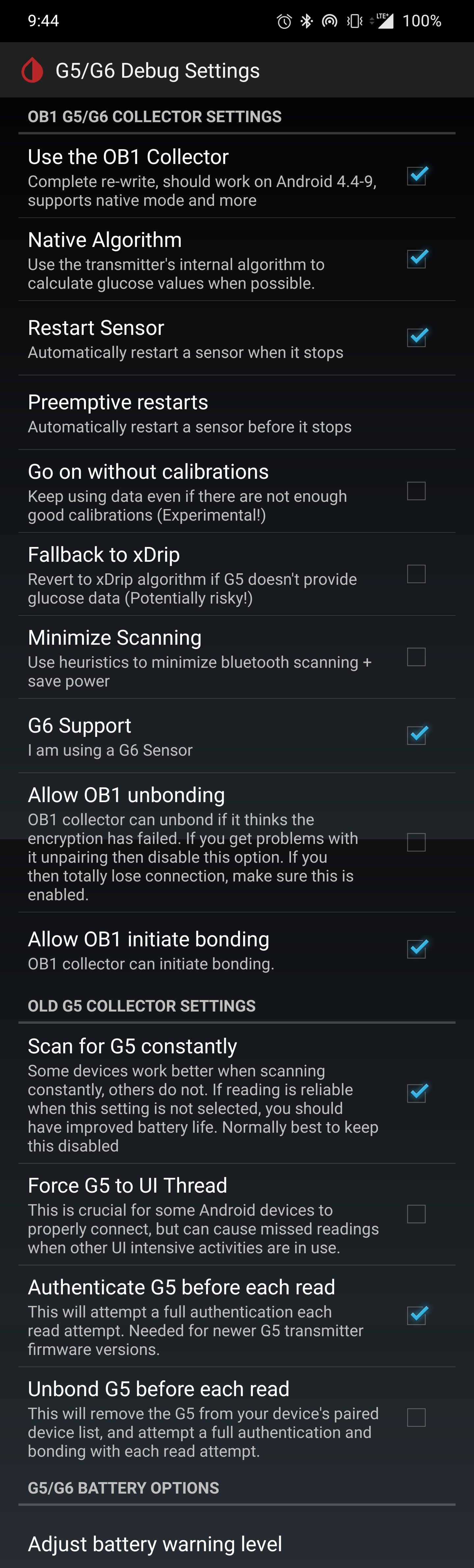
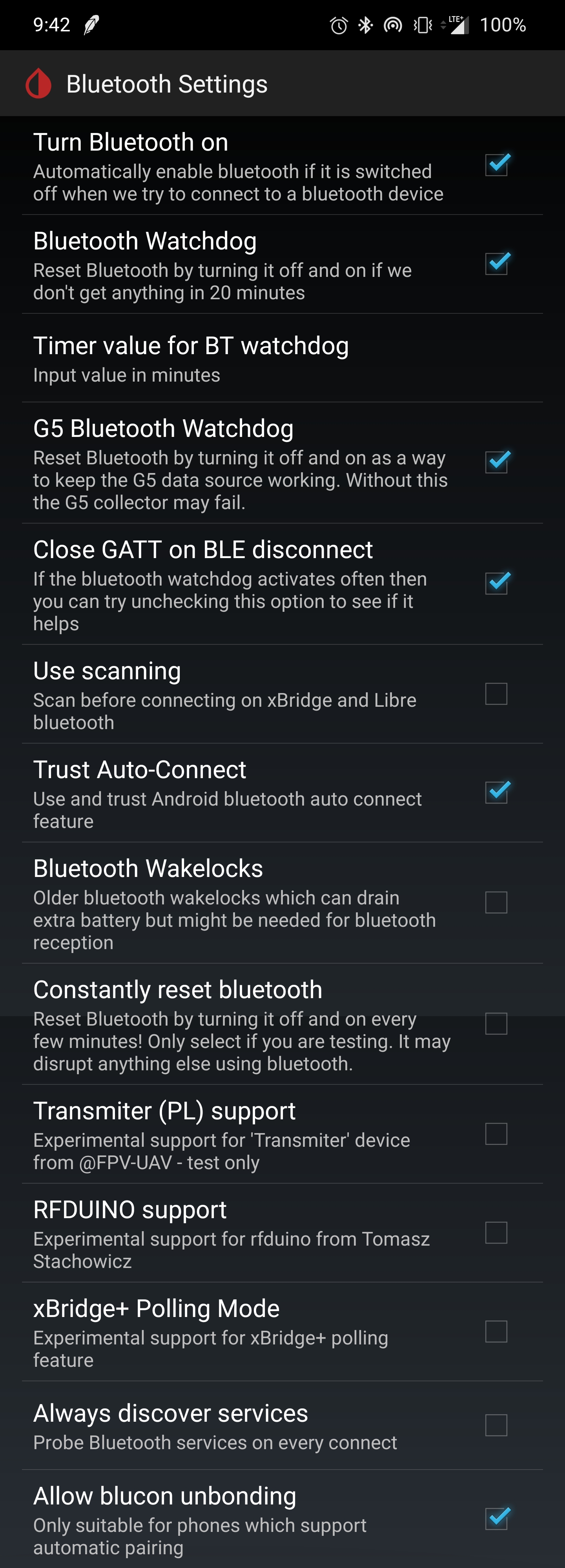
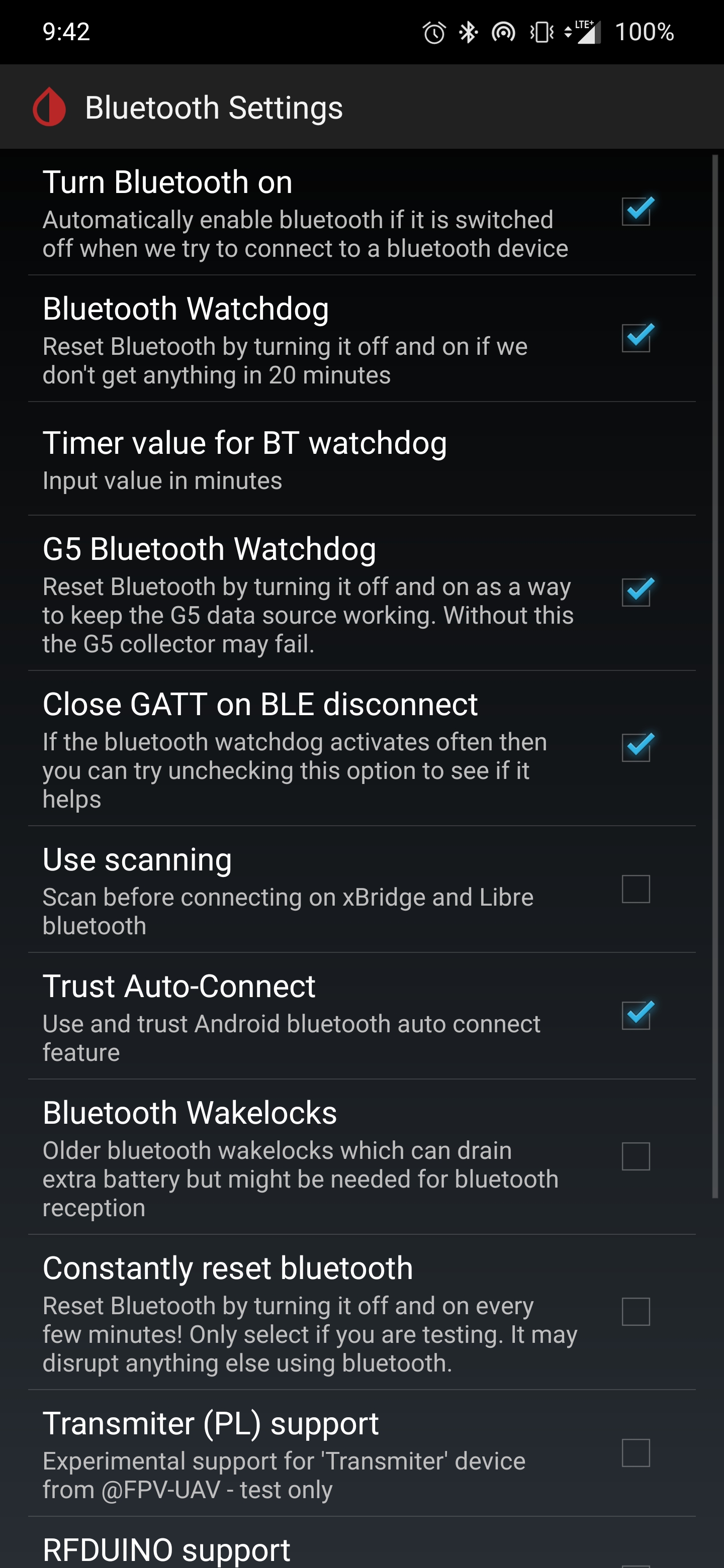
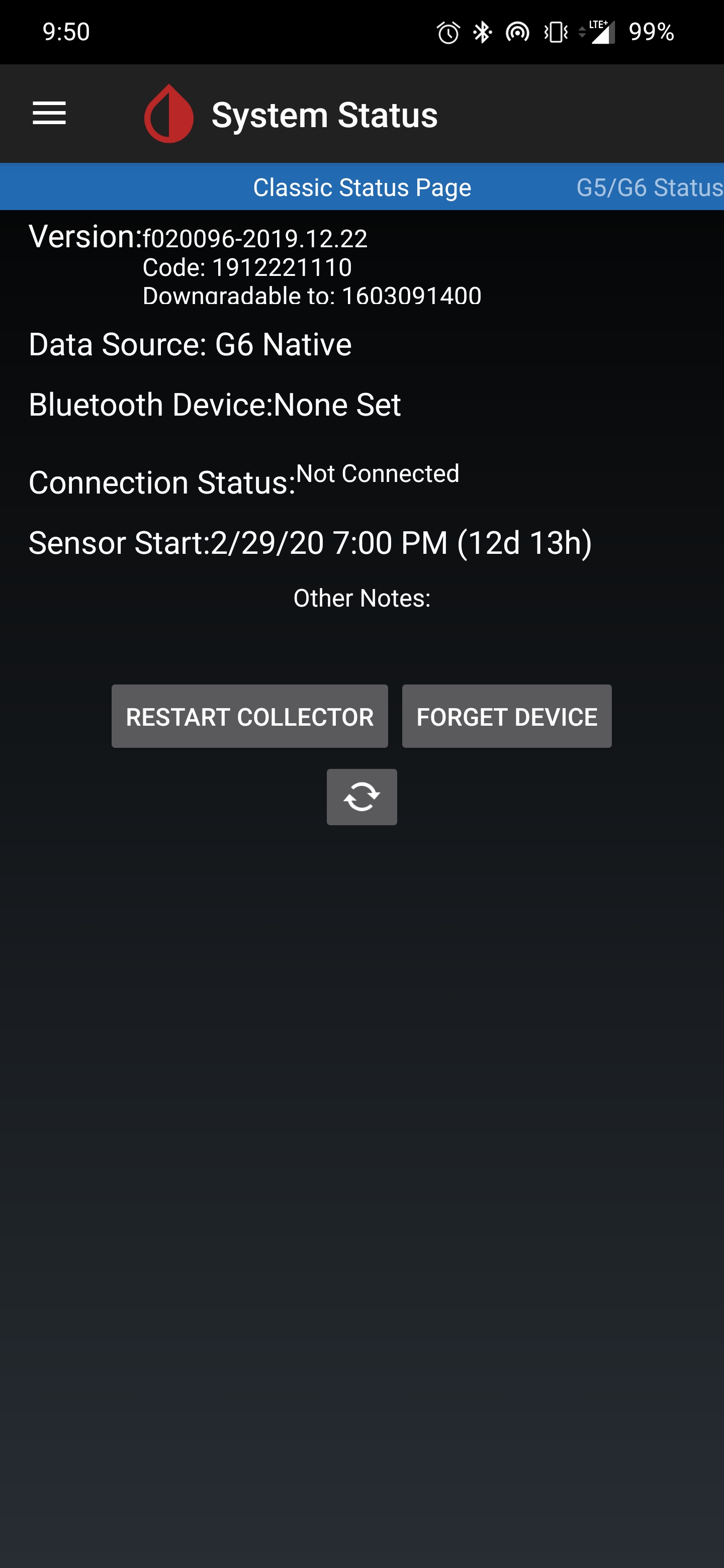
borijess
on 13 Mar 2020
For those of you on OnePlus 7 pro device. What are your xdrip settings. I have missed readings. Currently on over an hour without a reading. You can see in the status page it does not reconnect. These are my settings. Please post the ones that work for you.)
Hi @borijess, I activated "Minimize Scanning". I think, this did it for me, when I had problems.
I also deactivated "Trust Auto-Connect" and activated "Use background Scans" (It's not shown in your screenshots. I don't know why.)
Using OP7 with latest OTA Android 10 and latest xDrip+ nightly.
Good luck!
loop2016
on 13 Mar 2020
For those of you on OnePlus 7 pro device. What are your xdrip settings. I have missed readings. Currently on over an hour without a reading. You can see in the status page it does not reconnect. These are my settings. Please post the ones that work for you.)
Hi @borijess, I activated "Minimize Scanning". I think, this did it for me, when I had problems.
I also deactivated "Trust Auto-Connect" and activated "Use background Scans" (It's not shown in your screenshots. I don't know why.)
Using OP7 with latest OTA Android 10 and latest xDrip+ nightly.Good luck!
Where do you find Use background scans.
borijess
on 13 Mar 2020
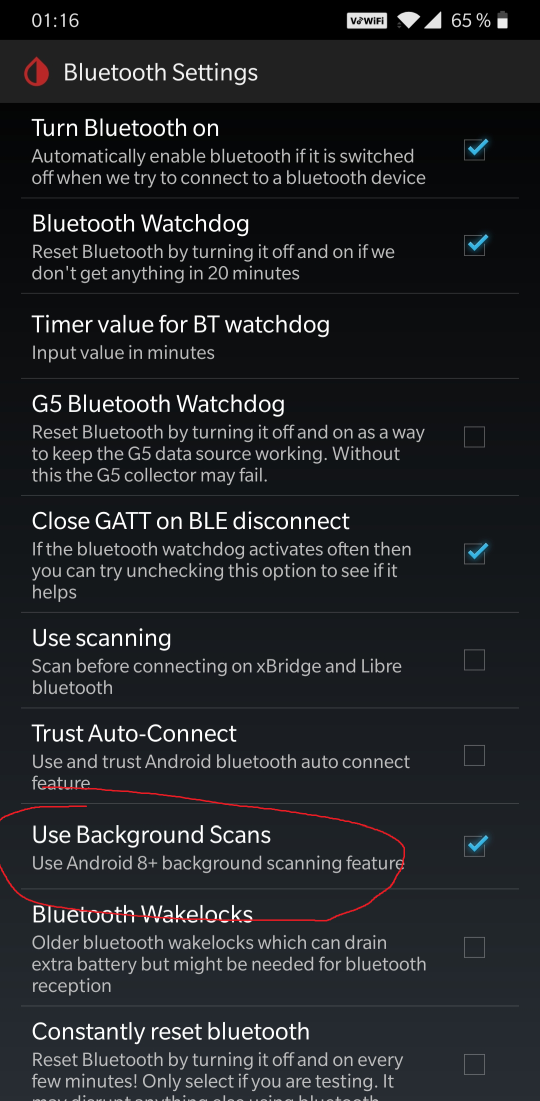
loop2016
on 14 Mar 2020
In case somebody stumbles accross this in search for an answer: Had the same issue on Xiaomi Mi A2 lite after updating it to Android 10 (custom rom, although should be true for most Android 10 devices). For me installing the latest nightly build (19th Apr 2020) did the job. It promptet me to grant permission to location data to the app and set it to "Always allow". after that, it kept the connection also while the phone's screen was off and would properly reconnect. My suspicion is that when updating on an existing setup to Android 10, location permission might be set wrongly. So check in Xdrip App-Info (easiest way is to long press xdrip icon in launcher and select it there), if location data access permission is set correctly to "Always allow". Also make sure to enable background scans from the post over this one.
 opal06
on 22 Apr 2020
opal06
on 22 Apr 2020
Same problem on OnePlus 8 Pro with Android 10 on OxygenOS 10.5.5IN11BA.
Anyone has now a final proper setting to use with latest xDrip+ Nightly from April 19th?
 tgessendorfer
on 1 May 2020
tgessendorfer
on 1 May 2020
Same problem on OnePlus 8 Pro with Android 10 on OxygenOS 10.5.5IN11BA.
Anyone has now a final proper setting to use with latest xDrip+ Nightly from April 19th?
I am using the 4-19 on my OnePlus 7pro and it's working great.
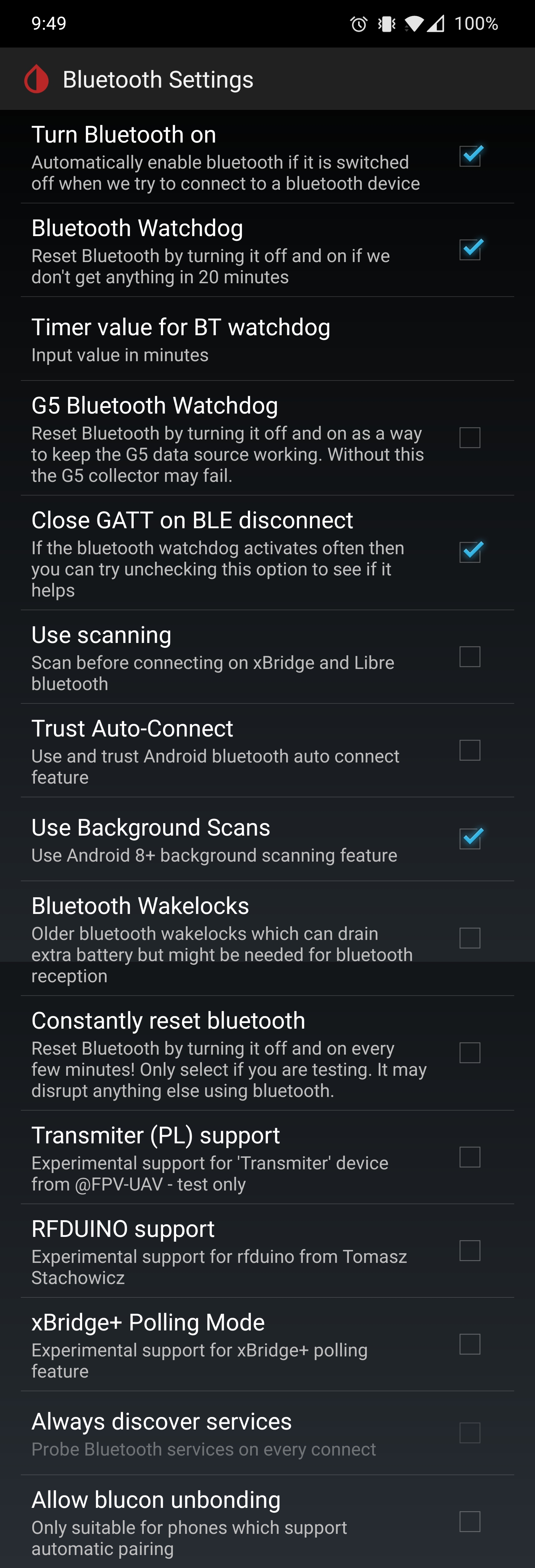
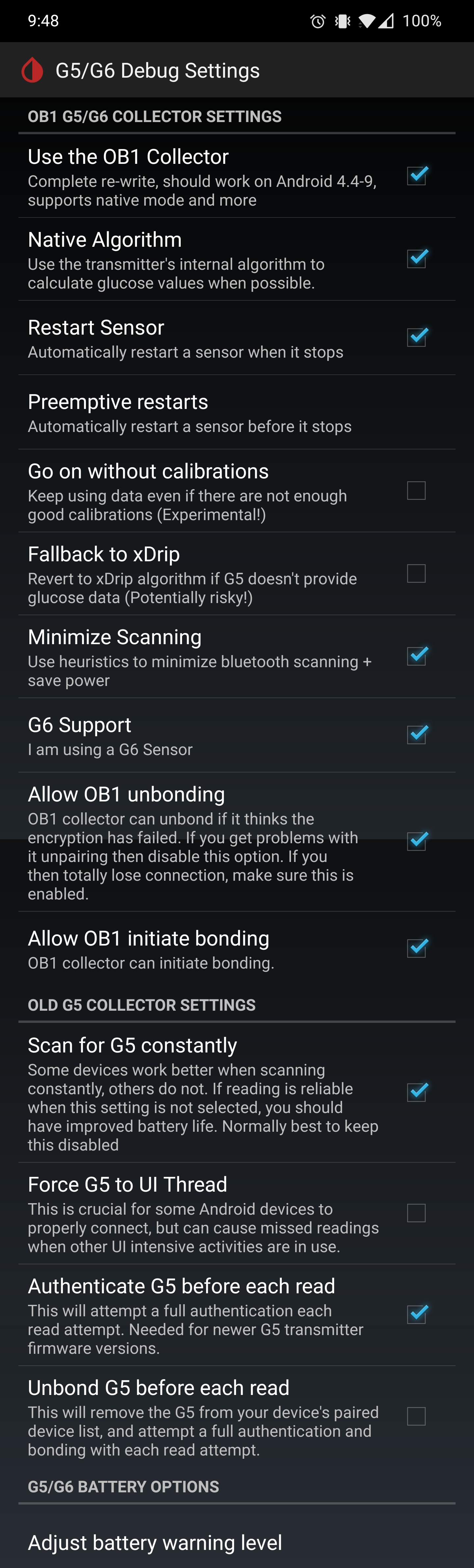
borijess
on 1 May 2020
Same problem on OnePlus 8 Pro with Android 10 on OxygenOS 10.5.5IN11BA.
Anyone has now a final proper setting to use with latest xDrip+ Nightly from April 19th?I am using the 4-19 on my OnePlus 7pro and it's working great.
Interesting that you have Allow Unbonding enabled but I will do now same as you.
Wasted a couple of sensors before I found out the issue is on the phone.
Interestingly I had a OP7Pro until this week with latest OxygenOS Beta and never experienced those problems.
tgessendorfer
on 1 May 2020
Same problem on OnePlus 8 Pro with Android 10 on OxygenOS 10.5.5IN11BA.
Anyone has now a final proper setting to use with latest xDrip+ Nightly from April 19th?I am using the 4-19 on my OnePlus 7pro and it's working great.
Interesting that you have Allow Unbonding enabled but I will do now same as you.
Wasted a couple of sensors before I found out the issue is on the phone.Interestingly I had a OP7Pro until this week with latest OxygenOS Beta and never experienced those problems.
Yes I am on the latest beta 12.
borijess
on 1 May 2020
Anyone here got a working setup on huawei p30 pro / android 10?
Ferdinandoz
on 5 May 2020
Same problem on OnePlus 8 Pro with Android 10 on OxygenOS 10.5.5IN11BA.
Anyone has now a final proper setting to use with latest xDrip+ Nightly from April 19th?
(Same device) I've been modifying every setting possible to attempt to maintain a connection. I think the longest I've maintained a connection is 5-6 hours. As many have said though, if the device reboots, goes out of range, or even "goes to sleep" (on nightstand while sleeping. Battery optimization is disabled for app), it will stop working.
I originally imported my settings from my 7 Pro but they didn't work, I also don't remember what errors I was dealing with on my 7 Pro before it just started magically working one day.
My 8 Pro though now actually unpairs the transmitter. I can't figure out how to stop it...
 thederekFawcett
on 12 May 2020
thederekFawcett
on 12 May 2020
Things were working very well over the past couple weeks with these updated settings on the 4-19 build. It's been awesome not having this drop it's connection during the middle of thenight! Unfortunatley a new, but perhaps related, issue arose yesterday.
My phone ran out of battery. When it was rebooted after an hour, it would not reconnect with the transmitter. Attempts to stop the sensor and restart the transmitter with a new sensor has failed. Each request gets added to Queue Items. Brainstate is no longer stuck on scanning, but it's not giving much information other than Connection Status:Not Connected on classic status page.
I'm not sure what i need to do clear the queue and 'reset' the connection with the transmitter. Tried the restart collector button, forget device and 'reload' buttons on the classic status page to no effect. I've been waiting the requisite 5-mins between changes. It's not clear what's going on. any ideas where to go from here?
 iancj88
on 17 May 2020
iancj88
on 17 May 2020
Things were working very well over the past couple weeks with these updated settings on the 4-19 build. It's been awesome not having this drop it's connection during the middle of thenight! Unfortunatley a new, but perhaps related, issue arose yesterday.
My phone ran out of battery. When it was rebooted after an hour, it would not reconnect with the transmitter. Attempts to stop the sensor and restart the transmitter with a new sensor has failed. Each request gets added to Queue Items. Brainstate is no longer stuck on scanning, but it's not giving much information other than Connection Status:Not Connected on classic status page.
I'm not sure what i need to do clear the queue and 'reset' the connection with the transmitter. Tried the restart collector button, forget device and 'reload' buttons on the classic status page to no effect. I've been waiting the requisite 5-mins between changes. It's not clear what's going on. any ideas where to go from here?
Backup settings, uninstall and reinstall App and restored settings without starting the sensor.
After up to 5minutes xDrip will reconnect. That is what I have to do.
Wiping Bluetooth and xDrip storage/cache does not help.
Rebooting not required as well.
tgessendorfer
on 17 May 2020
Same issue running Moto G7 Android 10, Dexcom G6 and xdrip build from 2020.07.13
It seems to disconnect when I'm away from the phone it doesn't reconnect OR, as of late, if my phone connects to another blue tooth device (e.g. my cars bluetooth or headset bluetooth). So far none of the workarounds have helped. If anyone wants to see logs, I will share them.
 sweetafro
on 21 Jul 2020
sweetafro
on 21 Jul 2020
Same issue running Moto G7 Android 10, Dexcom G6 and xdrip build from 2020.07.13
It seems to disconnect when I'm away from the phone it doesn't reconnect OR, as of late, if my phone connects to another blue tooth device (e.g. my cars bluetooth or headset bluetooth). So far none of the workarounds have helped. If anyone wants to see logs, I will share them.
Please let me know if you find a fix. On Moto g7 also with same issue.
 lillydexcom
on 10 Aug 2020
lillydexcom
on 10 Aug 2020
Same issue running Moto G7 Android 10, Dexcom G6 and xdrip build from 2020.07.13
It seems to disconnect when I'm away from the phone it doesn't reconnect OR, as of late, if my phone connects to another blue tooth device (e.g. my cars bluetooth or headset bluetooth). So far none of the workarounds have helped. If anyone wants to see logs, I will share them.
Same here, using a Moto G7 Power which just updated to Android 10. Running nightly build 27 July 2020. It seemed to intermittently connect and disconnect, but overnight I had 2 hr and 4 hr gaps. Failing to reconnect this morning.
Tried the "backup-delete-reinstall" method suggested by tgessendorfer and it looked to work but issues still occurring.
In desperate need of help here! Wish I had never updated the phone software...
 hellis5544
on 13 Aug 2020
hellis5544
on 13 Aug 2020
OK so I have at least some success / promising results with another method.
It is a modified version of the "backup - delete - reinstall method"
What I did was:
- backup settings to SD card
- delete Xdrip+
- clear bluetooth cache by opening Android settings > apps > hamburger menu top right, select show system apps > bluetooth > clear cache
- reinstall Xdrip+ (I am using latest nightly build, but some of the other comments I have seen mention better results with late Dec 2019 build)
- BEFORE opening Xdrip > Android Settings > Apps > Xdrip+ > Advanced > Select allow "Modify System Settings" & make sure location access is granted
- Open Xdrip, do not go through source setup but instead allow restore from backup
- Make sure all permissions Xdrip requests in notification area are allowed
Not sure if step 3 or 5 was the magic bullet or if they both have to be done, but doing this has allowed me to reconnect to the G5 and get no dropped readings for the last 2.5 hrs. Hopefully this continues... I'll update if something goes wrong, but most promising results I've had since the update threw everything out of whack. Hope this helps someone else.
UPDATE::
After working fine for a few hours the bluetooth connection was lost and refused to connect again of its own accord.
This time I did the same procedure as above but used the Dec 22 2019 version mentioned earlier. I have been running this one for over 12 hours (overnight) with no issue so far. and it is unlikely I would have had no disconnections overnight, so I think it is reconnecting properly. Must be something about how newer versions of Xdrip don't play nice with their bluetooth implementation on Android 10...
UPDATE 2::
Well looks like my hopes were falsely high. Lost connection again today and failed to regain on its own. Back to the drawing board
hellis5544
on 13 Aug 2020
Mine has been fairly consistent for a week now. Even after a disconnect because the phone is too far away for too long, it seems to reconnect automatically again. The things I did, of which some combination seemed to have worked:
- upgraded to a nightly build (~1.5 weeks ago)
- allowed location sharing with xdrip per many people's suggestions
- turned off battery saver mode on my android
It occurred to me that with battery saving mode on, recent versions of android restrict location sharing. Unfortunately, I don't think there is a way to change the parameters of what battery saving mode does to allow location sharing but to keep doing all its other battery saving things. Which is disappointing, since I have been running in always-on-battery-saving for ~2 years to get a longer time on battery.
 hardaker
on 27 Aug 2020
hardaker
on 27 Aug 2020
It isn't entirely clear what the cause of this issue is and although the unpairing work-around did seem to help in many cases it now causes problems with the november security patch and results in frequently pop-ups asking for pairing.
As such I have issued a new nightly (15th Nov) which disables the unpairing work-around by default (can be re-enabled with preference option) and introduces a new option Avoid Scanning which requires the Minimize Scanning feature to be enabled first.
If you have problems with the Android 10 work-around option causing pop-ups but it doesn't work (after a period of time) when you disable this feature, then please try using the Avoid Scanning feature to see if that resolves the issue for you.
Because of the fragmentation of the Android Bluetooth stack, in that on some platforms we must scan etc, and some devices have the Android 10 bonding issue and others have the pop-up issue, it is likely that using these preference settings will be the only way to reliably cover all the different combinations. I only have a limited number of handsets to test with this issue so please report back any findings. Thanks.
jamorham
on 15 Nov 2020
I'm not sure what to tell people to do on facebook.
I asked them to leave Android 10 workaround unchecked. And try "Minimize Scanning" both ways.
Many claim neither works.
I myself am still on Android 9, and Motorola. So, I have no problem. But, I don't think I can do any testing.
Is there anything I can do to help?
Do you have any suggestions for what I should suggest on facebook?
 Navid200
on 16 Nov 2020
Navid200
on 16 Nov 2020
I am still struggling myself but I believe it’s the sensor insertion this time. I will try a new one tonight. They need to know things like expired very old dex g5 causes issues and wont pair a lot of the time. At least it wont for me .Some might not know basics like unpair old Dexcom’s from phone. Are they the running Dexcom app and the xdrip app? I believe a lot think they just download the one a file but I downloaded all three. Supporting software, location set to On, turn off battery saver, etc. I would make a list of things to check off for them and and post that. You cant please everyone!!! You do amazing things to help others so thank you.
Jennifer Draney
utinsulin4all Lead Administrator
[email protected]jenniferdraney@outlook.com
allmyblueheartsare4type1
Sent from Mailhttps://go.microsoft.com/fwlink/?LinkId=550986 for Windows 10
From: Navid200notifications@github.com
Sent: Monday, November 16, 2020 6:48 AM
To: NightscoutFoundation/xDripxDrip@noreply.github.com
Cc: Subscribedsubscribed@noreply.github.com
Subject: Re: [NightscoutFoundation/xDrip] Android 10 BLE + G6 - Stuck in "scanning" (#1061)
I'm not sure what to tell people to do on facebook.
I asked them to leave Android 10 workaround unchecked. And try "Minimize Scanning" both ways.
Many claim neither works.
I myself am still on Android 9, and Motorola. So, I have no problem. But, I don't think I can do any testing.
Is there anything I can do to help?
Do you have any suggestions for what I should suggest on facebook?
—
You are receiving this because you are subscribed to this thread.
Reply to this email directly, view it on GitHubhttps://github.com/NightscoutFoundation/xDrip/issues/1061#issuecomment-728044828, or unsubscribehttps://github.com/notifications/unsubscribe-auth/AO4UACBWPEYVPOIZELZVHMTSQEURZANCNFSM4JCJ4CXQ.
 allmyblueheartsare4type1
on 16 Nov 2020
allmyblueheartsare4type1
on 16 Nov 2020
Jamoran's tip works. I have a Samsung S10+ mobile with Android 10 on it.
To solve the reconnection problem with the G6 transmitter, I installed the new xDrip+ nightly build version from 15/11/202020.
Under Settings>Advanced Settings>Bluetooth Settings I had initially only activated "Trust Auto Restore". So it ran for about an hour. But then I didn't get any more blood glucose values and I could do what I wanted, xdrip didn't get any information.
So I activated "minimize scanning" and "avoid scanning". I also still have activated "Trust Auto Restore". I haven`t disabled this function. Nevertheless the system works now about 16 hours.
 Quergestreift
on 16 Nov 2020
Quergestreift
on 16 Nov 2020
Thank you @jamorham So far so good with the 15 Nov release. I am running Android 10 on a Moto G Power (latest US version). Installed and running solidly for the last 18 hours. I did not have to change any of the default settings so far. Will update if there are any new issues.
sweetafro
on 22 Nov 2020
Related issues
 dlopez1984
·
6Comments
dlopez1984
·
6Comments
 aeonsablaze
·
12Comments
aeonsablaze
·
12Comments
 ArkonPhoenix
·
4Comments
ArkonPhoenix
·
4Comments
 anjalileah
·
4Comments
anjalileah
·
4Comments
 tynbendad
·
19Comments
tynbendad
·
19Comments
Most helpful comment
It isn't entirely clear what the cause of this issue is and although the unpairing work-around did seem to help in many cases it now causes problems with the november security patch and results in frequently pop-ups asking for pairing.
As such I have issued a new nightly (15th Nov) which disables the unpairing work-around by default (can be re-enabled with preference option) and introduces a new option
Avoid Scanningwhich requires theMinimize Scanningfeature to be enabled first.If you have problems with the Android 10 work-around option causing pop-ups but it doesn't work (after a period of time) when you disable this feature, then please try using the
Avoid Scanningfeature to see if that resolves the issue for you.Because of the fragmentation of the Android Bluetooth stack, in that on some platforms we must scan etc, and some devices have the Android 10 bonding issue and others have the pop-up issue, it is likely that using these preference settings will be the only way to reliably cover all the different combinations. I only have a limited number of handsets to test with this issue so please report back any findings. Thanks.