Xdrip: Tidepool Integration
xDrip should have the ability to upload data to Tidepool.
 jamorham
All 144 comments
That would be awesome! They brag on being very flexible and open source, so they should provide an easy to implement pathway to integration.
 doc77
on 9 Sep 2018
doc77
on 9 Sep 2018
Appears as though tidepool's public API documentation is a bit lacking.. reaching out to them to see if they have an updated version of the info on this page. (the linked google doc is unavailable) https://developer.tidepool.org/tidepool-api/index/
 jwoglom
on 9 Sep 2018
jwoglom
on 9 Sep 2018
@jamorham - Sounds great (as always). I have one design question related to sync follower setups and uploads to tidepool and other platforms. I have noticed that with NS rest api uploads I need to upload from followers too in order not to have a complete representation in NS. If I only upload from one phone in the sync-follower setup then I only get the data that is entered on this particular phone and not the data coming from the fellow followers. Is this intentional by design (or am I simply using it wrong) or would it be possible to have either the master or one of the followers to upload on behalf on the sync group?
 jweismann
on 9 Sep 2018
jweismann
on 9 Sep 2018
This would be great
 dmelliott20
on 9 Sep 2018
dmelliott20
on 9 Sep 2018
+1
 n0rbertg
on 9 Sep 2018
n0rbertg
on 9 Sep 2018
Yes, I agree, that would be helpful
 yeagerm
on 9 Sep 2018
yeagerm
on 9 Sep 2018
Sounds great+1
 stackenblochen
on 9 Sep 2018
stackenblochen
on 9 Sep 2018
Agree, this would be awesome.
 kskandispersonal
on 9 Sep 2018
kskandispersonal
on 9 Sep 2018
I have a proof-of-concept Tidepool uploader working that takes an xDrip+ exported file (SiDiary format) and uploads the data to Tidepool. It is using their new, and yet unreleased API. There's one messy workaround for uploading carbs. The reason an updated doc is not published is because the new API is not yet done and released. I think we will have to wait for its release to do any real work with it.
 bassettb
on 10 Sep 2018
bassettb
on 10 Sep 2018
Hello!
@bassettb is correct - Tidepool is still working toward the release of our public open APIs which will really open the floodgates for future integrations. Although there are a few exceptions - we have not given many access to info about the open API as so much is in flux and we do not want to waste anyone's efforts by letting them build on the API and then pulling the rug from beneath them with drastic changes.
I am a big fan of all of the work of those who have worked on xDrip+, Nightscout, etc and I cannot wait to see this type of integration exist.
Thank you all and thank you @jamorham !
 NRiggall
on 11 Sep 2018
NRiggall
on 11 Sep 2018
So I have a working implementation for xDrip+ written now (many thanks to @bassettb for the proof-of-concept c# example tool and Tidepool for access to the api)
I've implemented it to be as modular and adaptable as possible in terms of the data structures, rest-api endpoints and the message sequence, bearing in mind the expectation that the api may be subject to change. I am fairly confident it will be possible to modify this very quickly as required.
It supports CGM data from all collectors, manual and automated synced blood test data, treatment items entered in xDrip or via Nightscout or from any followers or pump synchronization. It uses the data pulled from AAPS to upload the dynamic basal rate information.
To avoid problems with duplicated data I went with a completely linear upload strategy from oldest to newest never repeating the same uploaded time segment. It seems to take about 1 second to upload an entire days worth of data.
Overall it is looking good and a very worthy addition to xDrip in my opinion as this is something I would rate as an urgent priority for the community.
As far as I understand it, the next steps would need to be Tidepool agreeing that it would be possible for the api to be utilized by xDrip users. I will contact Tidepool to discuss this and hopefully we can get interested people testing it soon.

jamorham
on 14 Sep 2018
@JamOrHam This is great news! Do you have a time frame for its inclusion into xDrip+?
Many thanks to @bassettb for his hard work and to you for all you do for us xDrip+ users.
doc77
on 14 Sep 2018
Thank you!! Looking forward to using this feature. Question... do you think you could also go the other way? If a user uploads their pump data to Tidepool, can you retrieve it into xDrip+ and NS?
kskandispersonal
on 14 Sep 2018
@doc77 well the code is ready as far as I'm concerned but Tidepool need to be willing to receive data from xDrip. I would expect first steps would be a limited trial of nightly+engineering mode users perhaps.
@kskandispersonal I haven't yet been able to retrieve datasets from tidepool, but if we could do that then yes definitely we could sync in both directions.
jamorham
on 14 Sep 2018
what are the benefits to use tidepool? as far as I have understood it seems to be a NS like?
 gregorybel
on 16 Sep 2018
gregorybel
on 16 Sep 2018
Discussions with Tidepool this looks like it is going to happen. No ETA yet though.
jamorham
on 28 Sep 2018
@jamorham Awesome! Thank you very much. I think this will be a great enhancement to the already indispensable app that you have developed.
doc77
on 28 Sep 2018
@jamorham Thank you ! 👍
 yepee1
on 18 Oct 2018
yepee1
on 18 Oct 2018
Really looking forward to this! Williing to beta test if needed
 cramis1
on 18 Oct 2018
cramis1
on 18 Oct 2018
Thank you to all involved - I'm looking forward to this integration, too.
 9zr5EHJA
on 20 Oct 2018
9zr5EHJA
on 20 Oct 2018
There is some movement on this so hopefully it wont be too much longer till we can start the first round of testing with nightly users.
jamorham
on 23 Oct 2018
Will be happy to be a beta tester.
doc77
on 23 Oct 2018
Just wondering what's the status with this. Is there any update from Tidepool?
n0rbertg
on 15 Nov 2018
I really appreciate your interest and patience on this, everyone!
We (Tidepool) were in the middle of working on a new upload delivery mechanism that is better suited to real-time applications like mobile uploads (obviously including xDrip+). This PR makes use of the new, continuous mechanism.
This also enables the xDrip+/Tidepool integration to be widely adopted without causing any negative impact on Tidepool's servers.
Thanks for all the help @jamorham!
 pazaan
on 28 Nov 2018
pazaan
on 28 Nov 2018
Integration with Tidepool is a major step, and adds a new dimension to xDrip. Thank you @jamorham for doing this!
doc77
on 28 Nov 2018
This feature is in the 28th Nov Nightly for early testing. To use it you need to register at: https://int-app.tidepool.org/ and then input your credentials to the Tidepool cloud upload section in xDrip settings.
Data should be uploaded every 20 minutes. There is currently very little feedback in the user interface as to whether it is working or not so you would need to refresh on the website to check the data.
This is still early stages and requires testing and feedback from early adopters!
jamorham
on 28 Nov 2018
I had to sign up for a new Tidepool account at the link. I entered in my original tidepool credentials and set up a new int-app account. Entered the credentials into xDrip+. The "Test Tidepool Login" seems to be non-funcional as it did nothing when I clicked it.
Its been about an hour and a half and data has not been uploaded to Tidepool. Log shows multiple login requests that failed. Got the message that "login failed: java.net.UnknownHostException: Unable to resove host "int-api.tidepool.org" No address associated with hostname"
doc77
on 28 Nov 2018
Should the hostname be "int-app.tidepool.com"?
doc77
on 28 Nov 2018
Update: Its working! Tidepool data chunks are uploading about every 10 minutes. Started several weeks before and is almost caught up to today. Data shows in Tidepool.
Thank you for this @ jamorham!
doc77
on 28 Nov 2018
Yes, so I should also have mentioned it will try to upload data going back 2 months in chunks of 2-3 days until it has caught up. At every stage we are doing everything possible to ensure xDrip never causes Tidepool any load related problems and is always well behaved and polite.
edit: I've been informed that we probably do not need to be this cautious and could upload much bigger chunks and tidepool servers wont blink, so I will work on testing that and updating the code. Also compression isn't currently enabled but I would plan to switch that on too.
jamorham
on 28 Nov 2018
The "Test Tidepool Login" generates "Login was not successful: 401 Unauthorized" even though I am using my existing Tidepool credentials which work on the Tidepool site. Does it need to be a new account?
kskandispersonal
on 29 Nov 2018
@kskandispersonal Yes, new login is required as this is the int site. See https://github.com/NightscoutFoundation/xDrip/issues/581#issuecomment-442517992
jamorham
on 29 Nov 2018
@jamorham Thanks, just signed up w/ new account:-) And now uploading! Thank you!!!!
kskandispersonal
on 29 Nov 2018
I had to create a new account (with the same credentials) on the web site @jamorham refers to. It took about 2 hours for the uploads to start, and about four hours to load about 2 months worth of data. And the data was available on both sides, the original Tidepool and the int-app.tidepool.org.
doc77
on 29 Nov 2018
@doc77 Thanks, xDrip+ Event Log is showing the TidpoolUploadChunk so it should be doing the upload. I don't see anything on the Tidepool site yet.
Are you saying that you can see your data on both the original site, https://app.tidepool.org, and the one referenced above, https://int-app.tidepool.org/? That would be great. I already have data on the original site such as insulin dosage that are not on nightscout and xdrip so I'd like to keep that data.
kskandispersonal
on 29 Nov 2018
Are you saying that you can see your data on both the original site, https://app.tidepool.org, and the one referenced above, https://int-app.tidepool.org/?
@kskandispersonal No, you will only see data on https://int-app.tidepool.org during this testing period.
pazaan
on 29 Nov 2018
@pazaan Okay, Thank you!! I am seeing my BGs updated now on the new site:)
kskandispersonal
on 29 Nov 2018
@kskandispersonal once testing is complete, we will point xDrip+ to Tidepool's production server. But we do want to take the time to test properly to ensure that the data uploaded is accurate. Especially since a popular use-case for this integration is sharing data with clinicians.
pazaan
on 29 Nov 2018
@kskadispersonal Arrgh! I was mistaken. I can't see the newly updated data on the original app.tidepool.org site.
doc77
on 29 Nov 2018
@pazaan Understood. Yes, indeed, testing is important! I just uploaded my omnipod data to the test site:)
@doc77 No problem:) It will be soon!
kskandispersonal
on 29 Nov 2018
@pazaan Ah, okay, the uploader, of course, uploads the pump data to the production site!!
kskandispersonal
on 29 Nov 2018
@kskandispersonal Right. The Tidepool Uploader _can_ upload to int as well if you want, but if you do that, you run the risk of duplicates (if there are duplicate data points, like boluses or wizard entries)
pazaan
on 29 Nov 2018
@pazaan How would I configure the Uploader to upload to the int site? I can of course wait 'til the test is complete, but I wouldn't mind testing the complete view of my treatments:)
kskandispersonal
on 29 Nov 2018
@kskandispersonal if you right-click in the Tidepool Uploader app's login page (log out if you're already logged in), you will get a context menu for "Change Server" that lets you change to "Integration".
pazaan
on 29 Nov 2018
@pazaan I'm not getting the context menu. Should I right click on a specific element? I logged out of the uploader and it is just showing the credential textboxes and the Login button. v0.312.0 showing in lower left corner.
kskandispersonal
on 29 Nov 2018
@pazaan I reverted back to Uploader v2.8.6 and now it is showing the change server context menu. Thank you! I will try it.
kskandispersonal
on 29 Nov 2018
@kskandispersonal I was about to say - looks like you're running a really old uploader!
pazaan
on 29 Nov 2018
@pazaan Nice, uploaded all of the omnipod data:)
kskandispersonal
on 29 Nov 2018
29th Nov nightly contains updates/improvements to Tidepool support. If you are testing, please update to this version. Improvements in user feedback, for example you can now see the status in System Status Uploader tab and tapping Last Poll can force an immediate upload.
jamorham
on 29 Nov 2018
@jamorham. It seems that a treatment entered in the past, after that chunk upload, is not included in subsequent uploads, so it never makes it to Tidepool.
doc77
on 29 Nov 2018
Can't get it working...
xdrip crashes when trying to upload to tidepool (using the https://int-app.tidepool.org site), whenever I test the tidepool connection in the settings section or press the "Last Poll" in the system status uploader tab, so there is nothing in the logs...
Anything else I have to install on my phone or set on the tidepool web-page?
 ralf-ms
on 29 Nov 2018
ralf-ms
on 29 Nov 2018
@ralf-ms sorry my bad, try this version instead: https://github.com/NightscoutFoundation/xDrip/releases/download/2018.11.29b/xDrip-plus-20181129-8deb3d2.apk
jamorham
on 30 Nov 2018
@jamorham thanx a lot, it's working now!
ralf-ms
on 30 Nov 2018
I had to sign up for a new Tidepool account at the link. I entered in my original tidepool credentials and set up a new int-app account. Entered the credentials into xDrip+. The "Test Tidepool Login" seems to be non-funcional as it did nothing when I clicked it.
Its been about an hour and a half and data has not been uploaded to Tidepool. Log shows multiple login requests that failed. Got the message that "login failed: java.net.UnknownHostException: Unable to resove host "int-api.tidepool.org" No address associated with hostname"
@doc77 I am having the same problem. My credentials seem to be fine and when I do connect test in the app it just gives me connecting message and nothing else happens. How did you manage to fix it? Tried on both domains (int and without int).
 miguelpruivo
on 1 Dec 2018
miguelpruivo
on 1 Dec 2018
@miguelpruivo You need to sign up for an account at http://int-app.tidepool.org, enter the login credentials, and wait for about 2-3 hours. Then go back and check your logs, it should show TidepoolChunkUpload about every 20 minutes. You can also check your upload tab in system status.
Make sure you're using the latest nightly (the one with the "b" serial #.)
doc77
on 1 Dec 2018
@doc77 I’m using the latest one from 29 nov. After some hours the system status reports: login failed: Javax.net.ssl.exception.
Connection closed by peer
miguelpruivo
on 1 Dec 2018
@miguelpruivo Make sure you are using 2018.11.29b It is the second one from the top in the updates.
It also looks like it's trying to connect to an https site, asking for an ssl connection. The site is http
Just make sure your credentials are correct, and nothing in the phone settings are interfering, like a firewall.
doc77
on 1 Dec 2018
@doc77 how can I update xdrip without losing data/settings? And what’s the difference for the one without a b letter?
miguelpruivo
on 1 Dec 2018
@ miguelpruivo The updates do not alter the settings in any way. You can feel confident that your data and settings will remain intact.
doc77
on 1 Dec 2018
@doc77 so I just need to download the xdrip and install it? It will override the previous version just like that?
I’ve the one without the b letter. What’s the difference?
miguelpruivo
on 1 Dec 2018
The original update had a mistake in it that prevented tidepool upload. @jamorham almost immediately corrected it in the "b" version. You absolutely need the "b" version.
Just download it and install it over your current xDrip+ app. Make sure "install from unknown sources" is checked in your phone settings.
doc77
on 1 Dec 2018
Also, subsequent updates will very likely contain further tidepool upload improvements, so you should check back often.
doc77
on 1 Dec 2018
@doc77 just tried with the version released yesterday (1 Dec) and it gives me the same error. Also tried with the b release. What else can I do?
miguelpruivo
on 2 Dec 2018
@doc77 just tried with the version released yesterday (1 Dec) and it gives me the same error. Also tried with the
brelease. What else can I do?
Make sure you're using your username / password for the int-app site and not the main one. And there is no typo, extra space, or anything there. It should work then.
n0rbertg
on 2 Dec 2018
Did you create an account successfully at http:\int-app.tidepool.org ? And then enter the username and password into xDrip+ ?
Double check the username and password. If you are using the latest update, have checked that your phone settings are not interfering, and everything is correctly entered, it should work. It may take a couple of hours to start uploading, but it should.
doc77
on 2 Dec 2018
@doc77 yes! I’ve account in both sites but I’m using different emails just to be sure. Also I’ve checked everything and looked for typos everything seems to be fine. What should I look for in the phone settings? Thank you.
miguelpruivo
on 2 Dec 2018
Just make sure there is nothing preventing an outward bound connection, like a firewall or a setting in your security section.
doc77
on 2 Dec 2018
What’s the cause behind this error?
miguelpruivo
on 2 Dec 2018
I think it means it's looking for an https site to get a handshake to the ssl. Beyond that I don't know, you would need to ask @jamorham . Maybe you can just upload the event log and explain your problem in the comments.
I wish I could be of more help to you getting this straightened out.
doc77
on 2 Dec 2018
Thank you for the insights @doc77. Where can I find the events logger?
miguelpruivo
on 2 Dec 2018
On the xDrip+ home screen there is a 3 dot menu at the upper right. One of the options will be "view events log". From the events log you will have the option of uploading it to the developer.
Good luck!
doc77
on 2 Dec 2018
It displays the same error. Can’t give a handshake or disconnected by peer.
miguelpruivo
on 2 Dec 2018
@miguelpruvio which version of Android do you have? I don’t think that versions <4.4 can connect to Tidepool due to TLS configuration.
pazaan
on 2 Dec 2018
@pazaan it’s an old Samsung tab that I’ve here with KitKat 4.2 I believe. I’m an iPhone user but with an android watch.
Any workaround? I would like to see my data on tidepool tho.
Thank you.
Edit: based on official documentation it should be after 4.2 actually.
miguelpruivo
on 2 Dec 2018
Tidepool only supports TLS1.2+ to remove the risk of exposing anyone’s Public Health Information due to old TLS vulnerabilities. Many vendors have end of life’d their support for TLS 1.0 and 1.1.
Android 4.2 doesn’t support TLS 1.2 (see https://www.ssllabs.com/ssltest/clients.html).
You can still upload your data to Tidepool using the Tidepool Uploader, or if you really only want to use xDrip+, you’ll need to do so on a device that has Android 4.4 KitKat or more recent.
pazaan
on 2 Dec 2018
@pazaan my bad. I checked and I have the 4.4.4 version which I believe should be compatible right? But I still get the same error from the handshake.
miguelpruivo
on 2 Dec 2018
I seem to get a 401 unauthorised error no matter what I try. Using the 1st December nightly. Have tried making another tidepool account so can confirm I am using the correct E-Mail and password.
 Saikoudaze
on 2 Dec 2018
Saikoudaze
on 2 Dec 2018
@saikoudaze And you’re definitely making the account on https://int-app.tidepool.org?
pazaan
on 2 Dec 2018
@pazaan I am. Still getting the peer closed connection. I am at 4.4.4.
miguelpruivo
on 3 Dec 2018
It may be more than just the TLS version, for example supported cipher suites, intermediate certificate chains, root certificates etc. It may be possible to make it work on < 5.0 but we haven't tested that in any detail and it will involve significantly weakening the TLS security if it is even possible at all.
edit: actually I just remembered something
jamorham
on 3 Dec 2018
Well... I might have to root and upgrade it to 6.0 or so. Which version you can assure it will work?
miguelpruivo
on 3 Dec 2018
@pazaan I just remembered fixing this before. Actually we can use this: https://github.com/NightscoutFoundation/xDrip/blob/3a9d67f4ed38567068336eb70fb76f35c705471d/app/src/main/java/com/eveningoutpost/dexdrip/UtilityModels/OkHttpWrapper.java
jamorham
on 3 Dec 2018
@jamorham will it work on 4.4.4 with OkHttp wrapper?
miguelpruivo
on 3 Dec 2018
Ok, so I have tried to use the TLS 1.2 wrapper workaround but it still doesn't work as the cipher suites available at Tidepool are so restrictive that there isn't an overlap with Android 4.4.2 that I can find.
Looking at the network traffic I think the only way to get it to work would be if Tidepool enabled a common older cipher like TLS_ECDHE_RSA_WITH_AES_256_CBC_SHA (0xc014) as far as I know there are no practical attacks against this cipher within TLS 1.2. @pazaan
jamorham
on 3 Dec 2018
@jamorham since I'm at 4.4.4, to which version should I try to root & upgrade my device in order to safely rest assure that it will work? Or should I wait since you're trying to figure some workarounds? Thank you.
miguelpruivo
on 3 Dec 2018
@miguelpruivo please can you test the 3rd Dec nightly to see if it makes any difference? If your 4.4.4 device is the same as my 4.4.2 then I am thinking it wont help but you may have a different set of ciphers available.
Beyond that if you are planning to upgrade your device, I would say install the most stable version that you can find. Android versions use more memory and cpu the higher you get so I would say you could try 6.0.1, anything 5.1 and above should work. It depends a lot on how well supported your handset is.
jamorham
on 3 Dec 2018
@jamorham 4.4.2 should support TLS_ECDHE_RSA_WITH_AES_128_GCM_SHA256, which is enabled.
pazaan
on 3 Dec 2018
@pazaan I know it is reported that it should but I am not sure whether in practice it actually does. Documentation inside okhttp source (which is a very widely used library) says:
For example, none of the better cipher suites listed above shipped with Android 4.4 or Java 7.
They could be wrong and there is a way to do it, but the wrapper enables a whole bunch of ciphers and none of the more modern ones appear in the client hello packet that android 4.4 initiates when using TLS 1.2 (which is also disabled by default on android 4.4) - At least not on the test device I have been using but it is also likely to be representative of devices found in the wild.
jamorham
on 3 Dec 2018
@jamorham tried the latest version a while ago. Although now it gives me a toast with login failed and some logs, the information is all about the same and still can’t get in.
miguelpruivo
on 4 Dec 2018
@jamorham Tried the latest version tonight and appears to be uploading to Tidepool on https://int-app.tidepool.org
 Vebelfester
on 10 Dec 2018
Vebelfester
on 10 Dec 2018
@jamorham Thanks a lot for the Tidepool upload! I started this morning and the upload to https://int-app.tidepool.org works excellent.
 samkoch
on 10 Dec 2018
samkoch
on 10 Dec 2018
would it be possible to allow uploader from osx chrome as there is no option when I right click
 tonydeleon9
on 17 Dec 2018
tonydeleon9
on 17 Dec 2018
Hi @tonydeleon9 - I'm not clear on what you're asking, or what you're trying to do. Can you please explain so that I can answer correctly?
pazaan
on 17 Dec 2018
Hi @tonydeleon9 - I'm not clear on what you're asking, or what you're trying to do. Can you please explain so that I can answer correctly?
Sorry, when I try to upload my Medtronic 640g data using Tidepool uploader, there is no option to change serverwhen I right click, I'm using the latest version of uploader, I'm using osx
if I use my wifes pc I can do it
thanks Tony
tonydeleon9
on 17 Dec 2018
there is no option to change server when I right click
@tonydeleon9 - sorry to ask a frustrating questions, but are you doing it on the login page of the Uploader? The context menu is only available on the login page, not once you have already logged in. If you are on the login page, are you getting any other options in the context menu?
pazaan
on 18 Dec 2018
Other than Android 4 users, could everyone chime in to this issue ticket and let me know whether the Tidepool integration is working correctly for you all? Thanks.
jamorham
on 18 Dec 2018
Other than Android 4 users, could everyone chime in to this issue ticket and let me know whether the Tidepool integration is working correctly for you all? Thanks.
Im on a Galaxy s8+ running Android 8.0 and tidepool appears to be working perfectly for me
cramis1
on 18 Dec 2018
@jamorham Works great for me! No issues whatsoever.
samkoch
on 18 Dec 2018
Samsung Note 8 running Android 8.0.0 non rooted, Tidepool update works great! The only thing I'd like to see is upload of entries made after a chunk upload if possible.
doc77
on 18 Dec 2018
@doc77 yes entries entered for past times is a known issue which I expect I can resolve in due course.
jamorham
on 18 Dec 2018
there is no option to change server when I right click
@tonydeleon9 - sorry to ask a frustrating questions, but are you doing it on the login page of the Uploader? The context menu is only available on the login page, not once you have already logged in. If you are on the login page, are you getting any other options in the context menu?
I've figured it out, on osx in the login page you have to press control and right click to get the change server menu up,
thanks for your help, Tidepool is amazing I've been looking for something similar for a while, hopefully it will be able to send data to diasend (for clinic only)in the future and have estimated hba1c next to the avg bg on the daily page
tonydeleon9
on 19 Dec 2018
Works well on Android 9 (OnePlus 6T OxygenOS)
n0rbertg
on 19 Dec 2018
Works with Moto G5S and android 7.1.1.
(Only 'remember me' in uploader does not work for the integration server, maybe Tidepool policy).
 nahuis
on 23 Dec 2018
nahuis
on 23 Dec 2018
@nahuis that’s not a Tidepool policy issue. That sounds like a bug.
pazaan
on 23 Dec 2018
Remember me is also not working for me
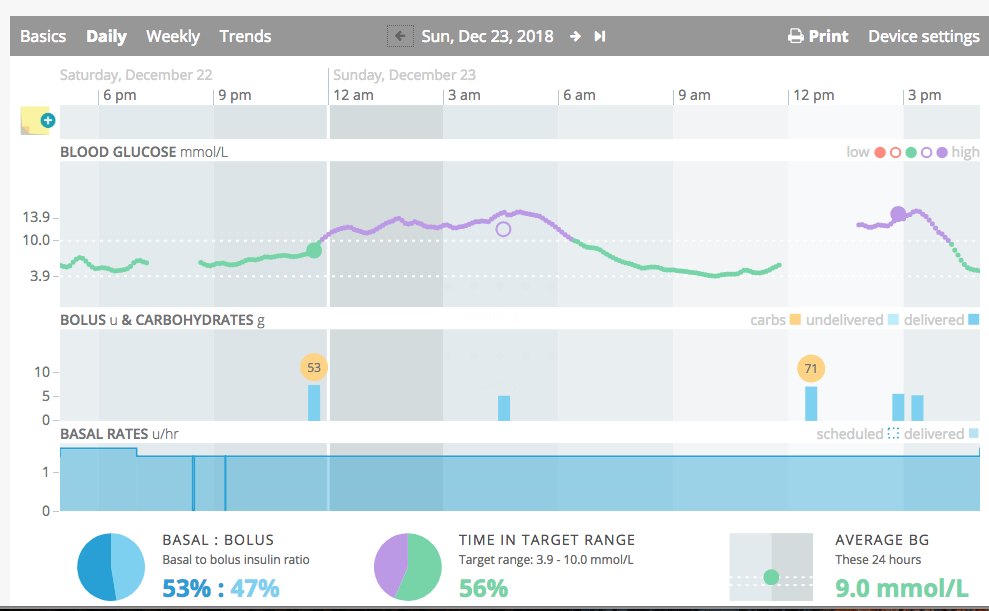
my back filled data is not showing on Tidepool, although it is showing in xdrip is there something I'm not doing correctly
tonydeleon9
on 24 Dec 2018
@tonydeleon9 I believe that if you will delete your data, everything will be uploaded again.
I don't know how to do it...
 tzachi-dar
on 24 Dec 2018
tzachi-dar
on 24 Dec 2018
One thing that I can see is that if there are no readings (for example with the libre) then once there is backfill, data is not uploaded again.
tzachi-dar
on 24 Dec 2018
@tonydeleon9 @tzachi-dar The 28th Dec nightly includes a new feature for setting the Data Age Mins which should resolve the issues being seen with back-filling.
You should set this to the maximum time backfilled data can appear in the past. For Dexcom Native mode this would be 3 hours = 180 minutes, for Libre 8 hours = 480 - The same setting can also be used if you enter treatment data in the past as well.
jamorham
on 28 Dec 2018
If you have installed the 28th Dec nightly, please replace it with the 28b version as there was a bug with the previous: https://github.com/NightscoutFoundation/xDrip/releases/download/2018.12.28b/xDrip-plus-20181228-8f1a9bb.apk
jamorham
on 28 Dec 2018
@jamorham I finally got around to trying this, and I have it working fine on the int-app version of tidepool.
Pixel 3 XL Android 9.0 Pie
 ddellspe
on 31 Dec 2018
ddellspe
on 31 Dec 2018
Thanks a lot for adding tidepool to the list of cloud upload facilities to xdrip. This is really great!
Having said that, I'm somewhat uncertain as to how we benefit most from this new feature. My main concern is that while xdrip serves as the prime CGM source for many (and hence uploading CGM data alone to tidepool would be great in itself) xdrip isn't IMHO the most obvious source for pump data (examples of insulin data that - to the best of my knowledge - isn't handled by xdrip and hence wouldn't
get uploaded: basal, tdd, pump site changes, pump alarms and errors, details on bolus computations such as what the pump calculated and what was actually delivered etc). Now, these details are (at least to some extend) handled by the tidepool uploader software. A third important but more tricky data component is carbs where some may be properly registered under the pump itself (e.g. main meals) but corrections are (at least in hour case) registered under xdrip. What I would like to see in tidepool
eventually, would be the most accurate and complete registration of ALL my diabetes data. That is, in our case:
1) CGM data from xdrip
2) pump data from the pump itself
3) Carb data:
a) From a standalone source where user could be responsible for the tricky merging of data stemming from carb intake registered in different sources
b) I know that this is an xdrip issue forum but for the sake of completeness: Alternatively if tidepool itself could do the merging of carb data from the two main sources xdrip and the pump itself.
Thus, the feature request is more optional choices for upload:
1) Would it be possible to have xdrip upload CGM related data only? Users could then use the same account for their tidepool uploader and upload pump data via the the tidepool uploader software.
2) Would it be possible to have carb data from xdrip too but no insulin data from xdrip?
Finally, I have some questions to the implementation in a desert-sync scenario:
1) With desert-sync, will treatment data entered on any hosts in the sync group be uploaded if just ONE of the hosts in the sync group is being configured as sync-to-tidepool host. Or is it only data from the hosts that is configured as sync-to-tidepool host that will get uploaded (despite the fact that data will be present on any of the hosts due to the desert-sync feature)? Here, I'm talking about treatment data only (not CGM data) since I recall that with nightscout upload of treatment data one had to have ALL hosts in the sync group to do NS upload of treatments. Otherwise, only the treatment from the hosts that were configured as NS upload hosts would upload their treatment data.
jweismann
on 3 Jan 2019
@jamorham xDrip+ has not synced with tidepool for 24 hours, and I can't force a sync.
I just downloaded the latest nightly, and was using the next latest previously.
doc77
on 7 Jan 2019
@jweismann Desert Sync and data synced from Nightscout or xDrip followers should be fine. You just need to set the Data Age Mins to something which allows for any remote synchronization to be completed.
I believe that Tidepool will de-duplicate from different upload sources with uuid. xDrip attempts to maintain uniqueness with entries synced from Nightscout with their _id value. There is work at the moment on Nightscout schema to include proper uuid identifiers in Nightscout records. xDrip already maintains a uuid for every record type.
I am getting pump data here such as site changes and boluses in xDrip. There still needs to be some additions to xDrip to fully support this with basal rates etc. That is a work in progress which will be added later for the Tidepool uploader.
jamorham
on 7 Jan 2019
It's been pointed out to me that the time delay slider in the tidepool integration applet is linear. In other words, if it is set to 1440 it won't upload but once every 24 hours. Resetting the time delay for 20 minutes solved the problem.
doc77
on 7 Jan 2019
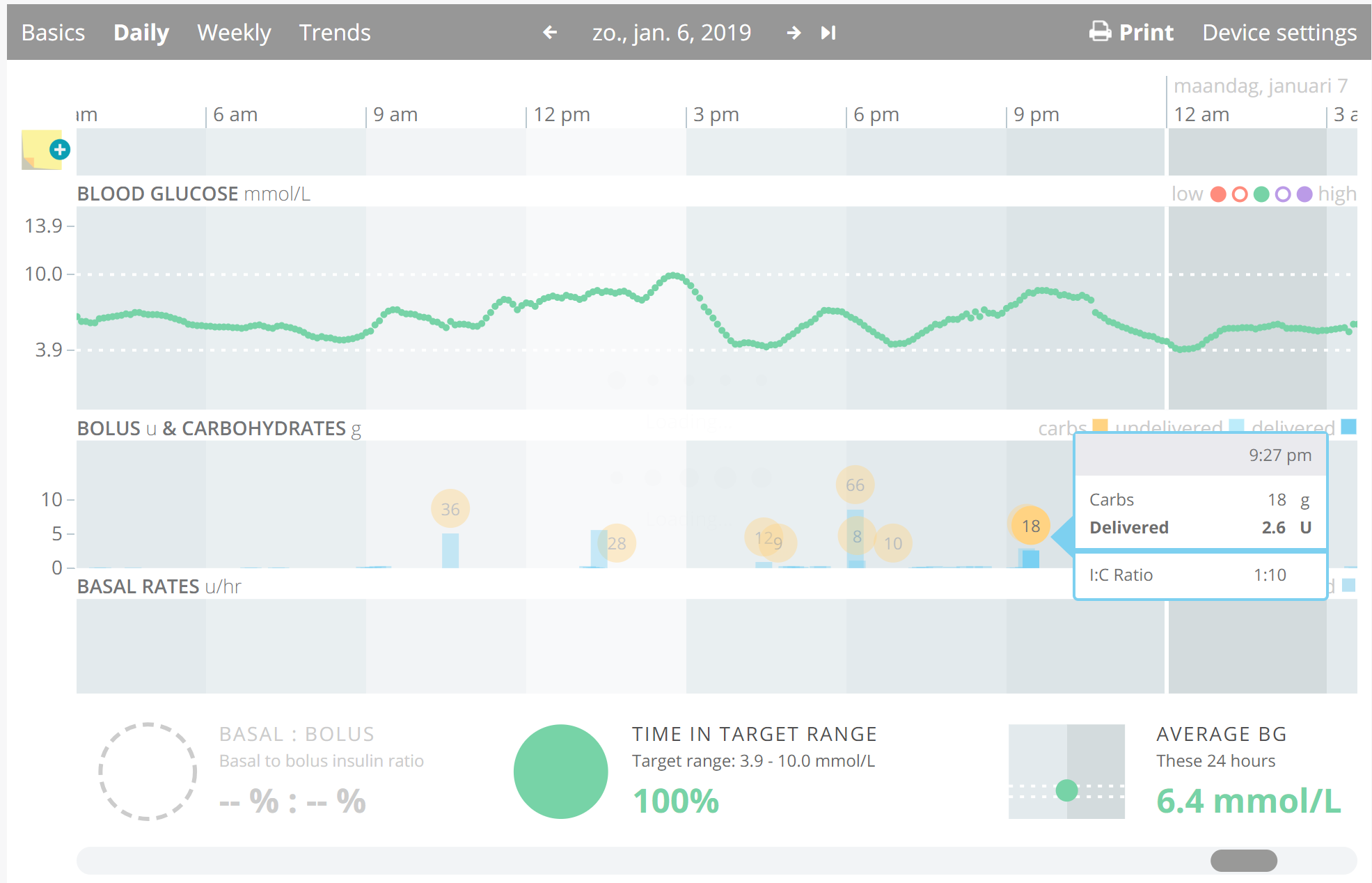
the I:C ratio is calculated incorrectly it seems. Happens at every bolus+carb entry (always value 1:10):
what is the method to get basals into int-app.tidepool.org as well? All info is in my xDrip (coming from AndroidAPS), but it's not uploaded to Tidepool.
 hartlijn
on 8 Jan 2019
hartlijn
on 8 Jan 2019
@hartlijn I think you'll need to set your carb ratio in the xDrip simulation settings profile editor.
jamorham
on 8 Jan 2019
@jamorham ah I see. Now I can relate to the comment of @jweismann about which app/platform should be the real source of data. I have xDrip, Nightscout, AndroidAPS and TidePool.
In this example the I:C ratio is at all places mentioned. But the real source ain't xDrip imo. Or am I missing a point here? Is the intention of Tidepool to show the _profile_ I:C ratio used by the bolus wizard or the _actual_ I:C ratio (insulin dosed/carbs registered)? In the latter I think it shouldnt be provided but calculated by Tidepool.
hartlijn
on 8 Jan 2019
@hartlijn does AndroidAPS expose that data in the treatment entries it broadcasts? I didn't think it did, but if it did then we could incorporate those in to any data uploaded. We also could sync carb ratio profiles from various sources.
jamorham
on 8 Jan 2019
I just set this up - and it seemed to work - at first. (UniHertz Atom)
It seemed to upload data. But now all I can only see data between Nov 13 and Nov 23, 2018..
Is there a way to clear the data and start over?
Also, it is quite tedious to click back one day at a time - is there a way to go to a specific date?
Finally - I don't see any useful reports for us Type 2 folks, except possibly the trend page - and Nightscout has a better looking report for that.
Can someone convince me this is worth the effort?
 TecMunky
on 8 Jan 2019
TecMunky
on 8 Jan 2019
@hartlijn The I:C ratio shown on the wizard event in Tidepool should be the _actual_ I:C ratio used for that wizard calculation, and is provided _to_ Tidepool as data, and is not calculated. If this value is incorrect, then xDrip+ needs to send the correct value.
pazaan
on 8 Jan 2019
The 9th Jan Nightly now has support for the Production Tidepool servers and authorization from Tidepool to utilize them.
By default, nightly users will continue to be using the Integration servers. Switching to the production servers will mean registering a new account (or using your existing one if you had a tidepool account before). You also will need to uncheck the checkbox in the xDrip Tidepool settings for this.
Data for users from the Integration tests wont get populated to the production system (but I can probably get something going with that in the near future if needed) The Tidepool support is still evolving but this is a real milestone.
jamorham
on 9 Jan 2019
this is really great!
@jamorham insulin bolusses are included in the upload (also the super micro bolusses as shown as yellow triangles in xdrip), but basal rates aren't. Would it be possible to add the (temp) basal-rates in the upload? as shown in screenshot on top.
Then we would have a full bridge between AndroidAPS and Tidepool (being xdrip with the upload integration)!

hartlijn
on 10 Jan 2019
@jamorham I just made the switch over this morning, I'm unable to get it to work after switching, is there a recommended way to deal with the migration from int-app to app? The Error I get is Upload chunk is null, cannot proceed. (Looks like that was because of the bad interval that I accidentally changed)
Is there a way to force another backfill into the other domain?
ddellspe
on 10 Jan 2019
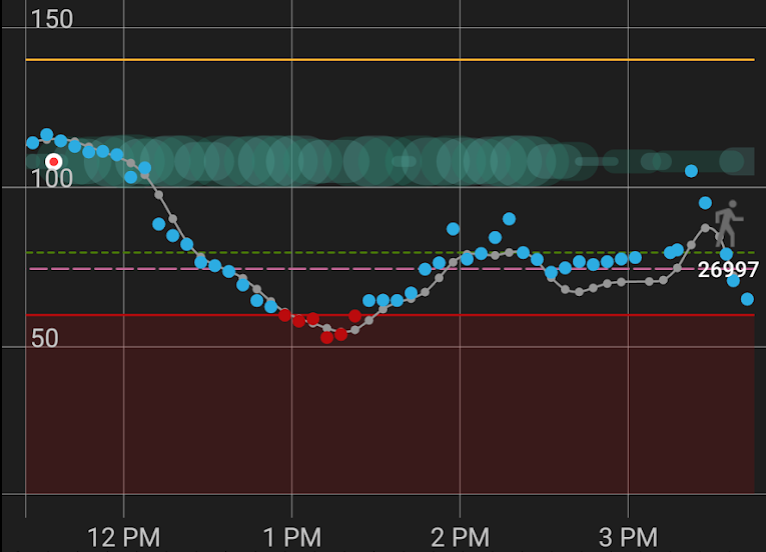
@jamorham @pazaan Would it be possible for xDrip+ to send step count to Tidepool? Does Tidepool support steps in its app? xDrip+ displays steps graphically on the home screen (and History screen), allowing users to see the correlation between exercise and BGs. This would be a great feature on the Tidepool webapp. Thank you!
kskandispersonal
on 30 Jan 2019
Hi @kskandispersonal. Exercise is supported by the Tidepool data model, but is currently not visualised in the web app.
pazaan
on 31 Jan 2019
@pazaan Thank you, looking forward to the visualised activity support in the web app! 👍 Also, unrelated, but I noticed when uploading OmniPod data using the Tidepool Uploader, that Carb only records are not uploaded. OmniPod PDM users have the ability to enter Carbs without necessarily entering a bolus. These are not displayed in the Tidepool app. I am using Diasend, too, and they are displayed properly by that web app.
kskandispersonal
on 31 Jan 2019
Great that xdrip goes to Tidepool without having to day anything (be around wifi) - how can I get nightscout to upload to Tidepool- I would love to be able to see my AAPS on the app - I can only see overall and daily and trends at the moment. I am technically challenged (old) so very plain English responses please ...
 JMehrtens
on 2 Feb 2019
JMehrtens
on 2 Feb 2019
@JMehrtens There's not currently an easy way to do this using AAPS
pazaan
on 4 Feb 2019
Thanks Lennart
hope your systems are all working well - AAPS is the best thing since
sliced bread even if I can't get Tidepool or Fitbit playing nicely with it
cheers
Jean Mehrtens
On Mon, Feb 4, 2019 at 1:00 PM Lennart Goedhart notifications@github.com
wrote:
@JMehrtens https://github.com/JMehrtens There's not currently an easy
way to do this using AAPS—
You are receiving this because you were mentioned.
Reply to this email directly, view it on GitHub
https://github.com/NightscoutFoundation/xDrip/issues/581#issuecomment-460111490,
or mute the thread
https://github.com/notifications/unsubscribe-auth/Ahp8oYG8tFbfsD0YsuKmfQwmcjcMxn9Nks5vJ5RUgaJpZM4WgAMk
.
--
Jean Mehrtens
61 3 9459 4063
mob 0438 095 142
Knit on, with confidence and hope, through all crises. (Elizabeth
Zimmermann)
JMehrtens
on 4 Feb 2019
Hello! I've scanned the thread and got the int version working with xdrip! However, does this mean that I can't use the (android) app on my phone? I know I can log on to the site using my mobile browser. Or can I now move to the non-int version and use the mobile app that way? Thanks
 ImLateImLateForAVery
on 22 Feb 2019
ImLateImLateForAVery
on 22 Feb 2019
Is there a way to upload basalrates (from AAPS via nightscout) from xdrip to tidepool?
 Lispro2011
on 5 Mar 2019
Lispro2011
on 5 Mar 2019
Is there a way to upload basalrates (from AAPS via nightscout) from xdrip to tidepool?
no, but as far as I know will be in the future.
 libxmike
on 6 Mar 2019
libxmike
on 6 Mar 2019
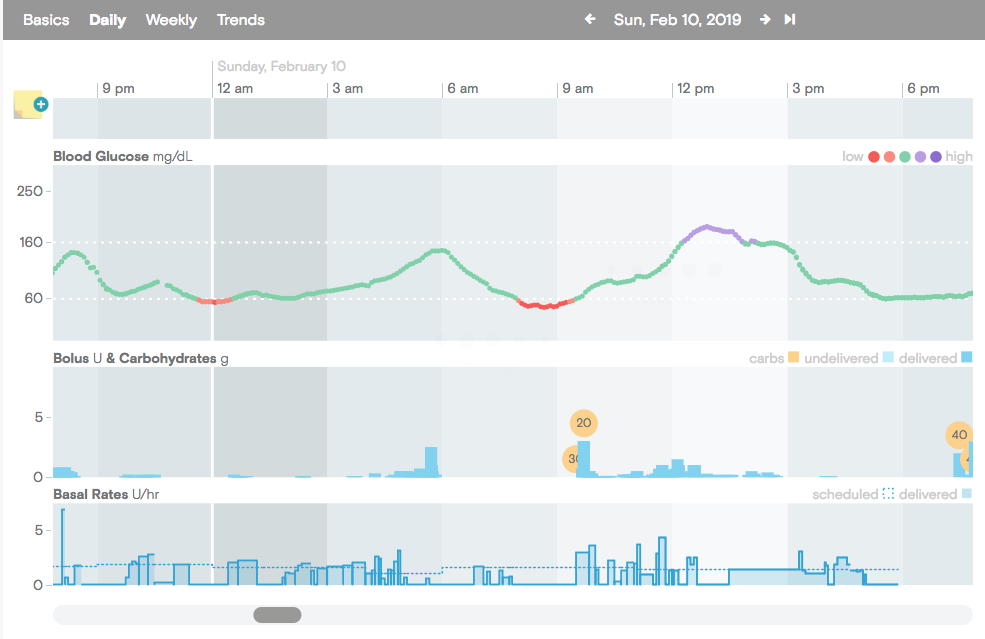
basal rate upload was working for me for maybe 24h on release before Feb 10 nightly, then stoped, I think after upgrade to Feb 10 nightly, what was the reason why stopped? settings? the upgrade?
It was on the tidepool production environment, never used the int env. Temp Basal is coming from AAPS
libxmike
on 6 Mar 2019
@jamorham please can you give me a short feedback about the current state of this interface?
Tidepool support told me that the public API is still not released. In a couple of days I want to start loop testing with Omnipod + Xdrip + AndroidAPS. It means I won't get any data from the PDM to upload carbs and Insulin and BR via Windows Tidepool Uploader.
Final question: Can I get Carbs+Bolus+Basal rates from Xdrip up to Tidepool?
Your feedback is very much appreciated.
 Flori3000
on 12 Mar 2019
Flori3000
on 12 Mar 2019
I've been using this with G6 and AndroidAPS in the Tidepool production environment. Blood Test, CGM and Carbs/Bolus data is all coming through fine. Basals are not implemented yet and still a work in progress that I need to finish.
jamorham
on 12 Mar 2019
What about notes? I couldn't find them in Tidepool, is there any reason behind this?
n0rbertg
on 8 Jul 2019
@n0rbertg - there won't be any notes in Tidepool, because xDrip is not a Tidepool application. xDrip+ implements a 3rd party integration.
pazaan
on 9 Jul 2019
Hallo, nutze die Dana RS, G6, xdrip+(2019.08.20) und AAPS(2.3) und habe die Verbindung zu Tidepool. Allerdings vermisse ich dort meine Basalraten. Was muss ich tun, damit das möglich ist mit anzeigen zu lassen?
 Snowli1710
on 26 Sep 2019
Snowli1710
on 26 Sep 2019
@Snowli1710
Ich denke du muss https://github.com/NightscoutFoundation/xDrip/pull/973 mit daumen hoch markieren und warten. es gibt keine angabe ob der inzulin bolus oder basal ist in xdrip
You have to vote for https://github.com/NightscoutFoundation/xDrip/pull/973. This time there is no information if the insulin is basal or bolus in xdrip.
 k2s
on 26 Sep 2019
k2s
on 26 Sep 2019
Hello,
As I understand Tidepool integration service uploads data on Tidepool server on the flow based on Data Age Mins parameter. This parameter finally defnes the uplaod frequency...
Is there a way to upload all history data available in xDrip?
Sometime I remove my CGM for the night (Libre+MM+xDrip) so I get back data on xDrip in the morning only when I plug back my MM. If my first assumption is right, that means the frequency should be defined with the longest CGM interrupted time.
Thank you for hep and time,
Simon
 MrSiimon
on 29 Sep 2019
MrSiimon
on 29 Sep 2019
Does anyone have information on what still needs to be done here to add basal data to Tidepool?
While I accept that XDrip may not be the best candidate to upload pump data (including basals), this implementation does seem to be the furthest along (by far) with Tidepool integration.
Or, if everyone has switched to Nightscout reporting for conversations with the doctor, should this issue be closed?
@jamorham if you can provide some info here that would be fantastic. Thank you so much for all the incredible work!
 samspycher
on 18 Oct 2020
samspycher
on 18 Oct 2020
The integration is almost complete. Remaining features are tracked in separate issues. Hence, closing this issue.
 tolot27
on 21 Oct 2020
tolot27
on 21 Oct 2020
can you please advise orher issue number so I can follow?
On Tue, Oct 20, 2020, 10:47 PM Mathias Walter notifications@github.com
wrote:
The integration is almost complete. Remaining features are tracked in
separate issues. Hence, closing this issue.—
You are receiving this because you are subscribed to this thread.
Reply to this email directly, view it on GitHub
https://github.com/NightscoutFoundation/xDrip/issues/581#issuecomment-713319166,
or unsubscribe
https://github.com/notifications/unsubscribe-auth/ADLXN5VI7MYYPBQKKLSQXKDSLZYV3ANCNFSM4FUAAMSA
.
 Jimwedel
on 21 Oct 2020
Jimwedel
on 21 Oct 2020
@jimwedel Just follow the two cross referenced issues a few lines above.
tolot27
on 21 Oct 2020
Related issues
 gruoner
·
5Comments
gruoner
·
5Comments
 opasha
·
9Comments
opasha
·
9Comments
 dideldum
·
7Comments
dideldum
·
7Comments
 m1st0
·
10Comments
m1st0
·
10Comments
 jo1st
·
19Comments
jo1st
·
19Comments
Most helpful comment
So I have a working implementation for xDrip+ written now (many thanks to @bassettb for the proof-of-concept c# example tool and Tidepool for access to the api)
I've implemented it to be as modular and adaptable as possible in terms of the data structures, rest-api endpoints and the message sequence, bearing in mind the expectation that the api may be subject to change. I am fairly confident it will be possible to modify this very quickly as required.
It supports CGM data from all collectors, manual and automated synced blood test data, treatment items entered in xDrip or via Nightscout or from any followers or pump synchronization. It uses the data pulled from AAPS to upload the dynamic basal rate information.
To avoid problems with duplicated data I went with a completely linear upload strategy from oldest to newest never repeating the same uploaded time segment. It seems to take about 1 second to upload an entire days worth of data.
Overall it is looking good and a very worthy addition to xDrip in my opinion as this is something I would rate as an urgent priority for the community.
As far as I understand it, the next steps would need to be Tidepool agreeing that it would be possible for the api to be utilized by xDrip users. I will contact Tidepool to discuss this and hopefully we can get interested people testing it soon.