Xbmc: Using Alt+Space I can move kodi on full-screen mode
Bug report
Describe the bug
Here is a clear and concise description of what the problem is:
Hello, There is a bug on Kodi (tested on Windows Store version)
Using Alt+Space I can move Kodi on full-screen mode
Expected Behavior
Here is a clear and concise description of what was expected to happen:
Actual Behavior
Possible Fix
To Reproduce
Steps to reproduce the behavior:
2.
3.
Debuglog
The debuglog can be found here:
Screenshots
Here are some links or screenshots to help explain the problem:
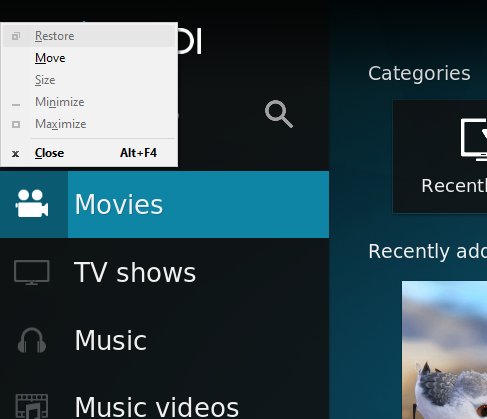
After:

All move item disabled for all maximize windows (like below picture)

Additional context or screenshots (if appropriate)
Here is some additional context or explanation that might help:
Your Environment
Used Operating system:
- [ ] Android
- [ ] iOS
- [ ] Linux
- [ ] OSX
- [ ] Raspberry-Pi
- [X] Windows
- [X] Windows UWP
- Operating system version/name: Windows 10
- Kodi version: 18.3
note: Once the issue is made we require you to update it with new information or Kodi versions should that be required.
Team Kodi will consider your problem report however, we will not make any promises the problem will be solved.
 xmha97
All 13 comments
Thank you for using Kodi and our issue tracker. This is your friendly Kodi GitHub bot :wink:
It seems that you have not followed the template we provide and require for all bug reports (or have opened a roadmap item by accident). Please understand that following the template is mandatory and required for the team to be able handle the volume of open issues efficiently.
Please edit your issue message to follow our template and make sure to fill in all fields appropriately. The issue will be closed after one week has passed without satisfactory follow-up from your side.
This is an automatically generated message. If you believe it was sent in error, please say so and a team member will remove the "Ignored rules" label.
![xbmc-gh-bot[bot] picture](https://avatars2.githubusercontent.com/u/199122?v=4&s=40) xbmc-gh-bot[bot]
on 5 Sep 2019
xbmc-gh-bot[bot]
on 5 Sep 2019
I guess the logfile is rather useless in that case. Hence I'll remove the 'ignored rules' label
Anyway, if you don't mind if would be nice if you could provide it and also stop ignoring our template like you have been advised some times before.
Maybe @afedchin can have a look?!
 DaVukovic
on 5 Sep 2019
DaVukovic
on 5 Sep 2019
Hey! Can you provide the log, please? I will look into it and try to fix it. Thanks.
 gusandrianos
on 11 Oct 2019
xmha97
on 11 Oct 2019
gusandrianos
on 11 Oct 2019
xmha97
on 11 Oct 2019
Greetings,i would like to know if this is still open.
If it is open let me know if there is anything other that what i see that i need to know!
Thanks in advance!
 GiannisProkopiou
on 14 Mar 2020
GiannisProkopiou
on 14 Mar 2020
Greetings,i would like to know if this is still open.
If it is open let me know if there is anything other that what i see that i need to know!
Thanks in advance!
Yes, I downloaded Kodi v18.6 from Microsoft Store.
This is still open.
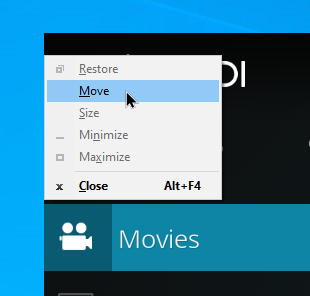
xmha97
on 14 Mar 2020
强啊大佬
 Sherlock-liufr
on 15 Apr 2020
Sherlock-liufr
on 15 Apr 2020
Excuse me the answer is
protected override void OnKeyDown(KeyEventArgs e)
{
    if (Keyboard.Modifiers == ModifierKeys.Alt && e.SystemKey == Key.Space)
    {
        e.Handled = true;
    }
    else
    {
        base.OnKeyDown(e);
    }
}
 ghost
on 6 May 2020
ghost
on 6 May 2020
Maybe @afedchin can have a look?!
Hey look I have the answer But I can't fix it bc I dont see all of the code and im not on team kodi to be able to fix this.
ghost
on 18 May 2020
All the source used for Kodi is in the github repo. PR's are welcome from anyone with fixes to issues. You dont need to be a team member to raise a PR against the xbmc repo
 fuzzard
on 18 May 2020
fuzzard
on 18 May 2020
All the source used for Kodi is in the github repo. PR's are welcome from anyone with fixes to issues. You dont need to be a team member to raise a PR against the xbmc repo
Okay, When I look at the code it all I see is readme.md
I don't have the ability to see past the blob/
Via https://github.com/xbmc/xbmc/
Also when I look at the wiki it is wrong? It is nearly impossible for me to try to make a pr honestly when I can't see the whole path?
Also I don't have write access with out being on team kodi.
Not too sure if you can see the path but I know the answer I just can't implement it because or do a PR / fix the issue bc the code is missing on my end.
Can any one can help me to put this code in to kodi?
P.S Thanks for the responces
ghost
on 18 May 2020
You dont need write access to raise a PR. All dev you do can be done locally on your device, and then git push to your own github repo, at which point a PR can be raised between the 2.
The readme is the default file to show, but it still has the entire folder structure above it. Click on any folder/file, and you can view that file.
In particualr, app source is in the xbmc folder https://github.com/xbmc/xbmc/tree/master/xbmc
May be worth doing some beginner git tutorials and what not to get your head around it all. Theres nothing special around how kodi uses git compared to any other project
fuzzard
on 18 May 2020
Yey Thank you. :) I didn't even think of git tree. duh.
Noob moment.
ghost
on 18 May 2020
Related issues
 xekon
·
11Comments
xekon
·
11Comments
 rozhuk-im
·
6Comments
rozhuk-im
·
6Comments
 pitsi
·
7Comments
pitsi
·
7Comments
 hrubymar10
·
6Comments
hrubymar10
·
6Comments
 Gustav0ar
·
9Comments
Gustav0ar
·
9Comments
Most helpful comment
强啊大佬