Xbmc: Nothing shows up on add source > browse > windows network (smb)
Bug report
I wanted to transfer some files earlier, from my servers' samba shares to some libreelec's folders on the rpi. After noticing that I do not have the shares listed on kodi's file manager, I decided to add them, so I went through the usual procedure: add source > browse > windows share (smb).
And there was nothing in there as seen here

Expected Behavior
It should show the workgroup at first (named "workgroup" in my setup), then the host names of the servers that have samba shares and then the shares themselves, e.g worgkroup > mpriki (name of my server) > public (name of the share).
Actual Behavior
As mentioned above, nothing shows up on kodi's browser.
Possible Fix
No idea if there is a possible fix. However, kodi can see the share if I add it manually in add network location > protocol: windows network (smb) and provide all info manually
To Reproduce
Steps to reproduce the behavior:
- Connect the kodi running system to a network that provides samba shares
- Do the procedure mentioned above
- Changing minimium and maximum protocol versions (in settings > services > smb client) makes no dfference. I have set them both to "none" for now.
Debuglog
No log. Oddly, there is literally nothing written on kodi.log when that happens. If it helps, this is what smbstatus on the server reports when kodi is connected to the share. It also shows that smb3 is used as protocol.
https://paste.debian.net/1059161
(paste will be available for 3 days)
Screenshots
Check above.
Used Operating system:
- [ ] Android
- [ ] iOS
- [x] Linux
- [ ] OSX
- [x] Raspberry-Pi
- [ ] Windows
- [ ] Windows UWP
Operating system version/name
Debian testing x64 and libreelec 8.95.2 beta as clients, debian unstable x32 as server.
Samba 4.9.4 on all 3 of them
Kodi version:
18 rc4 on both the pi and the pc.
 pitsi
pitsi
All 7 comments
Network browsing is a feature of SMB1, which is being phased out by multiple vendors due to security issues that have been actively exploited by malware (such as WannaCry).
Servers should now support only SMB2 (and above), and clients should only support SMB2 (or above).
Kodi 18 will only connect to servers using SMB2 or better, so network browsing is no longer supported.
In the absence of network browsing you should instead add your SMB shares using Add Source > Browse > Add network location....
If you really want to browse your SMB network you'll need to downgrade your server by re-enabling SMB1 (although as you are using Samba 4.9.4, it's probably still enabled), and then enable _only_ SMB1 support in Kodi (it should be using min=SMB2, max=SMB3/None by default, where None implies "highest" ie. SMB3). So set min=SMB1, max=SMB1.
Obviously, (re-)enabling SMB1 support leaves you and your entire network at risk of malware so is not a decision to be taken lightly, and certainly not one I would recommend.
 MilhouseVH
on 8 Jan 2019
MilhouseVH
on 8 Jan 2019
As this is not a bug I'm closing the ticket. If you need further guidance/help please start a thread in the LE forums. Thanks.
 chewitt
on 8 Jan 2019
chewitt
on 8 Jan 2019
@MilhouseVH
I can not find which version of smb my server is using, but it is definitely not smb1 because
a) samba defaults to smb2 or newer since version 4.5, mid 2016 that is
https://www.samba.org/samba/history/samba-4.5.0.html
b) since then, in order to make it allow smb1 connections, one has to use these in smb.conf
  lanman auth = yes
  ntlm auth = yes
Credits go to arch wiki. But I don't use those parameters in my samba server!
Plus, as I have proven above, kodi connects to the share using the smbv3 protocol.
So, what I keep from you is that network browsing demands smb1...
On the other hand however, I can see my shares thtough the file manager's (pcmanfm + gvfs) network browsing
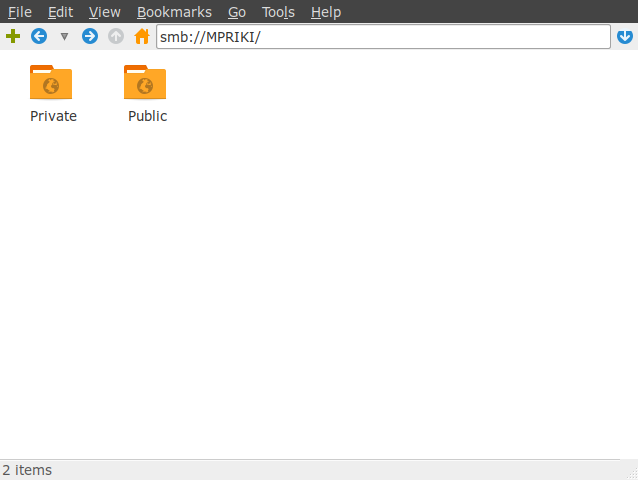
and, as smbstatus reports again, smb3 is used
505 nobody nogroup mitsos (ipv4:192.168.1.2:45896) SMB3_11 -
Can you explain why network browsing works in the file manager but not in kodi, while they both use the same protocol and connect to the same server? Because I can't.
Sadly, I no longer have kodi 17.x to prove that network browsing worked there.
@chewitt
How can you justify this is not a bug in kodi? Yes, the problem first appeared while I was using it under libreelec, but it is not a problem of libreelec by any means as I have shown. In order to mae screenshots etc, I had to reproduce it on my own pc and it did reproduced perfectly.
Plus, I am not going to join another forum to report something that it is not actually their fault.
p.s. The screenshot above is probably wrong, but I went there through network > windows network > workgroup > mpriki. I should have stopped one level before that. Now I can't reproduce it and make a new one, because nothing shows up after clicking "windows network".
pitsi
on 8 Jan 2019
a) samba defaults to smb2 or newer since version 4.5, mid 2016 that is
https://www.samba.org/samba/history/samba-4.5.0.html
You are mistaken.
That release does not change the SMB1 default - all it does is disable a feature of SMB1 (ntlm auth) which - when enabled - weakens the SMB1 protocol even further.
By default, Samba server continues to support SMB1 connections by default - it's up to your distribution to ship hardened defaults. Check /etc/samba/smb.conf - if it doesn't mention server min protocol=SMB2 (or better) then your server still supports SMB1 connections as that is the default server min protocol.
As for Samba clients, it's not until Samba 4.7.0 that Samba could even negotiate better than SMB1 without a non-default configuration.
Kodi 18 on LibreELEC will default to client min protocol=SMB2/client max protocol=None (where None will mean "highest", ie. SMB3), so Kodi 18 on LibreELEC - by default - will not connect to servers that only support SMB1. As LibreELEC does not support SMB1 by default, it cannot browse SMB networks.
If you want to browse your network then set min/max=SMB1 but understand your network is at risk.
b) since then, in order to make it allow smb1 connections, one has to use these in smb.conf
  lanman auth = yes
  ntlm auth = yes
No, those are SMB1 settings that are needed to connect with craptastically outdated Samba 3.x servers (10+ years old), the version that is shipped to this day by the likes of ASUS in their top-of-the-line network routers. The above settings weaken SMB1 security even further, and not every SMB1 server requires those insecure settings (ASUS do).
So, what I keep from you is that network browsing demands smb1...
Yes, both on the server and client (and probably also the master browser too, if that isn't the server or the client... but I digress).
This post from a Samba developer confirms that network browsing (MS-RAP/MS-BRW) is dependent on SMB1, and will not work without it.
Can you explain why network browsing works in the file manager but not in kodi, while they both use the same protocol and connect to the same server?
Maybe File Manager is using SMB1 to browse the network (as your server may still support SMB1) but then connects with SMB3. Or it might be using another browsing service such as Bonjour/Zeroconf, and not Samba.
Try disabling SMB1 in your server by adding server min protocol=SMB2/server max protocol=SMB3 to /etc/samba/smb.conf, then see if File Manager is still able to browse your SMB network.
Or disable SMB1 support in your client (File Manager) by adding client min protocol=SMB2/client max protocol=SMB3 to /etc/samba/smb.conf (assuming File Manager uses the system-wide Samba config, of course).
Otherwise I've no idea.
Sadly, I no longer have kodi 17.x to prove that network browsing worked there.
You don't have to, as the Kodi 17.x defaults were a little more "loose" and we continued to support SMB1 by default as it was a transitional phase. Now, 12 months later with Kodi 18, almost all vendors (most notably Microsoft) have completed the deprecation of SMB1.
How can you justify this is not a bug in kodi?
It's not a bug because it's essentially by design. It's not ideal, we get that, but since all responsible OS vendors are disabling SMB1 (and there is no replacement for network browsing in Samba once SMB1 is disabled either in the server or client) there is little we can do as the only option would be to continue supporting SMB1 in the client, which leaves the client at risk of a MITM downgrade protocol attack. And continuing to support SMB1 wouldn't work once SMB1 is disabled by server vendors.
Continuing to support SMB1 by default would be irresponsible, so something had to give when we disabled SMB1, and network browsing was it.
Any further discussion about Samba network browsing as a bug is futile - we know why it doesn't work, but improved security and interoperability trumps this minor usability feature.
If you really wish to discuss this further then the forum is the place to do so, as it avoids spamming github. I won't make any further replies here on this subject.
MilhouseVH
on 8 Jan 2019
Wow! Thanks for all that info.
I will make the changes you suggest for smb.conf tomorrow and I will make a new thread in kodi's forum if needed.
Since samba network browsing does not work, how about removing the "windows network (smb)" entry from the "browse new share" dialog?
p.s. Sorry for the delay in replying, I was at my job when you replied.
pitsi
on 8 Jan 2019
Since samba network browsing does not work, how about removing the "windows network (smb)" entry from the "browse new share" dialog?
Although I said I wouldn't respond, this is a valid question.
The answer is that some people still use ASUS routers (and other servers with outdated versions of Samba that don't/will never support SMB2 or better) and are willing to accept the risk of using SMB1 within their network, so for those users network browsing is still a usable option.
What we should/could perhaps do is remove the SMB network browse functionality from the dialog whenever both client min protocol and client max protocol are not set to SMB1, as in those circumstances it is very unlikely to work.
MilhouseVH
on 9 Jan 2019
Sorry to spam my report with something offtopic, but I was about to force smb2 as min and smb3 as max protocol and those incompetent baffoons of ms broke smb2 on w7!
https://borncity.com/win/2019/01/09/netzwerk-issues-with-updates-kb4480970-and-kb4480960/
I guess I will risk it with smb1 :(
pitsi
on 10 Jan 2019
Related issues
 Krawei
·
4Comments
Krawei
·
4Comments
 Pentaphon
·
7Comments
Pentaphon
·
7Comments
 kekukui
·
8Comments
kekukui
·
8Comments
 djp952
·
12Comments
djp952
·
12Comments
 rozhuk-im
·
6Comments
rozhuk-im
·
6Comments
Most helpful comment
You are mistaken.
That release does not change the SMB1 default - all it does is disable a feature of SMB1 (
ntlm auth) which - when enabled - weakens the SMB1 protocol even further.By default, Samba server continues to support SMB1 connections by default - it's up to your distribution to ship hardened defaults. Check
/etc/samba/smb.conf- if it doesn't mentionserver min protocol=SMB2(or better) then your server still supports SMB1 connections as that is the default server min protocol.As for Samba clients, it's not until Samba 4.7.0 that Samba could even negotiate better than SMB1 without a non-default configuration.
Kodi 18 on LibreELEC will default to client min protocol=SMB2/client max protocol=None (where None will mean "highest", ie. SMB3), so Kodi 18 on LibreELEC - by default - will not connect to servers that only support SMB1. As LibreELEC does not support SMB1 by default, it cannot browse SMB networks.
If you want to browse your network then set min/max=SMB1 but understand your network is at risk.
No, those are SMB1 settings that are needed to connect with craptastically outdated Samba 3.x servers (10+ years old), the version that is shipped to this day by the likes of ASUS in their top-of-the-line network routers. The above settings weaken SMB1 security even further, and not every SMB1 server requires those insecure settings (ASUS do).
Yes, both on the server and client (and probably also the master browser too, if that isn't the server or the client... but I digress).
This post from a Samba developer confirms that network browsing (
MS-RAP/MS-BRW) is dependent on SMB1, and will not work without it.Maybe File Manager is using SMB1 to browse the network (as your server may still support SMB1) but then connects with SMB3. Or it might be using another browsing service such as Bonjour/Zeroconf, and not Samba.
Try disabling SMB1 in your server by adding
server min protocol=SMB2/server max protocol=SMB3to/etc/samba/smb.conf, then see if File Manager is still able to browse your SMB network.Or disable SMB1 support in your client (File Manager) by adding
client min protocol=SMB2/client max protocol=SMB3to/etc/samba/smb.conf(assuming File Manager uses the system-wide Samba config, of course).Otherwise I've no idea.
You don't have to, as the Kodi 17.x defaults were a little more "loose" and we continued to support SMB1 by default as it was a transitional phase. Now, 12 months later with Kodi 18, almost all vendors (most notably Microsoft) have completed the deprecation of SMB1.
It's not a bug because it's essentially by design. It's not ideal, we get that, but since all responsible OS vendors are disabling SMB1 (and there is no replacement for network browsing in Samba once SMB1 is disabled either in the server or client) there is little we can do as the only option would be to continue supporting SMB1 in the client, which leaves the client at risk of a MITM downgrade protocol attack. And continuing to support SMB1 wouldn't work once SMB1 is disabled by server vendors.
Continuing to support SMB1 by default would be irresponsible, so something had to give when we disabled SMB1, and network browsing was it.
Any further discussion about Samba network browsing as a bug is futile - we know why it doesn't work, but improved security and interoperability trumps this minor usability feature.
If you really wish to discuss this further then the forum is the place to do so, as it avoids spamming github. I won't make any further replies here on this subject.