Xamarincommunitytoolkit: [Bug] UWP: TouchEffect not working
Description
I tested on iOS 14 and it was fine but in UWP nothing works!!!
Steps to Reproduce
- create a blank XF UWP app
- add this piece of Code
<StackLayout Padding="10,5" xct:TouchEffect.NormalAnimationDuration="500" xct:TouchEffect.NormalBackgroundColor="Green" xct:TouchEffect.PressedAnimationDuration="500" xct:TouchEffect.PressedBackgroundColor="Red" xct:TouchEffect.PressedRotation="10" xct:TouchEffect.PressedRotationX="15" xct:TouchEffect.PressedRotationY="15" xct:TouchEffect.PressedScale="1.2" xct:TouchEffect.PressedTranslationX="5" xct:TouchEffect.PressedTranslationY="5" HorizontalOptions="CenterAndExpand" VerticalOptions="CenterAndExpand"> <Label FontSize="60" Text="CLICK ME" TextColor="Yellow" /> </StackLayout> - test the UWP version
Basic Information
- Version with issue: 1.0.0-preview2497
- IDE: VS 16.8.2
- Platform Target Frameworks:
- iOS: 14.2
- UWP: 19041
- Affected Devices: Windows PC
Reproduction Link
 mhrastegary77
👍1
All 3 comments
@mhrastegary77 thanks for your report. But this isn't a bug.
Our minimal version support, for UWP, is 17763 if you update the Min Version, the effects will work.
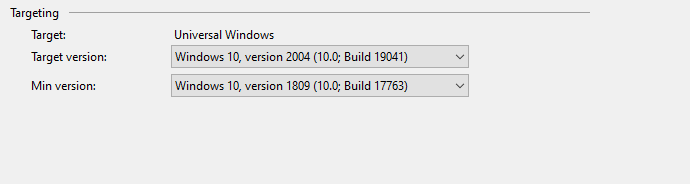
 pictos
on 28 Nov 2020
pictos
on 28 Nov 2020
❤1
👍1
Thanks @pictos !!! it works perfectly now.
Love the hover option btw @AndreiMisiukevich ❤
mhrastegary77
on 29 Nov 2020
❤2
@mhrastegary77 good to know. Hope that you are enjoying the XCT!
pictos
on 29 Nov 2020
Was this page helpful?
0 / 5 - 0 ratings
Related issues
 varyamereon
·
4Comments
varyamereon
·
4Comments
 jsmarcus
·
5Comments
jsmarcus
·
5Comments
 knocte
·
5Comments
knocte
·
5Comments
 jfversluis
·
6Comments
jfversluis
·
6Comments
 jBijsterboschNL
·
5Comments
jBijsterboschNL
·
5Comments
Most helpful comment
Thanks @pictos !!! it works perfectly now.
Love the hover option btw @AndreiMisiukevich ❤